
Doom using MS Paint as a playable display by leveraging clipboard and paste. Includes Doom shareware and plays with music and sound effects.
Python
189
9 commits
updated Jul 21, 2026
README
MS Paint Doom
Real DOOM — the actual shareware DOOM1.WAD — playable, with Microsoft
Paint as the monitor.
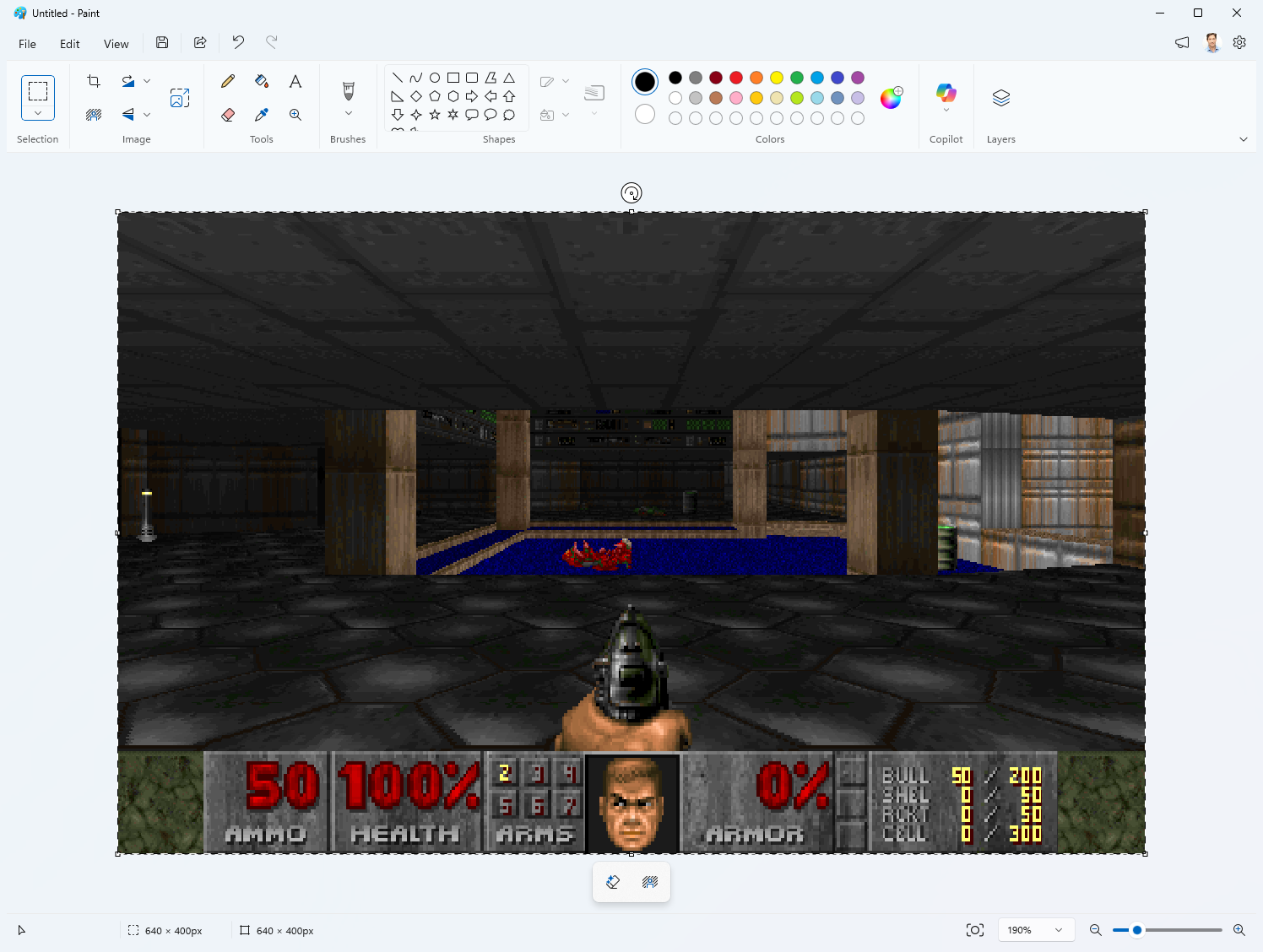
The actual Doom engine (ViZDoom) runs the real shareware DOOM1.WAD — with
the BSD-licensed Freedoom WADs covering the episodes shareware doesn't ship —
and renders headlessly; every frame is placed on the Windows clipboard and
pasted into Paint's canvas as a genuine document edit. Which means:
- The spreadsheet-tier framerate is part of the charm.
- Ctrl+Z rewinds time. Every frame is an undo step. You died? Un-die.
- File > Save at any moment produces a legitimate
.pngof your current frame, because as far as Paint knows, you painted it.
Run
run.bat
(Creates a venv and installs dependencies on first run.) Paint opens; keep it focused and play:
| Key | Action |
|---|---|
W S / ↑ ↓ | move forward / back |
A D / ← → | turn |
Q E (or , .) | strafe |
Ctrl or F | fire |
| Space | use / open doors |
| Shift | run |
| F12 | quit |
Fire is bound to both Ctrl and F: utilities with their own keyboard
hooks (PowerToys and friends) can eat bare Ctrl presses, so the game's hook
captures Ctrl ahead of them — and F remains a belt-and-suspenders
alternative for setups (remote desktop, VMs) where Ctrl never arrives at all.
Input is polled with tap-catching, so a quick fire tap still registers
despite Paint's low frame rate.
Options: --map E1M2, --wad 2 (Freedoom Phase 2, maps MAP01+),
--scale 0|1|2 (on-screen zoom via Paint's free view zoom; 0 = autofit the
window, the default), --skill 1..5, --no-sound (all audio off),
--no-music (keep sound effects, skip the soundtrack), --music-volume 0..100
(default 40 — the MIDI synth runs much hotter than the engine's effects),
--music-wad PATH (soundtrack from another WAD),
--res 320x200|320x240|640x400|640x480 (default 640x400;
320x200 is Doom's native res and pastes fastest, 320x240 is the
aspect-correct 4:3 view — see How it works).
Game data & soundtrack: wad\doom1.wad — the freely-distributable
shareware episode — is both the game data and the source of the real Bobby
Prince tracks for episode 1 (vanilla WADs store music as MUS; it's converted
to MIDI on the fly). Maps shareware doesn't ship (--map E2M1+, --wad 2)
fall back to Freedoom for both game data and music. If you own the full game,
drop its doom.wad (or doom2.wad) into wad\ for the rest of the
soundtrack, or pass --music-wad PATH.
If you hear nothing: the boot log prints Audio out: <device> at <N>% —
check that's the device you're actually listening on, and that its volume
isn't near zero. The game repairs its own per-app mixer volumes at startup
(Windows persists those forever, and a session once muted stays muted),
rebuilds the engine's sound system once at boot (its audio init can come up
silently broken), and if you're still firing into a dead-silent engine it
resets the sound system again automatically (see Sound below).
While playing, the console shows a live pastes/s ticker (one line, updated
in place) — the actual rate frames are landing in Paint.
Debugging: every session writes last_run.log (registered inputs,
pause/resume, engine audio peaks, self-heal events). run_debug.bat also
echoes registered inputs to the console live.
How it works
-
Engine — ViZDoom steps the simulation N tics per rendered frame (N is measured from real elapsed time, so the game runs at normal speed no matter how slow Paint is).
-
Display — the frame goes to the clipboard as a DIB, then onto the canvas. At startup the app self-tests which paste path works:
- Ctrl+V (preferred): a synthetic paste keystroke. Opens no menu, so it never diverts your gameplay keystrokes. Some Paint builds silently drop synthetic keys, hence the self-test.
- Edit > Paste via UI Automation (fallback): rock-solid, but briefly opens the Edit menu each frame. Used only when Ctrl+V doesn't register. (The self-test is genuinely load-bearing: some Paint builds drop most synthetic Ctrl+V chords, and which path wins can vary run to run.)
A pasted image lands as a floating selection. The next paste implicitly commits it, preserving one Undo step per frame without a separate flattening action. The low-level input hook prevents gameplay keys from moving the selection. The final frame is left as an uncommitted floating selection when the game exits — there is no explicit per-frame commit step.
Before the first paste, the canvas's bottom-right resize handle is synthetically dragged to make it 1×1 pixel. If the handle is offscreen above 100% zoom, Ctrl+0 resets directly to 100%; Ctrl+PageDown continues lower only if needed. Paint then auto-expands the canvas to the exact frame dimensions on the first paste. Paint's Fit to window button then chooses the largest visible scale; if that produces fractional display dimensions, one or more Ctrl+PageDown steps select the nearest exact ratio with a clickable margin. At sub-100% zoom, the drag may land a few pixels above 1×1; any result smaller than the incoming frame is sufficient. This avoids both a resize dialog and a separate startup crop.
Clipboard discipline matters here: Paint processes each paste asynchronously, reading the image off the clipboard on its own schedule. Rewriting the clipboard while that read is still in flight makes the read fail, and Paint responds with a modal "Can't complete operation" error that silently kills the paste. We hit this constantly with the naive approach — calling
EmptyClipboard/SetClipboardDatafor every frame — because emptying the clipboard to re-arm the next frame frees the bytes out from under Paint's in-progress read. Fixed settle timers can't close that race (paste latency varies wildly with frame size).The fix is to stop rewriting the clipboard at all. Windows lets you own the clipboard as an OLE data object (
OleSetClipboardwith anIDataObject) instead of pushing a fresh handle each time; consumers read it by callingIDataObject::GetData. We publish one such object once and update the frame bytes it hands out in place. The object is reference-counted, so a read still in flight stays valid even as the next frame arrives — the race simply can't occur, and the dialog is gone. EachGetDatacall doubles as our positive "frame was consumed" signal, so the next frame is only published after that signal (or a generous timeout, which just means the paste keystroke was dropped). Eight consecutive missed consumption signals trigger the UIA menu fallback. On exitOleFlushClipboardleaves the last frame pasteable.If another app takes the clipboard — you alt-tab away and copy something — a clipboard listener flags the loss, and the game reclaims ownership with the next frame it publishes. Reclaiming on publish rather than on a timer means a copy you make while the game is paused stays yours until you return to Paint.
Paint's per-frame cost is dominated by pixel count, not per-paste overhead, so frame resolution is the biggest lever on smoothness. The default 640×400 is the heaviest;
--res 320x200(Doom's authentic native resolution) quarters the pixels, so it can run right up to Doom's 35 Hz tic rate. (Driving 320×200 that fast used to make Paint raise its clipboard-error dialog intermittently; the OLE in-place clipboard above removes that race entirely, so it's now dialog-free even at full rate.)320x200has square pixels, so it looks horizontally stretched;--res 320x240is the aspect-correct 4:3 view (how Doom looked on a CRT). Paint's Fit-to-window zoom scales whichever frame back up to the same on-screen size.Pacing needs no tuned frame rate. Two things gate a new frame, and the loop simply waits for both: (a) Paint has finished reading the previous frame (the
GetData"consumed" signal above), and (b) the engine has advanced a tic (a genuinely new frame exists). Waiting on (a) means we never outrun Paint's compositor; waiting on (b) means we never paste the same frame twice. Their combination is self-clocking — the effective rate ismin(35 Hz tic rate, this machine's Paint composite rate)with no constant to tune, so it scales to the hardware automatically (faster PC → faster, up to 35; slower PC → slower).The engine runs on its own thread at Doom's native 35 Hz, and Paint's clipboard read (its
GetDatacall) is answered with the freshest finished frame the instant it reads — so what appears reflects the current game state rather than the one queued when the Ctrl+V was sent, measurably lowering on-screen latency. -
Sound — effects come from the engine itself (ViZDoom plays them through OpenAL on the default device; the sfx volume is pinned at launch because ZDoom persists cvars to
_vizdoom.ini, and a stale zero would mute every later run).run.batswaps ViZDoom's bundled OpenAL-Soft 1.21 for the 1.24 build inthird_party\— older OpenAL keeps playing to whatever device was default at boot, so switching to a headset mid-session used to strand the gunshots on the desk speakers while the music followed you; 1.24's WASAPI backend tracks the default device automatically.The engine's audio init can also come up silently broken (device opens, renders zeros, engine never notices — nondeterministic). Two defenses: at boot, once the first tic has run and device enumeration has settled, the game unconditionally triggers ZDoom's
snd_reset(an in-place sound system rebuild — harmless if the init was fine). And it self-heals during play: it meters its own engine's audio session, and firing into silence triggers anothersnd_resetwithin a few seconds, logged inlast_run.log.Music is a different story: ViZDoom strips ZDoom's music playback entirely, so
music.pypulls the map's music lump straight out of the game WAD (converting Doom's MUS format to MIDI when needed) and loops it through Windows' built-in MIDI sequencer (MCI). Alt-tab pauses the tune along with the game; the pause also mutes this process's audio session because MCI's pause freezes the sequence without releasing held notes, and a sustained organ chord droning over your spreadsheet is nobody's idea of stealth. -
Input — a low-level keyboard hook (
WH_KEYBOARD_LL) captures the game keys while Paint is foreground and swallows them, so Paint itself never sees them. This matters more than it sounds: Paint is the focused window while you play, and a stray arrow key dismisses the paste menu (stalling frames for many seconds — arrows literally froze the game until a menu-ignoring key like Ctrl advanced it), nudges the floating pasted selection, or navigates menus by mnemonic. Ctrl (fire) is captured too: utilities running their own low-level hooks (PowerToys and friends) can suppress bare Ctrl presses before the game polls them — our hook runs first and wins. Ctrl+Z time-rewind still works: a Z pressed while Ctrl is captured is re-injected into Paint as a clean Ctrl+Z chord. Shift is the only game key left pass-through. Alt-tabbing still pauses the game: keys are only captured while Paint is foreground. If the hook can't install, input falls back to plainGetAsyncKeyStatepolling (old behavior, keys leak into Paint). Input is sampled once per engine tic on the render thread, so control latency tracks the 35 Hz tic rate rather than the slower paste rate; a tap latch still catches keys pressed and released between samples.
Frames commit implicitly — no synthetic Esc, no click. An earlier version committed each floating selection explicitly (first with Esc, later with an outside-canvas click). Esc was actively dangerous: while you hold Ctrl to fire, that Esc becomes Ctrl+Esc, which opens the Windows Start menu, steals focus, and freezes the game. Letting the next paste commit the previous frame avoids per-frame keyboard chords and clicks entirely, and the Ctrl+V paste path avoids opening any menu that could eat gameplay keys.
Files
mspaintdoom/— the app:main.py(loop),engine_vzd.py(ViZDoom wrapper),paint_out.py(Paint window mgmt, pasting, watchdogs),clipserve.py(OLEIDataObjectclipboard owner),keys.py(keyboard hook + polling),music.py(WAD music → MIDI, audio plumbing),sendinput.py,capture.pywad\doom1.wad— shareware DOOM (game data + episode 1 soundtrack)third_party\OpenAL32.dll— OpenAL-Soft 1.24 (installed over ViZDoom's byrun.bat)run_debug.bat— run with live input echo (MSPAINTDOOM_DEBUG=1)last_run.log— written every session: inputs, pauses, audio self-healsmoke_test.py— engine renders headlessly, no Paint involvedtest_quiet.py— clipboard→paste→capture round-trip without touching focusexp_ole_clip.py,exp_verify_game_path.py— the experiments that proved out the OLE clipboard design (kept as documentation)cap_now.py <out.png>— snapshot the Paint window (works while occluded)PLAN.md— original build plan
Honest asterisks
- The engine is ViZDoom (ZDoom-based). Game data for episode 1 is the real
shareware
DOOM1.WAD(freely distributable, inwad\); maps beyond episode 1 (--map E2M1+ or--wad 2) fall back to Freedoom, since shareware only ships E1. A commercialdoom.wad/doom2.waddropped intowad\supplies the soundtrack for those maps; wiring one up as full game data is a one-liner (DoomEngine(game_wad=...)accepts any IWAD). - ViZDoom boots straight into the map — no title screen, no attract demos, no in-game menus. The shareware WAD is real; the arcade shell around it isn't.
- Paint renders the game but does not compute it. Paint computes nothing. Paint has never computed anything. That's the joke.
License
MIT (see LICENSE). Third-party bits keep their own terms: OpenAL-Soft
(third_party\, LGPL v2 — license included), the DOOM shareware WAD
(id Software's shareware terms: freely redistributable, not open source),
and Freedoom (BSD, bundled with the vizdoom package).
Contributors

9 commits
Similar repos


Languages
Python
99.4%
Doom using MS Paint as a playable display by leveraging clipboard and paste. Includes Doom shareware and plays with music and sound effects.
Python
189
9 commits
updated Jul 21, 2026
README
MS Paint Doom
Real DOOM — the actual shareware DOOM1.WAD — playable, with Microsoft
Paint as the monitor.
The actual Doom engine (ViZDoom) runs the real shareware DOOM1.WAD — with
the BSD-licensed Freedoom WADs covering the episodes shareware doesn't ship —
and renders headlessly; every frame is placed on the Windows clipboard and
pasted into Paint's canvas as a genuine document edit. Which means:
- The spreadsheet-tier framerate is part of the charm.
- Ctrl+Z rewinds time. Every frame is an undo step. You died? Un-die.
- File > Save at any moment produces a legitimate
.pngof your current frame, because as far as Paint knows, you painted it.
Run
run.bat
(Creates a venv and installs dependencies on first run.) Paint opens; keep it focused and play:
| Key | Action |
|---|---|
W S / ↑ ↓ | move forward / back |
A D / ← → | turn |
Q E (or , .) | strafe |
Ctrl or F | fire |
| Space | use / open doors |
| Shift | run |
| F12 | quit |
Fire is bound to both Ctrl and F: utilities with their own keyboard
hooks (PowerToys and friends) can eat bare Ctrl presses, so the game's hook
captures Ctrl ahead of them — and F remains a belt-and-suspenders
alternative for setups (remote desktop, VMs) where Ctrl never arrives at all.
Input is polled with tap-catching, so a quick fire tap still registers
despite Paint's low frame rate.
Options: --map E1M2, --wad 2 (Freedoom Phase 2, maps MAP01+),
--scale 0|1|2 (on-screen zoom via Paint's free view zoom; 0 = autofit the
window, the default), --skill 1..5, --no-sound (all audio off),
--no-music (keep sound effects, skip the soundtrack), --music-volume 0..100
(default 40 — the MIDI synth runs much hotter than the engine's effects),
--music-wad PATH (soundtrack from another WAD),
--res 320x200|320x240|640x400|640x480 (default 640x400;
320x200 is Doom's native res and pastes fastest, 320x240 is the
aspect-correct 4:3 view — see How it works).
Game data & soundtrack: wad\doom1.wad — the freely-distributable
shareware episode — is both the game data and the source of the real Bobby
Prince tracks for episode 1 (vanilla WADs store music as MUS; it's converted
to MIDI on the fly). Maps shareware doesn't ship (--map E2M1+, --wad 2)
fall back to Freedoom for both game data and music. If you own the full game,
drop its doom.wad (or doom2.wad) into wad\ for the rest of the
soundtrack, or pass --music-wad PATH.
If you hear nothing: the boot log prints Audio out: <device> at <N>% —
check that's the device you're actually listening on, and that its volume
isn't near zero. The game repairs its own per-app mixer volumes at startup
(Windows persists those forever, and a session once muted stays muted),
rebuilds the engine's sound system once at boot (its audio init can come up
silently broken), and if you're still firing into a dead-silent engine it
resets the sound system again automatically (see Sound below).
While playing, the console shows a live pastes/s ticker (one line, updated
in place) — the actual rate frames are landing in Paint.
Debugging: every session writes last_run.log (registered inputs,
pause/resume, engine audio peaks, self-heal events). run_debug.bat also
echoes registered inputs to the console live.
How it works
-
Engine — ViZDoom steps the simulation N tics per rendered frame (N is measured from real elapsed time, so the game runs at normal speed no matter how slow Paint is).
-
Display — the frame goes to the clipboard as a DIB, then onto the canvas. At startup the app self-tests which paste path works:
- Ctrl+V (preferred): a synthetic paste keystroke. Opens no menu, so it never diverts your gameplay keystrokes. Some Paint builds silently drop synthetic keys, hence the self-test.
- Edit > Paste via UI Automation (fallback): rock-solid, but briefly opens the Edit menu each frame. Used only when Ctrl+V doesn't register. (The self-test is genuinely load-bearing: some Paint builds drop most synthetic Ctrl+V chords, and which path wins can vary run to run.)
A pasted image lands as a floating selection. The next paste implicitly commits it, preserving one Undo step per frame without a separate flattening action. The low-level input hook prevents gameplay keys from moving the selection. The final frame is left as an uncommitted floating selection when the game exits — there is no explicit per-frame commit step.
Before the first paste, the canvas's bottom-right resize handle is synthetically dragged to make it 1×1 pixel. If the handle is offscreen above 100% zoom, Ctrl+0 resets directly to 100%; Ctrl+PageDown continues lower only if needed. Paint then auto-expands the canvas to the exact frame dimensions on the first paste. Paint's Fit to window button then chooses the largest visible scale; if that produces fractional display dimensions, one or more Ctrl+PageDown steps select the nearest exact ratio with a clickable margin. At sub-100% zoom, the drag may land a few pixels above 1×1; any result smaller than the incoming frame is sufficient. This avoids both a resize dialog and a separate startup crop.
Clipboard discipline matters here: Paint processes each paste asynchronously, reading the image off the clipboard on its own schedule. Rewriting the clipboard while that read is still in flight makes the read fail, and Paint responds with a modal "Can't complete operation" error that silently kills the paste. We hit this constantly with the naive approach — calling
EmptyClipboard/SetClipboardDatafor every frame — because emptying the clipboard to re-arm the next frame frees the bytes out from under Paint's in-progress read. Fixed settle timers can't close that race (paste latency varies wildly with frame size).The fix is to stop rewriting the clipboard at all. Windows lets you own the clipboard as an OLE data object (
OleSetClipboardwith anIDataObject) instead of pushing a fresh handle each time; consumers read it by callingIDataObject::GetData. We publish one such object once and update the frame bytes it hands out in place. The object is reference-counted, so a read still in flight stays valid even as the next frame arrives — the race simply can't occur, and the dialog is gone. EachGetDatacall doubles as our positive "frame was consumed" signal, so the next frame is only published after that signal (or a generous timeout, which just means the paste keystroke was dropped). Eight consecutive missed consumption signals trigger the UIA menu fallback. On exitOleFlushClipboardleaves the last frame pasteable.If another app takes the clipboard — you alt-tab away and copy something — a clipboard listener flags the loss, and the game reclaims ownership with the next frame it publishes. Reclaiming on publish rather than on a timer means a copy you make while the game is paused stays yours until you return to Paint.
Paint's per-frame cost is dominated by pixel count, not per-paste overhead, so frame resolution is the biggest lever on smoothness. The default 640×400 is the heaviest;
--res 320x200(Doom's authentic native resolution) quarters the pixels, so it can run right up to Doom's 35 Hz tic rate. (Driving 320×200 that fast used to make Paint raise its clipboard-error dialog intermittently; the OLE in-place clipboard above removes that race entirely, so it's now dialog-free even at full rate.)320x200has square pixels, so it looks horizontally stretched;--res 320x240is the aspect-correct 4:3 view (how Doom looked on a CRT). Paint's Fit-to-window zoom scales whichever frame back up to the same on-screen size.Pacing needs no tuned frame rate. Two things gate a new frame, and the loop simply waits for both: (a) Paint has finished reading the previous frame (the
GetData"consumed" signal above), and (b) the engine has advanced a tic (a genuinely new frame exists). Waiting on (a) means we never outrun Paint's compositor; waiting on (b) means we never paste the same frame twice. Their combination is self-clocking — the effective rate ismin(35 Hz tic rate, this machine's Paint composite rate)with no constant to tune, so it scales to the hardware automatically (faster PC → faster, up to 35; slower PC → slower).The engine runs on its own thread at Doom's native 35 Hz, and Paint's clipboard read (its
GetDatacall) is answered with the freshest finished frame the instant it reads — so what appears reflects the current game state rather than the one queued when the Ctrl+V was sent, measurably lowering on-screen latency. -
Sound — effects come from the engine itself (ViZDoom plays them through OpenAL on the default device; the sfx volume is pinned at launch because ZDoom persists cvars to
_vizdoom.ini, and a stale zero would mute every later run).run.batswaps ViZDoom's bundled OpenAL-Soft 1.21 for the 1.24 build inthird_party\— older OpenAL keeps playing to whatever device was default at boot, so switching to a headset mid-session used to strand the gunshots on the desk speakers while the music followed you; 1.24's WASAPI backend tracks the default device automatically.The engine's audio init can also come up silently broken (device opens, renders zeros, engine never notices — nondeterministic). Two defenses: at boot, once the first tic has run and device enumeration has settled, the game unconditionally triggers ZDoom's
snd_reset(an in-place sound system rebuild — harmless if the init was fine). And it self-heals during play: it meters its own engine's audio session, and firing into silence triggers anothersnd_resetwithin a few seconds, logged inlast_run.log.Music is a different story: ViZDoom strips ZDoom's music playback entirely, so
music.pypulls the map's music lump straight out of the game WAD (converting Doom's MUS format to MIDI when needed) and loops it through Windows' built-in MIDI sequencer (MCI). Alt-tab pauses the tune along with the game; the pause also mutes this process's audio session because MCI's pause freezes the sequence without releasing held notes, and a sustained organ chord droning over your spreadsheet is nobody's idea of stealth. -
Input — a low-level keyboard hook (
WH_KEYBOARD_LL) captures the game keys while Paint is foreground and swallows them, so Paint itself never sees them. This matters more than it sounds: Paint is the focused window while you play, and a stray arrow key dismisses the paste menu (stalling frames for many seconds — arrows literally froze the game until a menu-ignoring key like Ctrl advanced it), nudges the floating pasted selection, or navigates menus by mnemonic. Ctrl (fire) is captured too: utilities running their own low-level hooks (PowerToys and friends) can suppress bare Ctrl presses before the game polls them — our hook runs first and wins. Ctrl+Z time-rewind still works: a Z pressed while Ctrl is captured is re-injected into Paint as a clean Ctrl+Z chord. Shift is the only game key left pass-through. Alt-tabbing still pauses the game: keys are only captured while Paint is foreground. If the hook can't install, input falls back to plainGetAsyncKeyStatepolling (old behavior, keys leak into Paint). Input is sampled once per engine tic on the render thread, so control latency tracks the 35 Hz tic rate rather than the slower paste rate; a tap latch still catches keys pressed and released between samples.
Frames commit implicitly — no synthetic Esc, no click. An earlier version committed each floating selection explicitly (first with Esc, later with an outside-canvas click). Esc was actively dangerous: while you hold Ctrl to fire, that Esc becomes Ctrl+Esc, which opens the Windows Start menu, steals focus, and freezes the game. Letting the next paste commit the previous frame avoids per-frame keyboard chords and clicks entirely, and the Ctrl+V paste path avoids opening any menu that could eat gameplay keys.
Files
mspaintdoom/— the app:main.py(loop),engine_vzd.py(ViZDoom wrapper),paint_out.py(Paint window mgmt, pasting, watchdogs),clipserve.py(OLEIDataObjectclipboard owner),keys.py(keyboard hook + polling),music.py(WAD music → MIDI, audio plumbing),sendinput.py,capture.pywad\doom1.wad— shareware DOOM (game data + episode 1 soundtrack)third_party\OpenAL32.dll— OpenAL-Soft 1.24 (installed over ViZDoom's byrun.bat)run_debug.bat— run with live input echo (MSPAINTDOOM_DEBUG=1)last_run.log— written every session: inputs, pauses, audio self-healsmoke_test.py— engine renders headlessly, no Paint involvedtest_quiet.py— clipboard→paste→capture round-trip without touching focusexp_ole_clip.py,exp_verify_game_path.py— the experiments that proved out the OLE clipboard design (kept as documentation)cap_now.py <out.png>— snapshot the Paint window (works while occluded)PLAN.md— original build plan
Honest asterisks
- The engine is ViZDoom (ZDoom-based). Game data for episode 1 is the real
shareware
DOOM1.WAD(freely distributable, inwad\); maps beyond episode 1 (--map E2M1+ or--wad 2) fall back to Freedoom, since shareware only ships E1. A commercialdoom.wad/doom2.waddropped intowad\supplies the soundtrack for those maps; wiring one up as full game data is a one-liner (DoomEngine(game_wad=...)accepts any IWAD). - ViZDoom boots straight into the map — no title screen, no attract demos, no in-game menus. The shareware WAD is real; the arcade shell around it isn't.
- Paint renders the game but does not compute it. Paint computes nothing. Paint has never computed anything. That's the joke.
License
MIT (see LICENSE). Third-party bits keep their own terms: OpenAL-Soft
(third_party\, LGPL v2 — license included), the DOOM shareware WAD
(id Software's shareware terms: freely redistributable, not open source),
and Freedoom (BSD, bundled with the vizdoom package).
Similar repos
Contributors
9 commits
Languages
Python
99.4%