
README
BevelDesk


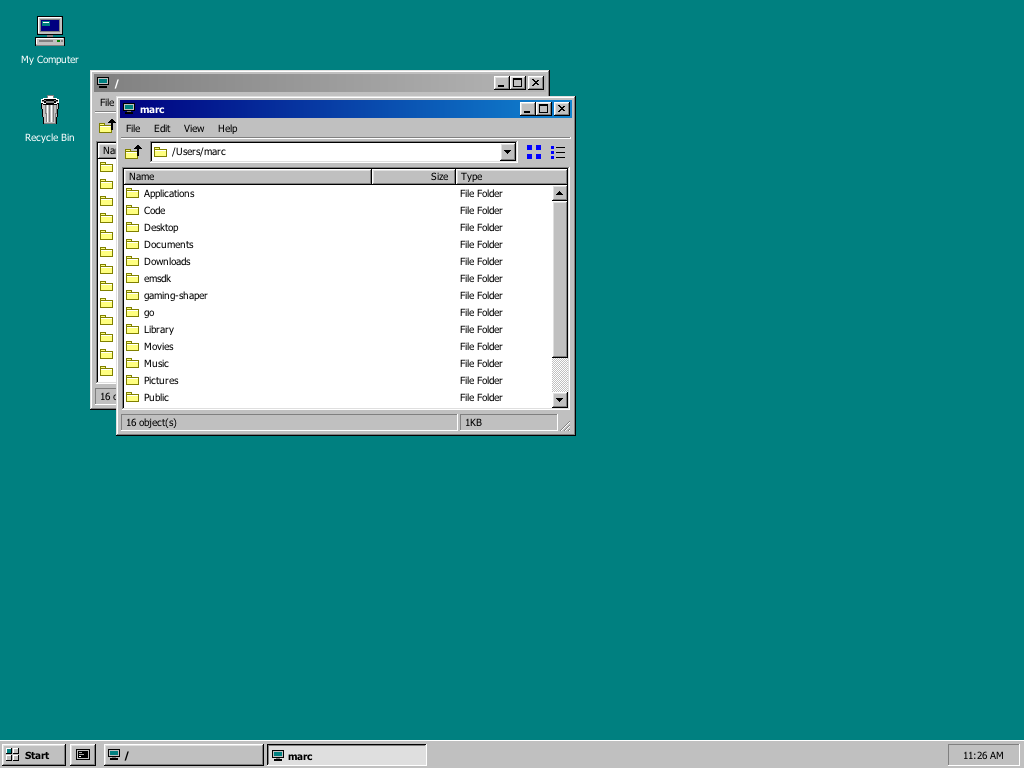
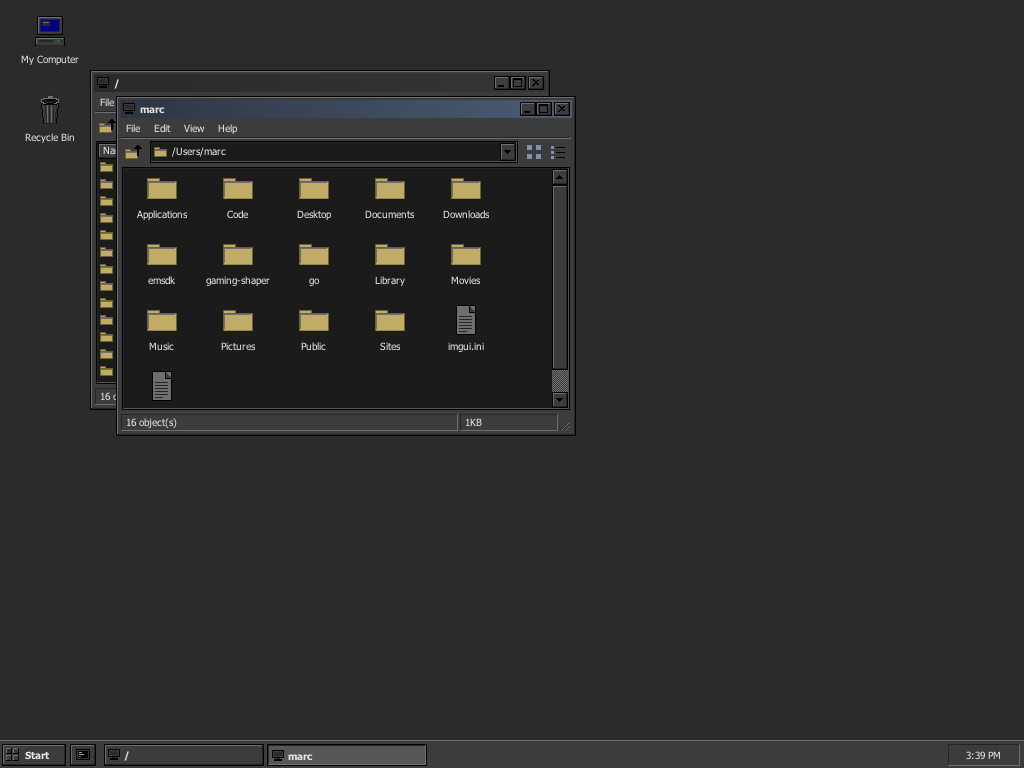
A beveled desktop environment that actually works — built entirely with Dear ImGui's DrawList API. One binary, two moods: silver Windows 95 and dark NeXT Night, switchable at runtime.
▶ Try the live demo in your browser (WebAssembly, no install)
Beveled chrome, a real file manager over your actual filesystem, and an MS-DOS Prompt running a live shell (your zsh) through a pty — every bevel, caption bar, scrollbar and icon drawn by hand, pixel by pixel. No stock ImGui styling, no image assets, no web views.
BevelDesk borrows from the two great beveled desktops — Win95 and NeXTSTEP —
which share one visual philosophy (3D edges, light from the top-left, per-window
chrome). So the dark NeXT Night mode isn't a reskin engine; it's a second
Palette + Style the same drawing code reads. Flip it in Display Properties ▸
Appearance and the whole desktop — chrome, dialogs, taskbar, icons — repaints
live. It's BevelDesk's own dark design language, not a NeXTSTEP replica.
| Windows 95 | NeXT Night |
|---|---|
 |  |
Features
- Theme95 rendering layer — the 1995 visual language reproduced from
research: the 16-color system palette (
#C0C0C0chrome,#000080captions,#008080desktop), the four 3D bevel conventions (raised, pressed, sunken field, window frame — each with its distinct edge-color order), 18px captions, 16×14 caption buttons, procedurally drawn icons. - Real window management — drag, resize, minimize to taskbar, maximize/restore with saved geometry, double-click captions, and the full system menu on the caption icon (double-click it to close, like the original).
- Explorer — browse your real filesystem: Details view with sortable columns (folders first, KB sizes right-aligned), Large Icons view, Up button, address well, status bar, custom Win95 scrollbars with arrow buttons and dithered tracks. Open as many windows as you like.
- MS-DOS Prompt — a genuine interactive shell (
$SHELL) on a POSIX pty in an authentic fixed 80×25 terminal: VT100/xterm-subset emulation, 16-color SGR (with 256-color mapping), OSC window titles, scrollback, Ctrl+C that actually interrupts. The window closes when the shell exits — just like 1995, except this one runs zsh. (macOS/Linux) - Taskbar & Start menu — live clock, per-window task buttons with pressed/active states, and a working Start menu: Programs (MS-DOS Prompt), Documents / Find (Explorer), Settings (Display Properties), Help (About), Run… (a real Run box — type a folder to open it, or a command to run in a DOS prompt), Shut Down… (the iconic dithered screen-fade dialog).
- UI zoom — Ctrl/Cmd + mouse-wheel (or
+/-/0on a US keyboard) scales the whole desktop through 1×–3×, with fonts re-rasterized at each level so text stays crisp (no bitmap blur). Handy on 4K/5K displays. - Two moods, one binary — a silver Windows 95 scheme and a dark
NeXT Night scheme (charcoal chrome, chiseled black-keyline bevels,
muted-gold folders, a steel active caption). Everything shared; the two
differ only by a
Palette(colors) and a smallStyle(chiseled vs. Win95 bevel). A third mood would be additive — fill one morePalette. - Display Properties (Start ▸ Settings) — recolor the desktop from the
classic 16-color picker with a live monitor preview, or switch scheme on the
Appearance tab; live-apply with OK/Cancel/Apply revert semantics. Start
in the dark scheme directly with
--night. - Crisp on Retina — native-resolution rendering with the UI font (Tahoma / Microsoft Sans Serif / DejaVu, probed from your system) rasterized at monitor density. Fixed 96-dpi metrics, like the original.
Download
Prebuilt binaries for every release are on the Releases page:
- macOS — universal (Apple silicon + Intel)
BevelDesk.app. Unsigned: right-click ▸ Open on first launch, orxattr -d com.apple.quarantine BevelDesk.app. - Linux x86_64 — needs OpenGL and X11/Wayland runtime libraries.
- Windows x86_64 — note: the MS-DOS Prompt is POSIX-only for now.
Building
Requirements: CMake ≥ 3.16, a C++17 compiler, network on first configure (dependencies fetched via FetchContent: GLFW 3.4, Dear ImGui 1.92.8, stb).
macOS
cmake -S . -B build -DCMAKE_BUILD_TYPE=Release
cmake --build build -j
./build/beveldesk                  # or double-click "build/BevelDesk.app"
Linux
sudo apt install build-essential cmake libgl1-mesa-dev xorg-dev
cmake -S . -B build -DCMAKE_BUILD_TYPE=Release
cmake --build build -j
./build/beveldesk
Windows (Visual Studio 2019+)
cmake -S . -B build
cmake --build build --config Release
build\Release\beveldesk.exe
(The MS-DOS Prompt is POSIX-only for now — a ConPTY port is a welcome PR.)
Running
| Command | Effect |
|---|---|
./build/beveldesk | normal 1024×768 window (--windowed WxH picks another size) |
./build/beveldesk --fullscreen | total immersion — no host chrome; exit via Start ▸ Shut Down… or Cmd/Ctrl+Q |
./build/beveldesk --borderless | square-cornered undecorated window; drag it by the taskbar's empty area, Cmd+M minimizes |
./build/beveldesk --night | boot straight into the dark NeXT Night scheme (toggle live in Display Properties ▸ Appearance) |
./build/beveldesk --zoom 1.5 | start at a UI zoom level (also Ctrl/Cmd +/-/0 at runtime) |
./build/beveldesk --screenshot [out.png] | headless QA: renders 10 frames, writes a PNG, exits |
…--screenshot s.png --demo start|max|nav|icons|shutdown|dos|sysmenu|appearance | screenshot specific UI states (dos runs a live shell for ~1.4 s first; appearance opens the scheme picker) |
Double-click My Computer to browse /, Recycle Bin for ~/.Trash.
Start ▸ MS-DOS Prompt opens a shell. Inside Explorer: double-click folders
to navigate, click column headers to sort, toolbar buttons switch view modes.
Code layout
src/
  main.cpp            entry point: GLFW/ImGui boot, main loop, CLI flags
  app/                the model — AppState, windows, terminal emulator (no drawing)
  theme95/            the beveled visual language (reusable, app-agnostic)
    palette.*           Palette + Style schemes (Silver / NeXT Night), live
                        color globals, ApplyScheme(); metrics
    bevel.*             the four 3D edge conventions (+ chiseled variant) + dither
    widgets.*           Button, Radio, ToolButton, CaptionButton, ScrollBarV
    window.*            window chrome, system menu, dialogs
    style.* icons95.*   global ImGui style; procedural icons
  shell/              the desktop environment, one component per surface
    desktop.* taskbar.* explorer.* dosprompt.* shutdown.* displayprops.*
  platform/           OS glue: fonts, pty (forkpty), GL textures, screenshots
Adding a mood is additive: fill one more Palette (16-odd colors) plus a
Style flag or two and add it to the Appearance list — every draw call reads
the live t95:: color globals unchanged, so nothing else moves. A new program
(Notepad, Minesweeper…) is one new shell/ component drawing inside
t95::BeginWindow95.
WebAssembly build
The live demo is the same code
compiled with Emscripten (web/ holds the HTML shell, bundled DejaVu fonts,
and a small mock filesystem for Explorer to browse). To build it locally:
source /path/to/emsdk/emsdk_env.sh
emcmake cmake -S . -B build-web -DCMAKE_BUILD_TYPE=Release
cmake --build build-web -j
python3 -m http.server -d build-web 8000   # then open http://localhost:8000/index.html
The MS-DOS Prompt is native-only (the browser has no pty/forkpty); on the
web it simply doesn't open. Everything else — Explorer, dialogs, zoom, the
Start menu — runs in the browser.
Project docs
CONTRIBUTING.md— the contributor's field guide: architecture seams, Win95 authenticity rules, the build/verify loop, and the Dear ImGui gotchas that each cost a debugging round (read this first)PLAN.md— the Win95 visual-language research (palette, bevels, metrics, Explorer anatomy)DECISIONS.md— every ambiguity resolved, numbered, with reasoningCRITIQUE.md— the compile → screenshot → inspect → fix iterations, including the bugs only play-testing foundSTATUS.md— what works, known limitations, roadmap
Authenticity notes
Windows and Windows 95 are trademarks of Microsoft Corporation. BevelDesk is
an independent homage that reproduces the style of the era for educational
and nostalgic purposes; it ships no Microsoft assets, fonts, or code. Fonts
are probed from your operating system at runtime. Menus deliberately cast no
drop shadow (that's Windows 3.1 / Windows 2000 — see DECISIONS.md #13b).
Contributors

43 commits
Similar repos


Languages
C++
93.9%
CMake
2.2%
C
2.0%
HTML
1.9%
README
BevelDesk
A beveled desktop environment that actually works — built entirely with Dear ImGui's DrawList API. One binary, two moods: silver Windows 95 and dark NeXT Night, switchable at runtime.
▶ Try the live demo in your browser (WebAssembly, no install)
Beveled chrome, a real file manager over your actual filesystem, and an MS-DOS Prompt running a live shell (your zsh) through a pty — every bevel, caption bar, scrollbar and icon drawn by hand, pixel by pixel. No stock ImGui styling, no image assets, no web views.
BevelDesk borrows from the two great beveled desktops — Win95 and NeXTSTEP —
which share one visual philosophy (3D edges, light from the top-left, per-window
chrome). So the dark NeXT Night mode isn't a reskin engine; it's a second
Palette + Style the same drawing code reads. Flip it in Display Properties ▸
Appearance and the whole desktop — chrome, dialogs, taskbar, icons — repaints
live. It's BevelDesk's own dark design language, not a NeXTSTEP replica.
| Windows 95 | NeXT Night |
|---|---|
| |
Features
- Theme95 rendering layer — the 1995 visual language reproduced from
research: the 16-color system palette (
#C0C0C0chrome,#000080captions,#008080desktop), the four 3D bevel conventions (raised, pressed, sunken field, window frame — each with its distinct edge-color order), 18px captions, 16×14 caption buttons, procedurally drawn icons. - Real window management — drag, resize, minimize to taskbar, maximize/restore with saved geometry, double-click captions, and the full system menu on the caption icon (double-click it to close, like the original).
- Explorer — browse your real filesystem: Details view with sortable columns (folders first, KB sizes right-aligned), Large Icons view, Up button, address well, status bar, custom Win95 scrollbars with arrow buttons and dithered tracks. Open as many windows as you like.
- MS-DOS Prompt — a genuine interactive shell (
$SHELL) on a POSIX pty in an authentic fixed 80×25 terminal: VT100/xterm-subset emulation, 16-color SGR (with 256-color mapping), OSC window titles, scrollback, Ctrl+C that actually interrupts. The window closes when the shell exits — just like 1995, except this one runs zsh. (macOS/Linux) - Taskbar & Start menu — live clock, per-window task buttons with pressed/active states, and a working Start menu: Programs (MS-DOS Prompt), Documents / Find (Explorer), Settings (Display Properties), Help (About), Run… (a real Run box — type a folder to open it, or a command to run in a DOS prompt), Shut Down… (the iconic dithered screen-fade dialog).
- UI zoom — Ctrl/Cmd + mouse-wheel (or
+/-/0on a US keyboard) scales the whole desktop through 1×–3×, with fonts re-rasterized at each level so text stays crisp (no bitmap blur). Handy on 4K/5K displays. - Two moods, one binary — a silver Windows 95 scheme and a dark
NeXT Night scheme (charcoal chrome, chiseled black-keyline bevels,
muted-gold folders, a steel active caption). Everything shared; the two
differ only by a
Palette(colors) and a smallStyle(chiseled vs. Win95 bevel). A third mood would be additive — fill one morePalette. - Display Properties (Start ▸ Settings) — recolor the desktop from the
classic 16-color picker with a live monitor preview, or switch scheme on the
Appearance tab; live-apply with OK/Cancel/Apply revert semantics. Start
in the dark scheme directly with
--night. - Crisp on Retina — native-resolution rendering with the UI font (Tahoma / Microsoft Sans Serif / DejaVu, probed from your system) rasterized at monitor density. Fixed 96-dpi metrics, like the original.
Download
Prebuilt binaries for every release are on the Releases page:
- macOS — universal (Apple silicon + Intel)
BevelDesk.app. Unsigned: right-click ▸ Open on first launch, orxattr -d com.apple.quarantine BevelDesk.app. - Linux x86_64 — needs OpenGL and X11/Wayland runtime libraries.
- Windows x86_64 — note: the MS-DOS Prompt is POSIX-only for now.
Building
Requirements: CMake ≥ 3.16, a C++17 compiler, network on first configure (dependencies fetched via FetchContent: GLFW 3.4, Dear ImGui 1.92.8, stb).
macOS
cmake -S . -B build -DCMAKE_BUILD_TYPE=Release
cmake --build build -j
./build/beveldesk                  # or double-click "build/BevelDesk.app"
Linux
sudo apt install build-essential cmake libgl1-mesa-dev xorg-dev
cmake -S . -B build -DCMAKE_BUILD_TYPE=Release
cmake --build build -j
./build/beveldesk
Windows (Visual Studio 2019+)
cmake -S . -B build
cmake --build build --config Release
build\Release\beveldesk.exe
(The MS-DOS Prompt is POSIX-only for now — a ConPTY port is a welcome PR.)
Running
| Command | Effect |
|---|---|
./build/beveldesk | normal 1024×768 window (--windowed WxH picks another size) |
./build/beveldesk --fullscreen | total immersion — no host chrome; exit via Start ▸ Shut Down… or Cmd/Ctrl+Q |
./build/beveldesk --borderless | square-cornered undecorated window; drag it by the taskbar's empty area, Cmd+M minimizes |
./build/beveldesk --night | boot straight into the dark NeXT Night scheme (toggle live in Display Properties ▸ Appearance) |
./build/beveldesk --zoom 1.5 | start at a UI zoom level (also Ctrl/Cmd +/-/0 at runtime) |
./build/beveldesk --screenshot [out.png] | headless QA: renders 10 frames, writes a PNG, exits |
…--screenshot s.png --demo start|max|nav|icons|shutdown|dos|sysmenu|appearance | screenshot specific UI states (dos runs a live shell for ~1.4 s first; appearance opens the scheme picker) |
Double-click My Computer to browse /, Recycle Bin for ~/.Trash.
Start ▸ MS-DOS Prompt opens a shell. Inside Explorer: double-click folders
to navigate, click column headers to sort, toolbar buttons switch view modes.
Code layout
src/
  main.cpp            entry point: GLFW/ImGui boot, main loop, CLI flags
  app/                the model — AppState, windows, terminal emulator (no drawing)
  theme95/            the beveled visual language (reusable, app-agnostic)
    palette.*           Palette + Style schemes (Silver / NeXT Night), live
                        color globals, ApplyScheme(); metrics
    bevel.*             the four 3D edge conventions (+ chiseled variant) + dither
    widgets.*           Button, Radio, ToolButton, CaptionButton, ScrollBarV
    window.*            window chrome, system menu, dialogs
    style.* icons95.*   global ImGui style; procedural icons
  shell/              the desktop environment, one component per surface
    desktop.* taskbar.* explorer.* dosprompt.* shutdown.* displayprops.*
  platform/           OS glue: fonts, pty (forkpty), GL textures, screenshots
Adding a mood is additive: fill one more Palette (16-odd colors) plus a
Style flag or two and add it to the Appearance list — every draw call reads
the live t95:: color globals unchanged, so nothing else moves. A new program
(Notepad, Minesweeper…) is one new shell/ component drawing inside
t95::BeginWindow95.
WebAssembly build
The live demo is the same code
compiled with Emscripten (web/ holds the HTML shell, bundled DejaVu fonts,
and a small mock filesystem for Explorer to browse). To build it locally:
source /path/to/emsdk/emsdk_env.sh
emcmake cmake -S . -B build-web -DCMAKE_BUILD_TYPE=Release
cmake --build build-web -j
python3 -m http.server -d build-web 8000   # then open http://localhost:8000/index.html
The MS-DOS Prompt is native-only (the browser has no pty/forkpty); on the
web it simply doesn't open. Everything else — Explorer, dialogs, zoom, the
Start menu — runs in the browser.
Project docs
CONTRIBUTING.md— the contributor's field guide: architecture seams, Win95 authenticity rules, the build/verify loop, and the Dear ImGui gotchas that each cost a debugging round (read this first)PLAN.md— the Win95 visual-language research (palette, bevels, metrics, Explorer anatomy)DECISIONS.md— every ambiguity resolved, numbered, with reasoningCRITIQUE.md— the compile → screenshot → inspect → fix iterations, including the bugs only play-testing foundSTATUS.md— what works, known limitations, roadmap
Authenticity notes
Windows and Windows 95 are trademarks of Microsoft Corporation. BevelDesk is
an independent homage that reproduces the style of the era for educational
and nostalgic purposes; it ships no Microsoft assets, fonts, or code. Fonts
are probed from your operating system at runtime. Menus deliberately cast no
drop shadow (that's Windows 3.1 / Windows 2000 — see DECISIONS.md #13b).
Similar repos
Contributors
43 commits
Languages
C++
93.9%
CMake
2.2%
C
2.0%
HTML
1.9%