


MIQT is MIT-licensed Qt bindings for Go.
This is a straightforward binding of the Qt 5.15 / Qt 6.4+ API using CGO. You must have a working Qt C++ development toolchain to use this Go binding.
These bindings were newly started in August 2024. The bindings are complete for QtCore, QtGui, QtWidgets, Qt SQL, QtMultimedia, QtMultimediaWidgets, QtSpatialAudio, QtPrintSupport, QtSvg, QtScript, QtNetwork, QtWebkit, QtWebChannel, QtWebEngine, QtCharts, QtPositioning, Qt Websockets, QStateMachine, QtUiPlugin/QtUiTools, QML, QScintilla, ScintillaEdit, Qwt, there is subclassing support, and there is a uic/rcc/lupdate implementation. But, the bindings may be immature in some ways. Please try out the bindings and raise issues if you have trouble.
| OS | Arch | Linkage | Status |
|---|---|---|---|
| Linux | x86_64 | Static or Dynamic (.so) | ✅ Works |
| Linux | ARM64 | Static or Dynamic (.so) | ✅ Works |
| Windows | x86_64 | Static or Dynamic (.dll) | ✅ Works |
| Android | ARM64 | Dynamic (bundled in .apk package) | ✅ Works |
| FreeBSD | x86_64 | Static or Dynamic (.so) | ✅ Works |
| macOS | x86_64 | Static or Dynamic (.dylib) | ✅ Works |
| macOS | ARM64 | Static or Dynamic (.dylib) | ✅ Works |
The MIQT Go bindings are licensed under the MIT license.
You must also meet your Qt license obligations.
These apps are listed in alphabetical order. Raise an issue or PR to have your app listed here!
MIQT is also used to produce Qt bindings to other programming languages:
Make sure to compile with go build -ldflags "-s -w". This reduces the helloworld example from 43MB to 6MB.
Then, it's possible to reduce the size further with upx --best to 2MB or upx --lzma to 1.4MB.
You can also try miqt-docker native -minify-build to use aggressive CFLAGS.
Yes. You must also meet your Qt license obligations: either use Qt dynamically-linked dll/so/dylib files under the LGPL, or, purchase a Qt commercial license for static linking.
The first time MIQT is used, your go build would take about 10 minutes. But after that, any go build is very fast.
Go 1.26 is significantly faster.
If you are compiling your app within a Dockerfile, you could cache the build step by running go install github.com/mappu/miqt/qt.
If you are compiling your app with a one-shot docker run command, the compile speed can be improved if you also bind-mount the Docker container's GOCACHE directory: -v $(pwd)/container-build-cache:/root/.cache/go-build. The miqt-docker helper app does this automatically.
See also issue #8.
MIQT is a clean-room binding that does not use any code from other Qt bindings.
Most functions are implemented 1:1. The Qt documentation should be used.
Container types:
QByteArray, QString, QList<T>, QVector<T>, QMap<K,V>, QHash<K,V> types are projected as plain Go []byte, string, []T, and map[K]V. Therefore, you can't call any of the Qt type's methods, you must use some Go equivalent method instead.QString::fromUtf8. Therefore, the Go string must be UTF-8 to avoid mojibake. If the Go string contains binary data, the conversion would corrupt such bytes into U+FFFD (�). On return to Go space, this becomes \xEF\xBF\xBD.QMap/QHash will differ from the Go map iteration order. QMap is iterated by key order, but Go maps and QHash iterate in an undefined internal order.Memory management:
QSize), the binding may have moved it to the heap, and in Go this may be represented as a pointer type. In such cases, a Go finalizer is added to automatically delete the heap object. This means code using MIQT can look basically similar to the Qt C++ equivalent code.Events and signals:
connect(sourceObject, sourceSignal, targetObject, targetSlot) is projected as targetObject.onSourceSignal(func()...).func() receives super() as a first argument that can be used to call the base class implementation.Class pointers:
var myLabel *qt.QLabel to a function taking only the *qt.QWidget base class, write myLabel.QWidget.QMenu::addAction(QString) vs QWidget::addAction(QAction*)), the base class version is shadowed and can only be called via myQMenu.QWidget.AddAction(QAction*).QTabWidget.CurrentWidget() == MyTab will never compare equal because CurrentWidget() created a new Go struct wrapping the same C++ pointer. You can compare QTabWidget.CurrentIndex(), or, you can use: QTabWidget.CurrentWidget().UnsafePointer() == MyTab.UnsafePointer().Multithreading:
qt.NewQApplication in MIQT, that will be considered the Qt main thread and will automatically signal the Go runtime to bind to a fixed OS thread using runtime.LockOSThread().(qt6/mainthread).Wait() or Start() to access the Qt objects from Qt's main thread.Android:
QFileDialog may return a filepath of the form content://.... Such paths can be opened with qt.QFile but not with Go os.Open(); you can pass the handle to Go using os.NewFile(QFile.Handle(), "name").Some C++ idioms that were difficult to project were omitted from the binding. But, this can be improved in the future.
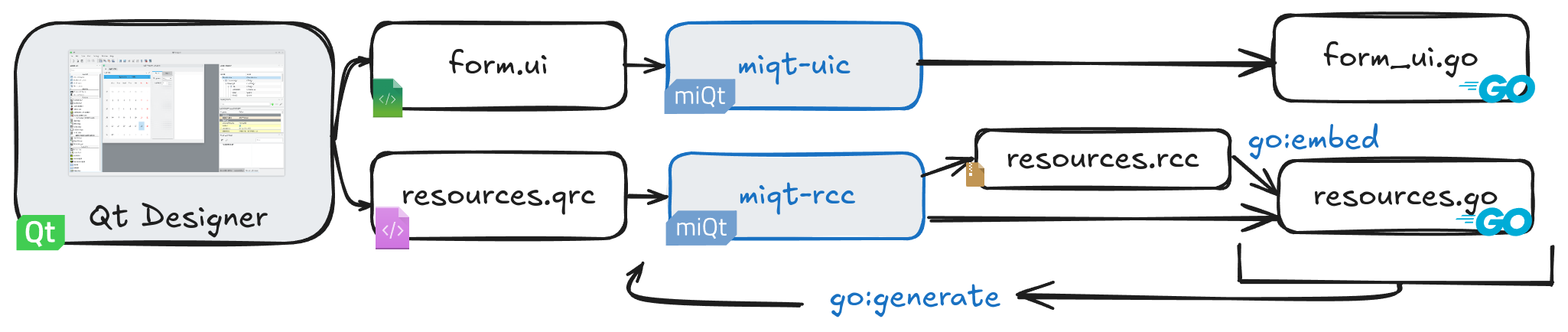
MIQT has a custom implementation of Qt uic and rcc tools, to allow using Qt Designer for form design and resource management. After running the miqt-uic and miqt-rcc tools once, you can rebuild any changes using the convenient go generate command.
To install the tools, run:
go install github.com/mappu/miqt/cmd/miqt-uic@latest
go install github.com/mappu/miqt/cmd/miqt-rcc@latest
The tools are installed into your ~/go/bin directory. You could add this directory to your $PATH.
MIQT uses pkg-config to find all used Qt libraries. Every Qt library should have a definition file in .pc format, which provides CGO with the necessary CXXFLAGS/LDFLAGS. Your Qt development environment already included the necessary .pc definition files.
You can use the PKG_CONFIG_PATH environment variable to override where CGO looks for .pc files. Read more »
After changing the environment variable, you may need to run go clean -cache to ensure the next go build properly rebuilds MIQT against the changed Qt target. Otherwise, a previous Qt installation could be targeted from the cached build data.
The import path changes from github.com/mappu/miqt/qt to github.com/mappu/miqt/qt6, but most basic classes are the same.
You can update all imports by running find . -type f -name .go -exec sed -i 's_"github.com/mappu/miqt/qt"_qt "github.com/mappu/miqt/qt6"_' {} \;
Fork this repository and add your library to the genbindings/config-libraries file. Read more »
You can use the ordinary go get and go build commands. To help with cross-compilation, you can use the optional miqt-docker tool. Read more »
Tested with Debian 12 / Qt 5.15 + 6.4 / GCC 12
Tested with Fedora 40 + 41 / Qt 6.7 + 6.8 / GCC 14
For dynamic linking, with the system Qt (Qt 5):
# Debian / Ubuntu (Minimal)
apt install qtbase5-dev build-essential golang-go

# Debian / Ubuntu (Full)
apt install qtbase5-dev libqscintilla2-qt5-dev libqt5svg5-dev libqt5webchannel5-dev libqt5webkit5-dev qtbase5-private-dev qtmultimedia5-dev qtpdf5-dev qtpositioning5-dev qttools5 qtwebengine5-dev qtwebengine5-private-dev build-essential golang-go
For dynamic linking, with the system Qt (Qt 6):
# Debian / Ubuntu (Minimal)
apt install qt6-base-dev build-essential golang-go

# Debian / Ubuntu (Full)
apt install qt6-base-dev libqscintilla2-qt6-dev qt6-base-private-dev qt6-charts-dev qt6-multimedia-dev qt6-pdf-dev qt6-positioning-dev qt6-svg-dev qt6-tools-dev qt6-webchannel-dev qt6-webengine-dev qt6-declarative-dev qml6-module-qtquick-{controls,shapes,layouts,templates,window} build-essential golang-go

# Fedora
dnf install qt6-qtbase-devel qscintilla-qt6-devel qt6-qtcharts-devel qt6-qtmultimedia-devel qt6-qtpdf-devel qt6-qtpositioning-devel qt6-qtsvg-devel qt6-qttools-devel qt6-qtwebchannel-devel qt6-qtwebengine-devel qt6-qtdeclarative-devel golang

# Manjaro
pamac install qt6-base qscintilla-qt6 qt6-charts qt6-multimedia qt6-positioning qt6-svg qt6-tools qt6-webchannel qt6-webengine qt6-declarative go

# Arch Linux (Minimal)
pacman -S pkg-config gcc go qt6-base

# Arch Linux (Full)
pacman -S pkg-config gcc go qt6-base qscintilla-qt6 qt6-charts qt6-multimedia qt6-positioning qt6-svg qt6-tools qt6-webchannel qt6-webengine qt6-declarative
go build -ldflags '-s -w'
go install github.com/mappu/miqt/cmd/miqt-docker@latest

# Many docker templates are available by running `miqt-docker -Help`
miqt-docker win32-qt5-dynamic -windows-build
miqt-docker win32-qt5-static -windows-build --tags=windowsqtstatic
miqt-docker win64-qt6-static -windows-build --tags=windowsqtstatic
Tested with Fsu0413 Qt 5.15 / Clang 18.1 native compilation
C:\dev\rootfs:$env:CGO_ENABLED = 1
$env:CC = 'C:\dev\rootfs\bin\clang.exe'
$env:CXX = 'C:\dev\rootfs\bin\clang++.exe'
$env:PKG_CONFIG = 'C:\dev\rootfs\bin\pkg-config.exe'
$env:CGO_CXXFLAGS = '-Wno-ignored-attributes' # Clang 18 recommendation
go build -ldflags "-s -w -H windowsgui"Tested with MSYS2 UCRT64 Qt 5.15 / Qt 6.7 / GCC 14
Install MSYS2 from msys2.org.
For dynamic linking:
# Install Go and C++ toolchains
pacman -S mingw-w64-ucrt-x86_64-{go,gcc,pkg-config}
export GOROOT=/ucrt64/lib/go # Needed only if this is the first time installing Go in MSYS2. Otherwise it would be automatically applied when opening a new Bash terminal.

# Install Qt
pacman -S mingw-w64-ucrt-x86_64-qt5-base # For Qt 5 (UCRT64 GCC toolchain)
pacman -S mingw-w64-ucrt-x86_64-qt6-base # For Qt 6 (UCRT64 GCC toolchain)
pacman -S mingw-w64-clang-x86_64-qt6-base # For Qt 6 (CLANG64 toolchain)

go build -ldflags "-s -w -H windowsgui"
qt5-base package is built to use libicu, whereas the Fsu0413 Qt packages are not. ICU is included by default with Windows 10 1703 and later. If you are targeting older versions of Windows, then when using MSYS2, your distribution size including .dll files will be larger.Tested with MSYS2 UCRT64 Qt 5.15
Install MSYS2 from msys2.org.
# Install Go and C++ toolchains
pacman -S mingw-w64-ucrt-x86_64-{go,gcc,pkg-config}
export GOROOT=/ucrt64/lib/go # Needed only if this is the first time installing Go in MSYS2. Otherwise it would be automatically applied when opening a new Bash terminal.

# Install Qt
pacman -S mingw-w64-ucrt-x86_64-qt5-static

# Select this static Qt installation
export PKG_CONFIG_PATH=/ucrt64/qt5-static/lib/pkgconfig

# Export environment variables for extra needed static libraries
export CGO_LDFLAGS='-LC:/msys64/ucrt64/qt5-static/share/qt5/plugins/platforms -lqwindows -lQt5FontDatabaseSupport -lQt5EventDispatcherSupport -lQt5ThemeSupport -lQt5PlatformCompositorSupport -lQt5AccessibilitySupport -lQt5WindowsUIAutomationSupport -lwtsapi32 -LC:/msys64/ucrt64/qt5-static/share/qt5/plugins/styles -lqwindowsvistastyle -lQt5VulkanSupport -lqtfreetype -static -static-libgcc -static-libstdc++'

# The pkg-config declares that this copy of Qt depends on "libz" and "libzstd"
# with no file extension. Set up file copies so that they can be properly found
cp -vn /ucrt64/lib/libzstd.a /ucrt64/qt5-static/lib/libzstd
cp -vn /ucrt64/lib/libz.a /ucrt64/qt5-static/lib/libz

# Build
go build -ldflags "-s -w -H windowsgui" --tags=windowsqtstatic
This version of Qt is not compiled with libicu support. This produces a smaller binary size.
Tested with MXE Qt 5.15 / MXE GCC 5, and MXE Qt 6.8 / MXE GCC 11 under cross-compilation
For static linking:
docker/ directory: docker build -t miqt/win64-cross:latest -f win64-cross-go1.23-qt5.15-static.Dockerfile .docker run --rm -v $(pwd):/src -w /src miqt/win64-cross:latest go build --tags=windowsqtstatic -ldflags '-s -w -H windowsgui'For dynamic linking:
docker/ directory: docker build -t miqt/win64-dynamic:latest -f win64-cross-go1.23-qt5.15-dynamic.Dockerfile .docker run --rm -v $(pwd):/src -w /src miqt/win64-dynamic:latest go build -ldflags '-s -w -H windowsgui'See FAQ Q3 for advice about docker performance.
To add an icon and other properties to the .exe, you can use the go-winres tool. See the examples/windowsmanifest for details.
Tested with FreeBSD 14.2 / Go 1.21 / Qt 6.7 / Clang
pkg install git
pkg install devel/pkgconf
pkg install go
pkg install qt6-base qt6-charts qt6-multimedia qt6-pdf qt6-positioning qt6-svg qt6-tools qt6-webchannel qt6-webengine qt6-declarative qscintilla2-qt6

go build -ldflags '-s -w'
Tested with macOS 12.6 "Monterey" x86_64 / Go 1.23 / Qt 5.15 / Apple Clang 14.0
Install Homebrew from brew.sh.
For dynamic linking:
xcode-select --install
brew install golang
brew install pkg-config
brew install qt@5
go build -ldflags '-s -w'
Installing qt@5 from Homebrew may be very slow if Homebrew chooses to do a from-source build instead of a binary Bottle build, particularly owing to QtWebEngine (Chromium).
If you get an error related to
pkg-configwhen building the miqt application after installing thepkg-configtool with brew, you may have forgotten to add environment variables. To do this, do not forget to apply the instructions in the output ofbrew install pkg-configcommand. You can find related discussion about this topic by clicking this link -> https://github.com/mappu/miqt/discussions/257.
Tested with osxcross 14.5 / Go 1.19 / MacPorts Qt 5.15 / Debian Clang 14.0
For dynamic linking:
docker/ directory: docker build -t miqt/osxcross:latest -f macos-cross-x86_64-sdk14.5-go1.19-qt5.15-dynamic.Dockerfile .docker run --rm -v $(pwd):/src -w /src miqt/osxcross:latest go build -ldflags '-s -w'See FAQ Q3 for advice about docker performance.
Tested with Raymii Qt 5.15 / Android SDK 31 / Android NDK 22 and with Qt.io Qt 6.6 / Android SDK 33 / Android NDK 25
MIQT supports compiling for Android. Some extra steps are required to bridge the Java, C++, Go worlds.
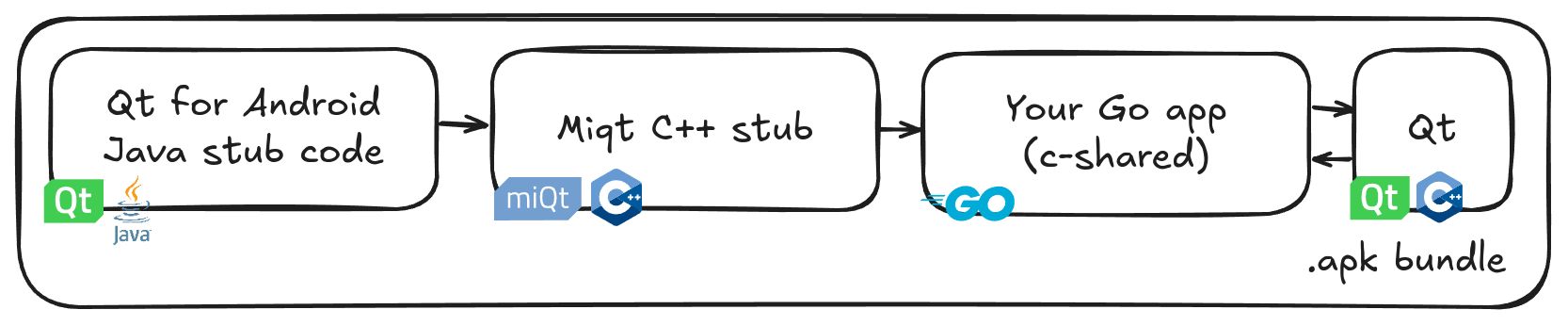
go install github.com/mappu/miqt/cmd/miqt-docker
miqt-docker android-qt5 -android-build # or android-qt6
This produces an .apk in the current directory. A default manifest, icon, and keystore will be created. If you customize the AndroidManifest.xml file or images, they will be used for the next build.
Advanced users may customize the build process or manually invoke androiddeployqt. You can invoke it inside the container environment via miqt-docker android-qt5 androiddeployqt .... For more information, see the android-build.sh file that miqt-docker is running.
3,416 followers · starred Jul 2025
5,733 followers · starred Oct 2024
272 followers · starred Oct 2024
430 followers · starred Oct 2024
MIQT is MIT-licensed Qt bindings for Go.
This is a straightforward binding of the Qt 5.15 / Qt 6.4+ API using CGO. You must have a working Qt C++ development toolchain to use this Go binding.
These bindings were newly started in August 2024. The bindings are complete for QtCore, QtGui, QtWidgets, Qt SQL, QtMultimedia, QtMultimediaWidgets, QtSpatialAudio, QtPrintSupport, QtSvg, QtScript, QtNetwork, QtWebkit, QtWebChannel, QtWebEngine, QtCharts, QtPositioning, Qt Websockets, QStateMachine, QtUiPlugin/QtUiTools, QML, QScintilla, ScintillaEdit, Qwt, there is subclassing support, and there is a uic/rcc/lupdate implementation. But, the bindings may be immature in some ways. Please try out the bindings and raise issues if you have trouble.
| OS | Arch | Linkage | Status |
|---|---|---|---|
| Linux | x86_64 | Static or Dynamic (.so) | ✅ Works |
| Linux | ARM64 | Static or Dynamic (.so) | ✅ Works |
| Windows | x86_64 | Static or Dynamic (.dll) | ✅ Works |
| Android | ARM64 | Dynamic (bundled in .apk package) | ✅ Works |
| FreeBSD | x86_64 | Static or Dynamic (.so) | ✅ Works |
| macOS | x86_64 | Static or Dynamic (.dylib) | ✅ Works |
| macOS | ARM64 | Static or Dynamic (.dylib) | ✅ Works |
The MIQT Go bindings are licensed under the MIT license.
You must also meet your Qt license obligations.
These apps are listed in alphabetical order. Raise an issue or PR to have your app listed here!
MIQT is also used to produce Qt bindings to other programming languages:
Make sure to compile with go build -ldflags "-s -w". This reduces the helloworld example from 43MB to 6MB.
Then, it's possible to reduce the size further with upx --best to 2MB or upx --lzma to 1.4MB.
You can also try miqt-docker native -minify-build to use aggressive CFLAGS.
Yes. You must also meet your Qt license obligations: either use Qt dynamically-linked dll/so/dylib files under the LGPL, or, purchase a Qt commercial license for static linking.
The first time MIQT is used, your go build would take about 10 minutes. But after that, any go build is very fast.
Go 1.26 is significantly faster.
If you are compiling your app within a Dockerfile, you could cache the build step by running go install github.com/mappu/miqt/qt.
If you are compiling your app with a one-shot docker run command, the compile speed can be improved if you also bind-mount the Docker container's GOCACHE directory: -v $(pwd)/container-build-cache:/root/.cache/go-build. The miqt-docker helper app does this automatically.
See also issue #8.
MIQT is a clean-room binding that does not use any code from other Qt bindings.
Most functions are implemented 1:1. The Qt documentation should be used.
Container types:
QByteArray, QString, QList<T>, QVector<T>, QMap<K,V>, QHash<K,V> types are projected as plain Go []byte, string, []T, and map[K]V. Therefore, you can't call any of the Qt type's methods, you must use some Go equivalent method instead.QString::fromUtf8. Therefore, the Go string must be UTF-8 to avoid mojibake. If the Go string contains binary data, the conversion would corrupt such bytes into U+FFFD (�). On return to Go space, this becomes \xEF\xBF\xBD.QMap/QHash will differ from the Go map iteration order. QMap is iterated by key order, but Go maps and QHash iterate in an undefined internal order.Memory management:
QSize), the binding may have moved it to the heap, and in Go this may be represented as a pointer type. In such cases, a Go finalizer is added to automatically delete the heap object. This means code using MIQT can look basically similar to the Qt C++ equivalent code.Events and signals:
connect(sourceObject, sourceSignal, targetObject, targetSlot) is projected as targetObject.onSourceSignal(func()...).func() receives super() as a first argument that can be used to call the base class implementation.Class pointers:
var myLabel *qt.QLabel to a function taking only the *qt.QWidget base class, write myLabel.QWidget.QMenu::addAction(QString) vs QWidget::addAction(QAction*)), the base class version is shadowed and can only be called via myQMenu.QWidget.AddAction(QAction*).QTabWidget.CurrentWidget() == MyTab will never compare equal because CurrentWidget() created a new Go struct wrapping the same C++ pointer. You can compare QTabWidget.CurrentIndex(), or, you can use: QTabWidget.CurrentWidget().UnsafePointer() == MyTab.UnsafePointer().Multithreading:
qt.NewQApplication in MIQT, that will be considered the Qt main thread and will automatically signal the Go runtime to bind to a fixed OS thread using runtime.LockOSThread().(qt6/mainthread).Wait() or Start() to access the Qt objects from Qt's main thread.Android:
QFileDialog may return a filepath of the form content://.... Such paths can be opened with qt.QFile but not with Go os.Open(); you can pass the handle to Go using os.NewFile(QFile.Handle(), "name").Some C++ idioms that were difficult to project were omitted from the binding. But, this can be improved in the future.
MIQT has a custom implementation of Qt uic and rcc tools, to allow using Qt Designer for form design and resource management. After running the miqt-uic and miqt-rcc tools once, you can rebuild any changes using the convenient go generate command.
To install the tools, run:
go install github.com/mappu/miqt/cmd/miqt-uic@latest
go install github.com/mappu/miqt/cmd/miqt-rcc@latest
The tools are installed into your ~/go/bin directory. You could add this directory to your $PATH.
MIQT uses pkg-config to find all used Qt libraries. Every Qt library should have a definition file in .pc format, which provides CGO with the necessary CXXFLAGS/LDFLAGS. Your Qt development environment already included the necessary .pc definition files.
You can use the PKG_CONFIG_PATH environment variable to override where CGO looks for .pc files. Read more »
After changing the environment variable, you may need to run go clean -cache to ensure the next go build properly rebuilds MIQT against the changed Qt target. Otherwise, a previous Qt installation could be targeted from the cached build data.
The import path changes from github.com/mappu/miqt/qt to github.com/mappu/miqt/qt6, but most basic classes are the same.
You can update all imports by running find . -type f -name .go -exec sed -i 's_"github.com/mappu/miqt/qt"_qt "github.com/mappu/miqt/qt6"_' {} \;
Fork this repository and add your library to the genbindings/config-libraries file. Read more »
You can use the ordinary go get and go build commands. To help with cross-compilation, you can use the optional miqt-docker tool. Read more »
Tested with Debian 12 / Qt 5.15 + 6.4 / GCC 12
Tested with Fedora 40 + 41 / Qt 6.7 + 6.8 / GCC 14
For dynamic linking, with the system Qt (Qt 5):
# Debian / Ubuntu (Minimal)
apt install qtbase5-dev build-essential golang-go

# Debian / Ubuntu (Full)
apt install qtbase5-dev libqscintilla2-qt5-dev libqt5svg5-dev libqt5webchannel5-dev libqt5webkit5-dev qtbase5-private-dev qtmultimedia5-dev qtpdf5-dev qtpositioning5-dev qttools5 qtwebengine5-dev qtwebengine5-private-dev build-essential golang-go
For dynamic linking, with the system Qt (Qt 6):
# Debian / Ubuntu (Minimal)
apt install qt6-base-dev build-essential golang-go

# Debian / Ubuntu (Full)
apt install qt6-base-dev libqscintilla2-qt6-dev qt6-base-private-dev qt6-charts-dev qt6-multimedia-dev qt6-pdf-dev qt6-positioning-dev qt6-svg-dev qt6-tools-dev qt6-webchannel-dev qt6-webengine-dev qt6-declarative-dev qml6-module-qtquick-{controls,shapes,layouts,templates,window} build-essential golang-go

# Fedora
dnf install qt6-qtbase-devel qscintilla-qt6-devel qt6-qtcharts-devel qt6-qtmultimedia-devel qt6-qtpdf-devel qt6-qtpositioning-devel qt6-qtsvg-devel qt6-qttools-devel qt6-qtwebchannel-devel qt6-qtwebengine-devel qt6-qtdeclarative-devel golang

# Manjaro
pamac install qt6-base qscintilla-qt6 qt6-charts qt6-multimedia qt6-positioning qt6-svg qt6-tools qt6-webchannel qt6-webengine qt6-declarative go

# Arch Linux (Minimal)
pacman -S pkg-config gcc go qt6-base

# Arch Linux (Full)
pacman -S pkg-config gcc go qt6-base qscintilla-qt6 qt6-charts qt6-multimedia qt6-positioning qt6-svg qt6-tools qt6-webchannel qt6-webengine qt6-declarative
go build -ldflags '-s -w'
go install github.com/mappu/miqt/cmd/miqt-docker@latest

# Many docker templates are available by running `miqt-docker -Help`
miqt-docker win32-qt5-dynamic -windows-build
miqt-docker win32-qt5-static -windows-build --tags=windowsqtstatic
miqt-docker win64-qt6-static -windows-build --tags=windowsqtstatic
Tested with Fsu0413 Qt 5.15 / Clang 18.1 native compilation
C:\dev\rootfs:$env:CGO_ENABLED = 1
$env:CC = 'C:\dev\rootfs\bin\clang.exe'
$env:CXX = 'C:\dev\rootfs\bin\clang++.exe'
$env:PKG_CONFIG = 'C:\dev\rootfs\bin\pkg-config.exe'
$env:CGO_CXXFLAGS = '-Wno-ignored-attributes' # Clang 18 recommendation
go build -ldflags "-s -w -H windowsgui"Tested with MSYS2 UCRT64 Qt 5.15 / Qt 6.7 / GCC 14
Install MSYS2 from msys2.org.
For dynamic linking:
# Install Go and C++ toolchains
pacman -S mingw-w64-ucrt-x86_64-{go,gcc,pkg-config}
export GOROOT=/ucrt64/lib/go # Needed only if this is the first time installing Go in MSYS2. Otherwise it would be automatically applied when opening a new Bash terminal.

# Install Qt
pacman -S mingw-w64-ucrt-x86_64-qt5-base # For Qt 5 (UCRT64 GCC toolchain)
pacman -S mingw-w64-ucrt-x86_64-qt6-base # For Qt 6 (UCRT64 GCC toolchain)
pacman -S mingw-w64-clang-x86_64-qt6-base # For Qt 6 (CLANG64 toolchain)

go build -ldflags "-s -w -H windowsgui"
qt5-base package is built to use libicu, whereas the Fsu0413 Qt packages are not. ICU is included by default with Windows 10 1703 and later. If you are targeting older versions of Windows, then when using MSYS2, your distribution size including .dll files will be larger.Tested with MSYS2 UCRT64 Qt 5.15
Install MSYS2 from msys2.org.
# Install Go and C++ toolchains
pacman -S mingw-w64-ucrt-x86_64-{go,gcc,pkg-config}
export GOROOT=/ucrt64/lib/go # Needed only if this is the first time installing Go in MSYS2. Otherwise it would be automatically applied when opening a new Bash terminal.

# Install Qt
pacman -S mingw-w64-ucrt-x86_64-qt5-static

# Select this static Qt installation
export PKG_CONFIG_PATH=/ucrt64/qt5-static/lib/pkgconfig

# Export environment variables for extra needed static libraries
export CGO_LDFLAGS='-LC:/msys64/ucrt64/qt5-static/share/qt5/plugins/platforms -lqwindows -lQt5FontDatabaseSupport -lQt5EventDispatcherSupport -lQt5ThemeSupport -lQt5PlatformCompositorSupport -lQt5AccessibilitySupport -lQt5WindowsUIAutomationSupport -lwtsapi32 -LC:/msys64/ucrt64/qt5-static/share/qt5/plugins/styles -lqwindowsvistastyle -lQt5VulkanSupport -lqtfreetype -static -static-libgcc -static-libstdc++'

# The pkg-config declares that this copy of Qt depends on "libz" and "libzstd"
# with no file extension. Set up file copies so that they can be properly found
cp -vn /ucrt64/lib/libzstd.a /ucrt64/qt5-static/lib/libzstd
cp -vn /ucrt64/lib/libz.a /ucrt64/qt5-static/lib/libz

# Build
go build -ldflags "-s -w -H windowsgui" --tags=windowsqtstatic
This version of Qt is not compiled with libicu support. This produces a smaller binary size.
Tested with MXE Qt 5.15 / MXE GCC 5, and MXE Qt 6.8 / MXE GCC 11 under cross-compilation
For static linking:
docker/ directory: docker build -t miqt/win64-cross:latest -f win64-cross-go1.23-qt5.15-static.Dockerfile .docker run --rm -v $(pwd):/src -w /src miqt/win64-cross:latest go build --tags=windowsqtstatic -ldflags '-s -w -H windowsgui'For dynamic linking:
docker/ directory: docker build -t miqt/win64-dynamic:latest -f win64-cross-go1.23-qt5.15-dynamic.Dockerfile .docker run --rm -v $(pwd):/src -w /src miqt/win64-dynamic:latest go build -ldflags '-s -w -H windowsgui'See FAQ Q3 for advice about docker performance.
To add an icon and other properties to the .exe, you can use the go-winres tool. See the examples/windowsmanifest for details.
Tested with FreeBSD 14.2 / Go 1.21 / Qt 6.7 / Clang
pkg install git
pkg install devel/pkgconf
pkg install go
pkg install qt6-base qt6-charts qt6-multimedia qt6-pdf qt6-positioning qt6-svg qt6-tools qt6-webchannel qt6-webengine qt6-declarative qscintilla2-qt6

go build -ldflags '-s -w'
Tested with macOS 12.6 "Monterey" x86_64 / Go 1.23 / Qt 5.15 / Apple Clang 14.0
Install Homebrew from brew.sh.
For dynamic linking:
xcode-select --install
brew install golang
brew install pkg-config
brew install qt@5
go build -ldflags '-s -w'
Installing qt@5 from Homebrew may be very slow if Homebrew chooses to do a from-source build instead of a binary Bottle build, particularly owing to QtWebEngine (Chromium).
If you get an error related to
pkg-configwhen building the miqt application after installing thepkg-configtool with brew, you may have forgotten to add environment variables. To do this, do not forget to apply the instructions in the output ofbrew install pkg-configcommand. You can find related discussion about this topic by clicking this link -> https://github.com/mappu/miqt/discussions/257.
Tested with osxcross 14.5 / Go 1.19 / MacPorts Qt 5.15 / Debian Clang 14.0
For dynamic linking:
docker/ directory: docker build -t miqt/osxcross:latest -f macos-cross-x86_64-sdk14.5-go1.19-qt5.15-dynamic.Dockerfile .docker run --rm -v $(pwd):/src -w /src miqt/osxcross:latest go build -ldflags '-s -w'See FAQ Q3 for advice about docker performance.
Tested with Raymii Qt 5.15 / Android SDK 31 / Android NDK 22 and with Qt.io Qt 6.6 / Android SDK 33 / Android NDK 25
MIQT supports compiling for Android. Some extra steps are required to bridge the Java, C++, Go worlds.
go install github.com/mappu/miqt/cmd/miqt-docker
miqt-docker android-qt5 -android-build # or android-qt6
This produces an .apk in the current directory. A default manifest, icon, and keystore will be created. If you customize the AndroidManifest.xml file or images, they will be used for the next build.
Advanced users may customize the build process or manually invoke androiddeployqt. You can invoke it inside the container environment via miqt-docker android-qt5 androiddeployqt .... For more information, see the android-build.sh file that miqt-docker is running.
3,416 followers · starred Jul 2025
5,733 followers · starred Oct 2024
272 followers · starred Oct 2024
430 followers · starred Oct 2024