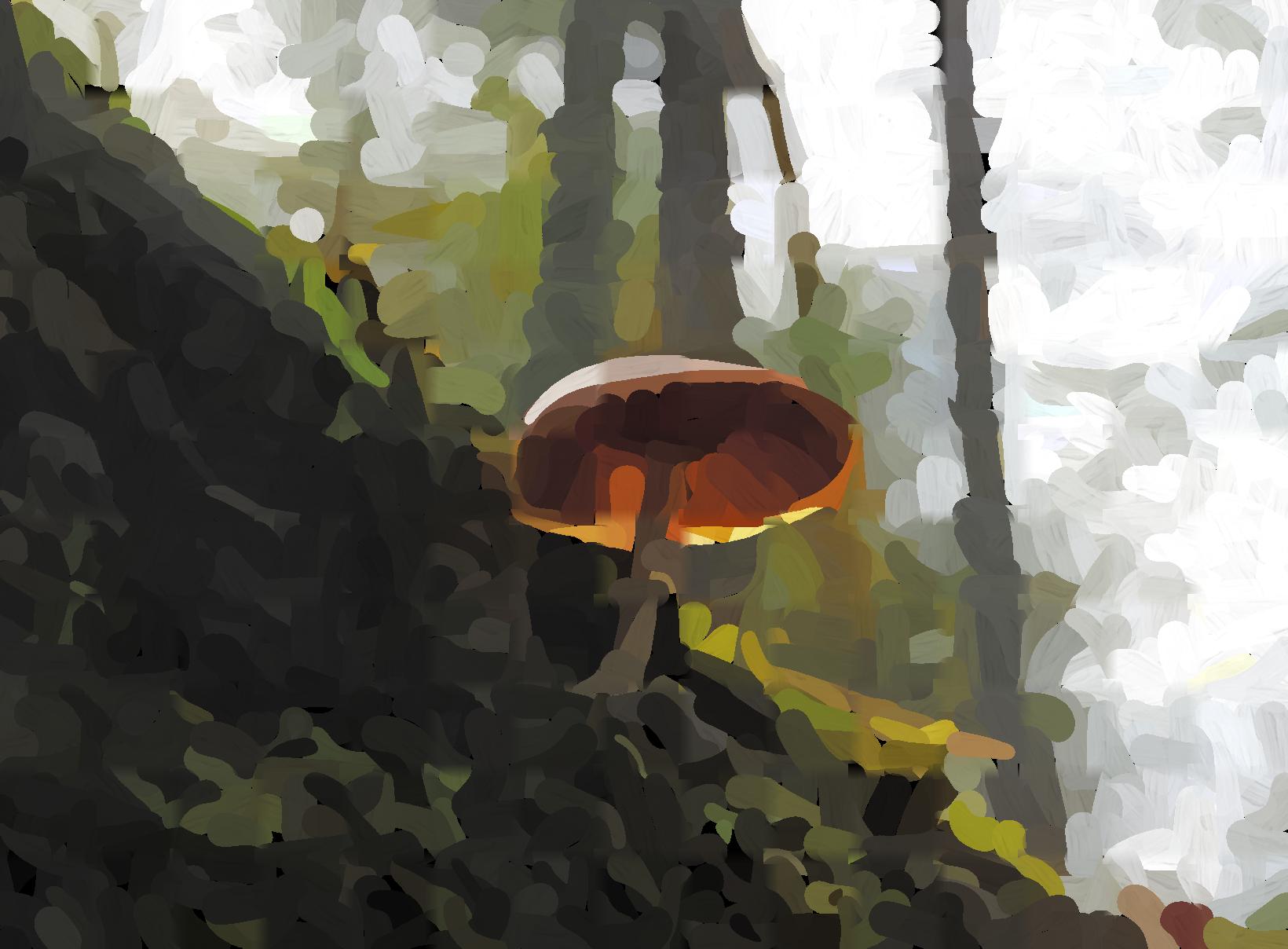
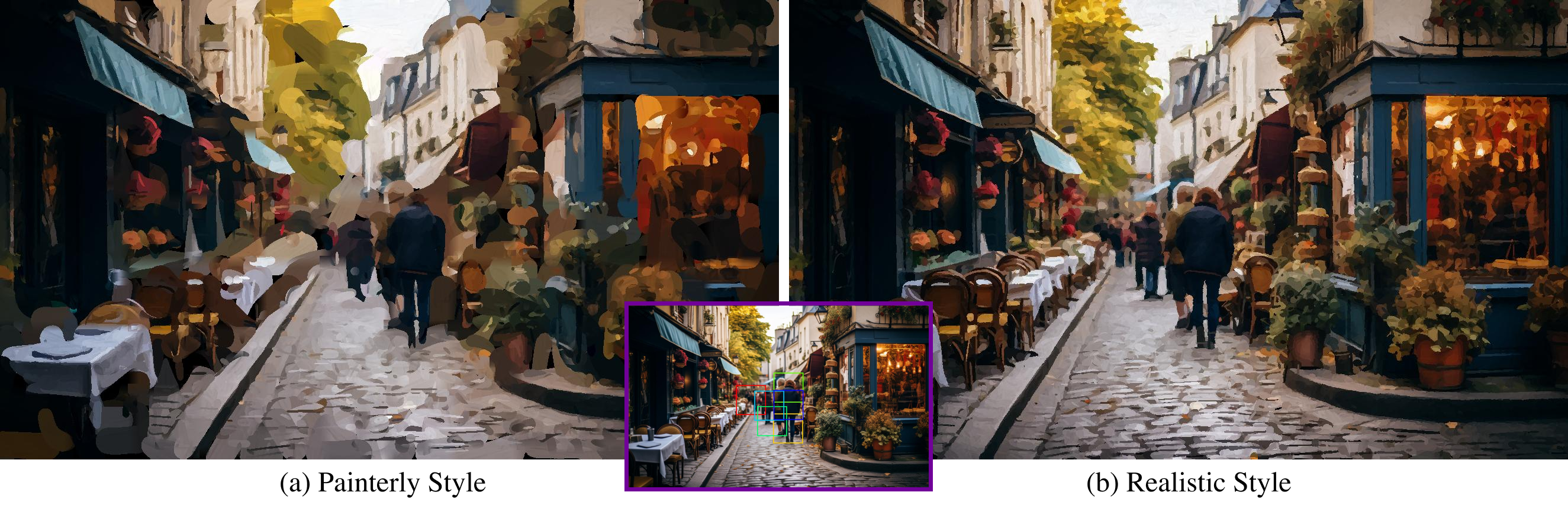
This repository contains a semantic-based painting optimization algorithm which aims to transform a given input image into a painting. The algorithm takes advantage of modern computer vision techniques, segmentation networks, and a differentiable renderer to generate results.
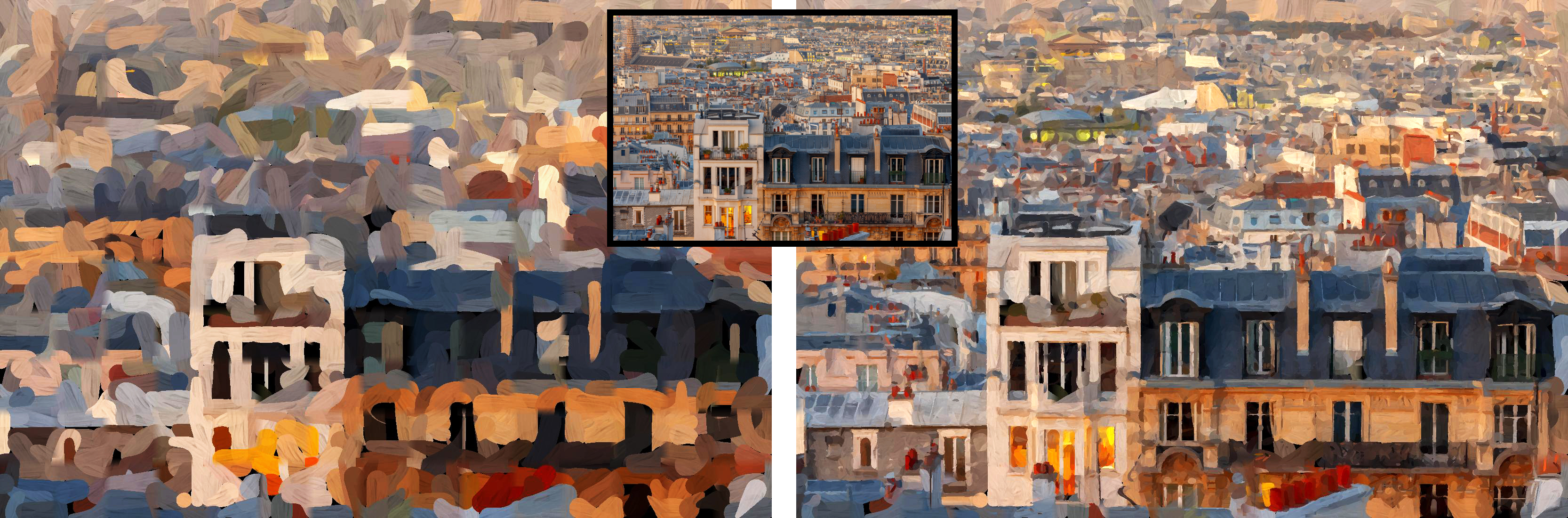
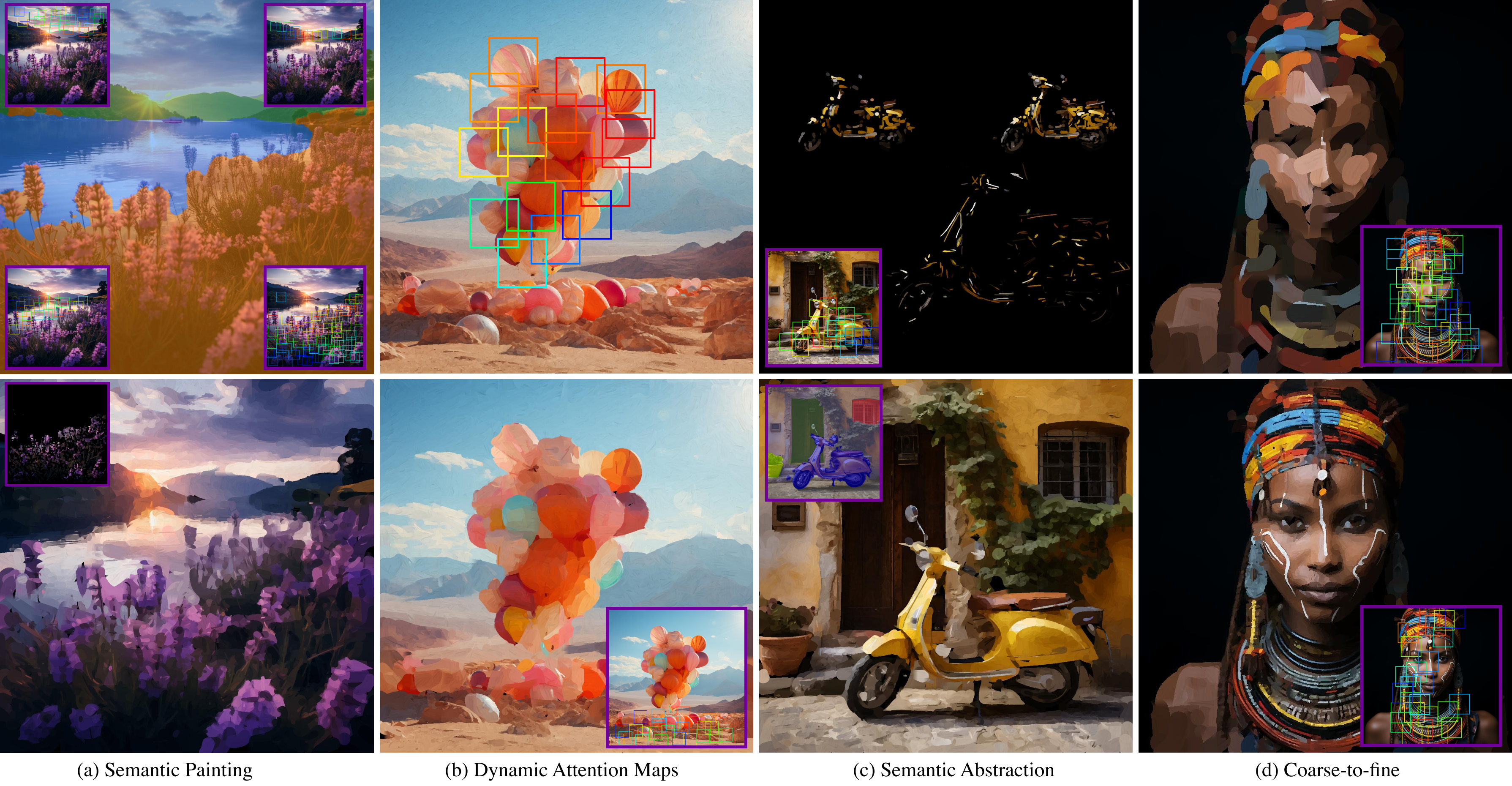

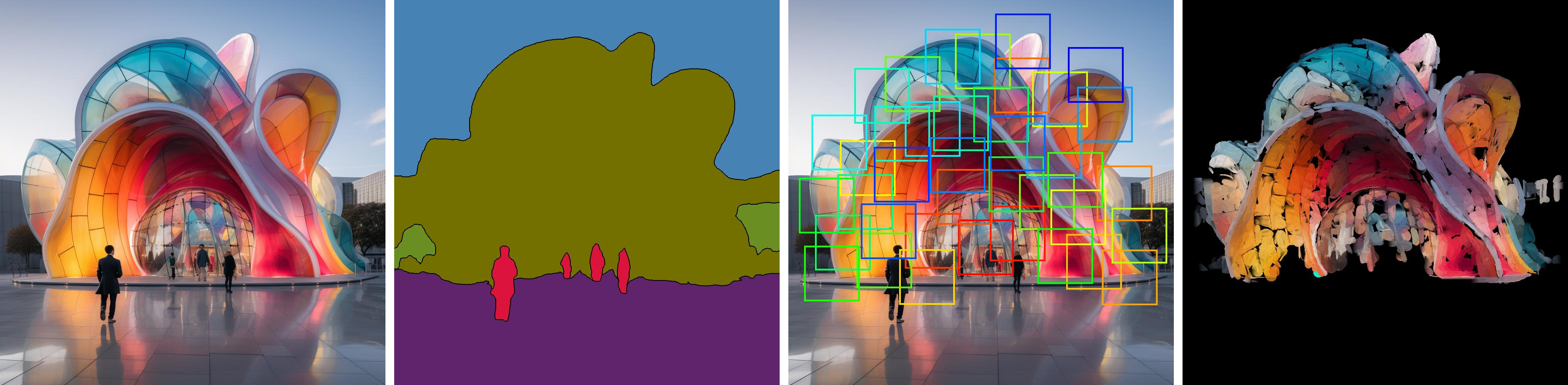
The algorithm aims to efficiently optimize a collection of stroke parameters to create a painting from a given image input. The method starts with an image and optimizes a parameter vector of strokes. When rendered on a canvas, it recreates the input image in the form of a painting. The approach is designed to efficiently manage any input size or aspect ratio. It divides the canvas into semantic areas using a segmentation network. This provides a higher control over the painting compared to previous optimization and neural methods.
Layered Painting & Patch-Based Approach:
128x128 size and batch-optimizes all stroke parameters in each patch.Semantic Segmentation:
Visual Working Memory:
Stroke Initialization, Renderer, and Blending:
Optimization & Loss Functions:
requirements.txt using the following command (if using Ubuntu):pip install -r requirements.txt
pip install -r requirements_os.txt
Note: The requirements_os.txt has been updated with all necessary dependencies and is fully optimized for Apple Silicon Macs with MPS (Metal Performance Shaders) support.
macOS Setup (Automatic): The code now automatically detects and configures MPS device support. No manual changes needed!
Download the renderer and perceptual network here and store them in a folder under the main directory. *Update: also provided in folder model_checkpoints.
This version includes significant performance and memory optimizations:
python main.py [options]
Core Settings:
--image_path: Path to input image (default: 'images/paris2.jpeg')--style: Painting style - 'realistic', 'painterly', 'abstract', 'expressionist' (default: 'expressionist')--canvas_size: Canvas size for patches (default: 128, use 16-32 for faster processing)--save_dir: Directory to save results (default: './results')🆕 New Optimization Arguments:
--use_mixed_precision: Enable mixed precision training (default: True)--image_resize_factor: Resize input image by factor (e.g., 0.33 for 3x smaller, 0.5 for 2x smaller)--upsample: Enable upsampling of small images (default: True, set to False to keep resized images small)--min_image_size: Minimum image size for upsampling (default: 1800, set lower to avoid upsampling after resize)--texturize: Use texturize feature (default: True, set to False for memory savings)--save_animation: Save animation frames (default: True, set to False for memory savings)Performance Settings:
--lr: Learning rate (default: 0.004, try 0.008 for faster convergence)--aspect_ratio_downsample: Automatic downsampling factor for very large images (default: 3)--global_loss: Global loss strategy (default: False)--exp_name: Experiment name (default: 'exp_320')Advanced Options:
--brush_type: Brush type - 'straight' or 'curved' (default: 'curved')--canvas_color: Canvas background - 'black' or 'white' (default: 'black')--use_transparency: Enable stroke transparency (default: False)--stroke_init_mode: Stroke initialization - 'random' or 'grid' (default: 'grid')--renderer_ckpt_path: Path to renderer checkpoint (default: './model_checkpoints/renderer.pkl')Style Transfer Options:
--add_style: Enable CLIP-based style transfer (default: False)--style_prompt: Text prompt for style (default: 'Starry Night by Vincent Van Gogh')--style_transfer: Enable neural style transfer (default: False)--style_img_path: Path to style reference image (default: None)Basic usage:
python main.py --image_path images/paris2.jpeg --style painterly
Optimized for memory/speed (recommended for Apple Silicon):
python main.py \
  --image_path images/paris2.jpeg \
  --style painterly \
  --canvas_size 16 \
  --image_resize_factor 0.33 \
  --use_mixed_precision True \
  --texturize False \
  --save_animation False
For maximum memory efficiency:
export PYTORCH_MPS_HIGH_WATERMARK_RATIO=0.0
python main.py \
  --image_path images/paris2.jpeg \
  --style painterly \
  --canvas_size 8 \
  --image_resize_factor 0.5 \
  --lr 0.008
Ultra-fast testing (10x smaller image):
python main.py \
  --image_path images/paris2.jpeg \
  --style painterly \
  --canvas_size 8 \
  --image_resize_factor 0.1 \
  --upsample False \
  --lr 0.008
⚠️ Upsampling Fix: When using --image_resize_factor, the algorithm now automatically skips upsampling to preserve your intended image size. Use --upsample False to completely disable upsampling, or adjust --min_image_size to control the upsampling threshold.
Memory Issues:
--canvas_size (8, 16, 32)--image_resize_factor 0.5 or smaller--texturize False and --save_animation Falseexport PYTORCH_MPS_HIGH_WATERMARK_RATIO=0.0 on macOSPerformance Tips:
--lr (0.008) for faster convergenceCommon Issues:
pip install <package>| Metric | Before | After | Improvement |
|---|---|---|---|
| Memory Usage | 18.13 GB (failed) | ~12 GB (successful) | ~35% reduction |
| Level 0 Time | Failed | ~3.4 minutes | ✅ Completion |
| Early Termination | None | 20-50% speedup | New feature |
| Patch Processing | All patches | Error-filtered only | ~30-60% reduction |
| Apple Silicon | Manual setup | Automatic MPS | Plug-and-play |
The method uses various techniques and algorithms to produce a painting from an input image. Key components include:

@misc{deguevara2023segmentationbased,
      title={Segmentation-Based Parametric Painting},
      author={Manuel Ladron de Guevara and Matthew Fisher and Aaron Hertzmann},
      year={2023},
      eprint={2311.14271},
      archivePrefix={arXiv},
      primaryClass={cs.CV},
      }
For any queries or feedback related to the algorithm, please open an issue on GitHub or contact the authors directly.
This repository contains a semantic-based painting optimization algorithm which aims to transform a given input image into a painting. The algorithm takes advantage of modern computer vision techniques, segmentation networks, and a differentiable renderer to generate results.
The algorithm aims to efficiently optimize a collection of stroke parameters to create a painting from a given image input. The method starts with an image and optimizes a parameter vector of strokes. When rendered on a canvas, it recreates the input image in the form of a painting. The approach is designed to efficiently manage any input size or aspect ratio. It divides the canvas into semantic areas using a segmentation network. This provides a higher control over the painting compared to previous optimization and neural methods.
Layered Painting & Patch-Based Approach:
128x128 size and batch-optimizes all stroke parameters in each patch.Semantic Segmentation:
Visual Working Memory:
Stroke Initialization, Renderer, and Blending:
Optimization & Loss Functions:
requirements.txt using the following command (if using Ubuntu):pip install -r requirements.txt
pip install -r requirements_os.txt
Note: The requirements_os.txt has been updated with all necessary dependencies and is fully optimized for Apple Silicon Macs with MPS (Metal Performance Shaders) support.
macOS Setup (Automatic): The code now automatically detects and configures MPS device support. No manual changes needed!
Download the renderer and perceptual network here and store them in a folder under the main directory. *Update: also provided in folder model_checkpoints.
This version includes significant performance and memory optimizations:
python main.py [options]
Core Settings:
--image_path: Path to input image (default: 'images/paris2.jpeg')--style: Painting style - 'realistic', 'painterly', 'abstract', 'expressionist' (default: 'expressionist')--canvas_size: Canvas size for patches (default: 128, use 16-32 for faster processing)--save_dir: Directory to save results (default: './results')🆕 New Optimization Arguments:
--use_mixed_precision: Enable mixed precision training (default: True)--image_resize_factor: Resize input image by factor (e.g., 0.33 for 3x smaller, 0.5 for 2x smaller)--upsample: Enable upsampling of small images (default: True, set to False to keep resized images small)--min_image_size: Minimum image size for upsampling (default: 1800, set lower to avoid upsampling after resize)--texturize: Use texturize feature (default: True, set to False for memory savings)--save_animation: Save animation frames (default: True, set to False for memory savings)Performance Settings:
--lr: Learning rate (default: 0.004, try 0.008 for faster convergence)--aspect_ratio_downsample: Automatic downsampling factor for very large images (default: 3)--global_loss: Global loss strategy (default: False)--exp_name: Experiment name (default: 'exp_320')Advanced Options:
--brush_type: Brush type - 'straight' or 'curved' (default: 'curved')--canvas_color: Canvas background - 'black' or 'white' (default: 'black')--use_transparency: Enable stroke transparency (default: False)--stroke_init_mode: Stroke initialization - 'random' or 'grid' (default: 'grid')--renderer_ckpt_path: Path to renderer checkpoint (default: './model_checkpoints/renderer.pkl')Style Transfer Options:
--add_style: Enable CLIP-based style transfer (default: False)--style_prompt: Text prompt for style (default: 'Starry Night by Vincent Van Gogh')--style_transfer: Enable neural style transfer (default: False)--style_img_path: Path to style reference image (default: None)Basic usage:
python main.py --image_path images/paris2.jpeg --style painterly
Optimized for memory/speed (recommended for Apple Silicon):
python main.py \
  --image_path images/paris2.jpeg \
  --style painterly \
  --canvas_size 16 \
  --image_resize_factor 0.33 \
  --use_mixed_precision True \
  --texturize False \
  --save_animation False
For maximum memory efficiency:
export PYTORCH_MPS_HIGH_WATERMARK_RATIO=0.0
python main.py \
  --image_path images/paris2.jpeg \
  --style painterly \
  --canvas_size 8 \
  --image_resize_factor 0.5 \
  --lr 0.008
Ultra-fast testing (10x smaller image):
python main.py \
  --image_path images/paris2.jpeg \
  --style painterly \
  --canvas_size 8 \
  --image_resize_factor 0.1 \
  --upsample False \
  --lr 0.008
⚠️ Upsampling Fix: When using --image_resize_factor, the algorithm now automatically skips upsampling to preserve your intended image size. Use --upsample False to completely disable upsampling, or adjust --min_image_size to control the upsampling threshold.
Memory Issues:
--canvas_size (8, 16, 32)--image_resize_factor 0.5 or smaller--texturize False and --save_animation Falseexport PYTORCH_MPS_HIGH_WATERMARK_RATIO=0.0 on macOSPerformance Tips:
--lr (0.008) for faster convergenceCommon Issues:
pip install <package>| Metric | Before | After | Improvement |
|---|---|---|---|
| Memory Usage | 18.13 GB (failed) | ~12 GB (successful) | ~35% reduction |
| Level 0 Time | Failed | ~3.4 minutes | ✅ Completion |
| Early Termination | None | 20-50% speedup | New feature |
| Patch Processing | All patches | Error-filtered only | ~30-60% reduction |
| Apple Silicon | Manual setup | Automatic MPS | Plug-and-play |
The method uses various techniques and algorithms to produce a painting from an input image. Key components include:
@misc{deguevara2023segmentationbased,
      title={Segmentation-Based Parametric Painting},
      author={Manuel Ladron de Guevara and Matthew Fisher and Aaron Hertzmann},
      year={2023},
      eprint={2311.14271},
      archivePrefix={arXiv},
      primaryClass={cs.CV},
      }
For any queries or feedback related to the algorithm, please open an issue on GitHub or contact the authors directly.