
A OpenAI embedding API compatible microservice for Magda
TypeScript
0
77 commits
updated Feb 23, 2025
README
magda-embedding-api


An OpenAI's embeddings API compatible microservice for Magda.
See this test case for an example of how to use this API with @langchain/openai.
Text embeddings evaluate how closely related text strings are. They are commonly utilized for:
- Search (ranking results based on their relevance to a query)
- Clustering (grouping text strings by similarity)
- Recommendations (suggesting items with similar text strings)
- Anomaly detection (identifying outliers with minimal relatedness)
- Diversity measurement (analyzing similarity distributions)
- Classification (categorizing text strings by their most similar label)
An embedding is a vector, or a list, of floating-point numbers. The distance between two vectors indicates their relatedness, with smaller distances suggesting higher relatedness and larger distances indicating lower relatedness.
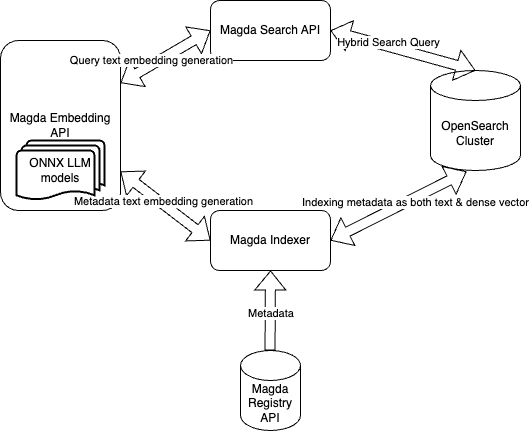
This embedding API is created for Magda's vector / hybrid search solution. The API interface is compatible with OpenAI's embeddings API to make it easier to reuse existing tools & libraries.
the diagram below shows Magda's use case
Model Selection & Resources requirements
Only the default mode, will be included in the docker image to speed up the starting up. If you want to use a different model (via
appConfig.modelList), besides the resources requirements consideration here, you might also want to increasepluginTimeoutand adjuststartupProbeto allow the longer starting up time introduced by the model downloading.
Due to this issue of ONNX runtime, the peak memory usage of the service is much higher than the model file size (2 times higher). e.g. For the default 500MB model file, the peak memory usage could up to 1.8GB - 2GB. However, the memory usage will drop back to much lower (for default model, it's around 800MB-900MB) after the model is loaded. Please make sure your Kubernetes cluster has enough resources to run the service.
When specify appConfig.modelList, you can set the value of dtype field to select precision (quantizations) of the model. The possible value are: full-precision ("fp32"), half-precision ("fp16"), 8-bit ("q8", "int8", "uint8"), and 4-bit ("q4", "bnb4", "q4f16"). Please refer to helm chart document below for more information. You can also find an example from this config file here.
Memory consumption test result for a few selected models can be found: https://github.com/magda-io/magda-embedding-api/issues/2
Requirements
Kubernetes: >= 1.21.0
| Repository | Name | Version |
|---|---|---|
| oci://ghcr.io/magda-io/charts | magda-common | 4.2.1 |
Values
| Key | Type | Default | Description |
|---|---|---|---|
| affinity | object | {} | |
| appConfig | object | {} | Application configuration of the service. You can supply a list of key-value pairs to be used as the application configuration. Currently, the only supported config field is modelList. Via the modelList field, you can specify a list of LLM models that the service supports. Although you can specify multiple models, only one model will be used at this moment. Each model item have the following fields:
startupProbe settings to accommodate the model downloading time. Depends on the model size, you might also want to adjust the resources.limits.memory & resources.requests.memoryvalue. |
| autoscaling.hpa.enabled | bool | false | |
| autoscaling.hpa.maxReplicas | int | 3 | |
| autoscaling.hpa.minReplicas | int | 2 | |
| autoscaling.hpa.targetCPU | int | 90 | |
| autoscaling.hpa.targetMemory | string | "" | |
| bodyLimit | int | Default to 10485760 (10MB). | Defines the maximum payload, in bytes, that the server is allowed to accept |
| closeGraceDelay | int | Default to 25000 (25s). | The maximum amount of time before forcefully closing pending requests. This should set to a value lower than the Pod's termination grace period (which is default to 30s) |
| debug | bool | false | Start Fastify app in debug mode with nodejs inspector inspector port is 9320 |
| defaultImage.imagePullSecret | bool | false | |
| defaultImage.pullPolicy | string | "IfNotPresent" | |
| defaultImage.repository | string | "ghcr.io/magda-io" | |
| deploymentAnnotations | object | {} | |
| envFrom | list | [] | |
| extraContainers | string | "" | |
| extraEnvs | list | [] | |
| extraInitContainers | string | "" | |
| extraVolumeMounts | list | [] | |
| extraVolumes | list | [] | |
| fullnameOverride | string | "" | |
| global.image | object | {} | |
| global.rollingUpdate | object | {} | |
| hostAliases | list | [] | |
| image.name | string | "magda-embedding-api" | |
| lifecycle | object | {} | pod lifecycle policies as outlined here: https://kubernetes.io/docs/concepts/containers/container-lifecycle-hooks/#container-hooks |
| livenessProbe.failureThreshold | int | 10 | |
| livenessProbe.httpGet.path | string | "/status/liveness" | |
| livenessProbe.httpGet.port | int | 3000 | |
| livenessProbe.initialDelaySeconds | int | 10 | |
| livenessProbe.periodSeconds | int | 20 | |
| livenessProbe.successThreshold | int | 1 | |
| livenessProbe.timeoutSeconds | int | 5 | |
| logLevel | string | "warn" | The log level of the application. one of 'fatal', 'error', 'warn', 'info', 'debug', 'trace'; also 'silent' is supported to disable logging. Any other value defines a custom level and requires supplying a level value via levelVal. |
| maxWorkers | int | Default to 1. | The maximum number of workers that run the model to serve the request. |
| minWorkers | int | Default to 1. | The maximum number of workers that run the model to serve the request. |
| nameOverride | string | "" | |
| nodeSelector | object | {} | |
| pluginTimeout | int | Default to 180000 (180 seconds). | The maximum amount of time in milliseconds in which a fastify plugin can load. If not, ready will complete with an Error with code 'ERR_AVVIO_PLUGIN_TIMEOUT'. |
| podAnnotations | object | {} | |
| podSecurityContext.runAsNonRoot | bool | true | |
| podSecurityContext.runAsUser | int | 1000 | |
| priorityClassName | string | "magda-9" | |
| rbac.automountServiceAccountToken | bool | false | Controls whether or not the Service Account token is automatically mounted to /var/run/secrets/kubernetes.io/serviceaccount |
| rbac.create | bool | false | |
| rbac.serviceAccountAnnotations | object | {} | |
| rbac.serviceAccountName | string | "" | |
| readinessProbe.failureThreshold | int | 10 | |
| readinessProbe.httpGet.path | string | "/status/readiness" | |
| readinessProbe.httpGet.port | int | 3000 | |
| readinessProbe.initialDelaySeconds | int | 10 | |
| readinessProbe.periodSeconds | int | 20 | |
| readinessProbe.successThreshold | int | 1 | |
| readinessProbe.timeoutSeconds | int | 5 | |
| replicas | int | 2 | |
| resources.limits.memory | string | "850M" | the memory limit of the container Due to this issue of ONNX runtime, the peak memory usage of the service is much higher than the model file size. When change the default model, be sure to test the peak memory usage of the service before setting the memory limit. When test your model memory requirement, please note that the memory usage of the model often goes much higher with long context length. E.g. the default model supports up to 8192 tokens (default max_length set to 1024), but when the content go beyond 512 tokens, the memory usage will be much higher (requires around 2G). |
| resources.requests.cpu | string | "100m" | |
| resources.requests.memory | string | "650M" | the memory request of the container Once the model is loaded, the memory usage of the service for serving request would be much lower. Set to 850M for default model. |
| service.annotations | object | {} | |
| service.httpPortName | string | "http" | |
| service.labels | object | {} | |
| service.loadBalancerIP | string | "" | |
| service.loadBalancerSourceRanges | list | [] | |
| service.name | string | "magda-embedding-api" | |
| service.nodePort | string | "" | |
| service.port | int | 80 | |
| service.targetPort | int | 3000 | |
| service.type | string | "ClusterIP" | |
| startupProbe.failureThreshold | int | 30 | |
| startupProbe.httpGet.path | string | "/status/startup" | |
| startupProbe.httpGet.port | int | 3000 | |
| startupProbe.initialDelaySeconds | int | 10 | |
| startupProbe.periodSeconds | int | 10 | |
| startupProbe.successThreshold | int | 1 | |
| startupProbe.timeoutSeconds | int | 5 | |
| tolerations | list | [] | |
| topologySpreadConstraints | list | [] | This is the pod topology spread constraints https://kubernetes.io/docs/concepts/workloads/pods/pod-topology-spread-constraints/ |
| workerTaskTimeout | int | Default to 60000 (60 seconds). | The maximum time in milliseconds that a worker can run before being killed. |
Build & Run for Local Development
Please note: for production deployment, please use the released Docker images & helm charts.
Prerequisites
- Node.js 18.x
- Minikube (for local Kubernetes development)
Install dependencies
yarn install
Run the service locally
yarn start
Build Docker Image, Push into local Registry & Deploy to minikube Cluster
yarn build
yarn docker-build-local
Deploy to minikube Cluster
helm -n test upgrade --install test ./deploy/magda-embedding-api -f ./deploy/test-deploy.yaml
Contributors

77 commits
Similar repos


Languages
TypeScript
94.7%
Dockerfile
3.2%
JavaScript
2.1%
A OpenAI embedding API compatible microservice for Magda
TypeScript
0
77 commits
updated Feb 23, 2025
README
magda-embedding-api
An OpenAI's embeddings API compatible microservice for Magda.
See this test case for an example of how to use this API with @langchain/openai.
Text embeddings evaluate how closely related text strings are. They are commonly utilized for:
- Search (ranking results based on their relevance to a query)
- Clustering (grouping text strings by similarity)
- Recommendations (suggesting items with similar text strings)
- Anomaly detection (identifying outliers with minimal relatedness)
- Diversity measurement (analyzing similarity distributions)
- Classification (categorizing text strings by their most similar label)
An embedding is a vector, or a list, of floating-point numbers. The distance between two vectors indicates their relatedness, with smaller distances suggesting higher relatedness and larger distances indicating lower relatedness.
This embedding API is created for Magda's vector / hybrid search solution. The API interface is compatible with OpenAI's embeddings API to make it easier to reuse existing tools & libraries.
the diagram below shows Magda's use case
Model Selection & Resources requirements
Only the default mode, will be included in the docker image to speed up the starting up. If you want to use a different model (via
appConfig.modelList), besides the resources requirements consideration here, you might also want to increasepluginTimeoutand adjuststartupProbeto allow the longer starting up time introduced by the model downloading.
Due to this issue of ONNX runtime, the peak memory usage of the service is much higher than the model file size (2 times higher). e.g. For the default 500MB model file, the peak memory usage could up to 1.8GB - 2GB. However, the memory usage will drop back to much lower (for default model, it's around 800MB-900MB) after the model is loaded. Please make sure your Kubernetes cluster has enough resources to run the service.
When specify appConfig.modelList, you can set the value of dtype field to select precision (quantizations) of the model. The possible value are: full-precision ("fp32"), half-precision ("fp16"), 8-bit ("q8", "int8", "uint8"), and 4-bit ("q4", "bnb4", "q4f16"). Please refer to helm chart document below for more information. You can also find an example from this config file here.
Memory consumption test result for a few selected models can be found: https://github.com/magda-io/magda-embedding-api/issues/2
Requirements
Kubernetes: >= 1.21.0
| Repository | Name | Version |
|---|---|---|
| oci://ghcr.io/magda-io/charts | magda-common | 4.2.1 |
Values
| Key | Type | Default | Description |
|---|---|---|---|
| affinity | object | {} | |
| appConfig | object | {} | Application configuration of the service. You can supply a list of key-value pairs to be used as the application configuration. Currently, the only supported config field is modelList. Via the modelList field, you can specify a list of LLM models that the service supports. Although you can specify multiple models, only one model will be used at this moment. Each model item have the following fields:
startupProbe settings to accommodate the model downloading time. Depends on the model size, you might also want to adjust the resources.limits.memory & resources.requests.memoryvalue. |
| autoscaling.hpa.enabled | bool | false | |
| autoscaling.hpa.maxReplicas | int | 3 | |
| autoscaling.hpa.minReplicas | int | 2 | |
| autoscaling.hpa.targetCPU | int | 90 | |
| autoscaling.hpa.targetMemory | string | "" | |
| bodyLimit | int | Default to 10485760 (10MB). | Defines the maximum payload, in bytes, that the server is allowed to accept |
| closeGraceDelay | int | Default to 25000 (25s). | The maximum amount of time before forcefully closing pending requests. This should set to a value lower than the Pod's termination grace period (which is default to 30s) |
| debug | bool | false | Start Fastify app in debug mode with nodejs inspector inspector port is 9320 |
| defaultImage.imagePullSecret | bool | false | |
| defaultImage.pullPolicy | string | "IfNotPresent" | |
| defaultImage.repository | string | "ghcr.io/magda-io" | |
| deploymentAnnotations | object | {} | |
| envFrom | list | [] | |
| extraContainers | string | "" | |
| extraEnvs | list | [] | |
| extraInitContainers | string | "" | |
| extraVolumeMounts | list | [] | |
| extraVolumes | list | [] | |
| fullnameOverride | string | "" | |
| global.image | object | {} | |
| global.rollingUpdate | object | {} | |
| hostAliases | list | [] | |
| image.name | string | "magda-embedding-api" | |
| lifecycle | object | {} | pod lifecycle policies as outlined here: https://kubernetes.io/docs/concepts/containers/container-lifecycle-hooks/#container-hooks |
| livenessProbe.failureThreshold | int | 10 | |
| livenessProbe.httpGet.path | string | "/status/liveness" | |
| livenessProbe.httpGet.port | int | 3000 | |
| livenessProbe.initialDelaySeconds | int | 10 | |
| livenessProbe.periodSeconds | int | 20 | |
| livenessProbe.successThreshold | int | 1 | |
| livenessProbe.timeoutSeconds | int | 5 | |
| logLevel | string | "warn" | The log level of the application. one of 'fatal', 'error', 'warn', 'info', 'debug', 'trace'; also 'silent' is supported to disable logging. Any other value defines a custom level and requires supplying a level value via levelVal. |
| maxWorkers | int | Default to 1. | The maximum number of workers that run the model to serve the request. |
| minWorkers | int | Default to 1. | The maximum number of workers that run the model to serve the request. |
| nameOverride | string | "" | |
| nodeSelector | object | {} | |
| pluginTimeout | int | Default to 180000 (180 seconds). | The maximum amount of time in milliseconds in which a fastify plugin can load. If not, ready will complete with an Error with code 'ERR_AVVIO_PLUGIN_TIMEOUT'. |
| podAnnotations | object | {} | |
| podSecurityContext.runAsNonRoot | bool | true | |
| podSecurityContext.runAsUser | int | 1000 | |
| priorityClassName | string | "magda-9" | |
| rbac.automountServiceAccountToken | bool | false | Controls whether or not the Service Account token is automatically mounted to /var/run/secrets/kubernetes.io/serviceaccount |
| rbac.create | bool | false | |
| rbac.serviceAccountAnnotations | object | {} | |
| rbac.serviceAccountName | string | "" | |
| readinessProbe.failureThreshold | int | 10 | |
| readinessProbe.httpGet.path | string | "/status/readiness" | |
| readinessProbe.httpGet.port | int | 3000 | |
| readinessProbe.initialDelaySeconds | int | 10 | |
| readinessProbe.periodSeconds | int | 20 | |
| readinessProbe.successThreshold | int | 1 | |
| readinessProbe.timeoutSeconds | int | 5 | |
| replicas | int | 2 | |
| resources.limits.memory | string | "850M" | the memory limit of the container Due to this issue of ONNX runtime, the peak memory usage of the service is much higher than the model file size. When change the default model, be sure to test the peak memory usage of the service before setting the memory limit. When test your model memory requirement, please note that the memory usage of the model often goes much higher with long context length. E.g. the default model supports up to 8192 tokens (default max_length set to 1024), but when the content go beyond 512 tokens, the memory usage will be much higher (requires around 2G). |
| resources.requests.cpu | string | "100m" | |
| resources.requests.memory | string | "650M" | the memory request of the container Once the model is loaded, the memory usage of the service for serving request would be much lower. Set to 850M for default model. |
| service.annotations | object | {} | |
| service.httpPortName | string | "http" | |
| service.labels | object | {} | |
| service.loadBalancerIP | string | "" | |
| service.loadBalancerSourceRanges | list | [] | |
| service.name | string | "magda-embedding-api" | |
| service.nodePort | string | "" | |
| service.port | int | 80 | |
| service.targetPort | int | 3000 | |
| service.type | string | "ClusterIP" | |
| startupProbe.failureThreshold | int | 30 | |
| startupProbe.httpGet.path | string | "/status/startup" | |
| startupProbe.httpGet.port | int | 3000 | |
| startupProbe.initialDelaySeconds | int | 10 | |
| startupProbe.periodSeconds | int | 10 | |
| startupProbe.successThreshold | int | 1 | |
| startupProbe.timeoutSeconds | int | 5 | |
| tolerations | list | [] | |
| topologySpreadConstraints | list | [] | This is the pod topology spread constraints https://kubernetes.io/docs/concepts/workloads/pods/pod-topology-spread-constraints/ |
| workerTaskTimeout | int | Default to 60000 (60 seconds). | The maximum time in milliseconds that a worker can run before being killed. |
Build & Run for Local Development
Please note: for production deployment, please use the released Docker images & helm charts.
Prerequisites
- Node.js 18.x
- Minikube (for local Kubernetes development)
Install dependencies
yarn install
Run the service locally
yarn start
Build Docker Image, Push into local Registry & Deploy to minikube Cluster
yarn build
yarn docker-build-local
Deploy to minikube Cluster
helm -n test upgrade --install test ./deploy/magda-embedding-api -f ./deploy/test-deploy.yaml
Similar repos
Contributors
77 commits
Languages
TypeScript
94.7%
Dockerfile
3.2%
JavaScript
2.1%