
Humbug: building an operating system for human-AI collaboration
See the codeSee what people are saying
README
Humbug: building an operating system for human-AI collaboration
Humbug is a modular, extensible platform that aims to let you and your AIs work on ideas together. Think of it as an operating system for human-AI collaboration.
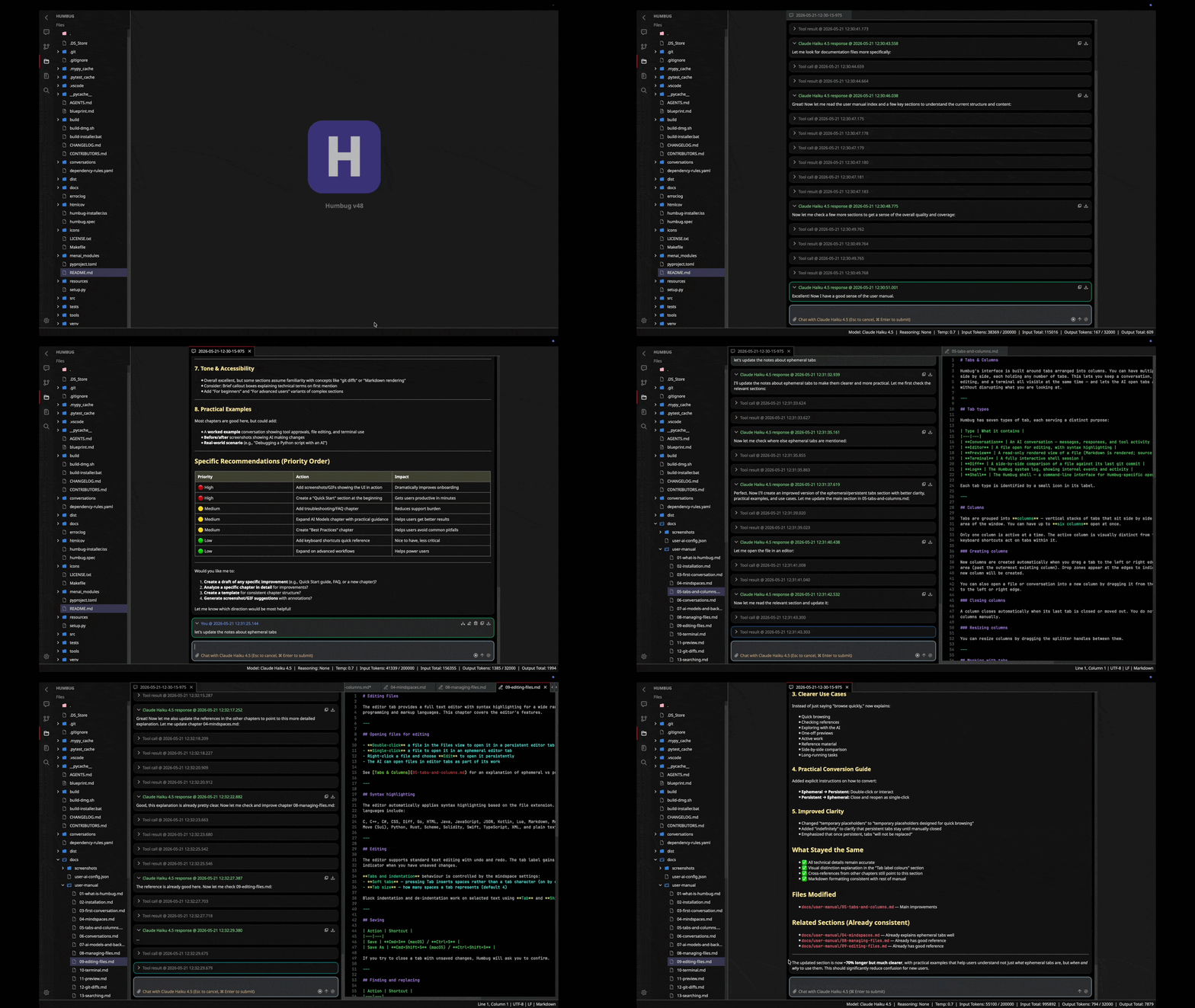
Humbug now has a full user manual.
What are the core ideas?
Human–AI collaboration at the heart of the design
When you're using AI, you're no longer working alone. Humbug treats both humans and AIs as first-class actors. All tools, including the GUI, are designed to be available for both to use, so it's faster and easier to get things done (there's still work to do on this though).
Conversations drive agentic workflows
The core of Humbug is its conversation capability. You talk to the AI about what you want to achieve and let it work out the rest. Humbug's tool framework helps the AI "discover" whatever it needs, then lets it edit content and run tools to achieve what you want.
Powerful, pluggable AI tools
We designed computers to give humans better, faster, and more reliable tools. Humbug's tool framework sets out to do the same for AIs. It enables your LLMs to:
- Delegate tasks
- Read, write, modify, and search your mindspace filesystem
- Check the time, wait for time to pass
- Apply complex logic with a custom pure functional programming language (Menai)
- Interact with local shells (Linux and MacOS) and command prompts (Windows)
- Convert documents between different formats
- Get detailed help if it runs into any problems with tools
- Orchestrate its own UI.
Humbug's tool system is flexible, secure, and designed to make it easy to add new capabilities.
Human-in-the-loop
Human languages are plagued with ambiguity and LLMs can get tripped up by these in very similar ways to other people do. While other AI frameworks hide what's going on, Humbug's approach is to give you visibility of everything. You get to see potential problems and apply course-corrections before they lead to expensive mistakes.
Other software doesn't do this, but this approach keeps you aware of the decisions being made, and what's being created.
Human oversight is also a key mitigation against AIs doing strange and dangerous things. If an AI wants to do something that might have dangerous consequences it has to seek approval first. If you say no, or aren't sure then that operation will not happen (no need to hope the AI will do the right thing).
LLMs, lots of LLMs
Humbug lets you work with multiple large language models (LLMs) simultaneously, supporting local, cloud-based, or hybrids of both. Works with LLMs from Anthropic, DeepSeek, Google, Mistral, Ollama (local and cloud), OpenAI, vLLM, xAI, and Z.ai, so you're not tied to any one provider. You can optimize for cost, and are future-proofed when you want to use something new. You can seamlessly switch between models, even switching mid-conversation.
Not just a platform for developers
It's designed to help with any activities where you and your AIs need to work together on a problem. While it has a lot of tools for software developers, it has been designed to support a much wider set of needs. With its extensibility it's also easy to think about adding new tools for AIs, humans, or both.
One example of this is it can extract and analyze text from Microsoft Word and PDF files. Another is it has both user tool and an AI tool to convert Markdown and Word files, allowing the standard format in the business world to be used easily alongside the standard in the AI world.
You own all your own data (everything is local)
Humbug doesn't need the cloud to operate. It will work just fine with Ollama or VLLM on a local system or network. That means it will also work just fine with private LLMs inside of organizations that block cloud access (e.g. highly regulated ones).
Having everything local also means you don't risk being locked into specific LLM providers as you can freely switch between different models and different providers. This also means you have all your conversation transcripts locally too.
While other tools try to hide these conversation details, having them allows you to audit what happened and why. This is an incredibly powerful forensic tool.
Mindspaces: project-centric workspaces
Every project lives in its own mindspace: a persistent, context-rich environment with isolated files, settings, and conversations.
Within each mindspace your AIs can automatically manage AGENTS.md files that tell new AI sessions how to navigate the code.
They can also manage blueprint.md files that allow AI sessions to understand what the mindspace is for, and important decisions that have been made about it.
OS-agnostic
Humbug provides OS-like concepts but doesn't try to replace your computer's operating system. It runs on top of Microsoft Windows, macOS, or Linux, and provides a unified experience on all of them.
Other platforms often leave Windows as a second-class citizen, but Humbug tries to give everyone the same first-class experience.
Humbug is identical on all three platforms, other than minor OS-specific requirements such as keyboard shortcuts and task bar interactions.
Rich user interactions
Humbug's UI supports simultaneous conversations, file editing with syntax highlights, markdown preview pages, terminal emulators, a system shell, and a system log. It also features git version control integration with a sidebar and side-by-side diff tabs so your work need never be lost. UI orchestration means your AI can drive these tools the same way you do, enabling a fully agentic experience.
Menai: a programming language designed for AIs
Previously, programming languages were designed to meet the needs of human developers. While AIs are proficient with most of these languages, they risk being unsafe because they support potentially dangerous I/O operations. Menai is an experimental, Lisp-inspired language designed to suit the needs of AIs for algorithmic processing operations. It supports higher-order functions and tail-call optimizations.
Menai supports simple calculations and string processing, all the way through to highly complex algorithmic tasks. Being side-effect free, Menai is intrinsically safe for AIs to use and does not require any user approvals. The Menai tool implementation has detailed error reporting to make it easier for AIs to debug any issues in their own code.
Over time Menai will be used in more parts of Humbug's design. An example of this is that AIs are able to write Menai programs to edit files and edit code in editor buffers. This lets them do much more complex file transformations quickly and more accurately.
Open and extensible
Add new AI backends, tools, or integrations with minimal friction. Humbug is open-source and highly modular. You don't need to worry about being locked into a vendor tool and can add new features if you want them.
Minimal dependencies
Humbug follows the pattern of most operating system kernels. It aims to be simple and largely self-contained. The code has only 3 third party runtime package dependencies other than the standard Python library, so both you and your LLMs can understand almost every part from the one git repo. There is an additional dependency on menai, a sibling project under the Humbug umbrella.
The minimal dependency principle serves several purposes:
- The code is largely self-contained so it's much easier for humans and AIs to understand.
- The limited dependencies make it much easier to replace parts of the design.
- The attack surface for a software supply chain attack is very small.
The minimal dependency principle is strongly enforced by the dependency_checker tool.
This prevents unwanted third party libraries from being used, but also ensures internal packages maintain a strict acyclic dependency graph.
Clean backend/frontend separation
Humbug has a clean backend/frontend separation, so it should be possible to build both new front ends, but also to build a headless version. Both of these are under investigation.
As of v49, AIs no longer route requests through the UI infrastructure. Instead, AI tools are registered with a context registry and the UI aspects are attached to that context registry. This means the UI now responds to what the AI wants do, without the AI having to be deeply embedded within it.
The "desktop" GUI
The desktop GUI supports sidebar panels and desktop tabs. Most of the real work happens in the tabs.
Both use a plugin registry/manager approach making it easy to design new visualizations of your project mindspace.
Bootstrapped: built using itself
Each version of Humbug has been built using the previous version. This has meant over 90% of the code has been built by LLMs. This isn't just "vibe-coded", however! Using each ever more capable version of Humbug to help design and build its successor has freed up huge amounts of human time to think about bigger design problems. The tireless ability of LLMs to morph software into new forms also means the software has a clean, highly modular architecture.
The conversations directory in the Humbug git repository includes a lot of discussions with AIs about improvements to itself.
What Humbug is NOT
It can help to say what Humbug is not, because a platform like this is easy to mistake for something simpler.
- Not a chatbot wrapper. Humbug isn't a thin shell around an AI API. It's a full collaboration environment where both you and your AIs are first-class actors, with equal access to the same tools and UI.
- Not a replacement for your operating system. Humbug provides OS-like ideas — mindspaces, tools, tabs, a filesystem — but runs on top of Windows, macOS, or Linux rather than replacing them.
- Not just a developer tool. Although it has strong support for software development, it's designed for any activity where you and your AIs need to work together — writing, research, analysis, and more.
- Not a walled garden. Humbug is open source and designed to be extended. You can add new AI backends, tools, and integrations, and you're never locked into a single provider.
- Not a single-AI system. Multiple AI conversations can run at the same time, and AIs can delegate tasks to other AI instances.
Getting Humbug
You can either run Humbug as a developer (see the notes below) or by downloading an executable. Executables are available for MacOS (Apple silicon or Intel x86), Windows (x86), or Linux (Intel x86 or ARM64).
Note for Windows users
The Windows download is not currently code-signed, so Windows Defender SmartScreen may show a "Windows protected your PC" warning when you run it for the first time. To proceed, click More info then Run anyway. This is expected for an open-source project and the warning will become less frequent over time as the build accumulates reputation.
Getting started
When you first start Humbug it will check to see if any AI providers and models have been configured. If they haven't then Humbug will guide you to the right place to configure them in the settings.
Humbug will run with local AI models via Ollama or VLLM, and will also run with API keys from the major LLM cloud services.
Learn more
- User manual: User manual
- What's new: Latest updates
- Download: Download Humbug
- Blog posts: Dave's blog posts about Humbug and Menai
- Developer notes: Dave's project notes
- Menai summary: Menai project page
- GitHub discussions: GitHub discussions
- YouTube: @m6rai on YouTube
Get involved
Humbug is open source and the project welcomes contributions. If you're interested in helping, join the GitHub discussions.
If you plan to contribute changes, see CONTRIBUTING.md for coding standards and how to verify your work.
Developer notes
Software requirements
Most of Humbug is written in Python so you need a Python development setup to work with it.
- Python 3.10 or higher
Third party runtime dependencies (installed automatically):
- PySide6 (the GUI framework)
- qasync (allows the GUI framework to work nicely with async Python code)
- certifi (SSL/TLS root certificates to allow TLS network connections without any other system changes)
Humbug project runtime dependencies (installed automatically):
- menai (the Menai language engine, installed from PyPI; includes the pre-built C VM)
Developer dependencies (installed automatically with .[dev]):
- pytest + pytest-cov (test runner and coverage)
- mypy (static type checking)
- pylint (linting)
- pyinstaller (building standalone application bundles)
Developer installation
-
Create and activate a virtual environment:
Linux and macOS:
python -m venv venv
source venv/bin/activate
Windows:
python -m venv venv venv\Scripts\activate -
Install all dependencies (runtime and developer tools):
pip install -e ".[dev]" -
Launch the application:
python -m desktop
The Menai package is installed automatically from PyPI as a dependency of Humbug. Pre-built wheels include the C VM for all supported platforms (Linux, macOS, and Windows on x86_64 and ARM64, Python 3.10–3.14), so no separate clone, build, or download step is needed.
Significant stargazers

224 followers · starred Mar 2026
Languages
Python
99.0%
Humbug: building an operating system for human-AI collaboration
See the codeSee what people are saying
README
Humbug: building an operating system for human-AI collaboration
Humbug is a modular, extensible platform that aims to let you and your AIs work on ideas together. Think of it as an operating system for human-AI collaboration.
Humbug now has a full user manual.
What are the core ideas?
Human–AI collaboration at the heart of the design
When you're using AI, you're no longer working alone. Humbug treats both humans and AIs as first-class actors. All tools, including the GUI, are designed to be available for both to use, so it's faster and easier to get things done (there's still work to do on this though).
Conversations drive agentic workflows
The core of Humbug is its conversation capability. You talk to the AI about what you want to achieve and let it work out the rest. Humbug's tool framework helps the AI "discover" whatever it needs, then lets it edit content and run tools to achieve what you want.
Powerful, pluggable AI tools
We designed computers to give humans better, faster, and more reliable tools. Humbug's tool framework sets out to do the same for AIs. It enables your LLMs to:
- Delegate tasks
- Read, write, modify, and search your mindspace filesystem
- Check the time, wait for time to pass
- Apply complex logic with a custom pure functional programming language (Menai)
- Interact with local shells (Linux and MacOS) and command prompts (Windows)
- Convert documents between different formats
- Get detailed help if it runs into any problems with tools
- Orchestrate its own UI.
Humbug's tool system is flexible, secure, and designed to make it easy to add new capabilities.
Human-in-the-loop
Human languages are plagued with ambiguity and LLMs can get tripped up by these in very similar ways to other people do. While other AI frameworks hide what's going on, Humbug's approach is to give you visibility of everything. You get to see potential problems and apply course-corrections before they lead to expensive mistakes.
Other software doesn't do this, but this approach keeps you aware of the decisions being made, and what's being created.
Human oversight is also a key mitigation against AIs doing strange and dangerous things. If an AI wants to do something that might have dangerous consequences it has to seek approval first. If you say no, or aren't sure then that operation will not happen (no need to hope the AI will do the right thing).
LLMs, lots of LLMs
Humbug lets you work with multiple large language models (LLMs) simultaneously, supporting local, cloud-based, or hybrids of both. Works with LLMs from Anthropic, DeepSeek, Google, Mistral, Ollama (local and cloud), OpenAI, vLLM, xAI, and Z.ai, so you're not tied to any one provider. You can optimize for cost, and are future-proofed when you want to use something new. You can seamlessly switch between models, even switching mid-conversation.
Not just a platform for developers
It's designed to help with any activities where you and your AIs need to work together on a problem. While it has a lot of tools for software developers, it has been designed to support a much wider set of needs. With its extensibility it's also easy to think about adding new tools for AIs, humans, or both.
One example of this is it can extract and analyze text from Microsoft Word and PDF files. Another is it has both user tool and an AI tool to convert Markdown and Word files, allowing the standard format in the business world to be used easily alongside the standard in the AI world.
You own all your own data (everything is local)
Humbug doesn't need the cloud to operate. It will work just fine with Ollama or VLLM on a local system or network. That means it will also work just fine with private LLMs inside of organizations that block cloud access (e.g. highly regulated ones).
Having everything local also means you don't risk being locked into specific LLM providers as you can freely switch between different models and different providers. This also means you have all your conversation transcripts locally too.
While other tools try to hide these conversation details, having them allows you to audit what happened and why. This is an incredibly powerful forensic tool.
Mindspaces: project-centric workspaces
Every project lives in its own mindspace: a persistent, context-rich environment with isolated files, settings, and conversations.
Within each mindspace your AIs can automatically manage AGENTS.md files that tell new AI sessions how to navigate the code.
They can also manage blueprint.md files that allow AI sessions to understand what the mindspace is for, and important decisions that have been made about it.
OS-agnostic
Humbug provides OS-like concepts but doesn't try to replace your computer's operating system. It runs on top of Microsoft Windows, macOS, or Linux, and provides a unified experience on all of them.
Other platforms often leave Windows as a second-class citizen, but Humbug tries to give everyone the same first-class experience.
Humbug is identical on all three platforms, other than minor OS-specific requirements such as keyboard shortcuts and task bar interactions.
Rich user interactions
Humbug's UI supports simultaneous conversations, file editing with syntax highlights, markdown preview pages, terminal emulators, a system shell, and a system log. It also features git version control integration with a sidebar and side-by-side diff tabs so your work need never be lost. UI orchestration means your AI can drive these tools the same way you do, enabling a fully agentic experience.
Menai: a programming language designed for AIs
Previously, programming languages were designed to meet the needs of human developers. While AIs are proficient with most of these languages, they risk being unsafe because they support potentially dangerous I/O operations. Menai is an experimental, Lisp-inspired language designed to suit the needs of AIs for algorithmic processing operations. It supports higher-order functions and tail-call optimizations.
Menai supports simple calculations and string processing, all the way through to highly complex algorithmic tasks. Being side-effect free, Menai is intrinsically safe for AIs to use and does not require any user approvals. The Menai tool implementation has detailed error reporting to make it easier for AIs to debug any issues in their own code.
Over time Menai will be used in more parts of Humbug's design. An example of this is that AIs are able to write Menai programs to edit files and edit code in editor buffers. This lets them do much more complex file transformations quickly and more accurately.
Open and extensible
Add new AI backends, tools, or integrations with minimal friction. Humbug is open-source and highly modular. You don't need to worry about being locked into a vendor tool and can add new features if you want them.
Minimal dependencies
Humbug follows the pattern of most operating system kernels. It aims to be simple and largely self-contained. The code has only 3 third party runtime package dependencies other than the standard Python library, so both you and your LLMs can understand almost every part from the one git repo. There is an additional dependency on menai, a sibling project under the Humbug umbrella.
The minimal dependency principle serves several purposes:
- The code is largely self-contained so it's much easier for humans and AIs to understand.
- The limited dependencies make it much easier to replace parts of the design.
- The attack surface for a software supply chain attack is very small.
The minimal dependency principle is strongly enforced by the dependency_checker tool.
This prevents unwanted third party libraries from being used, but also ensures internal packages maintain a strict acyclic dependency graph.
Clean backend/frontend separation
Humbug has a clean backend/frontend separation, so it should be possible to build both new front ends, but also to build a headless version. Both of these are under investigation.
As of v49, AIs no longer route requests through the UI infrastructure. Instead, AI tools are registered with a context registry and the UI aspects are attached to that context registry. This means the UI now responds to what the AI wants do, without the AI having to be deeply embedded within it.
The "desktop" GUI
The desktop GUI supports sidebar panels and desktop tabs. Most of the real work happens in the tabs.
Both use a plugin registry/manager approach making it easy to design new visualizations of your project mindspace.
Bootstrapped: built using itself
Each version of Humbug has been built using the previous version. This has meant over 90% of the code has been built by LLMs. This isn't just "vibe-coded", however! Using each ever more capable version of Humbug to help design and build its successor has freed up huge amounts of human time to think about bigger design problems. The tireless ability of LLMs to morph software into new forms also means the software has a clean, highly modular architecture.
The conversations directory in the Humbug git repository includes a lot of discussions with AIs about improvements to itself.
What Humbug is NOT
It can help to say what Humbug is not, because a platform like this is easy to mistake for something simpler.
- Not a chatbot wrapper. Humbug isn't a thin shell around an AI API. It's a full collaboration environment where both you and your AIs are first-class actors, with equal access to the same tools and UI.
- Not a replacement for your operating system. Humbug provides OS-like ideas — mindspaces, tools, tabs, a filesystem — but runs on top of Windows, macOS, or Linux rather than replacing them.
- Not just a developer tool. Although it has strong support for software development, it's designed for any activity where you and your AIs need to work together — writing, research, analysis, and more.
- Not a walled garden. Humbug is open source and designed to be extended. You can add new AI backends, tools, and integrations, and you're never locked into a single provider.
- Not a single-AI system. Multiple AI conversations can run at the same time, and AIs can delegate tasks to other AI instances.
Getting Humbug
You can either run Humbug as a developer (see the notes below) or by downloading an executable. Executables are available for MacOS (Apple silicon or Intel x86), Windows (x86), or Linux (Intel x86 or ARM64).
Note for Windows users
The Windows download is not currently code-signed, so Windows Defender SmartScreen may show a "Windows protected your PC" warning when you run it for the first time. To proceed, click More info then Run anyway. This is expected for an open-source project and the warning will become less frequent over time as the build accumulates reputation.
Getting started
When you first start Humbug it will check to see if any AI providers and models have been configured. If they haven't then Humbug will guide you to the right place to configure them in the settings.
Humbug will run with local AI models via Ollama or VLLM, and will also run with API keys from the major LLM cloud services.
Learn more
- User manual: User manual
- What's new: Latest updates
- Download: Download Humbug
- Blog posts: Dave's blog posts about Humbug and Menai
- Developer notes: Dave's project notes
- Menai summary: Menai project page
- GitHub discussions: GitHub discussions
- YouTube: @m6rai on YouTube
Get involved
Humbug is open source and the project welcomes contributions. If you're interested in helping, join the GitHub discussions.
If you plan to contribute changes, see CONTRIBUTING.md for coding standards and how to verify your work.
Developer notes
Software requirements
Most of Humbug is written in Python so you need a Python development setup to work with it.
- Python 3.10 or higher
Third party runtime dependencies (installed automatically):
- PySide6 (the GUI framework)
- qasync (allows the GUI framework to work nicely with async Python code)
- certifi (SSL/TLS root certificates to allow TLS network connections without any other system changes)
Humbug project runtime dependencies (installed automatically):
- menai (the Menai language engine, installed from PyPI; includes the pre-built C VM)
Developer dependencies (installed automatically with .[dev]):
- pytest + pytest-cov (test runner and coverage)
- mypy (static type checking)
- pylint (linting)
- pyinstaller (building standalone application bundles)
Developer installation
-
Create and activate a virtual environment:
Linux and macOS:
python -m venv venv
source venv/bin/activate
Windows:
python -m venv venv venv\Scripts\activate -
Install all dependencies (runtime and developer tools):
pip install -e ".[dev]" -
Launch the application:
python -m desktop
The Menai package is installed automatically from PyPI as a dependency of Humbug. Pre-built wheels include the C VM for all supported platforms (Linux, macOS, and Windows on x86_64 and ARM64, Python 3.10–3.14), so no separate clone, build, or download step is needed.
Significant stargazers
224 followers · starred Mar 2026
Languages
Python
99.0%