Open-source screenshot and screen recording for macOS. The free, native alternative to CleanShot X. Built with Swift 6.0 and SwiftUI.
See the codeOpen-source screenshot and screen recording for macOS.
A native, feature-rich alternative to CleanShot X. Built with Swift 6.0 and SwiftUI, targeting macOS 15.0+.




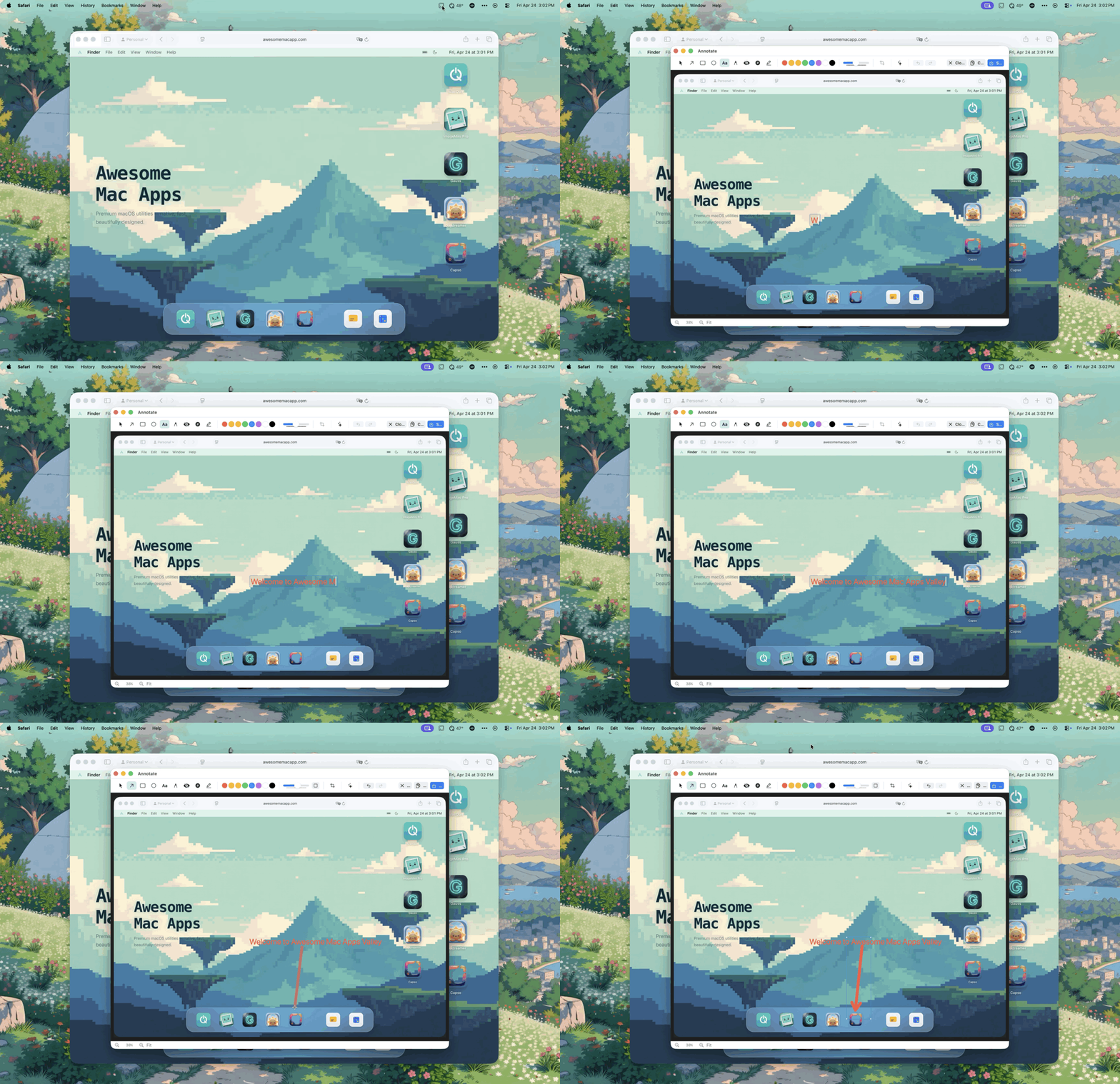
Download → • Follow @lzhgus • Features • Build from Source
Grab the latest signed, notarized DMG from GitHub Releases →
Or install via Homebrew:
brew tap lzhgus/tap
brew install --cask capso
Screen recording, camera, and microphone permissions are required. The app will prompt on first use.
Every macOS screenshot tool worth using costs money — CleanShot X is $29, Cap is $58. They're excellent apps, but a core productivity feature shouldn't be locked behind a paywall.
Capso is our answer: a fully native, feature-complete alternative that's free forever, built in the open, and architected so the underlying pieces (CaptureKit, AnnotationKit, OCRKit…) are reusable SPM packages you can drop into your own app.
Capso exists to give back to the macOS community and to show what a modern, modular Swift 6 app can look like.
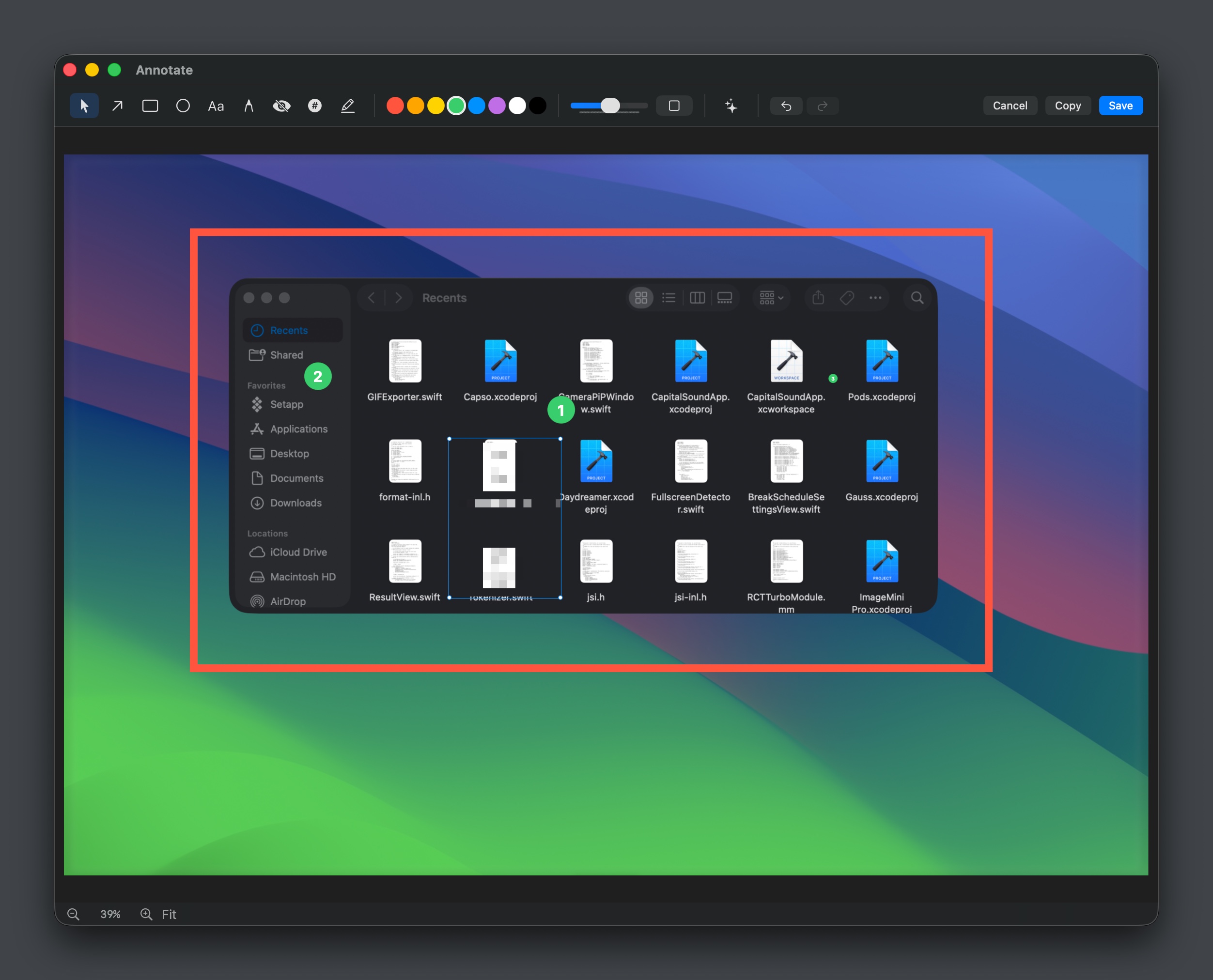
Annotation editor with drawing tools, counters, and markers
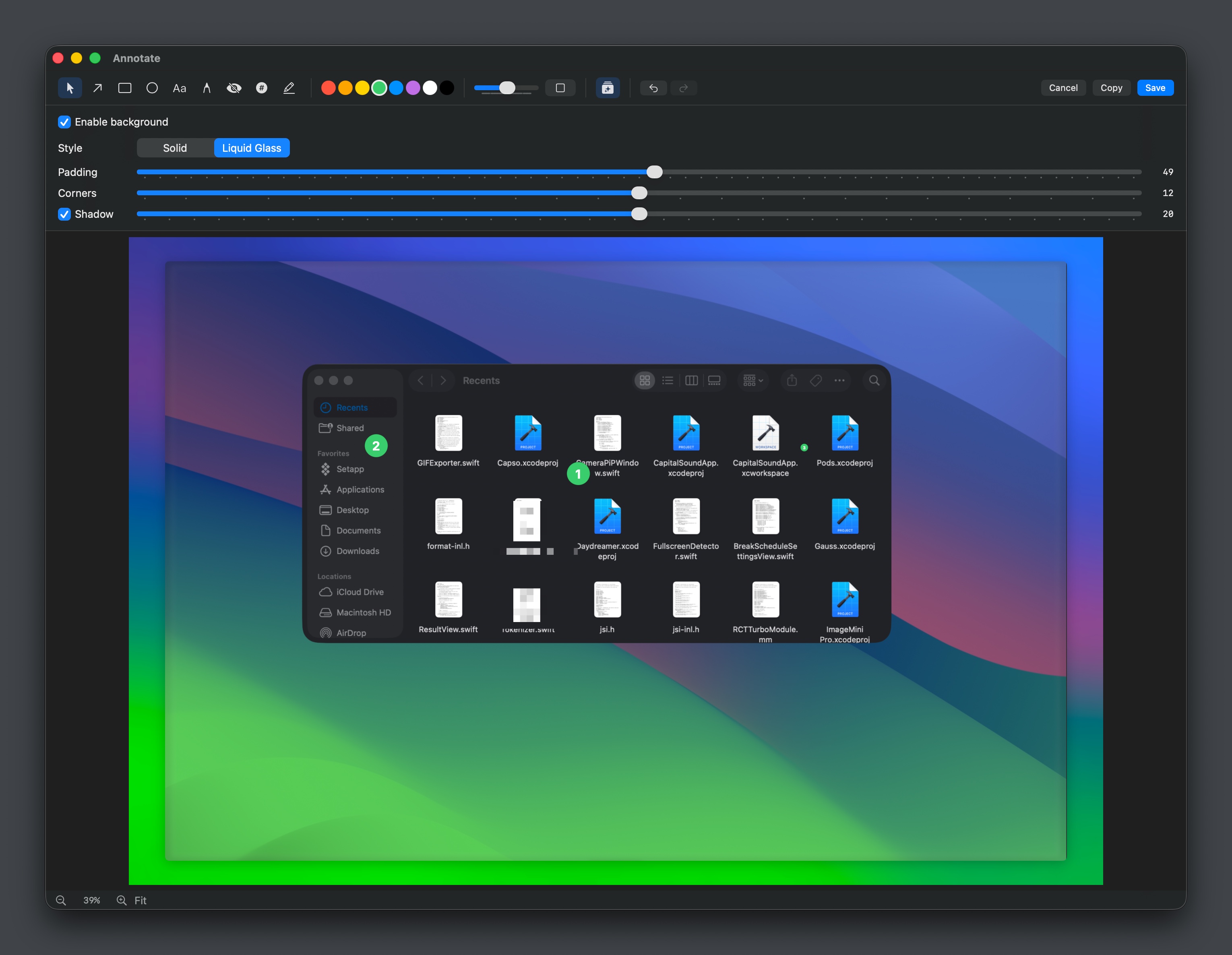
Screenshot beautification — background, padding, corners, shadow
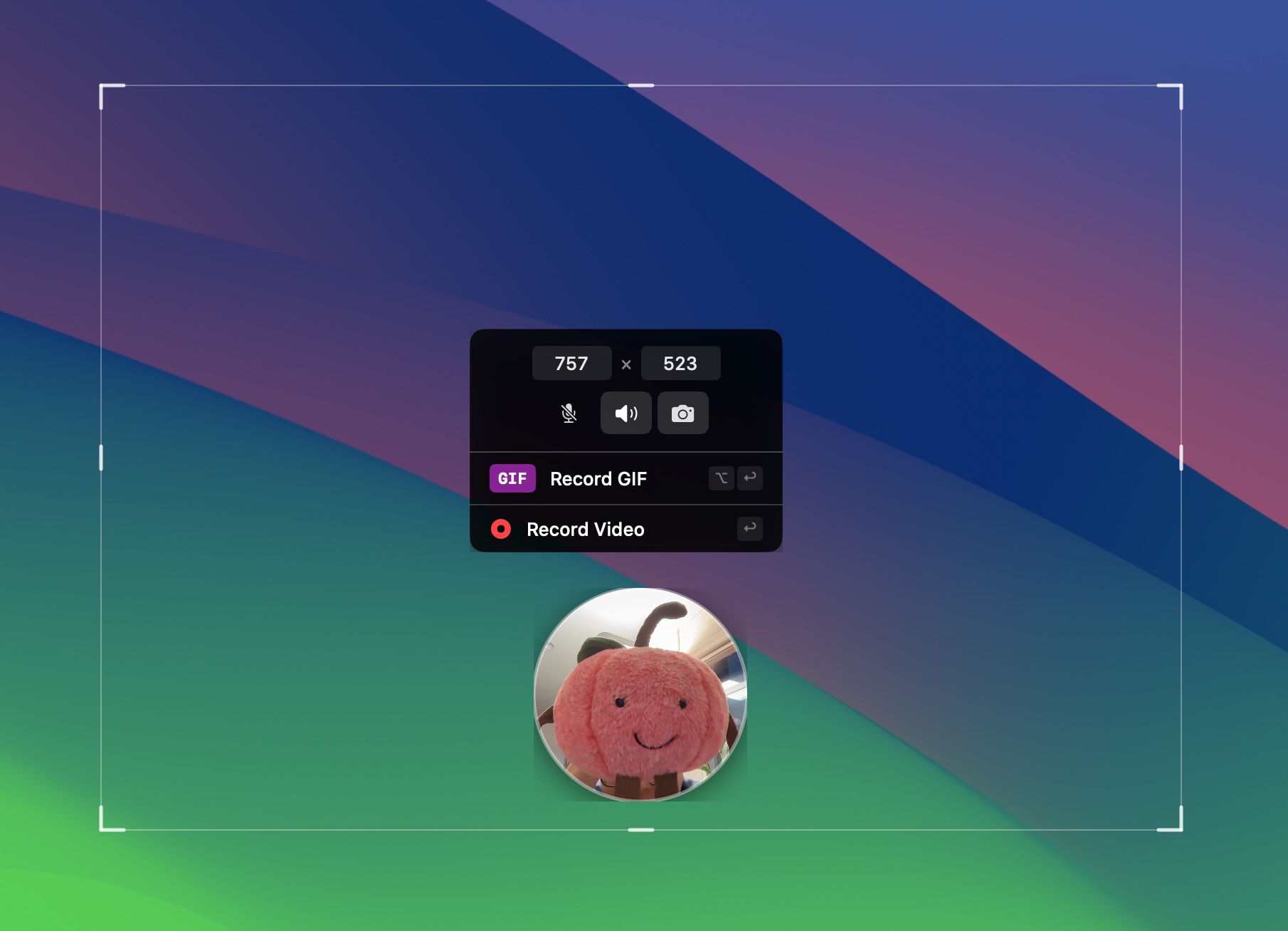
Screen recording with webcam PiP and GIF/Video options
| CleanShot X | Shottr | Cap | Capso | |
|---|---|---|---|---|
| Screenshots | Full | Full | Basic | Full |
| All-in-One HUD | Yes | No | No | Yes |
| Recording | Video + GIF | No | Video + GIF | Video + GIF |
| Webcam PiP | Yes | No | Yes | Yes (4 shapes) |
| OCR | Yes | Yes | No | Yes |
| Annotation | Advanced | Advanced | Basic | Advanced |
| Pin to Screen | Yes | Yes | No | Yes |
| Beautification | Yes | No | Yes | Yes |
| Native Swift | Yes | Yes | No (Tauri) | Yes (Swift 6) |
| Open Source | No | No | Partial | Yes |
| Price | $29 | $8 | $58 | Free |
Requirements: Xcode 16+, macOS 15.0+, XcodeGen
# Install XcodeGen if you don't have it
brew install xcodegen

# Clone and build
git clone https://github.com/lzhgus/Capso.git
cd Capso
xcodegen generate
open Capso.xcodeproj
# Build and run in Xcode (Cmd+R)
Or build from the command line:
xcodegen generate
xcodebuild -project Capso.xcodeproj -scheme Capso -configuration Release build
Capso uses a modular SPM (Swift Package Manager) architecture. The app is a thin SwiftUI + AppKit shell; all core capabilities live in 12 independent packages.
Capso/
├── App/                     # Main app target (thin shell)
│   ├── CapsoApp.swift       # @main entry point
│   ├── MenuBar/             # Menu bar controller
│   ├── Capture/             # Capture overlay, All-in-One HUD, pinned screenshots
│   ├── Recording/           # Recording coordinator, controls, toolbar
│   ├── Editor/              # Recording editor, timeline, preview, export UI
│   ├── Camera/              # Webcam PiP window
│   ├── AnnotationEditor/    # Annotation editor, inline annotation + beautify
│   ├── OCR/                 # OCR coordinator, overlay, toast
│   ├── Translation/         # Capture translation flow and result card
│   ├── History/             # Screenshot history window
│   ├── QuickAccess/         # Floating preview window
│   └── Preferences/         # Settings window
├── Packages/
│   ├── SharedKit/           # Settings, permissions, utilities
│   ├── CaptureKit/          # ScreenCaptureKit wrapper
│   ├── RecordingKit/        # Screen recording engine
│   ├── CameraKit/           # AVFoundation webcam capture
│   ├── AnnotationKit/       # Drawing/annotation system
│   ├── OCRKit/              # Vision framework OCR
│   ├── ExportKit/           # Video/GIF export + composited editor export
│   ├── EffectsKit/          # Cursor telemetry, click highlights, effects
│   ├── EditorKit/           # Recording editor models, compositor, zoom/cursor logic
│   ├── HistoryKit/          # Persistent screenshot/recording history
│   ├── ShareKit/            # Cloud sharing destinations and uploads
│   └── TranslationKit/      # OCR-backed translation service models
└── project.yml              # XcodeGen project definition
Each package can be tested independently:
swift test --package-path Packages/SharedKit
swift test --package-path Packages/AnnotationKit
# etc.
The package split means you can embed, for example, CaptureKit or AnnotationKit in your own app without pulling in the entire Capso shell — something no Electron- or Tauri-based alternative can offer.
See open issues for current priorities and GitHub Releases for version history. Contributions welcome!
See CONTRIBUTING.md for development setup and guidelines.
Thanks to everyone who has contributed to Capso.
Join them and help make Capso better.
Capso is licensed under the Business Source License 1.1.
TL;DR:
| What you want to do | Allowed? |
|---|---|
| Use Capso personally | ✅ |
| Use Capso inside your company | ✅ |
| Read, modify, and build from source | ✅ |
| Fork it and ship a free derivative | ✅ |
| Fork it and sell a competing screen-capture product | ❌ |
| Any use after 2029-04-08 | ✅ Becomes Apache 2.0 |
The license auto-converts to Apache 2.0 three years after each release — so every version eventually becomes fully permissive open source.
If Capso saves you time, a small tip keeps it growing — every bit funds more polish, more features, fewer bugs.



Built in the open by the Capso project.
4,694 followers · starred Aug 2026
615 followers · starred Aug 2026
38 followers · starred Apr 2026
70 followers · starred Apr 2026
Open-source screenshot and screen recording for macOS. The free, native alternative to CleanShot X. Built with Swift 6.0 and SwiftUI.
See the codeOpen-source screenshot and screen recording for macOS.
A native, feature-rich alternative to CleanShot X. Built with Swift 6.0 and SwiftUI, targeting macOS 15.0+.
Download → • Follow @lzhgus • Features • Build from Source
Grab the latest signed, notarized DMG from GitHub Releases →
Or install via Homebrew:
brew tap lzhgus/tap
brew install --cask capso
Screen recording, camera, and microphone permissions are required. The app will prompt on first use.
Every macOS screenshot tool worth using costs money — CleanShot X is $29, Cap is $58. They're excellent apps, but a core productivity feature shouldn't be locked behind a paywall.
Capso is our answer: a fully native, feature-complete alternative that's free forever, built in the open, and architected so the underlying pieces (CaptureKit, AnnotationKit, OCRKit…) are reusable SPM packages you can drop into your own app.
Capso exists to give back to the macOS community and to show what a modern, modular Swift 6 app can look like.
Annotation editor with drawing tools, counters, and markers
Screenshot beautification — background, padding, corners, shadow
Screen recording with webcam PiP and GIF/Video options
| CleanShot X | Shottr | Cap | Capso | |
|---|---|---|---|---|
| Screenshots | Full | Full | Basic | Full |
| All-in-One HUD | Yes | No | No | Yes |
| Recording | Video + GIF | No | Video + GIF | Video + GIF |
| Webcam PiP | Yes | No | Yes | Yes (4 shapes) |
| OCR | Yes | Yes | No | Yes |
| Annotation | Advanced | Advanced | Basic | Advanced |
| Pin to Screen | Yes | Yes | No | Yes |
| Beautification | Yes | No | Yes | Yes |
| Native Swift | Yes | Yes | No (Tauri) | Yes (Swift 6) |
| Open Source | No | No | Partial | Yes |
| Price | $29 | $8 | $58 | Free |
Requirements: Xcode 16+, macOS 15.0+, XcodeGen
# Install XcodeGen if you don't have it
brew install xcodegen

# Clone and build
git clone https://github.com/lzhgus/Capso.git
cd Capso
xcodegen generate
open Capso.xcodeproj
# Build and run in Xcode (Cmd+R)
Or build from the command line:
xcodegen generate
xcodebuild -project Capso.xcodeproj -scheme Capso -configuration Release build
Capso uses a modular SPM (Swift Package Manager) architecture. The app is a thin SwiftUI + AppKit shell; all core capabilities live in 12 independent packages.
Capso/
├── App/                     # Main app target (thin shell)
│   ├── CapsoApp.swift       # @main entry point
│   ├── MenuBar/             # Menu bar controller
│   ├── Capture/             # Capture overlay, All-in-One HUD, pinned screenshots
│   ├── Recording/           # Recording coordinator, controls, toolbar
│   ├── Editor/              # Recording editor, timeline, preview, export UI
│   ├── Camera/              # Webcam PiP window
│   ├── AnnotationEditor/    # Annotation editor, inline annotation + beautify
│   ├── OCR/                 # OCR coordinator, overlay, toast
│   ├── Translation/         # Capture translation flow and result card
│   ├── History/             # Screenshot history window
│   ├── QuickAccess/         # Floating preview window
│   └── Preferences/         # Settings window
├── Packages/
│   ├── SharedKit/           # Settings, permissions, utilities
│   ├── CaptureKit/          # ScreenCaptureKit wrapper
│   ├── RecordingKit/        # Screen recording engine
│   ├── CameraKit/           # AVFoundation webcam capture
│   ├── AnnotationKit/       # Drawing/annotation system
│   ├── OCRKit/              # Vision framework OCR
│   ├── ExportKit/           # Video/GIF export + composited editor export
│   ├── EffectsKit/          # Cursor telemetry, click highlights, effects
│   ├── EditorKit/           # Recording editor models, compositor, zoom/cursor logic
│   ├── HistoryKit/          # Persistent screenshot/recording history
│   ├── ShareKit/            # Cloud sharing destinations and uploads
│   └── TranslationKit/      # OCR-backed translation service models
└── project.yml              # XcodeGen project definition
Each package can be tested independently:
swift test --package-path Packages/SharedKit
swift test --package-path Packages/AnnotationKit
# etc.
The package split means you can embed, for example, CaptureKit or AnnotationKit in your own app without pulling in the entire Capso shell — something no Electron- or Tauri-based alternative can offer.
See open issues for current priorities and GitHub Releases for version history. Contributions welcome!
See CONTRIBUTING.md for development setup and guidelines.
Thanks to everyone who has contributed to Capso.
Join them and help make Capso better.
Capso is licensed under the Business Source License 1.1.
TL;DR:
| What you want to do | Allowed? |
|---|---|
| Use Capso personally | ✅ |
| Use Capso inside your company | ✅ |
| Read, modify, and build from source | ✅ |
| Fork it and ship a free derivative | ✅ |
| Fork it and sell a competing screen-capture product | ❌ |
| Any use after 2029-04-08 | ✅ Becomes Apache 2.0 |
The license auto-converts to Apache 2.0 three years after each release — so every version eventually becomes fully permissive open source.
If Capso saves you time, a small tip keeps it growing — every bit funds more polish, more features, fewer bugs.
Built in the open by the Capso project.
4,694 followers · starred Aug 2026
615 followers · starred Aug 2026
38 followers · starred Apr 2026
70 followers · starred Apr 2026