Official implementation of Inductive Moment Matching
Python
585
6 commits
updated Jul 11, 2025
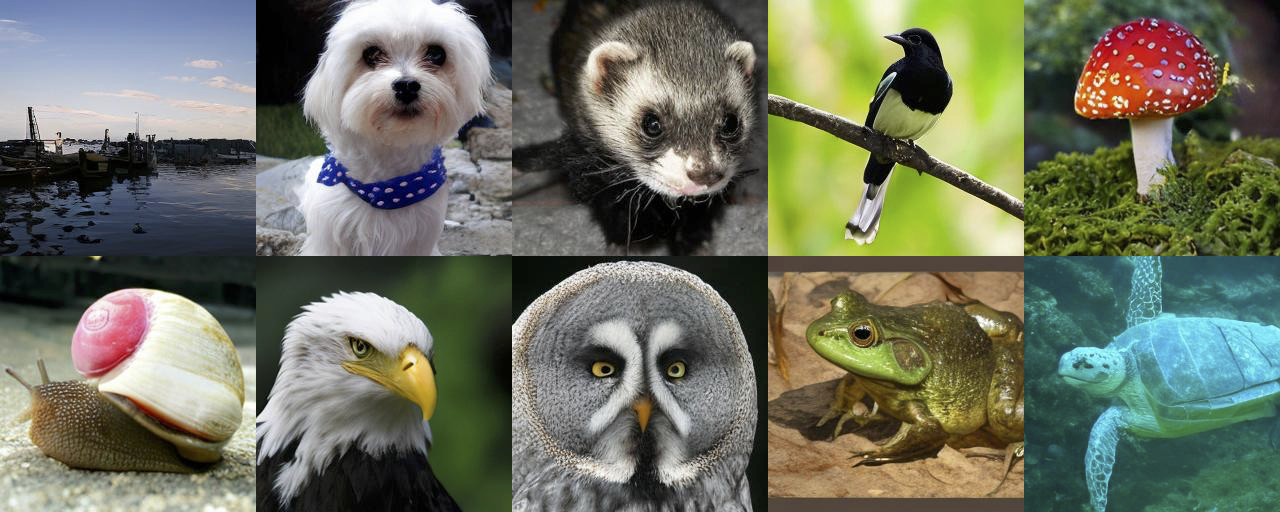
Official Implementation of Inductive Moment Matching
Also check out our accompanying position paper that explains the motivation and ways of designing new generative paradigms.
To install all packages in this codebase along with their dependencies, run
conda env create -f env.yml
For multi-node jobs, we use Slurm via submitit, which can be installed via
pip install submitit
We provide pretrained checkpoints through our repo on Hugging Face:
t-s is passed as second time embedding, trained with a=2: imagenet256_ts_a2.pkl.s is passed as second time embedding directly, trained with a=1: imagenet256_s_a1.pkl.Datasets are stored as uncompressed ZIP archives containing uncompressed PNG or NPY files, along with a metadata file dataset.json for labels. When using latent diffusion, it is necessary to create two different versions of a given dataset: the original RGB version, used for evaluation, and a VAE-encoded latent version, used for training.
To set up CIFAR-10:
Download the (CIFAR-10 python version)[https://www.cs.toronto.edu/~kriz/cifar.html] and convert via:
python dataset_tool.py --source=YOUR_DOWNLOADED_TARGZ_FILE \
    --dest=YOUR_PATH/datasets/cifar10-32x32.zip
To set up ImageNet-256:
Download the ILSVRC2012 data archive from Kaggle and extract it somewhere, e.g., downloads/imagenet.
Crop and resize the images to create the original RGB dataset:
# Convert raw ImageNet data to a ZIP archive at 256x256 resolution
python dataset_tool.py convert --source=downloads/imagenet/ILSVRC/Data/CLS-LOC/train \
    --dest=YOUR_PATH/datasets/img256.zip --resolution=256x256 --transform=center-crop-dhariwal
# Convert the pixel data to VAE latents
python dataset_tool.py encode --source=YOUR_PATH/datasets/img256.zip \
    --dest=YOUR_PATH/datasets/img256-sd.zip
calculate_metrics.py:# Compute dataset reference statistics for calculating metrics
python calculate_metrics.py ref --data=YOUR_PATH/datasets/img256.zip \
--dest=YOUR_PATH/dataset-refs/img256.pkl
The default configs are in configs/. Before training, properly replace the logger and dataset.path fields to your own choice. You can train on a single node by
bash run_train.sh NUM_GPUS_PER_NODE CONFIG_NAME REPLACEMENT_ARGS
where NUM_GPUS_PER_NODE is number of GPUs per node, CONFIG_NAME is either cifar10.yaml or im256.yaml.
If you want to replace any config args, for example, loss.a on CIFAR-10 from 1 to 2, you can run
bash run_train.sh 8 cifar10.yaml loss.a=2
To train multi-node, we use submitit and run
python launch.py --ngpus=NUM_GPUS_PER_NODE --nodes=NUM_NODES --config-name=CONFIG_NAME
And output folder will be created under ./outputs/
The checkpoints can be tested via
python generate_images.py --config-name=CONFIG_NAME eval.resume=CKPT_PATH REPLACEMENT_ARGS
where CONFIG_NAME is im256_generate_images.yaml or cifar10_generate_images.yaml and CKPT_PATH is the path to your checkpoint. When loading imagenet256_s_a1.pkl, REPLACEMENT_ARGS needs to be network.temb_type=identity. Otherwise, REPLACEMENT_ARGS is empty.
The eval scripts calculate FID scores. Make sure your follow our guidelines and have reference stats files ready.
bash run_eval.sh NUM_GPUS_PER_NODE CONFIG_NAME eval.resume=YOUR_MODEL_PKL_PATH
For example, to evaluate on CIFAR-10 with your model saved at outputs/cifar/network-snapshot-latest.pkl with 8 GPUs on a single node, run
bash run_eval.sh 8 cifar10.yaml eval.resume=outputs/cifar/network-snapshot-latest.pkl
YOUR_MODEL_PKL_PATH can also be a directory containing all checkpoints of a run labeled with training iterations (i.e. your training directory). It will sort from the latest checkpoint to earliest and evaluate in that order.
Some of the utility functions are based on EDM, and thus parts of the code would apply under this license.
@inproceedings{
zhou2025inductive,
title={Inductive Moment Matching},
author={Linqi Zhou and Stefano Ermon and Jiaming Song},
booktitle={Forty-second International Conference on Machine Learning},
year={2025}
}
1,007 followers · starred Mar 2025
137 followers · starred Mar 2025
381 followers · starred Mar 2025
249 followers · starred Mar 2025
Official implementation of Inductive Moment Matching
Python
585
6 commits
updated Jul 11, 2025
Official Implementation of Inductive Moment Matching
Also check out our accompanying position paper that explains the motivation and ways of designing new generative paradigms.
To install all packages in this codebase along with their dependencies, run
conda env create -f env.yml
For multi-node jobs, we use Slurm via submitit, which can be installed via
pip install submitit
We provide pretrained checkpoints through our repo on Hugging Face:
t-s is passed as second time embedding, trained with a=2: imagenet256_ts_a2.pkl.s is passed as second time embedding directly, trained with a=1: imagenet256_s_a1.pkl.Datasets are stored as uncompressed ZIP archives containing uncompressed PNG or NPY files, along with a metadata file dataset.json for labels. When using latent diffusion, it is necessary to create two different versions of a given dataset: the original RGB version, used for evaluation, and a VAE-encoded latent version, used for training.
To set up CIFAR-10:
Download the (CIFAR-10 python version)[https://www.cs.toronto.edu/~kriz/cifar.html] and convert via:
python dataset_tool.py --source=YOUR_DOWNLOADED_TARGZ_FILE \
    --dest=YOUR_PATH/datasets/cifar10-32x32.zip
To set up ImageNet-256:
Download the ILSVRC2012 data archive from Kaggle and extract it somewhere, e.g., downloads/imagenet.
Crop and resize the images to create the original RGB dataset:
# Convert raw ImageNet data to a ZIP archive at 256x256 resolution
python dataset_tool.py convert --source=downloads/imagenet/ILSVRC/Data/CLS-LOC/train \
    --dest=YOUR_PATH/datasets/img256.zip --resolution=256x256 --transform=center-crop-dhariwal
# Convert the pixel data to VAE latents
python dataset_tool.py encode --source=YOUR_PATH/datasets/img256.zip \
    --dest=YOUR_PATH/datasets/img256-sd.zip
calculate_metrics.py:# Compute dataset reference statistics for calculating metrics
python calculate_metrics.py ref --data=YOUR_PATH/datasets/img256.zip \
--dest=YOUR_PATH/dataset-refs/img256.pkl
The default configs are in configs/. Before training, properly replace the logger and dataset.path fields to your own choice. You can train on a single node by
bash run_train.sh NUM_GPUS_PER_NODE CONFIG_NAME REPLACEMENT_ARGS
where NUM_GPUS_PER_NODE is number of GPUs per node, CONFIG_NAME is either cifar10.yaml or im256.yaml.
If you want to replace any config args, for example, loss.a on CIFAR-10 from 1 to 2, you can run
bash run_train.sh 8 cifar10.yaml loss.a=2
To train multi-node, we use submitit and run
python launch.py --ngpus=NUM_GPUS_PER_NODE --nodes=NUM_NODES --config-name=CONFIG_NAME
And output folder will be created under ./outputs/
The checkpoints can be tested via
python generate_images.py --config-name=CONFIG_NAME eval.resume=CKPT_PATH REPLACEMENT_ARGS
where CONFIG_NAME is im256_generate_images.yaml or cifar10_generate_images.yaml and CKPT_PATH is the path to your checkpoint. When loading imagenet256_s_a1.pkl, REPLACEMENT_ARGS needs to be network.temb_type=identity. Otherwise, REPLACEMENT_ARGS is empty.
The eval scripts calculate FID scores. Make sure your follow our guidelines and have reference stats files ready.
bash run_eval.sh NUM_GPUS_PER_NODE CONFIG_NAME eval.resume=YOUR_MODEL_PKL_PATH
For example, to evaluate on CIFAR-10 with your model saved at outputs/cifar/network-snapshot-latest.pkl with 8 GPUs on a single node, run
bash run_eval.sh 8 cifar10.yaml eval.resume=outputs/cifar/network-snapshot-latest.pkl
YOUR_MODEL_PKL_PATH can also be a directory containing all checkpoints of a run labeled with training iterations (i.e. your training directory). It will sort from the latest checkpoint to earliest and evaluate in that order.
Some of the utility functions are based on EDM, and thus parts of the code would apply under this license.
@inproceedings{
zhou2025inductive,
title={Inductive Moment Matching},
author={Linqi Zhou and Stefano Ermon and Jiaming Song},
booktitle={Forty-second International Conference on Machine Learning},
year={2025}
}
1,007 followers · starred Mar 2025
137 followers · starred Mar 2025
381 followers · starred Mar 2025
249 followers · starred Mar 2025