
Single-node Phoenix hub for sequenced device sync and live pings, with an operator dashboard you can actually look at.
Elixir
0
17 commits
updated Sep 17, 2026
README
Nexus Relay

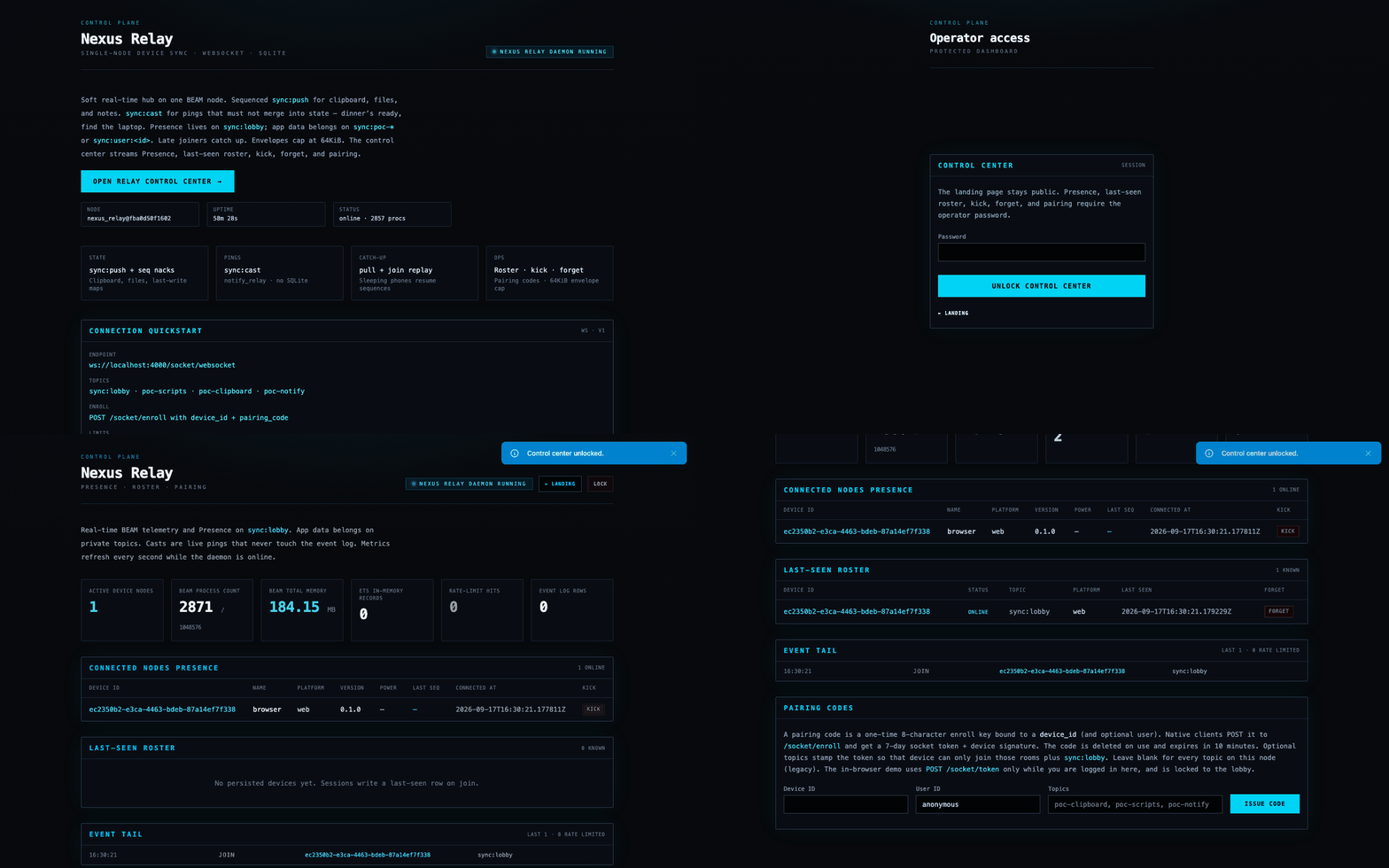
A small Phoenix daemon you run on one machine — a house Mac, a LAN box, a $5 VPS — so phones and laptops can share ordered state and the occasional live ping, with a control room you can actually look at when something is stuck.
It is not a drop-in NATS or MQTT. Those win at fan-out. This wins when you want a handful of devices you own, catch-up after sleep, pairing instead of a token paste, and a page that shows who is online, who was last seen, and who to kick.
The hub is a middle-man. It does not watch your clipboard or your disk. Edge scripts do that; the daemon stores sequences, broadcasts, and forgets on command. It never decrypts ciphertext you send it.
Licensed under the MIT License. See CONTRIBUTING and SECURITY.
Run it
mix setup
mix phx.server
Open http://localhost:4000. The landing page is public. The dashboard is behind the operator password (nexus in development; NEXUS_RELAY_OPERATOR_PASSWORD in production).
For a phone on the same Wi-Fi, keep HTTP bound to {0, 0, 0, 0} in config/dev.exs and still run one replica. A second Phoenix node splits Presence and dual-writes SQLite. Leave DNS_CLUSTER_QUERY unset.
mix test
mix precommit
Config and OTP child changes need a full restart, not LiveReload.
How it feels to use
- Unlock
/dashboard. - Issue a pairing code for
phone-1. Optionally stamp topics (poc-clipboard, poc-scripts, poc-notify) so that token cannot sit on every room;sync:lobbyis always allowed. Blank topics means the whole household bus (legacy). - On the device:
curl -X POST http://YOUR_HOST:4000/socket/enroll \
  -H "content-type: application/json" \
  -d '{"device_id":"phone-1","pairing_code":"<code>"}'
That returns a 7-day socket token and device signature. Connect to ws://YOUR_HOST:4000/socket/websocket (or wss:// behind TLS) with those params, then join a data topic such as sync:poc-clipboard or sync:poc-notify. Use sync:lobby for the operator Presence table, not for app payloads.
Python and TypeScript helpers live in examples/. They pull on
connect, reconnect with backoff when the socket drops (they do not retry an
in-flight sync:push), and they can cast() a notify ping that never touches the
event log.
What to send
Durable state — sync:push. Clipboard text, a file snapshot, a note. Sequences must be contiguous. Duplicates nack stale_sequence; a skip nacks sequence_gap with the expected number — then sync:pull from the last ack. Peers on the same topic get a state broadcast. Late joiners get each other device’s latest payload without asking.
{
  "device_id": "phone-1",
  "sequence_number": 1,
  "timestamp": "2026-09-09T12:00:00Z",
  "data_hash": "abc123",
  "changes": { "note": "hello" }
}
Timestamps are ISO8601 UTC (Z). Encrypted envelopes are allowed (ciphertext / nonce / auth_tag); leave changes empty. The hub only checks that the blobs look well-formed.
Live pings — sync:cast. Dinner’s ready, find the laptop, a CI job tapping the Mac you’re sitting at. No sequence, no SQLite, no merge into the last clipboard. See examples/notify_relay.
{ "type": "notify", "body": { "title": "Dinner", "body": "table is ready" } }
Both share a 100 frames / minute / device budget. JSON larger than 64KiB nacks payload_too_large. Override with NEXUS_RELAY_MAX_PAYLOAD_BYTES.
Catch-up — sync:pull. Your own log after a given sequence. Example clients call this on connect. Heartbeats keep the session alive; idle sockets are pruned after 30s.
Operator surface
| Path | Who |
|---|---|
/ | Landing: node, uptime, connect cheat-sheet |
/login | Operator password |
/dashboard | Presence, last-seen roster, kick, forget, pairing, event tail, BEAM stats |
POST /socket/token | Browser mint (operator cookie + CSRF) |
POST /socket/enroll | Pairing code, no CSRF |
GET /health | { "ok": true } for a reverse proxy |
Forget disconnects the device and deletes its snapshot plus event log. Kick only drops the live session.
Production
One BEAM, one SQLite file, TLS in front (Caddy or nginx). Required:
PHX_SERVER=trueSECRET_KEY_BASE(mix phx.gen.secret)DATABASE_PATH(the sqlite file)NEXUS_RELAY_OPERATOR_PASSWORDPHX_HOST(public hostname; used for URL generation andcheck_origin)
GET /health is a plain HTTP probe for a reverse proxy. Do not point DNS_CLUSTER_QUERY at other nodes and expect the sync engine to follow.
Docker
One container, one SQLite volume, HTTP on port 4000. Fine on a house LAN. The
image does not mint certificates — put Caddy in front for public wss://
(deploy/).
cp .env.example .env
# paste `mix phx.gen.secret` into SECRET_KEY_BASE
# set NEXUS_RELAY_OPERATOR_PASSWORD
# phones on Wi-Fi: PHX_HOST=<this machine's LAN IP>  (not localhost)
docker compose up --build
On a Mac, if docker is missing from your PATH, Docker Desktop’s CLI is
/Applications/Docker.app/Contents/Resources/bin. Accept the first-run license
in the Docker Desktop window if the engine never starts.
Open http://localhost:4000 or http://$PHX_HOST:4000.
Compose defaults PHX_SCHEME=http so a phone can use ws://. SQLite lives in
the relay-data volume (docker compose down keeps it; down -v wipes it).
Behind Caddy, set PHX_HOST=relay.example.com and PHX_SCHEME=https in .env
and proxy to :4000. Still run one replica. The container is always HTTP;
the proxy owns TLS.
Internals (when you need them)
OTP rest-for-one engine: Registry, ETS Store, pairing codes, per-device DeviceSession, heartbeat prune, SQLite flush every 5s (keep last 500 events per device), rate limiter, a 20-event ops ring.
Connect params: Phoenix.Token salt nexus_relay.socket plus device signature salt nexus_relay.device, same device_id, 7-day max age. Mix :dev accepts unsigned params. The literal your_test_token works only when Mix is loaded and env is not :prod — never in a release. Production enroll is pairing codes.
Join sync:user:<id> only if the token’s user matches, unless the socket user is anonymous. Tokens may carry a topic allowlist; otherwise any sync:* join on this node is allowed. Treat the daemon as a household bus, not a multi-tenant SaaS.
Examples
The daemon does not watch files, clipboards, or Notification Center. These processes at the edge do:
examples/script_relay— file watch → hub → write a copy (sync:push)examples/clipboard_relay— Mac pasteboard ↔ Android Termux (sync:push)examples/notify_relay— phone pings a laptop; OS notification (sync:cast)examples/ts— the same three flows on Node 22+
Security model
This is a bus for devices you operate. A token without a topic allowlist can join any sync:* room on the node. Pairing codes are one-time, ten minutes. Ciphertext is pass-through. Two untrusted parties on one replica is the wrong deployment. Reports: SECURITY.md.
License
MIT.
Contributing
CONTRIBUTING.md. mix precommit is the gate; GitHub Actions runs it on main and on pull requests.
Contributors

17 commits
See what people are saying
Similar repos


Languages
Elixir
93.5%
HTML
2.1%
JavaScript
1.9%
CSS
1.9%
Single-node Phoenix hub for sequenced device sync and live pings, with an operator dashboard you can actually look at.
Elixir
0
17 commits
updated Sep 17, 2026
README
Nexus Relay
A small Phoenix daemon you run on one machine — a house Mac, a LAN box, a $5 VPS — so phones and laptops can share ordered state and the occasional live ping, with a control room you can actually look at when something is stuck.
It is not a drop-in NATS or MQTT. Those win at fan-out. This wins when you want a handful of devices you own, catch-up after sleep, pairing instead of a token paste, and a page that shows who is online, who was last seen, and who to kick.
The hub is a middle-man. It does not watch your clipboard or your disk. Edge scripts do that; the daemon stores sequences, broadcasts, and forgets on command. It never decrypts ciphertext you send it.
Licensed under the MIT License. See CONTRIBUTING and SECURITY.
Run it
mix setup
mix phx.server
Open http://localhost:4000. The landing page is public. The dashboard is behind the operator password (nexus in development; NEXUS_RELAY_OPERATOR_PASSWORD in production).
For a phone on the same Wi-Fi, keep HTTP bound to {0, 0, 0, 0} in config/dev.exs and still run one replica. A second Phoenix node splits Presence and dual-writes SQLite. Leave DNS_CLUSTER_QUERY unset.
mix test
mix precommit
Config and OTP child changes need a full restart, not LiveReload.
How it feels to use
- Unlock
/dashboard. - Issue a pairing code for
phone-1. Optionally stamp topics (poc-clipboard, poc-scripts, poc-notify) so that token cannot sit on every room;sync:lobbyis always allowed. Blank topics means the whole household bus (legacy). - On the device:
curl -X POST http://YOUR_HOST:4000/socket/enroll \
  -H "content-type: application/json" \
  -d '{"device_id":"phone-1","pairing_code":"<code>"}'
That returns a 7-day socket token and device signature. Connect to ws://YOUR_HOST:4000/socket/websocket (or wss:// behind TLS) with those params, then join a data topic such as sync:poc-clipboard or sync:poc-notify. Use sync:lobby for the operator Presence table, not for app payloads.
Python and TypeScript helpers live in examples/. They pull on
connect, reconnect with backoff when the socket drops (they do not retry an
in-flight sync:push), and they can cast() a notify ping that never touches the
event log.
What to send
Durable state — sync:push. Clipboard text, a file snapshot, a note. Sequences must be contiguous. Duplicates nack stale_sequence; a skip nacks sequence_gap with the expected number — then sync:pull from the last ack. Peers on the same topic get a state broadcast. Late joiners get each other device’s latest payload without asking.
{
  "device_id": "phone-1",
  "sequence_number": 1,
  "timestamp": "2026-09-09T12:00:00Z",
  "data_hash": "abc123",
  "changes": { "note": "hello" }
}
Timestamps are ISO8601 UTC (Z). Encrypted envelopes are allowed (ciphertext / nonce / auth_tag); leave changes empty. The hub only checks that the blobs look well-formed.
Live pings — sync:cast. Dinner’s ready, find the laptop, a CI job tapping the Mac you’re sitting at. No sequence, no SQLite, no merge into the last clipboard. See examples/notify_relay.
{ "type": "notify", "body": { "title": "Dinner", "body": "table is ready" } }
Both share a 100 frames / minute / device budget. JSON larger than 64KiB nacks payload_too_large. Override with NEXUS_RELAY_MAX_PAYLOAD_BYTES.
Catch-up — sync:pull. Your own log after a given sequence. Example clients call this on connect. Heartbeats keep the session alive; idle sockets are pruned after 30s.
Operator surface
| Path | Who |
|---|---|
/ | Landing: node, uptime, connect cheat-sheet |
/login | Operator password |
/dashboard | Presence, last-seen roster, kick, forget, pairing, event tail, BEAM stats |
POST /socket/token | Browser mint (operator cookie + CSRF) |
POST /socket/enroll | Pairing code, no CSRF |
GET /health | { "ok": true } for a reverse proxy |
Forget disconnects the device and deletes its snapshot plus event log. Kick only drops the live session.
Production
One BEAM, one SQLite file, TLS in front (Caddy or nginx). Required:
PHX_SERVER=trueSECRET_KEY_BASE(mix phx.gen.secret)DATABASE_PATH(the sqlite file)NEXUS_RELAY_OPERATOR_PASSWORDPHX_HOST(public hostname; used for URL generation andcheck_origin)
GET /health is a plain HTTP probe for a reverse proxy. Do not point DNS_CLUSTER_QUERY at other nodes and expect the sync engine to follow.
Docker
One container, one SQLite volume, HTTP on port 4000. Fine on a house LAN. The
image does not mint certificates — put Caddy in front for public wss://
(deploy/).
cp .env.example .env
# paste `mix phx.gen.secret` into SECRET_KEY_BASE
# set NEXUS_RELAY_OPERATOR_PASSWORD
# phones on Wi-Fi: PHX_HOST=<this machine's LAN IP>  (not localhost)
docker compose up --build
On a Mac, if docker is missing from your PATH, Docker Desktop’s CLI is
/Applications/Docker.app/Contents/Resources/bin. Accept the first-run license
in the Docker Desktop window if the engine never starts.
Open http://localhost:4000 or http://$PHX_HOST:4000.
Compose defaults PHX_SCHEME=http so a phone can use ws://. SQLite lives in
the relay-data volume (docker compose down keeps it; down -v wipes it).
Behind Caddy, set PHX_HOST=relay.example.com and PHX_SCHEME=https in .env
and proxy to :4000. Still run one replica. The container is always HTTP;
the proxy owns TLS.
Internals (when you need them)
OTP rest-for-one engine: Registry, ETS Store, pairing codes, per-device DeviceSession, heartbeat prune, SQLite flush every 5s (keep last 500 events per device), rate limiter, a 20-event ops ring.
Connect params: Phoenix.Token salt nexus_relay.socket plus device signature salt nexus_relay.device, same device_id, 7-day max age. Mix :dev accepts unsigned params. The literal your_test_token works only when Mix is loaded and env is not :prod — never in a release. Production enroll is pairing codes.
Join sync:user:<id> only if the token’s user matches, unless the socket user is anonymous. Tokens may carry a topic allowlist; otherwise any sync:* join on this node is allowed. Treat the daemon as a household bus, not a multi-tenant SaaS.
Examples
The daemon does not watch files, clipboards, or Notification Center. These processes at the edge do:
examples/script_relay— file watch → hub → write a copy (sync:push)examples/clipboard_relay— Mac pasteboard ↔ Android Termux (sync:push)examples/notify_relay— phone pings a laptop; OS notification (sync:cast)examples/ts— the same three flows on Node 22+
Security model
This is a bus for devices you operate. A token without a topic allowlist can join any sync:* room on the node. Pairing codes are one-time, ten minutes. Ciphertext is pass-through. Two untrusted parties on one replica is the wrong deployment. Reports: SECURITY.md.
License
MIT.
Contributing
CONTRIBUTING.md. mix precommit is the gate; GitHub Actions runs it on main and on pull requests.
See what people are saying
Similar repos
Contributors
17 commits
Languages
Elixir
93.5%
HTML
2.1%
JavaScript
1.9%
CSS
1.9%