Type-safe FFmpeg bindings for Python & TypeScript — filters, typing, and docs
See the code



typed-ffmpeg offers a modern, type-safe interface to FFmpeg for both Python and TypeScript, providing extensive support for complex filters with detailed typing and documentation. Inspired by ffmpeg-python, this project enhances functionality by addressing common limitations, such as lack of IDE integration and comprehensive typing, while also introducing new features like JSON serialization of filter graphs and automatic FFmpeg validation.
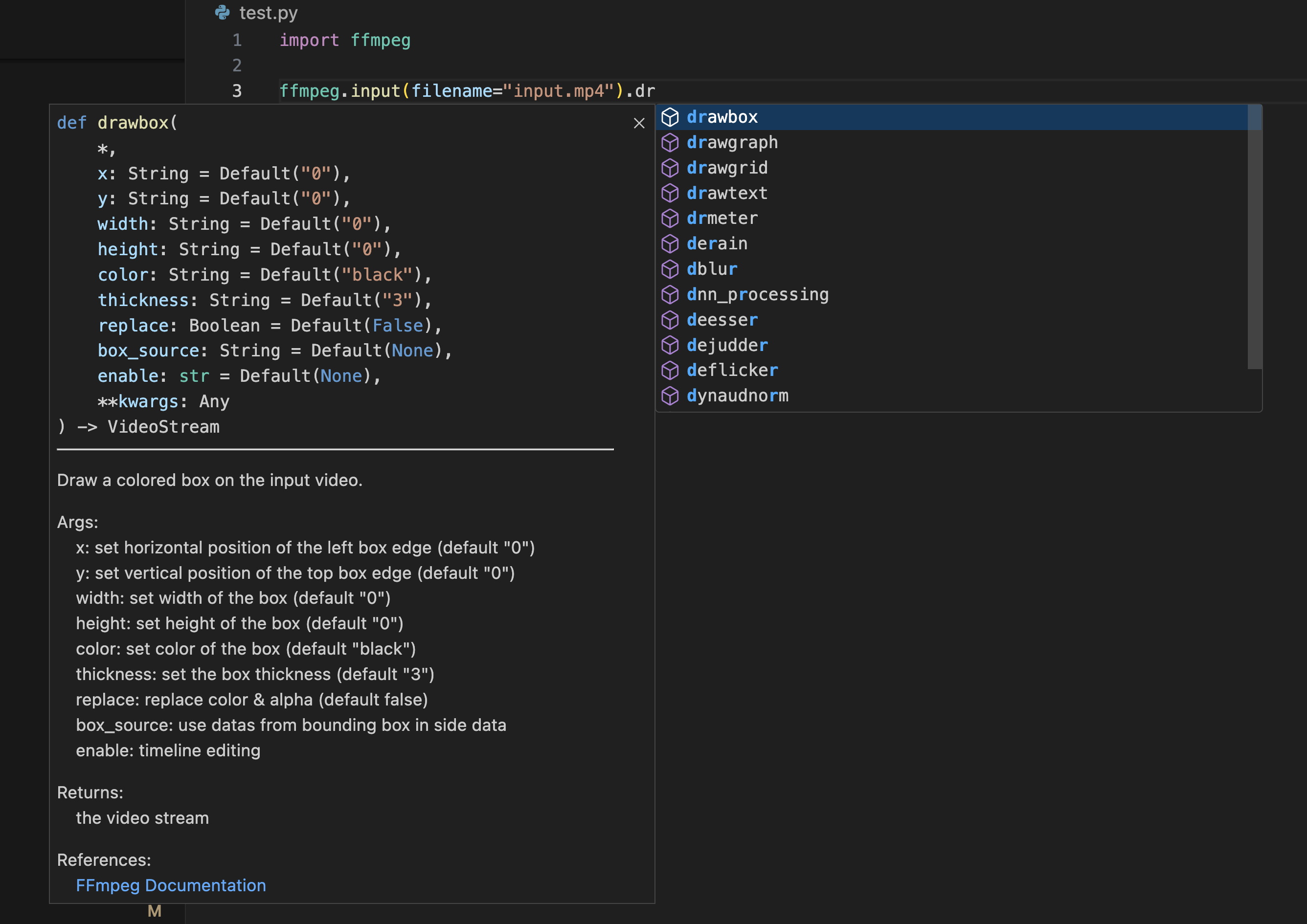
graphviz for visual representation, aiding in understanding and debugging.typed-ffmpeg v4 ships separate PyPI packages for each FFmpeg major version. Install only the bindings you need:
| Package | FFmpeg version | Description |
|---|---|---|
typed-ffmpeg | Latest (v9) | Recommended for most users |
typed-ffmpeg-v5 | FFmpeg 5.x | Bindings for FFmpeg 5 |
typed-ffmpeg-v6 | FFmpeg 6.x | Bindings for FFmpeg 6 |
typed-ffmpeg-v7 | FFmpeg 7.x | Bindings for FFmpeg 7 |
typed-ffmpeg-v8 | FFmpeg 8.x | Bindings for FFmpeg 8 |
typed-ffmpeg-v9 | FFmpeg 9.x | Bindings for FFmpeg 9 |
ffmpeg-core | — | Shared runtime (auto-installed) |
All packages expose the same ffmpeg namespace, so your code works identically regardless of which package you install.
To match your installed FFmpeg version:
ffmpeg -version | head -1        # e.g. ffmpeg version 6.1.1
pip install typed-ffmpeg-v6      # install the matching package
| Extra | Install | Description |
|---|---|---|
[graph] | pip install 'typed-ffmpeg[graph]' | Graph visualization via Graphviz |
[parse] | pip install 'typed-ffmpeg[parse]' | CLI parsing and compile_as_python() support |
The [parse] extra installs version-specific cache data (ffmpeg-data-v5 through ffmpeg-data-v9) needed by ffmpeg.compile.compile_cli.parse() to reconstruct filter graphs from FFmpeg command lines. Most users do not need this.
See the v4 Package Architecture docs for details and the Migration Guide if you are upgrading from typed-ffmpeg 3.x.
Install the latest version (bindings for FFmpeg 8.x):
pip install typed-ffmpeg
Or install bindings for a specific FFmpeg version:
pip install typed-ffmpeg-v5   # FFmpeg 5.x
pip install typed-ffmpeg-v6   # FFmpeg 6.x
pip install typed-ffmpeg-v7   # FFmpeg 7.x
pip install typed-ffmpeg-v8   # FFmpeg 8.x
pip install typed-ffmpeg-v9   # FFmpeg 9.x
With optional extras:
pip install 'typed-ffmpeg[graph]'          # graph visualization
pip install 'typed-ffmpeg[parse]'          # CLI parsing support
pip install 'typed-ffmpeg-v7[parse]'       # CLI parsing for FFmpeg 7.x
Note: FFmpeg must be installed on your system.
Note: If you need to install ffmpeg-python at the same time, use pip install typed-ffmpeg-compatible to prevent conflicts with the module name. Then use import typed_ffmpeg as ffmpeg instead of import ffmpeg.
TypeScript bindings are available as npm packages for each FFmpeg major version:
| Package | FFmpeg version | Description |
|---|---|---|
@typed-ffmpeg/core | — | Core runtime (Node.js + browser ESM) |
@typed-ffmpeg/v5 | FFmpeg 5.x | Bindings for FFmpeg 5 |
@typed-ffmpeg/v6 | FFmpeg 6.x | Bindings for FFmpeg 6 |
@typed-ffmpeg/v7 | FFmpeg 7.x | Bindings for FFmpeg 7 |
@typed-ffmpeg/v8 | FFmpeg 8.x | Bindings for FFmpeg 8 |
@typed-ffmpeg/v9 | FFmpeg 9.x | Bindings for FFmpeg 9 |
npm install @typed-ffmpeg/core @typed-ffmpeg/v9 # latest FFmpeg bindings
import { input } from "@typed-ffmpeg/v8";

const cmd = input("input.mp4")
  .video
  .scale({ w: 1280, h: 720 })
  .output("output.mp4")
  .overwriteOutput()
  .compile();
// => ["-i", "input.mp4", "-filter_complex", "...", "output.mp4"]
@typed-ffmpeg/core ships three builds — CJS (Node.js default), ESM, and a browser-safe ESM bundle — selected automatically via the exports field. The TypeScript API mirrors the Python API with idiomatic TypeScript patterns (options objects instead of keyword arguments). Each version package includes JSDoc annotations indicating filter availability across FFmpeg versions. See packages/ts-core/ and packages/ts-v5/ through packages/ts-v9/ for details.
Here's how to quickly start using typed-ffmpeg:
import ffmpeg

# Analyze a media file
info = ffmpeg.probe("video.mp4")
print(f"Duration: {float(info['format']['duration']):.2f} seconds")
print(f"Streams: {len(info['streams'])}")

# Flip video horizontally and output
f = (
    ffmpeg
    .input(filename='input.mp4')
    .hflip()
    .output(filename='output.mp4')
)
f

For a more complex example:
import ffmpeg.filters
import ffmpeg

# Complex filter graph example
in_file = ffmpeg.input("input.mp4")
overlay_file = ffmpeg.input("overlay.png")

f = (
    ffmpeg.filters
    .concat(
        in_file.trim(start_frame=10, end_frame=20),
        in_file.trim(start_frame=30, end_frame=40),
    )
    .video(0)
    .overlay(overlay_file.hflip())
    .drawbox(x="50", y="50", width="120", height="120", color="red", thickness="5")
    .output(filename="out.mp4")
)
f

See the Usage section in our documentation for more examples and detailed guides.
Try out typed-ffmpeg directly in your browser with our Interactive Playground! The playground provides a live environment where you can:
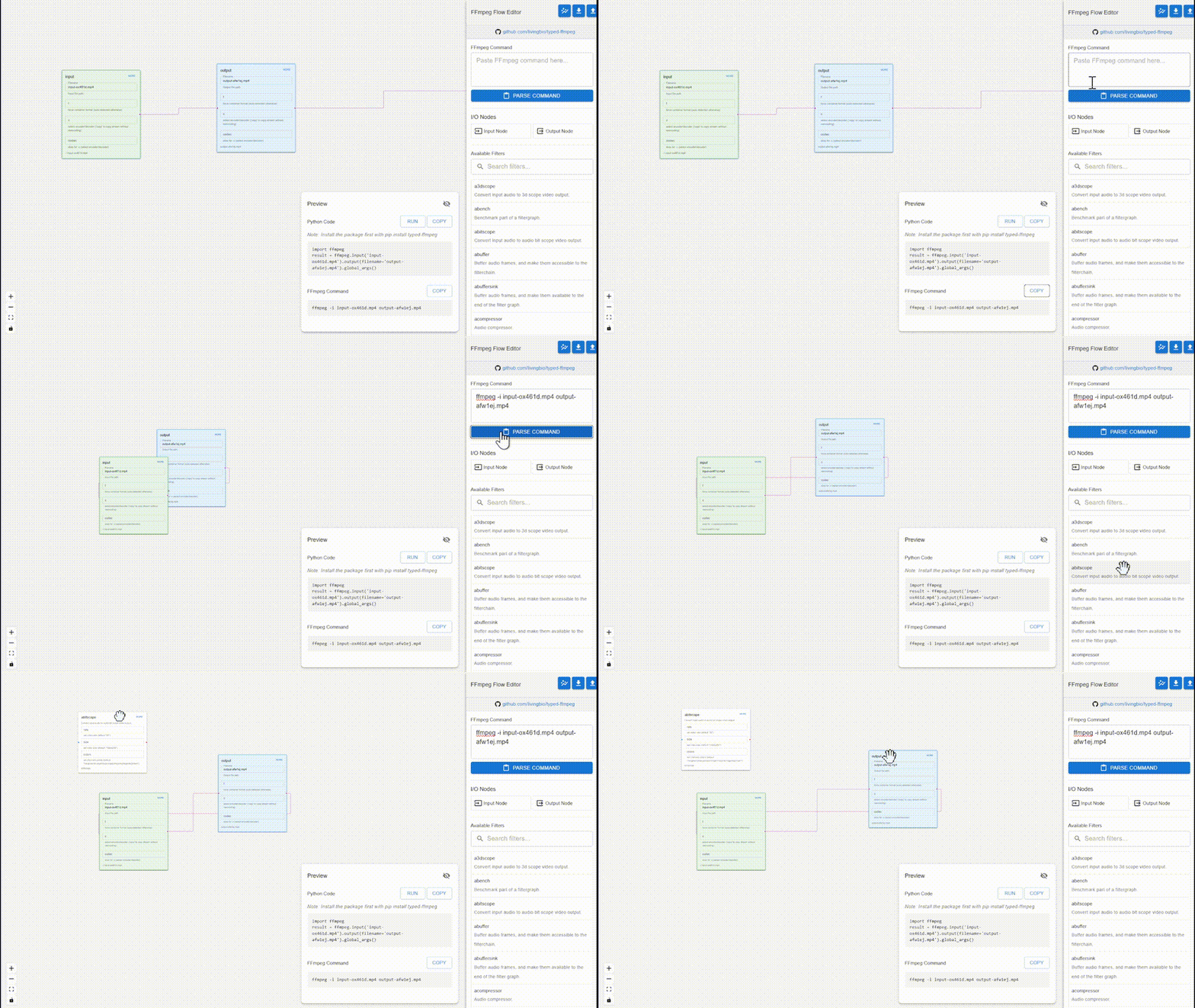
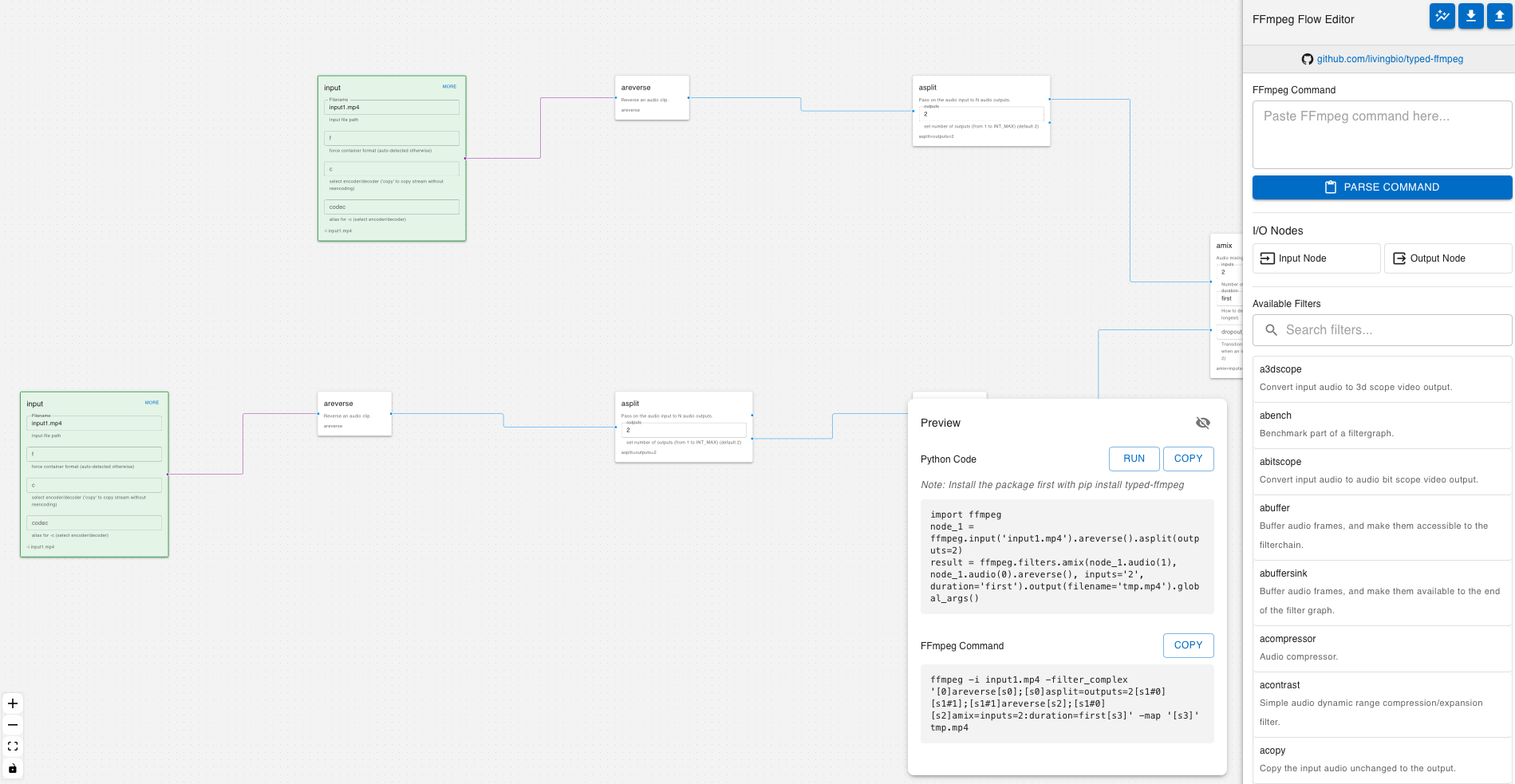
The playground is perfect for learning and prototyping FFmpeg filter chains without setting up a local environment.
This project was initially inspired by the capabilities of GPT-3, with the original concept focusing on using GPT-3 to generate an FFmpeg filter SDK directly from the FFmpeg documentation. However, during the development process, I encountered limitations with GPT-3's ability to fully automate this task.
As a result, I shifted to traditional code generation methods to complete the SDK, ensuring a more robust and reliable tool. Despite this change in approach, both GitHub Copilot and GPT-3 were instrumental in accelerating the development process, providing valuable insights and saving significant time.
I would also like to extend my gratitude to the ffmpeg-python project, which inspired this project significantly. The API style and design ideas from ffmpeg-python have been influential, and I have utilized these aspects to shape the development of our SDK.
This project is dedicated to my son, Austin, on his seventh birthday (February 24, 2024), whose curiosity and zest for life continually inspire me.
Feel free to check the Documentation for detailed information and more advanced features.
Install all development dependencies:
uv pip install --group dev
No need to use requirements.in or requirements.txt anymore. All dependencies are managed in pyproject.toml and locked in uv.lock.
(top 24 of 31)
6,595 followers · starred Mar 2026
17,254 followers · starred May 2025
764 followers · starred May 2025
304 followers · starred Jun 2025
Type-safe FFmpeg bindings for Python & TypeScript — filters, typing, and docs
See the code
typed-ffmpeg offers a modern, type-safe interface to FFmpeg for both Python and TypeScript, providing extensive support for complex filters with detailed typing and documentation. Inspired by ffmpeg-python, this project enhances functionality by addressing common limitations, such as lack of IDE integration and comprehensive typing, while also introducing new features like JSON serialization of filter graphs and automatic FFmpeg validation.
graphviz for visual representation, aiding in understanding and debugging.typed-ffmpeg v4 ships separate PyPI packages for each FFmpeg major version. Install only the bindings you need:
| Package | FFmpeg version | Description |
|---|---|---|
typed-ffmpeg | Latest (v9) | Recommended for most users |
typed-ffmpeg-v5 | FFmpeg 5.x | Bindings for FFmpeg 5 |
typed-ffmpeg-v6 | FFmpeg 6.x | Bindings for FFmpeg 6 |
typed-ffmpeg-v7 | FFmpeg 7.x | Bindings for FFmpeg 7 |
typed-ffmpeg-v8 | FFmpeg 8.x | Bindings for FFmpeg 8 |
typed-ffmpeg-v9 | FFmpeg 9.x | Bindings for FFmpeg 9 |
ffmpeg-core | — | Shared runtime (auto-installed) |
All packages expose the same ffmpeg namespace, so your code works identically regardless of which package you install.
To match your installed FFmpeg version:
ffmpeg -version | head -1        # e.g. ffmpeg version 6.1.1
pip install typed-ffmpeg-v6      # install the matching package
| Extra | Install | Description |
|---|---|---|
[graph] | pip install 'typed-ffmpeg[graph]' | Graph visualization via Graphviz |
[parse] | pip install 'typed-ffmpeg[parse]' | CLI parsing and compile_as_python() support |
The [parse] extra installs version-specific cache data (ffmpeg-data-v5 through ffmpeg-data-v9) needed by ffmpeg.compile.compile_cli.parse() to reconstruct filter graphs from FFmpeg command lines. Most users do not need this.
See the v4 Package Architecture docs for details and the Migration Guide if you are upgrading from typed-ffmpeg 3.x.
Install the latest version (bindings for FFmpeg 8.x):
pip install typed-ffmpeg
Or install bindings for a specific FFmpeg version:
pip install typed-ffmpeg-v5   # FFmpeg 5.x
pip install typed-ffmpeg-v6   # FFmpeg 6.x
pip install typed-ffmpeg-v7   # FFmpeg 7.x
pip install typed-ffmpeg-v8   # FFmpeg 8.x
pip install typed-ffmpeg-v9   # FFmpeg 9.x
With optional extras:
pip install 'typed-ffmpeg[graph]'          # graph visualization
pip install 'typed-ffmpeg[parse]'          # CLI parsing support
pip install 'typed-ffmpeg-v7[parse]'       # CLI parsing for FFmpeg 7.x
Note: FFmpeg must be installed on your system.
Note: If you need to install ffmpeg-python at the same time, use pip install typed-ffmpeg-compatible to prevent conflicts with the module name. Then use import typed_ffmpeg as ffmpeg instead of import ffmpeg.
TypeScript bindings are available as npm packages for each FFmpeg major version:
| Package | FFmpeg version | Description |
|---|---|---|
@typed-ffmpeg/core | — | Core runtime (Node.js + browser ESM) |
@typed-ffmpeg/v5 | FFmpeg 5.x | Bindings for FFmpeg 5 |
@typed-ffmpeg/v6 | FFmpeg 6.x | Bindings for FFmpeg 6 |
@typed-ffmpeg/v7 | FFmpeg 7.x | Bindings for FFmpeg 7 |
@typed-ffmpeg/v8 | FFmpeg 8.x | Bindings for FFmpeg 8 |
@typed-ffmpeg/v9 | FFmpeg 9.x | Bindings for FFmpeg 9 |
npm install @typed-ffmpeg/core @typed-ffmpeg/v9 # latest FFmpeg bindings
import { input } from "@typed-ffmpeg/v8";

const cmd = input("input.mp4")
  .video
  .scale({ w: 1280, h: 720 })
  .output("output.mp4")
  .overwriteOutput()
  .compile();
// => ["-i", "input.mp4", "-filter_complex", "...", "output.mp4"]
@typed-ffmpeg/core ships three builds — CJS (Node.js default), ESM, and a browser-safe ESM bundle — selected automatically via the exports field. The TypeScript API mirrors the Python API with idiomatic TypeScript patterns (options objects instead of keyword arguments). Each version package includes JSDoc annotations indicating filter availability across FFmpeg versions. See packages/ts-core/ and packages/ts-v5/ through packages/ts-v9/ for details.
Here's how to quickly start using typed-ffmpeg:
import ffmpeg

# Analyze a media file
info = ffmpeg.probe("video.mp4")
print(f"Duration: {float(info['format']['duration']):.2f} seconds")
print(f"Streams: {len(info['streams'])}")

# Flip video horizontally and output
f = (
    ffmpeg
    .input(filename='input.mp4')
    .hflip()
    .output(filename='output.mp4')
)
f
For a more complex example:
import ffmpeg.filters
import ffmpeg

# Complex filter graph example
in_file = ffmpeg.input("input.mp4")
overlay_file = ffmpeg.input("overlay.png")

f = (
    ffmpeg.filters
    .concat(
        in_file.trim(start_frame=10, end_frame=20),
        in_file.trim(start_frame=30, end_frame=40),
    )
    .video(0)
    .overlay(overlay_file.hflip())
    .drawbox(x="50", y="50", width="120", height="120", color="red", thickness="5")
    .output(filename="out.mp4")
)
f
See the Usage section in our documentation for more examples and detailed guides.
Try out typed-ffmpeg directly in your browser with our Interactive Playground! The playground provides a live environment where you can:
The playground is perfect for learning and prototyping FFmpeg filter chains without setting up a local environment.
This project was initially inspired by the capabilities of GPT-3, with the original concept focusing on using GPT-3 to generate an FFmpeg filter SDK directly from the FFmpeg documentation. However, during the development process, I encountered limitations with GPT-3's ability to fully automate this task.
As a result, I shifted to traditional code generation methods to complete the SDK, ensuring a more robust and reliable tool. Despite this change in approach, both GitHub Copilot and GPT-3 were instrumental in accelerating the development process, providing valuable insights and saving significant time.
I would also like to extend my gratitude to the ffmpeg-python project, which inspired this project significantly. The API style and design ideas from ffmpeg-python have been influential, and I have utilized these aspects to shape the development of our SDK.
This project is dedicated to my son, Austin, on his seventh birthday (February 24, 2024), whose curiosity and zest for life continually inspire me.
Feel free to check the Documentation for detailed information and more advanced features.
Install all development dependencies:
uv pip install --group dev
No need to use requirements.in or requirements.txt anymore. All dependencies are managed in pyproject.toml and locked in uv.lock.
(top 24 of 31)
6,595 followers · starred Mar 2026
17,254 followers · starred May 2025
764 followers · starred May 2025
304 followers · starred Jun 2025



