
Subway runner in a pane on the right of Claude Code, playable while Claude works. A Claude Mod built on function hooks.
TypeScript
1
0 commits
updated Sep 16, 2026
README
cc-subway
An endless runner in a pane on the right of the Claude Code transcript, for the minutes Claude spends working.
Run /subway. A pane opens beside the transcript with three lanes of track running toward a night skyline. Click the picture, then ← → to change lane, ↑ to jump the low barriers, ↓ to roll under the high ones, and change lane to dodge the trains. Coins score ten. When Claude finishes the turn the game pauses and says so, so you never miss a reply. Playing costs no tokens: the plugin answers every key itself, without asking the model.
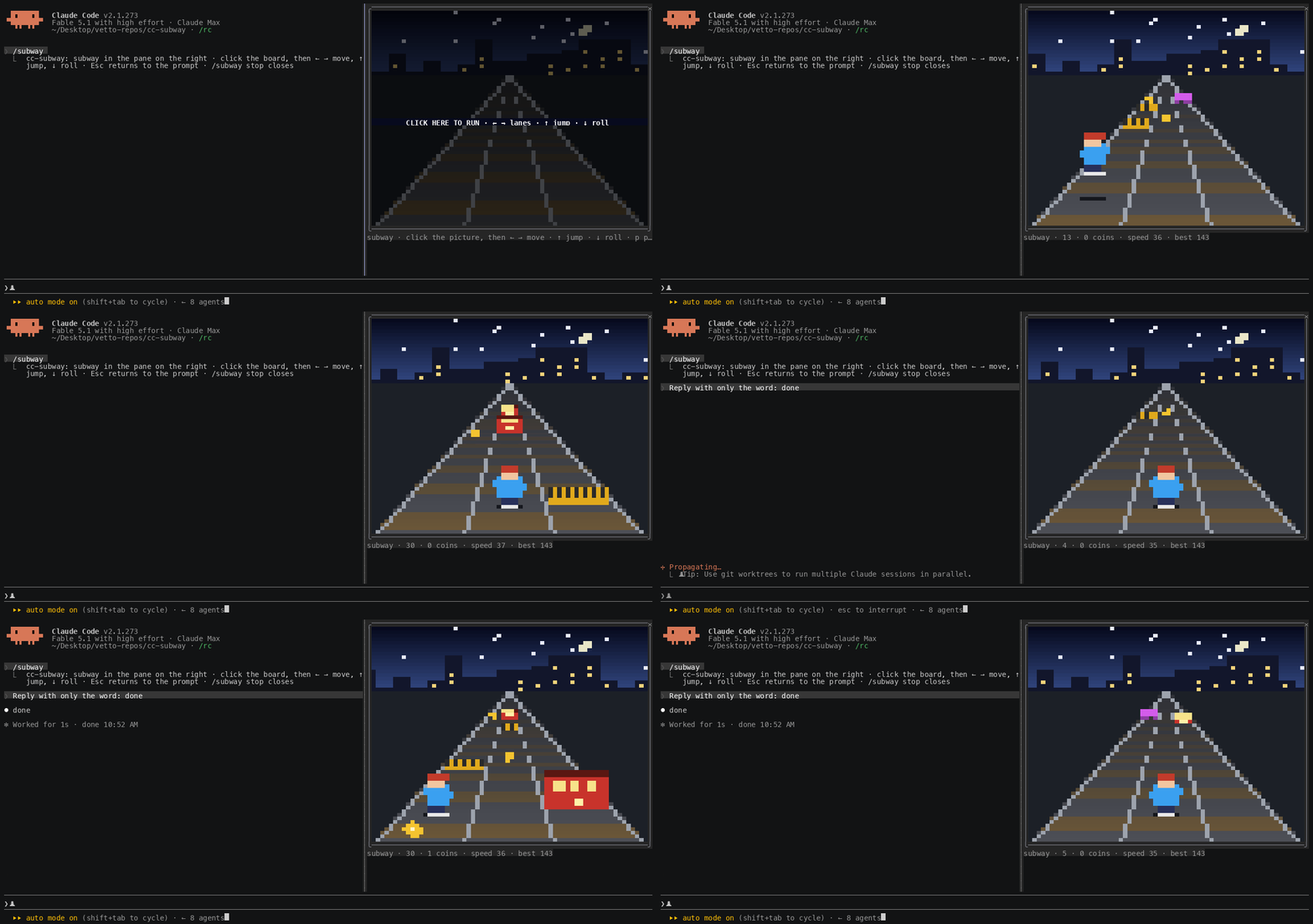
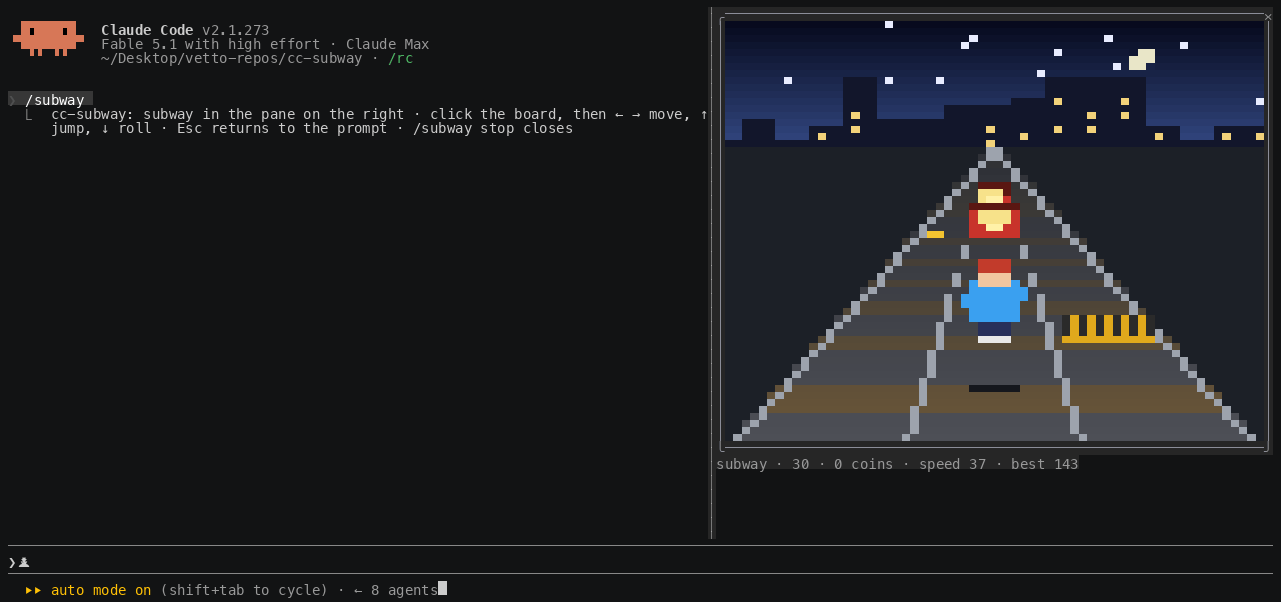
The picture is drawn at one pixel per column and two per row, with the ▀ half block coloured front and back, twenty frames a second: a gradient sky with stars and a moon, a skyline that drifts by more slowly than the track, rails converging to a vanishing point, sleepers scrolling at the game's speed, trains with lit windows, and a runner with a run cycle, a jump arc and a roll.
The plugin is built on Claude Code function hooks ("Claude Mods"): TypeScript that runs inside Claude Code's own process, instead of shell-command hooks. They are in early access, so they need the environment variable the quick start sets, and the API can change between Claude Code releases.
Requirements
- Claude Code 2.1.269 or later, with
CLAUDE_CODE_ENABLE_FUNCTION_HOOKS=1set. The quick start shows where. - An interactive terminal session. Nothing draws in
claude -p, the desktop app or mobile. - A terminal that reports the mouse. One click is what gives the board the keyboard.
- For the pane to dock on the right: the fullscreen layout, which is the default outside tmux, and a terminal at least 110 columns wide. Narrower, or on the main screen, the same pane sits inline above the prompt.
- A terminal font with the
▀half block. Modern terminals are fine.
Quick start
-
Turn function hooks on. Add this to
~/.claude/settings.json(create the file if it does not exist, or merge theenvkey into what is there). Without it the plugin installs fine but does nothing.{ "env": { "CLAUDE_CODE_ENABLE_FUNCTION_HOOKS": "1" } }For a single session instead, prefix the command:
CLAUDE_CODE_ENABLE_FUNCTION_HOOKS=1 claude. -
Install from GitHub. The repo is its own marketplace:
claude plugin marketplace add lucastononro/cc-subway claude plugin install cc-subway@cc-subway -
Start
claudeand run/subway. The pane opens on the right.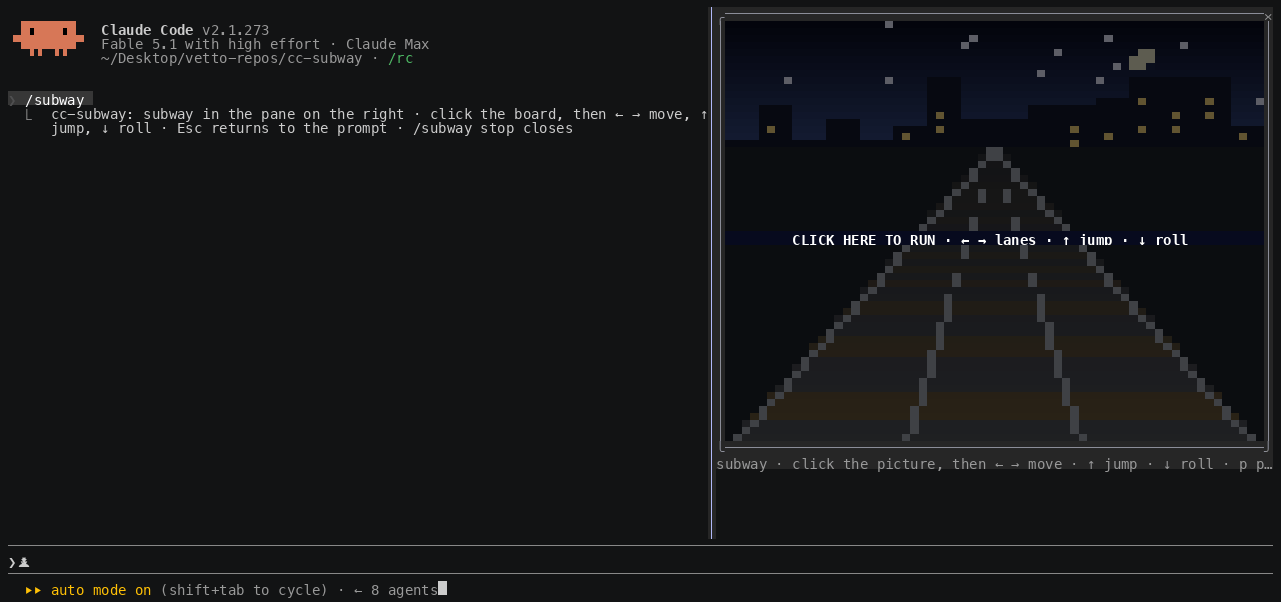
-
Click the picture, then use the arrows. The click gives the game the keyboard; until then your keys go to the prompt.
-
Press Esc to give the keyboard back to the prompt.
/subwayagain,/subway stop, or ctrl+x x closes the pane.
If /subway is an unknown command, see Troubleshooting.
To remove it:
claude plugin uninstall cc-subway
claude plugin marketplace remove cc-subway
To try it without installing, or to hack on it, clone and load it for one session:
git clone https://github.com/lucastononro/cc-subway
cd cc-subway
claude --plugin-dir .
The repo's own .claude/settings.json sets the variable for sessions started inside the folder.
Controls
← →, or a d | change lane |
↑, w, Space, Enter | jump: clears a yellow low barrier |
↓, s | roll: passes under a purple high barrier |
| click | left third of the picture moves left, right third moves right, the middle jumps |
p | pause |
r | start again |
| Esc | keyboard back to the prompt; the game keeps running |
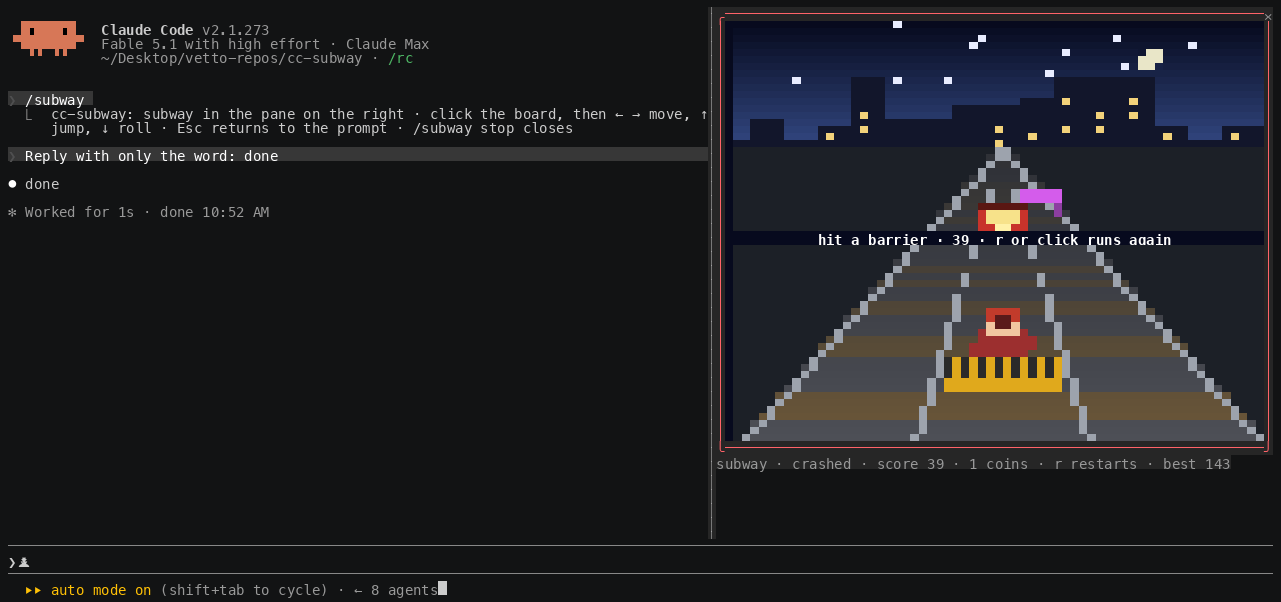
A red train blocks the lane whatever you do: change lane. Coins are worth ten, every row travelled one. The track speeds up as you go. Only one lane is blocked on any row, so there is always somewhere to go.
Playing while Claude works
Send your prompt, then open the game. When the turn finishes, the picture dims, a banner says ● Claude is done across the track, and the status line turns yellow. Press a key or click to carry on, or Esc to go and read the reply.
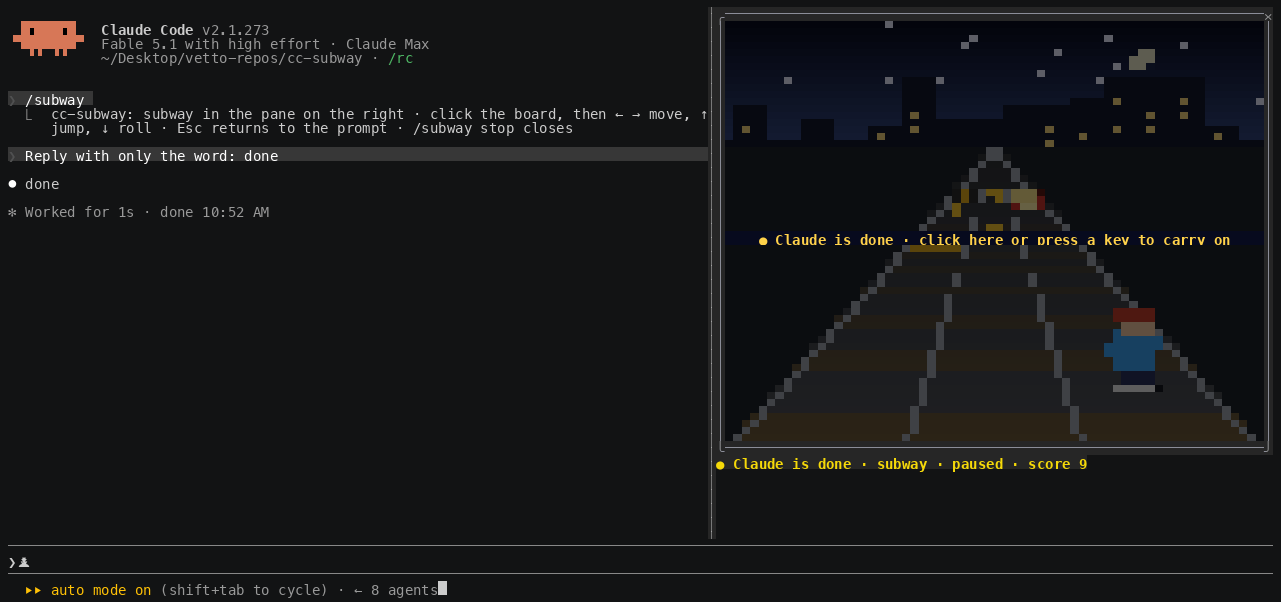
The best score is kept in the plugin's store across sessions, and a new best shows a toast.
How it works
hooks/register.tsxis the hooks module.session.startregisters/subway;command.runopens the pane with$.ui.open({ id: 'subway' });ui.renderfor{ component: 'Pane', requestId: 'subway' }draws the board as aClientelement sized to the pane'sbodyColumnsandscroll.bodyRows;turn.completebumps a counter the board reads to pause;ui.messagekeeps the best score in$.store.hooks/board.tsxis the surface module: it runs on the drawing thread with its own frame clock, keys and mouse. It ticks the rules ten times a second, paints the scene twenty times a second with the▀half block (foreground for the top pixel, background for the bottom), folding runs of colour when a row would exceed the engine's node budget, and posts the score back when a round ends.hooks/scene.tspaints the picture into a buffer of hex-coloured pixels: the sky, the skyline, the perspective track, the things on it scaled by distance, the runner and its poses, the crash flash. Pure, so it renders headless in tests.hooks/game.tsholds the rules as pure functions: lanes, the jump and roll timers, spawning, collisions, speed.
Two rules for the board file: never name a local variable h, because every JSX tag compiles to a call of h; and write the Client module path as a string literal, because the engine reads it off the source.
Develop
bun test                                             # the rules and the scene; PREVIEW=1 prints ASCII frames
bunx --bun oxlint@1.83.0 hooks tests --deny-warnings # dead code and correctness, no config file
claude plugin validate .claude-plugin/plugin.json    # lists the hooked events, $ calls and surface modules
claude plugin validate .                             # checks the marketplace manifest
Type checking needs the early-access types: open a Claude Code session in this folder with function hooks on, run /plugin-types (it writes the git-ignored .claude/types/), then bunx -p typescript tsc -p .. If bun is not installed, npx -y bun@1 test works.
Edits hot-reload into a running session. If a reload fails partway, the transcript says so; restart the session.
The gif and the screenshots are captured from a real session in a 150 by 42 terminal, driven through tmux: docs/capture/record.sh opens the session, plays a scripted run, sends Claude a one-word prompt so the pause shows, grabs frames with tmux capture-pane -e, and renders them with agg.
Troubleshooting
/subwayis an unknown command. Function hooks are off. CheckCLAUDE_CODE_ENABLE_FUNCTION_HOOKSis set in~/.claude/settings.jsonunderenv, and that the plugin is loaded with/plugins.- The pane opened above the prompt, not on the right. The terminal is under 110 columns, or Claude Code is on the main-screen layout (tmux, or
CLAUDE_CODE_NO_FLICKER=0). Widen the terminal; the pane moves on the next open. - Keys go to the prompt instead of the game. Click the picture first. Esc hands the keyboard back to the prompt.
- Nothing happens when you click. Your terminal does not report the mouse, and the board cannot get the keyboard without a click.
- The picture is small. It follows the pane: a wider terminal and a taller pane give a bigger picture, up to 72 columns by 30 rows.
- The picture is replaced by one line naming the plugin and the module. The board threw an error or ran over its time budget and was unmounted. Run
/subway stopand open it again. If it repeats, start Claude with--debug-file /tmp/cc-subway.logand search the log forcc-subway.
Limits
- Twenty frames a second, so it feels coarse next to a real console.
- The game only gets the keyboard after a click, and never gets Esc, which always returns to the prompt.
- A headless
claude -prun, the desktop app and mobile never draw the pane. - The best score lives in the plugin's store on this machine.
A clone of the genre, not affiliated with or endorsed by SYBO.
License
MIT. See LICENSE.
See what people are saying
Similar repos


Languages
TypeScript
100.0%
Subway runner in a pane on the right of Claude Code, playable while Claude works. A Claude Mod built on function hooks.
TypeScript
1
0 commits
updated Sep 16, 2026
README
cc-subway
An endless runner in a pane on the right of the Claude Code transcript, for the minutes Claude spends working.
Run /subway. A pane opens beside the transcript with three lanes of track running toward a night skyline. Click the picture, then ← → to change lane, ↑ to jump the low barriers, ↓ to roll under the high ones, and change lane to dodge the trains. Coins score ten. When Claude finishes the turn the game pauses and says so, so you never miss a reply. Playing costs no tokens: the plugin answers every key itself, without asking the model.
The picture is drawn at one pixel per column and two per row, with the ▀ half block coloured front and back, twenty frames a second: a gradient sky with stars and a moon, a skyline that drifts by more slowly than the track, rails converging to a vanishing point, sleepers scrolling at the game's speed, trains with lit windows, and a runner with a run cycle, a jump arc and a roll.
The plugin is built on Claude Code function hooks ("Claude Mods"): TypeScript that runs inside Claude Code's own process, instead of shell-command hooks. They are in early access, so they need the environment variable the quick start sets, and the API can change between Claude Code releases.
Requirements
- Claude Code 2.1.269 or later, with
CLAUDE_CODE_ENABLE_FUNCTION_HOOKS=1set. The quick start shows where. - An interactive terminal session. Nothing draws in
claude -p, the desktop app or mobile. - A terminal that reports the mouse. One click is what gives the board the keyboard.
- For the pane to dock on the right: the fullscreen layout, which is the default outside tmux, and a terminal at least 110 columns wide. Narrower, or on the main screen, the same pane sits inline above the prompt.
- A terminal font with the
▀half block. Modern terminals are fine.
Quick start
-
Turn function hooks on. Add this to
~/.claude/settings.json(create the file if it does not exist, or merge theenvkey into what is there). Without it the plugin installs fine but does nothing.{ "env": { "CLAUDE_CODE_ENABLE_FUNCTION_HOOKS": "1" } }For a single session instead, prefix the command:
CLAUDE_CODE_ENABLE_FUNCTION_HOOKS=1 claude. -
Install from GitHub. The repo is its own marketplace:
claude plugin marketplace add lucastononro/cc-subway claude plugin install cc-subway@cc-subway -
Start
claudeand run/subway. The pane opens on the right. -
Click the picture, then use the arrows. The click gives the game the keyboard; until then your keys go to the prompt.
-
Press Esc to give the keyboard back to the prompt.
/subwayagain,/subway stop, or ctrl+x x closes the pane.
If /subway is an unknown command, see Troubleshooting.
To remove it:
claude plugin uninstall cc-subway
claude plugin marketplace remove cc-subway
To try it without installing, or to hack on it, clone and load it for one session:
git clone https://github.com/lucastononro/cc-subway
cd cc-subway
claude --plugin-dir .
The repo's own .claude/settings.json sets the variable for sessions started inside the folder.
Controls
← →, or a d | change lane |
↑, w, Space, Enter | jump: clears a yellow low barrier |
↓, s | roll: passes under a purple high barrier |
| click | left third of the picture moves left, right third moves right, the middle jumps |
p | pause |
r | start again |
| Esc | keyboard back to the prompt; the game keeps running |
A red train blocks the lane whatever you do: change lane. Coins are worth ten, every row travelled one. The track speeds up as you go. Only one lane is blocked on any row, so there is always somewhere to go.
Playing while Claude works
Send your prompt, then open the game. When the turn finishes, the picture dims, a banner says ● Claude is done across the track, and the status line turns yellow. Press a key or click to carry on, or Esc to go and read the reply.
The best score is kept in the plugin's store across sessions, and a new best shows a toast.
How it works
hooks/register.tsxis the hooks module.session.startregisters/subway;command.runopens the pane with$.ui.open({ id: 'subway' });ui.renderfor{ component: 'Pane', requestId: 'subway' }draws the board as aClientelement sized to the pane'sbodyColumnsandscroll.bodyRows;turn.completebumps a counter the board reads to pause;ui.messagekeeps the best score in$.store.hooks/board.tsxis the surface module: it runs on the drawing thread with its own frame clock, keys and mouse. It ticks the rules ten times a second, paints the scene twenty times a second with the▀half block (foreground for the top pixel, background for the bottom), folding runs of colour when a row would exceed the engine's node budget, and posts the score back when a round ends.hooks/scene.tspaints the picture into a buffer of hex-coloured pixels: the sky, the skyline, the perspective track, the things on it scaled by distance, the runner and its poses, the crash flash. Pure, so it renders headless in tests.hooks/game.tsholds the rules as pure functions: lanes, the jump and roll timers, spawning, collisions, speed.
Two rules for the board file: never name a local variable h, because every JSX tag compiles to a call of h; and write the Client module path as a string literal, because the engine reads it off the source.
Develop
bun test                                             # the rules and the scene; PREVIEW=1 prints ASCII frames
bunx --bun oxlint@1.83.0 hooks tests --deny-warnings # dead code and correctness, no config file
claude plugin validate .claude-plugin/plugin.json    # lists the hooked events, $ calls and surface modules
claude plugin validate .                             # checks the marketplace manifest
Type checking needs the early-access types: open a Claude Code session in this folder with function hooks on, run /plugin-types (it writes the git-ignored .claude/types/), then bunx -p typescript tsc -p .. If bun is not installed, npx -y bun@1 test works.
Edits hot-reload into a running session. If a reload fails partway, the transcript says so; restart the session.
The gif and the screenshots are captured from a real session in a 150 by 42 terminal, driven through tmux: docs/capture/record.sh opens the session, plays a scripted run, sends Claude a one-word prompt so the pause shows, grabs frames with tmux capture-pane -e, and renders them with agg.
Troubleshooting
/subwayis an unknown command. Function hooks are off. CheckCLAUDE_CODE_ENABLE_FUNCTION_HOOKSis set in~/.claude/settings.jsonunderenv, and that the plugin is loaded with/plugins.- The pane opened above the prompt, not on the right. The terminal is under 110 columns, or Claude Code is on the main-screen layout (tmux, or
CLAUDE_CODE_NO_FLICKER=0). Widen the terminal; the pane moves on the next open. - Keys go to the prompt instead of the game. Click the picture first. Esc hands the keyboard back to the prompt.
- Nothing happens when you click. Your terminal does not report the mouse, and the board cannot get the keyboard without a click.
- The picture is small. It follows the pane: a wider terminal and a taller pane give a bigger picture, up to 72 columns by 30 rows.
- The picture is replaced by one line naming the plugin and the module. The board threw an error or ran over its time budget and was unmounted. Run
/subway stopand open it again. If it repeats, start Claude with--debug-file /tmp/cc-subway.logand search the log forcc-subway.
Limits
- Twenty frames a second, so it feels coarse next to a real console.
- The game only gets the keyboard after a click, and never gets Esc, which always returns to the prompt.
- A headless
claude -prun, the desktop app and mobile never draw the pane. - The best score lives in the plugin's store on this machine.
A clone of the genre, not affiliated with or endorsed by SYBO.
License
MIT. See LICENSE.
See what people are saying
Similar repos
Languages
TypeScript
100.0%