A web interface for Stable Diffusion, implemented using Gradio library.
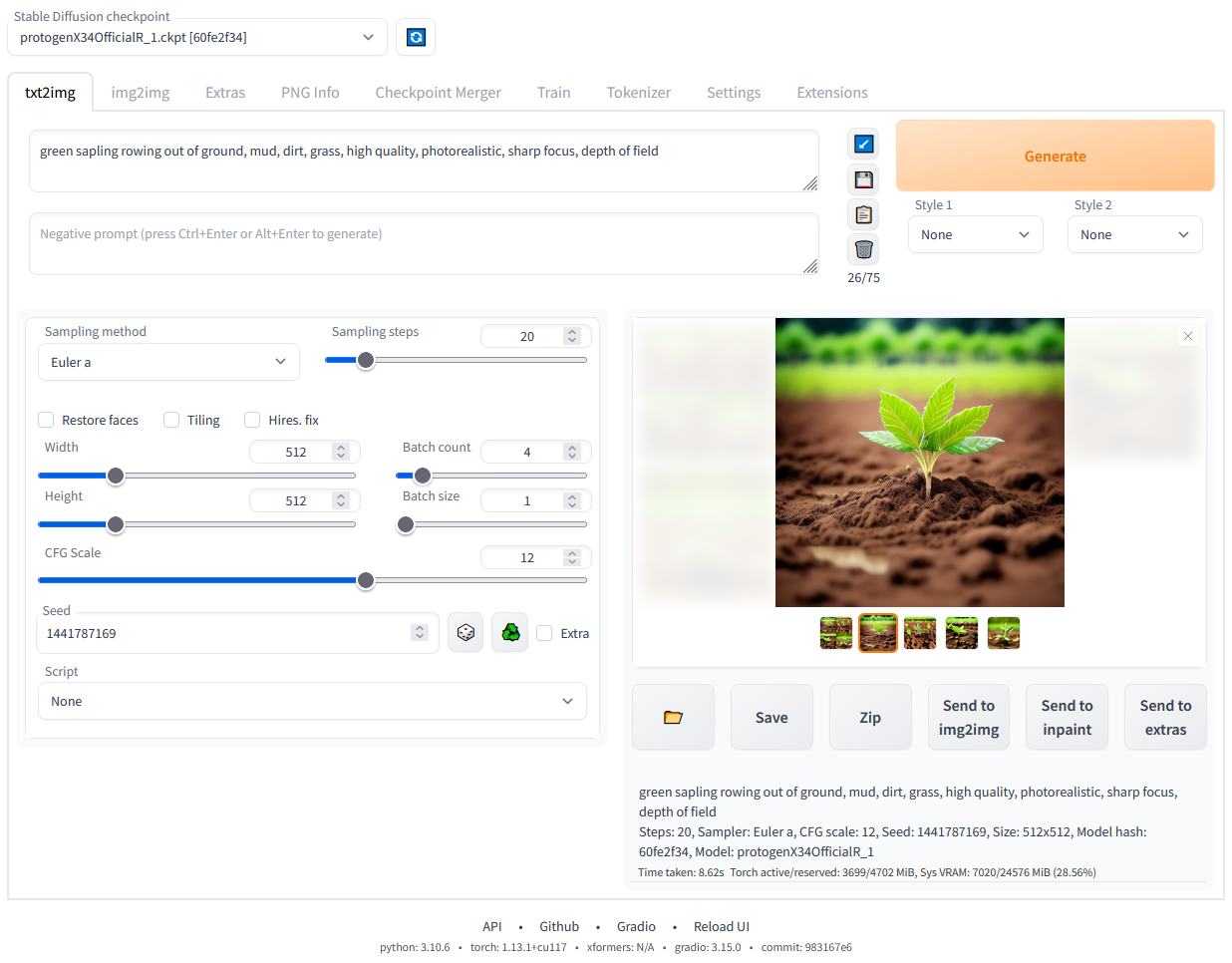
Detailed feature showcase with images:
((tuxedo)) - will pay more attention to tuxedo(tuxedo:1.21) - alternative syntaxCtrl+Up or Ctrl+Down (or Command+Up or Command+Down if you're on a MacOS) to automatically adjust attention to selected text (code contributed by anonymous user)--allow-code to enable)ANDa cat :1.2 AND a dog AND a penguin :2.2--xformers to commandline args)DirectML support for every GPUs that support DirectX 12 API.
ZLUDA support for AMDGPUs.
--use-directml: Use DirectML as a torch backend.--use-zluda: Use ZLUDA as a torch backend.DirectML is available for every gpu that supports DirectX 12.
If you are using one of recent AMDGPUs, ZLUDA is more recommended.
Start WebUI with --use-directml.
Most of AMDGPUs are compatible.
Start WebUI with --use-zluda.
Visit SD.Next ZLUDA installation guide for details.
(Everything is same except for which repository you clone. You'll clone this repository instead of SD.Next if you want to use the original Stable diffusion WebUI)
sd.webui.zip from v1.0.0-pre and extract its contents.update.bat.run.bat.
For more details see Install-and-Run-on-NVidia-GPUs
git clone https://github.com/lshqqytiger/stable-diffusion-webui-amdgpu.git.webui-user.bat from Windows Explorer as normal, non-administrator, user.# Debian-based:
sudo apt install wget git python3 python3-venv libgl1 libglib2.0-0
# Red Hat-based:
sudo dnf install wget git python3 gperftools-libs libglvnd-glx
# openSUSE-based:
sudo zypper install wget git python3 libtcmalloc4 libglvnd
# Arch-based:
sudo pacman -S wget git python3
If your system is very new, you need to install python3.11 or python3.10:
# Ubuntu 24.04
sudo add-apt-repository ppa:deadsnakes/ppa
sudo apt update
sudo apt install python3.11

# Manjaro/Arch
sudo pacman -S yay
yay -S python311 # do not confuse with python3.11 package

# Only for 3.11
# Then set up env variable in launch script
export python_cmd="python3.11"
# or in webui-user.sh
python_cmd="python3.11"
wget -q https://raw.githubusercontent.com/lshqqytiger/stable-diffusion-webui-amdgpu/master/webui.sh
Or just clone the repo wherever you want:
git clone https://github.com/lshqqytiger/stable-diffusion-webui-amdgpu
webui.sh.webui-user.sh for options.Find the instructions here.
Here's how to add code to this repo: Contributing
The documentation was moved from this README over to the project's wiki.
For the purposes of getting Google and other search engines to crawl the wiki, here's a link to the (not for humans) crawlable wiki.
Licenses for borrowed code can be found in Settings -> Licenses screen, and also in html/licenses.html file.
289 followers · starred Jun 2023
11 followers · starred Apr 2023
41 followers · starred Apr 2023
A web interface for Stable Diffusion, implemented using Gradio library.
Detailed feature showcase with images:
((tuxedo)) - will pay more attention to tuxedo(tuxedo:1.21) - alternative syntaxCtrl+Up or Ctrl+Down (or Command+Up or Command+Down if you're on a MacOS) to automatically adjust attention to selected text (code contributed by anonymous user)--allow-code to enable)ANDa cat :1.2 AND a dog AND a penguin :2.2--xformers to commandline args)DirectML support for every GPUs that support DirectX 12 API.
ZLUDA support for AMDGPUs.
--use-directml: Use DirectML as a torch backend.--use-zluda: Use ZLUDA as a torch backend.DirectML is available for every gpu that supports DirectX 12.
If you are using one of recent AMDGPUs, ZLUDA is more recommended.
Start WebUI with --use-directml.
Most of AMDGPUs are compatible.
Start WebUI with --use-zluda.
Visit SD.Next ZLUDA installation guide for details.
(Everything is same except for which repository you clone. You'll clone this repository instead of SD.Next if you want to use the original Stable diffusion WebUI)
sd.webui.zip from v1.0.0-pre and extract its contents.update.bat.run.bat.
For more details see Install-and-Run-on-NVidia-GPUs
git clone https://github.com/lshqqytiger/stable-diffusion-webui-amdgpu.git.webui-user.bat from Windows Explorer as normal, non-administrator, user.# Debian-based:
sudo apt install wget git python3 python3-venv libgl1 libglib2.0-0
# Red Hat-based:
sudo dnf install wget git python3 gperftools-libs libglvnd-glx
# openSUSE-based:
sudo zypper install wget git python3 libtcmalloc4 libglvnd
# Arch-based:
sudo pacman -S wget git python3
If your system is very new, you need to install python3.11 or python3.10:
# Ubuntu 24.04
sudo add-apt-repository ppa:deadsnakes/ppa
sudo apt update
sudo apt install python3.11

# Manjaro/Arch
sudo pacman -S yay
yay -S python311 # do not confuse with python3.11 package

# Only for 3.11
# Then set up env variable in launch script
export python_cmd="python3.11"
# or in webui-user.sh
python_cmd="python3.11"
wget -q https://raw.githubusercontent.com/lshqqytiger/stable-diffusion-webui-amdgpu/master/webui.sh
Or just clone the repo wherever you want:
git clone https://github.com/lshqqytiger/stable-diffusion-webui-amdgpu
webui.sh.webui-user.sh for options.Find the instructions here.
Here's how to add code to this repo: Contributing
The documentation was moved from this README over to the project's wiki.
For the purposes of getting Google and other search engines to crawl the wiki, here's a link to the (not for humans) crawlable wiki.
Licenses for borrowed code can be found in Settings -> Licenses screen, and also in html/licenses.html file.
289 followers · starred Jun 2023
11 followers · starred Apr 2023
41 followers · starred Apr 2023



