locluclak/pronunciation-trainer

AI-powered pronunciation practice with real-time feedback, IPA transcription, and detailed scoring.

Python

2

5 commits

updated Jun 17, 2026
See the code

README

Logo

AI Pronunciation Trainer

AI-powered pronunciation practice with real-time feedback, IPA transcription, and detailed scoring.

Features | Demo | Setup | Usage | Acknowledgments


Features

Sentence Practice

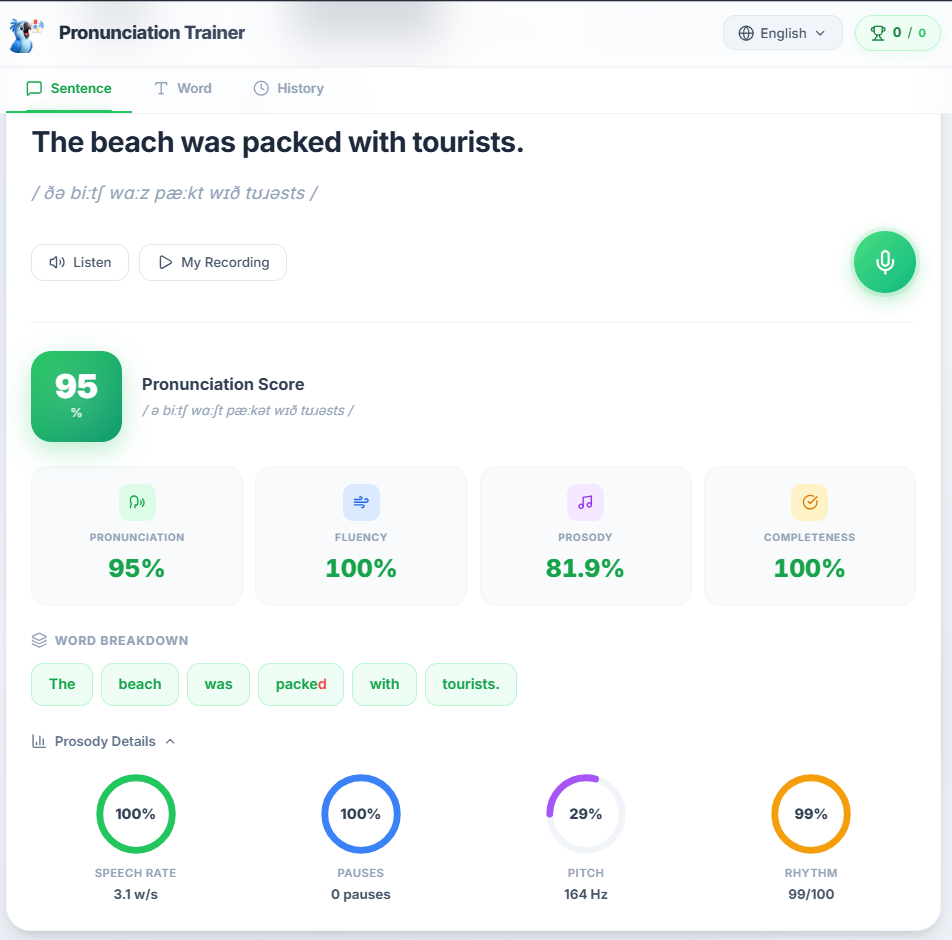
Practice full sentences with AI-powered pronunciation scoring. Record yourself, compare with native pronunciation, and get detailed feedback on each word.
Sentence Practice

  • IPA Transcription — See the phonetic breakdown of every sentence
  • Word Breakdown — Color-coded chips show which words you pronounced correctly (green) and which need improvement (red)
  • Prosody Analysis — Speech rate, pauses, pitch, and rhythm scored individually
  • Custom Text — Type any sentence you want to practice

Word Practice

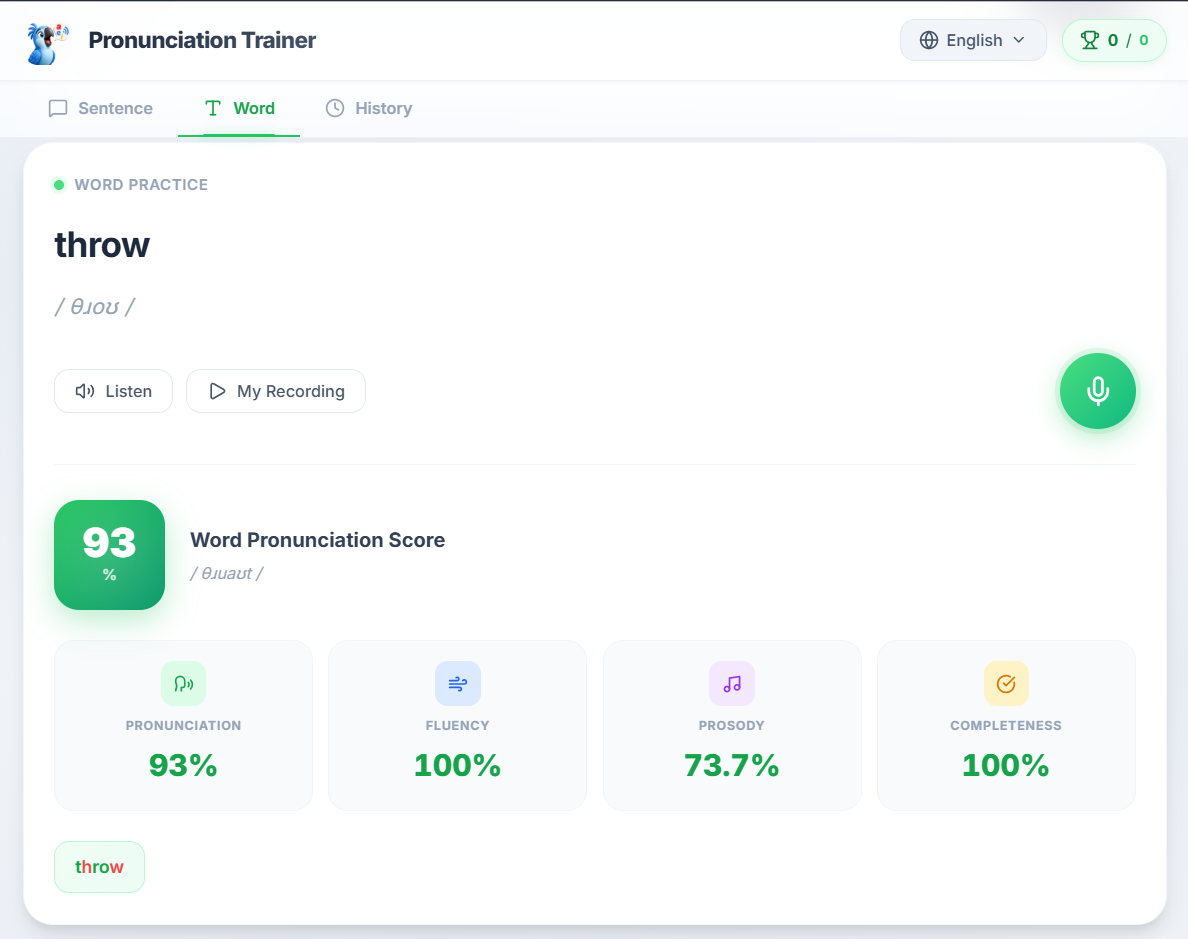
Focus on individual words that are difficult for you. Type any word or pick from curated practice sets.
Word Practice

  • Instant IPA — Look up the IPA transcription for any English word
  • Targeted Feedback — See exactly which sounds you need to work on
  • Error Analysis — Detailed explanation of pronunciation mistakes with tips

Curated Practice Sets

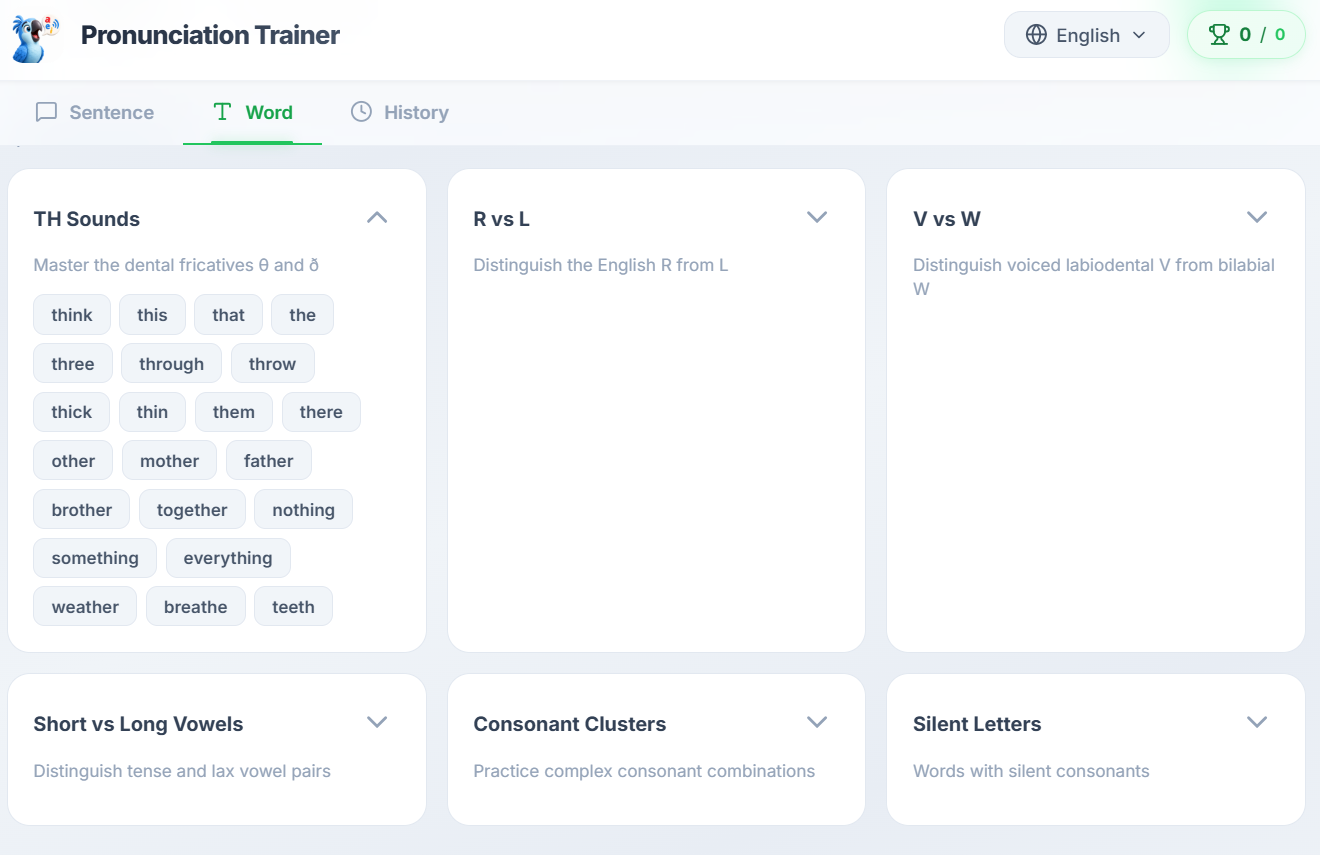
Struggling with specific sounds? Choose from built-in word lists organized by common pronunciation challenges.
Practice Sets

  • TH Sounds — Master θ and ð (think, this, that, three...)
  • R vs L — Distinguish English R from L
  • V vs W — Tell apart voiced labiodental V from bilabial W
  • Short vs Long Vowels — Distinguish tense and lax vowel pairs
  • Consonant Clusters — Practice complex consonant combinations
  • Silent Letters — Words with silent consonants

Progress Tracking

Monitor your improvement over time with session history and score trends.
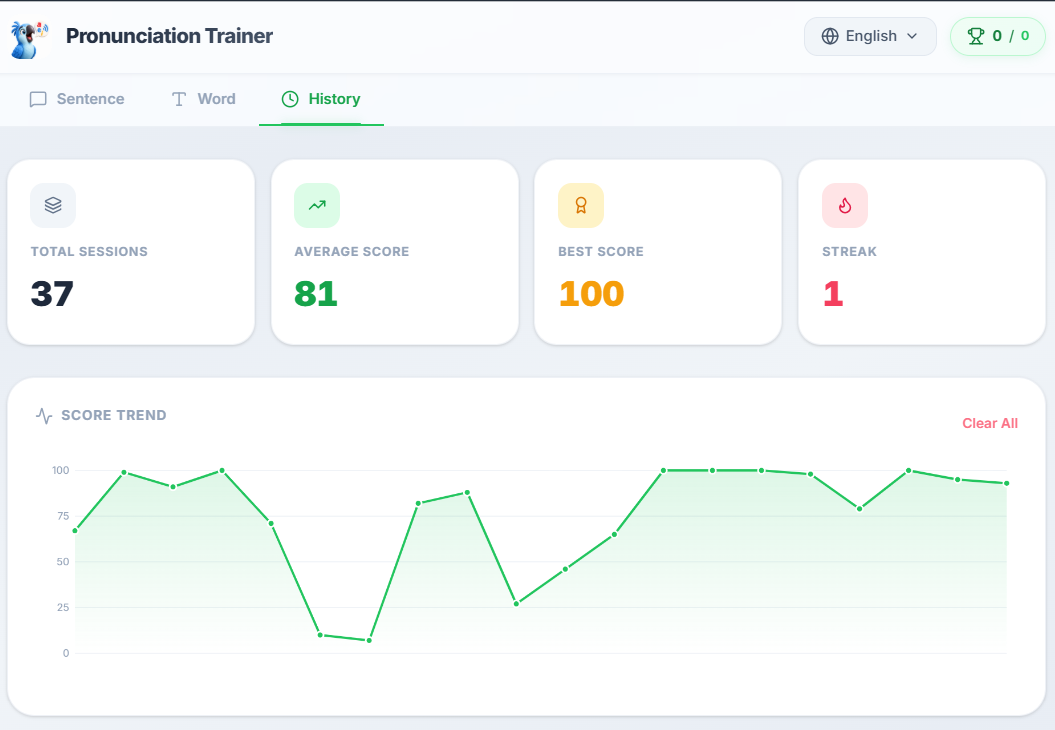
History & Score Trend

  • Total Sessions — Track how much you've practiced
  • Average & Best Score — See your overall performance
  • Score Trend Chart — Visualize your progress over time
  • Streak — Stay motivated with practice streaks

Multi-Language Support

  • English (with Piper TTS natural voice)
  • German (with Piper TTS natural voice)

Setup

docker compose up --build

Then open http://localhost:3000 in your browser.

Option 2: Local Installation

Prerequisites

Install

# Clone the repository
git clone https://github.com/locluclak/ai-pronunciation-trainer.git
cd ai-pronunciation-trainer

# Install dependencies
pip install -r requirements.txt

# Run the app
python webApp.py

The app will open automatically at http://127.0.0.1:3000.

ffmpeg Setup (Windows)

Add ffmpeg's bin folder to your system PATH:

  1. Download ffmpeg from https://ffmpeg.org/download.html
  2. Extract and locate the bin folder
  3. Add to PATH: Settings → System → About → Advanced system settings → Environment Variables → Path → Edit → New → paste the bin folder path

ffmpeg Setup (macOS)

brew install ffmpeg

Usage

Sentence Practice

  1. Click New Sentence to get a random sentence, or type your own in Custom Text
  2. Click Listen to hear the native pronunciation
  3. Click the ** microphone** button to record yourself
  4. Click the microphone button again to stop recording
  5. View your score, word breakdown, and prosody analysis

Word Practice

  1. Switch to the Word tab
  2. Type any word and click IPA to see its phonetic transcription
  3. Pick a word from the Practice Sets or type your own
  4. Record yourself and get detailed feedback on your pronunciation

Progress History

  1. Switch to the History tab
  2. View your total sessions, average score, best score, and streak
  3. Track your improvement with the Score Trend chart

Tech Stack

ComponentTechnology
FrontendVanilla HTML/CSS/JS
BackendPython Flask
ASRFaster-Whisper / WhisperX
TTSPiper TTS (ONNX)
IPACMUdict + g2p-en / Epitran
ProsodyPraat-parselmouth

Acknowledgments

This project is built upon the excellent work of Thiago Lobato and his original AI Pronunciation Trainer. The original project provided the foundation for pronunciation scoring, phoneme analysis, and the core architecture that made this enhanced version possible.

A big thank you to:

  • Thiago Lobato — for creating the original project and making it open source
  • Piper TTS — for the lightweight, natural-sounding text-to-speech engine
  • WhisperX — for accurate word-level alignment
  • Faster-Whisper — for efficient speech recognition

Made with care by locluclak

locluclak/pronunciation-trainer

AI-powered pronunciation practice with real-time feedback, IPA transcription, and detailed scoring.

Python

2

5 commits

updated Jun 17, 2026

See the code

README

Logo

AI Pronunciation Trainer

AI-powered pronunciation practice with real-time feedback, IPA transcription, and detailed scoring.

Features | Demo | Setup | Usage | Acknowledgments


Features

Sentence Practice

Practice full sentences with AI-powered pronunciation scoring. Record yourself, compare with native pronunciation, and get detailed feedback on each word.

Sentence Practice

  • IPA Transcription — See the phonetic breakdown of every sentence
  • Word Breakdown — Color-coded chips show which words you pronounced correctly (green) and which need improvement (red)
  • Prosody Analysis — Speech rate, pauses, pitch, and rhythm scored individually
  • Custom Text — Type any sentence you want to practice

Word Practice

Focus on individual words that are difficult for you. Type any word or pick from curated practice sets.

Word Practice

  • Instant IPA — Look up the IPA transcription for any English word
  • Targeted Feedback — See exactly which sounds you need to work on
  • Error Analysis — Detailed explanation of pronunciation mistakes with tips

Curated Practice Sets

Struggling with specific sounds? Choose from built-in word lists organized by common pronunciation challenges.

Practice Sets

  • TH Sounds — Master θ and ð (think, this, that, three...)
  • R vs L — Distinguish English R from L
  • V vs W — Tell apart voiced labiodental V from bilabial W
  • Short vs Long Vowels — Distinguish tense and lax vowel pairs
  • Consonant Clusters — Practice complex consonant combinations
  • Silent Letters — Words with silent consonants

Progress Tracking

Monitor your improvement over time with session history and score trends.

History & Score Trend

  • Total Sessions — Track how much you've practiced
  • Average & Best Score — See your overall performance
  • Score Trend Chart — Visualize your progress over time
  • Streak — Stay motivated with practice streaks

Multi-Language Support

  • English (with Piper TTS natural voice)
  • German (with Piper TTS natural voice)

Setup

docker compose up --build

Then open http://localhost:3000 in your browser.

Option 2: Local Installation

Prerequisites

Install

# Clone the repository
git clone https://github.com/locluclak/ai-pronunciation-trainer.git
cd ai-pronunciation-trainer

# Install dependencies
pip install -r requirements.txt

# Run the app
python webApp.py

The app will open automatically at http://127.0.0.1:3000.

ffmpeg Setup (Windows)

Add ffmpeg's bin folder to your system PATH:

  1. Download ffmpeg from https://ffmpeg.org/download.html
  2. Extract and locate the bin folder
  3. Add to PATH: Settings → System → About → Advanced system settings → Environment Variables → Path → Edit → New → paste the bin folder path

ffmpeg Setup (macOS)

brew install ffmpeg

Usage

Sentence Practice

  1. Click New Sentence to get a random sentence, or type your own in Custom Text
  2. Click Listen to hear the native pronunciation
  3. Click the ** microphone** button to record yourself
  4. Click the microphone button again to stop recording
  5. View your score, word breakdown, and prosody analysis

Word Practice

  1. Switch to the Word tab
  2. Type any word and click IPA to see its phonetic transcription
  3. Pick a word from the Practice Sets or type your own
  4. Record yourself and get detailed feedback on your pronunciation

Progress History

  1. Switch to the History tab
  2. View your total sessions, average score, best score, and streak
  3. Track your improvement with the Score Trend chart

Tech Stack

ComponentTechnology
FrontendVanilla HTML/CSS/JS
BackendPython Flask
ASRFaster-Whisper / WhisperX
TTSPiper TTS (ONNX)
IPACMUdict + g2p-en / Epitran
ProsodyPraat-parselmouth

Acknowledgments

This project is built upon the excellent work of Thiago Lobato and his original AI Pronunciation Trainer. The original project provided the foundation for pronunciation scoring, phoneme analysis, and the core architecture that made this enhanced version possible.

A big thank you to:

  • Thiago Lobato — for creating the original project and making it open source
  • Piper TTS — for the lightweight, natural-sounding text-to-speech engine
  • WhisperX — for accurate word-level alignment
  • Faster-Whisper — for efficient speech recognition

Made with care by locluclak
