
Render images in the terminal with Textual and rich
Python
183
139 commits
updated Sep 17, 2026
README
textual-image




Render images directly in your terminal using Textual and Rich.
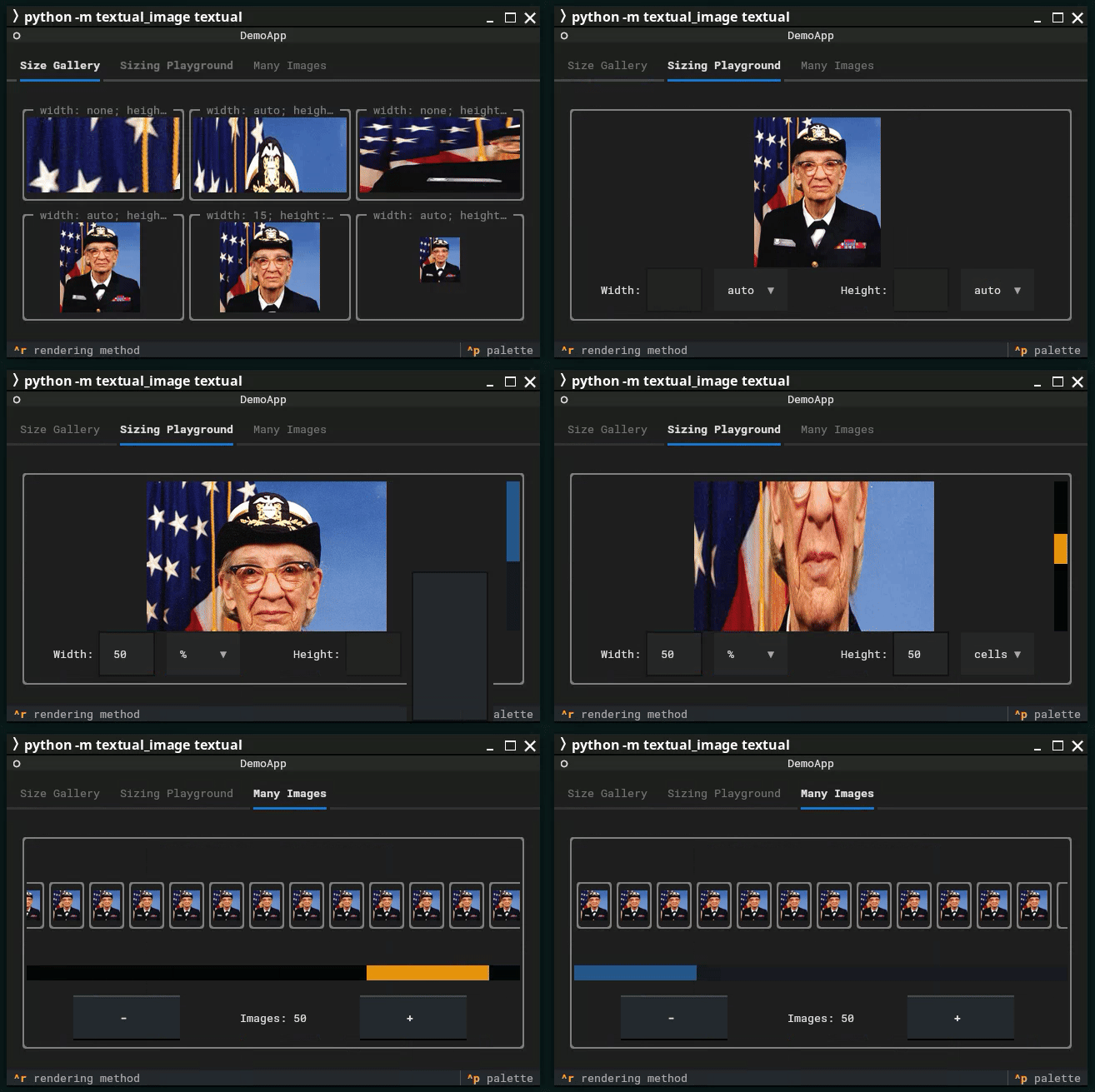
textual-image offers both Rich renderables and Textual Widgets that leverage the Terminal Graphics Protocol (TGP) and Sixel protocols to display images in your terminal. For terminals that don't support these protocols, fallback rendering using Unicode characters is available.
Supported Terminals
- Terminal Graphics Protocol (TGP): Initially introduced by the Kitty terminal emulator. While support is partially available in other terminals, it doesn't seem to be really usable there.
- Sixel Graphics: Supported by various terminal emulators including xterm and a lot of others.
Note: As implementation of these protocols differ a lot feedback on different terminal emulators is very welcome.
See the Support Matrix below on what was tested already.
Support Matrix 1
| Terminal | TGP support | Sixel support | Works with textual-image |
|---|---|---|---|
| Black Box | ❌ | ✅ | ✅ |
| foot | ❌ | ✅ | ✅ |
| GNOME Terminal | ❌ | ❌ | |
| iTerm2 | ❌ | ✅ | ✅ |
| kitty | ✅ | ❌ | ✅ |
| konsole | ✅ | ✅ | ✅ |
| tmux | ⚠️ | ✅ | ✅ |
| Visual Studio Code | ❌ | ✅ | ✅ |
| Warp | ❌ | ❌ | ❌ |
| wezterm | ✅ | ✅ | ✅ |
| Windows Console | ❌ | ❌ | |
| Windows Terminal | ❌ | ✅ | ✅ |
| xterm | ❌ | ✅ | ✅ |
✅ = Supported; ❌ = Not Supported; ⚠️ = Requires additional terminal/tmux configuration
BlackBox
Homepage: https://gitlab.gnome.org/raggesilver/blackbox
TGP support: No
Sixel support: Yes
Works: Yes
Notes:
Preferences -> Advanced -> Sixel Support has to be enabled.
Needs to be linked against a version of VTE with Sixel support enabled. This is the case for the Flatpak version of BlackBox, but not on most Linux distribution's native packages.
foot
Homepage: https://codeberg.org/dnkl/foot
TGP support: No
Sixel support: Yes
Works: Yes
Notes:
Works out of the box, no known issues.
GNOME Terminal
Homepage: https://gitlab.gnome.org/GNOME/gnome-terminal
TGP support: No
Sixel support: No
Works: No
Notes:
Relies on VTE Sixel implementation (https://gitlab.gnome.org/GNOME/vte/-/issues/253). While that one is available in an experimental state, I didn't find any resources if it's somehow possible to enable Sixel support on the terminal.
iTerm2
Homepage: https://iterm2.com/
TGP support: No
Sixel support: Yes
Works: Yes
Notes:
Works out of the box.
Kitty
Homepage: https://sw.kovidgoyal.net/kitty/
TGP support: Yes
Sixel support: No
Works: Yes
Notes:
Works out of the box.
Konsole
Homepage: https://konsole.kde.org/
TGP support: Partially
Sixel support: Yes
Works: Yes
Notes:
TGP support is not in a usable state. However, Sixel is working out of the box with a few minor graphical glitches in Textual.
tmux
Homepage: https://github.com/tmux/tmux/wiki
TGP support: Via passthrough
Sixel support: Yes
Works: Partially
Notes:
tmux does not render TGP itself, but TGP can work when tmux passes the Kitty graphics control sequences through to a TGP-enabled outer terminal and preserves truecolor output. Sixel should use tmux's native Sixel support instead, which requires tmux to know that the outer terminal supports Sixel.
For a broad setup, add this to .tmux.conf, then restart tmux or reload the config:
set -g allow-passthrough on
set -ga terminal-features ',*:RGB:sixel'
If you prefer a narrower rule, replace * with the terminal name shown by tmux display-message -p '#{client_termname}', for example xterm-256color:RGB:sixel for Windows Terminal. Sixel generally works, but heavily depends on the underlying terminal. In some terminals it works great, in others major bugs occur, even if the terminal without tmux works.
Visual Studio Code
Homepage: https://code.visualstudio.com/
TGP support: No
Sixel support: Yes
Works: Yes
Notes:
The terminal.integrated.enableImages setting has to be enabled.
Warp
Homepage: https://www.warp.dev/
TGP support: No
Sixel support: No
Works: No
Notes:
Warp partially supports TGP and reports so when queried for it. But as it does not support TGP's unicode placeholders which are used by textual-image the actual rendering fails.
WezTerm
Homepage: https://wezfurlong.org/wezterm/index.html
TGP support: No
Sixel support: Yes
Works: Yes
Notes:
Works out of the box.
Windows Console
TGP support: No
Sixel support: No
Works: No
Notes:
Windows Console and Windows Terminal are two different pieces of software. The latter one is supported.
Windows Terminal
Homepage: https://github.com/microsoft/terminal
TGP support: No
Sixel support: Yes
Works: Yes
Notes:
Sixel support was added in version 1.22, please make sure you're on that version.
xterm
Homepage: https://invisible-island.net/xterm/
TGP support: No
Sixel support: Yes
Works: Yes
Notes:
Sixel on xterm is disabled by default. To enable it, add +lc and -ti vt340 options when launching xterm:
xterm +lc -ti vt340
Alternatively, you can add these options to your xterm configuration file (~/.Xresources or ~/.Xdefaults) to make the change permanent:
echo 'XTerm*decTerminalID: vt340' >> ~/.Xresources
xrdb -merge ~/.Xresources
Installation
Install textual-image using pip with the following commands:
For the basic installation:
pip install textual-image
To include the Textual Widget's dependencies:
pip install textual-image[textual]
Development
This project uses uv for dependency management and running development tools. With just installed, run just for all checks, or just matrix to run tests on Python 3.12–3.14.
Install uv, then sync the project with all optional extras and dev dependencies:
uv sync --all-extras
uv run pre-commit install --hook-type commit-msg
Run tests, type checking, and linting:
uv run pytest --cov=textual_image --cov-report=term-missing
uv run mypy .
uv run ruff check .
uv run ruff format --check .
uv run typos .
Build distribution packages:
uv build
Demonstration
Once installed, run the demo application to see the module in action.
For a demonstration of the Rich renderable, use:
python -m textual_image rich
For a demonstration of the Textual Widget, use:
python -m textual_image textual
The module will automatically select the best available rendering option. If you wish to specify a particular rendering method, use the -p argument with one of the following values: tgp, sixel, halfcell, or unicode.
For more information, use:
python -m textual_image --help
Usage
Rich Integration
To use the Rich renderable, simply pass an instance of textual_image.renderable.Image to a Rich function that renders data:
from rich.console import Console
from textual_image.renderable import Image

console = Console()
console.print(Image("path/to/image.png"))
The Image constructor accepts either a string, a pathlib.Path representing the file path of an image readable by Pillow, or a Pillow Image instance directly.
By default, the image is rendered in its original dimensions. You can modify this behavior by specifying the width and/or height parameters. These can be defined as an integer (number of cells), a percentage string (e.g., 50%), or the literal auto to automatically scale while maintaining the aspect ratio.
textual_image.renderable.Image defaults to the best available rendering method. To specify an explicit rendering method, use one of the following classes: textual_image.renderable.tgp.Image, textual_image.renderable.sixel.Image, textual_image.renderable.halfcell.Image, or textual_image.renderable.unicode.Image.
Textual Integration
For integration with Textual, textual-image offers a Textual Widget to render images:
from textual.app import App, ComposeResult
from textual_image.widget import Image


class ImageApp(App[None]):
    def compose(self) -> ComposeResult:
        yield Image("path/to/image.png")


ImageApp().run()
The Image constructor accepts either a string or a pathlib.Path with the file path of an image readable by Pillow, or a Pillow Image instance directly.
You can also set the image using the image property of an Image instance:
from textual.app import App, ComposeResult
from textual_image.widget import Image


class ImageApp(App[None]):
    def compose(self) -> ComposeResult:
        image = Image()
        image.image = "path/to/image.png"
        yield image


ImageApp().run()
If a different image is set, the Widget will update to display the new image.
By default, the best available rendering option is used. To override this, you can instantiate textual_image.widget.TGPImage, textual_image.widget.SixelImage, textual_image.widget.HalfcellImage, or textual_image.widget.UnicodeImage directly.
Note: The process of determining the best available rendering option involves querying the terminal, which means sending and receiving data. Since Textual starts threads to handle input and output, this query will not work once the Textual app has started. Therefore, make sure that textual_image.renderable is imported before running the Textual app (which is typically the case in most use cases).
Limitations
- High Sixel images in Rich: As terminal emulators don't implement the Sixel protocol exactly consistent, a workaround to get the cursor position in Rich right had to be implemented. This breaks as soon as the image is higher that the terminal window itself. Rendering will still happen, but the image may be displaced and borders around it may be broken.
- Sixel Support in Textual: Sixel support in Textual is not particularly performant due to the way Textual handles rendering. The Sixel graphics are injected into the rendering process in a somewhat hacky manner, which affects performance. Scrolling and changing styles of images can lead to a lot of flickering. But for mostly static images it should work fine. If not, please file an issue on GitHub.
- textual-serve: textual-serve is not supported. As an alternative, textual-serve-asgi supports rendering images in the browser.
Contribution
If you find this module useful, please consider starring the repository on GitHub.
This project began by moving some TGP functionality from a private project to a public GitHub repository and PyPI package, with some additional code added along the way to support Sixel graphics. If you encounter any issues, please file an issue on GitHub.
Contributions via pull requests are welcome and encouraged.
Footnotes
-
Based on Are We Sixel Yet? ↩
Contributors


Similar repos


Languages
Python
99.4%
Render images in the terminal with Textual and rich
Python
183
139 commits
updated Sep 17, 2026
README
textual-image
Render images directly in your terminal using Textual and Rich.
textual-image offers both Rich renderables and Textual Widgets that leverage the Terminal Graphics Protocol (TGP) and Sixel protocols to display images in your terminal. For terminals that don't support these protocols, fallback rendering using Unicode characters is available.
Supported Terminals
- Terminal Graphics Protocol (TGP): Initially introduced by the Kitty terminal emulator. While support is partially available in other terminals, it doesn't seem to be really usable there.
- Sixel Graphics: Supported by various terminal emulators including xterm and a lot of others.
Note: As implementation of these protocols differ a lot feedback on different terminal emulators is very welcome.
See the Support Matrix below on what was tested already.
Support Matrix 1
| Terminal | TGP support | Sixel support | Works with textual-image |
|---|---|---|---|
| Black Box | ❌ | ✅ | ✅ |
| foot | ❌ | ✅ | ✅ |
| GNOME Terminal | ❌ | ❌ | |
| iTerm2 | ❌ | ✅ | ✅ |
| kitty | ✅ | ❌ | ✅ |
| konsole | ✅ | ✅ | ✅ |
| tmux | ⚠️ | ✅ | ✅ |
| Visual Studio Code | ❌ | ✅ | ✅ |
| Warp | ❌ | ❌ | ❌ |
| wezterm | ✅ | ✅ | ✅ |
| Windows Console | ❌ | ❌ | |
| Windows Terminal | ❌ | ✅ | ✅ |
| xterm | ❌ | ✅ | ✅ |
✅ = Supported; ❌ = Not Supported; ⚠️ = Requires additional terminal/tmux configuration
BlackBox
Homepage: https://gitlab.gnome.org/raggesilver/blackbox
TGP support: No
Sixel support: Yes
Works: Yes
Notes:
Preferences -> Advanced -> Sixel Support has to be enabled.
Needs to be linked against a version of VTE with Sixel support enabled. This is the case for the Flatpak version of BlackBox, but not on most Linux distribution's native packages.
foot
Homepage: https://codeberg.org/dnkl/foot
TGP support: No
Sixel support: Yes
Works: Yes
Notes:
Works out of the box, no known issues.
GNOME Terminal
Homepage: https://gitlab.gnome.org/GNOME/gnome-terminal
TGP support: No
Sixel support: No
Works: No
Notes:
Relies on VTE Sixel implementation (https://gitlab.gnome.org/GNOME/vte/-/issues/253). While that one is available in an experimental state, I didn't find any resources if it's somehow possible to enable Sixel support on the terminal.
iTerm2
Homepage: https://iterm2.com/
TGP support: No
Sixel support: Yes
Works: Yes
Notes:
Works out of the box.
Kitty
Homepage: https://sw.kovidgoyal.net/kitty/
TGP support: Yes
Sixel support: No
Works: Yes
Notes:
Works out of the box.
Konsole
Homepage: https://konsole.kde.org/
TGP support: Partially
Sixel support: Yes
Works: Yes
Notes:
TGP support is not in a usable state. However, Sixel is working out of the box with a few minor graphical glitches in Textual.
tmux
Homepage: https://github.com/tmux/tmux/wiki
TGP support: Via passthrough
Sixel support: Yes
Works: Partially
Notes:
tmux does not render TGP itself, but TGP can work when tmux passes the Kitty graphics control sequences through to a TGP-enabled outer terminal and preserves truecolor output. Sixel should use tmux's native Sixel support instead, which requires tmux to know that the outer terminal supports Sixel.
For a broad setup, add this to .tmux.conf, then restart tmux or reload the config:
set -g allow-passthrough on
set -ga terminal-features ',*:RGB:sixel'
If you prefer a narrower rule, replace * with the terminal name shown by tmux display-message -p '#{client_termname}', for example xterm-256color:RGB:sixel for Windows Terminal. Sixel generally works, but heavily depends on the underlying terminal. In some terminals it works great, in others major bugs occur, even if the terminal without tmux works.
Visual Studio Code
Homepage: https://code.visualstudio.com/
TGP support: No
Sixel support: Yes
Works: Yes
Notes:
The terminal.integrated.enableImages setting has to be enabled.
Warp
Homepage: https://www.warp.dev/
TGP support: No
Sixel support: No
Works: No
Notes:
Warp partially supports TGP and reports so when queried for it. But as it does not support TGP's unicode placeholders which are used by textual-image the actual rendering fails.
WezTerm
Homepage: https://wezfurlong.org/wezterm/index.html
TGP support: No
Sixel support: Yes
Works: Yes
Notes:
Works out of the box.
Windows Console
TGP support: No
Sixel support: No
Works: No
Notes:
Windows Console and Windows Terminal are two different pieces of software. The latter one is supported.
Windows Terminal
Homepage: https://github.com/microsoft/terminal
TGP support: No
Sixel support: Yes
Works: Yes
Notes:
Sixel support was added in version 1.22, please make sure you're on that version.
xterm
Homepage: https://invisible-island.net/xterm/
TGP support: No
Sixel support: Yes
Works: Yes
Notes:
Sixel on xterm is disabled by default. To enable it, add +lc and -ti vt340 options when launching xterm:
xterm +lc -ti vt340
Alternatively, you can add these options to your xterm configuration file (~/.Xresources or ~/.Xdefaults) to make the change permanent:
echo 'XTerm*decTerminalID: vt340' >> ~/.Xresources
xrdb -merge ~/.Xresources
Installation
Install textual-image using pip with the following commands:
For the basic installation:
pip install textual-image
To include the Textual Widget's dependencies:
pip install textual-image[textual]
Development
This project uses uv for dependency management and running development tools. With just installed, run just for all checks, or just matrix to run tests on Python 3.12–3.14.
Install uv, then sync the project with all optional extras and dev dependencies:
uv sync --all-extras
uv run pre-commit install --hook-type commit-msg
Run tests, type checking, and linting:
uv run pytest --cov=textual_image --cov-report=term-missing
uv run mypy .
uv run ruff check .
uv run ruff format --check .
uv run typos .
Build distribution packages:
uv build
Demonstration
Once installed, run the demo application to see the module in action.
For a demonstration of the Rich renderable, use:
python -m textual_image rich
For a demonstration of the Textual Widget, use:
python -m textual_image textual
The module will automatically select the best available rendering option. If you wish to specify a particular rendering method, use the -p argument with one of the following values: tgp, sixel, halfcell, or unicode.
For more information, use:
python -m textual_image --help
Usage
Rich Integration
To use the Rich renderable, simply pass an instance of textual_image.renderable.Image to a Rich function that renders data:
from rich.console import Console
from textual_image.renderable import Image

console = Console()
console.print(Image("path/to/image.png"))
The Image constructor accepts either a string, a pathlib.Path representing the file path of an image readable by Pillow, or a Pillow Image instance directly.
By default, the image is rendered in its original dimensions. You can modify this behavior by specifying the width and/or height parameters. These can be defined as an integer (number of cells), a percentage string (e.g., 50%), or the literal auto to automatically scale while maintaining the aspect ratio.
textual_image.renderable.Image defaults to the best available rendering method. To specify an explicit rendering method, use one of the following classes: textual_image.renderable.tgp.Image, textual_image.renderable.sixel.Image, textual_image.renderable.halfcell.Image, or textual_image.renderable.unicode.Image.
Textual Integration
For integration with Textual, textual-image offers a Textual Widget to render images:
from textual.app import App, ComposeResult
from textual_image.widget import Image


class ImageApp(App[None]):
    def compose(self) -> ComposeResult:
        yield Image("path/to/image.png")


ImageApp().run()
The Image constructor accepts either a string or a pathlib.Path with the file path of an image readable by Pillow, or a Pillow Image instance directly.
You can also set the image using the image property of an Image instance:
from textual.app import App, ComposeResult
from textual_image.widget import Image


class ImageApp(App[None]):
    def compose(self) -> ComposeResult:
        image = Image()
        image.image = "path/to/image.png"
        yield image


ImageApp().run()
If a different image is set, the Widget will update to display the new image.
By default, the best available rendering option is used. To override this, you can instantiate textual_image.widget.TGPImage, textual_image.widget.SixelImage, textual_image.widget.HalfcellImage, or textual_image.widget.UnicodeImage directly.
Note: The process of determining the best available rendering option involves querying the terminal, which means sending and receiving data. Since Textual starts threads to handle input and output, this query will not work once the Textual app has started. Therefore, make sure that textual_image.renderable is imported before running the Textual app (which is typically the case in most use cases).
Limitations
- High Sixel images in Rich: As terminal emulators don't implement the Sixel protocol exactly consistent, a workaround to get the cursor position in Rich right had to be implemented. This breaks as soon as the image is higher that the terminal window itself. Rendering will still happen, but the image may be displaced and borders around it may be broken.
- Sixel Support in Textual: Sixel support in Textual is not particularly performant due to the way Textual handles rendering. The Sixel graphics are injected into the rendering process in a somewhat hacky manner, which affects performance. Scrolling and changing styles of images can lead to a lot of flickering. But for mostly static images it should work fine. If not, please file an issue on GitHub.
- textual-serve: textual-serve is not supported. As an alternative, textual-serve-asgi supports rendering images in the browser.
Contribution
If you find this module useful, please consider starring the repository on GitHub.
This project began by moving some TGP functionality from a private project to a public GitHub repository and PyPI package, with some additional code added along the way to support Sixel graphics. If you encounter any issues, please file an issue on GitHub.
Contributions via pull requests are welcome and encouraged.
Footnotes
-
Based on Are We Sixel Yet? ↩
Similar repos
Contributors
Languages
Python
99.4%