A potoo is a funny looking bird with huge eyes, that stares at your analytics data
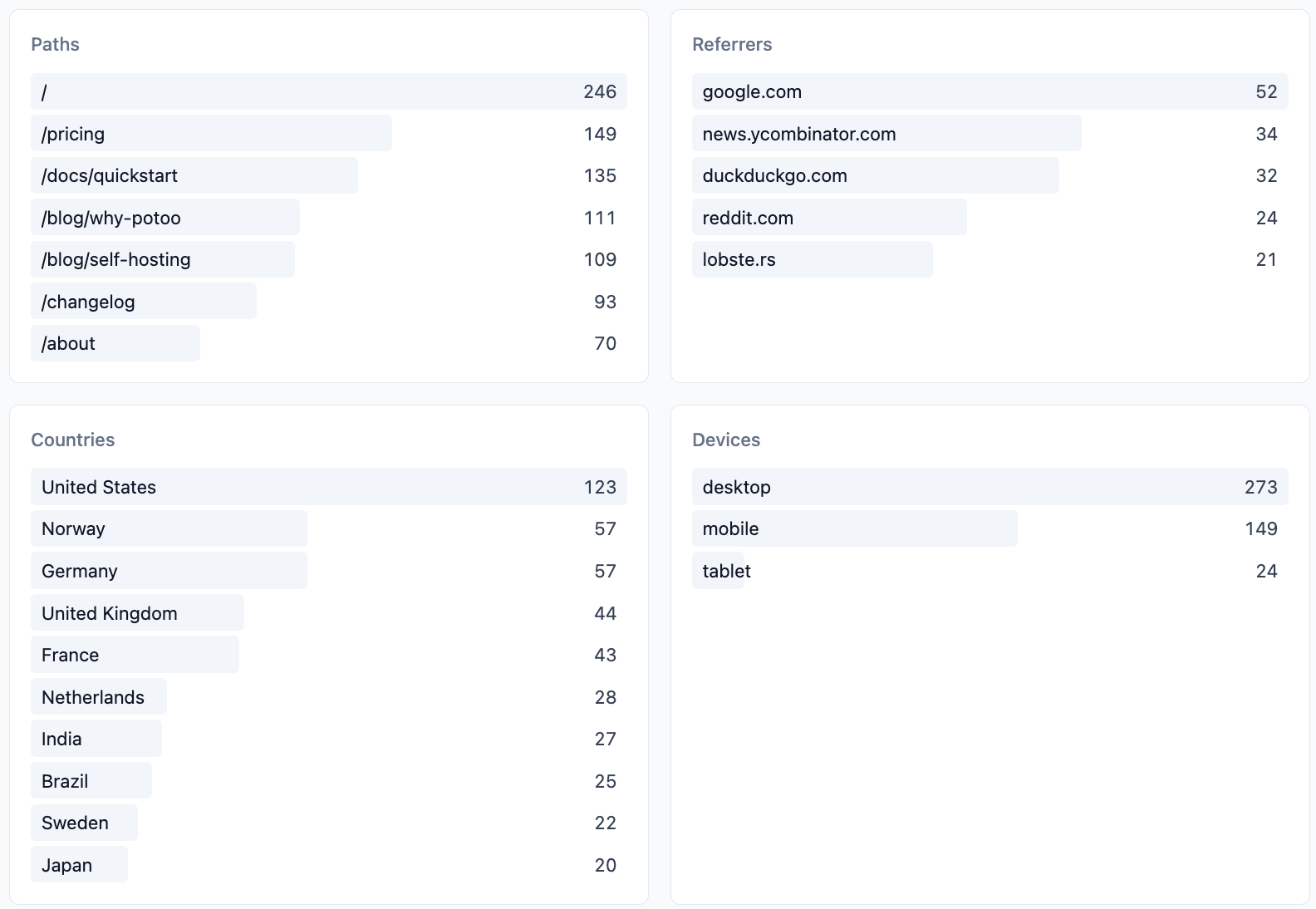
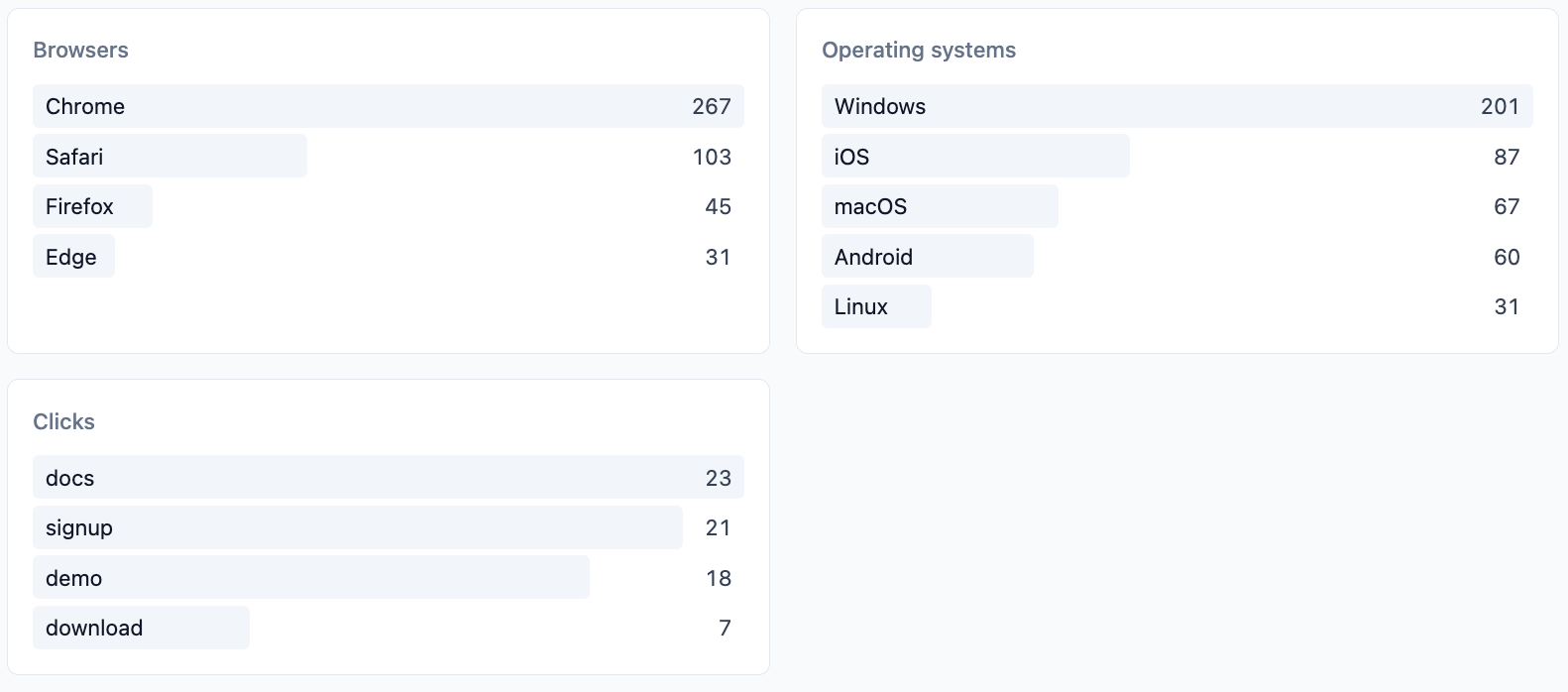
A small, privacy-friendly web analytics tool you host yourself. One binary serves the dashboard and collects the numbers; your visitors keep their identity, and you keep your data.
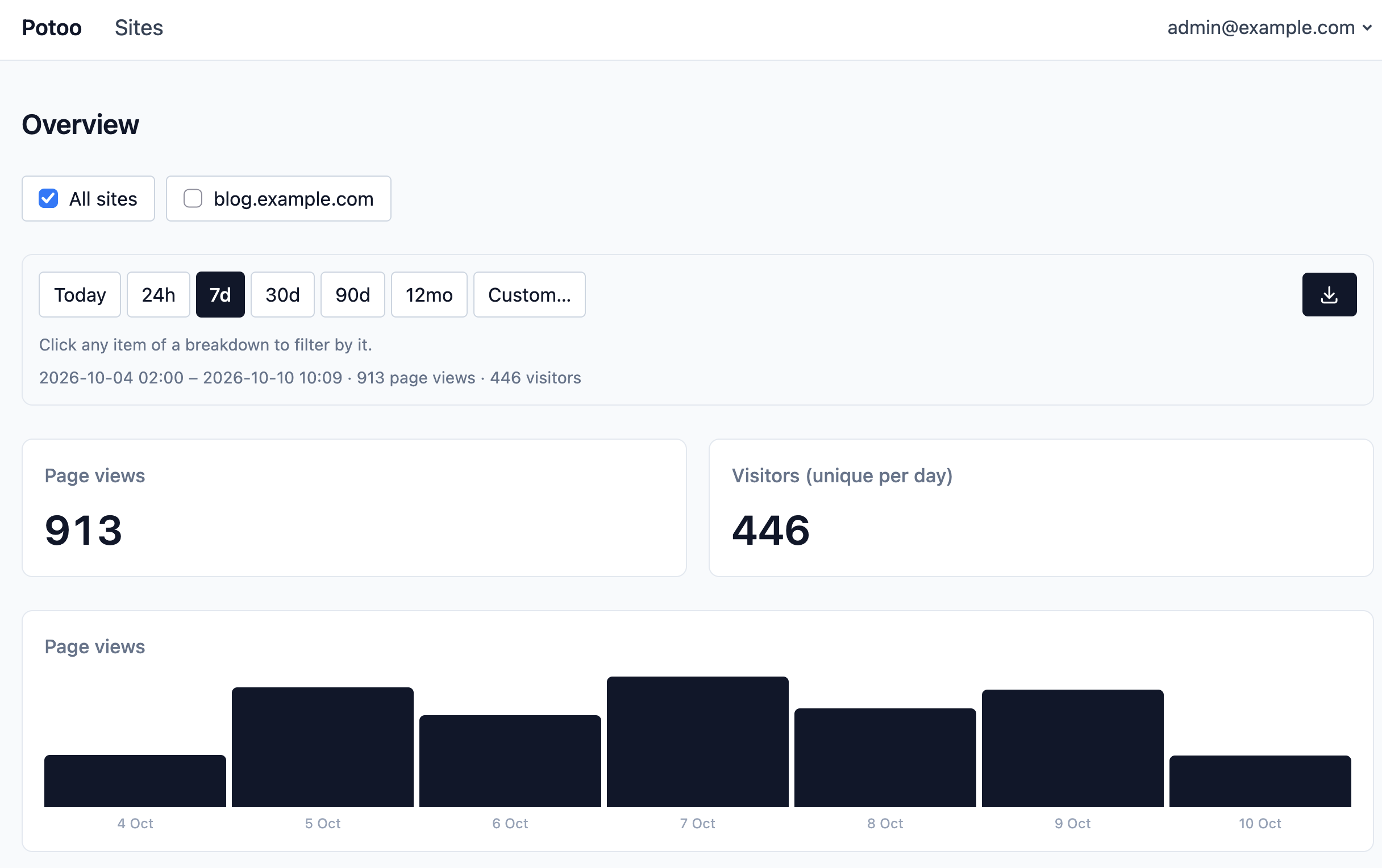
pushState is tracked.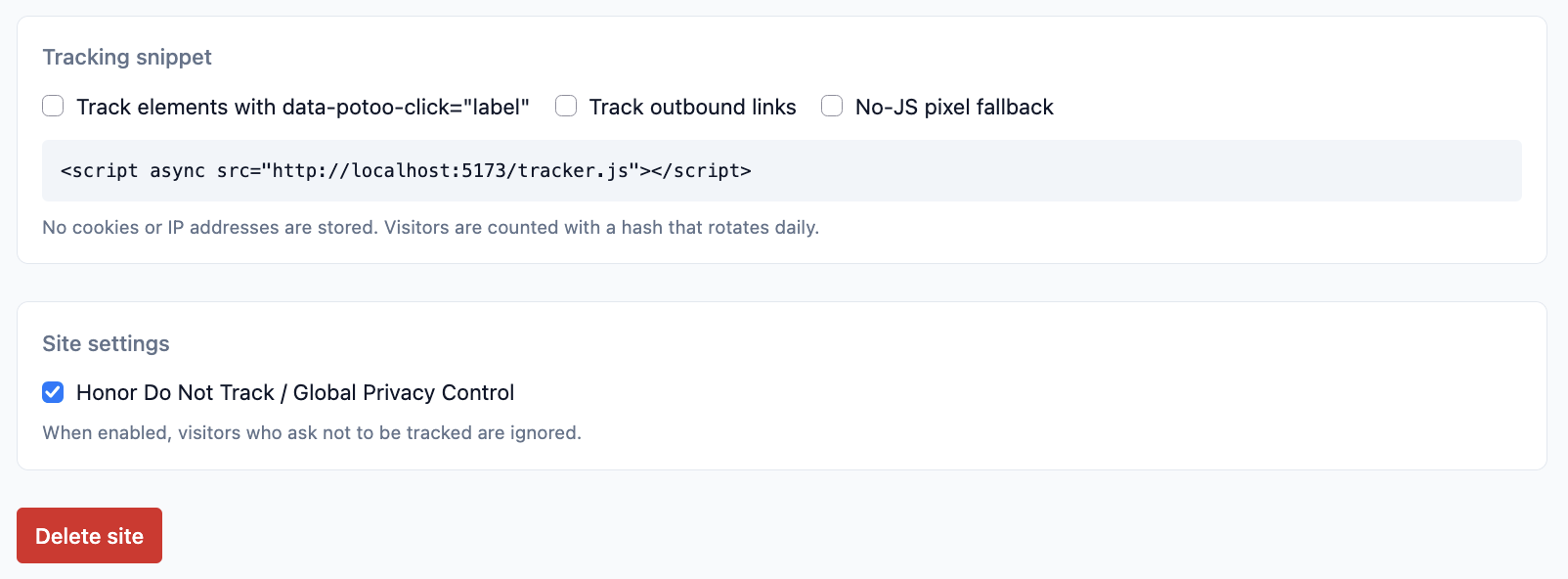
Every release publishes a multi-arch image (amd64 and arm64) to the GitHub Container Registry, so running your own instance is one command:
docker run -d --name potoo -p 8000:8000 -v potoo-data:/data ghcr.io/lmxrd/potoo
Or, as a docker-compose.yml — the database and the GeoIP database stay in
the ./data folder next to it, and the image's built-in healthcheck is all
the supervision it needs:
services:
  potoo:
    image: ghcr.io/lmxrd/potoo
    restart: unless-stopped
    ports:
      - "8000:8000"
    volumes:
      - ./data:/data
    environment:
      # To register the IP of the app sits behind a reverse proxy that sets
      # X-Forwarded-For and terminates TLS; see the configuration table below
      # for everything else.
      TRUST_PROXY: "1"
      # RETENTION_DAYS: "365"   # delete hits older than a year
docker compose up -d
To build the image yourself:
docker build -t potoo .
docker run -d --name potoo -p 8000:8000 -v potoo-data:/data potoo
The image is Alpine holding a single static binary: the frontend and
the database schema are embedded in it. The database and the GeoIP database
live in the /data volume. Build it yourself with mise run build:docker
(podman); it builds natively for the architecture of your machine.
Behind a reverse proxy, set TRUST_PROXY=1 so the client IP is read from
X-Forwarded-For, and terminate TLS there.
With mise (or Rust and pnpm directly) installed:
mise run build
./backend/target/release/potoo
The task builds the frontend and compiles everything into one binary: the
frontend is embedded in it. To run from source instead: mise run start.
Open http://localhost:8000; with no users yet, every page redirects to
/setup, where you create the first admin. Then:
When someone visits a page with your snippet in it, their browser tells potoo about the visit. Two public endpoints do that job — one for visitors whose browser runs JavaScript, one for everyone else:
/tracker.js — the script most visitors runThe snippet generator on every site's page produces a single script tag:
<script async src="https://your-potoo.example/tracker.js"></script>
The script waits until the page has loaded, then sends one small message to
potoo (a POST to /api/collect) containing only the site's hostname, the
page's path, and — for the first pageview — the site the visitor came from. It
does the same again when a single-page app navigates within the site, so those
views are counted too. Options, combined as needed:
| Option | What it does |
|---|---|
data-clicks | Records clicks on elements with data-potoo-click="label" |
data-outbound | Records clicks on links leaving your site |
data-host | Reports a different hostname than location.host |
| The pixel fallback | Adds the <noscript> image tag below |
/api/collect — where the hits arriveThe write endpoint of both the script and the pixel. On every hit, potoo derives what the dashboard needs and then discards the rest:
no, desktop, chrome, macos); the dashboard decides what to call
them. A client or platform Potoo does not know is kept under the short
name it announces (palemoon, cros), never as the user agent, and is
reported once in the server's log so it can be given a name;/api/pixel — visitors without JavaScriptSome visitors have JavaScript off (or blocked). Browsers like that still download images, so the snippet's optional fallback is an invisible 1x1 image:
<noscript><img src="https://your-potoo.example/api/pixel?h=example.com" alt=""></noscript>
Requesting the image is the visit: potoo records a pageview using what the
request carries anyway (the query string's site and path, or the Referer
header), then returns the transparent GIF. It counts pageviews only — no
in-app navigation, no clicks.
Visitors who ask not to be tracked (Do Not Track or Global Privacy Control) are ignored by default; each site can turn that off.
Every endpoint that filters by time — the stats of the overview, the stats of one site, and the export — takes the same query params:
| Param | What it is |
|---|---|
from+to | Both required: the exact window, as ISO 8601 timestamps (the to instant included). It spans at most 730 days — two years |
sites | Comma-separated hostnames, e.g. blog.example.com,shop.example.com; when absent, every site. An unknown hostname is a 400 |
q | A filter over the dashboard's facets, e.g. country==NO;path==/pricing |
The dashboard's presets (24h, 7d, 30d, ...) are a URL shorthand: the
dashboard turns each into its exact from/to window when the request is
made, so a preset stays rolling as long as the dashboard keeps re-fetching
it. The q filter is equality on the facets the dashboard shows, OR (,)
within one facet and AND (;) across them.
The export is GET /api/export with those params, and returns raw data only:
one CSV row per recorded hit — site, timestamp, kind, path, name, referrer,
country, device, browser, operating system — oldest first. It is the same set
of rows the dashboard view is computed from, so what you see is what you get.
The import (admins only; "Import hits" in the account menu) is
POST /api/import with a file in the export's format, as a multipart file
part or as a text/csv body, up to 256 MB. It is all or nothing: if a row
cannot be read, or names a site that does not exist, nothing is added and
the answer says what is wrong and on which line. The export ends with a
visitor column (the pseudonymous hash of the day) and the import takes it
back, so a round trip keeps the unique visitors; the column is optional in a
file to import. A hit without one adds a page view but no unique visitor.
Sites that do not exist are refused, or created when the request has
create_sites=true (the import page has a toggle for it). Country, device, browser and OS may be empty (they show as Unknown), and rows
are not checked for duplicates.
| Variable | Default | Purpose |
|---|---|---|
PORT | 8000 | HTTP port |
DATABASE_PATH | data/potoo.db | SQLite file |
SQLITE_SYNCHRONOUS | NORMAL | How hard SQLite syncs to disk: NORMAL is fast and safe (a power cut can lose the last few hits, never corrupt); FULL syncs every commit |
GEOIP_DB_PATH | data/country.mmdb | MaxMind-format country DB. Downloaded from DB-IP on boot when missing or older than a week, and refreshed weekly (the current month's file, or last month's until the new one is published) |
GEOIP_URL | unset | Override the download URL, e.g. your own mirror. Empty string disables downloading; a missing file then leaves country empty |
TRUST_PROXY | unset | Set to 1 to read the client IP from X-Forwarded-For (behind a reverse proxy) |
RETENTION_DAYS | unset | Delete hits older than this |
This site or product includes IP data from db-ip.com, licensed under CC BY 4.0.
A hit is answered as soon as it is queued, and a single writer commits the
queued hits to the database in batches, typically within a few
milliseconds. A clean stop (docker stop, a deploy) finishes the requests
in flight and writes everything queued. A crash or a power cut can lose the
hits still queued — the last few milliseconds — and, with the default
SQLITE_SYNCHRONOUS=NORMAL, the last few commits. Past a queue of 20,000
waiting hits the tracker answers 503 instead of buffering more.
Every endpoint is described in an OpenAPI 3.1 document, generated from the code
rather than hosted: mise run gen:spec writes it to
backend/target/specs/openapi.json. The dashboard's API client is generated from
it, and you can load it into any OpenAPI viewer or client generator.
Origin, so
a determined visitor can send spoofed hits. Acceptable for analytics, worth
knowing.Development setup, the task list, the code layout and the conventions a change must follow live in CONTRIBUTING.md.
A potoo is a funny looking bird with huge eyes, that stares at your analytics data
A small, privacy-friendly web analytics tool you host yourself. One binary serves the dashboard and collects the numbers; your visitors keep their identity, and you keep your data.
pushState is tracked.
Every release publishes a multi-arch image (amd64 and arm64) to the GitHub Container Registry, so running your own instance is one command:
docker run -d --name potoo -p 8000:8000 -v potoo-data:/data ghcr.io/lmxrd/potoo
Or, as a docker-compose.yml — the database and the GeoIP database stay in
the ./data folder next to it, and the image's built-in healthcheck is all
the supervision it needs:
services:
  potoo:
    image: ghcr.io/lmxrd/potoo
    restart: unless-stopped
    ports:
      - "8000:8000"
    volumes:
      - ./data:/data
    environment:
      # To register the IP of the app sits behind a reverse proxy that sets
      # X-Forwarded-For and terminates TLS; see the configuration table below
      # for everything else.
      TRUST_PROXY: "1"
      # RETENTION_DAYS: "365"   # delete hits older than a year
docker compose up -d
To build the image yourself:
docker build -t potoo .
docker run -d --name potoo -p 8000:8000 -v potoo-data:/data potoo
The image is Alpine holding a single static binary: the frontend and
the database schema are embedded in it. The database and the GeoIP database
live in the /data volume. Build it yourself with mise run build:docker
(podman); it builds natively for the architecture of your machine.
Behind a reverse proxy, set TRUST_PROXY=1 so the client IP is read from
X-Forwarded-For, and terminate TLS there.
With mise (or Rust and pnpm directly) installed:
mise run build
./backend/target/release/potoo
The task builds the frontend and compiles everything into one binary: the
frontend is embedded in it. To run from source instead: mise run start.
Open http://localhost:8000; with no users yet, every page redirects to
/setup, where you create the first admin. Then:
When someone visits a page with your snippet in it, their browser tells potoo about the visit. Two public endpoints do that job — one for visitors whose browser runs JavaScript, one for everyone else:
/tracker.js — the script most visitors runThe snippet generator on every site's page produces a single script tag:
<script async src="https://your-potoo.example/tracker.js"></script>
The script waits until the page has loaded, then sends one small message to
potoo (a POST to /api/collect) containing only the site's hostname, the
page's path, and — for the first pageview — the site the visitor came from. It
does the same again when a single-page app navigates within the site, so those
views are counted too. Options, combined as needed:
| Option | What it does |
|---|---|
data-clicks | Records clicks on elements with data-potoo-click="label" |
data-outbound | Records clicks on links leaving your site |
data-host | Reports a different hostname than location.host |
| The pixel fallback | Adds the <noscript> image tag below |
/api/collect — where the hits arriveThe write endpoint of both the script and the pixel. On every hit, potoo derives what the dashboard needs and then discards the rest:
no, desktop, chrome, macos); the dashboard decides what to call
them. A client or platform Potoo does not know is kept under the short
name it announces (palemoon, cros), never as the user agent, and is
reported once in the server's log so it can be given a name;/api/pixel — visitors without JavaScriptSome visitors have JavaScript off (or blocked). Browsers like that still download images, so the snippet's optional fallback is an invisible 1x1 image:
<noscript><img src="https://your-potoo.example/api/pixel?h=example.com" alt=""></noscript>
Requesting the image is the visit: potoo records a pageview using what the
request carries anyway (the query string's site and path, or the Referer
header), then returns the transparent GIF. It counts pageviews only — no
in-app navigation, no clicks.
Visitors who ask not to be tracked (Do Not Track or Global Privacy Control) are ignored by default; each site can turn that off.
Every endpoint that filters by time — the stats of the overview, the stats of one site, and the export — takes the same query params:
| Param | What it is |
|---|---|
from+to | Both required: the exact window, as ISO 8601 timestamps (the to instant included). It spans at most 730 days — two years |
sites | Comma-separated hostnames, e.g. blog.example.com,shop.example.com; when absent, every site. An unknown hostname is a 400 |
q | A filter over the dashboard's facets, e.g. country==NO;path==/pricing |
The dashboard's presets (24h, 7d, 30d, ...) are a URL shorthand: the
dashboard turns each into its exact from/to window when the request is
made, so a preset stays rolling as long as the dashboard keeps re-fetching
it. The q filter is equality on the facets the dashboard shows, OR (,)
within one facet and AND (;) across them.
The export is GET /api/export with those params, and returns raw data only:
one CSV row per recorded hit — site, timestamp, kind, path, name, referrer,
country, device, browser, operating system — oldest first. It is the same set
of rows the dashboard view is computed from, so what you see is what you get.
The import (admins only; "Import hits" in the account menu) is
POST /api/import with a file in the export's format, as a multipart file
part or as a text/csv body, up to 256 MB. It is all or nothing: if a row
cannot be read, or names a site that does not exist, nothing is added and
the answer says what is wrong and on which line. The export ends with a
visitor column (the pseudonymous hash of the day) and the import takes it
back, so a round trip keeps the unique visitors; the column is optional in a
file to import. A hit without one adds a page view but no unique visitor.
Sites that do not exist are refused, or created when the request has
create_sites=true (the import page has a toggle for it). Country, device, browser and OS may be empty (they show as Unknown), and rows
are not checked for duplicates.
| Variable | Default | Purpose |
|---|---|---|
PORT | 8000 | HTTP port |
DATABASE_PATH | data/potoo.db | SQLite file |
SQLITE_SYNCHRONOUS | NORMAL | How hard SQLite syncs to disk: NORMAL is fast and safe (a power cut can lose the last few hits, never corrupt); FULL syncs every commit |
GEOIP_DB_PATH | data/country.mmdb | MaxMind-format country DB. Downloaded from DB-IP on boot when missing or older than a week, and refreshed weekly (the current month's file, or last month's until the new one is published) |
GEOIP_URL | unset | Override the download URL, e.g. your own mirror. Empty string disables downloading; a missing file then leaves country empty |
TRUST_PROXY | unset | Set to 1 to read the client IP from X-Forwarded-For (behind a reverse proxy) |
RETENTION_DAYS | unset | Delete hits older than this |
This site or product includes IP data from db-ip.com, licensed under CC BY 4.0.
A hit is answered as soon as it is queued, and a single writer commits the
queued hits to the database in batches, typically within a few
milliseconds. A clean stop (docker stop, a deploy) finishes the requests
in flight and writes everything queued. A crash or a power cut can lose the
hits still queued — the last few milliseconds — and, with the default
SQLITE_SYNCHRONOUS=NORMAL, the last few commits. Past a queue of 20,000
waiting hits the tracker answers 503 instead of buffering more.
Every endpoint is described in an OpenAPI 3.1 document, generated from the code
rather than hosted: mise run gen:spec writes it to
backend/target/specs/openapi.json. The dashboard's API client is generated from
it, and you can load it into any OpenAPI viewer or client generator.
Origin, so
a determined visitor can send spoofed hits. Acceptable for analytics, worth
knowing.Development setup, the task list, the code layout and the conventions a change must follow live in CONTRIBUTING.md.



