
Learning Physics-grounded 4d Dynamics With Neural Gaussian Force Fields
See the codeREADME
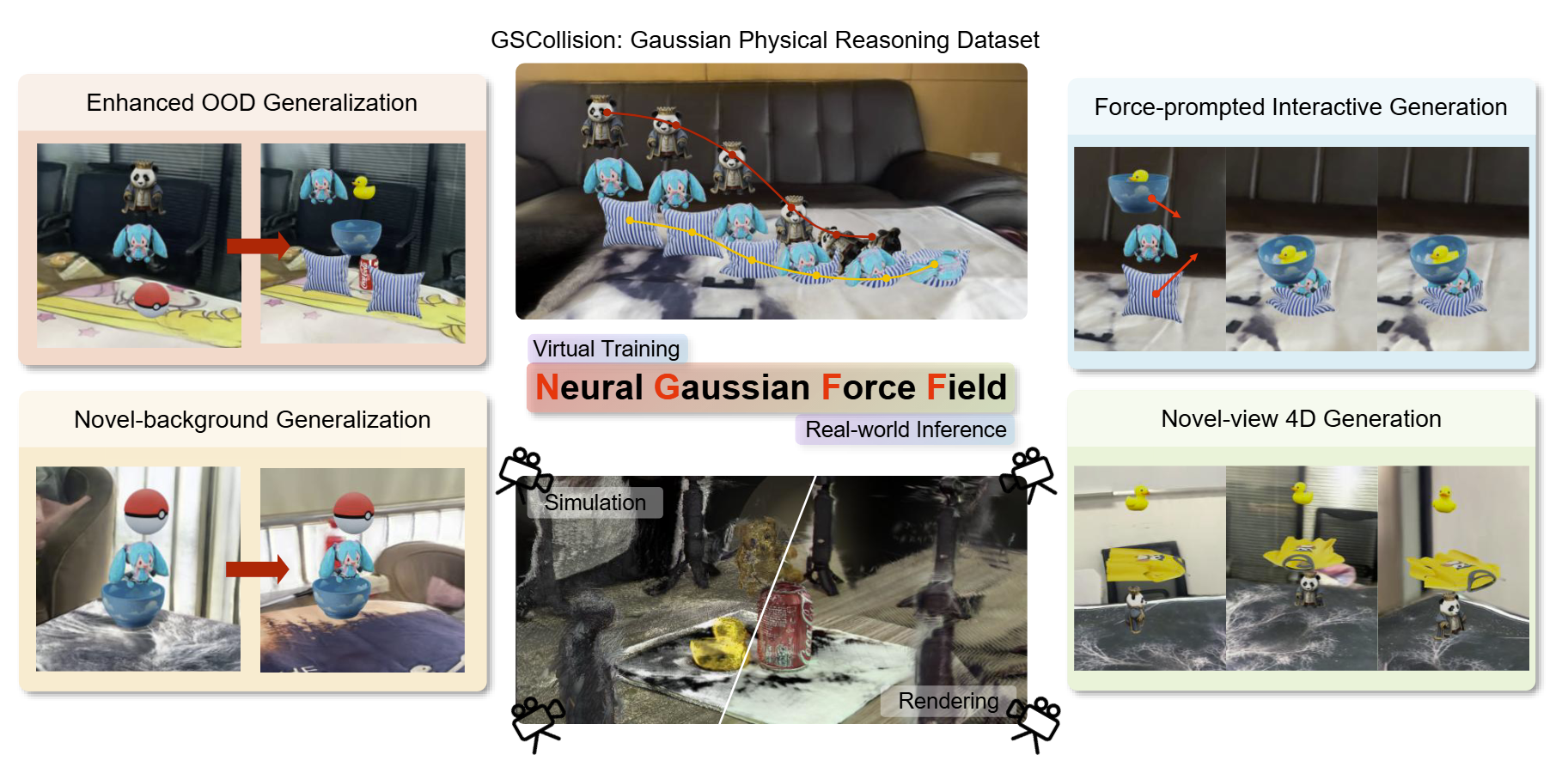
Learning Physics-Grounded 4D Dynamics with Neural Gaussian Force Fields
ICLR 2026
Shiqian Li1* Ruihong Shen1* Junfeng Ni2 Chang Pan1 Chi Zhang1† Yixin Zhu1†
1Peking University 2Tsinghua University
* Equal Contribution † Corresponding Author




🔧 Setting up
Clone the repo
git clone https://github.com/lishiqianhugh/NeuralGaussianForceField
Python environment
Run:
conda create -n ngff python=3.10 -y
conda activate ngff
bash setup_env.sh
to setup the conda environment easily.
Download pretrained models
- SuperGlue
wget -O videogen/externals/superglue/weights/superglue_indoor.pth https://github.com/magicleap/SuperGluePretrainedNetwork/raw/master/models/weights/superglue_indoor.pth
wget -O videogen/externals/superglue/weights/superglue_outdoor.pth https://github.com/magicleap/SuperGluePretrainedNetwork/raw/master/models/weights/superglue_outdoor.pth
wget -O videogen/externals/superglue/weights/superpoint_v1.pth https://github.com/magicleap/SuperGluePretrainedNetwobrk/raw/master/models/weights/superpoint_v1.pth
- OSEDiff
Download stable-diffusion-2.1-base from huggingface and put it in videogen/checkpoints/OSEDiff/stable-diffusion-2-1-base
wget -O videogen/checkpoints/OSEDiff/ram_swin_large_14m.pth https://huggingface.co/spaces/xinyu1205/recognize-anything/blob/main/ram_swin_large_14m.pth
wget -O videogen/checkpoints/OSEDiff/DAPE.pth https://github.com/cswry/OSEDiff/blob/main/preset/models/DAPE.pth
wget -O videogen/checkpoints/OSEDiff/osediff.pkl https://github.com/cswry/OSEDiff/blob/main/preset/models/osediff.pkl
- Pi3_splat
huggingface-cli download lishiqianhugh/Pi3_splat \
  --repo-type model \
  --revision main \
  --local-dir ./videogen/checkpoints/Pi3_splat \
  --local-dir-use-symlinks False
- DiffSplat
Download DiffSplat from huggingface and put it in videogen/checkpoints/DiffSplat
Note that for sd1.5, you only need to download gsdiff_gobj83k_sd15_image__render, elevest_gobj265k_b_C25, gsrecon_gobj265k_cnp_even4, gsvae_gobj265k_sd.
If you want to refine object reconstruction using sd3.5, you also need to download gsdiff_gobj83k_sd35m_image__render and gsvae_gobj265k_sd3.
- SAM2
wget -O videogen/checkpoints/sam2/sam2.1_hiera_l.yaml https://github.com/facebookresearch/sam2/blob/main/sam2/configs/sam2.1/sam2.1_hiera_l.yaml
wget -O videogen/checkpoints/sam2/sam2.1_hiera_large.pt https://dl.fbaipublicfiles.com/segment_anything_2/092824/sam2.1_hiera_large.pt
📊 Data generation
The data should be organized as :
GSCollision/        # Root folder of the dataset
│── objects/        # Individual object Gaussian splats (PLY files)
│   ├── panda/       # Gaussian splats of "panda" object
│   ├── can/        # Gaussian splats of "can" object
│   ├── ball/     # Gaussian splats of "ball" object
│   └── ...
│
│── backgrounds/    # Background Gaussian splats (PLY files)
│   ├── table0/
│   ├── table1/
│   └── ...
│
│── scene_configs/  # Scene composition configuration files
│   ├── 3_0.json
│   ├── 4.json
│   ├── 6.json
│   └── ...
│
│── scenes/  # Combined multi-object Gaussian splats (static gaussians)
│   ├── 3_0/
│   │   ├── 0_panda_ball_can  # containing PLY files
│   │   └── ...
│   ├── 4/
│   ├── 6/
│   └── ...
│
│── initial/  # Multi-view images of initial scenes with backgrounds
│   ├── 3_0/
│   │   ├── 0_panda_ball_can # containing MP4 files
│   │   └── ...
│   ├── 4/
│   ├── 6/
│   └── ...
│
│── mpm/   # Simulation results (dynamic gaussians without backgrounds)
│   ├── 3_0/
│   │   ├── 0_panda_ball_can  # containing H5 files
│   │   └── ...
│   ├── 4/
│   ├── 6/
│   └── ...
│
│── dynamic/   # Renderd videos
│   ├── 3_0/
│   │   ├── 0_panda_ball_can  # containing MP4 files with different backgrounds and views
│   │   └── ...
│   ├── 4/
│   ├── 6/
│   └── ...
│
└── README.md  # Documentation for dataset structure, usage, and metadata
Step 1: Config the json files in scene_configs to set initial object poses or generate config files automatically by running python -m dataset.generate_configs --obj_num 2 --scene_num 5
Step 2: Run python -m dataset.generate_scene --input {json_file} --output {output_dir} to generate Gaussians. Run scripts/generate_scene.sh to generate all on a slurm cluster.
Step 3: Run the following simulation file to simulate dynamics using MPM. Specify --model_path for foreground objects, and --config for simulation and camera settings. The simulated gaussians (.h5) will be saved into --output_path.
python -m dataset.gs_simulation_scene \
--model_path /mnt/nfs_project_a/shared/data/ply_output/scenesoccersoccer/soccer_soccer_0 \
--config ./config/dynamic_config.json \
--output_path ./output/soccer_soccer_0 \
--save_h5
Run bash scripts/mpm.sh to generate all scenes on a slurm cluster.
Step 4: Render the images for --model_path by specifying --background_path for backgrounds, --config for camera settings, and --single_view for certain view (moving camera if not specified, render all 100 views if specified as -1). The multi-view images of initial scenes and the dynamic output will be saved into --initial_path and --output_path, respectively. --render_depth renders normalized depthmaps into uint16 PNGs.
python -m dataset.render \
--model_path ./data/GSCollision/mpm/3_0/0_panda_ball_can \
--background_path ./data/GSCollision/backgrounds/table6 \
--config ./config/dynamic_config.json \
--initial_path ./data/GSCollision/initial_123/3_0/0_panda_ball_can/table6 \
--output_path ./data/GSCollision/dynamic_123/3_0/0_panda_ball_can/table6 \
--render_img \
--render_depth \
--compile_video \
--white_bg \
--fixed_view -1
Run bash scripts/render.sh to render all scenes on a slurm cluster.
🚀 Training the dynamic models
Train dynamic models. Take ngff for example.
accelerate launch -m dynamic_models.train \
--num_keypoints 2048 \
--ode_method euler \
--step_size 2e-2 \
--lr 1e-3 \
--min_lr 1e-4 \
--hidden_dim 128 \
--num_layers 4 \
--batch_size 8 \
--steps 80 \
--chunk 80 \
--epochs 2000 \
--dynamic_model ngff \
--sample_num 10 \
--threshold 5e-2
Train with multiple GPUs:
accelerate launch --multi_gpu --num_processes=4 --main_process_port=29500 -m dynamic_models.train \
--num_keypoints 2048 \
--ode_method euler \
--step_size 2e-2 \
--lr 3e-4 \
--min_lr 5e-5 \
--hidden_dim 128 \
--num_layers 4 \
--batch_size 13 \
--steps 60 \
--chunk 60 \
--epochs 500
4D Video prediction
This part contains the code for generating 4D videos using the trained NGFF dynamics model.
-
Reconstruction
python -m videogen.reconstruct \
--data_path ./data/GSCollision/initial/3_9/2700_duck_bowl_ball/table3/2700_duck_bowl_ball.mp4 \
--save_folder debug \
--interval 4 --visualize \
[--refine]
For batched inference, you can specify
--batch_inference_jsonto specify the json file containing the data path and save folder. You need to create a json file with the following format:[ { "data_path": , "save_folder": }, { "data_path": , "save_folder": } ]The segemented object file and background gaussian .ply file will be saved.
-
Run inference to generate 4D videos
python -m videogen.eval \
--model_path ./data/GSCollision/reconstruct/3_9/2700_duck_bowl_ball/table3/sim_refine \
--background_path ./data/GSCollision/reconstruct/3_9/2700_duck_bowl_ball/table3/bg \
--dynamic_model ngff \
--config ./config/dynamic_config.json \
--output_path ./data/GSCollision/videogen_inference/NGFF_V/refine/3_9/2700_duck_bowl_ball/table3/view_0 \
--compile_video \
--white_b \
--single_view 0 \
--resolution 448
or infer with ground-truth foreground objects by moidify
--model_path(use simple ground as background if--background_pathis not specified):python -m videogen.eval \ --model_path ./data/GSCollision/scenes/3_9/2810_bowl_pillow_can \ --dynamic_model ngff \ --config ./config/dynamic_config.json \ --output_path output/dynamic_prediction/ngff/2810_bowl_pillow_can \ --compile_video \ --white_b \ --single_view 0Specify
--dynamic_modelto use other models. -
We also provide a pipeline script for reconstructing and generating 4D videos online.
python -m videogen.pipeline_reconstruct_and_eval --batch_inference_json ./data/GSCollision/jsons/batch_circle360_1.json --models NGFF,Pointformer,GCN --config ./config/dynamic_config.json --steps 100 --resolution 448 --output_root ./data/GSCollision/videogen_inference_highres_360_debug/For batched inference, you can specify
--batch_inference_jsonto specify the json file containing the data path and save folder.[ { "data_path": "./data/GSCollision/initial/3_9/2951_phone_duck_miku/table2/", "views": "84" }, { "data_path": "./data/GSCollision/initial/3_9/2951_phone_duck_miku/table6/", "views": "0,circle360" } ]
🌎 Visualize gaussians in web browser
Run the following command to build a visualization on server with a server_port:
python -m tools.gaussian_viser --ply_path debug/edited_gaussians.pt --port 8088
Open a local terminal and enter the command:
ssh -L [local_port]:[computenode]:[server_port] user@server
Then, open your web browser and type the address localhost:{local_port}
😊 Acknowledgment
This project extends our prior research on Neural Force Field, which focuses on abstract physical reasoning.
Our codebase is built upon many fantastic projects. We thank the following project authors for generously open-sourcing their code:
📚 Citation
If you find our work helpful, please consider citing:
@inproceedings{
  Li2026PhysicsGrounded4D,
  title     = {Learning Physics-Grounded 4D Dynamics with Neural Gaussian Force Fields},
  author    = {Li, Shiqian and Shen, Ruihong and Ni, Junfeng and Pan, Chang and Zhang, Chi and Zhu, Yixin},
  year      = {2026},
  booktitle = {ICLR},
  url       = {https://neuralgaussianforcefield.github.io/}
}
Contributors

1 commits
Similar repos


Languages
Python
98.5%
Shell
1.5%
Learning Physics-grounded 4d Dynamics With Neural Gaussian Force Fields
See the codeREADME
Learning Physics-Grounded 4D Dynamics with Neural Gaussian Force Fields
ICLR 2026
Shiqian Li1* Ruihong Shen1* Junfeng Ni2 Chang Pan1 Chi Zhang1† Yixin Zhu1†
1Peking University 2Tsinghua University
* Equal Contribution † Corresponding Author
🔧 Setting up
Clone the repo
git clone https://github.com/lishiqianhugh/NeuralGaussianForceField
Python environment
Run:
conda create -n ngff python=3.10 -y
conda activate ngff
bash setup_env.sh
to setup the conda environment easily.
Download pretrained models
- SuperGlue
wget -O videogen/externals/superglue/weights/superglue_indoor.pth https://github.com/magicleap/SuperGluePretrainedNetwork/raw/master/models/weights/superglue_indoor.pth
wget -O videogen/externals/superglue/weights/superglue_outdoor.pth https://github.com/magicleap/SuperGluePretrainedNetwork/raw/master/models/weights/superglue_outdoor.pth
wget -O videogen/externals/superglue/weights/superpoint_v1.pth https://github.com/magicleap/SuperGluePretrainedNetwobrk/raw/master/models/weights/superpoint_v1.pth
- OSEDiff
Download stable-diffusion-2.1-base from huggingface and put it in videogen/checkpoints/OSEDiff/stable-diffusion-2-1-base
wget -O videogen/checkpoints/OSEDiff/ram_swin_large_14m.pth https://huggingface.co/spaces/xinyu1205/recognize-anything/blob/main/ram_swin_large_14m.pth
wget -O videogen/checkpoints/OSEDiff/DAPE.pth https://github.com/cswry/OSEDiff/blob/main/preset/models/DAPE.pth
wget -O videogen/checkpoints/OSEDiff/osediff.pkl https://github.com/cswry/OSEDiff/blob/main/preset/models/osediff.pkl
- Pi3_splat
huggingface-cli download lishiqianhugh/Pi3_splat \
  --repo-type model \
  --revision main \
  --local-dir ./videogen/checkpoints/Pi3_splat \
  --local-dir-use-symlinks False
- DiffSplat
Download DiffSplat from huggingface and put it in videogen/checkpoints/DiffSplat
Note that for sd1.5, you only need to download gsdiff_gobj83k_sd15_image__render, elevest_gobj265k_b_C25, gsrecon_gobj265k_cnp_even4, gsvae_gobj265k_sd.
If you want to refine object reconstruction using sd3.5, you also need to download gsdiff_gobj83k_sd35m_image__render and gsvae_gobj265k_sd3.
- SAM2
wget -O videogen/checkpoints/sam2/sam2.1_hiera_l.yaml https://github.com/facebookresearch/sam2/blob/main/sam2/configs/sam2.1/sam2.1_hiera_l.yaml
wget -O videogen/checkpoints/sam2/sam2.1_hiera_large.pt https://dl.fbaipublicfiles.com/segment_anything_2/092824/sam2.1_hiera_large.pt
📊 Data generation
The data should be organized as :
GSCollision/        # Root folder of the dataset
│── objects/        # Individual object Gaussian splats (PLY files)
│   ├── panda/       # Gaussian splats of "panda" object
│   ├── can/        # Gaussian splats of "can" object
│   ├── ball/     # Gaussian splats of "ball" object
│   └── ...
│
│── backgrounds/    # Background Gaussian splats (PLY files)
│   ├── table0/
│   ├── table1/
│   └── ...
│
│── scene_configs/  # Scene composition configuration files
│   ├── 3_0.json
│   ├── 4.json
│   ├── 6.json
│   └── ...
│
│── scenes/  # Combined multi-object Gaussian splats (static gaussians)
│   ├── 3_0/
│   │   ├── 0_panda_ball_can  # containing PLY files
│   │   └── ...
│   ├── 4/
│   ├── 6/
│   └── ...
│
│── initial/  # Multi-view images of initial scenes with backgrounds
│   ├── 3_0/
│   │   ├── 0_panda_ball_can # containing MP4 files
│   │   └── ...
│   ├── 4/
│   ├── 6/
│   └── ...
│
│── mpm/   # Simulation results (dynamic gaussians without backgrounds)
│   ├── 3_0/
│   │   ├── 0_panda_ball_can  # containing H5 files
│   │   └── ...
│   ├── 4/
│   ├── 6/
│   └── ...
│
│── dynamic/   # Renderd videos
│   ├── 3_0/
│   │   ├── 0_panda_ball_can  # containing MP4 files with different backgrounds and views
│   │   └── ...
│   ├── 4/
│   ├── 6/
│   └── ...
│
└── README.md  # Documentation for dataset structure, usage, and metadata
Step 1: Config the json files in scene_configs to set initial object poses or generate config files automatically by running python -m dataset.generate_configs --obj_num 2 --scene_num 5
Step 2: Run python -m dataset.generate_scene --input {json_file} --output {output_dir} to generate Gaussians. Run scripts/generate_scene.sh to generate all on a slurm cluster.
Step 3: Run the following simulation file to simulate dynamics using MPM. Specify --model_path for foreground objects, and --config for simulation and camera settings. The simulated gaussians (.h5) will be saved into --output_path.
python -m dataset.gs_simulation_scene \
--model_path /mnt/nfs_project_a/shared/data/ply_output/scenesoccersoccer/soccer_soccer_0 \
--config ./config/dynamic_config.json \
--output_path ./output/soccer_soccer_0 \
--save_h5
Run bash scripts/mpm.sh to generate all scenes on a slurm cluster.
Step 4: Render the images for --model_path by specifying --background_path for backgrounds, --config for camera settings, and --single_view for certain view (moving camera if not specified, render all 100 views if specified as -1). The multi-view images of initial scenes and the dynamic output will be saved into --initial_path and --output_path, respectively. --render_depth renders normalized depthmaps into uint16 PNGs.
python -m dataset.render \
--model_path ./data/GSCollision/mpm/3_0/0_panda_ball_can \
--background_path ./data/GSCollision/backgrounds/table6 \
--config ./config/dynamic_config.json \
--initial_path ./data/GSCollision/initial_123/3_0/0_panda_ball_can/table6 \
--output_path ./data/GSCollision/dynamic_123/3_0/0_panda_ball_can/table6 \
--render_img \
--render_depth \
--compile_video \
--white_bg \
--fixed_view -1
Run bash scripts/render.sh to render all scenes on a slurm cluster.
🚀 Training the dynamic models
Train dynamic models. Take ngff for example.
accelerate launch -m dynamic_models.train \
--num_keypoints 2048 \
--ode_method euler \
--step_size 2e-2 \
--lr 1e-3 \
--min_lr 1e-4 \
--hidden_dim 128 \
--num_layers 4 \
--batch_size 8 \
--steps 80 \
--chunk 80 \
--epochs 2000 \
--dynamic_model ngff \
--sample_num 10 \
--threshold 5e-2
Train with multiple GPUs:
accelerate launch --multi_gpu --num_processes=4 --main_process_port=29500 -m dynamic_models.train \
--num_keypoints 2048 \
--ode_method euler \
--step_size 2e-2 \
--lr 3e-4 \
--min_lr 5e-5 \
--hidden_dim 128 \
--num_layers 4 \
--batch_size 13 \
--steps 60 \
--chunk 60 \
--epochs 500
4D Video prediction
This part contains the code for generating 4D videos using the trained NGFF dynamics model.
-
Reconstruction
python -m videogen.reconstruct \
--data_path ./data/GSCollision/initial/3_9/2700_duck_bowl_ball/table3/2700_duck_bowl_ball.mp4 \
--save_folder debug \
--interval 4 --visualize \
[--refine]
For batched inference, you can specify
--batch_inference_jsonto specify the json file containing the data path and save folder. You need to create a json file with the following format:[ { "data_path": , "save_folder": }, { "data_path": , "save_folder": } ]The segemented object file and background gaussian .ply file will be saved.
-
Run inference to generate 4D videos
python -m videogen.eval \
--model_path ./data/GSCollision/reconstruct/3_9/2700_duck_bowl_ball/table3/sim_refine \
--background_path ./data/GSCollision/reconstruct/3_9/2700_duck_bowl_ball/table3/bg \
--dynamic_model ngff \
--config ./config/dynamic_config.json \
--output_path ./data/GSCollision/videogen_inference/NGFF_V/refine/3_9/2700_duck_bowl_ball/table3/view_0 \
--compile_video \
--white_b \
--single_view 0 \
--resolution 448
or infer with ground-truth foreground objects by moidify
--model_path(use simple ground as background if--background_pathis not specified):python -m videogen.eval \ --model_path ./data/GSCollision/scenes/3_9/2810_bowl_pillow_can \ --dynamic_model ngff \ --config ./config/dynamic_config.json \ --output_path output/dynamic_prediction/ngff/2810_bowl_pillow_can \ --compile_video \ --white_b \ --single_view 0Specify
--dynamic_modelto use other models. -
We also provide a pipeline script for reconstructing and generating 4D videos online.
python -m videogen.pipeline_reconstruct_and_eval --batch_inference_json ./data/GSCollision/jsons/batch_circle360_1.json --models NGFF,Pointformer,GCN --config ./config/dynamic_config.json --steps 100 --resolution 448 --output_root ./data/GSCollision/videogen_inference_highres_360_debug/For batched inference, you can specify
--batch_inference_jsonto specify the json file containing the data path and save folder.[ { "data_path": "./data/GSCollision/initial/3_9/2951_phone_duck_miku/table2/", "views": "84" }, { "data_path": "./data/GSCollision/initial/3_9/2951_phone_duck_miku/table6/", "views": "0,circle360" } ]
🌎 Visualize gaussians in web browser
Run the following command to build a visualization on server with a server_port:
python -m tools.gaussian_viser --ply_path debug/edited_gaussians.pt --port 8088
Open a local terminal and enter the command:
ssh -L [local_port]:[computenode]:[server_port] user@server
Then, open your web browser and type the address localhost:{local_port}
😊 Acknowledgment
This project extends our prior research on Neural Force Field, which focuses on abstract physical reasoning.
Our codebase is built upon many fantastic projects. We thank the following project authors for generously open-sourcing their code:
📚 Citation
If you find our work helpful, please consider citing:
@inproceedings{
  Li2026PhysicsGrounded4D,
  title     = {Learning Physics-Grounded 4D Dynamics with Neural Gaussian Force Fields},
  author    = {Li, Shiqian and Shen, Ruihong and Ni, Junfeng and Pan, Chang and Zhang, Chi and Zhu, Yixin},
  year      = {2026},
  booktitle = {ICLR},
  url       = {https://neuralgaussianforcefield.github.io/}
}
Similar repos
Contributors
1 commits
Languages
Python
98.5%
Shell
1.5%