Lint an npm or yarn lockfile to analyze and detect security issues
JavaScript
870
236 commits
updated Oct 9, 2026
lint lockfiles for improved security and trust policies



Lockfiles are used as trusted whitelist of resources manifest to fetch packages from. However, keeping track of the changes introduced to lockfiles is not an easy task as they are designed to be consumed by machines 🤖.
What happens when someone creates a Pull Request and sneaks a malicious resource package that replaces a real library? 😱
Exactly! Lint your lockfiles to ensure they adhere to pre-defined security policies and mitigate this vector of attack.
Why is this important? read: Why npm lockfiles can be a security blindspot for injecting malicious modules
Easily invoked with npx on any project and lint it:
npx lockfile-lint --path yarn.lock --allowed-hosts npm yarn --validate-https
To lint the npm-shrinkwrap.json file, add the --type npm flag:
npx lockfile-lint --path npm-shrinkwrap.json --type npm --allowed-hosts npm yarn --validate-https
If you get no results, congratulations, the file passes!
If lockfile-lint detects exceptions to the policies it will report them:
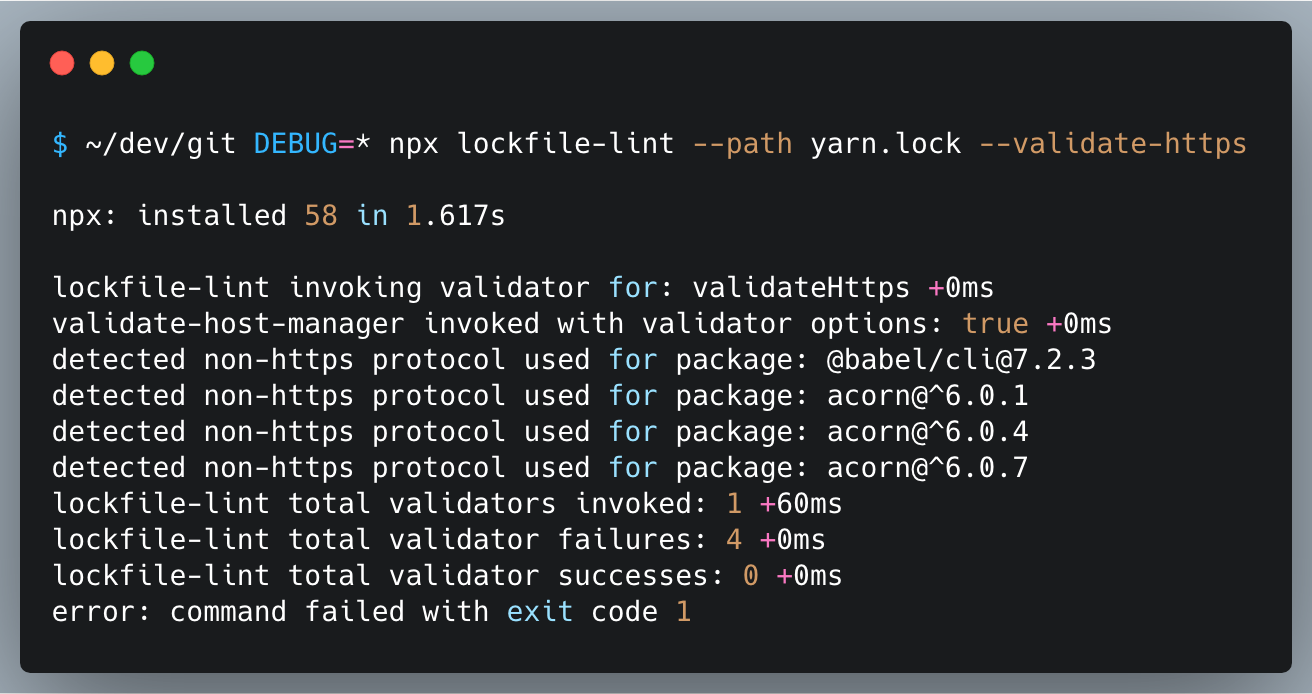
Refer to lockfile-lint for more details on the CLI usage.
You can use lockfile-lint as a standalone CLI tool, or as an API library using the following npm packages:
Please be advised of the following security disclaimers that are outside of the control of a lockfile linter:
When you whitelist all hosts from npmjs, yarnpkg, github or other registries you implicitly convey that you trust all the packages originating from these sources. As such, a malicious package can exist in a registry source that you whitelist. Direct dependencies that you should add to a project should be well vetted before adding such as using a tool like npq.
pnpm doesn't maintain the tarball source of an npm package so unlike yarn, and npm, there's no way to inject an attacker-controlled malicious source file in pnpm-lock.yaml. Other vectors that were explored were to inject new packages into the lockfile (that aren't in package.json) yet pnpm isn't prone to these malicious attempts and would not install them.
If you have witnessed a possible attack vector on pnpm's lockfile, please open an issue with reproducible steps.
npm audit?npm audit is a tool to audit your dependencies for known vulnerabilities. However, it doesn't address the issue of malicious packages being injected into your lockfile. lockfile-lint is a tool that is designed to address this issue.
Please consult CONTRIBUTING for guidelines on contributing to this project.
lockfile-lint © Liran Tal, Released under the Apache-2.0 License.
Overall
Maintained
Code review
Latest release
Releases this year
(top 24 of 34)
10,162 followers · starred Feb 2022
10,732 followers · starred Oct 2022
305 followers · starred Jan 2025
650 followers · starred Oct 2019
Lint an npm or yarn lockfile to analyze and detect security issues
JavaScript
870
236 commits
updated Oct 9, 2026
lint lockfiles for improved security and trust policies
Lockfiles are used as trusted whitelist of resources manifest to fetch packages from. However, keeping track of the changes introduced to lockfiles is not an easy task as they are designed to be consumed by machines 🤖.
What happens when someone creates a Pull Request and sneaks a malicious resource package that replaces a real library? 😱
Exactly! Lint your lockfiles to ensure they adhere to pre-defined security policies and mitigate this vector of attack.
Why is this important? read: Why npm lockfiles can be a security blindspot for injecting malicious modules
Easily invoked with npx on any project and lint it:
npx lockfile-lint --path yarn.lock --allowed-hosts npm yarn --validate-https
To lint the npm-shrinkwrap.json file, add the --type npm flag:
npx lockfile-lint --path npm-shrinkwrap.json --type npm --allowed-hosts npm yarn --validate-https
If you get no results, congratulations, the file passes!
If lockfile-lint detects exceptions to the policies it will report them:
Refer to lockfile-lint for more details on the CLI usage.
You can use lockfile-lint as a standalone CLI tool, or as an API library using the following npm packages:
Please be advised of the following security disclaimers that are outside of the control of a lockfile linter:
When you whitelist all hosts from npmjs, yarnpkg, github or other registries you implicitly convey that you trust all the packages originating from these sources. As such, a malicious package can exist in a registry source that you whitelist. Direct dependencies that you should add to a project should be well vetted before adding such as using a tool like npq.
pnpm doesn't maintain the tarball source of an npm package so unlike yarn, and npm, there's no way to inject an attacker-controlled malicious source file in pnpm-lock.yaml. Other vectors that were explored were to inject new packages into the lockfile (that aren't in package.json) yet pnpm isn't prone to these malicious attempts and would not install them.
If you have witnessed a possible attack vector on pnpm's lockfile, please open an issue with reproducible steps.
npm audit?npm audit is a tool to audit your dependencies for known vulnerabilities. However, it doesn't address the issue of malicious packages being injected into your lockfile. lockfile-lint is a tool that is designed to address this issue.
Please consult CONTRIBUTING for guidelines on contributing to this project.
lockfile-lint © Liran Tal, Released under the Apache-2.0 License.
Overall
Maintained
Code review
Latest release
Releases this year
(top 24 of 34)
10,162 followers · starred Feb 2022
10,732 followers · starred Oct 2022
305 followers · starred Jan 2025
650 followers · starred Oct 2019