rats-search: BitTorrent P2P multi-platform search engine for Desktop and Web servers with integrated torrent client
C++
2,021
1,506 commits
updated Oct 7, 2026





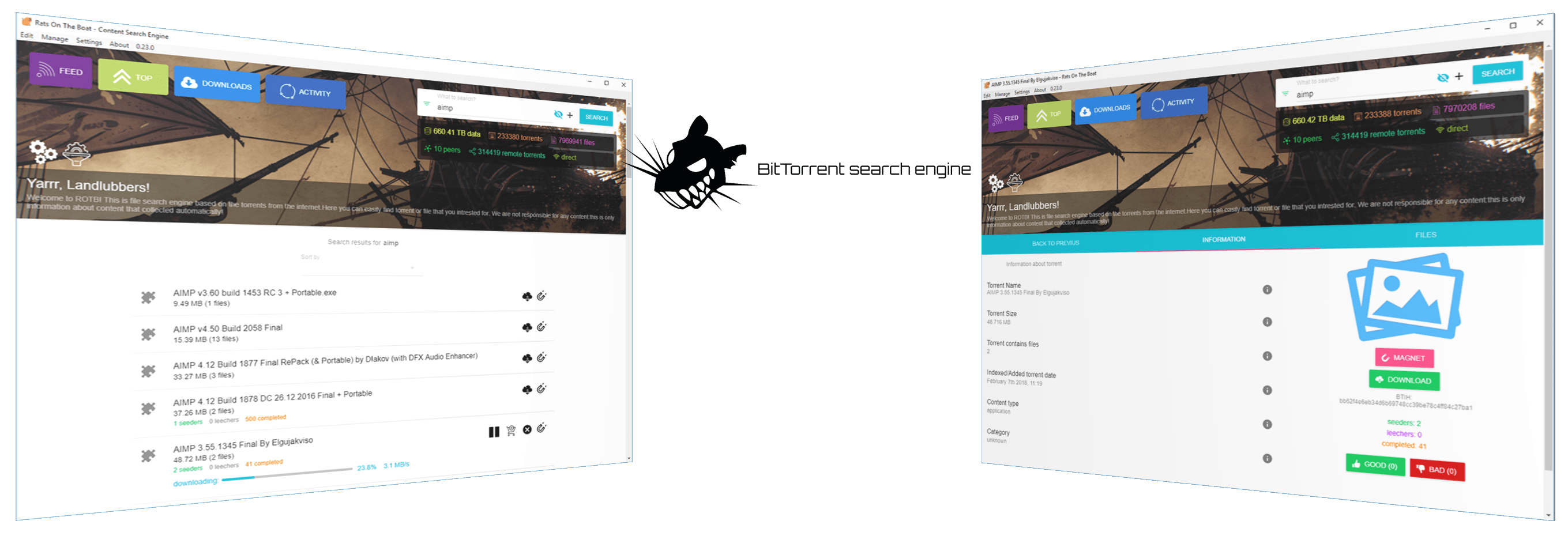
A high-performance BitTorrent search program for desktop and server. It collects and indexes torrents from the DHT network, allowing powerful full-text search through torrent statistics and categories. Works over an encrypted P2P network and supports Windows, Linux, and macOS platforms.
.ratsdb file and merge it back (resumable)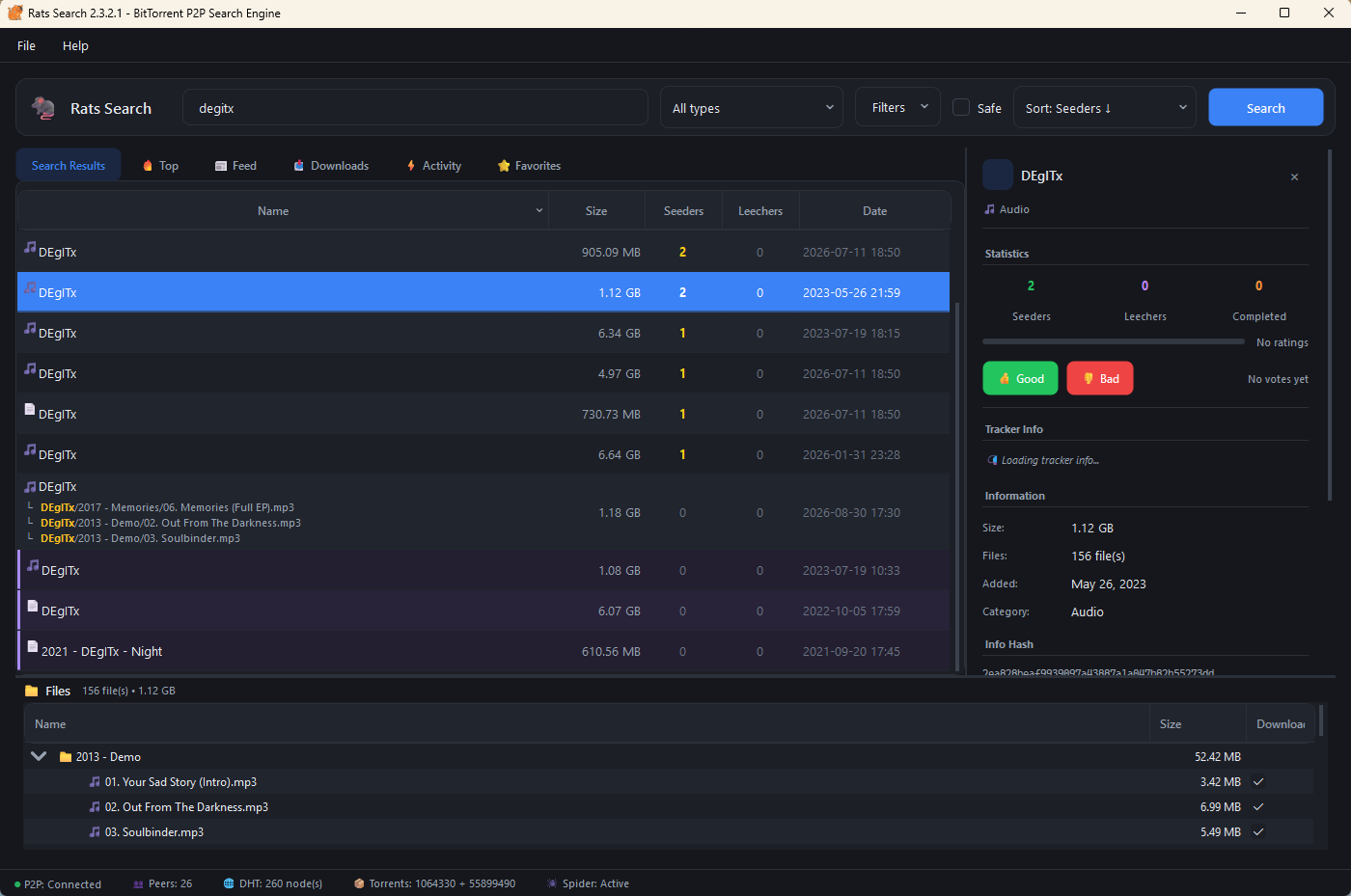
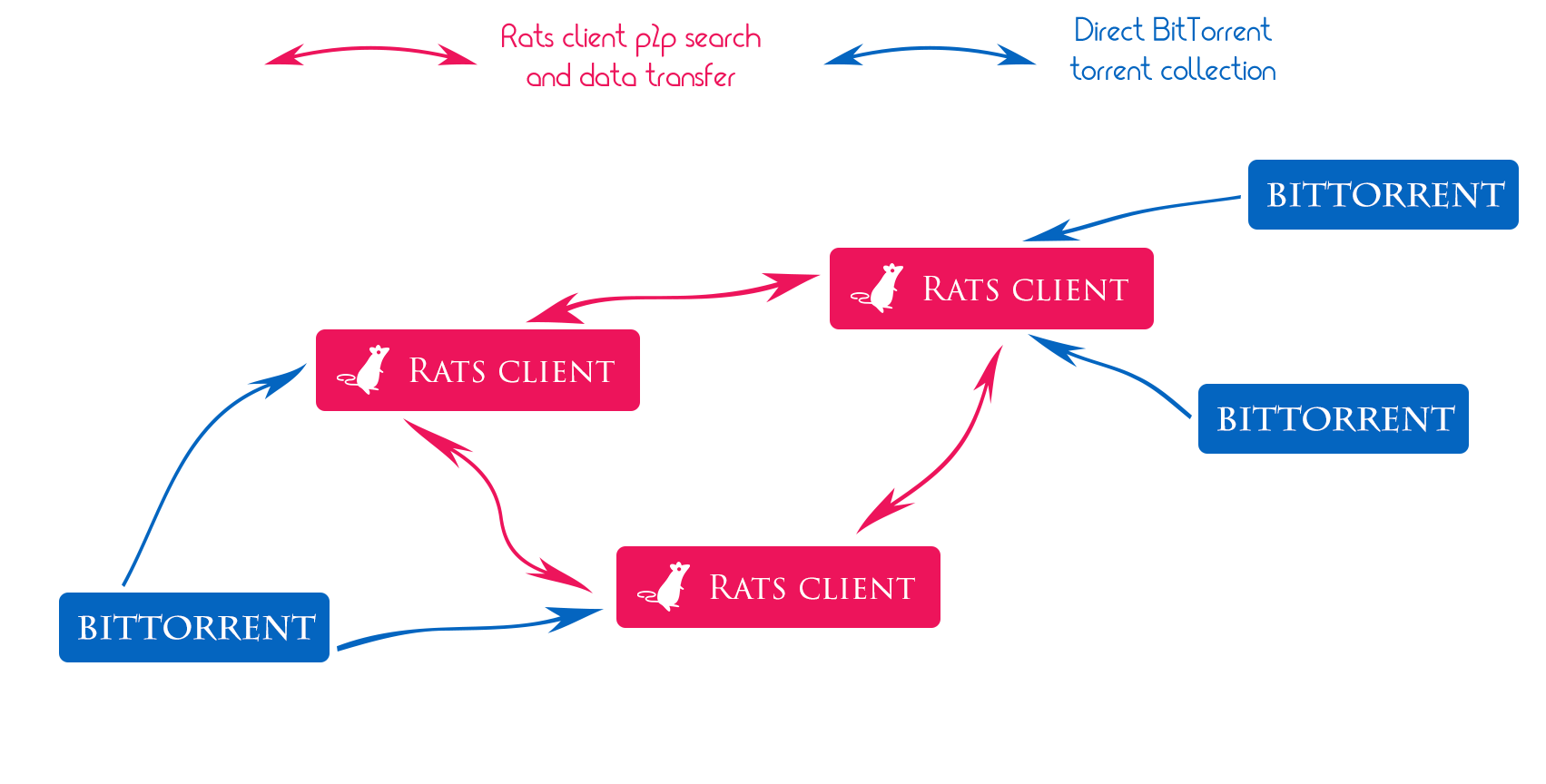
Rats Search is built on librats — a high-performance P2P networking library providing:
| Feature | Description |
|---|---|
| BitTorrent Mainline DHT | Compatible with the largest distributed hash table network (millions of nodes) |
| mDNS Discovery | Automatic local network peer discovery without internet |
| NAT Traversal | STUN/ICE support for connecting through firewalls and NAT |
| Noise Protocol Encryption | End-to-end encryption with Curve25519 + ChaCha20-Poly1305 |
| GossipSub Messaging | Scalable publish-subscribe protocol for P2P communication |
| Thread-safe Design | Modern C++17 concurrency with minimal overhead |
⬇️ Download the latest release for Windows, Linux, or macOS.
| Platform | Package |
|---|---|
| Windows | RatsSearch-Windows-x64.zip |
| Linux | RatsSearch-Linux-x64.AppImage or .tar.gz |
| macOS Intel | RatsSearch-macOS-Intel.zip |
| macOS ARM | RatsSearch-macOS-ARM.zip |
Clone the repository with submodules:
git clone --recurse-submodules https://github.com/DEgITx/rats-search.git
cd rats-search
Configure and build:
cmake -B build -G "Ninja" -DCMAKE_BUILD_TYPE=Release
cmake --build build --config Release
The executable will be in build/bin/.
| Option | Default | Description |
|---|---|---|
RATS_SEARCH_BUILD_TESTS | ON | Build unit tests |
RATS_SEARCH_USE_SYSTEM_LIBRATS | OFF | Use system-installed librats |
Simply run the executable:
./RatsSearch
Command line options:
| Option | Description |
|---|---|
-p, --port <port> | P2P listen port (overrides config setting) |
-d, --dht-port <port> | DHT port (overrides config setting) |
--data-dir <path> | Data directory for database and config |
-h, --help | Display help |
-v, --version | Display version |
For servers without a display, use console mode:
./RatsSearch --console
Console mode options:
| Option | Description |
|---|---|
-c, --console | Run in console mode (no GUI) |
-p, --port <port> | P2P listen port (overrides config setting) |
-d, --dht-port <port> | DHT port (overrides config setting) |
--data-dir <path> | Data directory for database and config |
-s, --spider | Force-enable the DHT spider even when indexer is off in the config |
-m, --max-peers <n> | Maximum P2P connections (overrides config, range: 10-1000) |
Console mode runs unattended: it starts every subsystem, logs to
<data-dir>/rats-search.log, and exits on Ctrl+C. It reads no commands from
stdin — to query or drive a running instance, enable the REST API
("restApi": true) and use the HTTP/WebSocket API.
Example:
# Start with the spider forced on
./RatsSearch --console --spider --data-dir /var/lib/rats-search

# Or start with custom ports
./RatsSearch -c -p 4445 -d 4446 -s
After first launch, a configuration file rats.json will be created in the data directory:
{
    "p2pPort": 4445,
    "dhtPort": 4446,
    "httpPort": 8095,
    "restApi": true,
    "indexer": true,
    "darkMode": true
}
| Setting | Description |
|---|---|
p2pPort | Port for P2P communication (TCP/UDP) |
dhtPort | Port for DHT operations (UDP) |
httpPort | Port for REST API server (WebSocket listens on httpPort + 1) |
restApi | Enable/disable REST API |
indexer | Enable/disable DHT indexer |
upnp | Enable/disable UPnP/NAT-PMP port mapping (config-file only) |
holePunch | Enable/disable NAT hole punching, the fallback for networks where port mapping fails; also relays other peers' rendezvous (config-file only) |
relay | Enable/disable relayed circuits — reaching a peer through a third node both ends already hold, the fallback for peers no punch can reach (config-file only) |
relayServe | Carry other peers' relayed circuits. Off by default: it spends real uplink on somebody else's traffic (config-file only) |
Rats Search includes a built-in REST API server for integrations and custom clients.
We welcome all contributions: bug fixes, improvements, code refactoring, and other enhancements.
Run Rats Search in a container (console mode, no GUI):
docker build -t rats-search .
docker run -d -p 8095:8095 -v rats-data:/data rats-search
The default command starts the spider with 30 max P2P peers. Override as needed:
docker run -d \
  -p 8095:8095 \
  -v rats-data:/data \
  rats-search \
  /app/RatsSearch --console --spider --max-peers 100 --data-dir /data
| Port / Volume | Description |
|---|---|
8095 | HTTP REST API (enable restApi in /data/rats.json) |
/data | Persistent storage for database, config, and logs |
The previous Electron-based version is preserved in the legacy/ folder for reference and for running the web server interface.
cd legacy
npm install --force
npm run buildweb
npm run server
Access the web interface at: http://localhost:8095
Bitcoin: bc1pmzppgyj3qlveeqzpuza3j079wjskdf56nk7f2pd7mqc6fl53yr8su93kpx
Subscribe to autor (GitHub donations): https://github.com/sponsors/DEgITx
MIT License © 2026
121 followers · starred Dec 2025
136 followers · starred Mar 2018
45 followers · starred Nov 2022
103 followers · starred Apr 2023
rats-search: BitTorrent P2P multi-platform search engine for Desktop and Web servers with integrated torrent client
C++
2,021
1,506 commits
updated Oct 7, 2026
A high-performance BitTorrent search program for desktop and server. It collects and indexes torrents from the DHT network, allowing powerful full-text search through torrent statistics and categories. Works over an encrypted P2P network and supports Windows, Linux, and macOS platforms.
.ratsdb file and merge it back (resumable)
Rats Search is built on librats — a high-performance P2P networking library providing:
| Feature | Description |
|---|---|
| BitTorrent Mainline DHT | Compatible with the largest distributed hash table network (millions of nodes) |
| mDNS Discovery | Automatic local network peer discovery without internet |
| NAT Traversal | STUN/ICE support for connecting through firewalls and NAT |
| Noise Protocol Encryption | End-to-end encryption with Curve25519 + ChaCha20-Poly1305 |
| GossipSub Messaging | Scalable publish-subscribe protocol for P2P communication |
| Thread-safe Design | Modern C++17 concurrency with minimal overhead |
⬇️ Download the latest release for Windows, Linux, or macOS.
| Platform | Package |
|---|---|
| Windows | RatsSearch-Windows-x64.zip |
| Linux | RatsSearch-Linux-x64.AppImage or .tar.gz |
| macOS Intel | RatsSearch-macOS-Intel.zip |
| macOS ARM | RatsSearch-macOS-ARM.zip |
Clone the repository with submodules:
git clone --recurse-submodules https://github.com/DEgITx/rats-search.git
cd rats-search
Configure and build:
cmake -B build -G "Ninja" -DCMAKE_BUILD_TYPE=Release
cmake --build build --config Release
The executable will be in build/bin/.
| Option | Default | Description |
|---|---|---|
RATS_SEARCH_BUILD_TESTS | ON | Build unit tests |
RATS_SEARCH_USE_SYSTEM_LIBRATS | OFF | Use system-installed librats |
Simply run the executable:
./RatsSearch
Command line options:
| Option | Description |
|---|---|
-p, --port <port> | P2P listen port (overrides config setting) |
-d, --dht-port <port> | DHT port (overrides config setting) |
--data-dir <path> | Data directory for database and config |
-h, --help | Display help |
-v, --version | Display version |
For servers without a display, use console mode:
./RatsSearch --console
Console mode options:
| Option | Description |
|---|---|
-c, --console | Run in console mode (no GUI) |
-p, --port <port> | P2P listen port (overrides config setting) |
-d, --dht-port <port> | DHT port (overrides config setting) |
--data-dir <path> | Data directory for database and config |
-s, --spider | Force-enable the DHT spider even when indexer is off in the config |
-m, --max-peers <n> | Maximum P2P connections (overrides config, range: 10-1000) |
Console mode runs unattended: it starts every subsystem, logs to
<data-dir>/rats-search.log, and exits on Ctrl+C. It reads no commands from
stdin — to query or drive a running instance, enable the REST API
("restApi": true) and use the HTTP/WebSocket API.
Example:
# Start with the spider forced on
./RatsSearch --console --spider --data-dir /var/lib/rats-search

# Or start with custom ports
./RatsSearch -c -p 4445 -d 4446 -s
After first launch, a configuration file rats.json will be created in the data directory:
{
    "p2pPort": 4445,
    "dhtPort": 4446,
    "httpPort": 8095,
    "restApi": true,
    "indexer": true,
    "darkMode": true
}
| Setting | Description |
|---|---|
p2pPort | Port for P2P communication (TCP/UDP) |
dhtPort | Port for DHT operations (UDP) |
httpPort | Port for REST API server (WebSocket listens on httpPort + 1) |
restApi | Enable/disable REST API |
indexer | Enable/disable DHT indexer |
upnp | Enable/disable UPnP/NAT-PMP port mapping (config-file only) |
holePunch | Enable/disable NAT hole punching, the fallback for networks where port mapping fails; also relays other peers' rendezvous (config-file only) |
relay | Enable/disable relayed circuits — reaching a peer through a third node both ends already hold, the fallback for peers no punch can reach (config-file only) |
relayServe | Carry other peers' relayed circuits. Off by default: it spends real uplink on somebody else's traffic (config-file only) |
Rats Search includes a built-in REST API server for integrations and custom clients.
We welcome all contributions: bug fixes, improvements, code refactoring, and other enhancements.
Run Rats Search in a container (console mode, no GUI):
docker build -t rats-search .
docker run -d -p 8095:8095 -v rats-data:/data rats-search
The default command starts the spider with 30 max P2P peers. Override as needed:
docker run -d \
  -p 8095:8095 \
  -v rats-data:/data \
  rats-search \
  /app/RatsSearch --console --spider --max-peers 100 --data-dir /data
| Port / Volume | Description |
|---|---|
8095 | HTTP REST API (enable restApi in /data/rats.json) |
/data | Persistent storage for database, config, and logs |
The previous Electron-based version is preserved in the legacy/ folder for reference and for running the web server interface.
cd legacy
npm install --force
npm run buildweb
npm run server
Access the web interface at: http://localhost:8095
Bitcoin: bc1pmzppgyj3qlveeqzpuza3j079wjskdf56nk7f2pd7mqc6fl53yr8su93kpx
Subscribe to autor (GitHub donations): https://github.com/sponsors/DEgITx
MIT License © 2026
121 followers · starred Dec 2025
136 followers · starred Mar 2018
45 followers · starred Nov 2022
103 followers · starred Apr 2023



