🌈💻🎨 A tiny markup language for terminal output. Makes formatting output in CLI apps easier!
Go
745
19 commits
updated Mar 2, 2026


A Go module (and standalone binary) to make the output of coloured/formatted text in the terminal easier and more readable.
You can use it in your Go programs, and bash etc. too.
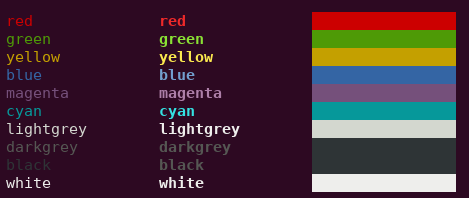
The output of coloured/formatted text is easy using the following syntax:
package main

import "github.com/liamg/tml"

func main() {
    tml.Printf("<red>this text is <bold>red</bold></red> and the following is <green>%s</green>\n", "not red")
}
First, install tml:
Install Go and run the following command.
# For Go 1.16+
# Make sure that `$GOPATH/bin` is in your `$PATH`, because that's where this gets installed

go install github.com/liamg/tml/tml@latest

# For Go <1.16

go get -u github.com/liamg/tml/tml
Then you can simply pipe text containing tags to tml:
#!/bin/bash

echo "<red>this text is <bold>red</bold></red> and the following is <green>not red</green>" | tml
Each tag is enclosed in angle brackets, much like HTML.
You can nest tags as deeply as you like.
It's not required to close tags you've opened, though it can make for easier reading.
<red><green><yellow><blue><magenta><cyan><lightgrey><darkgrey><black><white><lightred><lightgreen><lightyellow><lightblue><lightmagenta><lightcyan><bg-red><bg-green><bg-yellow><bg-blue><bg-magenta><bg-cyan><bg-lightgrey><bg-darkgrey><bg-black><bg-white><bg-lightred><bg-lightgreen><bg-lightyellow><bg-lightblue><bg-lightmagenta><bg-lightcyan><bold><dim><italic><underline><blink><reverse><hidden><strikethrough>Overall
Maintained
Code review
Go module
Latest release
Releases this year
🌈💻🎨 A tiny markup language for terminal output. Makes formatting output in CLI apps easier!
Go
745
19 commits
updated Mar 2, 2026
A Go module (and standalone binary) to make the output of coloured/formatted text in the terminal easier and more readable.
You can use it in your Go programs, and bash etc. too.
The output of coloured/formatted text is easy using the following syntax:
package main

import "github.com/liamg/tml"

func main() {
    tml.Printf("<red>this text is <bold>red</bold></red> and the following is <green>%s</green>\n", "not red")
}
First, install tml:
Install Go and run the following command.
# For Go 1.16+
# Make sure that `$GOPATH/bin` is in your `$PATH`, because that's where this gets installed

go install github.com/liamg/tml/tml@latest

# For Go <1.16

go get -u github.com/liamg/tml/tml
Then you can simply pipe text containing tags to tml:
#!/bin/bash

echo "<red>this text is <bold>red</bold></red> and the following is <green>not red</green>" | tml
Each tag is enclosed in angle brackets, much like HTML.
You can nest tags as deeply as you like.
It's not required to close tags you've opened, though it can make for easier reading.
<red><green><yellow><blue><magenta><cyan><lightgrey><darkgrey><black><white><lightred><lightgreen><lightyellow><lightblue><lightmagenta><lightcyan><bg-red><bg-green><bg-yellow><bg-blue><bg-magenta><bg-cyan><bg-lightgrey><bg-darkgrey><bg-black><bg-white><bg-lightred><bg-lightgreen><bg-lightyellow><bg-lightblue><bg-lightmagenta><bg-lightcyan><bold><dim><italic><underline><blink><reverse><hidden><strikethrough>Overall
Maintained
Code review
Go module
Latest release
Releases this year