
README
The Crumb Programming Language
Crumb is a high level, functional, interpreted, dynamically typed, general-purpose programming language, with a terse syntax, and a verbose standard library.
It features:
- Strictly no side effects* to help you write functional code
- The ability to localize the effects of imported Crumb files.
- Dynamic typing and garbage collection.
- 0 keywords, everything is a function.
*With the exception of IO
Click here to Get Started.
table = (map (range 10) {_ y ->
  <- (map (range 10) {item x ->
    <- (multiply (add x 1) (add y 1))
  })
})
From examples/mult-table.crumb
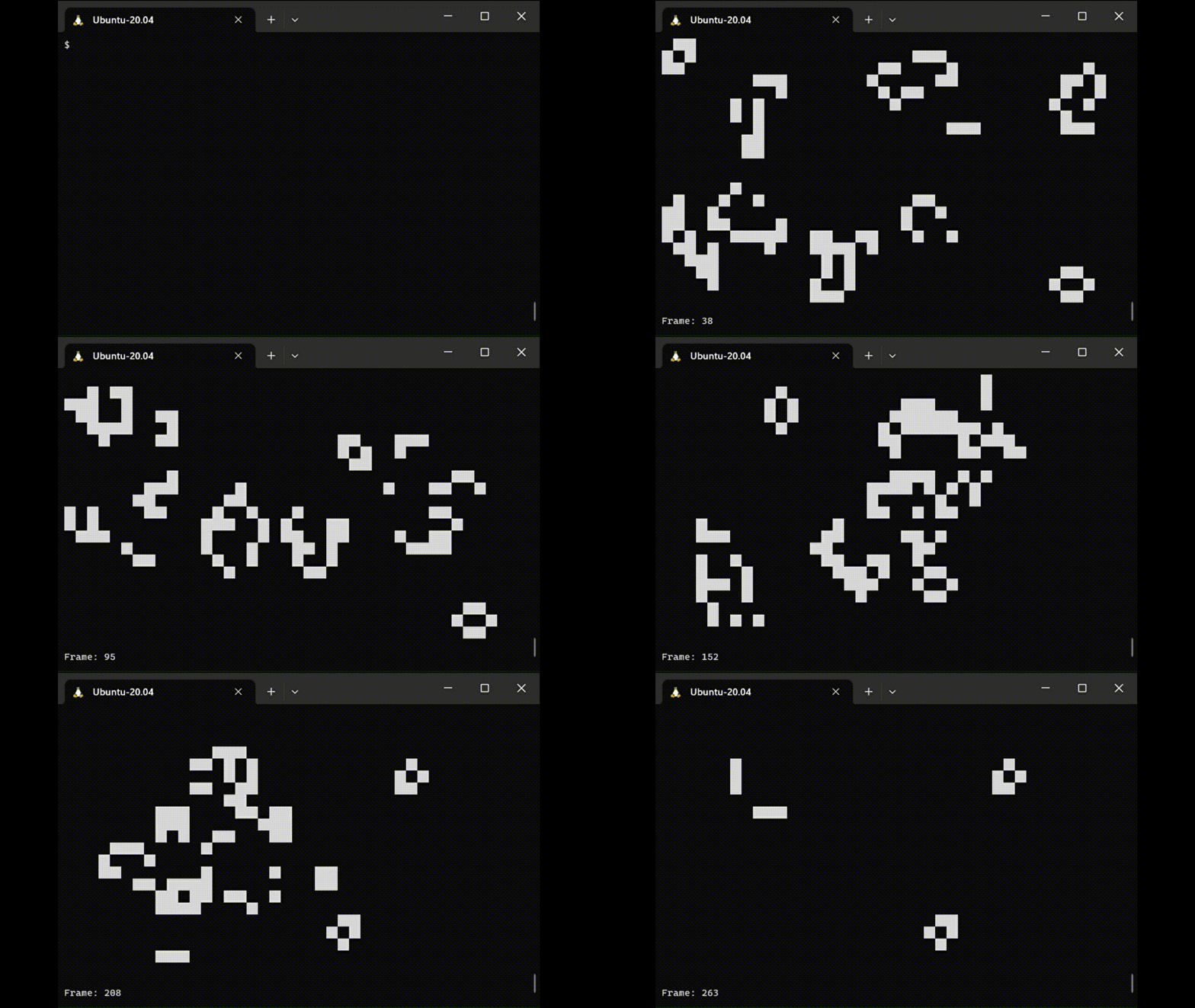 From
From examples/game-of-life.crumb
Find more examples under the examples directory.
Crumb can also build standalone binaries through Loaf.
Getting Started
Install
You do not need to clone this repo. Instead, follow the instructions in this template repo.
If you are on VSCode, you can install the Crumb syntax highlighter extension. The source for the extension can be found here.
Basics
All function calls are done with s-expressions (think lisp). For example,
(print "hello world")
In this case, the function print is applied with the string "hello world" as an argument.
All data in crumb is one of 6 different types:
stringintegerfloatfunction/native functionlistvoid
We can store this data in variables, for example,
a = 5
b = "hello"
We can combine data together to form lists,
magic_list = (list 123 "hello" 42.0)
Lists are always passed by value.
We can encapsulate code in functions using curly braces,
f = {
  (print "Funky!")
}

(f) // prints "Funky"
Functions can get arguments, denoted using the "->" symbol. For example,
add_two_things = {a b ->
  (print (add a b))
}

(add_two_things 3 5) // prints 8
They can also return values using the "<-" symbol,
geometric_mean = {a b ->
  <- (power (multiply a b) 0.5)
}

(print (geometric_mean 3 5) "\n") // prints 3.87...
Functions operate in a few important ways:
- Function applications are dynamically scoped.
- Functions cannot create side effects.
- Like in JavaScript and Python, all functions are first-class.
Most of the features you may expect in a programming language are implemented in the form of functions. For example, here is a Fizzbuzz program using the add, loop, if, remainder, is, and print functions,
(loop 100 {i ->
  i = (add i 1)

  (if (is (remainder i 15) 0) {
      (print "fizzbuzz\n")
    } (is (remainder i 3) 0) {
      (print "fizz\n")
    } (is (remainder i 5) 0) {
      (print "buzz\n")
    } {(print i "\n")}
  )
})
You should now be ready to write your own Crumb programs! More info on how to build applications with events, files, code-splitting, and more, is found in the standard library documentation below.
Standard Library
IO
-
arguments- A list command line arguments, like argv in C.
- Will skip all arguments up to and including the path to the crumb program.
-
(print arg1 arg2 arg3 ...)- Prints all arguments to stdout, returns nothing.
-
(input)- Gets a line of input from stdin.
-
(rows)- Returns the number of rows in the terminal.
-
(columns)- Returns the number of columns in the terminal.
-
(read_file path)- Returns the contents of the file designated by
path, in a string. If the file cannot be read, returns void. path:string
- Returns the contents of the file designated by
-
(write_file path contents)- Writes the string
contentsinto the file designated bypath, returns nothing. path:stringcontents:string
- Writes the string
-
(event time)or(event)- Returns the ANSI string corresponding with the current event. This may block for up to
timeseconds, rounded up to the nearest 100 ms. If notimeis supplied, the function will not return before receiving an event. time:integerorfloat
- Returns the ANSI string corresponding with the current event. This may block for up to
-
(use path1 path2 path3 ... fn)- Crumb's code splitting method. Runs code in file paths, in order, on a new scope. Then uses said scope to apply
fn. path1,path2,path3, ...:stringfn:function
- Crumb's code splitting method. Runs code in file paths, in order, on a new scope. Then uses said scope to apply
-
(shell command)- Runs
commandas an sh program in a seperate process, and returns stdout of the process as astring. command:string
- Runs
Comparisons
-
(is a b)- Checks if
aandbare equal, returns1if so, else returns0. Ifaandbare lists, a deep comparison is made.
- Checks if
-
(less_than a b)- Checks if
ais less thanb, returns1if so, else returns0. a:integerorfloatb:integerorfloat
- Checks if
-
(greater_than a b)- Checks if
ais greater thanb, returns1if so, else returns0. a:integerorfloatb:integerorfloat
- Checks if
Logical Operators
-
(not a)- Returns
0ifais1, and1ifais0. a:integer, which is1or0
- Returns
-
(and arg1 arg2 arg3 ...)- Returns
1if all arguments are1, else returns0 arg1,arg2,arg3, ...:integer, which is1or0
- Returns
-
(or arg1 arg2 arg3 ...)- Returns
1if at least one argument is1, else returns0 arg1,arg2,arg3, ...:integer, which is1or0
- Returns
Arithmetic
-
(add arg1 arg2 arg3 ...)- Returns
arg1+arg2+arg3+ ... - Requires a minimum of two args
arg1,arg2,arg3, ...:integerorfloat
- Returns
-
(subtract arg1 arg2 arg3 ...)- Returns
arg1-arg2-arg3- ... - Requires a minimum of two args
arg1,arg2,arg3, ...:integerorfloat
- Returns
-
(divide arg1 arg2 arg3 ...)- Returns
arg1/arg2/arg3/ ... - Requires a minimum of two args
arg1,arg2,arg3, ...:integerorfloat
- Returns
-
(multiply arg1 arg2 arg3 ...)- Returns
arg1*arg2*arg3* ... - Requires a minimum of two args
arg1,arg2,arg3, ...:integerorfloat
- Returns
-
(remainder a b)- Returns the remainder of
aandb. a:integerorfloatb:integerorfloat
- Returns the remainder of
-
(power a b)- Returns
ato the power ofb. a:integerorfloatb:integerorfloat
- Returns
-
(random)- Returns a random number from 0 to 1.
Control
-
(loop count fn)- Applies
fn,counttimes. Iffnreturns, the loop breaks, andloopreturns whateverfnreturned, else repeats until loop is completed. count:integer, which is greater than or equal to0fn:function, which is in the form{n -> ...}, where n is the current loop index (starting at0).
- Applies
-
(until stop fn initial_state)or(until stop fn)- Applies
fn, and repeats untilfnreturnsstop.untilreturns whateverfnreturned, beforestop. - The return value of every past iteration is passed on to the next. The initial iteration uses
initial_stateif supplied, or returnsvoidif not. fn:function, which is in the form{state n -> ...}, where n is the current loop index (starting at0), andstateis the current state.
- Applies
-
(if condition1 fn1 condtion2 fn2 condtion3 fn3 ... fn_else)- If
condition1is1, appliesfn1. - Else if
condition2is1, appliesfn2, else if ... - If no condtions were
1, appliesfn_else. - Return whatever the result of
fn1,fn2,fn3, ..., orfn_elsewas. condition1,condition2,condition3, ...:integer, which is1or0fn1,fn2,fn3, ...,fn_else:function, which takes no arguments
- If
-
(wait time)- Blocks execution for
timeamount of seconds. time:integerorfloat.
- Blocks execution for
Types
-
void- A value of type
void
- A value of type
-
(integer a)- Returns
aas aninteger. a:string,float, orinteger.
- Returns
-
(string a)- Returns
aas astring. a:string,float, orinteger.
- Returns
-
(float a)- Returns
aas afloat. a:string,float, orinteger.
- Returns
-
(type a)- Returns the type of
aas astring.
- Returns the type of
List and String
-
(list arg1 arg2 arg3 ...)- Returns a
list, with the arguments as it's contents.
- Returns a
-
(length x)- Returns the length of
x x:stringorlist.
- Returns the length of
-
(join arg1 arg2 arg3 ...)- Returns all args joined together.
- All args must be of the same type.
arg1,arg2,arg3, ...:stringorlist.
-
(get x index1)or(get x index1 index2)- Returns the item in
xatindex1. If x is astring, this is a single char. - If
index2is supplied, returns a sub-array or substring fromindex1toindex2, not includingindex2. x:stringorlist.index1:int.index2:int.
- Returns the item in
-
(insert x item)or(insert x item index)- Returns a
listorstring, in whichitemwas inserted intoxatindex. Does not overwrite any data. - If
indexnot supplied,itemis assumed to be put at the end ofx. x:stringorlist.item:stringifxisstring, else anyindex:int.
- Returns a
-
(set x item index)- Returns a
listorstring, in which the item located atindexinx, was replaced byitem. x:stringorlist.item:stringifxisstring, else anyindex:int.
- Returns a
-
(delete x index1)or(delete x index1 index2)- Returns a
stringorlist, whereindex1was removed fromx. - If
index2is supplied, all items fromindex1toindex2are removed, not includingindex2. x:stringorlist.index1:int.index2:int.
- Returns a
-
(map arr fn)- Returns a list created by calling
fnon every item ofarr, and using the values returned byfnto populate the returned array. arr:listfn:function, which is in the form{item i -> ...}, whereitemis the current item, andiis the current index.
- Returns a list created by calling
-
(reduce arr fn initial_acc)or(reduce arr fn)- Returns a value, computed via running
fnon every item inarr. With every iteration, the last return fromfnis passed to the next application offn. The final returned value fromfnis the value returned fromreduce. arr:list.fn:function, which is in the form{acc item i -> ...}, whereitemis the current item,accis the accumulator (the result offnfrom the last item), andiis the current index.accisinitial_accif supplied, orvoidif not.
- Returns a value, computed via running
-
(range n)- Returns a list with the integers from
0ton, not includingn. n:integer, which is greater than or equal to 0.
- Returns a list with the integers from
-
(find x item)- Returns the index of
iteminx. Returnsvoidif not found. x:stringorlistitem:stringifxisstring, else any
- Returns the index of
Syntax
Crumb utilizes a notably terse syntax definition. The whole syntax can described in 6 lines of EBNF. Additionally, there are no reserved words, and only 7 reserved symbols.
EBNF
program = start, statement, end;
statement = {return | assignment | value};
return = "<-", value;
assignment = identifier, "=", value;
value = application | function | int | float | string | identifier;
application = "(", {value}, ")";
function = "{", [{identifier}, "->"], statement, "}";
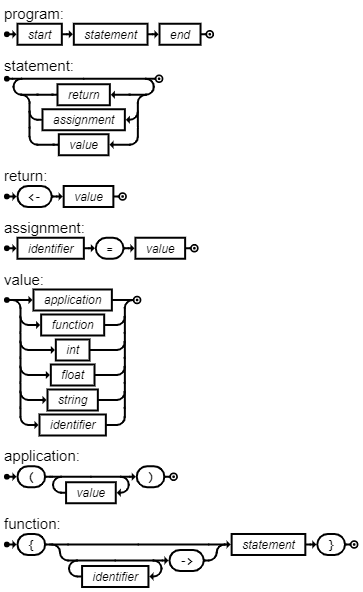
Crumb syntax diagram, generated with DrawGrammar.
Tokens
"="
"("
")"
"{"
"}"
"->"
"<-"
identifier
int
float
string
start
end
Specifics
Strings are characters surrounded by quotes, for example:
"hello world"
"this is\nsplit between new lines"
"\e[31mthis text is in red\e[0m"
Escape codes in Crumb are equivalent to their respective C escape codes. The list of supported escape codes is:
"\a"
"\b"
"\f"
"\n"
"\r"
"\t"
"\v"
"\e"
"\\"
"\""
"\x4d" // for arbitrary ascii chars
Integers are groups of number characters, that may be preceded by - for example:
1234
-14
345
Floats are like integers, but have a decimal in them, for example:
13.45
-2.3
745.0
Identifiers are any collection of characters, that are not separated by whitespace, don't begin with quotes or numbers, and are not any reserved symbols, for example:
hello
x₂
symbol1
+
Comments start with "//", and end with the end of a line, for example:
// this is a program that prints hi
(print "hi") // this prints hi
Development
To identify the current interpreter version, use the -v flag.
./crumb -v
When debugging the interpreter, it may be useful to compile with the -g flag.
gcc src/*.c -g -Wall -lm -o crumb
This will allow Valgrind to provide extra information,
valgrind --leak-check=full -s ./crumb -d YOURCODE.crumb
On mac, you can use leaks,
leaks -atExit -- ./crumb YOURCODE.crumb
To obtain debug information about how your code is interpreted (Tokens, AST, etc.), add the -d flag.
./crumb -d YOURCODE.crumb
You can also pipe code straight into crumb (passed files always take priority over piped code).
echo '(print (add 1 2) "\\n")' | ./crumb
Note that piping and using the event function is undefined/unsupported.
Loaf derives it's templating from loaf-template/template.crumb. For Loaf to function correctly, this template must have no dependencies, and expose the following function:
(template_main entry used_files)- Returns a formatted
main.cto substitute withsrc/main.cin standalone builds. entry:string, the entry point path of the Crumb program.used_files:listofstring, a list of paths to Crumb files in the project.
- Returns a formatted
Credit
- Built by Liam Ilan
Contributors

138 commits
Similar repos


Languages
C
100.0%
README
The Crumb Programming Language
Crumb is a high level, functional, interpreted, dynamically typed, general-purpose programming language, with a terse syntax, and a verbose standard library.
It features:
- Strictly no side effects* to help you write functional code
- The ability to localize the effects of imported Crumb files.
- Dynamic typing and garbage collection.
- 0 keywords, everything is a function.
*With the exception of IO
Click here to Get Started.
table = (map (range 10) {_ y ->
  <- (map (range 10) {item x ->
    <- (multiply (add x 1) (add y 1))
  })
})
From examples/mult-table.crumb
From examples/game-of-life.crumb
Find more examples under the examples directory.
Crumb can also build standalone binaries through Loaf.
Getting Started
Install
You do not need to clone this repo. Instead, follow the instructions in this template repo.
If you are on VSCode, you can install the Crumb syntax highlighter extension. The source for the extension can be found here.
Basics
All function calls are done with s-expressions (think lisp). For example,
(print "hello world")
In this case, the function print is applied with the string "hello world" as an argument.
All data in crumb is one of 6 different types:
stringintegerfloatfunction/native functionlistvoid
We can store this data in variables, for example,
a = 5
b = "hello"
We can combine data together to form lists,
magic_list = (list 123 "hello" 42.0)
Lists are always passed by value.
We can encapsulate code in functions using curly braces,
f = {
  (print "Funky!")
}

(f) // prints "Funky"
Functions can get arguments, denoted using the "->" symbol. For example,
add_two_things = {a b ->
  (print (add a b))
}

(add_two_things 3 5) // prints 8
They can also return values using the "<-" symbol,
geometric_mean = {a b ->
  <- (power (multiply a b) 0.5)
}

(print (geometric_mean 3 5) "\n") // prints 3.87...
Functions operate in a few important ways:
- Function applications are dynamically scoped.
- Functions cannot create side effects.
- Like in JavaScript and Python, all functions are first-class.
Most of the features you may expect in a programming language are implemented in the form of functions. For example, here is a Fizzbuzz program using the add, loop, if, remainder, is, and print functions,
(loop 100 {i ->
  i = (add i 1)

  (if (is (remainder i 15) 0) {
      (print "fizzbuzz\n")
    } (is (remainder i 3) 0) {
      (print "fizz\n")
    } (is (remainder i 5) 0) {
      (print "buzz\n")
    } {(print i "\n")}
  )
})
You should now be ready to write your own Crumb programs! More info on how to build applications with events, files, code-splitting, and more, is found in the standard library documentation below.
Standard Library
IO
-
arguments- A list command line arguments, like argv in C.
- Will skip all arguments up to and including the path to the crumb program.
-
(print arg1 arg2 arg3 ...)- Prints all arguments to stdout, returns nothing.
-
(input)- Gets a line of input from stdin.
-
(rows)- Returns the number of rows in the terminal.
-
(columns)- Returns the number of columns in the terminal.
-
(read_file path)- Returns the contents of the file designated by
path, in a string. If the file cannot be read, returns void. path:string
- Returns the contents of the file designated by
-
(write_file path contents)- Writes the string
contentsinto the file designated bypath, returns nothing. path:stringcontents:string
- Writes the string
-
(event time)or(event)- Returns the ANSI string corresponding with the current event. This may block for up to
timeseconds, rounded up to the nearest 100 ms. If notimeis supplied, the function will not return before receiving an event. time:integerorfloat
- Returns the ANSI string corresponding with the current event. This may block for up to
-
(use path1 path2 path3 ... fn)- Crumb's code splitting method. Runs code in file paths, in order, on a new scope. Then uses said scope to apply
fn. path1,path2,path3, ...:stringfn:function
- Crumb's code splitting method. Runs code in file paths, in order, on a new scope. Then uses said scope to apply
-
(shell command)- Runs
commandas an sh program in a seperate process, and returns stdout of the process as astring. command:string
- Runs
Comparisons
-
(is a b)- Checks if
aandbare equal, returns1if so, else returns0. Ifaandbare lists, a deep comparison is made.
- Checks if
-
(less_than a b)- Checks if
ais less thanb, returns1if so, else returns0. a:integerorfloatb:integerorfloat
- Checks if
-
(greater_than a b)- Checks if
ais greater thanb, returns1if so, else returns0. a:integerorfloatb:integerorfloat
- Checks if
Logical Operators
-
(not a)- Returns
0ifais1, and1ifais0. a:integer, which is1or0
- Returns
-
(and arg1 arg2 arg3 ...)- Returns
1if all arguments are1, else returns0 arg1,arg2,arg3, ...:integer, which is1or0
- Returns
-
(or arg1 arg2 arg3 ...)- Returns
1if at least one argument is1, else returns0 arg1,arg2,arg3, ...:integer, which is1or0
- Returns
Arithmetic
-
(add arg1 arg2 arg3 ...)- Returns
arg1+arg2+arg3+ ... - Requires a minimum of two args
arg1,arg2,arg3, ...:integerorfloat
- Returns
-
(subtract arg1 arg2 arg3 ...)- Returns
arg1-arg2-arg3- ... - Requires a minimum of two args
arg1,arg2,arg3, ...:integerorfloat
- Returns
-
(divide arg1 arg2 arg3 ...)- Returns
arg1/arg2/arg3/ ... - Requires a minimum of two args
arg1,arg2,arg3, ...:integerorfloat
- Returns
-
(multiply arg1 arg2 arg3 ...)- Returns
arg1*arg2*arg3* ... - Requires a minimum of two args
arg1,arg2,arg3, ...:integerorfloat
- Returns
-
(remainder a b)- Returns the remainder of
aandb. a:integerorfloatb:integerorfloat
- Returns the remainder of
-
(power a b)- Returns
ato the power ofb. a:integerorfloatb:integerorfloat
- Returns
-
(random)- Returns a random number from 0 to 1.
Control
-
(loop count fn)- Applies
fn,counttimes. Iffnreturns, the loop breaks, andloopreturns whateverfnreturned, else repeats until loop is completed. count:integer, which is greater than or equal to0fn:function, which is in the form{n -> ...}, where n is the current loop index (starting at0).
- Applies
-
(until stop fn initial_state)or(until stop fn)- Applies
fn, and repeats untilfnreturnsstop.untilreturns whateverfnreturned, beforestop. - The return value of every past iteration is passed on to the next. The initial iteration uses
initial_stateif supplied, or returnsvoidif not. fn:function, which is in the form{state n -> ...}, where n is the current loop index (starting at0), andstateis the current state.
- Applies
-
(if condition1 fn1 condtion2 fn2 condtion3 fn3 ... fn_else)- If
condition1is1, appliesfn1. - Else if
condition2is1, appliesfn2, else if ... - If no condtions were
1, appliesfn_else. - Return whatever the result of
fn1,fn2,fn3, ..., orfn_elsewas. condition1,condition2,condition3, ...:integer, which is1or0fn1,fn2,fn3, ...,fn_else:function, which takes no arguments
- If
-
(wait time)- Blocks execution for
timeamount of seconds. time:integerorfloat.
- Blocks execution for
Types
-
void- A value of type
void
- A value of type
-
(integer a)- Returns
aas aninteger. a:string,float, orinteger.
- Returns
-
(string a)- Returns
aas astring. a:string,float, orinteger.
- Returns
-
(float a)- Returns
aas afloat. a:string,float, orinteger.
- Returns
-
(type a)- Returns the type of
aas astring.
- Returns the type of
List and String
-
(list arg1 arg2 arg3 ...)- Returns a
list, with the arguments as it's contents.
- Returns a
-
(length x)- Returns the length of
x x:stringorlist.
- Returns the length of
-
(join arg1 arg2 arg3 ...)- Returns all args joined together.
- All args must be of the same type.
arg1,arg2,arg3, ...:stringorlist.
-
(get x index1)or(get x index1 index2)- Returns the item in
xatindex1. If x is astring, this is a single char. - If
index2is supplied, returns a sub-array or substring fromindex1toindex2, not includingindex2. x:stringorlist.index1:int.index2:int.
- Returns the item in
-
(insert x item)or(insert x item index)- Returns a
listorstring, in whichitemwas inserted intoxatindex. Does not overwrite any data. - If
indexnot supplied,itemis assumed to be put at the end ofx. x:stringorlist.item:stringifxisstring, else anyindex:int.
- Returns a
-
(set x item index)- Returns a
listorstring, in which the item located atindexinx, was replaced byitem. x:stringorlist.item:stringifxisstring, else anyindex:int.
- Returns a
-
(delete x index1)or(delete x index1 index2)- Returns a
stringorlist, whereindex1was removed fromx. - If
index2is supplied, all items fromindex1toindex2are removed, not includingindex2. x:stringorlist.index1:int.index2:int.
- Returns a
-
(map arr fn)- Returns a list created by calling
fnon every item ofarr, and using the values returned byfnto populate the returned array. arr:listfn:function, which is in the form{item i -> ...}, whereitemis the current item, andiis the current index.
- Returns a list created by calling
-
(reduce arr fn initial_acc)or(reduce arr fn)- Returns a value, computed via running
fnon every item inarr. With every iteration, the last return fromfnis passed to the next application offn. The final returned value fromfnis the value returned fromreduce. arr:list.fn:function, which is in the form{acc item i -> ...}, whereitemis the current item,accis the accumulator (the result offnfrom the last item), andiis the current index.accisinitial_accif supplied, orvoidif not.
- Returns a value, computed via running
-
(range n)- Returns a list with the integers from
0ton, not includingn. n:integer, which is greater than or equal to 0.
- Returns a list with the integers from
-
(find x item)- Returns the index of
iteminx. Returnsvoidif not found. x:stringorlistitem:stringifxisstring, else any
- Returns the index of
Syntax
Crumb utilizes a notably terse syntax definition. The whole syntax can described in 6 lines of EBNF. Additionally, there are no reserved words, and only 7 reserved symbols.
EBNF
program = start, statement, end;
statement = {return | assignment | value};
return = "<-", value;
assignment = identifier, "=", value;
value = application | function | int | float | string | identifier;
application = "(", {value}, ")";
function = "{", [{identifier}, "->"], statement, "}";
Crumb syntax diagram, generated with DrawGrammar.
Tokens
"="
"("
")"
"{"
"}"
"->"
"<-"
identifier
int
float
string
start
end
Specifics
Strings are characters surrounded by quotes, for example:
"hello world"
"this is\nsplit between new lines"
"\e[31mthis text is in red\e[0m"
Escape codes in Crumb are equivalent to their respective C escape codes. The list of supported escape codes is:
"\a"
"\b"
"\f"
"\n"
"\r"
"\t"
"\v"
"\e"
"\\"
"\""
"\x4d" // for arbitrary ascii chars
Integers are groups of number characters, that may be preceded by - for example:
1234
-14
345
Floats are like integers, but have a decimal in them, for example:
13.45
-2.3
745.0
Identifiers are any collection of characters, that are not separated by whitespace, don't begin with quotes or numbers, and are not any reserved symbols, for example:
hello
x₂
symbol1
+
Comments start with "//", and end with the end of a line, for example:
// this is a program that prints hi
(print "hi") // this prints hi
Development
To identify the current interpreter version, use the -v flag.
./crumb -v
When debugging the interpreter, it may be useful to compile with the -g flag.
gcc src/*.c -g -Wall -lm -o crumb
This will allow Valgrind to provide extra information,
valgrind --leak-check=full -s ./crumb -d YOURCODE.crumb
On mac, you can use leaks,
leaks -atExit -- ./crumb YOURCODE.crumb
To obtain debug information about how your code is interpreted (Tokens, AST, etc.), add the -d flag.
./crumb -d YOURCODE.crumb
You can also pipe code straight into crumb (passed files always take priority over piped code).
echo '(print (add 1 2) "\\n")' | ./crumb
Note that piping and using the event function is undefined/unsupported.
Loaf derives it's templating from loaf-template/template.crumb. For Loaf to function correctly, this template must have no dependencies, and expose the following function:
(template_main entry used_files)- Returns a formatted
main.cto substitute withsrc/main.cin standalone builds. entry:string, the entry point path of the Crumb program.used_files:listofstring, a list of paths to Crumb files in the project.
- Returns a formatted
Credit
- Built by Liam Ilan
Similar repos
Contributors
138 commits
Languages
C
100.0%