Command-line admin tool for observing and troubleshooting Postgres.
Go
1,631
630 commits
updated Sep 10, 2026



pgCenter is a command-line admin tool for observing and troubleshooting Postgres.
Postgres provides various activity statistics about its runtime, such as connections, statements, database operations, replication, resources usage and more. The general purpose of the statistics is to help DBAs to monitor and troubleshoot Postgres. However, these statistics provided in textual form retrieved from SQL functions and views, and Postgres doesn't provide native tools for working with statistics views.
pgCenter's main goal is to help Postgres DBA working with statistics and provide a convenient way to observe Postgres in runtime.
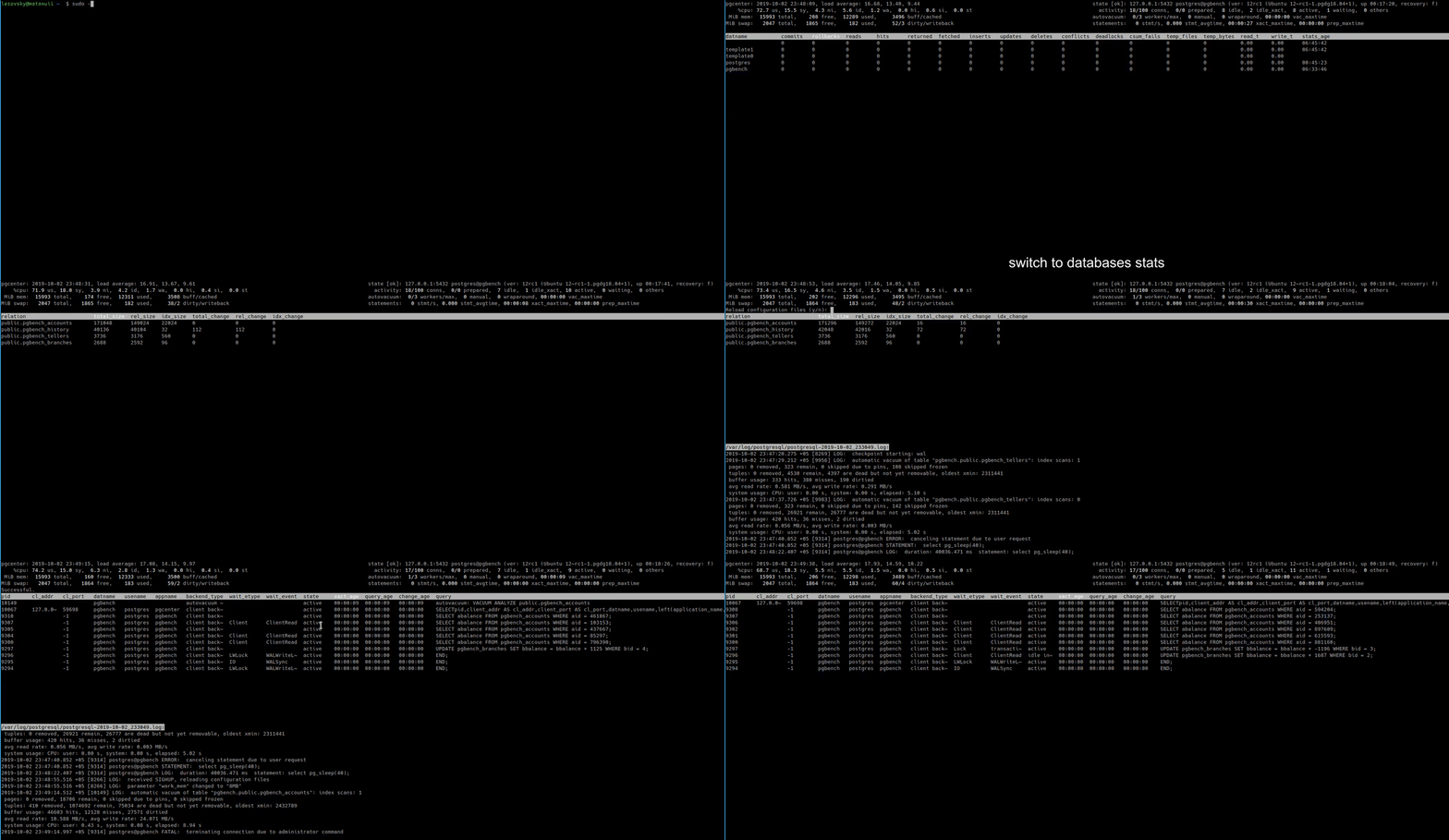
Shift+S): see CPU utilization, IO throughput, and IO wait time per PostgreSQL backend alongside query text — without leaving pgcenter. Instantly identify whether a slow query is CPU-bound or IO-bound.pgcenter report -N for post-mortem analysis.Pull Docker image from DockerHub; run pgcenter and connect to the database.
docker pull lesovsky/pgcenter:latest
docker run -it --rm lesovsky/pgcenter:latest pgcenter top -h 1.2.3.4 -U user -d dbname
pg_relation_size() and pg_total_relation_size() functions;pgcenter top also provides system usage information based on statistics from procfs filesystem:
Shift+S)pgcenter top includes a per-process stats screen (press Shift+S) that combines pg_stat_activity with per-backend CPU and IO metrics from /proc/[pid]/stat and /proc/[pid]/io. Shows CPU utilization (%all, %us, %sy), IO throughput (read,KiB/s, write,KiB/s), IO delay (%iodelay), and accumulated totals since process start. Available in local mode only.
These metrics are also captured by pgcenter record and can be replayed with pgcenter report -N for post-mortem analysis.
In the case of connecting to remote Postgres, there is possibility to use additional SQL functions used for retrieving /proc statistics from a remote host. For more information, see details here.
Packages for DEB, RPM, APK are available on releases page.
pgCenter has been developed to work on Linux and hasn't been tested on other OS (operating systems); therefore, it is not recommended using it on alternative systems because it will not operate properly.
pgCenter supports a wide range of PostgreSQL versions, despite the difference in statistics between each version. If pgCenter is unable to read a particular stat, it will show a descriptive error message.
Ideally, pgCenter requires SUPERUSER database privileges, or at least privileges to view statistics, read settings, logfiles and send signals to other backends. Roles with such privileges (except reading logs) have been introduced in Postgres 10; see details here.
It is recommended to run pgCenter on the same host where Postgres is running. This is because for Postgres, pgCenter is just a simple client application, and it may have the same problems as other applications that work with Postgres, such as network-related problems, slow responses, etc.
It is possible to run pgCenter on one host and connect to Postgres, which runs on another host, but some functions may not work - this fully applies to pgcenter top command.
pgCenter also supports Amazon RDS for PostgreSQL, but as mentioned above, some functions will not work, and also system stats will not be available, because of PostgreSQL RDS instances don't support untrusted procedural languages due to security reasons.
To help development you are encouraged to:
Overall
Maintained
Code review
Go module
Latest release
Releases this year
718 followers · starred Dec 2016
4,244 followers · starred May 2020
490 followers · starred Dec 2016
42 followers · starred Jun 2019
Command-line admin tool for observing and troubleshooting Postgres.
Go
1,631
630 commits
updated Sep 10, 2026
pgCenter is a command-line admin tool for observing and troubleshooting Postgres.
Postgres provides various activity statistics about its runtime, such as connections, statements, database operations, replication, resources usage and more. The general purpose of the statistics is to help DBAs to monitor and troubleshoot Postgres. However, these statistics provided in textual form retrieved from SQL functions and views, and Postgres doesn't provide native tools for working with statistics views.
pgCenter's main goal is to help Postgres DBA working with statistics and provide a convenient way to observe Postgres in runtime.
Shift+S): see CPU utilization, IO throughput, and IO wait time per PostgreSQL backend alongside query text — without leaving pgcenter. Instantly identify whether a slow query is CPU-bound or IO-bound.pgcenter report -N for post-mortem analysis.Pull Docker image from DockerHub; run pgcenter and connect to the database.
docker pull lesovsky/pgcenter:latest
docker run -it --rm lesovsky/pgcenter:latest pgcenter top -h 1.2.3.4 -U user -d dbname
pg_relation_size() and pg_total_relation_size() functions;pgcenter top also provides system usage information based on statistics from procfs filesystem:
Shift+S)pgcenter top includes a per-process stats screen (press Shift+S) that combines pg_stat_activity with per-backend CPU and IO metrics from /proc/[pid]/stat and /proc/[pid]/io. Shows CPU utilization (%all, %us, %sy), IO throughput (read,KiB/s, write,KiB/s), IO delay (%iodelay), and accumulated totals since process start. Available in local mode only.
These metrics are also captured by pgcenter record and can be replayed with pgcenter report -N for post-mortem analysis.
In the case of connecting to remote Postgres, there is possibility to use additional SQL functions used for retrieving /proc statistics from a remote host. For more information, see details here.
Packages for DEB, RPM, APK are available on releases page.
pgCenter has been developed to work on Linux and hasn't been tested on other OS (operating systems); therefore, it is not recommended using it on alternative systems because it will not operate properly.
pgCenter supports a wide range of PostgreSQL versions, despite the difference in statistics between each version. If pgCenter is unable to read a particular stat, it will show a descriptive error message.
Ideally, pgCenter requires SUPERUSER database privileges, or at least privileges to view statistics, read settings, logfiles and send signals to other backends. Roles with such privileges (except reading logs) have been introduced in Postgres 10; see details here.
It is recommended to run pgCenter on the same host where Postgres is running. This is because for Postgres, pgCenter is just a simple client application, and it may have the same problems as other applications that work with Postgres, such as network-related problems, slow responses, etc.
It is possible to run pgCenter on one host and connect to Postgres, which runs on another host, but some functions may not work - this fully applies to pgcenter top command.
pgCenter also supports Amazon RDS for PostgreSQL, but as mentioned above, some functions will not work, and also system stats will not be available, because of PostgreSQL RDS instances don't support untrusted procedural languages due to security reasons.
To help development you are encouraged to:
Overall
Maintained
Code review
Go module
Latest release
Releases this year
718 followers · starred Dec 2016
4,244 followers · starred May 2020
490 followers · starred Dec 2016
42 followers · starred Jun 2019