
README
Quarto Pseudocode Extension


A Quarto extension to render pseudocode for HTML and PDF document. It's based on pseudocode.js for HTML document, algorithm and algpseudocodex package for PDF document.
Installing
quarto add leovan/quarto-pseudocode
This will install the extension under the _extensions subdirectory. If you're using version control, you will want to check in this directory.
Using
Adding Extension
Add this in the header of your document, or in the _quarto.yml file:
filters:
  - pseudocode
Pseudocode Block
Add the pseudocode in a code block marked with pseudocode:
```pseudocode
#| html-indent-size: "1.2em"
#| html-comment-delimiter: "//"
#| html-line-number: true
#| html-line-number-punc: ":"
#| html-no-end: false
#| pdf-placement: "htb!"
#| pdf-line-number: true
#| pdf-comment-delimiter: "//"

\begin{algorithm}
\caption{Quicksort}
\begin{algorithmic}
\Procedure{Quicksort}{$A, p, r$}
  \If{$p < r$}
    \State $q = $ \Call{Partition}{$A, p, r$}
    \State \Call{Quicksort}{$A, p, q - 1$}
    \State \Call{Quicksort}{$A, q + 1, r$}
  \EndIf
\EndProcedure
\Procedure{Partition}{$A, p, r$}
  \State $x = A[r]$
  \State $i = p - 1$
  \For{$j = p$ \To $r - 1$}
    \If{$A[j] < x$}
      \State $i = i + 1$
      \State exchange
      $A[i]$ with     $A[j]$
    \EndIf
    \State exchange $A[i]$ with $A[r]$
  \EndFor
\EndProcedure
\end{algorithmic}
\end{algorithm}
```
[!IMPORTANT] Use upper camel case format keyword rather than all uppercase format keyword.
Parameters
Global parameters are show as below:
| Parameter | Default | Format | Description |
|---|---|---|---|
caption-prefix | "Algorithm" | ALL | Prefix used for generated pseudocode captions. |
reference-prefix | "Algorithm" | ALL | Prefix used for pseudocode cross-reference text. |
caption-number | true | ALL | Show numbering in pseudocode captions. |
caption-align | "left" | ALL | Alignment for pseudocode captions. |
Add global parameters in the header of your document, or in the _quarto.yml file:
pseudocode:
  caption-prefix: "Algorithm"
  reference-prefix: "Algorithm"
  caption-number: true
  caption-align: "left"
Parameters for pseudocode share the same format like R or Python code:
| Parameter | Default | Format | Description |
|---|---|---|---|
label | ALL | Cross-reference label, typically starting with alg-. | |
html-indent-size | "1.2em" | HTML | HTML indent size for pseudocode.js output. |
html-comment-delimiter | "//" | HTML | HTML comment delimiter token. |
html-line-number | true | HTML | Show line numbers in HTML output. |
html-line-number-punc | ":" | HTML | Punctuation used after line numbers in HTML output. |
html-no-end | false | HTML | Hide end statements in HTML output. |
html-indent-lines | false | HTML | Show indent guide lines in HTML output. |
pdf-placement | "H" | LaTeX algorithm placement token in PDF output. | |
pdf-line-number | true | Show line numbers in PDF output. | |
pdf-comment-delimiter | "//" | Comment delimiter token in PDF output. | |
pdf-no-end | false | Hide end statements in PDF output. | |
pdf-indent-lines | false | Show indent guide lines in PDF output. | |
pdf-italic-comment | false | Italic comments in PDF output. | |
pdf-right-comment | false | Right justified comments in PDF output. | |
pdf-comment-color | "black" | Color of the comments in PDF output. |
[!NOTE]
- If set the placement in pseudocode, such as
\begin{algorithm}[htb!], thenpdf-placementoption will be ignored.- If set show line number or not in pseudocode, such as
\begin{algorithmic}[1], thenpdf-line-numberoption will be ignored.- All these changes won't affect the output of HTML document. We recommend you set the parameters rather than modify pseudocode directly.
For HTML document, pseudocode.js render math formulas using either KaTeX or MathJax. We add pseudocode.js after html body, thus you need initialize KaTeX or MathJax before html body or in html header. Add this in the header of your document, or in the _quarto.yml file.
MathJax 3
format:
  html:
    include-in-header:
      text: |
        <script>
        MathJax = {
          loader: {
            load: ["[tex]/boldsymbol"],
          },
          tex: {
            tags: "all",
            inlineMath: [["$", "$"], ["\\(", "\\)"]],
            displayMath: [["$$", "$$"], ["\\[", "\\]"]],
            processEscapes: true,
            processEnvironments: true,
            packages: {
              "[+]": ["boldsymbol"],
            },
          },
        };
        </script>
        <script type="text/javascript" src="https://cdn.jsdelivr.net/npm/mathjax@3/es5/tex-chtml-full.js"></script>
MathJax 4
format:
  html:
    include-in-header:
      text: |
        <script>
        MathJax = {
          loader: {
            load: ["[tex]/boldsymbol"],
          },
          tex: {
            tags: "all",
            inlineMath: [["$", "$"], ["\\(", "\\)"]],
            displayMath: [["$$", "$$"], ["\\[", "\\]"]],
            processEscapes: true,
            processEnvironments: true,
            packages: {
              "[+]": ["boldsymbol"],
            },
          },
        };
        </script>
        <script type="text/javascript" src="https://cdn.jsdelivr.net/npm/mathjax@4/tex-chtml.js"></script>
KaTeX
format:
  html:
    include-in-header:
      text: |
      <link rel="stylesheet" href="https://cdn.jsdelivr.net/npm/katex@latest/dist/katex.min.css" />
      <script type="text/javascript" src="https://cdn.jsdelivr.net/npm/katex@latest/dist/katex.min.js"></script>
For PDF document, pseudocode caption in book type project will be changed from Algorithm n to Algorithm x.n in chapter x. Add \algrenewcommand{\algorithmiccomment}[1]{<your value> #1} in the header of your document, or in the _quarto.yml file will change the form in which comments are displayed:
format:
  pdf:
    include-before-body:
      text: |
        \algrenewcommand{\algorithmiccomment}[1]{\hskip3em$\rightarrow$ #1}
Cross Reference
Build-in Cross Reference
Set the label in pseudocode, and it must start with algo-:
[!WARNING] From Quarto 1.8,
alghas become a reserved cross reference prefix keyword.
```pseudocode
#| label: algo-quicksort
...

\begin{algorithm}
\caption{Quicksort}
\begin{algorithmic}
...
\end{algorithmic}
\end{algorithm}
```
Use @<label> to do cross reference:
Quicksort algorithm is shown as @algo-quicksort.
[!IMPORTANT] Must set
labeland\caption{}to make build-in cross reference works.
[!WARNING] For
booktype project, build-in cross reference in different files works only with PDF format.
Quarto Custom Cross Reference
Add custom cross reference for pseudocode in the header of your document, or in the _quarto.yml file:
crossref:
  custom:
    - kind: float
      key: alg
      reference-prefix: "Algorithm"
      caption-prefix: "Algorithm"
      latex-env: alg
      latex-list-of-description: Algorithm
Use Quarto custom cross reference to surround the pseudocode:
::: {#alg-quicksort}

```pseudocode
...

\begin{algorithm}
\caption{Quicksort}
\begin{algorithmic}
...
\end{algorithmic}
\end{algorithm}
```

Quicksort

:::
[!IMPORTANT]
- Do not set
labelto avoid conflict with build-in cross reference.- Set the global parameter
caption-numbertofalseto avoid show different numbers in pseudocode build-in caption and Quarto cross reference caption.- Set both captions in pseudocode and Quarto custom cross reference to achieve best effect.
Use @<label> to do cross reference.
Quicksort algorithm is shown as @alg-quicksort.
Difference
- Quarto custom cross reference will add an extra caption like figure, in which number may not be same as pseudocode build-in caption.
- Build-in cross reference in different files is only available with PDF document for
booktype project. Quarto custom cross reference works in both HTML and PDF document.
Now, expect cross reference in different files with PDF document for book type project, we strongly recommend use build-in cross reference to achieve best effect.
[!CAUTION] Do not use different type of cross reference in the same project.
Examples
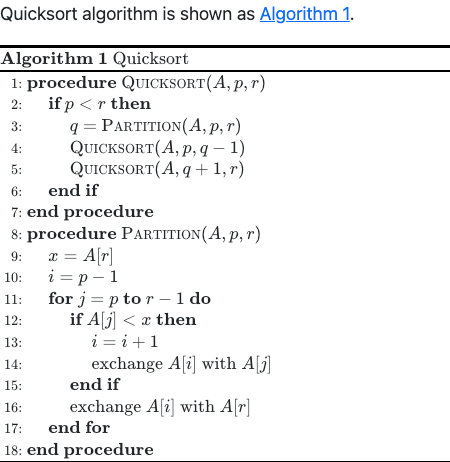
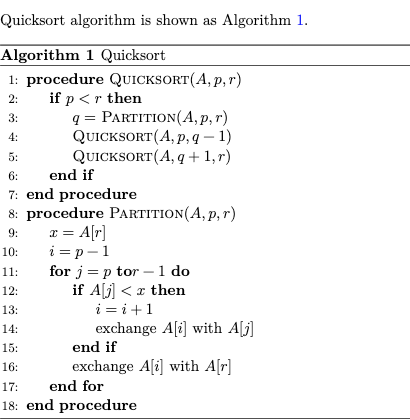
Pseudocode and cross reference rendered in HTML and PDF document are shown as below.
| HTML document | PDF document |
|---|---|
 |  |
More examples please refer:
- Single document (HTML and PDF): examples/simple.
- Book document (HTML and PDF): examples/book.
- Cross reference example (HTML and PDF): examples/cross-reference.
- Beamer presentation (PDF): examples/beamer.
- Revealjs presentation (HTML): examples/revealjs.
License
The MIT License (MIT)
Copyright (c) 2023-2026 范叶亮 | Leo Van
Contributors


Similar repos


Languages
Lua
100.0%
README
Quarto Pseudocode Extension
A Quarto extension to render pseudocode for HTML and PDF document. It's based on pseudocode.js for HTML document, algorithm and algpseudocodex package for PDF document.
Installing
quarto add leovan/quarto-pseudocode
This will install the extension under the _extensions subdirectory. If you're using version control, you will want to check in this directory.
Using
Adding Extension
Add this in the header of your document, or in the _quarto.yml file:
filters:
  - pseudocode
Pseudocode Block
Add the pseudocode in a code block marked with pseudocode:
```pseudocode
#| html-indent-size: "1.2em"
#| html-comment-delimiter: "//"
#| html-line-number: true
#| html-line-number-punc: ":"
#| html-no-end: false
#| pdf-placement: "htb!"
#| pdf-line-number: true
#| pdf-comment-delimiter: "//"

\begin{algorithm}
\caption{Quicksort}
\begin{algorithmic}
\Procedure{Quicksort}{$A, p, r$}
  \If{$p < r$}
    \State $q = $ \Call{Partition}{$A, p, r$}
    \State \Call{Quicksort}{$A, p, q - 1$}
    \State \Call{Quicksort}{$A, q + 1, r$}
  \EndIf
\EndProcedure
\Procedure{Partition}{$A, p, r$}
  \State $x = A[r]$
  \State $i = p - 1$
  \For{$j = p$ \To $r - 1$}
    \If{$A[j] < x$}
      \State $i = i + 1$
      \State exchange
      $A[i]$ with     $A[j]$
    \EndIf
    \State exchange $A[i]$ with $A[r]$
  \EndFor
\EndProcedure
\end{algorithmic}
\end{algorithm}
```
[!IMPORTANT] Use upper camel case format keyword rather than all uppercase format keyword.
Parameters
Global parameters are show as below:
| Parameter | Default | Format | Description |
|---|---|---|---|
caption-prefix | "Algorithm" | ALL | Prefix used for generated pseudocode captions. |
reference-prefix | "Algorithm" | ALL | Prefix used for pseudocode cross-reference text. |
caption-number | true | ALL | Show numbering in pseudocode captions. |
caption-align | "left" | ALL | Alignment for pseudocode captions. |
Add global parameters in the header of your document, or in the _quarto.yml file:
pseudocode:
  caption-prefix: "Algorithm"
  reference-prefix: "Algorithm"
  caption-number: true
  caption-align: "left"
Parameters for pseudocode share the same format like R or Python code:
| Parameter | Default | Format | Description |
|---|---|---|---|
label | ALL | Cross-reference label, typically starting with alg-. | |
html-indent-size | "1.2em" | HTML | HTML indent size for pseudocode.js output. |
html-comment-delimiter | "//" | HTML | HTML comment delimiter token. |
html-line-number | true | HTML | Show line numbers in HTML output. |
html-line-number-punc | ":" | HTML | Punctuation used after line numbers in HTML output. |
html-no-end | false | HTML | Hide end statements in HTML output. |
html-indent-lines | false | HTML | Show indent guide lines in HTML output. |
pdf-placement | "H" | LaTeX algorithm placement token in PDF output. | |
pdf-line-number | true | Show line numbers in PDF output. | |
pdf-comment-delimiter | "//" | Comment delimiter token in PDF output. | |
pdf-no-end | false | Hide end statements in PDF output. | |
pdf-indent-lines | false | Show indent guide lines in PDF output. | |
pdf-italic-comment | false | Italic comments in PDF output. | |
pdf-right-comment | false | Right justified comments in PDF output. | |
pdf-comment-color | "black" | Color of the comments in PDF output. |
[!NOTE]
- If set the placement in pseudocode, such as
\begin{algorithm}[htb!], thenpdf-placementoption will be ignored.- If set show line number or not in pseudocode, such as
\begin{algorithmic}[1], thenpdf-line-numberoption will be ignored.- All these changes won't affect the output of HTML document. We recommend you set the parameters rather than modify pseudocode directly.
For HTML document, pseudocode.js render math formulas using either KaTeX or MathJax. We add pseudocode.js after html body, thus you need initialize KaTeX or MathJax before html body or in html header. Add this in the header of your document, or in the _quarto.yml file.
MathJax 3
format:
  html:
    include-in-header:
      text: |
        <script>
        MathJax = {
          loader: {
            load: ["[tex]/boldsymbol"],
          },
          tex: {
            tags: "all",
            inlineMath: [["$", "$"], ["\\(", "\\)"]],
            displayMath: [["$$", "$$"], ["\\[", "\\]"]],
            processEscapes: true,
            processEnvironments: true,
            packages: {
              "[+]": ["boldsymbol"],
            },
          },
        };
        </script>
        <script type="text/javascript" src="https://cdn.jsdelivr.net/npm/mathjax@3/es5/tex-chtml-full.js"></script>
MathJax 4
format:
  html:
    include-in-header:
      text: |
        <script>
        MathJax = {
          loader: {
            load: ["[tex]/boldsymbol"],
          },
          tex: {
            tags: "all",
            inlineMath: [["$", "$"], ["\\(", "\\)"]],
            displayMath: [["$$", "$$"], ["\\[", "\\]"]],
            processEscapes: true,
            processEnvironments: true,
            packages: {
              "[+]": ["boldsymbol"],
            },
          },
        };
        </script>
        <script type="text/javascript" src="https://cdn.jsdelivr.net/npm/mathjax@4/tex-chtml.js"></script>
KaTeX
format:
  html:
    include-in-header:
      text: |
      <link rel="stylesheet" href="https://cdn.jsdelivr.net/npm/katex@latest/dist/katex.min.css" />
      <script type="text/javascript" src="https://cdn.jsdelivr.net/npm/katex@latest/dist/katex.min.js"></script>
For PDF document, pseudocode caption in book type project will be changed from Algorithm n to Algorithm x.n in chapter x. Add \algrenewcommand{\algorithmiccomment}[1]{<your value> #1} in the header of your document, or in the _quarto.yml file will change the form in which comments are displayed:
format:
  pdf:
    include-before-body:
      text: |
        \algrenewcommand{\algorithmiccomment}[1]{\hskip3em$\rightarrow$ #1}
Cross Reference
Build-in Cross Reference
Set the label in pseudocode, and it must start with algo-:
[!WARNING] From Quarto 1.8,
alghas become a reserved cross reference prefix keyword.
```pseudocode
#| label: algo-quicksort
...

\begin{algorithm}
\caption{Quicksort}
\begin{algorithmic}
...
\end{algorithmic}
\end{algorithm}
```
Use @<label> to do cross reference:
Quicksort algorithm is shown as @algo-quicksort.
[!IMPORTANT] Must set
labeland\caption{}to make build-in cross reference works.
[!WARNING] For
booktype project, build-in cross reference in different files works only with PDF format.
Quarto Custom Cross Reference
Add custom cross reference for pseudocode in the header of your document, or in the _quarto.yml file:
crossref:
  custom:
    - kind: float
      key: alg
      reference-prefix: "Algorithm"
      caption-prefix: "Algorithm"
      latex-env: alg
      latex-list-of-description: Algorithm
Use Quarto custom cross reference to surround the pseudocode:
::: {#alg-quicksort}

```pseudocode
...

\begin{algorithm}
\caption{Quicksort}
\begin{algorithmic}
...
\end{algorithmic}
\end{algorithm}
```

Quicksort

:::
[!IMPORTANT]
- Do not set
labelto avoid conflict with build-in cross reference.- Set the global parameter
caption-numbertofalseto avoid show different numbers in pseudocode build-in caption and Quarto cross reference caption.- Set both captions in pseudocode and Quarto custom cross reference to achieve best effect.
Use @<label> to do cross reference.
Quicksort algorithm is shown as @alg-quicksort.
Difference
- Quarto custom cross reference will add an extra caption like figure, in which number may not be same as pseudocode build-in caption.
- Build-in cross reference in different files is only available with PDF document for
booktype project. Quarto custom cross reference works in both HTML and PDF document.
Now, expect cross reference in different files with PDF document for book type project, we strongly recommend use build-in cross reference to achieve best effect.
[!CAUTION] Do not use different type of cross reference in the same project.
Examples
Pseudocode and cross reference rendered in HTML and PDF document are shown as below.
| HTML document | PDF document |
|---|---|
| |
More examples please refer:
- Single document (HTML and PDF): examples/simple.
- Book document (HTML and PDF): examples/book.
- Cross reference example (HTML and PDF): examples/cross-reference.
- Beamer presentation (PDF): examples/beamer.
- Revealjs presentation (HTML): examples/revealjs.
License
The MIT License (MIT)
Copyright (c) 2023-2026 范叶亮 | Leo Van
Similar repos
Contributors
Languages
Lua
100.0%