
See what people are saying
README



ColimUI
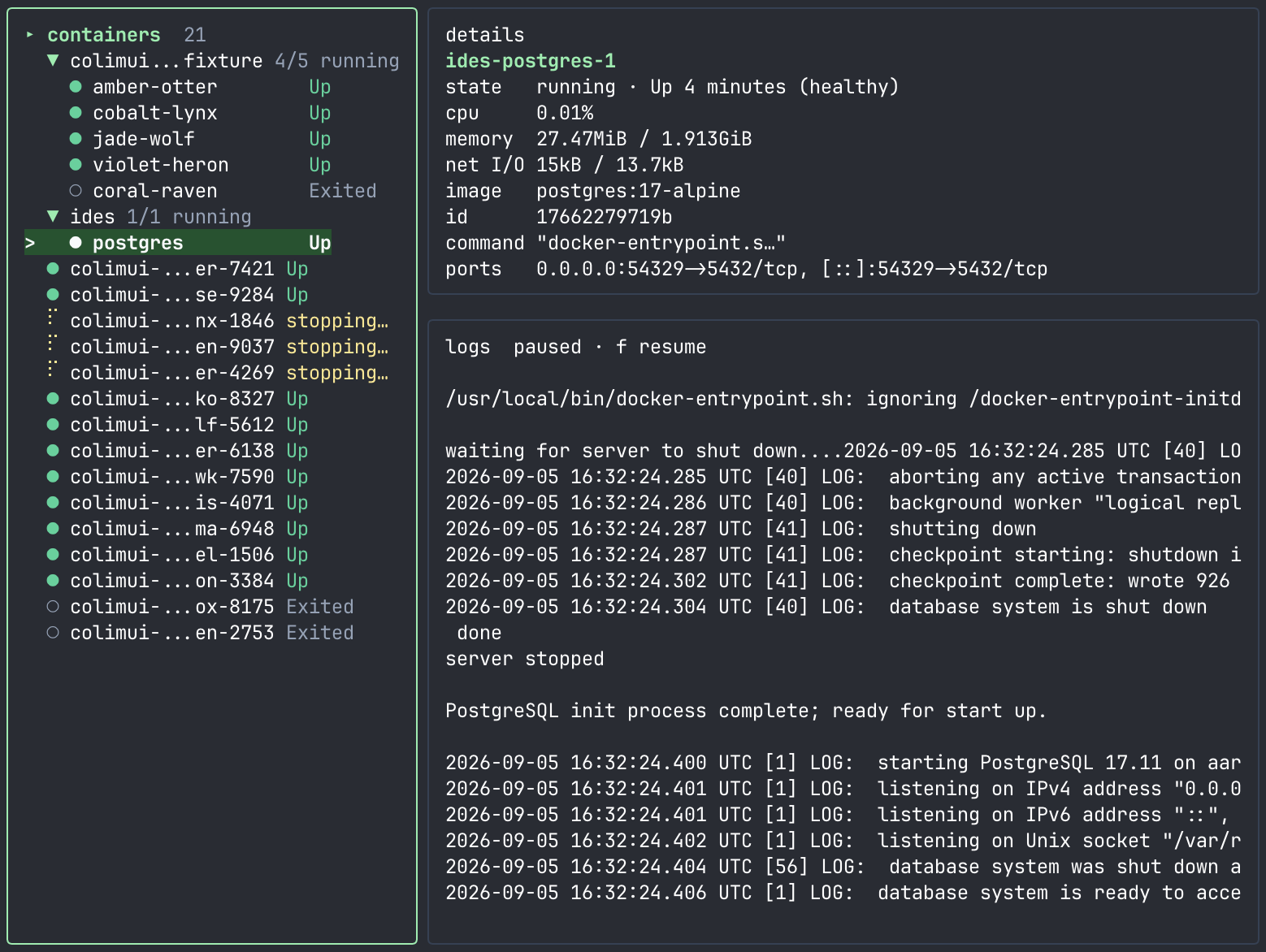
A lightweight terminal UI for Colima and Docker.
Install
The installer supports macOS and Linux on Intel/AMD and ARM CPUs. It downloads the binary, verifies its checksum, and installs to ~/.local/bin, set INSTALL_DIR to override it. If ~/.local/bin is not in your PATH, the installer prints the line to add.
curl -fsSL https://raw.githubusercontent.com/leodeim/colimui/main/scripts/install.sh | sh
Run
colimui
Update
colimui update
Install using Go:
go install github.com/leodeim/colimui@latest
Keys
| Key | Action |
|---|---|
? | Open or close the Actions menu |
u | Open/close Docker usage overview: total CPU, RAM, and storage |
c | Open cleanup confirmation for reclaimable Docker storage |
Tab, ←, → | Switch focus between containers and logs |
Enter | Start/stop the selected container |
/ | Search containers |
R | Toggle running containers only |
r | Refresh profiles and containers |
[ / ] | Switch to the previous/next Colima profile |
s / x | Start/stop the current Colima profile |
a | Enable/disable idle auto-stop (saved for future runs) |
m | Enable/disable the macOS menu bar item (saved for future runs) |
t | Restart the selected container |
e | Open an interactive shell in the selected container |
d | Open deletion confirmation for a stopped container |
y / n | Confirm/cancel deletion |
y | Copy the selected container's details to the clipboard |
Y | Copy the visible (filtered) logs to the clipboard |
l | Reload the selected container's logs |
f | Pause streaming without clearing logs, or resume from the latest 200 lines |
L | Search retained log text (pauses streaming) |
T | Show/hide Docker timestamps |
w | Wrap/trim long log lines |
Home | Load log history from the start, subject to retention limits |
Page Up / Down | Scroll logs |
End | Jump to the latest logs |
q | Quit, or close the current menu |
Idle auto-stop
When the current profile has had no active containers (running, restarting, or paused)
for 30 minutes, it runs colima stop for you. The header shows a countdown ("idle · auto-stop in
12m") once the timer is armed; press a to turn the feature off or back on.
Set COLIMUI_AUTO_STOP to override the saved setting for a single run: a
duration such as 45m or 2h (minimum 1m), or off to disable it. While
it is set, a is disabled.
While the macOS menu bar item is running it takes over enforcement: it watches
every profile (not just the selected one), keeps working after the TUI exits,
and shows the countdown in each profile's submenu. A menu bar item started
from the TUI follows the saved setting, not COLIMUI_AUTO_STOP.
New macOS setup script
Installs Homebrew if needed, then Colima, Docker, Docker Compose, and the latest ColimUI release.
bash -c "$(curl -fsSL https://raw.githubusercontent.com/leodeim/colimui/main/scripts/setup-mac.sh)"
References: Homebrew installation, Colima installation, Compose Homebrew package.
Contributors

60 commits
Similar repos


Languages
Go
96.7%
Shell
3.2%
See what people are saying
README
ColimUI
A lightweight terminal UI for Colima and Docker.
Install
The installer supports macOS and Linux on Intel/AMD and ARM CPUs. It downloads the binary, verifies its checksum, and installs to ~/.local/bin, set INSTALL_DIR to override it. If ~/.local/bin is not in your PATH, the installer prints the line to add.
curl -fsSL https://raw.githubusercontent.com/leodeim/colimui/main/scripts/install.sh | sh
Run
colimui
Update
colimui update
Install using Go:
go install github.com/leodeim/colimui@latest
Keys
| Key | Action |
|---|---|
? | Open or close the Actions menu |
u | Open/close Docker usage overview: total CPU, RAM, and storage |
c | Open cleanup confirmation for reclaimable Docker storage |
Tab, ←, → | Switch focus between containers and logs |
Enter | Start/stop the selected container |
/ | Search containers |
R | Toggle running containers only |
r | Refresh profiles and containers |
[ / ] | Switch to the previous/next Colima profile |
s / x | Start/stop the current Colima profile |
a | Enable/disable idle auto-stop (saved for future runs) |
m | Enable/disable the macOS menu bar item (saved for future runs) |
t | Restart the selected container |
e | Open an interactive shell in the selected container |
d | Open deletion confirmation for a stopped container |
y / n | Confirm/cancel deletion |
y | Copy the selected container's details to the clipboard |
Y | Copy the visible (filtered) logs to the clipboard |
l | Reload the selected container's logs |
f | Pause streaming without clearing logs, or resume from the latest 200 lines |
L | Search retained log text (pauses streaming) |
T | Show/hide Docker timestamps |
w | Wrap/trim long log lines |
Home | Load log history from the start, subject to retention limits |
Page Up / Down | Scroll logs |
End | Jump to the latest logs |
q | Quit, or close the current menu |
Idle auto-stop
When the current profile has had no active containers (running, restarting, or paused)
for 30 minutes, it runs colima stop for you. The header shows a countdown ("idle · auto-stop in
12m") once the timer is armed; press a to turn the feature off or back on.
Set COLIMUI_AUTO_STOP to override the saved setting for a single run: a
duration such as 45m or 2h (minimum 1m), or off to disable it. While
it is set, a is disabled.
While the macOS menu bar item is running it takes over enforcement: it watches
every profile (not just the selected one), keeps working after the TUI exits,
and shows the countdown in each profile's submenu. A menu bar item started
from the TUI follows the saved setting, not COLIMUI_AUTO_STOP.
New macOS setup script
Installs Homebrew if needed, then Colima, Docker, Docker Compose, and the latest ColimUI release.
bash -c "$(curl -fsSL https://raw.githubusercontent.com/leodeim/colimui/main/scripts/setup-mac.sh)"
References: Homebrew installation, Colima installation, Compose Homebrew package.
Similar repos
Contributors
60 commits
Languages
Go
96.7%
Shell
3.2%