A JSON tree view component that is easy to use and also supports data selection.
See the code

A Vue component for rendering JSON data as a tree structure.
Now it supports Vue3 at least. If you still use Vue2, see 1.x.




English | 简体中文
d.ts. IE / Edge |  Firefox |  Chrome |  Safari |  Electron |
|---|---|---|---|---|
| IE11, Edge | last 10 versions | last 10 versions | last 10 versions | last 2 versions |
$ npm install vue-json-pretty --save
$ yarn add vue-json-pretty
$ npm install vue-json-pretty@v1-latest --save
The CSS file is included separately and needs to be imported manually. You can either import CSS globally in your app (if supported by your framework) or directly from the component.
<template>
  <div>
    <vue-json-pretty :data="{ key: 'value' }" />
  </div>
</template>

<script>
import VueJsonPretty from 'vue-json-pretty';
import 'vue-json-pretty/lib/styles.css';

export default {
  components: {
    VueJsonPretty,
  },
};
</script>
plugins/vue-json-pretty.jsimport Vue from 'vue'
import VueJsonPretty from 'vue-json-pretty'
Vue.component("vue-json-pretty", VueJsonPretty)
nuxt.config.jscss: [
'vue-json-pretty/lib/styles.css'
],
plugins: [
'@/plugins/vue-json-pretty'
],
| Property | Description | Type | Default |
|---|---|---|---|
| data(v-model) | JSON data, support v-model when use editable | JSON object | - |
| indent | JSON indent | number | 2 |
| collapsedNodeLength | Objects or arrays which length is greater than this threshold will be collapsed | number | - |
| deep | Paths greater than this depth will be collapsed | number | - |
| showLength | Show the length when collapsed | boolean | false |
| showLine | Show the line | boolean | true |
| showLineNumber | Show the line number | boolean | false |
| showIcon | Show the icon | boolean | false |
| showDoubleQuotes | Show doublequotes on key | boolean | true |
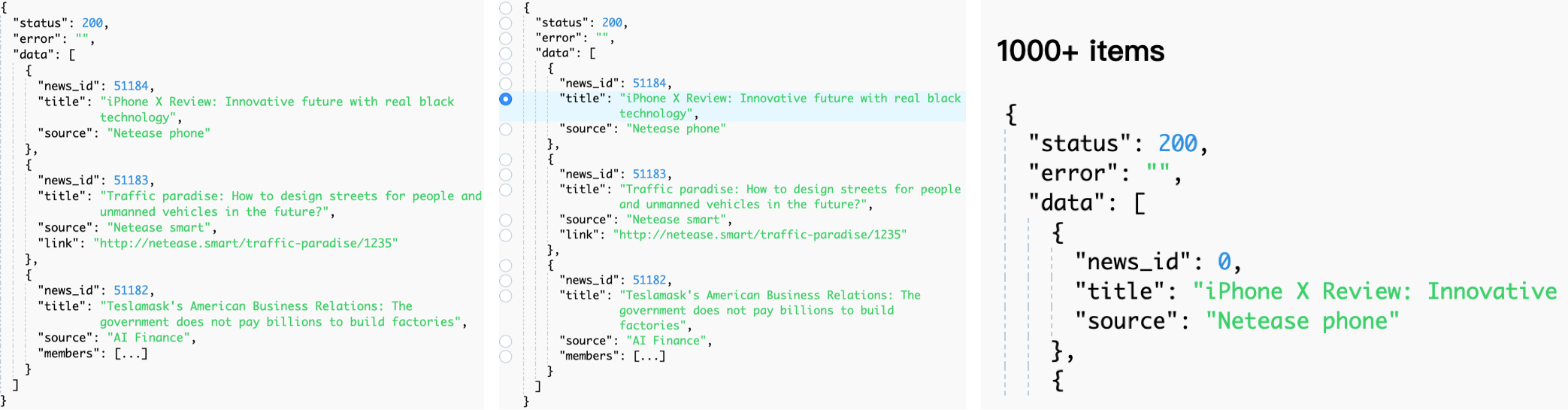
| virtual | Use virtual scroll | boolean | false |
| height | The height of list when using virtual | number | 400 |
| itemHeight | Fixed row height when using virtual (Estimated row height used before measurement when dynamicHeight is true) | number | 20 |
| dynamicHeight | Enable dynamic row heights (measured per row) | boolean | true |
| selectedValue(v-model) | Selected data path | string, array | - |
| rootPath | Root data path | string | root |
| nodeSelectable | Defines whether a node supports selection | (node) => boolean | - |
| selectableType | Support path select, default none | multiple | single | - |
| showSelectController | Show the select controller | boolean | false |
| selectOnClickNode | Trigger select when click node | boolean | true |
| highlightSelectedNode | Support highlighting selected nodes | boolean | true |
| collapsedOnClickBrackets | Support click brackets to collapse | boolean | true |
| renderNodeKey | render node key, or use slot #renderNodeKey | ({ node, defaultKey }) => vNode | - |
| renderNodeValue | render node value, or use slot #renderNodeValue | ({ node, defaultValue }) => vNode | - |
| renderNodeActions | render node actions, or use slot #renderNodeActions | boolean | ({ node, defaultActions }) => vNode | false |
| editable | Support editable | boolean | false |
| editableTrigger | Trigger | click | dblclick | click |
| theme | Sets the theme of the component. Options are 'light' or 'dark', with dark mode enhancing visibility on dark backgrounds | 'light' | 'dark' | light |
| search | Keyword for filtering the JSON tree. When non-empty, only matching nodes and their ancestors are shown | string | - |
| searchCaseSensitive | Whether the search is case-sensitive | boolean | false |
| searchStrict | Whether to use strict (exact) matching. When false, uses fuzzy (includes) matching | boolean | false |
| searchMode | Search scope: 'key' for property names, 'value' for values, 'all' for both | 'key' | 'value' | 'all' | 'all' |
| Event Name | Description | Parameters |
|---|---|---|
| nodeClick | triggers when click node | (node: NodeData) |
| nodeMouseover | triggers when mouseover node | (node: NodeData) |
| bracketsClick | triggers when click brackets | (collapsed: boolean, node: NodeData) |
| iconClick | triggers when click icon | (collapsed: boolean, node: NodeData) |
| selectedChange | triggers when the selected value changed | (newVal, oldVal) |
| searchMatchChange | triggers when search results change or navigation occurs | ({ currentIndex, totalCount }) |
| Slot Name | Description | Parameters | |
|---|---|---|---|
| renderNodeKey | render node key | { node, defaultKey } | |
| renderNodeValue | render node value | { node, defaultValue } | |
| renderNodeActions | render node actions | boolean | ({ node, defaultActions }) => vNode | false |
| Method | Description | Returns |
|---|---|---|
nextMatch() | Navigate to the next search match | - |
prevMatch() | Navigate to the previous search match | - |
getSearchResultInfo() | Get current search result info | { currentIndex, totalCount } |
Overall
Maintained
Code review
Latest release
Releases this year
164 followers · starred Jan 2026
37 followers · starred May 2024
39 followers · starred Jan 2019
827 followers · starred May 2025
A JSON tree view component that is easy to use and also supports data selection.
See the code
A Vue component for rendering JSON data as a tree structure.
Now it supports Vue3 at least. If you still use Vue2, see 1.x.
English | 简体中文
d.ts.IE / Edge | Firefox | Chrome | Safari | Electron |
|---|---|---|---|---|
| IE11, Edge | last 10 versions | last 10 versions | last 10 versions | last 2 versions |
$ npm install vue-json-pretty --save
$ yarn add vue-json-pretty
$ npm install vue-json-pretty@v1-latest --save
The CSS file is included separately and needs to be imported manually. You can either import CSS globally in your app (if supported by your framework) or directly from the component.
<template>
  <div>
    <vue-json-pretty :data="{ key: 'value' }" />
  </div>
</template>

<script>
import VueJsonPretty from 'vue-json-pretty';
import 'vue-json-pretty/lib/styles.css';

export default {
  components: {
    VueJsonPretty,
  },
};
</script>
plugins/vue-json-pretty.jsimport Vue from 'vue'
import VueJsonPretty from 'vue-json-pretty'
Vue.component("vue-json-pretty", VueJsonPretty)
nuxt.config.jscss: [
'vue-json-pretty/lib/styles.css'
],
plugins: [
'@/plugins/vue-json-pretty'
],
| Property | Description | Type | Default |
|---|---|---|---|
| data(v-model) | JSON data, support v-model when use editable | JSON object | - |
| indent | JSON indent | number | 2 |
| collapsedNodeLength | Objects or arrays which length is greater than this threshold will be collapsed | number | - |
| deep | Paths greater than this depth will be collapsed | number | - |
| showLength | Show the length when collapsed | boolean | false |
| showLine | Show the line | boolean | true |
| showLineNumber | Show the line number | boolean | false |
| showIcon | Show the icon | boolean | false |
| showDoubleQuotes | Show doublequotes on key | boolean | true |
| virtual | Use virtual scroll | boolean | false |
| height | The height of list when using virtual | number | 400 |
| itemHeight | Fixed row height when using virtual (Estimated row height used before measurement when dynamicHeight is true) | number | 20 |
| dynamicHeight | Enable dynamic row heights (measured per row) | boolean | true |
| selectedValue(v-model) | Selected data path | string, array | - |
| rootPath | Root data path | string | root |
| nodeSelectable | Defines whether a node supports selection | (node) => boolean | - |
| selectableType | Support path select, default none | multiple | single | - |
| showSelectController | Show the select controller | boolean | false |
| selectOnClickNode | Trigger select when click node | boolean | true |
| highlightSelectedNode | Support highlighting selected nodes | boolean | true |
| collapsedOnClickBrackets | Support click brackets to collapse | boolean | true |
| renderNodeKey | render node key, or use slot #renderNodeKey | ({ node, defaultKey }) => vNode | - |
| renderNodeValue | render node value, or use slot #renderNodeValue | ({ node, defaultValue }) => vNode | - |
| renderNodeActions | render node actions, or use slot #renderNodeActions | boolean | ({ node, defaultActions }) => vNode | false |
| editable | Support editable | boolean | false |
| editableTrigger | Trigger | click | dblclick | click |
| theme | Sets the theme of the component. Options are 'light' or 'dark', with dark mode enhancing visibility on dark backgrounds | 'light' | 'dark' | light |
| search | Keyword for filtering the JSON tree. When non-empty, only matching nodes and their ancestors are shown | string | - |
| searchCaseSensitive | Whether the search is case-sensitive | boolean | false |
| searchStrict | Whether to use strict (exact) matching. When false, uses fuzzy (includes) matching | boolean | false |
| searchMode | Search scope: 'key' for property names, 'value' for values, 'all' for both | 'key' | 'value' | 'all' | 'all' |
| Event Name | Description | Parameters |
|---|---|---|
| nodeClick | triggers when click node | (node: NodeData) |
| nodeMouseover | triggers when mouseover node | (node: NodeData) |
| bracketsClick | triggers when click brackets | (collapsed: boolean, node: NodeData) |
| iconClick | triggers when click icon | (collapsed: boolean, node: NodeData) |
| selectedChange | triggers when the selected value changed | (newVal, oldVal) |
| searchMatchChange | triggers when search results change or navigation occurs | ({ currentIndex, totalCount }) |
| Slot Name | Description | Parameters | |
|---|---|---|---|
| renderNodeKey | render node key | { node, defaultKey } | |
| renderNodeValue | render node value | { node, defaultValue } | |
| renderNodeActions | render node actions | boolean | ({ node, defaultActions }) => vNode | false |
| Method | Description | Returns |
|---|---|---|
nextMatch() | Navigate to the next search match | - |
prevMatch() | Navigate to the previous search match | - |
getSearchResultInfo() | Get current search result info | { currentIndex, totalCount } |
Overall
Maintained
Code review
Latest release
Releases this year
164 followers · starred Jan 2026
37 followers · starred May 2024
39 followers · starred Jan 2019
827 followers · starred May 2025



