Node.js Basics ( v24.x )
See the codeClick ★ if you like the project. Your contributions are heartily ♡ welcome.
Node.js is an open-source server side runtime environment built on Chrome's V8 JavaScript engine. It provides an event driven, non-blocking (asynchronous) I/O and cross-platform runtime environment for building highly scalable server-side applications using JavaScript.
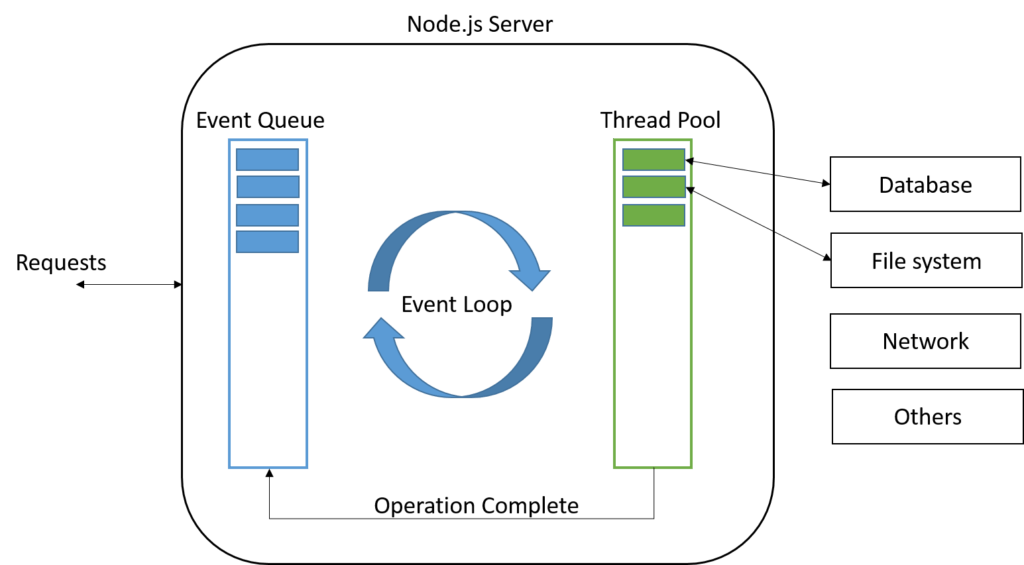
The Node.js Process Model is a single-threaded, event-driven architecture designed to handle many concurrent client requests efficiently. Unlike traditional web servers that create a new thread for every request, Node.js uses a Single-Threaded Event Loop to manage all non-blocking operations
Features:
Flow:
This is why Node.js is highly scalable for I/O-bound workloads — it never blocks waiting, unlike traditional thread-per-request servers.
Asynchronous and Event driven – All APIs of Node.js are asynchronous. This feature means that if a Node receives a request for some Input/Output operation, it will execute that operation in the background and continue with the processing of other requests. Thus it will not wait for the response from the previous requests.
Fast in Code execution – Node.js uses the V8 JavaScript Runtime engine, the one which is used by Google Chrome. Node has a wrapper over the JavaScript engine which makes the runtime engine much faster and hence processing of requests within Node.js also become faster.
Single Threaded but Highly Scalable – Node.js uses a single thread model for event looping. The response from these events may or may not reach the server immediately. However, this does not block other operations. Thus making Node.js highly scalable. Traditional servers create limited threads to handle requests while Node.js creates a single thread that provides service to much larger numbers of such requests.
Node.js library uses JavaScript – This is another important aspect of Node.js from the developer's point of view. The majority of developers are already well-versed in JavaScript. Hence, development in Node.js becomes easier for a developer who knows JavaScript.
There is an Active and vibrant community for the Node.js framework – The active community always keeps the framework updated with the latest trends in the web development.
No Buffering – Node.js applications never buffer any data. They simply output the data in chunks.
Node.js is completely event-driven and processes everything on a single thread using a non-blocking I/O model.
Node.js works asynchronously by using the event loop and callback functions, to handle multiple requests coming in parallel. An Event Loop is a functionality which handles and processes all your external events and just converts them to a callback function. It invokes all the event handlers at a proper time. Thus, lots of work is done on the back-end, while processing a single request, so that the new incoming request doesn't have to wait if the processing is not complete.
While processing a request, Node.js attaches a callback function to it and moves it to the back-end. Now, whenever its response is ready, an event is called which triggers the associated callback function to send this response.
Core Components:
| Component | Role |
|---|---|
| V8 Engine | Executes JavaScript on the server (same engine as Chrome) |
| libuv | C library that handles async I/O, thread pool, event loop |
| Event Queue | Holds incoming requests/events in FIFO order |
| Event Loop | Continuously polls the queue and dispatches callbacks |
| Thread Pool | Background workers (libuv) for blocking operations (file, DNS, crypto) |
Request Lifecycle:
Key Design Principles:
What it's great at: High-concurrency I/O-bound workloads (APIs, real-time apps, microservices)
What it's not ideal for: CPU-intensive tasks (use worker_threads or child_process for those)
In Node.js, the main difference between a process (using the child_process or cluster modules) and a thread (using the worker_threads module) lies in how they handle memory and isolation.
Process
A process is an independent program instance with its own memory space.
child_process.fork() — spawns a new V8 instanceThread
A thread is a unit of execution within a process.
worker_threads moduleSharedArrayBuffer)postMessage or shared memoryComparison Table
| Process | Thread | |
|---|---|---|
| Memory | Isolated | Shared within process |
| Creation cost | Higher (new V8 instance) | Lower |
| Communication | IPC (message passing) | SharedArrayBuffer / postMessage |
| Crash impact | Only that process | Can crash entire process |
| Use case | Separate Node.js apps, external commands | CPU-intensive JS tasks |
When to use which?
child_process.fork() — when you need full isolation (separate scripts, different environments)worker_threads — for CPU-heavy JS tasks (image processing, parsing, crypto) where you want low overhead and optional memory sharingNode.js's main event loop always runs on a single thread — neither approach blocks it when used correctly.
Node.js is single-threaded and event-driven, using a non-blocking I/O model to handle many concurrent operations efficiently.
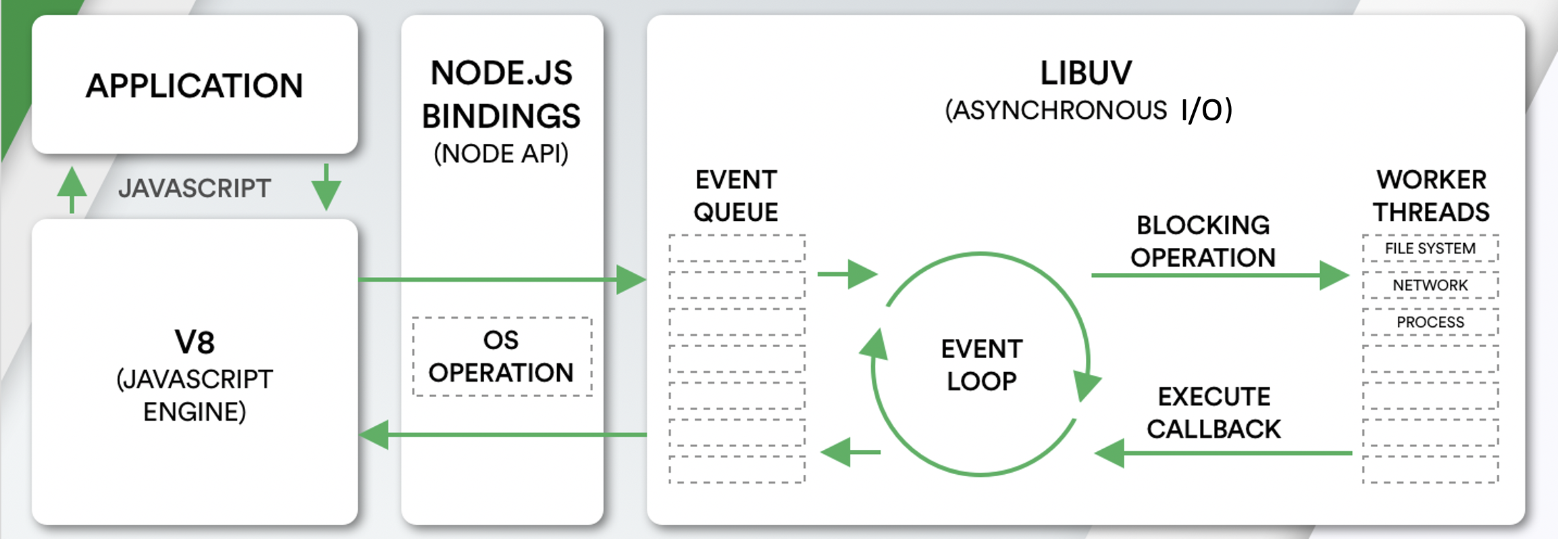
Core Components
| Component | Role |
|---|---|
| V8 Engine | Executes JavaScript (same engine as Chrome) |
| libuv | C library handling async I/O, thread pool, and event loop |
| Event Queue | Holds incoming requests/events in FIFO order |
| Event Loop | Continuously polls the queue and dispatches callbacks |
| Thread Pool | Background workers for blocking operations (file, DNS, crypto) |
Request Lifecycle
Client Requests
      ↓
  Event Queue
      ↓
  Event Loop (single thread)
    ├── Non-blocking? → Process & respond immediately
    └── Blocking I/O? → Thread Pool (libuv)
                              ↓
                         Callback fired → response sent
Key Design Principles
Node.js has a set of core modules that are part of the platform and come with the Node.js installation. These modules can be loaded into the program by using the require function.
The following table lists some of the important core modules in Node.js.
| Name | Description |
|---|---|
assert | It is used by Node.js for testing itself. |
buffer | Handle raw binary data outside the V8 heap |
child_process | Spawn child processes (exec, spawn, fork) |
cluster | This module is used by Node.js to take advantage of multi-core systems, so that it can handle more load. |
console | It is used to write data to console. Node.js has a Console object which contains functions to write data to console. |
crypto | Cryptographic functions — hashing, encryption, HMAC |
http/https | Create HTTP/HTTPS servers and make requests |
url | It includes methods for URL resolution and parsing. |
querystring | It includes methods to deal with query string. |
path | Utilities for working with file and directory paths |
fs | File system — read, write, update, delete, rename files. |
stream | Readable, Writable, Duplex, and Transform streams |
worker_threads | Run CPU-intensive JS in background threads |
util | It includes utility functions useful for programmers. |
zlib | It is used to compress and decompress data. |
Example:
const http   = require('http');
const fs     = require('fs');
const path   = require('path');
const crypto = require('crypto');

// HTTP server
http.createServer((req, res) => {
  res.writeHead(200, { 'Content-Type': 'text/plain' });
  res.end('Hello World');
}).listen(3000);

// File path
const filePath = path.join(__dirname, 'data', 'file.txt');

// Read file
fs.readFile(filePath, 'utf8', (err, data) => {
  if (err) throw err;
  console.log(data);
});

// Hash a string
const hash = crypto.createHash('sha256').update('secret').digest('hex');
console.log(hash);
Reactor Pattern is used to avoid the blocking of the Input/Output operations. It provides us with a handler that is associated with I/O operations. When the I/O requests are to be generated, they get submitted to a de-multiplexer, which handles concurrency in avoiding the blocking of the I/O mode and collects the requests in form of an event and queues those events.
Types of Input/Output operations
1. Blocking I/O (Synchronous): Application will make a function call and pause its execution at a point until the data is received.
2. Non-Blocking I/O (Asynchronous): Application will make a function call, and, without waiting for the results it continues its execution. Node.js uses non-blocking I/O exclusively.
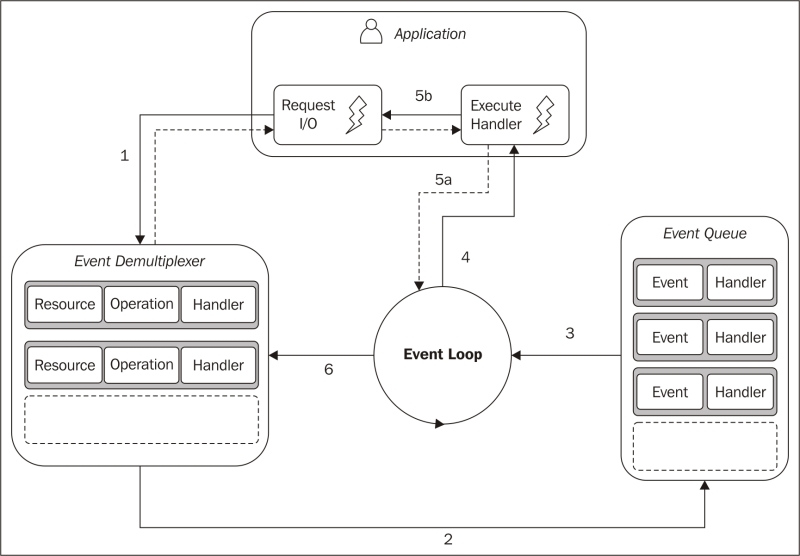
Reactor Pattern comprises of:
1. Resources: They are shared by multiple applications for I/O operations, generally slower in executions.
2. Synchronous Event De-multiplexer/Event Notifier: This uses Event Loop for blocking on all resources. When a set of I/O operations completes, the Event De-multiplexer pushes the new events into the Event Queue.
3. Event Loop and Event Queue: Event Queue queues up the new events that occurred along with its event-handler, pair.
4. Request Handler/Application: This is, generally, the application that provides the handler to be executed for registered events on resources.
Node.js Global Objects are the objects that are available in all modules. Global Objects are built-in objects that are part of the JavaScript and can be used directly in the application without importing any particular module.
Global Objects
| Object | Description |
|---|---|
global | The global namespace object (equivalent to window in browsers) |
process | Info and control over the current Node.js process |
console | Write to stdout/stderr |
Buffer | Handle raw binary data |
__dirname | Absolute path of the current module's directory |
__filename | Absolute path of the current module's file |
setTimeout / clearTimeout | Schedule a one-time callback |
setInterval / clearInterval | Schedule a repeating callback |
setImmediate / clearImmediate | Execute after current event loop iteration |
queueMicrotask | Queue a microtask |
URL / URLSearchParams | Web-compatible URL API |
fetch | HTTP client (available since Node.js v18) |
crypto | Web Crypto API (available since Node.js v19) |
Examples:
// __dirname and __filename
console.log(__dirname);   // D:\projects\myapp
console.log(__filename);  // D:\projects\myapp\index.js

// process — runtime info
console.log(process.version);       // v20.x.x
console.log(process.platform);      // 'win32' / 'linux'
console.log(process.env.NODE_ENV);  // 'development'
console.log(process.pid);           // process ID
process.exit(0);                    // exit with code 0

// global — set a truly global variable (avoid in practice)
global.appName = 'MyApp';
console.log(appName); // 'MyApp' — accessible anywhere

// Buffer
const buf = Buffer.from('hello');
console.log(buf.toString('hex')); // 68656c6c6f

// Timers
const timer = setTimeout(() => console.log('done'), 1000);
clearTimeout(timer); // cancel it
__dirnameand__filenameare not available in ES Modules — useimport.meta.urlwithfileURLToPath()instead. Theglobalobject in Node.js v21+ is also aliased asglobalThis(the standard cross-environment global).
V8 is an open-source, high-performance JavaScript and WebAssembly engine written in C++, developed by Google. It was originally designed for Google Chrome and Chromium-based browsers ( such as Brave ) in 2008, but it was later utilized to create Node.js for server-side coding.
V8 is the JavaScript engine i.e. it parses and executes JavaScript code. The DOM, and the other Web Platform APIs ( they all makeup runtime environment ) are provided by the browser.
V8 is known to be a JavaScript engine because it takes JavaScript code and executes it while browsing in Chrome. It provides a runtime environment for the execution of JavaScript code. The best part is that the JavaScript engine is completely independent of the browser in which it runs.
Just-In-Time (JIT) compilation:
V8 uses two compilers working together:
V8 Key Optimizations
libuv is a cross-platform C library that gives Node.js its ability to perform non-blocking, asynchronous I/O — the core of everything Node.js does efficiently. It provides the following features:
Example: Thread Pool
Some operations can't be made async at the OS level (e.g., some file system calls, DNS lookups, crypto). libuv offloads these to a pool of worker threads:
const fs = require('fs');
const crypto = require('crypto');

// These are offloaded to libuv\'s thread pool — main thread never blocks
fs.readFile('large-file.txt', (err, data) => {
  console.log('File read complete');
});

crypto.pbkdf2('password', 'salt', 100000, 64, 'sha512', (err, key) => {
  console.log('Hash complete');
});

console.log('Main thread continues immediately'); // prints first
Compilation is the process of converting human-readable code to machine code. There are two ways to compile the code
The V8 engine uses both a compiler and an interpreter and follows just-in-time (JIT) compilation to speed up the execution. JIT compiling works by compiling small portions of code that are just about to be executed. This prevents long compilation time and the code being compiles is only that which is highly likely to run.
Compilation Pipeline
JavaScript Source
       ↓
   Parser
       ↓ generates
Abstract Syntax Tree (AST)
       ↓
   Ignition (Interpreter)
       ↓ produces
   Bytecode  ←──────────────────────┐
       ↓  + profiling data          │ de-optimize if
   TurboFan (Optimizing Compiler)   │ assumptions wrong
       ↓                            │
Optimized Machine Code ─────────────┘
Stage 1 — Parsing
V8 reads JS source and builds an Abstract Syntax Tree (AST):
const x = a + b;

// AST (simplified):
// VariableDeclaration
//   └── BinaryExpression (+)
//         ├── Identifier (a)
//         └── Identifier (b)
Stage 2 — Ignition (Interpreter)
Ignition converts the AST into bytecode — a compact, platform-independent instruction set:
// Bytecode for: return a + b
LdaNamedProperty a
Add b
Return
Stage 3 — TurboFan (Optimizing Compiler)
When a function becomes "hot" (called many times), TurboFan kicks in:
function add(a, b) { return a + b; }

add(1, 2);   // interpreted by Ignition
add(3, 4);   // still Ignition, profiling
add(5, 6);   // ... "hot" → TurboFan optimizes assuming a,b are integers
add('x','y') //  assumption broken → deoptimize back to Ignition
Step 01: Create a project directory
mkdir myapp
cd myapp
Step 02: Initialize project and link it to npm
npm init
This creates a package.json file in your myapp folder. The file contains references for all npm packages you have downloaded to your project. The command will prompt you to enter a number of things.
You can enter your way through all of them EXCEPT this one:
entry point: (index.js)
Rename this to:
app.js
Step 03: Install Express in the myapp directory
npm install express --save
Step 04: app.js
/**
 * Express.js
 */
const express = require('express');
const app = express();

app.get('/', function (req, res) {
  res.send('Hello World!');
});

app.listen(3000, function () {
  console.log('App listening on port 3000!');
});
Step 05: Run the app
node app.js
⚝ Try this example on CodeSandbox
npm (Node Package Manager) is used to install, share, and manage JavaScript packages. It is bundled with Node.js.
npx (Node Package Execute) is an npm package runner (available since npm v5.2) that lets you execute CLI packages without installing them globally.
| Feature | npm | npx |
|---|---|---|
| Purpose | Install and manage packages | Execute packages directly |
| Global install required | Yes, to use a CLI tool globally | No, runs temporarily |
| Version pinning | Via npm install | Specify inline: npx pkg@version |
| Use case | npm install -g eslint | npx eslint index.js |
Example:
// Install globally with npm, then use
npm install -g create-react-app
create-react-app my-app

// Use once without installing globally with npx (recommended)
npx create-react-app my-app
The package.json file is the manifest of a Node.js project. It holds metadata about the project and manages its dependencies, scripts, and configuration.
Example:
{
  "name": "my-app",
  "version": "1.0.0",
  "description": "A Node.js application",
  "main": "index.js",
  "type": "module",
  "scripts": {
    "start": "node index.js",
    "dev": "nodemon index.js",
    "test": "jest"
  },
  "dependencies": {
    "express": "^5.0.0"
  },
  "devDependencies": {
    "jest": "^29.0.0",
    "nodemon": "^3.0.0"
  },
  "engines": {
    "node": ">=18.0.0"
  },
  "license": "MIT"
}
Important fields:
| Field | Description |
|---|---|
name | The name of the package |
version | Current version (follows semver: MAJOR.MINOR.PATCH) |
main | Entry point for CommonJS modules |
type | "module" for ES Modules, "commonjs" (default) for CJS |
scripts | Shorthand commands runnable via npm run <script> |
dependencies | Packages required in production |
devDependencies | Packages only needed during development/testing |
engines | Declares the Node.js version compatibility |
exports | Controls public API surface of the package |
package-lock.json is an automatically generated file that locks the exact version of every installed package (including transitive dependencies) to guarantee reproducible installs across all environments and team members.
package.json | package-lock.json | |
|---|---|---|
| Written by | Developer | npm (auto-generated) |
| Contains | Version ranges (^1.2.3) | Exact resolved versions |
| Purpose | Declare intent | Lock the dependency tree |
| Commit to git? | Yes | Yes |
Why it matters:
// package.json — "^1.2.3" allows 1.2.3 → 1.9.9
"dependencies": {
  "express": "^4.18.0"
}

// package-lock.json — pins exactly what was installed
"node_modules/express": {
  "version": "4.18.2",
  "resolved": "https://registry.npmjs.org/express/-/express-4.18.2.tgz",
  "integrity": "sha512-..."
}
Key npm commands:
npm install          # installs using lock file if it exists (reproducible)
npm ci               # strict clean install from lock file (best for CI/CD)
npm install pkg      # adds/updates package and regenerates lock file
npm update           # updates packages within semver ranges in package.json
npm ci vs npm install:
npm ci deletes node_modules first, installs exact versions from package-lock.json, and fails if the lock file is out of sync — ideal for CI pipelines.npm install creates or updates package-lock.json as needed.Always commit
package-lock.jsonto version control so every developer and CI environment installs the identical dependency tree.
Semantic Versioning (SemVer) is a versioning scheme MAJOR.MINOR.PATCH used by npm packages to communicate the nature of changes in a release.
| Part | When to increment | Example |
|---|---|---|
| MAJOR | Breaking (backward-incompatible) changes | 1.0.0 → 2.0.0 |
| MINOR | New backward-compatible features | 1.0.0 → 1.1.0 |
| PATCH | Backward-compatible bug fixes | 1.0.0 → 1.0.1 |
Version range specifiers in package.json:
| Specifier | Meaning | Example resolves to |
|---|---|---|
1.2.3 | Exact version only | 1.2.3 |
^1.2.3 | Compatible with 1.x.x (fixes + features, no breaking) | >=1.2.3 <2.0.0 |
~1.2.3 | Approximately (patch updates only) | >=1.2.3 <1.3.0 |
* or "" | Any version (not recommended in production) | latest |
>=1.0.0 | Greater than or equal | 1.0.0, 2.5.0, … |
1.2.x | Any patch in 1.2 | 1.2.0, 1.2.9, … |
Example:
{
  "dependencies": {
    "express": "^4.18.0",   // accepts 4.18.x, 4.19.x, … but NOT 5.x
    "lodash":  "~4.17.0",   // accepts 4.17.x only
    "uuid":    "9.0.0"      // pinned to exactly 9.0.0
  }
}
Pre-release and build metadata:
1.0.0-alpha.1   pre-release (lower than 1.0.0)
1.0.0-beta.2
1.0.0+build.123 build metadata (ignored in comparisons)
# Check installed vs available versions
npm outdated

# View resolved version
npm list express
Environment variables are key-value pairs available to a process at runtime, stored outside the application code. In Node.js they are accessed via process.env. They are the standard way to configure application behaviour (ports, credentials, feature flags) across different environments (development, test, production) without changing code.
Example:
// Set via the terminal before running the app:
// PORT=4000 NODE_ENV=production node app.js

const port = process.env.PORT || 3000;
const env  = process.env.NODE_ENV || 'development';

console.log(`Running on port ${port} in ${env} mode`);
Common environment variables in Node.js projects:
| Variable | Purpose |
|---|---|
NODE_ENV | Runtime environment (development, test, production) |
PORT | HTTP server port |
DATABASE_URL | Database connection string |
JWT_SECRET | Secret key for signing JSON Web Tokens |
LOG_LEVEL | Logging verbosity (debug, info, error) |
The dotenv package loads environment variables from a .env file into process.env, keeping secrets out of source code and making local configuration easy.
Installation:
npm install dotenv
.env file (never commit this to version control):
PORT=3000
NODE_ENV=development
DATABASE_URL=postgres://user:password@localhost:5432/mydb
JWT_SECRET=supersecretkey
app.js:
// Load .env as early as possible — before any other require()
require('dotenv').config();

const express = require('express');
const app = express();

const port = process.env.PORT || 3000;

app.get('/', (req, res) => {
  res.send(`Environment: ${process.env.NODE_ENV}`);
});

app.listen(port, () => {
  console.log(`Server running on port ${port}`);
});
Best practices:
# .gitignore — never commit secrets
.env
.env.local
.env.production
# .env.example — commit this template with placeholder values
PORT=3000
NODE_ENV=development
DATABASE_URL=postgres://user:password@localhost:5432/mydb
JWT_SECRET=
In production, set environment variables through the hosting platform (AWS Parameter Store, Heroku Config Vars, Kubernetes Secrets) instead of deploying a
.envfile.
NODE_ENV is a convention used by Node.js frameworks and libraries to alter their behaviour based on the runtime environment. It is not set automatically — you must define it explicitly.
Common values:
| Value | Usage |
|---|---|
development | Verbose errors, hot reload, debug logging |
test | Isolated databases, mocked services |
production | Minified output, cached templates, suppressed stack traces |
Example — toggling behaviour:
require('dotenv').config();

const express = require('express');
const app = express();

// Express automatically disables view cache and enables verbose errors
// when NODE_ENV !== 'production'
console.log(`NODE_ENV: ${process.env.NODE_ENV}`);

// Custom behaviour based on environment
if (process.env.NODE_ENV === 'production') {
  // Use a real database connection
  app.use(require('./middleware/errorHandler'));   // hides stack traces
} else {
  // Use an in-memory SQLite database for development
  app.use((err, req, res, next) => {
    console.error(err.stack);   // show full stack in dev
    res.status(500).json({ error: err.message, stack: err.stack });
  });
}
Setting NODE_ENV:
# Linux / macOS
NODE_ENV=production node app.js

# Windows PowerShell
$env:NODE_ENV="production"; node app.js

# Cross-platform via npm script (cross-env package)
npm install --save-dev cross-env
# package.json
"scripts": {
  "start": "cross-env NODE_ENV=production node app.js",
  "dev":   "cross-env NODE_ENV=development nodemon app.js"
}
A common pattern is a dedicated config module that reads from environment variables and provides typed, validated configuration to the rest of the application.
Example — config module:
// config/index.js
require('dotenv').config();

const config = {
  app: {
    port: parseInt(process.env.PORT, 10) || 3000,
    env: process.env.NODE_ENV || 'development',
  },
  db: {
    url: process.env.DATABASE_URL,
  },
  jwt: {
    secret: process.env.JWT_SECRET,
    expiresIn: process.env.JWT_EXPIRES_IN || '1d',
  },
};

// Validate required variables at startup
const required = ['DATABASE_URL', 'JWT_SECRET'];
for (const key of required) {
  if (!process.env[key]) {
    throw new Error(`Missing required environment variable: ${key}`);
  }
}

module.exports = config;
// app.js
const config = require('./config');

console.log(`Starting on port ${config.app.port}`);
Failing fast on missing variables at startup prevents hard-to-diagnose runtime errors.
Node.js uses the same data types as JavaScript, categorized into Primitive and Non-Primitive (Reference) types, but it also introduces specialized classes like Buffer to handle server-side needs.
1. Primitives:
2. Non-Primitive (Reference) Data Types:
3. Node.js Specific: The Buffer Class:
The Buffer class is essential for handling binary data in Node.js, such as reading from files or processing network packets
Strings in Node.js are sequences of unicode characters. Strings can be declared using single quotes, double quotes, or backticks (template literals).
Key characteristics:
str[0] gives the first characterCommon String methods:
| Method | Description |
|---|---|
charAt(i) | Returns the character at index i |
concat() | Joins two or more strings |
indexOf() | Returns the index of a substring (-1 if not found) |
includes() | Returns true if substring exists |
split() | Splits a string into an array |
slice(start, end) | Extracts a portion of the string |
toUpperCase() / toLowerCase() | Changes case |
trim() | Removes whitespace from both ends |
replace() | Replaces a substring or regex match |
Example:
const str1 = "Hello";
const str2 = 'World';
const str3 = `${str1}, ${str2}!`; // template literal

console.log(str3);                    // Hello, World!
console.log(str1.length);             // 5
console.log(str1.toUpperCase());      // HELLO
console.log(str3.includes('World'));  // true
console.log(str3.split(', '));        // ['Hello', 'World!']
console.log(str1.concat(' ', str2)); // Hello World
The number data type in Node.js is 64 bits floating point number both positive and negative. The parseInt() and parseFloat() functions are used to convert to number, if it fails to convert into a number then it returns NaN.
The Number data type in Node.js follows the IEEE 754 double-precision 64-bit floating-point standard (same as JavaScript). It represents both integers and decimals using the same type.
Key characteristics:
Number.MAX_SAFE_INTEGER)Infinity, -Infinity, NaNint vs float distinctionCommon utility functions:
| Function / Property | Description |
|---|---|
parseInt(str, radix) | Parses string to integer |
parseFloat(str) | Parses string to float |
Number(value) | Converts a value to number |
isNaN(value) | Checks if value is NaN |
isFinite(value) | Checks if value is finite |
Number.isInteger(value) | Checks if value is an integer |
Number.MAX_SAFE_INTEGER | 9007199254740991 (2⁵³ - 1) |
.toFixed(n) | Formats to n decimal places (returns string) |
Example:
// Basic numbers
const int = 42;
const float = 3.14;
console.log(typeof int);   // 'number'
console.log(typeof float); // 'number'

// Parsing
console.log(parseInt("32"));       // 32
console.log(parseInt("0xFF", 16)); // 255 (hex)
console.log(parseFloat("8.24"));   // 8.24
console.log(parseInt("abc"));      // NaN

// Special values
console.log(5 / 0);           // Infinity
console.log(-5 / 0);          // -Infinity
console.log(0 / 0);           // NaN
console.log(isNaN(NaN));      // true
console.log(isFinite(10 / 5)); // true
console.log(isFinite(10 / 0)); // false

// Precision
console.log((1.1 + 2.2).toFixed(2)); // "3.30" — floating point quirk
console.log(Number.MAX_SAFE_INTEGER); // 9007199254740991

// Type conversion
console.log(Number("42"));    // 42
console.log(Number(""));      // 0
console.log(Number("abc"));   // NaN
console.log(Number(true));    // 1
console.log(Number(false));   // 0
console.log(Number(null));    // 0
For integers larger than
Number.MAX_SAFE_INTEGER, useBigIntto avoid precision loss.
BigInt is a primitive type for representing integers of arbitrary precision — integers larger than $2^{53} - 1$ (Number.MAX_SAFE_INTEGER) where the regular Number type loses accuracy.
Two ways to create a BigInt:
const a = 9007199254740991n;      // append 'n' to an integer literal
const b = BigInt(9007199254740991); // BigInt() function
const c = BigInt('9007199254740991'); // from string
Why it's needed:
// Regular Number loses precision beyond MAX_SAFE_INTEGER
console.log(9007199254740991 + 1);  // 9007199254740992 ✓
console.log(9007199254740991 + 2);  // 9007199254740992 ✗ (wrong!)

// BigInt stays accurate
console.log(9007199254740991n + 2n); // 9007199254740993n ✓
Example:
const x = 10n;
const y = 3n;

console.log(x + y);   // 13n
console.log(x - y);   // 7n
console.log(x * y);   // 30n
console.log(x / y);   // 3n  (integer division — no decimals)
console.log(x % y);   // 1n
console.log(x ** y);  // 1000n

typeof 42n;            // 'bigint'
Important restrictions:
//  Cannot mix BigInt and Number directly
10n + 5;              // TypeError

//  Explicit conversion required
10n + BigInt(5);      // 15n
Number(10n) + 5;      // 15

//  No decimal BigInt
1.5n;                 // SyntaxError

//  Comparison with Number works (loose equality only)
42n == 42;            // true  (loose)
42n === 42;           // false (strict — different types)

//  JSON.stringify does NOT support BigInt natively
JSON.stringify(42n);  // TypeError — use .toString() first
Common use cases in Node.js:
bigint columns)process.hrtime.bigint())// Node.js built-in that returns BigInt
const start = process.hrtime.bigint();
// ... some work ...
const elapsed = process.hrtime.bigint() - start;
console.log(`Elapsed: ${elapsed} ns`);
The Boolean data type has exactly two possible values: true or false. It is used for logical conditions, control flow, and flag variables. Node.js (like JavaScript) follows specific truthy/falsy rules when coercing other types to Boolean.
Falsy values — coerce to false:
| Value | Type |
|---|---|
false | Boolean |
0, -0, 0n | Number / BigInt |
"", '', `` | Empty string |
null | Null |
undefined | Undefined |
NaN | Number |
Everything else is truthy (including [], {}, "0", "false").
Common Boolean operators:
| Operator | Name | Example | Result |
|---|---|---|---|
&& | Logical AND | true && false | false |
|| | Logical OR | true || false | true |
! | Logical NOT | !true | false |
?? | Nullish coalescing | null ?? 'default' | 'default' |
Example:
/**
 * Boolean Data Type
 */
// Literal boolean values
const isValid = true;
const isExpired = false;
console.log(typeof isValid); // 'boolean'

// Boolean() conversion
console.log(Boolean(1));         // true
console.log(Boolean(0));         // false
console.log(Boolean("hello"));   // true
console.log(Boolean(""));        // false
console.log(Boolean(null));      // false
console.log(Boolean(undefined)); // false
console.log(Boolean(NaN));       // false
console.log(Boolean([]));        // true  (empty array is truthy!)
console.log(Boolean({}));        // true  (empty object is truthy!)

// Logical operators
console.log(true && true);   // true
console.log(true && false);  // false
console.log(true || false);  // true
console.log(false || false); // false
console.log(!true);          // false
console.log(!false);         // true

// Short-circuit evaluation
const user = null;
const name = user && user.name; // null  (short-circuits, avoids error)
const role = user || 'guest';   // 'guest'

// Double negation — convert any value to boolean
console.log(!!1);    // true
console.log(!!"");   // false
console.log(!!null); // false
Avoid
new Boolean()— it creates a Boolean object (always truthy) rather than a primitive, which leads to confusing bugs. Always useBoolean()(withoutnew) or!!for type coercion.
Undefined and Null data type in Node.js?undefined and null are two distinct primitive types in Node.js that both represent the absence of a value, but with different semantics.
undefined
undefined.return statement.undefined.typeof undefined === 'undefined'null
typeof null === 'object' — this is a long-standing JavaScript quirk.===) to distinguish null from undefined.Key differences:
undefined | null | |
|---|---|---|
| Set by | JavaScript engine (automatically) | Developer (intentionally) |
| Meaning | Variable declared but not assigned | Intentional absence of value |
typeof | 'undefined' | 'object' (quirk) |
Loose equality (==) | null == undefined → true | null == undefined → true |
Strict equality (===) | null === undefined → false | null === undefined → false |
| JSON serialization | Omitted from JSON output | Serialized as null |
Example:
/**
 * Undefined and Null Data Types
 */

// --- undefined ---
let x;
console.log(x);           // undefined
console.log(typeof x);    // 'undefined'

function noReturn() {}
console.log(noReturn());  // undefined

const obj = { name: 'Node' };
console.log(obj.version); // undefined (property doesn't exist)

// Function parameter not passed
function greet(name) {
  console.log(name);
}
greet(); // undefined

// --- null ---
let y = null;
console.log(y);           // null
console.log(typeof y);    // 'object' (historical JS quirk)

// Intentionally clearing a reference
let user = { name: 'Alice' };
user = null; // release the reference

// --- Equality comparisons ---
console.log(null == undefined);   // true  (loose — both "empty")
console.log(null === undefined);  // false (strict — different types)

// --- Nullish coalescing (??) — guards against both null and undefined ---
const config = null;
const timeout = config ?? 3000;
console.log(timeout); // 3000

// --- Optional chaining (?.) — safe property access ---
const profile = null;
console.log(profile?.address?.city); // undefined (no error thrown)

// --- Checking for null or undefined ---
function isNullOrUndefined(val) {
  return val == null; // true for both null and undefined
}
console.log(isNullOrUndefined(null));      // true
console.log(isNullOrUndefined(undefined)); // true
console.log(isNullOrUndefined(0));         // false
console.log(isNullOrUndefined(''));        // false
Use
val == nullas a concise guard for bothnullandundefined. Useval === nullorval === undefinedwhen you need to distinguish between them.
Symbol is a primitive data type introduced in ES6. Every Symbol() call returns a guaranteed unique value — no two symbols are ever equal, even if they share the same description. Symbols are commonly used as unique, non-colliding property keys on objects.
Key characteristics:
Symbol('x') !== Symbol('x')typeof Symbol() === 'symbol'.toString() or .description neededfor...in, Object.keys(), and JSON.stringify()Object.getOwnPropertySymbols()Creating Symbols:
const sym1 = Symbol();             // no description
const sym2 = Symbol('id');         // with description (for debugging)
const sym3 = Symbol('id');         // different symbol — NOT equal to sym2

console.log(sym2 === sym3);        // false — always unique
console.log(typeof sym2);          // 'symbol'
console.log(sym2.description);     // 'id'
console.log(sym2.toString());      // 'Symbol(id)'
Use case 1 — unique object property keys (avoid naming collisions):
/**
 * Symbol as object property key
 */
const ID = Symbol('id');
const NAME = Symbol('name');

const user = {
  [ID]: 101,
  [NAME]: 'Alice',
  role: 'admin',
};

console.log(user[ID]);    // 101
console.log(user[NAME]);  // 'Alice'

// Symbols are invisible to standard enumeration
console.log(Object.keys(user));             // ['role']
console.log(JSON.stringify(user));          // '{"role":"admin"}'

// Access symbol keys explicitly
console.log(Object.getOwnPropertySymbols(user)); // [ Symbol(id), Symbol(name) ]
Use case 2 — constants / enum-like values:
// Symbols guarantee uniqueness, unlike string constants
const Direction = {
  UP:    Symbol('UP'),
  DOWN:  Symbol('DOWN'),
  LEFT:  Symbol('LEFT'),
  RIGHT: Symbol('RIGHT'),
};

function move(dir) {
  if (dir === Direction.UP) console.log('Moving up');
}

move(Direction.UP);   // Moving up
move(Symbol('UP'));   // no output — different symbol, even with same description
Use case 3 — Symbol.for() and the global symbol registry:
// Symbol.for() creates/retrieves a shared symbol from a global registry
const s1 = Symbol.for('shared');
const s2 = Symbol.for('shared');

console.log(s1 === s2);          // true — same registry entry
console.log(Symbol.keyFor(s1));  // 'shared'

// Regular Symbol() is NOT in the registry
const local = Symbol('shared');
console.log(local === s1);       // false
Use case 4 — Well-known Symbols (customize built-in behavior):
// Symbol.iterator — make an object iterable
const range = {
  from: 1,
  to: 5,
  [Symbol.iterator]() {
    let current = this.from;
    const last = this.to;
    return {
      next() {
        return current <= last
          ? { value: current++, done: false }
          : { value: undefined, done: true };
      },
    };
  },
};

console.log([...range]); // [1, 2, 3, 4, 5]
Well-known Symbols overview:
| Symbol | Purpose |
|---|---|
Symbol.iterator | Defines the default iterator (for...of, spread) |
Symbol.toPrimitive | Customizes type conversion |
Symbol.hasInstance | Customizes instanceof behavior |
Symbol.toStringTag | Customizes Object.prototype.toString output |
Symbol.asyncIterator | Defines the async iterator (for await...of) |
Functions are first-class citizens in Node.js — they can be assigned to variables, passed as arguments, returned from other functions, and stored in data structures. Node.js supports several function forms, each suited to different use cases.
Function types:
| Type | Syntax | this binding | arguments object | Hoisted? |
|---|---|---|---|---|
| Function declaration | function foo() {} | Dynamic | Yes | Yes |
| Function expression | const foo = function() {} | Dynamic | Yes | No |
| Arrow function | const foo = () => {} | Lexical (inherited) | No | No |
| Async function | async function foo() {} | Dynamic | Yes | Yes |
| Generator function | function* foo() {} | Dynamic | Yes | Yes |
1. Function declaration (hoisted):
// Can be called before the declaration
greet('World'); // Hello, World!

function greet(name) {
  console.log(`Hello, ${name}!`);
}
2. Function expression:
const square = function(n) {
  return n * n;
};
console.log(square(5)); // 25
3. Arrow function (no own this):
const add = (a, b) => a + b;
console.log(add(3, 4)); // 7

// Useful in callbacks — inherits `this` from enclosing scope
const timer = {
  seconds: 0,
  start() {
    setInterval(() => {
      this.seconds++; // `this` refers to `timer`, not the interval
    }, 1000);
  },
};
4. Default parameters:
function createUser(name, role = 'user', active = true) {
  return { name, role, active };
}
console.log(createUser('Alice'));          // { name: 'Alice', role: 'user', active: true }
console.log(createUser('Bob', 'admin'));   // { name: 'Bob', role: 'admin', active: true }
5. Rest parameters and spread:
function sum(...numbers) {
  return numbers.reduce((acc, n) => acc + n, 0);
}
console.log(sum(1, 2, 3, 4)); // 10

const nums = [1, 2, 3];
console.log(sum(...nums));    // 6
6. Functions as first-class citizens (higher-order functions):
// Function passed as argument (callback pattern)
function applyOperation(a, b, operation) {
  return operation(a, b);
}

const multiply = (x, y) => x * y;
console.log(applyOperation(4, 5, multiply)); // 20

// Function returning a function (closure)
function multiplier(factor) {
  return (number) => number * factor;
}
const double = multiplier(2);
const triple = multiplier(3);
console.log(double(7));  // 14
console.log(triple(7));  // 21
7. Async function (returns a Promise):
async function fetchData(url) {
  try {
    const response = await fetch(url);
    const data = await response.json();
    return data;
  } catch (err) {
    console.error('Fetch failed:', err.message);
  }
}
8. IIFE (Immediately Invoked Function Expression):
// Creates a private scope — useful for module-like isolation
const result = (function() {
  const secret = 42;
  return { getValue: () => secret };
})();

console.log(result.getValue()); // 42
9. Generator function:
function* idGenerator() {
  let id = 1;
  while (true) {
    yield id++;
  }
}

const gen = idGenerator();
console.log(gen.next().value); // 1
console.log(gen.next().value); // 2
console.log(gen.next().value); // 3
A Buffer is a fixed-size chunk of memory allocated outside the V8 heap, designed to handle raw binary data — file I/O, network packets, cryptographic operations, and image processing. Unlike JavaScript strings (UTF-16), Buffers store raw bytes.
Note: The old
new Buffer()constructor was deprecated and removed in Node.js v22. Always useBuffer.alloc(),Buffer.allocUnsafe(), orBuffer.from().
Buffer creation methods:
| Method | Description |
|---|---|
Buffer.alloc(size) | Zero-filled buffer of size bytes (safe) |
Buffer.allocUnsafe(size) | Uninitialized buffer — faster but may contain old data |
Buffer.from(string, encoding) | Buffer from a string |
Buffer.from(array) | Buffer from an array of byte values |
Buffer.from(buffer) | Copy of an existing Buffer |
Buffer.concat(list) | Concatenate multiple Buffers into one |
1. Allocating Buffers:
// Zero-filled (safe — always use this for sensitive data)
const safe = Buffer.alloc(8);
console.log(safe); // <Buffer 00 00 00 00 00 00 00 00>

// Uninitialized (faster, but may contain garbage — never expose without filling)
const unsafe = Buffer.allocUnsafe(8);
unsafe.fill(0); // manually zero it out before use
2. Creating from strings:
const buf = Buffer.from('Hello, Node.js', 'utf8');

console.log(buf.toString());          // Hello, Node.js  (default: utf8)
console.log(buf.toString('hex'));     // 48656c6c6f2c204e6f64652e6a73
console.log(buf.toString('base64')); // SGVsbG8sIE5vZGUuanM=
console.log(buf.length);             // 14 (bytes, not characters)
Supported encodings: 'utf8', 'ascii', 'base64', 'base64url', 'hex', 'latin1', 'binary', 'ucs2'
3. Creating from byte arrays:
const buf = Buffer.from([72, 101, 108, 108, 111]); // ASCII codes
console.log(buf.toString()); // Hello
4. Reading and writing bytes:
const buf = Buffer.alloc(4);

// Write individual bytes
buf[0] = 0x4e;  // 'N'
buf[1] = 0x6f;  // 'o'
buf[2] = 0x64;  // 'd'
buf[3] = 0x65;  // 'e'

console.log(buf.toString()); // Node

// Read/write multi-byte integers (useful for binary protocols)
const numBuf = Buffer.alloc(4);
numBuf.writeUInt32BE(305419896, 0); // big-endian
console.log(numBuf.readUInt32BE(0)); // 305419896
5. Slicing and copying:
const buf = Buffer.from('Node.js is great');

// subarray() — returns a view (shares memory, does NOT copy)
const view = buf.subarray(0, 7);
console.log(view.toString()); // Node.js

// copy() — copies bytes into another buffer
const dest = Buffer.alloc(7);
buf.copy(dest, 0, 0, 7);
console.log(dest.toString()); // Node.js

// Mutating the view also mutates the original
view[0] = 0x58; // 'X'
console.log(buf.toString()); // Xode.js is great  ← shared memory!
6. Concatenating Buffers:
const part1 = Buffer.from('Hello, ');
const part2 = Buffer.from('Node.js!');

const combined = Buffer.concat([part1, part2]);
console.log(combined.toString()); // Hello, Node.js!
7. Comparing Buffers:
const a = Buffer.from('ABC');
const b = Buffer.from('ABC');
const c = Buffer.from('XYZ');

console.log(a.equals(b));    // true
console.log(a.equals(c));    // false
console.log(Buffer.compare(a, c)); // -1 (a < c lexicographically)
8. Real-world use — reading a file as a Buffer:
const fs = require('fs');

fs.readFile('image.png', (err, data) => {
  // data is a Buffer containing raw binary file contents
  console.log(`File size: ${data.length} bytes`);
  console.log(`First 4 bytes (PNG magic number): ${data.subarray(0, 4).toString('hex')}`);
  // PNG files always start with: 89504e47
});
Buffer vs string performance:
Node.js supports two module systems: CommonJS (CJS) — the original system — and ES Modules (ESM) — the modern JavaScript standard
Feature comparison:
| Feature | CommonJS (CJS) | ES Modules (ESM) |
|---|---|---|
| Syntax | require() / module.exports | import / export |
| Loading | Synchronous (blocking) | Asynchronous (deferred) |
| File extension | .js or .cjs | .mjs or .js with "type":"module" |
__dirname / __filename | Available | Not available — use import.meta |
Top-level await | Not supported | Supported |
| Tree shaking | Not supported | Supported by bundlers |
| Named exports | Via destructuring require | Native export keyword |
| Default in Node.js | Yes | Opt-in ("type":"module" in package.json) |
require() inside ESM | Not available by default | Via createRequire() |
| Dynamic import | require() (sync) | import() (async, returns Promise) |
1. CommonJS — exporting and importing:
// math.js (CJS)
function add(a, b) { return a + b; }
function subtract(a, b) { return a - b; }

// Named exports via object
module.exports = { add, subtract };

// OR default export pattern
module.exports = add;
// app.js (CJS)
const { add, subtract } = require('./math');
console.log(add(2, 3));      // 5
console.log(subtract(5, 2)); // 3
2. ES Modules — named and default exports:
// math.mjs (ESM) — named exports
export function add(a, b) { return a + b; }
export function subtract(a, b) { return a - b; }
export const PI = 3.14159;

// Default export
export default function multiply(a, b) { return a * b; }
// app.mjs (ESM)
import multiply, { add, subtract, PI } from './math.mjs';

console.log(add(2, 3));        // 5
console.log(subtract(5, 2));   // 3
console.log(multiply(4, 5));   // 20
console.log(PI);               // 3.14159
3. Enabling ESM in a project:
// package.json — treat all .js files as ESM
{
  "type": "module"
}
Or use .mjs extension for individual files without changing package.json.
4. __dirname and __filename equivalent in ESM:
// ESM does not have __dirname — use import.meta.url instead
import { fileURLToPath } from 'url';
import { dirname, join } from 'path';

const __filename = fileURLToPath(import.meta.url);
const __dirname  = dirname(__filename);

console.log(__dirname);                   // current directory
console.log(join(__dirname, 'data.json')); // absolute path to a file
5. Top-level await — ESM only:
// app.mjs — await at the top level (no async wrapper needed)
const data = await fetch('https://api.example.com/config').then(r => r.json());
console.log(data);
// app.js (CJS) — must wrap in async function
(async () => {
  const data = await fetch('https://api.example.com/config').then(r => r.json());
  console.log(data);
})();
6. Using require() inside ESM (interop):
// ESM file that needs to require() a CJS module
import { createRequire } from 'module';
const require = createRequire(import.meta.url);

const lodash = require('lodash'); // works in ESM via createRequire
7. Dynamic import — works in both CJS and ESM:
// Lazy-load a module only when needed (returns a Promise)
async function loadModule() {
  const { add } = await import('./math.mjs');
  console.log(add(1, 2)); // 3
}
loadModule();
Recommendation: Use ESM (
import/export) for new projects — it supports top-levelawait, tree shaking, and is the official JavaScript standard. Use CommonJS only when working with legacy codebases or packages that don't yet support ESM.
When require() loads a module for the first time, Node.js executes the module file and caches the exported object in require.cache. Every subsequent require() call for the same file path returns the cached exports directly, without re-executing the file.
This means:
Example — cache in action:
// counter.js
let count = 0;
module.exports = {
  increment() { count++; },
  get()       { return count; },
};
// app.js
const a = require('./counter');
const b = require('./counter'); // same cached reference

a.increment();
a.increment();

console.log(a === b);   // true  — exact same object
console.log(b.get());   // 2     — b sees mutations made via a
Inspecting the cache:
// Print all cached module paths
console.log(Object.keys(require.cache));

// Delete a module from cache (forces re-execution on next require)
delete require.cache[require.resolve('./counter')];
When is caching NOT used?
require() with different resolved paths (e.g., case sensitivity on Linux, symlinks) creates separate cache entries.import) also cache, but their cache is separate from the CommonJS cache.require.cache bypasses it (useful in tests to get a fresh module).Practical use — singleton pattern:
// db.js — connection is created only once, shared across the app
const { Pool } = require('pg');
const pool = new Pool({ connectionString: process.env.DATABASE_URL });
module.exports = pool; // cached: every require('./db') returns the same Pool
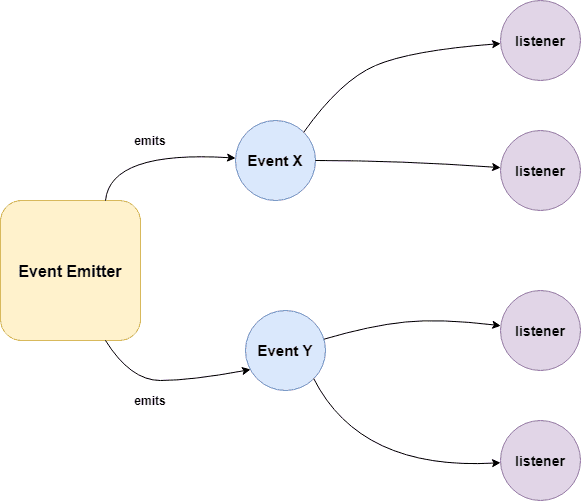
EventEmitter is a class from Node.js's built-in events module that implements the Observer (Pub/Sub) pattern — objects can emit named events, and listeners registered for those events are called when they fire.
EventEmitter is at the core of Node asynchronous event-driven architecture. Many of Node's built-in modules inherit from EventEmitter including prominent frameworks like Express.js. An emitter object basically has two main features:
Example:
/**
 * Callback Events with Parameters
 */
const events = require('events');
const eventEmitter = new events.EventEmitter();

function listener(code, msg) {
   console.log(`status ${code} and ${msg}`);
}

eventEmitter.on('status', listener); // Register listener
eventEmitter.emit('status', 200, 'ok');

// Output
status 200 and ok
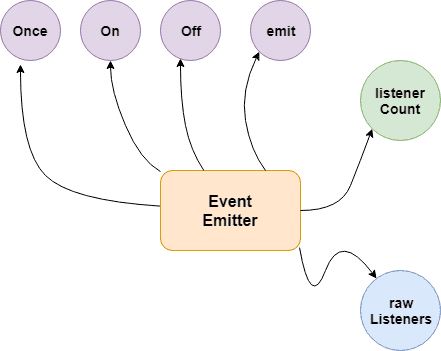
| Method | Description |
|---|---|
.on(event, listener) | Register a listener (fires every time) |
.once(event, listener) | Register a listener that fires only once |
.emit(event, ...args) | Trigger all listeners for an event |
.off(event, listener) | Remove a specific listener |
.removeAllListeners(event) | Remove all listeners for an event |
.listeners(event) | Returns array of listeners for an event |
.listenerCount(event) | Returns number of listeners |
.setMaxListeners(n) | Change the limit (default: 10) |
Node.js prints a warning when more than 10 listeners are registered for a single event — use
emitter.setMaxListeners(0)to disable the limit, or increase it as needed.
EventEmitter maintains an internal registry (a plain object) mapping event names to arrays of listener functions. When you emit an event, it looks up that array and calls each function synchronously in registration order.
Building Blocks:
Example 01:
/**
 * Callbacks Events
 */
const events = require('events');
const eventEmitter = new events.EventEmitter();

function listenerOne() {
   console.log('First Listener Executed');
}

function listenerTwo() {
   console.log('Second Listener Executed');
}

eventEmitter.on('listenerOne', listenerOne); // Register for listenerOne
eventEmitter.on('listenerOne', listenerTwo); // Register for listenerOne

// When the event "listenerOne" is emitted, both the above callbacks should be invoked.
eventEmitter.emit('listenerOne');

// Output
First Listener Executed
Second Listener Executed
Example 02:
/**
 * Emit Events Once
 */
const events = require('events');
const eventEmitter = new events.EventEmitter();

function listenerOnce() {
   console.log('listenerOnce fired once');
}

eventEmitter.once('listenerOne', listenerOnce); // Register listenerOnce
eventEmitter.emit('listenerOne');

// Output
listenerOnce fired once
Listener Registration
| Method | Description |
|---|---|
.on(event, listener) | Add a listener — fires every time the event is emitted |
.addListener(event, listener) | Alias for .on() |
.once(event, listener) | Add a listener that fires only once, then auto-removes |
.prependListener(event, listener) | Add listener to the beginning of the array (fires first) |
.prependOnceListener(event, listener) | Same as .prependListener() but fires only once |
Listener Removal
| Method | Description |
|---|---|
.off(event, listener) | Remove a specific listener |
.removeListener(event, listener) | Alias for .off() |
.removeAllListeners([event]) | Remove all listeners for an event (or all events if omitted) |
Emitting Events
| Method | Description |
|---|---|
.emit(event, ...args) | Trigger all listeners for the event synchronously. Returns true if listeners exist |
Inspection
| Method | Description |
|---|---|
.listeners(event) | Returns a copy of the listeners array for the event |
.rawListeners(event) | Returns raw listeners including .once() wrappers |
.listenerCount(event) | Returns the number of listeners registered for an event |
.eventNames() | Returns an array of all event names with registered listeners |
Configuration
| Method | Description |
|---|---|
.setMaxListeners(n) | Set the max listener limit (default: 10). Use 0 for unlimited |
.getMaxListeners() | Returns the current max listener limit |
Code Examples
const EventEmitter = require('events');
const emitter = new EventEmitter();

// --- Registration ---
emitter.on('data', (msg) => console.log('on:', msg));
emitter.once('data', (msg) => console.log('once:', msg));
emitter.prependListener('data', (msg) => console.log('prepend:', msg));

emitter.emit('data', 'hello');
// prepend: hello   ← fired first
// on: hello
// once: hello

emitter.emit('data', 'world');
// prepend: world
// on: world        ← once() is already removed

// --- Inspection ---
console.log(emitter.listenerCount('data'));  // 2
console.log(emitter.eventNames());           // ['data']

// --- Removal ---
const handler = (x) => console.log(x);
emitter.on('click', handler);
emitter.off('click', handler);              // removes specific listener
emitter.removeAllListeners('data');         // removes all 'data' listeners
emitter.removeAllListeners();              // removes everything

// --- Max listeners ---
emitter.setMaxListeners(20);
console.log(emitter.getMaxListeners());     // 20

// --- rawListeners (includes once wrapper) ---
emitter.once('ping', () => {});
console.log(emitter.rawListeners('ping')); // [Function: bound onceWrapper]
console.log(emitter.listeners('ping'));    // [Function (anonymous)] ← unwrapped
Always call
.off()or.removeAllListeners()when a listener is no longer needed — especially inside long-lived objects — to prevent memory leaks.
The Event Loop is the mechanism that allows Node.js to perform non-blocking I/O on a single thread by delegating operations to the OS kernel or libuv thread pool, then executing callbacks when they complete.
Node.js is a single-threaded application, but it can support concurrency via the concept of event and callbacks. Every API of Node.js is asynchronous and being single-threaded, they use async function calls to maintain concurrency. Node uses observer pattern. Node thread keeps an event loop and whenever a task gets completed, it fires the corresponding event which signals the event-listener function to execute.
Features of Event Loop:
The Six Main Phases
| Phase | Description |
|---|---|
| Timers | Executes callbacks from setTimeout() and setInterval() once their minimum threshold has passed. |
| Pending Callbacks | Handles certain system-level error callbacks, such as TCP errors (e.g., ECONNREFUSED). |
| Idle, Prepare | Used only internally by Node.js for housekeeping. |
| Poll | The heart of the loop. It retrieves new I/O events (network, disk) and executes their callbacks immediately. |
| Check | Executes setImmediate() callbacks, which are specifically designed to run right after the Poll phase. |
| Close Callbacks | Handles the closing of resources, like socket.on('close'), stream.on('close') |
Between every phase, Node.js drains microtasks in this order:
process.nextTick queue.then / .catch queueExample:
console.log('1. sync');

setTimeout(() => console.log('2. setTimeout'), 0);
setImmediate(() => console.log('3. setImmediate'));
Promise.resolve().then(() => console.log('4. Promise'));
process.nextTick(() => console.log('5. nextTick'));

console.log('6. sync end');

// Output:
// 1. sync
// 6. sync end
// 5. nextTick       ← microtask (highest priority)
// 4. Promise        ← microtask
// 2. setTimeout     ← timers phase
// 3. setImmediate   ← check phase
An array containing all eventListeners is maintained by Node.js. Each time .on(), .once(), or .addListener() function is executed, a new event listener is added to that array. When the concerned event is emitted, each eventListener that is present in the array is called in a sequential or synchronous manner.
The event listeners are called in a synchronous manner to avoid logical errors, race conditions etc. The total number of listeners that can be registered for a particular event, is controlled by .setMaxListeners(n). The default number of listeners is 10.
emitter.setMaxListeners(12);
Example: .on() — persistent listener
const EventEmitter = require('events');
const emitter = new EventEmitter();

// Fires every time the event is emitted
emitter.on('message', (data) => {
  console.log('Received:', data);
});

emitter.emit('message', 'hello');  // Received: hello
emitter.emit('message', 'world');  // Received: world
Example: .once() — single-fire listener
// Auto-removes itself after first call
emitter.once('connect', () => {
  console.log('Connected!');
});

emitter.emit('connect'); // Connected!
emitter.emit('connect'); // (nothing — listener is gone)
As an event Listener once registered, exists throughout the life cycle of the program. It is important to detach an event Listener once its no longer needed to avoid memory leaks. Functions like .removeListener(), .removeAllListeners() enable the removal of listeners from the listeners Array.
Example: removeAllListeners()
// In long-lived objects, clean up to prevent memory leaks
class Connection extends EventEmitter {
  destroy() {
    this.removeAllListeners(); // clean up everything
  }
}
1. process.nextTick():
The process.nextTick() method adds the callback function to the start of the next event queue. It is to be noted that, at the start of the program process.nextTick() method is called for the first time before the event loop is processed.
2. setImmediate():
The setImmediate() method is used to execute a function right after the current event loop finishes. It is callback function is placed in the check phase of the next event queue.
Example: Execution Order
/**
 * setImmediate() and process.nextTick()
 */
setImmediate(() => console.log('1. setImmediate'));

process.nextTick(() => console.log('2. nextTick'));

Promise.resolve().then(() => console.log('3. Promise'));

console.log('4. sync');

// Output:
// 4. sync
// 2. nextTick       ← microtask, runs before event loop phases
// 3. Promise        ← microtask, runs after nextTick queue
// 1. setImmediate   ← check phase
Example: Inside an I/O Callback
const fs = require('fs');

fs.readFile(__filename, () => {
  setTimeout(() => console.log('1. setTimeout'), 0);
  setImmediate(() => console.log('2. setImmediate'));
  process.nextTick(() => console.log('3. nextTick'));
});

// Output:
// 3. nextTick      ← always first (microtask)
// 2. setImmediate  ← always before setTimeout inside I/O
// 1. setTimeout
When to Use Each
The Node.js event loop processes asynchronous callbacks in a specific order across six phases. Each phase has a FIFO queue of callbacks to execute.
   ┌───────────────────────────┐
┌─>│           timers          │  ← setTimeout / setInterval callbacks
│  └─────────────┬─────────────┘
│  ┌─────────────┴─────────────┐
│  │     pending callbacks     │  ← I/O errors deferred to next loop
│  └─────────────┬─────────────┘
│  ┌─────────────┴─────────────┐
│  │       idle, prepare       │  ← internal use only
│  └─────────────┬─────────────┘
│  ┌─────────────┴─────────────┐
│  │           poll            │  ← retrieve new I/O events; execute I/O callbacks
│  └─────────────┬─────────────┘
│  ┌─────────────┴─────────────┐
│  │           check           │  ← setImmediate callbacks
│  └─────────────┬─────────────┘
│  ┌─────────────┴─────────────┐
└──┤      close callbacks      │  ← e.g., socket.on('close', ...)
   └───────────────────────────┘
| Phase | What runs here |
|---|---|
| timers | setTimeout and setInterval callbacks whose delay has expired |
| pending callbacks | I/O callbacks deferred from the previous iteration |
| idle / prepare | Internal Node.js use only |
| poll | Retrieves new I/O events; executes I/O-related callbacks (file, network) |
| check | setImmediate callbacks |
| close callbacks | socket.destroy(), stream.on('close') handlers |
Between every phase (and between every individual callback in some phases), Node.js drains the microtask queues:
process.nextTick queue (highest priority).then / .catch / .finally queueExample — phase execution order:
const fs = require('fs');

// Phase: timers
setTimeout(() => console.log('1. setTimeout'), 0);

// Phase: check
setImmediate(() => console.log('2. setImmediate'));

// Phase: poll (I/O callback)
fs.readFile(__filename, () => {
  console.log('3. fs.readFile callback');

  // Inside I/O callback: setImmediate always before setTimeout
  setTimeout(() => console.log('4. setTimeout inside I/O'), 0);
  setImmediate(() => console.log('5. setImmediate inside I/O'));
});

// Microtask: nextTick (runs before any phase)
process.nextTick(() => console.log('6. process.nextTick'));

// Microtask: Promise (runs after nextTick queue empties)
Promise.resolve().then(() => console.log('7. Promise.then'));

console.log('8. Synchronous code');

// Output order:
// 8. Synchronous code
// 6. process.nextTick
// 7. Promise.then
// 1. setTimeout          (order of 1 & 2 may vary outside I/O)
// 2. setImmediate
// 3. fs.readFile callback
// 5. setImmediate inside I/O   (always before setTimeout inside I/O)
// 4. setTimeout inside I/O
Key rules to remember:
process.nextTick fires before Promises, before any event loop phase.setImmediate always executes before setTimeout(fn, 0).setTimeout(fn, 0) vs setImmediate is non-deterministic.The JavaScript/Node.js execution model separates asynchronous work into microtasks (high-priority, run after every task) and macrotasks (lower-priority, run in event loop phases).
| Microtasks | Macrotasks (Tasks) | |
|---|---|---|
| Examples | process.nextTick, Promise.then/catch/finally, queueMicrotask | setTimeout, setInterval, setImmediate, I/O callbacks |
| When executed | After every macrotask / synchronous block, before the next event loop phase | One per event loop phase tick |
| Queue draining | Entire microtask queue drains before the next macrotask | One callback dequeued per iteration |
| Priority | process.nextTick > Promises | Depends on event loop phase |
Example — execution order:
console.log('1. Start');

setTimeout(() => console.log('2. setTimeout'), 0);       // macrotask
setImmediate(() => console.log('3. setImmediate'));       // macrotask

Promise.resolve()
  .then(() => console.log('4. Promise.then'));            // microtask

process.nextTick(() => console.log('5. nextTick'));       // microtask (highest)

queueMicrotask(() => console.log('6. queueMicrotask'));  // microtask

console.log('7. End');

// Output:
// 1. Start
// 7. End
// 5. nextTick          ← nextTick queue drained first
// 4. Promise.then      ← Promise microtask queue
// 6. queueMicrotask
// 2. setTimeout        ← macrotask (timers phase)
// 3. setImmediate      ← macrotask (check phase)
Why it matters — starvation risk:
Recursively calling process.nextTick or resolving promises in a loop can starve the event loop, preventing I/O callbacks from ever running:
//  Dangerous: starves the event loop
function recursive() {
  process.nextTick(recursive);
}
recursive();

//  Safe: use setImmediate to yield to I/O
function recursive() {
  setImmediate(recursive);
}
A callback is a function which is called when a task is completed, thus helps in preventing any kind of blocking and a callback function allows other code to run in the meantime.
Callback is called when task get completed and is asynchronous equivalent for a function. Using Callback concept, Node.js can process a large number of requests without waiting for any function to return the result which makes Node.js highly scalable.
Example:
/**
 * Callback Function
 */
function message(name, callback) {
  console.log("Hi" + " " + name);
  callback();
}

// Callback function
function callMe() {
  console.log("I am callback function");
}

// Passing function as an argument
message("Node.JS", callMe);
Output:
Hi Node.JS
I am callback function
1. Events:
Node.js events module which emits named events that can cause corresponding functions or callbacks to be called. Functions ( callbacks ) listen or subscribe to a particular event to occur and when that event triggers, all the callbacks subscribed to that event are fired one by one in order to which they were registered.
All objects that emit events are instances of the EventEmitter class. The event can be emitted or listen to an event with the help of EventEmitter
Example:
/**
 * Events Module
 */
const event = require('events');
const eventEmitter = new event.EventEmitter();

// add listener function for Sum event
eventEmitter.on('Sum', function(num1, num2) {
    console.log('Total: ' + (num1 + num2));
});

// call event
eventEmitter.emit('Sum', 10, 20);

// Output
Total: 30
2. Callbacks:
A callback function is a function passed into another function as an argument, which is then invoked inside the outer function to complete some kind of routine or action.
Example:
/**
 * Callbacks
 */
function sum(number) {
  console.log('Total: ' + number);
}

function calculator(num1, num2, callback) {
  let total = num1 + num2;
  callback(total);
}

calculator(10, 20, sum);

// Output
Total: 30
Callback functions are called when an asynchronous function returns its result, whereas event handling works on the observer pattern. The functions that listen to events act as Observers. Whenever an event gets fired, its listener function starts executing. Node.js has multiple in-built events available through events module and EventEmitter class which are used to bind events and event-listeners
In practice, modern Node.js prefers Promises/async-await over raw callbacks, while EventEmitter remains the standard for streaming data, servers, and pub/sub patterns.
The error-first callback is a Node.js convention where the first argument of every callback is reserved for an error object, and subsequent arguments carry the success result.
The Pattern
function(err, result1, result2, ...) {
  if (err) {
    // handle error — always check first
    return;
  }
  // use result
}
err is an Error object, results are undefinederr is null, results contain the dataWhy It Exists
Async exceptions cannot be caught with try/catch because the callback fires after the call stack has moved on:
Example:
//  This does NOT work for async errors
try {
  fs.readFile('file.txt', (err, data) => {
    throw new Error('oops'); // uncaught!
  });
} catch (e) {
  // never reaches here
}

//  Error-first callback handles it correctly
fs.readFile('file.txt', (err, data) => {
  if (err) {
    console.error('Failed:', err.message); // caught here
    return;
  }
  console.log(data);
});
Callback hell (also called the "Pyramid of Doom") is a situation where multiple nested callbacks make the code deeply indented, hard to read, and difficult to maintain.
The Problem
When async operations depend on each other's results, callbacks get nested inside callbacks:
Example:
// Real-world example: read file → parse → query DB → send email
fs.readFile('config.json', (err, config) => {
  if (err) return handleError(err);

  db.connect(config.dbUrl, (err, connection) => {
    if (err) return handleError(err);

    connection.query('SELECT * FROM users', (err, users) => {
      if (err) return handleError(err);

      emailService.send(users[0].email, (err, result) => {
        if (err) return handleError(err);

        // actual logic buried 4 levels deep
        console.log('Done!');
      });
    });
  });
});
Why It's a Problem
| Issue | Description |
|---|---|
| Readability | Code grows rightward in a pyramid shape |
| Maintainability | Hard to follow the flow of data |
| Error handling | Must handle errors at every level separately |
| Debugging | Stack traces are misleading; hard to pinpoint errors |
| Reusability | Logic is tightly coupled inside nested functions |
How to Avoid It
1. Named functions — extract callbacks into named functions:
fs.readFile('config.json', onFileRead);

function onFileRead(err, config) {
  if (err) return handleError(err);
  db.connect(config.dbUrl, onDbConnect);
}

function onDbConnect(err, connection) {
  if (err) return handleError(err);
  // ...
}
2. Promises — chain .then() instead of nesting:
readFile('config.json')
  .then(config => db.connect(config.dbUrl))
  .then(connection => connection.query('SELECT * FROM users'))
  .then(users => emailService.send(users[0].email))
  .then(() => console.log('Done!'))
  .catch(handleError); // single error handler for all
3. Async/Await — the modern, cleanest solution:
async function run() {
  try {
    const config = await readFile('config.json');
    const connection = await db.connect(config.dbUrl);
    const users = await connection.query('SELECT * FROM users');
    await emailService.send(users[0].email);
    console.log('Done!');
  } catch (err) {
    handleError(err);
  }
}
4. Async.js library — utility functions for common async patterns:
const async = require('async');

async.waterfall([
  (cb) => fs.readFile('config.json', cb),
  (config, cb) => db.connect(config.dbUrl, cb),
  (connection, cb) => connection.query('SELECT * FROM users', cb),
], (err, result) => {
  if (err) return handleError(err);
  console.log('Done!');
});
Modern Node.js strongly prefers async/await — it reads like synchronous code, has a single
try/catchfor all errors, and completely eliminates the pyramid structure.
The first argument passed to a callback handler in Node.js is always the error object (err). This is the error-first (or "Node-style") callback convention.
Example:
/**
 * Callback Handler
 */
const Division = (numerator, denominator, callback) => {
    if (denominator === 0) {
      callback(new Error('Divide by zero error!'));
    } else {
      callback(null, numerator / denominator);
    }
};

// Function Call
Division(5, 0, (err, result) => {
  if (err) {
    return console.log(err.message);
  }
  console.log(`Result: ${result}`);
});
The Timers module in Node.js contains functions that execute code after a set period of time. Timers do not need to be imported via require(), since all the methods are available globally to emulate the browser JavaScript API.
Some of the functions provided in this module are
1. setTimeout(callback, delay, ...args)
Executes the callback once after at least delay milliseconds. Returns a Timeout object usable with clearTimeout().
Syntax:
setTimeout(callback, delay, args )
Example:
const timer = setTimeout((msg) => {
  console.log(msg); // prints after ~1 second
}, 1000, 'Hello after 1 second');

// Cancel before it fires:
clearTimeout(timer);
2. setImmediate(callback, ...args)
Executes the callback once, at the end of the current event loop iteration — after I/O events but before timers.
Syntax:
setImmediate(callback, args)
Example:
setImmediate(() => console.log('setImmediate'));
setTimeout(() => console.log('setTimeout'), 0);
console.log('sync');

// Output:
// sync
// setImmediate  ← (inside I/O: always before setTimeout)
// setTimeout
3. setInterval(callback, delay, ...args)
Executes the callback repeatedly every delay milliseconds until stopped with clearInterval().
Syntax:
setInterval(callback, delay, args)
Example:
let count = 0;
const id = setInterval(() => {
  count++;
  console.log(`Tick ${count}`);
  if (count === 3) clearInterval(id); // stop after 3 ticks
}, 1000);
4. process.nextTick(callback)
Fires before the event loop moves to the next phase — even before setImmediate. It's a microtask, not technically a "timer" but closely related.
process.nextTick(() => console.log('nextTick'));
setImmediate(() => console.log('setImmediate'));
console.log('sync');

// Output:
// sync
// nextTick      ← microtask, runs first
// setImmediate
Execution Order Summary
Synchronous code
     ↓
process.nextTick()     ← microtask (highest priority)
     ↓
Promise.then()         ← microtask
     ↓
setTimeout / setInterval  ← timers phase
     ↓
setImmediate           ← check phase
Node.js has no built-in sleep() — but you can implement one using a Promise + setTimeout combination with async/await.
Example:
function sleep(time) {
  return new Promise((resolve) => setTimeout(resolve, time));
}

// Usage
async function run() {
  await sleep(1000); // pause for 1 second
  console.log("This printed after about 1 second");
}

run();
The function returns a Promise that resolves after ms milliseconds. await-ing it pauses execution without blocking the event loop.
In Node.js v16+,
timers/promisesprovides a built-in alternative:import { setTimeout as sleep } from 'timers/promises'; await sleep(1000);
Node.js provides several ways to read file content using the built-in fs (File System) module. The choice depends on whether you want the operation to be blocking (synchronous) or non-blocking (asynchronous).
1. Asynchronous (Non-Blocking) – Recommended
This is the standard approach for most Node.js applications as it allows the event loop to continue working while the file is being read.
Example:
const fs = require('fs').promises;

async function readFile() {
  try {
    const data = await fs.readFile('file.txt', 'utf8');
    console.log(data);
  } catch (err) {
    console.error(err);
  }
}
Example:
const fs = require('fs');
fs.readFile('file.txt', 'utf8', (err, data) => {
  if (err) throw err;
  console.log(data);
});
2. Synchronous (Blocking)
The fs.readFileSync() method stops all other code execution until the file is fully read. It returns the content directly rather than using a callback.
Example:
const fs = require('fs');

try {
  const data = fs.readFileSync('file.txt', 'utf8');
  console.log(data);
} catch (err) {
  console.error('Error reading file:', err.message);
}
3. Streams – For Large Files
For very large files (e.g., GBs of data), loading the entire content into memory at once can crash your app. Instead, use fs.createReadStream() to read the file in smaller chunks.
Example:
const fs = require('fs');

const stream = fs.createReadStream('large-file.txt', { encoding: 'utf8' });

stream.on('data', (chunk) => {
  console.log(`Received chunk: ${chunk.length} characters`);
});

stream.on('end', () => {
  console.log('Finished reading file.');
});

stream.on('error', (err) => {
  console.error('Error reading file:', err.message);
});
Note
Node.js provides fs.writeFile() (async) and fs.writeFileSync() (sync) to write data to a file. If the file does not exist, it is created. If it exists, its content is replaced.
1. Asynchronous with Callback:
const fs = require('fs');

fs.writeFile('output.txt', 'Hello, Node.js!', 'utf8', (err) => {
  if (err) {
    console.error('Error writing file:', err.message);
    return;
  }
  console.log('File written successfully.');
});
2. Asynchronous with Promises (async/await):
const fs = require('fs').promises;

async function writeFile() {
  try {
    await fs.writeFile('output.txt', 'Hello, Node.js!', 'utf8');
    console.log('File written successfully.');
  } catch (err) {
    console.error('Error writing file:', err.message);
  }
}

writeFile();
3. Synchronous:
const fs = require('fs');

try {
  fs.writeFileSync('output.txt', 'Hello, Node.js!', 'utf8');
  console.log('File written successfully.');
} catch (err) {
  console.error('Error writing file:', err.message);
}
Use the
flagoption to control write behavior:'w'(default, overwrite),'a'(append),'wx'(fail if file exists).
Use fs.appendFile() to add content to the end of an existing file. If the file does not exist, it is created automatically.
1. Asynchronous with Callback:
const fs = require('fs');

fs.appendFile('log.txt', 'New log entry\n', 'utf8', (err) => {
  if (err) {
    console.error('Error appending to file:', err.message);
    return;
  }
  console.log('Content appended successfully.');
});
2. Asynchronous with Promises:
const fs = require('fs').promises;

async function appendToFile() {
  try {
    await fs.appendFile('log.txt', `[${new Date().toISOString()}] App started\n`, 'utf8');
    console.log('Log entry added.');
  } catch (err) {
    console.error('Error:', err.message);
  }
}

appendToFile();
3. Synchronous:
const fs = require('fs');

try {
  fs.appendFileSync('log.txt', 'Sync log entry\n', 'utf8');
  console.log('Content appended.');
} catch (err) {
  console.error('Error:', err.message);
}
Use fs.unlink() (async) or fs.unlinkSync() (sync) to delete a file.
1. Asynchronous with Callback:
const fs = require('fs');

fs.unlink('output.txt', (err) => {
  if (err) {
    console.error('Error deleting file:', err.message);
    return;
  }
  console.log('File deleted successfully.');
});
2. Asynchronous with Promises:
const fs = require('fs').promises;

async function deleteFile(filePath) {
  try {
    await fs.unlink(filePath);
    console.log(`${filePath} deleted.`);
  } catch (err) {
    if (err.code === 'ENOENT') {
      console.log('File does not exist.');
    } else {
      console.error('Error:', err.message);
    }
  }
}

deleteFile('output.txt');
3. Synchronous:
const fs = require('fs');

try {
  fs.unlinkSync('output.txt');
  console.log('File deleted.');
} catch (err) {
  console.error('Error:', err.message);
}
In Node.js v14.14+, you can also use
fs.rm(path, { force: true })which does not throw if the file is missing.
Use fs.rename() to rename a file or move it to a different path.
Example — Rename:
const fs = require('fs');

fs.rename('old-name.txt', 'new-name.txt', (err) => {
  if (err) {
    console.error('Error renaming file:', err.message);
    return;
  }
  console.log('File renamed successfully.');
});
Example — Move (rename across directories):
const fs = require('fs').promises;
const path = require('path');

async function moveFile(src, dest) {
  try {
    // Ensure destination directory exists
    await fs.mkdir(path.dirname(dest), { recursive: true });
    await fs.rename(src, dest);
    console.log(`Moved: ${src} → ${dest}`);
  } catch (err) {
    console.error('Error moving file:', err.message);
  }
}

moveFile('uploads/temp.txt', 'archive/2026/temp.txt');
fs.rename()only works within the same filesystem/volume. To move across volumes, copy the file then delete the source usingfs.copyFile()+fs.unlink().
1. Using fs.existsSync() (synchronous):
const fs = require('fs');

if (fs.existsSync('config.json')) {
  console.log('File exists.');
} else {
  console.log('File not found.');
}
2. Using fs.access() (asynchronous, preferred):
const fs = require('fs');

fs.access('config.json', fs.constants.F_OK, (err) => {
  if (err) {
    console.log('File does not exist.');
  } else {
    console.log('File exists.');
  }
});
3. Check read/write permissions:
const fs = require('fs');

// Check if file is readable AND writable
fs.access('data.txt', fs.constants.R_OK | fs.constants.W_OK, (err) => {
  if (err) {
    console.error('No read/write access:', err.message);
  } else {
    console.log('File is readable and writable.');
  }
});
| Constant | Meaning |
|---|---|
fs.constants.F_OK | File exists |
fs.constants.R_OK | File is readable |
fs.constants.W_OK | File is writable |
fs.constants.X_OK | File is executable |
Avoid the pattern "check if exists, then act" — the file could be deleted between the check and the action. Instead, attempt the operation directly and handle the
ENOENTerror.
Use fs.stat() or fs.statSync() to retrieve metadata about a file or directory.
const fs = require('fs');

fs.stat('file.txt', (err, stats) => {
  if (err) {
    console.error('Error:', err.message);
    return;
  }

  console.log('Is file:', stats.isFile());           // true
  console.log('Is directory:', stats.isDirectory()); // false
  console.log('Size (bytes):', stats.size);
  console.log('Created:', stats.birthtime);
  console.log('Modified:', stats.mtime);
  console.log('Permissions (octal):', (stats.mode & 0o777).toString(8));
});
Using async/await:
const fs = require('fs').promises;

async function getFileInfo(filePath) {
  try {
    const stats = await fs.stat(filePath);
    return {
      size: stats.size,
      isFile: stats.isFile(),
      isDirectory: stats.isDirectory(),
      modified: stats.mtime,
    };
  } catch (err) {
    if (err.code === 'ENOENT') return null; // file not found
    throw err;
  }
}

getFileInfo('file.txt').then(console.log);
1. Create a directory:
const fs = require('fs').promises;

// Create a single directory
await fs.mkdir('logs');

// Create nested directories (recursive)
await fs.mkdir('logs/2026/april', { recursive: true });
2. Read directory contents:
const fs = require('fs');

fs.readdir('./src', (err, files) => {
  if (err) {
    console.error('Error reading directory:', err.message);
    return;
  }
  files.forEach((file) => console.log(file));
});
3. Read directory with file types:
const fs = require('fs').promises;

async function listDirectory(dirPath) {
  const entries = await fs.readdir(dirPath, { withFileTypes: true });

  entries.forEach((entry) => {
    if (entry.isDirectory()) {
      console.log(`[DIR]  ${entry.name}`);
    } else {
      console.log(`[FILE] ${entry.name}`);
    }
  });
}

listDirectory('./src');
4. Remove a directory:
const fs = require('fs').promises;

// Remove empty directory
await fs.rmdir('logs');

// Remove directory and all contents (Node.js v14.14+)
await fs.rm('logs', { recursive: true, force: true });
Use fs.watch() to monitor a file or directory for changes. It fires a callback whenever the file is modified, renamed, or deleted.
Example — watch a single file:
const fs = require('fs');

const watcher = fs.watch('config.json', (eventType, filename) => {
  console.log(`Event: ${eventType}`);   // 'change' or 'rename'
  console.log(`File: ${filename}`);
});

// Stop watching after 10 seconds
setTimeout(() => {
  watcher.close();
  console.log('Stopped watching.');
}, 10000);
Example — watch a directory:
const fs = require('fs');

fs.watch('./src', { recursive: true }, (eventType, filename) => {
  if (filename) {
    console.log(`[${eventType}] ${filename}`);
  }
});
Example — using fs.watchFile() for polling (more reliable across platforms):
const fs = require('fs');

fs.watchFile('data.txt', { interval: 1000 }, (curr, prev) => {
  if (curr.mtime > prev.mtime) {
    console.log('File was modified at:', curr.mtime);
  }
});
| Method | Mechanism | Reliability | CPU Usage |
|---|---|---|---|
fs.watch() | OS events | Fast, but inconsistent across platforms | Low |
fs.watchFile() | Polling | Consistent across all platforms | Higher |
For production file watching, consider the chokidar library — it normalizes behavior across all OS platforms.
Streams are objects that let you read data from a source or write data to a destination in continuous fashion. There are four types of streams
Node.js has 4 types of streams:
| Type | Description | Example |
|---|---|---|
| Readable | Data can be read from it | fs.createReadStream(), http.IncomingMessage |
| Writable | Data can be written to it | fs.createWriteStream(), http.ServerResponse |
| Duplex | Both readable and writable | net.Socket, TCP socket |
| Transform | Duplex that modifies data as it passes through | zlib.createGzip(), crypto.createCipher() |
Additional stream utilities:
PassThrough — a Transform that passes data through unchanged (useful for testing/piping)stream.pipeline() — connects streams and handles backpressure + error propagation automatically (preferred over .pipe())Each type of Stream is an EventEmitter instance and throws several events at different instance of times.
Methods:
1. Reading from a Stream:
const fs = require("fs");
let data = "";

// Create a readable stream
const readerStream = fs.createReadStream("file.txt");

// Set the encoding to be utf8.
readerStream.setEncoding("UTF8");

// Handle stream events --> data, end, and error
readerStream.on("data", function (chunk) {
  data += chunk;
});

readerStream.on("end", function () {
  console.log(data);
});

readerStream.on("error", function (err) {
  console.log(err.stack);
});
2. Writing to a Stream:
const fs = require("fs");
const data = "File writing to a stream example";

// Create a writable stream
const writerStream = fs.createWriteStream("file.txt");

// Write the data to stream with encoding to be utf8
writerStream.write(data, "UTF8");

// Mark the end of file
writerStream.end();

// Handle stream events --> finish, and error
writerStream.on("finish", function () {
  console.log("Write completed.");
});

writerStream.on("error", function (err) {
  console.log(err.stack);
});
3. Piping the Streams:
Piping is a mechanism where we provide the output of one stream as the input to another stream. It is normally used to get data from one stream and to pass the output of that stream to another stream. There is no limit on piping operations.
const fs = require("fs");

// Create a readable stream
const readerStream = fs.createReadStream('input.txt');

// Create a writable stream
const writerStream = fs.createWriteStream('output.txt');

// Pipe the read and write operations
// read input.txt and write data to output.txt
readerStream.pipe(writerStream);
4. Chaining the Streams:
Chaining is a mechanism to connect the output of one stream to another stream and create a chain of multiple stream operations. It is normally used with piping operations.
const fs = require("fs");
const zlib = require('zlib');

// Compress the file input.txt to input.txt.gz
fs.createReadStream('input.txt')
   .pipe(zlib.createGzip())
   .pipe(fs.createWriteStream('input.txt.gz'));

console.log("File Compressed.");
The Node.js stream feature makes it possible to process large data continuously in smaller chunks without keeping it all in memory. One benefit of using streams is that it saves time, since you don't have to wait for all the data to load before you start processing. This also makes the process less memory-intensive.
1. Use Streams (most important)
Never load large files/datasets into memory at once — process them chunk by chunk:
import { createReadStream, createWriteStream } from "node:fs";
import { pipeline } from "node:stream/promises";
import { createGzip } from "node:zlib";

// Process a large file without loading it all into memory
await pipeline(
  createReadStream("large-file.csv"),
  createGzip(),
  createWriteStream("large-file.csv.gz")
);
2. Async Iteration over Streams
const stream = createReadStream("data.json", { encoding: "utf8" });
for await (const chunk of stream) {
  process(chunk); // handles one chunk at a time
}
3. Database Pagination / Cursor
// Cursor-based: fetch in batches, not all at once
async function* iterateUsers(db) {
  let cursor = null;
  do {
    const rows = await db.query(
      "SELECT * FROM users WHERE id > $1 ORDER BY id LIMIT 1000",
      [cursor ?? 0]
    );
    if (!rows.length) break;
    yield rows;
    cursor = rows.at(-1).id;
  } while (true);
}

for await (const batch of iterateUsers(db)) {
  await processBatch(batch);
}
4. Worker Threads for CPU-heavy Processing
import { Worker } from "node:worker_threads";

// Offload heavy computation (parsing, aggregation) to a worker
const worker = new Worker("./data-processor.js", { workerData: { filePath } });
worker.on("message", (result) => console.log(result));
5. Node.js --max-old-space-size (last resort)
node --max-old-space-size=4096 app.js # increase heap to 4 GB
6. Limit Concurrency to Avoid Memory Spikes
async function processBatchWithLimit(items, concurrency = 5) {
  for (let i = 0; i < items.length; i += concurrency) {
    await Promise.all(items.slice(i, i + concurrency).map(processItem));
  }
}
Summary
| Strategy | Best For |
|---|---|
| Streams + pipeline | Large files, logs, CSV, JSON lines |
| Async generators | Database rows, API pagination |
| Worker Threads | CPU-intensive transformations |
| Batched processing | Rate-limited APIs, bulk DB inserts |
| LRU/TTL Cache | Repeated reads of hot data |
--max-old-space-size | Temporary fix only — not a solution |
Golden rule: If data doesn't fit comfortably in RAM, stream it. Never use
fs.readFileSyncor load entire collections into arrays for large datasets.
Backpressure is a flow-control mechanism that prevents a fast-producing readable stream from overwhelming a slow-consuming writable stream. When the writable's internal buffer fills up (exceeds highWaterMark), writable.write() returns false and the readable should pause until the drain event fires.
How it works
When writable.write(chunk) returns false, the internal buffer has exceeded its highWaterMark (default 16 KB). The readable should pause until the writable emits a drain event.
Example:
const readable = fs.createReadStream("huge.file");
const writable = fs.createWriteStream("output.file");

readable.on('data', (chunk) => {
  // Returns false when the buffer exceeds highWaterMark
  const canContinue = writable.write(chunk);
  if (!canContinue) {
    readable.pause(); // apply backpressure
  }
});

writable.on('drain', () => {
  readable.resume(); // buffer drained — resume reading
});

readable.on('end', () => writable.end());
Recommended: use pipeline() which handles backpressure automatically
import { pipeline } from "node:stream/promises";
import { createReadStream, createWriteStream } from "node:fs";

// pipeline pauses/resumes automatically + propagates errors + cleans up streams
await pipeline(
  createReadStream("huge.file"),
  createWriteStream("output.file")
);
pipe() and pipeline() in Node.js streams?Both connect a readable stream to a writable stream, but they differ significantly in error handling and cleanup.
.pipe() | stream.pipeline() | |
|---|---|---|
| Error propagation | Does NOT forward errors | Propagates errors to all streams |
| Stream cleanup | Destination not destroyed on source error | All streams destroyed on any error |
| Return value | Returns the destination stream | Returns void (or Promise with stream/promises) |
| Async/await | No | Yes (via node:stream/promises) |
| Available since | Node.js 0.9 | Node.js 10 (callback), Node.js 15 (promises) |
Example — .pipe() leaks on error:
const fs = require('fs');

const readable = fs.createReadStream('nonexistent.txt');
const writable = fs.createWriteStream('output.txt');

readable.on('error', (err) => console.error('Read error:', err.message));
// writable is NOT closed — resource leak!
readable.pipe(writable);
Example — pipeline() cleans up automatically:
const { pipeline } = require('node:stream/promises');
const { createReadStream, createWriteStream } = require('node:fs');
const { createGzip } = require('node:zlib');

async function compress(input, output) {
  try {
    await pipeline(
      createReadStream(input),
      createGzip(),
      createWriteStream(output)
    );
    console.log('Compression complete');
  } catch (err) {
    // All streams are automatically destroyed on error
    console.error('Pipeline failed:', err.message);
  }
}

compress('data.txt', 'data.txt.gz');
Rule: Always use
stream.pipeline()over.pipe()in production code..pipe()is only safe for simple, error-free scenarios.
A Readable stream operates in one of two modes:
| Paused Mode | Flowing Mode | |
|---|---|---|
| Default | Yes | No |
| Data delivery | On demand via .read() | Auto-pushed via 'data' events |
| Switch to flowing | Add 'data' listener / .resume() / .pipe() | — |
| Switch to paused | .pause() / remove 'data' listeners / .unpipe() | — |
| Backpressure | Easy to control | Requires .pause() / .resume() |
const { createReadStream } = require('node:fs');
const stream = createReadStream('file.txt');

// ── Paused mode — pull data manually ─────────────────────────────────────────
stream.on('readable', () => {
  let chunk;
  while ((chunk = stream.read(64)) !== null) { // pull 64 bytes at a time
    console.log('Read:', chunk.toString());
  }
});

stream.on('end', () => console.log('Done'));

// ── Flowing mode — data pushed automatically ──────────────────────────────────
const stream2 = createReadStream('file.txt');

// Adding a 'data' listener switches to flowing mode
stream2.on('data', (chunk) => {
  console.log('Chunk:', chunk.length, 'bytes');
});

stream2.on('end', () => console.log('Done'));

// ── Async iteration (recommended — handles both modes internally) ─────────────
const stream3 = createReadStream('file.txt', { encoding: 'utf8' });

for await (const chunk of stream3) {
  console.log(chunk);
}
Switching modes:
const stream = createReadStream('file.txt');
// starts in paused mode

stream.resume();   // switch to flowing — discards data (use only to drain)
stream.pause();    // switch back to paused

stream.on('data', handler); // switches to flowing
stream.off('data', handler); // does NOT automatically switch back to paused
stream.pause();              // must explicitly pause
Best practice: Use
for await...oforstream.pipeline()instead of manually managing modes — both handle backpressure and mode switching automatically.
highWaterMark in Node.js streams and how does it affect performance?highWaterMark is the threshold (in bytes for binary streams, or number of objects for object-mode streams) at which a stream's internal buffer is considered "full". It controls the balance between memory usage and throughput.
const { createReadStream, createWriteStream } = require('node:fs');

// Default highWaterMark is 16 KB (16384 bytes)
const defaultStream = createReadStream('file.txt');
console.log(defaultStream.readableHighWaterMark); // 16384

// Increase for high-throughput scenarios (fewer I/O calls)
const highThroughput = createReadStream('large.bin', {
  highWaterMark: 64 * 1024  // 64 KB chunks
});

// Decrease for low-memory or real-time scenarios
const lowMemory = createReadStream('stream.txt', {
  highWaterMark: 1024  // 1 KB chunks
});

// Object mode — highWaterMark is a COUNT (not bytes)
const { Transform } = require('node:stream');
const objectTransform = new Transform({
  objectMode: true,
  highWaterMark: 16,     // buffer up to 16 objects
  transform(obj, enc, cb) {
    this.push(process(obj));
    cb();
  }
});
How highWaterMark affects backpressure:
const writable = createWriteStream('output.txt', {
  highWaterMark: 4096  // 4 KB — writable.write() returns false when buffer > 4 KB
});

const readable = createReadStream('input.txt', {
  highWaterMark: 65536  // 64 KB read chunks
});

// With pipeline(), the mismatch is handled automatically:
// readable produces 64 KB → writable buffers → backpressure → readable pauses
const { pipeline } = require('node:stream/promises');
await pipeline(readable, writable);
Tuning guidelines:
| Scenario | highWaterMark | Effect |
|---|---|---|
| Default | 16 KB | Good balance for most cases |
| High throughput (disk copy) | 64–256 KB | Fewer syscalls, more memory |
| Real-time / streaming | 1–4 KB | Lower latency, more syscalls |
| Object mode | 16 objects | Adjust based on object size |
Increasing
highWaterMarkimproves throughput at the cost of memory. Decreasing it saves memory but increases I/O overhead. Profile withnode --profbefore tuning.
A Duplex stream is both Readable and Writable, but the two sides are independent — data written to the writable side does not automatically appear on the readable side (unlike Transform).
const { Duplex } = require('node:stream');

// ── Simple Duplex — echo server simulation ────────────────────────────────────
class EchoStream extends Duplex {
  constructor(options) {
    super(options);
    this._buffer = [];
  }

  // Writable side — receives incoming data
  _write(chunk, encoding, callback) {
    this._buffer.push(chunk); // store for reading
    callback();
  }

  // Readable side — produces data when consumer pulls
  _read(size) {
    if (this._buffer.length > 0) {
      this.push(this._buffer.shift());
    } else {
      this.push(null); // signal end
    }
  }
}

const echo = new EchoStream();
echo.write('Hello');
echo.write('World');
echo.end();

echo.on('data', (chunk) => console.log(chunk.toString())); // Hello, World
Duplex vs Transform:
| Duplex | Transform | |
|---|---|---|
| Readable ↔ Writable relationship | Independent | Input is transformed into output |
| Use case | TCP sockets, bidirectional channels | Compression, encryption, parsing |
_read + _write | Both required | _transform + optional _flush |
const { createReadStream, createWriteStream } = require('node:fs');
const { createGzip } = require('node:zlib');
const { pipeline } = require('node:stream/promises');

// ── always listen for 'error' on every stream when using .pipe() ─
readable.on('error', (err) => {
  console.error('Read error:', err.message);
  writable.destroy(err); // manually destroy writable
});
writable.on('error', (err) => {
  console.error('Write error:', err.message);
});

// ── use pipeline() which handles ALL of this automatically ───────────
try {
  await pipeline(
    createReadStream('input.txt'),
    createGzip(),
    createWriteStream('output.txt.gz')
  );
} catch (err) {
  // All streams are destroyed automatically on any error
  console.error('Pipeline failed:', err.message);
  // err.code e.g. 'ENOENT', 'EACCES', 'ERR_STREAM_DESTROYED'
}

// ── Error types in streams ────────────────────────────────────────────────────
const stream = createReadStream('file.txt');

stream.on('error', (err) => {
  switch (err.code) {
    case 'ENOENT':   console.error('File not found');      break;
    case 'EACCES':   console.error('Permission denied');   break;
    case 'EISDIR':   console.error('Path is a directory'); break;
    default:         console.error('Stream error:', err);
  }
});

// ── Checking if a stream is destroyed ────────────────────────────────────────
if (!stream.destroyed) {
  stream.destroy(); // forcefully close a stream
}

stream.on('close', () => console.log('Stream closed and resources released'));
Error handling checklist:
stream.pipeline() — handles cleanup automaticallyawait pipeline() in try/catchcallback(err) on failure'close' event to confirm resources are releasedNo, Node.js is not entirely single-threaded. Here's the full picture:
What runs on a single thread
What runs on multiple threads (behind the scenes)
fs.readFile, etc.)dns.lookup)pbkdf2, scrypt, randomBytes)zlib compressionworker_threads module) — explicitly run JS on separate threads for CPU-intensive taskschild_process module) — spawn separate OS processesSummary
Your JavaScript code         → single thread (event loop)
File I/O, DNS, crypto, zlib  → libuv thread pool (4 threads by default)
Network I/O (TCP, HTTP)      → OS kernel async (no threads)
Worker Threads               → separate JS threads (explicit, opt-in)
Child Processes              → separate OS processes (separate memory)
The design goal: keep the JS thread free from blocking by offloading slow work to libuv or OS — giving the illusion of concurrency without the complexity of multi-threaded programming. Use
worker_threadsexplicitly when you need true JS parallelism for CPU-heavy tasks.
While Node.js is primarily a single-threaded runtime that uses an event loop for asynchronous tasks, it handles "child threads" and parallel execution through two main built-in modules: worker_threads and child_process.
Node.js handles "child threads" through three distinct mechanisms:
1. libuv Thread Pool (automatic, transparent)
Node.js internally uses a pool of C++ threads via libuv to offload blocking operations:
const fs = require('fs');
const crypto = require('crypto');

// These silently run on libuv thread pool — JS thread never blocks
fs.readFile('large.txt', (err, data) => console.log('done'));
crypto.pbkdf2('password', 'salt', 100000, 64, 'sha512', (err, key) => console.log('hashed'));

console.log('main thread continues immediately');
Default pool size is 4 threads — increase via env var before any require():
process.env.UV_THREADPOOL_SIZE = '16'; // max 1024
2. Worker Threads (worker_threads — JS parallelism)
For CPU-intensive JavaScript tasks (stable since Node.js v12):
// main.js
const { Worker, isMainThread, parentPort, workerData } = require('worker_threads');

if (isMainThread) {
  const worker = new Worker(__filename, { workerData: { n: 40 } });
  worker.on('message', (result) => console.log('Result:', result));
  worker.on('error', (err) => console.error(err));
} else {
  // runs in a separate thread, shares memory via SharedArrayBuffer
  const fib = (n) => n <= 1 ? n : fib(n-1) + fib(n-2);
  parentPort.postMessage(fib(workerData.n));
}
3. Child Processes (child_process — separate OS processes)
For running external programs or isolating work in a separate Node.js process:
const { fork, spawn, exec } = require('child_process');

// fork — separate Node.js process with IPC channel
const child = fork('./worker.js');
child.send({ task: 'compute' });
child.on('message', (result) => console.log(result));

// spawn — stream output from any executable
const ls = spawn('ls', ['-la']);
ls.stdout.on('data', (data) => console.log(data.toString()));
By default, a single Node.js instance runs on one CPU core and does not fully utilize multi-core systems. Node.js provides three ways to leverage all processors:
1. Cluster Module (built-in — most common)
Forks one worker process per CPU core, all sharing the same port:
const cluster = require('cluster');
const os = require('os');
const express = require('express');

if (cluster.isPrimary) {
  const numCPUs = os.cpus().length; // e.g., 8 on an 8-core machine

  for (let i = 0; i < numCPUs; i++) {
    cluster.fork(); // each worker is a full Node.js process
  }

  cluster.on('exit', (worker) => {
    console.log(`Worker ${worker.process.pid} died — restarting`);
    cluster.fork(); // auto-restart crashed workers
  });
} else {
  const app = express();
  app.get('/', (req, res) => res.send(`Handled by PID ${process.pid}`));
  app.listen(3000);
}
2. PM2 Process Manager (production standard)
pm2 start app.js -i max        # fork one process per CPU core
pm2 start app.js -i 4          # fork exactly 4 processes
pm2 reload app.js              # zero-downtime reload across all workers
3. Worker Threads (CPU-bound JS tasks)
const { Worker, isMainThread } = require('worker_threads');
const os = require('os');

// Spread CPU-intensive work across all cores
if (isMainThread) {
  const tasks = largeDataset.chunk(os.cpus().length);
  tasks.forEach((chunk, i) => {
    new Worker('./process-chunk.js', { workerData: chunk });
  });
}
Does it fully utilize all processors?
| Mechanism | Uses all cores? | Notes |
|---|---|---|
| Single Node.js process | 1 core only | Default behavior |
| Cluster module | Yes | Separate processes, shared port |
| PM2 cluster mode | Yes | Managed, zero-downtime restarts |
| Worker Threads | Yes | Shared memory, same process |
Key limitations
os.availableParallelism() (Node.js 19+) is preferred over os.cpus().length as it respects container CPU limits (cgroups)const { availableParallelism } = require('os'); // Node.js 19+
const numCPUs = availableParallelism(); // respects Docker/K8s CPU limits
The cluster module provides a way of creating child processes that runs simultaneously and share the same server port.
Node.js runs single threaded programming, which is very memory efficient, but to take advantage of computers multi-core systems, the Cluster module allows you to easily create child processes that each runs on their own single thread, to handle the load.
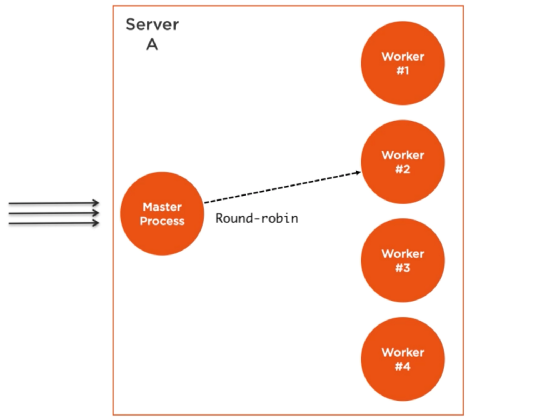
Example:
/**
 * Cluster Module
 */
const cluster = require("cluster");

if (cluster.isPrimary) {
  console.log(`Primary process is running...`);
  cluster.fork();
  cluster.fork();
} else {
  console.log(`Worker process started running`);
}
Output:
Master process is running...
Worker process started running
Worker process started running
| Method | Description |
|---|---|
| fork() | Creates a new worker, from a primary |
| isPrimary | Returns true if the current process is primary, otherwise false |
| isWorker | Returns true if the current process is worker, otherwise false |
| id | A unique id for a worker |
| process | Returns the global Child Process |
| send() | sends a message to a master or a worker |
| kill() | Kills the current worker |
| isDead | Returns true if the worker's process is dead, otherwise false |
| settings | Returns an object containing the cluster's settings |
| worker | Returns the current worker object |
| workers | Returns all workers of a master |
| exitedAfterDisconnect | Returns true if a worker was exited after disconnect, or the kill method |
| isConnected | Returns true if the worker is connected to its master, otherwise false |
| disconnect() | Disconnects all workers |
A single instance of Node.js runs in a single thread. To take advantage of multi-core systems, the user will sometimes want to launch a cluster of Node.js processes to handle the load. The cluster module allows easy creation of child processes that all share server ports.
The cluster module supports two methods of distributing incoming connections.
The first one (and the default one on all platforms except Windows), is the round-robin approach, where the primary process listens on a port, accepts new connections and distributes them across the workers in a round-robin fashion, with some built-in smarts to avoid overloading a worker process.
The second approach is where the primary process creates the listen socket and sends it to interested workers. The workers then accept incoming connections directly.
Example:
/**
 * Server Load Balancing in Node.js
 */
const cluster = require("cluster");
const express = require("express");
const os = require("os");

if (cluster.isPrimary) {
  console.log(`Primary PID ${process.pid} is running`);

  // Get the number of available cpu cores
  const nCPUs = os.cpus().length;
  // Fork worker processes for each available CPU core
  for (let i = 0; i < nCPUs; i++) {
    cluster.fork();
  }

  cluster.on("exit", (worker, code, signal) => {
    console.log(`Worker PID ${worker.process.pid} died`);
  });
} else {
  // Workers can share any TCP connection
  // In this case it is an Express server
  const app = express();
  app.get("/", (req, res) => {
    res.send("Node is Running...");
  });

  app.listen(3000, () => {
    console.log(`App listening at http://localhost:3000/`);
  });

  console.log(`Worker PID ${process.pid} started`);
}
Running Node.js will now share port 3000 between the workers:
Output:
Master PID 13972 is running
Worker PID 5680 started
App listening at http://localhost:3000/
Worker PID 14796 started
...
Node js despite being single-threaded is the asynchronous nature that makes it possible to handle concurrency and perform multiple I/O operations at the same time. Node js uses an event loop to maintain concurrency and perform non-blocking I/O operations.
As soon as Node js starts, it initializes an event loop. The event loop works on a queue (which is called an event queue) and performs tasks in FIFO (First In First Out) order. It executes a task only when there is no ongoing task in the call stack. The call stack works in LIFO(Last In First Out) order. The event loop continuously checks the call stack to check if there is any task that needs to be run. Now whenever the event loop finds any function, it adds it to the stack and runs in order.
Example:
/**
 * Concurrency
 */
function add(a, b) {
  return a + b;
}

function print(n) {
  console.log(`Two times the number ${n} is ` + add(n, n));
}

print(5);
Here, the function print(5) will be invoked and will push into the call stack. When the function is called, it starts consoling the statement inside it but before consoling the whole statement it encounters another function add(n,n) and suspends its current execution, and pushes the add function into the top of the call stack.
Now the function will return the addition a+b and then popped out from the stack and now the previously suspended function will start running and will log the output to console and then this function too will get pop from the stack and now the stack is empty. So this is how a call stack works.
If a child process in Node.js spawn their own child processes, kill() method will not kill the child process's own child processes. For example, if I start a process that starts it's own child processes via child_process module, killing that child process will not make my program to quit.
const spawn = require('child_process').spawn;
const child = spawn('my-command');

child.kill();
The program above will not quit if my-command spins up some more processes.
PID range hack:
We can start child processes with {detached: true} option so those processes will not be attached to main process but they will go to a new group of processes. Then using process.kill(-pid) method on main process we can kill all processes that are in the same group of a child process with the same pid group. In my case, I only have one processes in this group.
const spawn = require('child_process').spawn;
const child = spawn('my-command', {detached: true});

process.kill(-child.pid);
Please note - before pid. This converts a pid to a group of pids for process kill() method.
A load balancer is a process that takes in HTTP requests and forwards these HTTP requests to one of a collection of servers. Load balancers are usually used for performance purposes: if a server needs to do a lot of work for each request, one server might not be enough, but 2 servers alternating handling incoming requests might.
1. Using cluster module:
NodeJS has a built-in module called Cluster Module to take the advantage of a multi-core system. Using this module you can launch NodeJS instances to each core of your system. Master process listening on a port to accept client requests and distribute across the worker using some intelligent fashion. So, using this module you can utilize the working ability of your system.
2. Using PM2:
PM2 is a production process manager for Node.js applications with a built-in load balancer. It allows you to keep applications alive forever, to reload them without the downtime and to facilitate common system admin tasks.
$ pm2 start app.js -i max --name "Balancer"
This command will run the app.js file on the cluster mode to the total no of core available on your server.
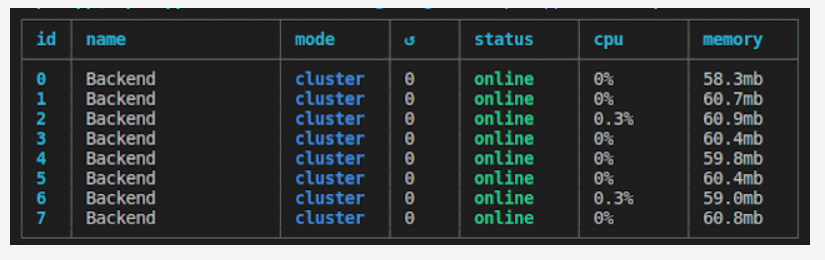
3. Using Express module:
The below code basically creates two Express Servers to handle the request
const body = require('body-parser');
const express = require('express');

const app1 = express();
const app2 = express();

// Parse the request body as JSON
app1.use(body.json());
app2.use(body.json());

const handler = serverNum => (req, res) => {
  console.log(`server ${serverNum}`, req.method, req.url, req.body);
  res.send(`Hello from server ${serverNum}!`);
};

// Only handle GET and POST requests
app1.get('*', handler(1)).post('*', handler(1));
app2.get('*', handler(2)).post('*', handler(2));

app1.listen(3000);
app2.listen(3001);
spawn() and fork() methods in Node.js?1. spawn():
In Node.js, spawn() launches a new process with the available set of commands. This doesn't generate a new V8 instance only a single copy of the node module is active on the processor. It is used when we want the child process to return a large amount of data back to the parent process.
When spawn is called, it creates a streaming interface between the parent and child process. Streaming Interface — one-time buffering of data in a binary format.
Example:
/**
 * The spawn() method
 */
const { spawn } = require("child_process");
const child = spawn("dir", ["D:\\empty"], { shell: true });

child.stdout.on("data", (data) => {
  console.log(`stdout ${data}`);
});
Output
stdout  Volume in drive D is Windows
 Volume Serial Number is 76EA-3749

stdout
 Directory of D:\
2. fork():
The fork() is a particular case of spawn() which generates a new V8 engines instance. Through this method, multiple workers run on a single node code base for multiple tasks. It is used to separate computation-intensive tasks from the main event loop.
When fork is called, it creates a communication channel between the parent and child process Communication Channel — messaging
Example:
/**
 * The fork() method
 */
const { fork } = require("child_process");

const forked = fork("child.js");

forked.on("message", (msg) => {
  console.log("Message from child", msg);
});

forked.send({ message: "fork() method" });
/**
 * child.js
 */
process.on("message", (msg) => {
  console.log("Message from parent:", msg);
});

let counter = 0;

setInterval(() => {
  process.send({ counter: counter++ });
}, 1000);
Output:
Message from parent: { message: 'fork() method' }
Message from child { counter: 0 }
Message from child { counter: 1 }
Message from child { counter: 2 }
...
...
Message from child { counter: n }
A daemon is a program that runs in background and has no controlling terminal. They are often used to provide background services. For example, a web-server or a database server can run as a daemon.
When a daemon process is initialized:
Daemonize Node.js process:
Example: Using an instance of Forever from Node.js
const forever = require("forever");

const child = new forever.Forever("your-filename.js", {
  max: 3,
  silent: true,
  args: [],
});

child.on("exit", this.callback);
child.start();
Worker Threads (the worker_threads module, stable since Node.js v12 LTS) run JavaScript in parallel on separate threads. Unlike child_process.fork(), workers share memory via SharedArrayBuffer and are best suited for CPU-intensive JavaScript tasks (e.g., image processing, cryptography, data parsing) without blocking the main event loop.
Key APIs:
| API | Description |
|---|---|
Worker | Represents a worker thread |
isMainThread | true if running in the main thread |
parentPort | MessagePort for communicating with the parent |
workerData | Data passed to the worker on creation |
SharedArrayBuffer | Shared memory between threads |
Example:
// worker-example.js (works as both main and worker)
const { Worker, isMainThread, parentPort, workerData } = require('worker_threads');

if (isMainThread) {
  // Main thread: spawn a worker
  const worker = new Worker(__filename, { workerData: { n: 40 } });

  worker.on('message', (result) => {
    console.log(`fibonacci(40) = ${result}`);
  });
  worker.on('error', (err) => console.error(err));
  worker.on('exit', (code) => console.log(`Worker exited with code ${code}`));
} else {
  // Worker thread: perform the CPU-intensive task
  function fibonacci(n) {
    if (n <= 1) return n;
    return fibonacci(n - 1) + fibonacci(n - 2);
  }
  parentPort.postMessage(fibonacci(workerData.n));
}
Worker Threads vs Child Processes:
| Worker Threads | Child Process | |
|---|---|---|
| Memory | Shared (via SharedArrayBuffer) | Separate |
| Communication | postMessage / SharedArrayBuffer | IPC / stdin/stdout |
| Best for | CPU-intensive JS tasks | External programs, separate Node processes |
| Overhead | Low | Higher |
JSON Web Token (JWT) is an open standard that defines a compact and self-contained way of securely transmitting information between parties as a JSON object. This information can be verified and trusted because it is digitally signed.
There are some advantages of using JWT for authorization:
Syntax:
jwt.sign(payload, secretOrPrivateKey, [options, callback])
Installation:
npm install jsonwebtoken bcryptjs --save
Example:
/**
 * AuthController.js
 */
const express = require('express');
const router = express.Router();
const bodyParser = require('body-parser');
const User = require('../user/User');

const jwt = require('jsonwebtoken');
const bcrypt = require('bcryptjs');
const config = require('../config');


router.use(bodyParser.urlencoded({ extended: false }));
router.use(bodyParser.json());

router.post('/register', function(req, res) {

  let hashedPassword = bcrypt.hashSync(req.body.password, 8);

  User.create({
    name : req.body.name,
    email : req.body.email,
    password : hashedPassword
  },
  function (err, user) {
    if (err) return res.status(500).send("There was a problem registering the user.")
    // create a token
    let token = jwt.sign({ id: user._id }, config.secret, {
      expiresIn: 86400 // expires in 24 hours
    });
    res.status(200).send({ auth: true, token: token });
  });
});
config.js:
/**
 * config.js
 */
module.exports = {
  'secret': 'supersecret'
};
The jwt.sign() method takes a payload and the secret key defined in config.js as parameters. It creates a unique string of characters representing the payload. In our case, the payload is an object containing only the id of the user.
Reference:
Microservices are a style of Service Oriented Architecture (SOA) where the app is structured on an assembly of interconnected services. With microservices, the application architecture is built with lightweight protocols. The services are finely seeded in the architecture. Microservices disintegrate the app into smaller services and enable improved modularity.
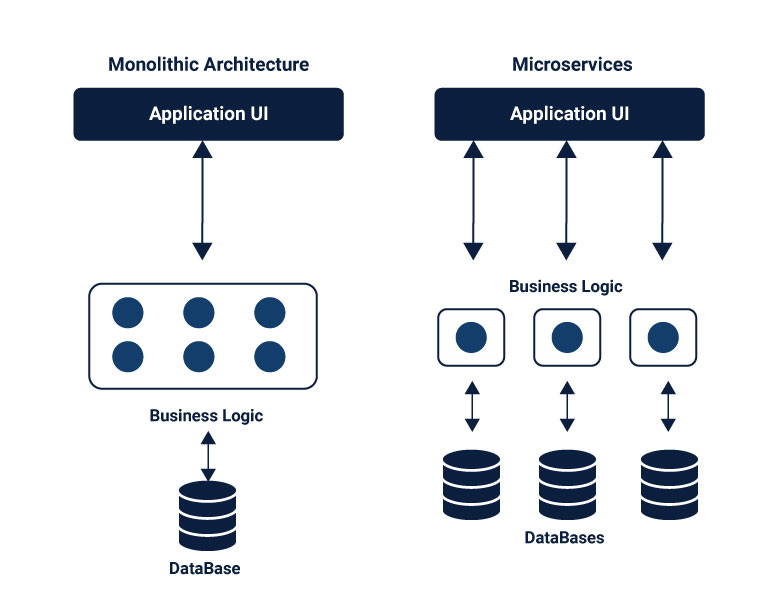
There are few things worth emphasizing about the superiority of microservices, and distributed systems generally, over monolithic architecture:
Example: Creating Microservices with Node.js
Step 01: Creating a Server to Accept Requests
This file is creating our server and assigns routes to process all requests.
//  server.js

const express = require('express')
const app = express();
const port = process.env.PORT || 3000;

const routes = require('./api/routes');
routes(app);
app.listen(port, function() {
   console.log('Server started on port: ' + port);
});
Step 02: Defining the routes
The next step is to define the routes for the microservices and then assign each to a target in the controller. We have two endpoints. One endpoint called "about" that returns information about the application. And a "distance" endpoint that includes two path parameters, both Zip Codes of the Lego store. This endpoint returns the distance, in miles, between these two Zip Codes.
const controller = require('./controller');

module.exports = function(app) {
   app.route('/about')
       .get(controller.about);
   app.route('/distance/:zipcode1/:zipcode2')
       .get(controller.getDistance);
};
Step 03: Adding Controller Logic
Within the controller file, we are going to create a controller object with two properties. Those properties are the functions to handle the requests we defined in the routes module.
const properties = require('../package.json')
const distance = require('../service/distance');

const controllers = {
   about: function(req, res) {
       let aboutInfo = {
           name: properties.name,
           version: properties.version
       }
       res.json(aboutInfo);
   },
   getDistance: function(req, res) {
           distance.find(req, res, function(err, dist) {
               if (err)
                   res.send(err);
               res.json(dist);
           });
       },
};

module.exports = controllers;
Microservices are an architectural style and comprises of small modules/elements which are independent of each other. At times they are interdependent on other microservices or even a database. Breaking down applications into smaller elements brings scalability and efficiency to the structure.
The microservices are distributed and communicate with each other by inter-service communication on network level. Each microservice has its own instance and process. Therefore, services must interact using an inter-service communication protocols like HTTP, gRPC or message brokers AMQP protocol.
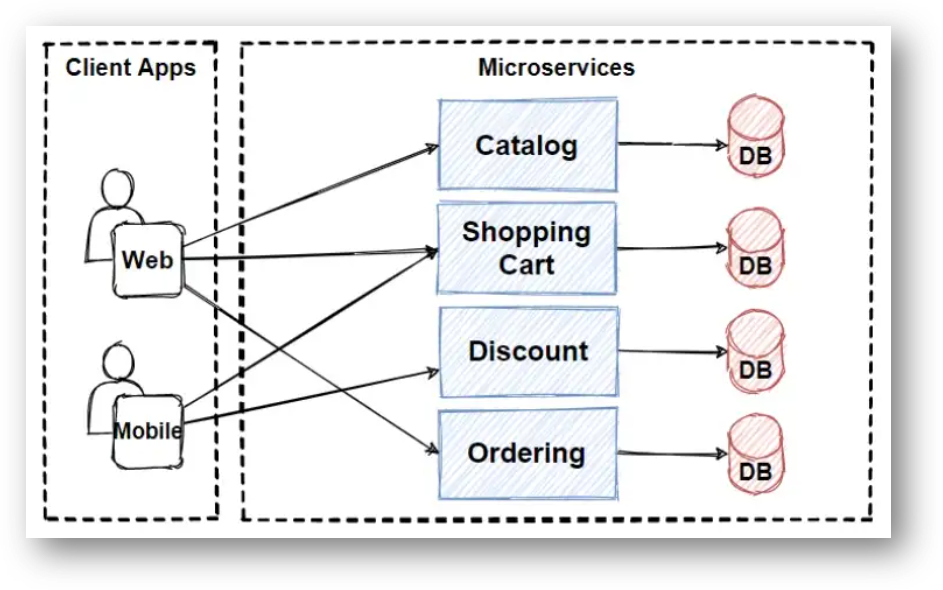
Client and services communicate with each other with many different types of communication. Mainly, those types of communications can be classified in two axes.
1. Synchronous Communication:
The Synchronous communication is using HTTP or gRPC protocol for returning sync response. The client sends a request and waits for a response from the service. So that means client code block their thread, until the response reach from the server.
2. Asynchronous Communication:
In Asynchronous communication, the client sends a request but it doesn't wait for a response from the service. The most popular protocol for this Asynchronous communications is AMQP (Advanced Message Queuing Protocol). So with using AMQP protocols, the client sends the message with using message broker systems like Kafka and RabbitMQ queue. The message producer usually does not wait for a response. This message consume from the subscriber systems in async way, and no one waiting for response suddenly.
To create a secure HTTPS server, you need a TLS/SSL certificate and private key. For development, generate a self-signed certificate using OpenSSL. For production, use a certificate from a trusted CA (e.g., Let's Encrypt).
Step 01: Generate a self-signed certificate (development only)
openssl req -nodes -new -x509 -keyout server.key -out server.cert -days 365
Step 02: server.js
const https = require('https');
const fs = require('fs');
const express = require('express');

const app = express();

app.get('/', (req, res) => {
  res.send('Secure Hello from Node.js!');
});

const options = {
  key:  fs.readFileSync('server.key'),
  cert: fs.readFileSync('server.cert'),
};

https.createServer(options, app).listen(443, () => {
  console.log('HTTPS server running on https://localhost:443');
});
Redirect HTTP to HTTPS:
const http = require('http');

// Redirect all HTTP traffic to HTTPS
http.createServer((req, res) => {
  res.writeHead(301, { Location: `https://${req.headers.host}${req.url}` });
  res.end();
}).listen(80);
In production, use a reverse proxy (Nginx, Caddy, or an AWS/GCP load balancer) to handle TLS termination in front of your Node.js app — this is simpler and more performant.
Routing defines the way in which the client requests are handled by the application endpoints. We define routing using methods of the Express app object that correspond to HTTP methods; for example, app.get() to handle GET requests and app.post to handle POST requests, app.all() to handle all HTTP methods and app.use() to specify middleware as the callback function.
These routing methods "listens" for requests that match the specified route(s) and method(s), and when it detects a match, it calls the specified callback function.
Syntax:
app.METHOD(PATH, HANDLER)
Where:
HTTP request method.a) Route methods:
// GET method route
app.get('/', function (req, res) {
  res.send('GET request')
})

// POST method route
app.post('/login', function (req, res) {
  res.send('POST request')
})

// ALL method route
app.all('/secret', function (req, res, next) {
  console.log('Accessing the secret section ...')
  next() // pass control to the next handler
})
b) Route paths:
Route paths, in combination with a request method, define the endpoints at which requests can be made. Route paths can be strings, string patterns, or regular expressions.
The characters ?, +, *, and () are subsets of their regular expression counterparts. The hyphen (-) and the dot (.) are interpreted literally by string-based paths.
Example:
// This route path will match requests to /about.
app.get('/about', function (req, res) {
  res.send('about')
})


// This route path will match acd and abcd.
app.get('/ab?cd', function (req, res) {
  res.send('ab?cd')
})


// This route path will match butterfly and dragonfly
app.get(/.*fly$/, function (req, res) {
  res.send('/.*fly$/')
})
c) Route parameters:
Route parameters are named URL segments that are used to capture the values specified at their position in the URL. The captured values are populated in the req.params object, with the name of the route parameter specified in the path as their respective keys.
Example:
app.get('/users/:userId', function (req, res) {
  res.send(req.params)
})
Response methods:
| Method | Description |
|---|---|
res.download() | Prompt a file to be downloaded. |
res.end() | End the response process. |
res.json() | Send a JSON response. |
res.jsonp() | Send a JSON response with JSONP support. |
res.redirect() | Redirect a request. |
res.render() | Render a view template. |
res.send() | Send a response of various types. |
res.sendFile() | Send a file as an octet stream. |
res.sendStatus() | Set the response status code and send its string representation as the response body. |
d) Router method:
const express = require('express')
const router = express.Router()

// middleware that is specific to this router
router.use(function timeLog (req, res, next) {
  console.log('Time: ', Date.now())
  next()
})

// define the home page route
router.get('/', function (req, res) {
  res.send('Birds home page')
})

// define the about route
router.get('/about', function (req, res) {
  res.send('About birds')
})

module.exports = router
Middleware functions are functions that have access to the request object (req), the response object (res), and the next function in the application's request-response cycle.
Middleware functions can perform the following tasks:
If the current middleware function does not end the request-response cycle, it must call next() to pass control to the next middleware function. Otherwise, the request will be left hanging.
The following figure shows the elements of a middleware function call:
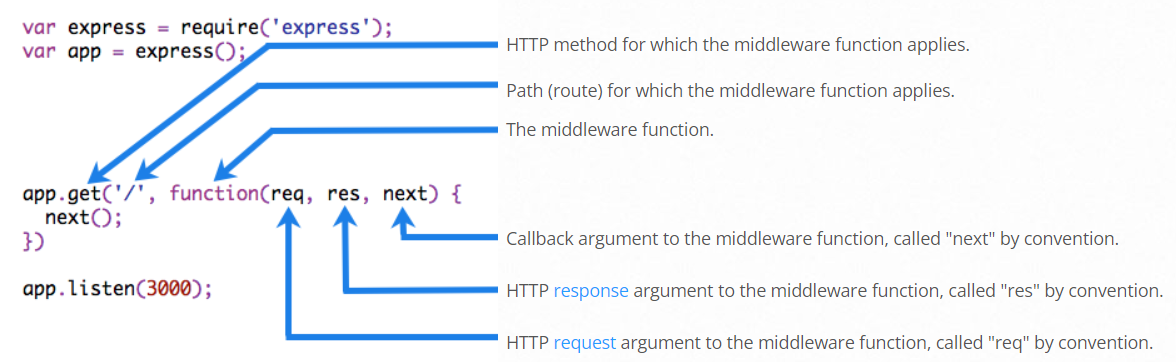
Middleware functions that return a Promise will call next(value) when they reject or throw an error. next will be called with either the rejected value or the thrown Error.
The next is a function in the Express router which executes the middleware succeeding the current middleware.
Example:
To load the middleware function, call app.use(), specifying the middleware function. For example, the following code loads the myLogger middleware function before the route to the root path (/).
/**
 * myLogger
 */
const express = require("express");
const app = express();

const myLogger = function (req, res, next) {
  console.log("LOGGED");
  next();
};

app.use(myLogger);

app.get("/", (req, res) => {
  res.send("Hello World!");
});

app.listen(3000);
⚝ Try this example on CodeSandbox
Note: The next() function is not a part of the Node.js or Express API, but is the third argument that is passed to the middleware function. The next() function could be named anything, but by convention it is always named “next”. To avoid confusion, always use this convention.
Express.js is a Node.js web application framework that provides broad features for building web and mobile applications. It is used to build a single page, multipage, and hybrid web application.
Features of Express.js:
The Express.js framework makes it very easy to develop an application which can be used to handle multiple types of requests like the GET, PUT, and POST and DELETE requests.
Example:
/**
 * Simple server using Express.js
 */
const express = require("express");
const app = express();

app.get("/", function (req, res) {
  res.send("Hello World!");
});

const server = app.listen(3000, function () {});
Keeping the API declaration separated from the network related configuration (port, protocol, etc) allows testing the API in-process, without performing network calls, with all the benefits that it brings to the table: fast testing execution and getting coverage metrics of the code. It also allows deploying the same API under flexible and different network conditions.
API declaration, should reside in app.js:
/**
 * app.js
 */
const app = express();

app.use(bodyParser.json());
app.use("/api/events", events.API);
app.use("/api/forms", forms);
Server network declaration
/**
 * server.js
 */
const app = require('../app');
const http = require('http');


// Get port from environment and store in Express.
const port = normalizePort(process.env.PORT || '3000');
app.set('port', port);


// Create HTTP server.
const server = http.createServer(app);
| Package | Description |
|---|---|
| async | Async is a utility module which provides straight-forward, powerful functions for working with asynchronous JavaScript |
| axios | Axios is a promise-based HTTP Client for node.js and the browser. |
| autocannon | AutoCannon is a tool for performance testing and a tool for benchmarking. |
| csv | csv module has four sub modules which provides CSV generation, parsing, transformation and serialization for Node.js |
| dayjs | Day.js is a fast, 2kB alternative to Moment.js for parsing, validating, manipulating, and formatting dates |
| debug | Debug is a tiny node.js debugging utility modelled after node core's debugging technique |
| eslint | ESLint is a static analysis tool to find and fix problems in JavaScript code, covering errors, best practices and style rules |
| express | Express is a fast, un-opinionated, minimalist web framework. It provides small, robust tooling for HTTP servers, making it a great solution for single page applications, web sites, hybrids, or public HTTP APIs |
| fastify | Fastify is a fast and low overhead web framework for Node.js, focused on performance and developer experience |
| http-server | is a simple, zero-configuration command-line http server. It is powerful enough for production usage, but it's simple and hackable enough to be used for testing, local development, and learning |
| inquirer | A collection of common interactive command line user interfaces |
| koa | Koa is web app framework. It is an expressive HTTP middleware for node.js to make web applications and APIs more enjoyable to write |
| lodash | The lodash library exported as a node module. Lodash is a modern JavaScript utility library delivering modularity, performance, & extras |
| mongoose | It is a MongoDB object modeling tool designed to work in an asynchronous environment |
| mongoDB | The official MongoDB driver for Node.js. It provides a high-level API on top of mongodb-core that is meant for end users |
| nodemon | It is a simple monitor script for use during development of a node.js app, It will watch the files in the directory in which nodemon was started, and if any files change, nodemon will automatically restart your node application |
| nodemailer | This module enables e-mail sending from a Node.js applications |
| passport | A simple, unobtrusive authentication middleware for Node.js. Passport uses the strategies to authenticate requests. Strategies can range from verifying username and password credentials or authentication using OAuth or OpenID |
| pino | Pino is an extremely fast, low overhead logger for Node.js |
| socket.io | Its a node.js realtime framework server |
| undici | Undici is a fast, reliable and spec-compliant HTTP/1.1 client for Node.js, now powering the built-in fetch() |
| validator | A nodejs module for a library of string validators and sanitizers |
| vite | Vite is a next-generation build tool that offers an extremely fast dev server and optimized production builds |
| winston | A multi-transport async logging library for Node.js |
| ws | A simple to use, blazing fast and thoroughly tested websocket client, server and console for node.js |
| xml2js | A Simple XML to JavaScript object converter |
| zod | TypeScript-first schema declaration and validation library for Node.js |
The only option is to automate the update / security audit of your dependencies. For that there are free and paid options:
1. Helmet module:
Helmet helps to secure your Express applications by setting various HTTP headers, like:
/**
 * Helmet
 */
const express = require('express')
const helmet = require('helmet')
const app = express()

app.use(helmet())
2. JOI module:
Validating user input is one of the most important things to do when it comes to the security of your application. Failing to do it correctly can open up your application and users to a wide range of attacks, including command injection, SQL injection or stored cross-site scripting.
To validate user input, one of the best libraries you can pick is joi. Joi is an object schema description language and validator for JavaScript objects.
/**
 * Joi
 */
const Joi = require('joi');

const schema = Joi.object().keys({
    username: Joi.string().alphanum().min(3).max(30).required(),
    password: Joi.string().regex(/^[a-zA-Z0-9]{3,30}$/),
    access_token: [Joi.string(), Joi.number()],
    birthyear: Joi.number().integer().min(1900).max(2013),
    email: Joi.string().email()
}).with('username', 'birthyear').without('password', 'access_token')

// Return result
const result = Joi.validate({
    username: 'abc',
    birthyear: 1994
}, schema)
// result.error === null -> valid
3. Regular Expressions:
Regular Expressions are a great way to manipulate texts and get the parts that you need from them. However, there is an attack vector called Regular Expression Denial of Service attack, which exposes the fact that most Regular Expression implementations may reach extreme situations for specially crafted input, that cause them to work extremely slowly.
The Regular Expressions that can do such a thing are commonly referred as Evil Regexes. These expressions contain: *grouping with repetition, *inside the repeated group: *repetition, or *alternation with overlapping
Examples of Evil Regular Expressions patterns:
(a+)+
([a-zA-Z]+)*
(a|aa)+
4. Security.txt:
Security.txt defines a standard to help organizations define the process for security researchers to securely disclose security vulnerabilities.
const express = require('express')
const securityTxt = require('express-security.txt')

const app = express()

app.get('/security.txt', securityTxt({
  // your security address
  contact: '[email protected]',
  // your pgp key
  encryption: 'encryption',
  // if you have a hall of fame for securty resourcers, include the link here
  acknowledgements: 'http://acknowledgements.example.com'
}))
NPM stands for Node Package Manager. It provides following two main functionalities.
npm --version
NPM helps to install any Node.js module using the following command.
npm install <Module Name>
For example, following is the command to install a famous Node.js web framework module called express-
npm install express
File can be uploaded to the server using Multer module. Multer is a Node.js middleware which is used for handling multipart/form-data, which is mostly used library for uploading files.
1. Installing the dependencies:
npm install express multer --save
2. server.js:
/**
 * File Upload in Node.js
 */
const express = require("express");
const multer = require("multer");
const app = express();

// parse JSON and urlencoded bodies (built-in since Express 4.16+)
app.use(express.json());
app.use(express.urlencoded({ extended: true }));

const storage = multer.diskStorage({
  destination: function (req, file, callback) {
    callback(null, "./uploads");
  },
  filename: function (req, file, callback) {
    callback(null, file.fieldname + "-" + Date.now());
  },
});

const upload = multer({ storage: storage }).single("userPhoto");

app.get("/", function (req, res) {
  res.sendFile(__dirname + "/index.html");
});

// POST: upload for single file upload
app.post("/api/photo", function (req, res) {
  upload(req, res, function (err) {
    if (err) {
      return res.end("Error uploading file.");
    }
    res.end("File is uploaded");
  });
});

app.listen(3000, function () {
  console.log("Listening on port 3000");
});
3. index.html:
<!DOCTYPE html>
<html lang="en">
<head>
    <title>Multer-File-Upload</title>
</head>
<body>
    <h1>MULTER File Upload | Single File Upload</h1>

    <form id = "uploadForm"
         enctype = "multipart/form-data"
         action = "/api/photo"
         method = "post"
    >
      <input type="file" name="userPhoto" />
      <input type="submit" value="Upload Image" name="submit">
    </form>
</body>
</html>
1. body-parser:
Since Express 4.16+, body parsing is built in. Use express.json() and express.urlencoded() directly — no separate package needed.
/**
 * Built-in body parsing (Express 4.16+)
 */
const express = require("express");

const app = express();

// Parse JSON bodies
app.use(express.json());

// Parse URL-encoded bodies
app.use(express.urlencoded({ extended: false }));

// POST /login gets urlencoded bodies
app.post("/login", function (req, res) {
  res.send("welcome, " + req.body.username);
});

// POST /api/users gets JSON bodies
app.post("/api/users", function (req, res) {
  // create user in req.body
});
2. cookie-parser:
A cookie is a piece of data that is sent to the client-side with a request and is stored on the client-side itself by the Web Browser the user is currently using.
The cookie-parser middleware's cookieParser function takes a secret string or array of strings as the first argument and an options object as the second argument.
Installation:
npm install cookie-parser
Example:
/**
 * cookie-parser
 */
const express = require('express')
const cookieParser = require('cookie-parser')

const app = express()
app.use(cookieParser())

app.get('/', function (req, res) {
  // Cookies that have not been signed
  console.log('Cookies: ', req.cookies)

  // Cookies that have been signed
  console.log('Signed Cookies: ', req.signedCookies)
})

app.listen(3000)
3. morgan:
HTTP request logger middleware for node.js.
Installation:
npm install morgan
Example:
/**
 * Writing logs to a file
 */
const express = require('express')
const fs = require('fs')
const morgan = require('morgan')
const path = require('path')

const app = express()

// create a write stream (in append mode)
const accessLogStream = fs.createWriteStream(path.join(__dirname, 'access.log'), { flags: 'a' })

// setup the logger
app.use(morgan('combined', { stream: accessLogStream }))

app.get('/', function (req, res) {
  res.send('hello, world!')
})
4. nodemon:
Nodemon is a utility that will monitor for any changes in source and automatically restart your server.
Installation:
npm install -g nodemon
Example:
{
  // ...
  "scripts": {
    "start": "nodemon server.js"
  },
  // ...
}
5. pm2:
P(rocess) M(anager) 2 (pm2) is a production process manager for Node.js applications with a built-in load balancer. It allows to keep applications alive forever, to reload them without downtime and to facilitate common system admin tasks.
Installation:
npm install pm2 -g
Start an application:
pm2 start app.js
Reference:
6. serve-favicon:
Node.js middleware for serving a favicon. It create new middleware to serve a favicon from the given path to a favicon file. path may also be a Buffer of the icon to serve.
Installation:
npm install serve-favicon
Example:
/**
 * serve-favicon
 */
const express = require('express')
const favicon = require('serve-favicon')
const path = require('path')

const app = express()
app.use(favicon(path.join(__dirname, 'public', 'favicon.ico')))

// Add your routes here, etc.

app.listen(3000)
7. cors:
Cross-Origin Resource Sharing (CORS) headers allow apps running in the browser to make requests to servers on different domains (also known as origins). CORS headers are set on the server side - the HTTP server is responsible for indicating that a given HTTP request can be cross-origin.
Installation:
npm install cors
Example:
/**
 * Enable CORS for a Single Route
 */
const express = require('express')
const cors = require('cors')
const app = express()

app.get('/products/:id', cors(), function (req, res, next) {
  res.json({msg: 'This is CORS-enabled for a Single Route'})
})

app.listen(8080, function () {
  console.log('CORS-enabled web server listening on port 80')
})
8. dotenv:
When a NodeJs application runs, it injects a global variable called process.env which contains information about the state of environment in which the application is running. The dotenv loads environment variables stored in the .env file into process.env.
Installation:
npm install dotenv
Usage:
// .env

DB_HOST=localhost
DB_USER=admin
DB_PASS=root
/**
* config.js
*/
const db = require('db')
db.connect({
host: process.env.DB_HOST,
username: process.env.DB_USER,
password: process.env.DB_PASS
})
9. fs-extra:
fs-extra contains methods that aren't included in the vanilla Node.js fs package. Such as recursive mkdir, copy, and remove. It also uses graceful-fs to prevent EMFILE errors.
Installation:
npm install fs-extra
Usage:
/**
* fs-extra
*/
const fs = require('fs-extra')
// Async with callbacks:
fs.copy('/tmp/myfile', '/tmp/mynewfile', err => {
if (err) return console.error(err)
console.log('success!')
})
10. dayjs:
Day.js is a fast, lightweight (2kB) alternative to the deprecated Moment.js for parsing, validating, manipulating, and formatting dates. It has a compatible API with Moment.js.
Installation:
npm install dayjs
Usage:
const dayjs = require('dayjs');
dayjs().format('MMMM DD YYYY, h:mm:ss a'); // April 16 2026, 10:30:00 am
dayjs().format('dddd'); // Thursday
dayjs().format("MMM DD YY"); // Apr 16 26
const dayjs = require('dayjs');
const relativeTime = require('dayjs/plugin/relativeTime');
dayjs.extend(relativeTime);
dayjs('2011-10-31').fromNow(); // 14 years ago
dayjs().startOf('day').fromNow(); // 10 hours ago
const dayjs = require('dayjs');
dayjs().subtract(10, 'day').format('YYYY-MM-DD'); // 2026-04-06
dayjs().add(1, 'month').format('YYYY-MM-DD'); // 2026-05-16
Rate limiting restricts the number of requests a client can make within a time window. It protects APIs from abuse, brute-force attacks, and DDoS.
Installation:
npm install express-rate-limit
Example:
const express = require('express');
const rateLimit = require('express-rate-limit');
const app = express();
// Global limiter: 100 requests per 15 minutes per IP
const globalLimiter = rateLimit({
windowMs: 15 * 60 * 1000, // 15 minutes
max: 100,
standardHeaders: 'draft-7', // Return rate limit info in RateLimit headers
legacyHeaders: false,
message: { error: 'Too many requests, please try again later.' },
});
app.use(globalLimiter);
// Stricter limiter for auth endpoints: 5 attempts per minute
const authLimiter = rateLimit({
windowMs: 60 * 1000,
max: 5,
message: { error: 'Too many login attempts. Please wait before trying again.' },
});
app.post('/api/auth/login', authLimiter, (req, res) => {
res.json({ message: 'Login successful' });
});
app.listen(3000, () => console.log('Server running on port 3000'));
For distributed systems (multiple Node.js instances), store rate limit counters in Redis using rate-limit-redis:
const RedisStore = require('rate-limit-redis');
const limiter = rateLimit({
windowMs: 15 * 60 * 1000,
max: 100,
store: new RedisStore({ sendCommand: (...args) => redisClient.sendCommand(args) }),
});
REST stands for REpresentational State Transfer. REST is web standards based architecture and uses HTTP Protocol. It is an architectural style as well as an approach for communications purposes that is often used in various web services development. A REST Server simply provides access to resources and REST client accesses and modifies the resources using HTTP protocol.
HTTP methods:
GET − Provides read-only access to a resource.PUT − Updates an existing resource or creates a new resource.DELETE − Removes a resource.POST − Creates a new resource.PATCH− Update/modify a resourceExample: users.json
{
"user1" : {
"id": 1,
"name" : "Ehsan Philip",
"age" : 24
},
"user2" : {
"id": 2,
"name" : "Karim Jimenez",
"age" : 22
},
"user3" : {
"id": 3,
"name" : "Giacomo Weir",
"age" : 18
}
}
List Users ( GET method)
Let's implement our first RESTful API listUsers using the following code in a server.js file −
const express = require('express');
const app = express();
const fs = require("fs");
app.get('/listUsers', function (req, res) {
fs.readFile( __dirname + "/" + "users.json", 'utf8', function (err, data) {
console.log( data );
res.end( data );
});
})
const server = app.listen(3000, function () {
const host = server.address().address
const port = server.address().port
console.log("App listening at http://%s:%s", host, port)
});
Add User ( POST method )
Following API will show you how to add new user in the list.
const express = require('express');
const app = express();
const fs = require("fs");
const user = {
"user4" : {
"id": 4,
"name" : "Spencer Amos",
"age" : 28
}
}
app.post('/addUser', function (req, res) {
// First read existing users.
fs.readFile( __dirname + "/" + "users.json", 'utf8', function (err, data) {
data = JSON.parse( data );
data["user4"] = user["user4"];
console.log( data );
res.end( JSON.stringify(data));
});
})
const server = app.listen(3000, function () {
const host = server.address().address
const port = server.address().port
console.log("App listening at http://%s:%s", host, port)
})
Delete User:
const express = require('express');
const app = express();
const fs = require("fs");
const id = 2;
app.delete('/deleteUser', function (req, res) {
// First read existing users.
fs.readFile( __dirname + "/" + "users.json", 'utf8', function (err, data) {
data = JSON.parse( data );
delete data["user" + 2];
console.log( data );
res.end( JSON.stringify(data));
});
})
const server = app.listen(3000, function () {
const host = server.address().address
const port = server.address().port
console.log("App listening at http://%s:%s", host, port)
})
The req.params are a part of a path in URL and they're also known as URL variables. for example, if you have the route /books/:id, then the id property will be available as req.params.id. req.params default value is an empty object {}.
A req.query is a part of a URL that assigns values to specified parameters. A query string commonly includes fields added to a base URL by a Web browser or other client application, for example as part of an HTML form. A query is the last part of URL
Example 01: req.params
/**
* req.params
*/
// GET http://localhost:3000/employees/10
app.get('/employees/:id', (req, res, next) => {
console.log(req.params.id); // 10
})
Example 02: req.query
/**
* req.query
*/
// GET http://localhost:3000/employees?page=20
app.get('/employees', (req, res, next) => {
console.log(req.query.page) // 20
})
It allows to associate handlers to an asynchronous action's eventual success value or failure reason. This lets asynchronous methods return values like synchronous methods: instead of the final value, the asynchronous method returns a promise for the value at some point in the future.
Promises in node.js promised to do some work and then had separate callbacks that would be executed for success and failure as well as handling timeouts. Another way to think of promises in node.js was that they were emitters that could emit only two events: success and error.The cool thing about promises is you can combine them into dependency chains (do Promise C only when Promise A and Promise B complete).
The core idea behind promises is that a promise represents the result of an asynchronous operation. A promise is in one of three different states:
Example:
/**
* Promise
*/
function getSum(num1, num2) {
const myPromise = new Promise((resolve, reject) => {
if (!isNaN(num1) && !isNaN(num2)) {
resolve(num1 + num2);
} else {
reject(new Error("Not a valid number"));
}
});
return myPromise;
}
console.log(getSum(10, 20)); // Promise { 30 }
All four are static methods that operate on an iterable of promises but differ in when they resolve/reject and what they return.
| Method | Resolves when | Rejects when | Returns |
|---|---|---|---|
Promise.all | All promises fulfill | Any promise rejects | Array of fulfilled values |
Promise.allSettled | All promises settle (fulfill or reject) | Never rejects | Array of {status, value/reason} objects |
Promise.race | First promise settles (either way) | First settles as rejection | Value/reason of first settled promise |
Promise.any | First promise fulfills | All promises reject | Value of first fulfilled promise |
Promise.all — fail fast:
const p1 = Promise.resolve(1);
const p2 = Promise.resolve(2);
const p3 = Promise.reject(new Error('p3 failed'));
// Rejects immediately when p3 rejects
Promise.all([p1, p2, p3])
.then(values => console.log(values))
.catch(err => console.error(err.message)); // p3 failed
// All succeed
Promise.all([Promise.resolve('a'), Promise.resolve('b')])
.then(values => console.log(values)); // ['a', 'b']
Promise.allSettled — never short-circuits:
const promises = [
Promise.resolve('success'),
Promise.reject(new Error('failure')),
Promise.resolve('another success'),
];
Promise.allSettled(promises).then(results => {
results.forEach(result => {
if (result.status === 'fulfilled') {
console.log('Value:', result.value);
} else {
console.log('Reason:', result.reason.message);
}
});
});
// Value: success
// Reason: failure
// Value: another success
Promise.race — first to settle wins:
const slow = new Promise(resolve => setTimeout(() => resolve('slow'), 500));
const fast = new Promise(resolve => setTimeout(() => resolve('fast'), 100));
Promise.race([slow, fast])
.then(winner => console.log(winner)); // fast
// Useful for timeouts:
function withTimeout(promise, ms) {
const timeout = new Promise((_, reject) =>
setTimeout(() => reject(new Error('Timed out')), ms)
);
return Promise.race([promise, timeout]);
}
Promise.any — first to fulfill (ignores rejections):
const p1 = Promise.reject(new Error('error 1'));
const p2 = new Promise(resolve => setTimeout(() => resolve('p2 resolved'), 200));
const p3 = new Promise(resolve => setTimeout(() => resolve('p3 resolved'), 100));
Promise.any([p1, p2, p3])
.then(first => console.log(first)) // p3 resolved
.catch(err => console.error(err)); // AggregateError only if ALL reject
When to use which:
| Use case | Method |
|---|---|
| Parallel fetch where ALL must succeed | Promise.all |
| Run all and inspect every result (e.g., batch job) | Promise.allSettled |
| Race against a timeout | Promise.race |
| Try multiple sources, use the first that works | Promise.any |
1. When the web server sets cookies, it can provide some additional attributes to make sure the cookies won't be accessible by using malicious JavaScript. One such attribute is HttpOnly.
Set-Cookie: [name]=[value]; HttpOnly
HttpOnly makes sure the cookies will be submitted only to the domain they originated from.
2. The "Secure" attribute can make sure the cookies are sent over secured channel only.
Set-Cookie: [name]=[value]; Secure
3. The web server can use X-XSS-Protection response header to make sure pages do not load when they detect reflected cross-site scripting (XSS) attacks.
X-XSS-Protection: 1; mode=block
4. The web server can use HTTP Content-Security-Policy response header to control what resources a user agent is allowed to load for a certain page. It can help to prevent various types of attacks like Cross Site Scripting (XSS) and data injection attacks.
Content-Security-Policy: default-src 'self' *.http://sometrustedwebsite.com
/**
* POST Request using Axios
*/
const express = require("express");
const app = express();
const axios = require("axios");
app.post("/user", async (req, res) => {
try {
const payload = { name: "Aashita Iyer", email: "[email protected]" };
const response = await axios.post("http://httpbin.org/post", payload);
console.log(response.data);
res.status(200).json(response.data);
} catch (err) {
res.status(500).json({ message: err });
}
});
app.listen(3000, function () {
console.log(`App listening at http://localhost:3000/`);
});
Output:
{
args: {},
data: '{"name":"Aashita Iyer","email":"[email protected]"}',
files: {},
form: {},
headers: {
Accept: 'application/json, text/plain, */*',
'Accept-Encoding': 'gzip, deflate, br',
'Content-Length': '56',
'Content-Type': 'application/json',
Host: 'httpbin.org',
'User-Agent': 'axios/1.1.3',
'X-Amzn-Trace-Id': 'Root=1-635cd3d3-1f13ea981467e6371ce3a740'
},
json: { email: '[email protected]', name: 'Aashita Iyer' },
origin: 'xx.xx.xx.xx',
url: 'http://httpbin.org/post'
}
Asynchronous programming is a form of parallel programming that allows a unit of work to run separately from the primary application thread. When the work is complete, it notifies the main thread (as well as whether the work was completed or failed). There are numerous benefits to using it, such as improved application performance and enhanced responsiveness.
1. Asynchronous:
The architecture of asynchronous explains that the message sent will not give the reply on immediate basis just like we send the mail but do not get the reply on an immediate basis. It does not have any dependency or order. Hence improving the system efficiency and performance. The server stores the information and when the action is done it will be notified.
2. Non-Blocking:
Nonblocking immediately responses with whatever data available. Moreover, it does not block any execution and keeps on running as per the requests. If an answer could not be retrieved then in those cases API returns immediately with an error. Nonblocking is mostly used with I/O(input/output). Node.js is itself based on nonblocking I/O model. There are few ways of communication that a nonblocking I/O has completed. The callback function is to be called when the operation is completed. Nonblocking call uses the help of javascript which provides a callback function.
Blocking vs Non-blocking:
Blocking is when the execution of additional JavaScript in the Node.js process must wait until a non-JavaScript operation completes. This happens because the event loop is unable to continue running JavaScript while a blocking operation is occurring.
Synchronous methods in the Node.js standard library that use libuv are the most commonly used blocking operations. Native modules may also have blocking methods. Blocking methods execute synchronously and non-blocking methods execute asynchronously.
Example:
// Blocking
const fs = require('fs');
const data = fs.readFileSync('/file.md'); // blocks here until file is read
console.log(data);
moreWork(); // will run after console.log
// Non-blocking
const fs = require('fs');
fs.readFile('/file.md', (err, data) => {
if (err) throw err;
console.log(data);
});
moreWork(); // will run before console.log
There are two types of API functions in Node.js:
1. Blocking functions:
In a blocking operation, all other code is blocked from executing until an I/O event that is being waited on occurs. Blocking functions execute synchronously.
Example:
const fs = require('fs');
const data = fs.readFileSync('/file.md'); // blocks here until file is read
console.log(data);
// moreWork(); will run after console.log
The second line of code blocks the execution of additional JavaScript until the entire file is read. moreWork () will only be called after Console.log
2. Non-blocking functions:
In a non-blocking operation, multiple I/O calls can be performed without the execution of the program being halted. Non-blocking functions execute asynchronously.
Example:
const fs = require('fs');
fs.readFile('/file.md', (err, data) => {
if (err) throw err;
console.log(data);
});
// moreWork(); will run before console.log
Since fs.readFile() is non-blocking, moreWork() does not have to wait for the file read to complete before being called. This allows for higher throughput.
PUT and PATCH are HTTP verbs and they both relate to updating a resource. The main difference between PUT and PATCH requests are in the way the server processes the enclosed entity to modify the resource identified by the Request-URI.
In a PUT request, the enclosed entity is considered to be a modified version of the resource stored on the origin server, and the client is requesting that the stored version be replaced.
With PATCH, however, the enclosed entity contains a set of instructions describing how a resource currently residing on the origin server should be modified to produce a new version.
Also, another difference is that when you want to update a resource with PUT request, you have to send the full payload as the request whereas with PATCH, you only send the parameters which you want to update.
The most commonly used HTTP verbs POST, GET, PUT, DELETE are similar to CRUD (Create, Read, Update and Delete) operations in database. We specify these HTTP verbs in the capital case. So, the below is the comparison between them.
POST - createGET - readPUT - updateDELETE - deletePATCH: Submits a partial modification to a resource. If you only need to update one field for the resource, you may want to use the PATCH method.
The HTTP core module is a key module to Node.js networking.
const http = require('http')
http.METHODS
require('http').METHODS
[ 'ACL',
'BIND',
'CHECKOUT',
'CONNECT',
'COPY',
'DELETE',
'GET',
'HEAD',
'LINK',
'LOCK',
'M-SEARCH',
'MERGE',
'MKACTIVITY',
'MKCALENDAR',
'MKCOL',
'MOVE',
'NOTIFY',
'OPTIONS',
'PATCH',
'POST',
'PROPFIND',
'PROPPATCH',
'PURGE',
'PUT',
'REBIND',
'REPORT',
'SEARCH',
'SUBSCRIBE',
'TRACE',
'UNBIND',
'UNLINK',
'UNLOCK',
'UNSUBSCRIBE' ]
http.STATUS_CODES
require('http').STATUS_CODES
{ '100': 'Continue',
'101': 'Switching Protocols',
'102': 'Processing',
'200': 'OK',
'201': 'Created',
'202': 'Accepted',
'203': 'Non-Authoritative Information',
'204': 'No Content',
'205': 'Reset Content',
'206': 'Partial Content',
'207': 'Multi-Status',
'208': 'Already Reported',
'226': 'IM Used',
'300': 'Multiple Choices',
'301': 'Moved Permanently',
'302': 'Found',
'303': 'See Other',
'304': 'Not Modified',
'305': 'Use Proxy',
'307': 'Temporary Redirect',
'308': 'Permanent Redirect',
'400': 'Bad Request',
'401': 'Unauthorized',
'402': 'Payment Required',
'403': 'Forbidden',
'404': 'Not Found',
'405': 'Method Not Allowed',
'406': 'Not Acceptable',
'407': 'Proxy Authentication Required',
'408': 'Request Timeout',
'409': 'Conflict',
'410': 'Gone',
'411': 'Length Required',
'412': 'Precondition Failed',
'413': 'Payload Too Large',
'414': 'URI Too Long',
'415': 'Unsupported Media Type',
'416': 'Range Not Satisfiable',
'417': 'Expectation Failed',
'418': 'I\'m a teapot',
'421': 'Misdirected Request',
'422': 'Unprocessable Entity',
'423': 'Locked',
'424': 'Failed Dependency',
'425': 'Unordered Collection',
'426': 'Upgrade Required',
'428': 'Precondition Required',
'429': 'Too Many Requests',
'431': 'Request Header Fields Too Large',
'451': 'Unavailable For Legal Reasons',
'500': 'Internal Server Error',
'501': 'Not Implemented',
'502': 'Bad Gateway',
'503': 'Service Unavailable',
'504': 'Gateway Timeout',
'505': 'HTTP Version Not Supported',
'506': 'Variant Also Negotiates',
'507': 'Insufficient Storage',
'508': 'Loop Detected',
'509': 'Bandwidth Limit Exceeded',
'510': 'Not Extended',
'511': 'Network Authentication Required' }
Making HTTP Requests
Since Node.js v18, the built-in fetch() API is available globally (stable since v21):
// GET request using built-in fetch (Node.js v18+)
const res = await fetch('https://nodejs.org/');
const body = await res.text();
console.log(body);
For more complex requests with options:
// GET request with headers using built-in fetch
const response = await fetch('https://nodejs.org/dist/index.json', {
method: 'GET',
headers: {
'Accept': 'application/json',
'Accept-Charset': 'utf-8',
'User-Agent': 'my-node-client'
}
});
const json = await response.json();
console.log(json);
Truncated — view the full README on GitHub.
14,857 followers · starred Feb 2023
339 followers · starred Feb 2022
Node.js Basics ( v24.x )
See the codeClick ★ if you like the project. Your contributions are heartily ♡ welcome.
Node.js is an open-source server side runtime environment built on Chrome's V8 JavaScript engine. It provides an event driven, non-blocking (asynchronous) I/O and cross-platform runtime environment for building highly scalable server-side applications using JavaScript.
The Node.js Process Model is a single-threaded, event-driven architecture designed to handle many concurrent client requests efficiently. Unlike traditional web servers that create a new thread for every request, Node.js uses a Single-Threaded Event Loop to manage all non-blocking operations
Features:
Flow:
This is why Node.js is highly scalable for I/O-bound workloads — it never blocks waiting, unlike traditional thread-per-request servers.
Asynchronous and Event driven – All APIs of Node.js are asynchronous. This feature means that if a Node receives a request for some Input/Output operation, it will execute that operation in the background and continue with the processing of other requests. Thus it will not wait for the response from the previous requests.
Fast in Code execution – Node.js uses the V8 JavaScript Runtime engine, the one which is used by Google Chrome. Node has a wrapper over the JavaScript engine which makes the runtime engine much faster and hence processing of requests within Node.js also become faster.
Single Threaded but Highly Scalable – Node.js uses a single thread model for event looping. The response from these events may or may not reach the server immediately. However, this does not block other operations. Thus making Node.js highly scalable. Traditional servers create limited threads to handle requests while Node.js creates a single thread that provides service to much larger numbers of such requests.
Node.js library uses JavaScript – This is another important aspect of Node.js from the developer's point of view. The majority of developers are already well-versed in JavaScript. Hence, development in Node.js becomes easier for a developer who knows JavaScript.
There is an Active and vibrant community for the Node.js framework – The active community always keeps the framework updated with the latest trends in the web development.
No Buffering – Node.js applications never buffer any data. They simply output the data in chunks.
Node.js is completely event-driven and processes everything on a single thread using a non-blocking I/O model.
Node.js works asynchronously by using the event loop and callback functions, to handle multiple requests coming in parallel. An Event Loop is a functionality which handles and processes all your external events and just converts them to a callback function. It invokes all the event handlers at a proper time. Thus, lots of work is done on the back-end, while processing a single request, so that the new incoming request doesn't have to wait if the processing is not complete.
While processing a request, Node.js attaches a callback function to it and moves it to the back-end. Now, whenever its response is ready, an event is called which triggers the associated callback function to send this response.
Core Components:
| Component | Role |
|---|---|
| V8 Engine | Executes JavaScript on the server (same engine as Chrome) |
| libuv | C library that handles async I/O, thread pool, event loop |
| Event Queue | Holds incoming requests/events in FIFO order |
| Event Loop | Continuously polls the queue and dispatches callbacks |
| Thread Pool | Background workers (libuv) for blocking operations (file, DNS, crypto) |
Request Lifecycle:
Key Design Principles:
What it's great at: High-concurrency I/O-bound workloads (APIs, real-time apps, microservices)
What it's not ideal for: CPU-intensive tasks (use worker_threads or child_process for those)
In Node.js, the main difference between a process (using the child_process or cluster modules) and a thread (using the worker_threads module) lies in how they handle memory and isolation.
Process
A process is an independent program instance with its own memory space.
child_process.fork() — spawns a new V8 instanceThread
A thread is a unit of execution within a process.
worker_threads moduleSharedArrayBuffer)postMessage or shared memoryComparison Table
| Process | Thread | |
|---|---|---|
| Memory | Isolated | Shared within process |
| Creation cost | Higher (new V8 instance) | Lower |
| Communication | IPC (message passing) | SharedArrayBuffer / postMessage |
| Crash impact | Only that process | Can crash entire process |
| Use case | Separate Node.js apps, external commands | CPU-intensive JS tasks |
When to use which?
child_process.fork() — when you need full isolation (separate scripts, different environments)worker_threads — for CPU-heavy JS tasks (image processing, parsing, crypto) where you want low overhead and optional memory sharingNode.js's main event loop always runs on a single thread — neither approach blocks it when used correctly.
Node.js is single-threaded and event-driven, using a non-blocking I/O model to handle many concurrent operations efficiently.
Core Components
| Component | Role |
|---|---|
| V8 Engine | Executes JavaScript (same engine as Chrome) |
| libuv | C library handling async I/O, thread pool, and event loop |
| Event Queue | Holds incoming requests/events in FIFO order |
| Event Loop | Continuously polls the queue and dispatches callbacks |
| Thread Pool | Background workers for blocking operations (file, DNS, crypto) |
Request Lifecycle
Client Requests
↓
Event Queue
↓
Event Loop (single thread)
├── Non-blocking? → Process & respond immediately
└── Blocking I/O? → Thread Pool (libuv)
↓
Callback fired → response sent
Key Design Principles
Node.js has a set of core modules that are part of the platform and come with the Node.js installation. These modules can be loaded into the program by using the require function.
The following table lists some of the important core modules in Node.js.
| Name | Description |
|---|---|
assert | It is used by Node.js for testing itself. |
buffer | Handle raw binary data outside the V8 heap |
child_process | Spawn child processes (exec, spawn, fork) |
cluster | This module is used by Node.js to take advantage of multi-core systems, so that it can handle more load. |
console | It is used to write data to console. Node.js has a Console object which contains functions to write data to console. |
crypto | Cryptographic functions — hashing, encryption, HMAC |
http/https | Create HTTP/HTTPS servers and make requests |
url | It includes methods for URL resolution and parsing. |
querystring | It includes methods to deal with query string. |
path | Utilities for working with file and directory paths |
fs | File system — read, write, update, delete, rename files. |
stream | Readable, Writable, Duplex, and Transform streams |
worker_threads | Run CPU-intensive JS in background threads |
util | It includes utility functions useful for programmers. |
zlib | It is used to compress and decompress data. |
Example:
const http = require('http');
const fs = require('fs');
const path = require('path');
const crypto = require('crypto');
// HTTP server
http.createServer((req, res) => {
res.writeHead(200, { 'Content-Type': 'text/plain' });
res.end('Hello World');
}).listen(3000);
// File path
const filePath = path.join(__dirname, 'data', 'file.txt');
// Read file
fs.readFile(filePath, 'utf8', (err, data) => {
if (err) throw err;
console.log(data);
});
// Hash a string
const hash = crypto.createHash('sha256').update('secret').digest('hex');
console.log(hash);
Reactor Pattern is used to avoid the blocking of the Input/Output operations. It provides us with a handler that is associated with I/O operations. When the I/O requests are to be generated, they get submitted to a de-multiplexer, which handles concurrency in avoiding the blocking of the I/O mode and collects the requests in form of an event and queues those events.
Types of Input/Output operations
1. Blocking I/O (Synchronous): Application will make a function call and pause its execution at a point until the data is received.
2. Non-Blocking I/O (Asynchronous): Application will make a function call, and, without waiting for the results it continues its execution. Node.js uses non-blocking I/O exclusively.
Reactor Pattern comprises of:
1. Resources: They are shared by multiple applications for I/O operations, generally slower in executions.
2. Synchronous Event De-multiplexer/Event Notifier: This uses Event Loop for blocking on all resources. When a set of I/O operations completes, the Event De-multiplexer pushes the new events into the Event Queue.
3. Event Loop and Event Queue: Event Queue queues up the new events that occurred along with its event-handler, pair.
4. Request Handler/Application: This is, generally, the application that provides the handler to be executed for registered events on resources.
Node.js Global Objects are the objects that are available in all modules. Global Objects are built-in objects that are part of the JavaScript and can be used directly in the application without importing any particular module.
Global Objects
| Object | Description |
|---|---|
global | The global namespace object (equivalent to window in browsers) |
process | Info and control over the current Node.js process |
console | Write to stdout/stderr |
Buffer | Handle raw binary data |
__dirname | Absolute path of the current module's directory |
__filename | Absolute path of the current module's file |
setTimeout / clearTimeout | Schedule a one-time callback |
setInterval / clearInterval | Schedule a repeating callback |
setImmediate / clearImmediate | Execute after current event loop iteration |
queueMicrotask | Queue a microtask |
URL / URLSearchParams | Web-compatible URL API |
fetch | HTTP client (available since Node.js v18) |
crypto | Web Crypto API (available since Node.js v19) |
Examples:
// __dirname and __filename
console.log(__dirname); // D:\projects\myapp
console.log(__filename); // D:\projects\myapp\index.js
// process — runtime info
console.log(process.version); // v20.x.x
console.log(process.platform); // 'win32' / 'linux'
console.log(process.env.NODE_ENV); // 'development'
console.log(process.pid); // process ID
process.exit(0); // exit with code 0
// global — set a truly global variable (avoid in practice)
global.appName = 'MyApp';
console.log(appName); // 'MyApp' — accessible anywhere
// Buffer
const buf = Buffer.from('hello');
console.log(buf.toString('hex')); // 68656c6c6f
// Timers
const timer = setTimeout(() => console.log('done'), 1000);
clearTimeout(timer); // cancel it
__dirnameand__filenameare not available in ES Modules — useimport.meta.urlwithfileURLToPath()instead. Theglobalobject in Node.js v21+ is also aliased asglobalThis(the standard cross-environment global).
V8 is an open-source, high-performance JavaScript and WebAssembly engine written in C++, developed by Google. It was originally designed for Google Chrome and Chromium-based browsers ( such as Brave ) in 2008, but it was later utilized to create Node.js for server-side coding.
V8 is the JavaScript engine i.e. it parses and executes JavaScript code. The DOM, and the other Web Platform APIs ( they all makeup runtime environment ) are provided by the browser.
V8 is known to be a JavaScript engine because it takes JavaScript code and executes it while browsing in Chrome. It provides a runtime environment for the execution of JavaScript code. The best part is that the JavaScript engine is completely independent of the browser in which it runs.
Just-In-Time (JIT) compilation:
V8 uses two compilers working together:
V8 Key Optimizations
libuv is a cross-platform C library that gives Node.js its ability to perform non-blocking, asynchronous I/O — the core of everything Node.js does efficiently. It provides the following features:
Example: Thread Pool
Some operations can't be made async at the OS level (e.g., some file system calls, DNS lookups, crypto). libuv offloads these to a pool of worker threads:
const fs = require('fs');
const crypto = require('crypto');
// These are offloaded to libuv\'s thread pool — main thread never blocks
fs.readFile('large-file.txt', (err, data) => {
console.log('File read complete');
});
crypto.pbkdf2('password', 'salt', 100000, 64, 'sha512', (err, key) => {
console.log('Hash complete');
});
console.log('Main thread continues immediately'); // prints first
Compilation is the process of converting human-readable code to machine code. There are two ways to compile the code
The V8 engine uses both a compiler and an interpreter and follows just-in-time (JIT) compilation to speed up the execution. JIT compiling works by compiling small portions of code that are just about to be executed. This prevents long compilation time and the code being compiles is only that which is highly likely to run.
Compilation Pipeline
JavaScript Source
↓
Parser
↓ generates
Abstract Syntax Tree (AST)
↓
Ignition (Interpreter)
↓ produces
Bytecode ←──────────────────────┐
↓ + profiling data │ de-optimize if
TurboFan (Optimizing Compiler) │ assumptions wrong
↓ │
Optimized Machine Code ─────────────┘
Stage 1 — Parsing
V8 reads JS source and builds an Abstract Syntax Tree (AST):
const x = a + b;
// AST (simplified):
// VariableDeclaration
// └── BinaryExpression (+)
// ├── Identifier (a)
// └── Identifier (b)
Stage 2 — Ignition (Interpreter)
Ignition converts the AST into bytecode — a compact, platform-independent instruction set:
// Bytecode for: return a + b
LdaNamedProperty a
Add b
Return
Stage 3 — TurboFan (Optimizing Compiler)
When a function becomes "hot" (called many times), TurboFan kicks in:
function add(a, b) { return a + b; }
add(1, 2); // interpreted by Ignition
add(3, 4); // still Ignition, profiling
add(5, 6); // ... "hot" → TurboFan optimizes assuming a,b are integers
add('x','y') // assumption broken → deoptimize back to Ignition
Step 01: Create a project directory
mkdir myapp
cd myapp
Step 02: Initialize project and link it to npm
npm init
This creates a package.json file in your myapp folder. The file contains references for all npm packages you have downloaded to your project. The command will prompt you to enter a number of things.
You can enter your way through all of them EXCEPT this one:
entry point: (index.js)
Rename this to:
app.js
Step 03: Install Express in the myapp directory
npm install express --save
Step 04: app.js
/**
* Express.js
*/
const express = require('express');
const app = express();
app.get('/', function (req, res) {
res.send('Hello World!');
});
app.listen(3000, function () {
console.log('App listening on port 3000!');
});
Step 05: Run the app
node app.js
⚝ Try this example on CodeSandbox
npm (Node Package Manager) is used to install, share, and manage JavaScript packages. It is bundled with Node.js.
npx (Node Package Execute) is an npm package runner (available since npm v5.2) that lets you execute CLI packages without installing them globally.
| Feature | npm | npx |
|---|---|---|
| Purpose | Install and manage packages | Execute packages directly |
| Global install required | Yes, to use a CLI tool globally | No, runs temporarily |
| Version pinning | Via npm install | Specify inline: npx pkg@version |
| Use case | npm install -g eslint | npx eslint index.js |
Example:
// Install globally with npm, then use
npm install -g create-react-app
create-react-app my-app
// Use once without installing globally with npx (recommended)
npx create-react-app my-app
The package.json file is the manifest of a Node.js project. It holds metadata about the project and manages its dependencies, scripts, and configuration.
Example:
{
"name": "my-app",
"version": "1.0.0",
"description": "A Node.js application",
"main": "index.js",
"type": "module",
"scripts": {
"start": "node index.js",
"dev": "nodemon index.js",
"test": "jest"
},
"dependencies": {
"express": "^5.0.0"
},
"devDependencies": {
"jest": "^29.0.0",
"nodemon": "^3.0.0"
},
"engines": {
"node": ">=18.0.0"
},
"license": "MIT"
}
Important fields:
| Field | Description |
|---|---|
name | The name of the package |
version | Current version (follows semver: MAJOR.MINOR.PATCH) |
main | Entry point for CommonJS modules |
type | "module" for ES Modules, "commonjs" (default) for CJS |
scripts | Shorthand commands runnable via npm run <script> |
dependencies | Packages required in production |
devDependencies | Packages only needed during development/testing |
engines | Declares the Node.js version compatibility |
exports | Controls public API surface of the package |
package-lock.json is an automatically generated file that locks the exact version of every installed package (including transitive dependencies) to guarantee reproducible installs across all environments and team members.
package.json | package-lock.json | |
|---|---|---|
| Written by | Developer | npm (auto-generated) |
| Contains | Version ranges (^1.2.3) | Exact resolved versions |
| Purpose | Declare intent | Lock the dependency tree |
| Commit to git? | Yes | Yes |
Why it matters:
// package.json — "^1.2.3" allows 1.2.3 → 1.9.9
"dependencies": {
"express": "^4.18.0"
}
// package-lock.json — pins exactly what was installed
"node_modules/express": {
"version": "4.18.2",
"resolved": "https://registry.npmjs.org/express/-/express-4.18.2.tgz",
"integrity": "sha512-..."
}
Key npm commands:
npm install # installs using lock file if it exists (reproducible)
npm ci # strict clean install from lock file (best for CI/CD)
npm install pkg # adds/updates package and regenerates lock file
npm update # updates packages within semver ranges in package.json
npm ci vs npm install:
npm ci deletes node_modules first, installs exact versions from package-lock.json, and fails if the lock file is out of sync — ideal for CI pipelines.npm install creates or updates package-lock.json as needed.Always commit
package-lock.jsonto version control so every developer and CI environment installs the identical dependency tree.
Semantic Versioning (SemVer) is a versioning scheme MAJOR.MINOR.PATCH used by npm packages to communicate the nature of changes in a release.
| Part | When to increment | Example |
|---|---|---|
| MAJOR | Breaking (backward-incompatible) changes | 1.0.0 → 2.0.0 |
| MINOR | New backward-compatible features | 1.0.0 → 1.1.0 |
| PATCH | Backward-compatible bug fixes | 1.0.0 → 1.0.1 |
Version range specifiers in package.json:
| Specifier | Meaning | Example resolves to |
|---|---|---|
1.2.3 | Exact version only | 1.2.3 |
^1.2.3 | Compatible with 1.x.x (fixes + features, no breaking) | >=1.2.3 <2.0.0 |
~1.2.3 | Approximately (patch updates only) | >=1.2.3 <1.3.0 |
* or "" | Any version (not recommended in production) | latest |
>=1.0.0 | Greater than or equal | 1.0.0, 2.5.0, … |
1.2.x | Any patch in 1.2 | 1.2.0, 1.2.9, … |
Example:
{
"dependencies": {
"express": "^4.18.0", // accepts 4.18.x, 4.19.x, … but NOT 5.x
"lodash": "~4.17.0", // accepts 4.17.x only
"uuid": "9.0.0" // pinned to exactly 9.0.0
}
}
Pre-release and build metadata:
1.0.0-alpha.1 pre-release (lower than 1.0.0)
1.0.0-beta.2
1.0.0+build.123 build metadata (ignored in comparisons)
# Check installed vs available versions
npm outdated
# View resolved version
npm list express
Environment variables are key-value pairs available to a process at runtime, stored outside the application code. In Node.js they are accessed via process.env. They are the standard way to configure application behaviour (ports, credentials, feature flags) across different environments (development, test, production) without changing code.
Example:
// Set via the terminal before running the app:
// PORT=4000 NODE_ENV=production node app.js
const port = process.env.PORT || 3000;
const env = process.env.NODE_ENV || 'development';
console.log(`Running on port ${port} in ${env} mode`);
Common environment variables in Node.js projects:
| Variable | Purpose |
|---|---|
NODE_ENV | Runtime environment (development, test, production) |
PORT | HTTP server port |
DATABASE_URL | Database connection string |
JWT_SECRET | Secret key for signing JSON Web Tokens |
LOG_LEVEL | Logging verbosity (debug, info, error) |
The dotenv package loads environment variables from a .env file into process.env, keeping secrets out of source code and making local configuration easy.
Installation:
npm install dotenv
.env file (never commit this to version control):
PORT=3000
NODE_ENV=development
DATABASE_URL=postgres://user:password@localhost:5432/mydb
JWT_SECRET=supersecretkey
app.js:
// Load .env as early as possible — before any other require()
require('dotenv').config();
const express = require('express');
const app = express();
const port = process.env.PORT || 3000;
app.get('/', (req, res) => {
res.send(`Environment: ${process.env.NODE_ENV}`);
});
app.listen(port, () => {
console.log(`Server running on port ${port}`);
});
Best practices:
# .gitignore — never commit secrets
.env
.env.local
.env.production
# .env.example — commit this template with placeholder values
PORT=3000
NODE_ENV=development
DATABASE_URL=postgres://user:password@localhost:5432/mydb
JWT_SECRET=
In production, set environment variables through the hosting platform (AWS Parameter Store, Heroku Config Vars, Kubernetes Secrets) instead of deploying a
.envfile.
NODE_ENV is a convention used by Node.js frameworks and libraries to alter their behaviour based on the runtime environment. It is not set automatically — you must define it explicitly.
Common values:
| Value | Usage |
|---|---|
development | Verbose errors, hot reload, debug logging |
test | Isolated databases, mocked services |
production | Minified output, cached templates, suppressed stack traces |
Example — toggling behaviour:
require('dotenv').config();
const express = require('express');
const app = express();
// Express automatically disables view cache and enables verbose errors
// when NODE_ENV !== 'production'
console.log(`NODE_ENV: ${process.env.NODE_ENV}`);
// Custom behaviour based on environment
if (process.env.NODE_ENV === 'production') {
// Use a real database connection
app.use(require('./middleware/errorHandler')); // hides stack traces
} else {
// Use an in-memory SQLite database for development
app.use((err, req, res, next) => {
console.error(err.stack); // show full stack in dev
res.status(500).json({ error: err.message, stack: err.stack });
});
}
Setting NODE_ENV:
# Linux / macOS
NODE_ENV=production node app.js
# Windows PowerShell
$env:NODE_ENV="production"; node app.js
# Cross-platform via npm script (cross-env package)
npm install --save-dev cross-env
# package.json
"scripts": {
"start": "cross-env NODE_ENV=production node app.js",
"dev": "cross-env NODE_ENV=development nodemon app.js"
}
A common pattern is a dedicated config module that reads from environment variables and provides typed, validated configuration to the rest of the application.
Example — config module:
// config/index.js
require('dotenv').config();
const config = {
app: {
port: parseInt(process.env.PORT, 10) || 3000,
env: process.env.NODE_ENV || 'development',
},
db: {
url: process.env.DATABASE_URL,
},
jwt: {
secret: process.env.JWT_SECRET,
expiresIn: process.env.JWT_EXPIRES_IN || '1d',
},
};
// Validate required variables at startup
const required = ['DATABASE_URL', 'JWT_SECRET'];
for (const key of required) {
if (!process.env[key]) {
throw new Error(`Missing required environment variable: ${key}`);
}
}
module.exports = config;
// app.js
const config = require('./config');
console.log(`Starting on port ${config.app.port}`);
Failing fast on missing variables at startup prevents hard-to-diagnose runtime errors.
Node.js uses the same data types as JavaScript, categorized into Primitive and Non-Primitive (Reference) types, but it also introduces specialized classes like Buffer to handle server-side needs.
1. Primitives:
2. Non-Primitive (Reference) Data Types:
3. Node.js Specific: The Buffer Class:
The Buffer class is essential for handling binary data in Node.js, such as reading from files or processing network packets
Strings in Node.js are sequences of unicode characters. Strings can be declared using single quotes, double quotes, or backticks (template literals).
Key characteristics:
str[0] gives the first characterCommon String methods:
| Method | Description |
|---|---|
charAt(i) | Returns the character at index i |
concat() | Joins two or more strings |
indexOf() | Returns the index of a substring (-1 if not found) |
includes() | Returns true if substring exists |
split() | Splits a string into an array |
slice(start, end) | Extracts a portion of the string |
toUpperCase() / toLowerCase() | Changes case |
trim() | Removes whitespace from both ends |
replace() | Replaces a substring or regex match |
Example:
const str1 = "Hello";
const str2 = 'World';
const str3 = `${str1}, ${str2}!`; // template literal
console.log(str3); // Hello, World!
console.log(str1.length); // 5
console.log(str1.toUpperCase()); // HELLO
console.log(str3.includes('World')); // true
console.log(str3.split(', ')); // ['Hello', 'World!']
console.log(str1.concat(' ', str2)); // Hello World
The number data type in Node.js is 64 bits floating point number both positive and negative. The parseInt() and parseFloat() functions are used to convert to number, if it fails to convert into a number then it returns NaN.
The Number data type in Node.js follows the IEEE 754 double-precision 64-bit floating-point standard (same as JavaScript). It represents both integers and decimals using the same type.
Key characteristics:
Number.MAX_SAFE_INTEGER)Infinity, -Infinity, NaNint vs float distinctionCommon utility functions:
| Function / Property | Description |
|---|---|
parseInt(str, radix) | Parses string to integer |
parseFloat(str) | Parses string to float |
Number(value) | Converts a value to number |
isNaN(value) | Checks if value is NaN |
isFinite(value) | Checks if value is finite |
Number.isInteger(value) | Checks if value is an integer |
Number.MAX_SAFE_INTEGER | 9007199254740991 (2⁵³ - 1) |
.toFixed(n) | Formats to n decimal places (returns string) |
Example:
// Basic numbers
const int = 42;
const float = 3.14;
console.log(typeof int); // 'number'
console.log(typeof float); // 'number'
// Parsing
console.log(parseInt("32")); // 32
console.log(parseInt("0xFF", 16)); // 255 (hex)
console.log(parseFloat("8.24")); // 8.24
console.log(parseInt("abc")); // NaN
// Special values
console.log(5 / 0); // Infinity
console.log(-5 / 0); // -Infinity
console.log(0 / 0); // NaN
console.log(isNaN(NaN)); // true
console.log(isFinite(10 / 5)); // true
console.log(isFinite(10 / 0)); // false
// Precision
console.log((1.1 + 2.2).toFixed(2)); // "3.30" — floating point quirk
console.log(Number.MAX_SAFE_INTEGER); // 9007199254740991
// Type conversion
console.log(Number("42")); // 42
console.log(Number("")); // 0
console.log(Number("abc")); // NaN
console.log(Number(true)); // 1
console.log(Number(false)); // 0
console.log(Number(null)); // 0
For integers larger than
Number.MAX_SAFE_INTEGER, useBigIntto avoid precision loss.
BigInt is a primitive type for representing integers of arbitrary precision — integers larger than $2^{53} - 1$ (Number.MAX_SAFE_INTEGER) where the regular Number type loses accuracy.
Two ways to create a BigInt:
const a = 9007199254740991n; // append 'n' to an integer literal
const b = BigInt(9007199254740991); // BigInt() function
const c = BigInt('9007199254740991'); // from string
Why it's needed:
// Regular Number loses precision beyond MAX_SAFE_INTEGER
console.log(9007199254740991 + 1); // 9007199254740992 ✓
console.log(9007199254740991 + 2); // 9007199254740992 ✗ (wrong!)
// BigInt stays accurate
console.log(9007199254740991n + 2n); // 9007199254740993n ✓
Example:
const x = 10n;
const y = 3n;
console.log(x + y); // 13n
console.log(x - y); // 7n
console.log(x * y); // 30n
console.log(x / y); // 3n (integer division — no decimals)
console.log(x % y); // 1n
console.log(x ** y); // 1000n
typeof 42n; // 'bigint'
Important restrictions:
// Cannot mix BigInt and Number directly
10n + 5; // TypeError
// Explicit conversion required
10n + BigInt(5); // 15n
Number(10n) + 5; // 15
// No decimal BigInt
1.5n; // SyntaxError
// Comparison with Number works (loose equality only)
42n == 42; // true (loose)
42n === 42; // false (strict — different types)
// JSON.stringify does NOT support BigInt natively
JSON.stringify(42n); // TypeError — use .toString() first
Common use cases in Node.js:
bigint columns)process.hrtime.bigint())// Node.js built-in that returns BigInt
const start = process.hrtime.bigint();
// ... some work ...
const elapsed = process.hrtime.bigint() - start;
console.log(`Elapsed: ${elapsed} ns`);
The Boolean data type has exactly two possible values: true or false. It is used for logical conditions, control flow, and flag variables. Node.js (like JavaScript) follows specific truthy/falsy rules when coercing other types to Boolean.
Falsy values — coerce to false:
| Value | Type |
|---|---|
false | Boolean |
0, -0, 0n | Number / BigInt |
"", '', `` | Empty string |
null | Null |
undefined | Undefined |
NaN | Number |
Everything else is truthy (including [], {}, "0", "false").
Common Boolean operators:
| Operator | Name | Example | Result |
|---|---|---|---|
&& | Logical AND | true && false | false |
|| | Logical OR | true || false | true |
! | Logical NOT | !true | false |
?? | Nullish coalescing | null ?? 'default' | 'default' |
Example:
/**
* Boolean Data Type
*/
// Literal boolean values
const isValid = true;
const isExpired = false;
console.log(typeof isValid); // 'boolean'
// Boolean() conversion
console.log(Boolean(1)); // true
console.log(Boolean(0)); // false
console.log(Boolean("hello")); // true
console.log(Boolean("")); // false
console.log(Boolean(null)); // false
console.log(Boolean(undefined)); // false
console.log(Boolean(NaN)); // false
console.log(Boolean([])); // true (empty array is truthy!)
console.log(Boolean({})); // true (empty object is truthy!)
// Logical operators
console.log(true && true); // true
console.log(true && false); // false
console.log(true || false); // true
console.log(false || false); // false
console.log(!true); // false
console.log(!false); // true
// Short-circuit evaluation
const user = null;
const name = user && user.name; // null (short-circuits, avoids error)
const role = user || 'guest'; // 'guest'
// Double negation — convert any value to boolean
console.log(!!1); // true
console.log(!!""); // false
console.log(!!null); // false
Avoid
new Boolean()— it creates a Boolean object (always truthy) rather than a primitive, which leads to confusing bugs. Always useBoolean()(withoutnew) or!!for type coercion.
Undefined and Null data type in Node.js?undefined and null are two distinct primitive types in Node.js that both represent the absence of a value, but with different semantics.
undefined
undefined.return statement.undefined.typeof undefined === 'undefined'null
typeof null === 'object' — this is a long-standing JavaScript quirk.===) to distinguish null from undefined.Key differences:
undefined | null | |
|---|---|---|
| Set by | JavaScript engine (automatically) | Developer (intentionally) |
| Meaning | Variable declared but not assigned | Intentional absence of value |
typeof | 'undefined' | 'object' (quirk) |
Loose equality (==) | null == undefined → true | null == undefined → true |
Strict equality (===) | null === undefined → false | null === undefined → false |
| JSON serialization | Omitted from JSON output | Serialized as null |
Example:
/**
* Undefined and Null Data Types
*/
// --- undefined ---
let x;
console.log(x); // undefined
console.log(typeof x); // 'undefined'
function noReturn() {}
console.log(noReturn()); // undefined
const obj = { name: 'Node' };
console.log(obj.version); // undefined (property doesn't exist)
// Function parameter not passed
function greet(name) {
console.log(name);
}
greet(); // undefined
// --- null ---
let y = null;
console.log(y); // null
console.log(typeof y); // 'object' (historical JS quirk)
// Intentionally clearing a reference
let user = { name: 'Alice' };
user = null; // release the reference
// --- Equality comparisons ---
console.log(null == undefined); // true (loose — both "empty")
console.log(null === undefined); // false (strict — different types)
// --- Nullish coalescing (??) — guards against both null and undefined ---
const config = null;
const timeout = config ?? 3000;
console.log(timeout); // 3000
// --- Optional chaining (?.) — safe property access ---
const profile = null;
console.log(profile?.address?.city); // undefined (no error thrown)
// --- Checking for null or undefined ---
function isNullOrUndefined(val) {
return val == null; // true for both null and undefined
}
console.log(isNullOrUndefined(null)); // true
console.log(isNullOrUndefined(undefined)); // true
console.log(isNullOrUndefined(0)); // false
console.log(isNullOrUndefined('')); // false
Use
val == nullas a concise guard for bothnullandundefined. Useval === nullorval === undefinedwhen you need to distinguish between them.
Symbol is a primitive data type introduced in ES6. Every Symbol() call returns a guaranteed unique value — no two symbols are ever equal, even if they share the same description. Symbols are commonly used as unique, non-colliding property keys on objects.
Key characteristics:
Symbol('x') !== Symbol('x')typeof Symbol() === 'symbol'.toString() or .description neededfor...in, Object.keys(), and JSON.stringify()Object.getOwnPropertySymbols()Creating Symbols:
const sym1 = Symbol(); // no description
const sym2 = Symbol('id'); // with description (for debugging)
const sym3 = Symbol('id'); // different symbol — NOT equal to sym2
console.log(sym2 === sym3); // false — always unique
console.log(typeof sym2); // 'symbol'
console.log(sym2.description); // 'id'
console.log(sym2.toString()); // 'Symbol(id)'
Use case 1 — unique object property keys (avoid naming collisions):
/**
* Symbol as object property key
*/
const ID = Symbol('id');
const NAME = Symbol('name');
const user = {
[ID]: 101,
[NAME]: 'Alice',
role: 'admin',
};
console.log(user[ID]); // 101
console.log(user[NAME]); // 'Alice'
// Symbols are invisible to standard enumeration
console.log(Object.keys(user)); // ['role']
console.log(JSON.stringify(user)); // '{"role":"admin"}'
// Access symbol keys explicitly
console.log(Object.getOwnPropertySymbols(user)); // [ Symbol(id), Symbol(name) ]
Use case 2 — constants / enum-like values:
// Symbols guarantee uniqueness, unlike string constants
const Direction = {
UP: Symbol('UP'),
DOWN: Symbol('DOWN'),
LEFT: Symbol('LEFT'),
RIGHT: Symbol('RIGHT'),
};
function move(dir) {
if (dir === Direction.UP) console.log('Moving up');
}
move(Direction.UP); // Moving up
move(Symbol('UP')); // no output — different symbol, even with same description
Use case 3 — Symbol.for() and the global symbol registry:
// Symbol.for() creates/retrieves a shared symbol from a global registry
const s1 = Symbol.for('shared');
const s2 = Symbol.for('shared');
console.log(s1 === s2); // true — same registry entry
console.log(Symbol.keyFor(s1)); // 'shared'
// Regular Symbol() is NOT in the registry
const local = Symbol('shared');
console.log(local === s1); // false
Use case 4 — Well-known Symbols (customize built-in behavior):
// Symbol.iterator — make an object iterable
const range = {
from: 1,
to: 5,
[Symbol.iterator]() {
let current = this.from;
const last = this.to;
return {
next() {
return current <= last
? { value: current++, done: false }
: { value: undefined, done: true };
},
};
},
};
console.log([...range]); // [1, 2, 3, 4, 5]
Well-known Symbols overview:
| Symbol | Purpose |
|---|---|
Symbol.iterator | Defines the default iterator (for...of, spread) |
Symbol.toPrimitive | Customizes type conversion |
Symbol.hasInstance | Customizes instanceof behavior |
Symbol.toStringTag | Customizes Object.prototype.toString output |
Symbol.asyncIterator | Defines the async iterator (for await...of) |
Functions are first-class citizens in Node.js — they can be assigned to variables, passed as arguments, returned from other functions, and stored in data structures. Node.js supports several function forms, each suited to different use cases.
Function types:
| Type | Syntax | this binding | arguments object | Hoisted? |
|---|---|---|---|---|
| Function declaration | function foo() {} | Dynamic | Yes | Yes |
| Function expression | const foo = function() {} | Dynamic | Yes | No |
| Arrow function | const foo = () => {} | Lexical (inherited) | No | No |
| Async function | async function foo() {} | Dynamic | Yes | Yes |
| Generator function | function* foo() {} | Dynamic | Yes | Yes |
1. Function declaration (hoisted):
// Can be called before the declaration
greet('World'); // Hello, World!
function greet(name) {
console.log(`Hello, ${name}!`);
}
2. Function expression:
const square = function(n) {
return n * n;
};
console.log(square(5)); // 25
3. Arrow function (no own this):
const add = (a, b) => a + b;
console.log(add(3, 4)); // 7
// Useful in callbacks — inherits `this` from enclosing scope
const timer = {
seconds: 0,
start() {
setInterval(() => {
this.seconds++; // `this` refers to `timer`, not the interval
}, 1000);
},
};
4. Default parameters:
function createUser(name, role = 'user', active = true) {
return { name, role, active };
}
console.log(createUser('Alice')); // { name: 'Alice', role: 'user', active: true }
console.log(createUser('Bob', 'admin')); // { name: 'Bob', role: 'admin', active: true }
5. Rest parameters and spread:
function sum(...numbers) {
return numbers.reduce((acc, n) => acc + n, 0);
}
console.log(sum(1, 2, 3, 4)); // 10
const nums = [1, 2, 3];
console.log(sum(...nums)); // 6
6. Functions as first-class citizens (higher-order functions):
// Function passed as argument (callback pattern)
function applyOperation(a, b, operation) {
return operation(a, b);
}
const multiply = (x, y) => x * y;
console.log(applyOperation(4, 5, multiply)); // 20
// Function returning a function (closure)
function multiplier(factor) {
return (number) => number * factor;
}
const double = multiplier(2);
const triple = multiplier(3);
console.log(double(7)); // 14
console.log(triple(7)); // 21
7. Async function (returns a Promise):
async function fetchData(url) {
try {
const response = await fetch(url);
const data = await response.json();
return data;
} catch (err) {
console.error('Fetch failed:', err.message);
}
}
8. IIFE (Immediately Invoked Function Expression):
// Creates a private scope — useful for module-like isolation
const result = (function() {
const secret = 42;
return { getValue: () => secret };
})();
console.log(result.getValue()); // 42
9. Generator function:
function* idGenerator() {
let id = 1;
while (true) {
yield id++;
}
}
const gen = idGenerator();
console.log(gen.next().value); // 1
console.log(gen.next().value); // 2
console.log(gen.next().value); // 3
A Buffer is a fixed-size chunk of memory allocated outside the V8 heap, designed to handle raw binary data — file I/O, network packets, cryptographic operations, and image processing. Unlike JavaScript strings (UTF-16), Buffers store raw bytes.
Note: The old
new Buffer()constructor was deprecated and removed in Node.js v22. Always useBuffer.alloc(),Buffer.allocUnsafe(), orBuffer.from().
Buffer creation methods:
| Method | Description |
|---|---|
Buffer.alloc(size) | Zero-filled buffer of size bytes (safe) |
Buffer.allocUnsafe(size) | Uninitialized buffer — faster but may contain old data |
Buffer.from(string, encoding) | Buffer from a string |
Buffer.from(array) | Buffer from an array of byte values |
Buffer.from(buffer) | Copy of an existing Buffer |
Buffer.concat(list) | Concatenate multiple Buffers into one |
1. Allocating Buffers:
// Zero-filled (safe — always use this for sensitive data)
const safe = Buffer.alloc(8);
console.log(safe); // <Buffer 00 00 00 00 00 00 00 00>
// Uninitialized (faster, but may contain garbage — never expose without filling)
const unsafe = Buffer.allocUnsafe(8);
unsafe.fill(0); // manually zero it out before use
2. Creating from strings:
const buf = Buffer.from('Hello, Node.js', 'utf8');
console.log(buf.toString()); // Hello, Node.js (default: utf8)
console.log(buf.toString('hex')); // 48656c6c6f2c204e6f64652e6a73
console.log(buf.toString('base64')); // SGVsbG8sIE5vZGUuanM=
console.log(buf.length); // 14 (bytes, not characters)
Supported encodings: 'utf8', 'ascii', 'base64', 'base64url', 'hex', 'latin1', 'binary', 'ucs2'
3. Creating from byte arrays:
const buf = Buffer.from([72, 101, 108, 108, 111]); // ASCII codes
console.log(buf.toString()); // Hello
4. Reading and writing bytes:
const buf = Buffer.alloc(4);
// Write individual bytes
buf[0] = 0x4e; // 'N'
buf[1] = 0x6f; // 'o'
buf[2] = 0x64; // 'd'
buf[3] = 0x65; // 'e'
console.log(buf.toString()); // Node
// Read/write multi-byte integers (useful for binary protocols)
const numBuf = Buffer.alloc(4);
numBuf.writeUInt32BE(305419896, 0); // big-endian
console.log(numBuf.readUInt32BE(0)); // 305419896
5. Slicing and copying:
const buf = Buffer.from('Node.js is great');
// subarray() — returns a view (shares memory, does NOT copy)
const view = buf.subarray(0, 7);
console.log(view.toString()); // Node.js
// copy() — copies bytes into another buffer
const dest = Buffer.alloc(7);
buf.copy(dest, 0, 0, 7);
console.log(dest.toString()); // Node.js
// Mutating the view also mutates the original
view[0] = 0x58; // 'X'
console.log(buf.toString()); // Xode.js is great ← shared memory!
6. Concatenating Buffers:
const part1 = Buffer.from('Hello, ');
const part2 = Buffer.from('Node.js!');
const combined = Buffer.concat([part1, part2]);
console.log(combined.toString()); // Hello, Node.js!
7. Comparing Buffers:
const a = Buffer.from('ABC');
const b = Buffer.from('ABC');
const c = Buffer.from('XYZ');
console.log(a.equals(b)); // true
console.log(a.equals(c)); // false
console.log(Buffer.compare(a, c)); // -1 (a < c lexicographically)
8. Real-world use — reading a file as a Buffer:
const fs = require('fs');
fs.readFile('image.png', (err, data) => {
// data is a Buffer containing raw binary file contents
console.log(`File size: ${data.length} bytes`);
console.log(`First 4 bytes (PNG magic number): ${data.subarray(0, 4).toString('hex')}`);
// PNG files always start with: 89504e47
});
Buffer vs string performance:
Node.js supports two module systems: CommonJS (CJS) — the original system — and ES Modules (ESM) — the modern JavaScript standard
Feature comparison:
| Feature | CommonJS (CJS) | ES Modules (ESM) |
|---|---|---|
| Syntax | require() / module.exports | import / export |
| Loading | Synchronous (blocking) | Asynchronous (deferred) |
| File extension | .js or .cjs | .mjs or .js with "type":"module" |
__dirname / __filename | Available | Not available — use import.meta |
Top-level await | Not supported | Supported |
| Tree shaking | Not supported | Supported by bundlers |
| Named exports | Via destructuring require | Native export keyword |
| Default in Node.js | Yes | Opt-in ("type":"module" in package.json) |
require() inside ESM | Not available by default | Via createRequire() |
| Dynamic import | require() (sync) | import() (async, returns Promise) |
1. CommonJS — exporting and importing:
// math.js (CJS)
function add(a, b) { return a + b; }
function subtract(a, b) { return a - b; }
// Named exports via object
module.exports = { add, subtract };
// OR default export pattern
module.exports = add;
// app.js (CJS)
const { add, subtract } = require('./math');
console.log(add(2, 3)); // 5
console.log(subtract(5, 2)); // 3
2. ES Modules — named and default exports:
// math.mjs (ESM) — named exports
export function add(a, b) { return a + b; }
export function subtract(a, b) { return a - b; }
export const PI = 3.14159;
// Default export
export default function multiply(a, b) { return a * b; }
// app.mjs (ESM)
import multiply, { add, subtract, PI } from './math.mjs';
console.log(add(2, 3)); // 5
console.log(subtract(5, 2)); // 3
console.log(multiply(4, 5)); // 20
console.log(PI); // 3.14159
3. Enabling ESM in a project:
// package.json — treat all .js files as ESM
{
"type": "module"
}
Or use .mjs extension for individual files without changing package.json.
4. __dirname and __filename equivalent in ESM:
// ESM does not have __dirname — use import.meta.url instead
import { fileURLToPath } from 'url';
import { dirname, join } from 'path';
const __filename = fileURLToPath(import.meta.url);
const __dirname = dirname(__filename);
console.log(__dirname); // current directory
console.log(join(__dirname, 'data.json')); // absolute path to a file
5. Top-level await — ESM only:
// app.mjs — await at the top level (no async wrapper needed)
const data = await fetch('https://api.example.com/config').then(r => r.json());
console.log(data);
// app.js (CJS) — must wrap in async function
(async () => {
const data = await fetch('https://api.example.com/config').then(r => r.json());
console.log(data);
})();
6. Using require() inside ESM (interop):
// ESM file that needs to require() a CJS module
import { createRequire } from 'module';
const require = createRequire(import.meta.url);
const lodash = require('lodash'); // works in ESM via createRequire
7. Dynamic import — works in both CJS and ESM:
// Lazy-load a module only when needed (returns a Promise)
async function loadModule() {
const { add } = await import('./math.mjs');
console.log(add(1, 2)); // 3
}
loadModule();
Recommendation: Use ESM (
import/export) for new projects — it supports top-levelawait, tree shaking, and is the official JavaScript standard. Use CommonJS only when working with legacy codebases or packages that don't yet support ESM.
When require() loads a module for the first time, Node.js executes the module file and caches the exported object in require.cache. Every subsequent require() call for the same file path returns the cached exports directly, without re-executing the file.
This means:
Example — cache in action:
// counter.js
let count = 0;
module.exports = {
increment() { count++; },
get() { return count; },
};
// app.js
const a = require('./counter');
const b = require('./counter'); // same cached reference
a.increment();
a.increment();
console.log(a === b); // true — exact same object
console.log(b.get()); // 2 — b sees mutations made via a
Inspecting the cache:
// Print all cached module paths
console.log(Object.keys(require.cache));
// Delete a module from cache (forces re-execution on next require)
delete require.cache[require.resolve('./counter')];
When is caching NOT used?
require() with different resolved paths (e.g., case sensitivity on Linux, symlinks) creates separate cache entries.import) also cache, but their cache is separate from the CommonJS cache.require.cache bypasses it (useful in tests to get a fresh module).Practical use — singleton pattern:
// db.js — connection is created only once, shared across the app
const { Pool } = require('pg');
const pool = new Pool({ connectionString: process.env.DATABASE_URL });
module.exports = pool; // cached: every require('./db') returns the same Pool
EventEmitter is a class from Node.js's built-in events module that implements the Observer (Pub/Sub) pattern — objects can emit named events, and listeners registered for those events are called when they fire.
EventEmitter is at the core of Node asynchronous event-driven architecture. Many of Node's built-in modules inherit from EventEmitter including prominent frameworks like Express.js. An emitter object basically has two main features:
Example:
/**
* Callback Events with Parameters
*/
const events = require('events');
const eventEmitter = new events.EventEmitter();
function listener(code, msg) {
console.log(`status ${code} and ${msg}`);
}
eventEmitter.on('status', listener); // Register listener
eventEmitter.emit('status', 200, 'ok');
// Output
status 200 and ok
| Method | Description |
|---|---|
.on(event, listener) | Register a listener (fires every time) |
.once(event, listener) | Register a listener that fires only once |
.emit(event, ...args) | Trigger all listeners for an event |
.off(event, listener) | Remove a specific listener |
.removeAllListeners(event) | Remove all listeners for an event |
.listeners(event) | Returns array of listeners for an event |
.listenerCount(event) | Returns number of listeners |
.setMaxListeners(n) | Change the limit (default: 10) |
Node.js prints a warning when more than 10 listeners are registered for a single event — use
emitter.setMaxListeners(0)to disable the limit, or increase it as needed.
EventEmitter maintains an internal registry (a plain object) mapping event names to arrays of listener functions. When you emit an event, it looks up that array and calls each function synchronously in registration order.
Building Blocks:
Example 01:
/**
* Callbacks Events
*/
const events = require('events');
const eventEmitter = new events.EventEmitter();
function listenerOne() {
console.log('First Listener Executed');
}
function listenerTwo() {
console.log('Second Listener Executed');
}
eventEmitter.on('listenerOne', listenerOne); // Register for listenerOne
eventEmitter.on('listenerOne', listenerTwo); // Register for listenerOne
// When the event "listenerOne" is emitted, both the above callbacks should be invoked.
eventEmitter.emit('listenerOne');
// Output
First Listener Executed
Second Listener Executed
Example 02:
/**
* Emit Events Once
*/
const events = require('events');
const eventEmitter = new events.EventEmitter();
function listenerOnce() {
console.log('listenerOnce fired once');
}
eventEmitter.once('listenerOne', listenerOnce); // Register listenerOnce
eventEmitter.emit('listenerOne');
// Output
listenerOnce fired once
Listener Registration
| Method | Description |
|---|---|
.on(event, listener) | Add a listener — fires every time the event is emitted |
.addListener(event, listener) | Alias for .on() |
.once(event, listener) | Add a listener that fires only once, then auto-removes |
.prependListener(event, listener) | Add listener to the beginning of the array (fires first) |
.prependOnceListener(event, listener) | Same as .prependListener() but fires only once |
Listener Removal
| Method | Description |
|---|---|
.off(event, listener) | Remove a specific listener |
.removeListener(event, listener) | Alias for .off() |
.removeAllListeners([event]) | Remove all listeners for an event (or all events if omitted) |
Emitting Events
| Method | Description |
|---|---|
.emit(event, ...args) | Trigger all listeners for the event synchronously. Returns true if listeners exist |
Inspection
| Method | Description |
|---|---|
.listeners(event) | Returns a copy of the listeners array for the event |
.rawListeners(event) | Returns raw listeners including .once() wrappers |
.listenerCount(event) | Returns the number of listeners registered for an event |
.eventNames() | Returns an array of all event names with registered listeners |
Configuration
| Method | Description |
|---|---|
.setMaxListeners(n) | Set the max listener limit (default: 10). Use 0 for unlimited |
.getMaxListeners() | Returns the current max listener limit |
Code Examples
const EventEmitter = require('events');
const emitter = new EventEmitter();
// --- Registration ---
emitter.on('data', (msg) => console.log('on:', msg));
emitter.once('data', (msg) => console.log('once:', msg));
emitter.prependListener('data', (msg) => console.log('prepend:', msg));
emitter.emit('data', 'hello');
// prepend: hello ← fired first
// on: hello
// once: hello
emitter.emit('data', 'world');
// prepend: world
// on: world ← once() is already removed
// --- Inspection ---
console.log(emitter.listenerCount('data')); // 2
console.log(emitter.eventNames()); // ['data']
// --- Removal ---
const handler = (x) => console.log(x);
emitter.on('click', handler);
emitter.off('click', handler); // removes specific listener
emitter.removeAllListeners('data'); // removes all 'data' listeners
emitter.removeAllListeners(); // removes everything
// --- Max listeners ---
emitter.setMaxListeners(20);
console.log(emitter.getMaxListeners()); // 20
// --- rawListeners (includes once wrapper) ---
emitter.once('ping', () => {});
console.log(emitter.rawListeners('ping')); // [Function: bound onceWrapper]
console.log(emitter.listeners('ping')); // [Function (anonymous)] ← unwrapped
Always call
.off()or.removeAllListeners()when a listener is no longer needed — especially inside long-lived objects — to prevent memory leaks.
The Event Loop is the mechanism that allows Node.js to perform non-blocking I/O on a single thread by delegating operations to the OS kernel or libuv thread pool, then executing callbacks when they complete.
Node.js is a single-threaded application, but it can support concurrency via the concept of event and callbacks. Every API of Node.js is asynchronous and being single-threaded, they use async function calls to maintain concurrency. Node uses observer pattern. Node thread keeps an event loop and whenever a task gets completed, it fires the corresponding event which signals the event-listener function to execute.
Features of Event Loop:
The Six Main Phases
| Phase | Description |
|---|---|
| Timers | Executes callbacks from setTimeout() and setInterval() once their minimum threshold has passed. |
| Pending Callbacks | Handles certain system-level error callbacks, such as TCP errors (e.g., ECONNREFUSED). |
| Idle, Prepare | Used only internally by Node.js for housekeeping. |
| Poll | The heart of the loop. It retrieves new I/O events (network, disk) and executes their callbacks immediately. |
| Check | Executes setImmediate() callbacks, which are specifically designed to run right after the Poll phase. |
| Close Callbacks | Handles the closing of resources, like socket.on('close'), stream.on('close') |
Between every phase, Node.js drains microtasks in this order:
process.nextTick queue.then / .catch queueExample:
console.log('1. sync');
setTimeout(() => console.log('2. setTimeout'), 0);
setImmediate(() => console.log('3. setImmediate'));
Promise.resolve().then(() => console.log('4. Promise'));
process.nextTick(() => console.log('5. nextTick'));
console.log('6. sync end');
// Output:
// 1. sync
// 6. sync end
// 5. nextTick ← microtask (highest priority)
// 4. Promise ← microtask
// 2. setTimeout ← timers phase
// 3. setImmediate ← check phase
An array containing all eventListeners is maintained by Node.js. Each time .on(), .once(), or .addListener() function is executed, a new event listener is added to that array. When the concerned event is emitted, each eventListener that is present in the array is called in a sequential or synchronous manner.
The event listeners are called in a synchronous manner to avoid logical errors, race conditions etc. The total number of listeners that can be registered for a particular event, is controlled by .setMaxListeners(n). The default number of listeners is 10.
emitter.setMaxListeners(12);
Example: .on() — persistent listener
const EventEmitter = require('events');
const emitter = new EventEmitter();
// Fires every time the event is emitted
emitter.on('message', (data) => {
console.log('Received:', data);
});
emitter.emit('message', 'hello'); // Received: hello
emitter.emit('message', 'world'); // Received: world
Example: .once() — single-fire listener
// Auto-removes itself after first call
emitter.once('connect', () => {
console.log('Connected!');
});
emitter.emit('connect'); // Connected!
emitter.emit('connect'); // (nothing — listener is gone)
As an event Listener once registered, exists throughout the life cycle of the program. It is important to detach an event Listener once its no longer needed to avoid memory leaks. Functions like .removeListener(), .removeAllListeners() enable the removal of listeners from the listeners Array.
Example: removeAllListeners()
// In long-lived objects, clean up to prevent memory leaks
class Connection extends EventEmitter {
destroy() {
this.removeAllListeners(); // clean up everything
}
}
1. process.nextTick():
The process.nextTick() method adds the callback function to the start of the next event queue. It is to be noted that, at the start of the program process.nextTick() method is called for the first time before the event loop is processed.
2. setImmediate():
The setImmediate() method is used to execute a function right after the current event loop finishes. It is callback function is placed in the check phase of the next event queue.
Example: Execution Order
/**
* setImmediate() and process.nextTick()
*/
setImmediate(() => console.log('1. setImmediate'));
process.nextTick(() => console.log('2. nextTick'));
Promise.resolve().then(() => console.log('3. Promise'));
console.log('4. sync');
// Output:
// 4. sync
// 2. nextTick ← microtask, runs before event loop phases
// 3. Promise ← microtask, runs after nextTick queue
// 1. setImmediate ← check phase
Example: Inside an I/O Callback
const fs = require('fs');
fs.readFile(__filename, () => {
setTimeout(() => console.log('1. setTimeout'), 0);
setImmediate(() => console.log('2. setImmediate'));
process.nextTick(() => console.log('3. nextTick'));
});
// Output:
// 3. nextTick ← always first (microtask)
// 2. setImmediate ← always before setTimeout inside I/O
// 1. setTimeout
When to Use Each
The Node.js event loop processes asynchronous callbacks in a specific order across six phases. Each phase has a FIFO queue of callbacks to execute.
┌───────────────────────────┐
┌─>│ timers │ ← setTimeout / setInterval callbacks
│ └─────────────┬─────────────┘
│ ┌─────────────┴─────────────┐
│ │ pending callbacks │ ← I/O errors deferred to next loop
│ └─────────────┬─────────────┘
│ ┌─────────────┴─────────────┐
│ │ idle, prepare │ ← internal use only
│ └─────────────┬─────────────┘
│ ┌─────────────┴─────────────┐
│ │ poll │ ← retrieve new I/O events; execute I/O callbacks
│ └─────────────┬─────────────┘
│ ┌─────────────┴─────────────┐
│ │ check │ ← setImmediate callbacks
│ └─────────────┬─────────────┘
│ ┌─────────────┴─────────────┐
└──┤ close callbacks │ ← e.g., socket.on('close', ...)
└───────────────────────────┘
| Phase | What runs here |
|---|---|
| timers | setTimeout and setInterval callbacks whose delay has expired |
| pending callbacks | I/O callbacks deferred from the previous iteration |
| idle / prepare | Internal Node.js use only |
| poll | Retrieves new I/O events; executes I/O-related callbacks (file, network) |
| check | setImmediate callbacks |
| close callbacks | socket.destroy(), stream.on('close') handlers |
Between every phase (and between every individual callback in some phases), Node.js drains the microtask queues:
process.nextTick queue (highest priority).then / .catch / .finally queueExample — phase execution order:
const fs = require('fs');
// Phase: timers
setTimeout(() => console.log('1. setTimeout'), 0);
// Phase: check
setImmediate(() => console.log('2. setImmediate'));
// Phase: poll (I/O callback)
fs.readFile(__filename, () => {
console.log('3. fs.readFile callback');
// Inside I/O callback: setImmediate always before setTimeout
setTimeout(() => console.log('4. setTimeout inside I/O'), 0);
setImmediate(() => console.log('5. setImmediate inside I/O'));
});
// Microtask: nextTick (runs before any phase)
process.nextTick(() => console.log('6. process.nextTick'));
// Microtask: Promise (runs after nextTick queue empties)
Promise.resolve().then(() => console.log('7. Promise.then'));
console.log('8. Synchronous code');
// Output order:
// 8. Synchronous code
// 6. process.nextTick
// 7. Promise.then
// 1. setTimeout (order of 1 & 2 may vary outside I/O)
// 2. setImmediate
// 3. fs.readFile callback
// 5. setImmediate inside I/O (always before setTimeout inside I/O)
// 4. setTimeout inside I/O
Key rules to remember:
process.nextTick fires before Promises, before any event loop phase.setImmediate always executes before setTimeout(fn, 0).setTimeout(fn, 0) vs setImmediate is non-deterministic.The JavaScript/Node.js execution model separates asynchronous work into microtasks (high-priority, run after every task) and macrotasks (lower-priority, run in event loop phases).
| Microtasks | Macrotasks (Tasks) | |
|---|---|---|
| Examples | process.nextTick, Promise.then/catch/finally, queueMicrotask | setTimeout, setInterval, setImmediate, I/O callbacks |
| When executed | After every macrotask / synchronous block, before the next event loop phase | One per event loop phase tick |
| Queue draining | Entire microtask queue drains before the next macrotask | One callback dequeued per iteration |
| Priority | process.nextTick > Promises | Depends on event loop phase |
Example — execution order:
console.log('1. Start');
setTimeout(() => console.log('2. setTimeout'), 0); // macrotask
setImmediate(() => console.log('3. setImmediate')); // macrotask
Promise.resolve()
.then(() => console.log('4. Promise.then')); // microtask
process.nextTick(() => console.log('5. nextTick')); // microtask (highest)
queueMicrotask(() => console.log('6. queueMicrotask')); // microtask
console.log('7. End');
// Output:
// 1. Start
// 7. End
// 5. nextTick ← nextTick queue drained first
// 4. Promise.then ← Promise microtask queue
// 6. queueMicrotask
// 2. setTimeout ← macrotask (timers phase)
// 3. setImmediate ← macrotask (check phase)
Why it matters — starvation risk:
Recursively calling process.nextTick or resolving promises in a loop can starve the event loop, preventing I/O callbacks from ever running:
// Dangerous: starves the event loop
function recursive() {
process.nextTick(recursive);
}
recursive();
// Safe: use setImmediate to yield to I/O
function recursive() {
setImmediate(recursive);
}
A callback is a function which is called when a task is completed, thus helps in preventing any kind of blocking and a callback function allows other code to run in the meantime.
Callback is called when task get completed and is asynchronous equivalent for a function. Using Callback concept, Node.js can process a large number of requests without waiting for any function to return the result which makes Node.js highly scalable.
Example:
/**
* Callback Function
*/
function message(name, callback) {
console.log("Hi" + " " + name);
callback();
}
// Callback function
function callMe() {
console.log("I am callback function");
}
// Passing function as an argument
message("Node.JS", callMe);
Output:
Hi Node.JS
I am callback function
1. Events:
Node.js events module which emits named events that can cause corresponding functions or callbacks to be called. Functions ( callbacks ) listen or subscribe to a particular event to occur and when that event triggers, all the callbacks subscribed to that event are fired one by one in order to which they were registered.
All objects that emit events are instances of the EventEmitter class. The event can be emitted or listen to an event with the help of EventEmitter
Example:
/**
* Events Module
*/
const event = require('events');
const eventEmitter = new event.EventEmitter();
// add listener function for Sum event
eventEmitter.on('Sum', function(num1, num2) {
console.log('Total: ' + (num1 + num2));
});
// call event
eventEmitter.emit('Sum', 10, 20);
// Output
Total: 30
2. Callbacks:
A callback function is a function passed into another function as an argument, which is then invoked inside the outer function to complete some kind of routine or action.
Example:
/**
* Callbacks
*/
function sum(number) {
console.log('Total: ' + number);
}
function calculator(num1, num2, callback) {
let total = num1 + num2;
callback(total);
}
calculator(10, 20, sum);
// Output
Total: 30
Callback functions are called when an asynchronous function returns its result, whereas event handling works on the observer pattern. The functions that listen to events act as Observers. Whenever an event gets fired, its listener function starts executing. Node.js has multiple in-built events available through events module and EventEmitter class which are used to bind events and event-listeners
In practice, modern Node.js prefers Promises/async-await over raw callbacks, while EventEmitter remains the standard for streaming data, servers, and pub/sub patterns.
The error-first callback is a Node.js convention where the first argument of every callback is reserved for an error object, and subsequent arguments carry the success result.
The Pattern
function(err, result1, result2, ...) {
if (err) {
// handle error — always check first
return;
}
// use result
}
err is an Error object, results are undefinederr is null, results contain the dataWhy It Exists
Async exceptions cannot be caught with try/catch because the callback fires after the call stack has moved on:
Example:
// This does NOT work for async errors
try {
fs.readFile('file.txt', (err, data) => {
throw new Error('oops'); // uncaught!
});
} catch (e) {
// never reaches here
}
// Error-first callback handles it correctly
fs.readFile('file.txt', (err, data) => {
if (err) {
console.error('Failed:', err.message); // caught here
return;
}
console.log(data);
});
Callback hell (also called the "Pyramid of Doom") is a situation where multiple nested callbacks make the code deeply indented, hard to read, and difficult to maintain.
The Problem
When async operations depend on each other's results, callbacks get nested inside callbacks:
Example:
// Real-world example: read file → parse → query DB → send email
fs.readFile('config.json', (err, config) => {
if (err) return handleError(err);
db.connect(config.dbUrl, (err, connection) => {
if (err) return handleError(err);
connection.query('SELECT * FROM users', (err, users) => {
if (err) return handleError(err);
emailService.send(users[0].email, (err, result) => {
if (err) return handleError(err);
// actual logic buried 4 levels deep
console.log('Done!');
});
});
});
});
Why It's a Problem
| Issue | Description |
|---|---|
| Readability | Code grows rightward in a pyramid shape |
| Maintainability | Hard to follow the flow of data |
| Error handling | Must handle errors at every level separately |
| Debugging | Stack traces are misleading; hard to pinpoint errors |
| Reusability | Logic is tightly coupled inside nested functions |
How to Avoid It
1. Named functions — extract callbacks into named functions:
fs.readFile('config.json', onFileRead);
function onFileRead(err, config) {
if (err) return handleError(err);
db.connect(config.dbUrl, onDbConnect);
}
function onDbConnect(err, connection) {
if (err) return handleError(err);
// ...
}
2. Promises — chain .then() instead of nesting:
readFile('config.json')
.then(config => db.connect(config.dbUrl))
.then(connection => connection.query('SELECT * FROM users'))
.then(users => emailService.send(users[0].email))
.then(() => console.log('Done!'))
.catch(handleError); // single error handler for all
3. Async/Await — the modern, cleanest solution:
async function run() {
try {
const config = await readFile('config.json');
const connection = await db.connect(config.dbUrl);
const users = await connection.query('SELECT * FROM users');
await emailService.send(users[0].email);
console.log('Done!');
} catch (err) {
handleError(err);
}
}
4. Async.js library — utility functions for common async patterns:
const async = require('async');
async.waterfall([
(cb) => fs.readFile('config.json', cb),
(config, cb) => db.connect(config.dbUrl, cb),
(connection, cb) => connection.query('SELECT * FROM users', cb),
], (err, result) => {
if (err) return handleError(err);
console.log('Done!');
});
Modern Node.js strongly prefers async/await — it reads like synchronous code, has a single
try/catchfor all errors, and completely eliminates the pyramid structure.
The first argument passed to a callback handler in Node.js is always the error object (err). This is the error-first (or "Node-style") callback convention.
Example:
/**
* Callback Handler
*/
const Division = (numerator, denominator, callback) => {
if (denominator === 0) {
callback(new Error('Divide by zero error!'));
} else {
callback(null, numerator / denominator);
}
};
// Function Call
Division(5, 0, (err, result) => {
if (err) {
return console.log(err.message);
}
console.log(`Result: ${result}`);
});
The Timers module in Node.js contains functions that execute code after a set period of time. Timers do not need to be imported via require(), since all the methods are available globally to emulate the browser JavaScript API.
Some of the functions provided in this module are
1. setTimeout(callback, delay, ...args)
Executes the callback once after at least delay milliseconds. Returns a Timeout object usable with clearTimeout().
Syntax:
setTimeout(callback, delay, args )
Example:
const timer = setTimeout((msg) => {
console.log(msg); // prints after ~1 second
}, 1000, 'Hello after 1 second');
// Cancel before it fires:
clearTimeout(timer);
2. setImmediate(callback, ...args)
Executes the callback once, at the end of the current event loop iteration — after I/O events but before timers.
Syntax:
setImmediate(callback, args)
Example:
setImmediate(() => console.log('setImmediate'));
setTimeout(() => console.log('setTimeout'), 0);
console.log('sync');
// Output:
// sync
// setImmediate ← (inside I/O: always before setTimeout)
// setTimeout
3. setInterval(callback, delay, ...args)
Executes the callback repeatedly every delay milliseconds until stopped with clearInterval().
Syntax:
setInterval(callback, delay, args)
Example:
let count = 0;
const id = setInterval(() => {
count++;
console.log(`Tick ${count}`);
if (count === 3) clearInterval(id); // stop after 3 ticks
}, 1000);
4. process.nextTick(callback)
Fires before the event loop moves to the next phase — even before setImmediate. It's a microtask, not technically a "timer" but closely related.
process.nextTick(() => console.log('nextTick'));
setImmediate(() => console.log('setImmediate'));
console.log('sync');
// Output:
// sync
// nextTick ← microtask, runs first
// setImmediate
Execution Order Summary
Synchronous code
↓
process.nextTick() ← microtask (highest priority)
↓
Promise.then() ← microtask
↓
setTimeout / setInterval ← timers phase
↓
setImmediate ← check phase
Node.js has no built-in sleep() — but you can implement one using a Promise + setTimeout combination with async/await.
Example:
function sleep(time) {
return new Promise((resolve) => setTimeout(resolve, time));
}
// Usage
async function run() {
await sleep(1000); // pause for 1 second
console.log("This printed after about 1 second");
}
run();
The function returns a Promise that resolves after ms milliseconds. await-ing it pauses execution without blocking the event loop.
In Node.js v16+,
timers/promisesprovides a built-in alternative:import { setTimeout as sleep } from 'timers/promises'; await sleep(1000);
Node.js provides several ways to read file content using the built-in fs (File System) module. The choice depends on whether you want the operation to be blocking (synchronous) or non-blocking (asynchronous).
1. Asynchronous (Non-Blocking) – Recommended
This is the standard approach for most Node.js applications as it allows the event loop to continue working while the file is being read.
Example:
const fs = require('fs').promises;
async function readFile() {
try {
const data = await fs.readFile('file.txt', 'utf8');
console.log(data);
} catch (err) {
console.error(err);
}
}
Example:
const fs = require('fs');
fs.readFile('file.txt', 'utf8', (err, data) => {
if (err) throw err;
console.log(data);
});
2. Synchronous (Blocking)
The fs.readFileSync() method stops all other code execution until the file is fully read. It returns the content directly rather than using a callback.
Example:
const fs = require('fs');
try {
const data = fs.readFileSync('file.txt', 'utf8');
console.log(data);
} catch (err) {
console.error('Error reading file:', err.message);
}
3. Streams – For Large Files
For very large files (e.g., GBs of data), loading the entire content into memory at once can crash your app. Instead, use fs.createReadStream() to read the file in smaller chunks.
Example:
const fs = require('fs');
const stream = fs.createReadStream('large-file.txt', { encoding: 'utf8' });
stream.on('data', (chunk) => {
console.log(`Received chunk: ${chunk.length} characters`);
});
stream.on('end', () => {
console.log('Finished reading file.');
});
stream.on('error', (err) => {
console.error('Error reading file:', err.message);
});
Note
Node.js provides fs.writeFile() (async) and fs.writeFileSync() (sync) to write data to a file. If the file does not exist, it is created. If it exists, its content is replaced.
1. Asynchronous with Callback:
const fs = require('fs');
fs.writeFile('output.txt', 'Hello, Node.js!', 'utf8', (err) => {
if (err) {
console.error('Error writing file:', err.message);
return;
}
console.log('File written successfully.');
});
2. Asynchronous with Promises (async/await):
const fs = require('fs').promises;
async function writeFile() {
try {
await fs.writeFile('output.txt', 'Hello, Node.js!', 'utf8');
console.log('File written successfully.');
} catch (err) {
console.error('Error writing file:', err.message);
}
}
writeFile();
3. Synchronous:
const fs = require('fs');
try {
fs.writeFileSync('output.txt', 'Hello, Node.js!', 'utf8');
console.log('File written successfully.');
} catch (err) {
console.error('Error writing file:', err.message);
}
Use the
flagoption to control write behavior:'w'(default, overwrite),'a'(append),'wx'(fail if file exists).
Use fs.appendFile() to add content to the end of an existing file. If the file does not exist, it is created automatically.
1. Asynchronous with Callback:
const fs = require('fs');
fs.appendFile('log.txt', 'New log entry\n', 'utf8', (err) => {
if (err) {
console.error('Error appending to file:', err.message);
return;
}
console.log('Content appended successfully.');
});
2. Asynchronous with Promises:
const fs = require('fs').promises;
async function appendToFile() {
try {
await fs.appendFile('log.txt', `[${new Date().toISOString()}] App started\n`, 'utf8');
console.log('Log entry added.');
} catch (err) {
console.error('Error:', err.message);
}
}
appendToFile();
3. Synchronous:
const fs = require('fs');
try {
fs.appendFileSync('log.txt', 'Sync log entry\n', 'utf8');
console.log('Content appended.');
} catch (err) {
console.error('Error:', err.message);
}
Use fs.unlink() (async) or fs.unlinkSync() (sync) to delete a file.
1. Asynchronous with Callback:
const fs = require('fs');
fs.unlink('output.txt', (err) => {
if (err) {
console.error('Error deleting file:', err.message);
return;
}
console.log('File deleted successfully.');
});
2. Asynchronous with Promises:
const fs = require('fs').promises;
async function deleteFile(filePath) {
try {
await fs.unlink(filePath);
console.log(`${filePath} deleted.`);
} catch (err) {
if (err.code === 'ENOENT') {
console.log('File does not exist.');
} else {
console.error('Error:', err.message);
}
}
}
deleteFile('output.txt');
3. Synchronous:
const fs = require('fs');
try {
fs.unlinkSync('output.txt');
console.log('File deleted.');
} catch (err) {
console.error('Error:', err.message);
}
In Node.js v14.14+, you can also use
fs.rm(path, { force: true })which does not throw if the file is missing.
Use fs.rename() to rename a file or move it to a different path.
Example — Rename:
const fs = require('fs');
fs.rename('old-name.txt', 'new-name.txt', (err) => {
if (err) {
console.error('Error renaming file:', err.message);
return;
}
console.log('File renamed successfully.');
});
Example — Move (rename across directories):
const fs = require('fs').promises;
const path = require('path');
async function moveFile(src, dest) {
try {
// Ensure destination directory exists
await fs.mkdir(path.dirname(dest), { recursive: true });
await fs.rename(src, dest);
console.log(`Moved: ${src} → ${dest}`);
} catch (err) {
console.error('Error moving file:', err.message);
}
}
moveFile('uploads/temp.txt', 'archive/2026/temp.txt');
fs.rename()only works within the same filesystem/volume. To move across volumes, copy the file then delete the source usingfs.copyFile()+fs.unlink().
1. Using fs.existsSync() (synchronous):
const fs = require('fs');
if (fs.existsSync('config.json')) {
console.log('File exists.');
} else {
console.log('File not found.');
}
2. Using fs.access() (asynchronous, preferred):
const fs = require('fs');
fs.access('config.json', fs.constants.F_OK, (err) => {
if (err) {
console.log('File does not exist.');
} else {
console.log('File exists.');
}
});
3. Check read/write permissions:
const fs = require('fs');
// Check if file is readable AND writable
fs.access('data.txt', fs.constants.R_OK | fs.constants.W_OK, (err) => {
if (err) {
console.error('No read/write access:', err.message);
} else {
console.log('File is readable and writable.');
}
});
| Constant | Meaning |
|---|---|
fs.constants.F_OK | File exists |
fs.constants.R_OK | File is readable |
fs.constants.W_OK | File is writable |
fs.constants.X_OK | File is executable |
Avoid the pattern "check if exists, then act" — the file could be deleted between the check and the action. Instead, attempt the operation directly and handle the
ENOENTerror.
Use fs.stat() or fs.statSync() to retrieve metadata about a file or directory.
const fs = require('fs');
fs.stat('file.txt', (err, stats) => {
if (err) {
console.error('Error:', err.message);
return;
}
console.log('Is file:', stats.isFile()); // true
console.log('Is directory:', stats.isDirectory()); // false
console.log('Size (bytes):', stats.size);
console.log('Created:', stats.birthtime);
console.log('Modified:', stats.mtime);
console.log('Permissions (octal):', (stats.mode & 0o777).toString(8));
});
Using async/await:
const fs = require('fs').promises;
async function getFileInfo(filePath) {
try {
const stats = await fs.stat(filePath);
return {
size: stats.size,
isFile: stats.isFile(),
isDirectory: stats.isDirectory(),
modified: stats.mtime,
};
} catch (err) {
if (err.code === 'ENOENT') return null; // file not found
throw err;
}
}
getFileInfo('file.txt').then(console.log);
1. Create a directory:
const fs = require('fs').promises;
// Create a single directory
await fs.mkdir('logs');
// Create nested directories (recursive)
await fs.mkdir('logs/2026/april', { recursive: true });
2. Read directory contents:
const fs = require('fs');
fs.readdir('./src', (err, files) => {
if (err) {
console.error('Error reading directory:', err.message);
return;
}
files.forEach((file) => console.log(file));
});
3. Read directory with file types:
const fs = require('fs').promises;
async function listDirectory(dirPath) {
const entries = await fs.readdir(dirPath, { withFileTypes: true });
entries.forEach((entry) => {
if (entry.isDirectory()) {
console.log(`[DIR] ${entry.name}`);
} else {
console.log(`[FILE] ${entry.name}`);
}
});
}
listDirectory('./src');
4. Remove a directory:
const fs = require('fs').promises;
// Remove empty directory
await fs.rmdir('logs');
// Remove directory and all contents (Node.js v14.14+)
await fs.rm('logs', { recursive: true, force: true });
Use fs.watch() to monitor a file or directory for changes. It fires a callback whenever the file is modified, renamed, or deleted.
Example — watch a single file:
const fs = require('fs');
const watcher = fs.watch('config.json', (eventType, filename) => {
console.log(`Event: ${eventType}`); // 'change' or 'rename'
console.log(`File: ${filename}`);
});
// Stop watching after 10 seconds
setTimeout(() => {
watcher.close();
console.log('Stopped watching.');
}, 10000);
Example — watch a directory:
const fs = require('fs');
fs.watch('./src', { recursive: true }, (eventType, filename) => {
if (filename) {
console.log(`[${eventType}] ${filename}`);
}
});
Example — using fs.watchFile() for polling (more reliable across platforms):
const fs = require('fs');
fs.watchFile('data.txt', { interval: 1000 }, (curr, prev) => {
if (curr.mtime > prev.mtime) {
console.log('File was modified at:', curr.mtime);
}
});
| Method | Mechanism | Reliability | CPU Usage |
|---|---|---|---|
fs.watch() | OS events | Fast, but inconsistent across platforms | Low |
fs.watchFile() | Polling | Consistent across all platforms | Higher |
For production file watching, consider the chokidar library — it normalizes behavior across all OS platforms.
Streams are objects that let you read data from a source or write data to a destination in continuous fashion. There are four types of streams
Node.js has 4 types of streams:
| Type | Description | Example |
|---|---|---|
| Readable | Data can be read from it | fs.createReadStream(), http.IncomingMessage |
| Writable | Data can be written to it | fs.createWriteStream(), http.ServerResponse |
| Duplex | Both readable and writable | net.Socket, TCP socket |
| Transform | Duplex that modifies data as it passes through | zlib.createGzip(), crypto.createCipher() |
Additional stream utilities:
PassThrough — a Transform that passes data through unchanged (useful for testing/piping)stream.pipeline() — connects streams and handles backpressure + error propagation automatically (preferred over .pipe())Each type of Stream is an EventEmitter instance and throws several events at different instance of times.
Methods:
1. Reading from a Stream:
const fs = require("fs");
let data = "";
// Create a readable stream
const readerStream = fs.createReadStream("file.txt");
// Set the encoding to be utf8.
readerStream.setEncoding("UTF8");
// Handle stream events --> data, end, and error
readerStream.on("data", function (chunk) {
data += chunk;
});
readerStream.on("end", function () {
console.log(data);
});
readerStream.on("error", function (err) {
console.log(err.stack);
});
2. Writing to a Stream:
const fs = require("fs");
const data = "File writing to a stream example";
// Create a writable stream
const writerStream = fs.createWriteStream("file.txt");
// Write the data to stream with encoding to be utf8
writerStream.write(data, "UTF8");
// Mark the end of file
writerStream.end();
// Handle stream events --> finish, and error
writerStream.on("finish", function () {
console.log("Write completed.");
});
writerStream.on("error", function (err) {
console.log(err.stack);
});
3. Piping the Streams:
Piping is a mechanism where we provide the output of one stream as the input to another stream. It is normally used to get data from one stream and to pass the output of that stream to another stream. There is no limit on piping operations.
const fs = require("fs");
// Create a readable stream
const readerStream = fs.createReadStream('input.txt');
// Create a writable stream
const writerStream = fs.createWriteStream('output.txt');
// Pipe the read and write operations
// read input.txt and write data to output.txt
readerStream.pipe(writerStream);
4. Chaining the Streams:
Chaining is a mechanism to connect the output of one stream to another stream and create a chain of multiple stream operations. It is normally used with piping operations.
const fs = require("fs");
const zlib = require('zlib');
// Compress the file input.txt to input.txt.gz
fs.createReadStream('input.txt')
.pipe(zlib.createGzip())
.pipe(fs.createWriteStream('input.txt.gz'));
console.log("File Compressed.");
The Node.js stream feature makes it possible to process large data continuously in smaller chunks without keeping it all in memory. One benefit of using streams is that it saves time, since you don't have to wait for all the data to load before you start processing. This also makes the process less memory-intensive.
1. Use Streams (most important)
Never load large files/datasets into memory at once — process them chunk by chunk:
import { createReadStream, createWriteStream } from "node:fs";
import { pipeline } from "node:stream/promises";
import { createGzip } from "node:zlib";
// Process a large file without loading it all into memory
await pipeline(
createReadStream("large-file.csv"),
createGzip(),
createWriteStream("large-file.csv.gz")
);
2. Async Iteration over Streams
const stream = createReadStream("data.json", { encoding: "utf8" });
for await (const chunk of stream) {
process(chunk); // handles one chunk at a time
}
3. Database Pagination / Cursor
// Cursor-based: fetch in batches, not all at once
async function* iterateUsers(db) {
let cursor = null;
do {
const rows = await db.query(
"SELECT * FROM users WHERE id > $1 ORDER BY id LIMIT 1000",
[cursor ?? 0]
);
if (!rows.length) break;
yield rows;
cursor = rows.at(-1).id;
} while (true);
}
for await (const batch of iterateUsers(db)) {
await processBatch(batch);
}
4. Worker Threads for CPU-heavy Processing
import { Worker } from "node:worker_threads";
// Offload heavy computation (parsing, aggregation) to a worker
const worker = new Worker("./data-processor.js", { workerData: { filePath } });
worker.on("message", (result) => console.log(result));
5. Node.js --max-old-space-size (last resort)
node --max-old-space-size=4096 app.js # increase heap to 4 GB
6. Limit Concurrency to Avoid Memory Spikes
async function processBatchWithLimit(items, concurrency = 5) {
for (let i = 0; i < items.length; i += concurrency) {
await Promise.all(items.slice(i, i + concurrency).map(processItem));
}
}
Summary
| Strategy | Best For |
|---|---|
| Streams + pipeline | Large files, logs, CSV, JSON lines |
| Async generators | Database rows, API pagination |
| Worker Threads | CPU-intensive transformations |
| Batched processing | Rate-limited APIs, bulk DB inserts |
| LRU/TTL Cache | Repeated reads of hot data |
--max-old-space-size | Temporary fix only — not a solution |
Golden rule: If data doesn't fit comfortably in RAM, stream it. Never use
fs.readFileSyncor load entire collections into arrays for large datasets.
Backpressure is a flow-control mechanism that prevents a fast-producing readable stream from overwhelming a slow-consuming writable stream. When the writable's internal buffer fills up (exceeds highWaterMark), writable.write() returns false and the readable should pause until the drain event fires.
How it works
When writable.write(chunk) returns false, the internal buffer has exceeded its highWaterMark (default 16 KB). The readable should pause until the writable emits a drain event.
Example:
const readable = fs.createReadStream("huge.file");
const writable = fs.createWriteStream("output.file");
readable.on('data', (chunk) => {
// Returns false when the buffer exceeds highWaterMark
const canContinue = writable.write(chunk);
if (!canContinue) {
readable.pause(); // apply backpressure
}
});
writable.on('drain', () => {
readable.resume(); // buffer drained — resume reading
});
readable.on('end', () => writable.end());
Recommended: use pipeline() which handles backpressure automatically
import { pipeline } from "node:stream/promises";
import { createReadStream, createWriteStream } from "node:fs";
// pipeline pauses/resumes automatically + propagates errors + cleans up streams
await pipeline(
createReadStream("huge.file"),
createWriteStream("output.file")
);
pipe() and pipeline() in Node.js streams?Both connect a readable stream to a writable stream, but they differ significantly in error handling and cleanup.
.pipe() | stream.pipeline() | |
|---|---|---|
| Error propagation | Does NOT forward errors | Propagates errors to all streams |
| Stream cleanup | Destination not destroyed on source error | All streams destroyed on any error |
| Return value | Returns the destination stream | Returns void (or Promise with stream/promises) |
| Async/await | No | Yes (via node:stream/promises) |
| Available since | Node.js 0.9 | Node.js 10 (callback), Node.js 15 (promises) |
Example — .pipe() leaks on error:
const fs = require('fs');
const readable = fs.createReadStream('nonexistent.txt');
const writable = fs.createWriteStream('output.txt');
readable.on('error', (err) => console.error('Read error:', err.message));
// writable is NOT closed — resource leak!
readable.pipe(writable);
Example — pipeline() cleans up automatically:
const { pipeline } = require('node:stream/promises');
const { createReadStream, createWriteStream } = require('node:fs');
const { createGzip } = require('node:zlib');
async function compress(input, output) {
try {
await pipeline(
createReadStream(input),
createGzip(),
createWriteStream(output)
);
console.log('Compression complete');
} catch (err) {
// All streams are automatically destroyed on error
console.error('Pipeline failed:', err.message);
}
}
compress('data.txt', 'data.txt.gz');
Rule: Always use
stream.pipeline()over.pipe()in production code..pipe()is only safe for simple, error-free scenarios.
A Readable stream operates in one of two modes:
| Paused Mode | Flowing Mode | |
|---|---|---|
| Default | Yes | No |
| Data delivery | On demand via .read() | Auto-pushed via 'data' events |
| Switch to flowing | Add 'data' listener / .resume() / .pipe() | — |
| Switch to paused | .pause() / remove 'data' listeners / .unpipe() | — |
| Backpressure | Easy to control | Requires .pause() / .resume() |
const { createReadStream } = require('node:fs');
const stream = createReadStream('file.txt');
// ── Paused mode — pull data manually ─────────────────────────────────────────
stream.on('readable', () => {
let chunk;
while ((chunk = stream.read(64)) !== null) { // pull 64 bytes at a time
console.log('Read:', chunk.toString());
}
});
stream.on('end', () => console.log('Done'));
// ── Flowing mode — data pushed automatically ──────────────────────────────────
const stream2 = createReadStream('file.txt');
// Adding a 'data' listener switches to flowing mode
stream2.on('data', (chunk) => {
console.log('Chunk:', chunk.length, 'bytes');
});
stream2.on('end', () => console.log('Done'));
// ── Async iteration (recommended — handles both modes internally) ─────────────
const stream3 = createReadStream('file.txt', { encoding: 'utf8' });
for await (const chunk of stream3) {
console.log(chunk);
}
Switching modes:
const stream = createReadStream('file.txt');
// starts in paused mode
stream.resume(); // switch to flowing — discards data (use only to drain)
stream.pause(); // switch back to paused
stream.on('data', handler); // switches to flowing
stream.off('data', handler); // does NOT automatically switch back to paused
stream.pause(); // must explicitly pause
Best practice: Use
for await...oforstream.pipeline()instead of manually managing modes — both handle backpressure and mode switching automatically.
highWaterMark in Node.js streams and how does it affect performance?highWaterMark is the threshold (in bytes for binary streams, or number of objects for object-mode streams) at which a stream's internal buffer is considered "full". It controls the balance between memory usage and throughput.
const { createReadStream, createWriteStream } = require('node:fs');
// Default highWaterMark is 16 KB (16384 bytes)
const defaultStream = createReadStream('file.txt');
console.log(defaultStream.readableHighWaterMark); // 16384
// Increase for high-throughput scenarios (fewer I/O calls)
const highThroughput = createReadStream('large.bin', {
highWaterMark: 64 * 1024 // 64 KB chunks
});
// Decrease for low-memory or real-time scenarios
const lowMemory = createReadStream('stream.txt', {
highWaterMark: 1024 // 1 KB chunks
});
// Object mode — highWaterMark is a COUNT (not bytes)
const { Transform } = require('node:stream');
const objectTransform = new Transform({
objectMode: true,
highWaterMark: 16, // buffer up to 16 objects
transform(obj, enc, cb) {
this.push(process(obj));
cb();
}
});
How highWaterMark affects backpressure:
const writable = createWriteStream('output.txt', {
highWaterMark: 4096 // 4 KB — writable.write() returns false when buffer > 4 KB
});
const readable = createReadStream('input.txt', {
highWaterMark: 65536 // 64 KB read chunks
});
// With pipeline(), the mismatch is handled automatically:
// readable produces 64 KB → writable buffers → backpressure → readable pauses
const { pipeline } = require('node:stream/promises');
await pipeline(readable, writable);
Tuning guidelines:
| Scenario | highWaterMark | Effect |
|---|---|---|
| Default | 16 KB | Good balance for most cases |
| High throughput (disk copy) | 64–256 KB | Fewer syscalls, more memory |
| Real-time / streaming | 1–4 KB | Lower latency, more syscalls |
| Object mode | 16 objects | Adjust based on object size |
Increasing
highWaterMarkimproves throughput at the cost of memory. Decreasing it saves memory but increases I/O overhead. Profile withnode --profbefore tuning.
A Duplex stream is both Readable and Writable, but the two sides are independent — data written to the writable side does not automatically appear on the readable side (unlike Transform).
const { Duplex } = require('node:stream');
// ── Simple Duplex — echo server simulation ────────────────────────────────────
class EchoStream extends Duplex {
constructor(options) {
super(options);
this._buffer = [];
}
// Writable side — receives incoming data
_write(chunk, encoding, callback) {
this._buffer.push(chunk); // store for reading
callback();
}
// Readable side — produces data when consumer pulls
_read(size) {
if (this._buffer.length > 0) {
this.push(this._buffer.shift());
} else {
this.push(null); // signal end
}
}
}
const echo = new EchoStream();
echo.write('Hello');
echo.write('World');
echo.end();
echo.on('data', (chunk) => console.log(chunk.toString())); // Hello, World
Duplex vs Transform:
| Duplex | Transform | |
|---|---|---|
| Readable ↔ Writable relationship | Independent | Input is transformed into output |
| Use case | TCP sockets, bidirectional channels | Compression, encryption, parsing |
_read + _write | Both required | _transform + optional _flush |
const { createReadStream, createWriteStream } = require('node:fs');
const { createGzip } = require('node:zlib');
const { pipeline } = require('node:stream/promises');
// ── always listen for 'error' on every stream when using .pipe() ─
readable.on('error', (err) => {
console.error('Read error:', err.message);
writable.destroy(err); // manually destroy writable
});
writable.on('error', (err) => {
console.error('Write error:', err.message);
});
// ── use pipeline() which handles ALL of this automatically ───────────
try {
await pipeline(
createReadStream('input.txt'),
createGzip(),
createWriteStream('output.txt.gz')
);
} catch (err) {
// All streams are destroyed automatically on any error
console.error('Pipeline failed:', err.message);
// err.code e.g. 'ENOENT', 'EACCES', 'ERR_STREAM_DESTROYED'
}
// ── Error types in streams ────────────────────────────────────────────────────
const stream = createReadStream('file.txt');
stream.on('error', (err) => {
switch (err.code) {
case 'ENOENT': console.error('File not found'); break;
case 'EACCES': console.error('Permission denied'); break;
case 'EISDIR': console.error('Path is a directory'); break;
default: console.error('Stream error:', err);
}
});
// ── Checking if a stream is destroyed ────────────────────────────────────────
if (!stream.destroyed) {
stream.destroy(); // forcefully close a stream
}
stream.on('close', () => console.log('Stream closed and resources released'));
Error handling checklist:
stream.pipeline() — handles cleanup automaticallyawait pipeline() in try/catchcallback(err) on failure'close' event to confirm resources are releasedNo, Node.js is not entirely single-threaded. Here's the full picture:
What runs on a single thread
What runs on multiple threads (behind the scenes)
fs.readFile, etc.)dns.lookup)pbkdf2, scrypt, randomBytes)zlib compressionworker_threads module) — explicitly run JS on separate threads for CPU-intensive taskschild_process module) — spawn separate OS processesSummary
Your JavaScript code → single thread (event loop)
File I/O, DNS, crypto, zlib → libuv thread pool (4 threads by default)
Network I/O (TCP, HTTP) → OS kernel async (no threads)
Worker Threads → separate JS threads (explicit, opt-in)
Child Processes → separate OS processes (separate memory)
The design goal: keep the JS thread free from blocking by offloading slow work to libuv or OS — giving the illusion of concurrency without the complexity of multi-threaded programming. Use
worker_threadsexplicitly when you need true JS parallelism for CPU-heavy tasks.
While Node.js is primarily a single-threaded runtime that uses an event loop for asynchronous tasks, it handles "child threads" and parallel execution through two main built-in modules: worker_threads and child_process.
Node.js handles "child threads" through three distinct mechanisms:
1. libuv Thread Pool (automatic, transparent)
Node.js internally uses a pool of C++ threads via libuv to offload blocking operations:
const fs = require('fs');
const crypto = require('crypto');
// These silently run on libuv thread pool — JS thread never blocks
fs.readFile('large.txt', (err, data) => console.log('done'));
crypto.pbkdf2('password', 'salt', 100000, 64, 'sha512', (err, key) => console.log('hashed'));
console.log('main thread continues immediately');
Default pool size is 4 threads — increase via env var before any require():
process.env.UV_THREADPOOL_SIZE = '16'; // max 1024
2. Worker Threads (worker_threads — JS parallelism)
For CPU-intensive JavaScript tasks (stable since Node.js v12):
// main.js
const { Worker, isMainThread, parentPort, workerData } = require('worker_threads');
if (isMainThread) {
const worker = new Worker(__filename, { workerData: { n: 40 } });
worker.on('message', (result) => console.log('Result:', result));
worker.on('error', (err) => console.error(err));
} else {
// runs in a separate thread, shares memory via SharedArrayBuffer
const fib = (n) => n <= 1 ? n : fib(n-1) + fib(n-2);
parentPort.postMessage(fib(workerData.n));
}
3. Child Processes (child_process — separate OS processes)
For running external programs or isolating work in a separate Node.js process:
const { fork, spawn, exec } = require('child_process');
// fork — separate Node.js process with IPC channel
const child = fork('./worker.js');
child.send({ task: 'compute' });
child.on('message', (result) => console.log(result));
// spawn — stream output from any executable
const ls = spawn('ls', ['-la']);
ls.stdout.on('data', (data) => console.log(data.toString()));
By default, a single Node.js instance runs on one CPU core and does not fully utilize multi-core systems. Node.js provides three ways to leverage all processors:
1. Cluster Module (built-in — most common)
Forks one worker process per CPU core, all sharing the same port:
const cluster = require('cluster');
const os = require('os');
const express = require('express');
if (cluster.isPrimary) {
const numCPUs = os.cpus().length; // e.g., 8 on an 8-core machine
for (let i = 0; i < numCPUs; i++) {
cluster.fork(); // each worker is a full Node.js process
}
cluster.on('exit', (worker) => {
console.log(`Worker ${worker.process.pid} died — restarting`);
cluster.fork(); // auto-restart crashed workers
});
} else {
const app = express();
app.get('/', (req, res) => res.send(`Handled by PID ${process.pid}`));
app.listen(3000);
}
2. PM2 Process Manager (production standard)
pm2 start app.js -i max # fork one process per CPU core
pm2 start app.js -i 4 # fork exactly 4 processes
pm2 reload app.js # zero-downtime reload across all workers
3. Worker Threads (CPU-bound JS tasks)
const { Worker, isMainThread } = require('worker_threads');
const os = require('os');
// Spread CPU-intensive work across all cores
if (isMainThread) {
const tasks = largeDataset.chunk(os.cpus().length);
tasks.forEach((chunk, i) => {
new Worker('./process-chunk.js', { workerData: chunk });
});
}
Does it fully utilize all processors?
| Mechanism | Uses all cores? | Notes |
|---|---|---|
| Single Node.js process | 1 core only | Default behavior |
| Cluster module | Yes | Separate processes, shared port |
| PM2 cluster mode | Yes | Managed, zero-downtime restarts |
| Worker Threads | Yes | Shared memory, same process |
Key limitations
os.availableParallelism() (Node.js 19+) is preferred over os.cpus().length as it respects container CPU limits (cgroups)const { availableParallelism } = require('os'); // Node.js 19+
const numCPUs = availableParallelism(); // respects Docker/K8s CPU limits
The cluster module provides a way of creating child processes that runs simultaneously and share the same server port.
Node.js runs single threaded programming, which is very memory efficient, but to take advantage of computers multi-core systems, the Cluster module allows you to easily create child processes that each runs on their own single thread, to handle the load.
Example:
/**
* Cluster Module
*/
const cluster = require("cluster");
if (cluster.isPrimary) {
console.log(`Primary process is running...`);
cluster.fork();
cluster.fork();
} else {
console.log(`Worker process started running`);
}
Output:
Master process is running...
Worker process started running
Worker process started running
| Method | Description |
|---|---|
| fork() | Creates a new worker, from a primary |
| isPrimary | Returns true if the current process is primary, otherwise false |
| isWorker | Returns true if the current process is worker, otherwise false |
| id | A unique id for a worker |
| process | Returns the global Child Process |
| send() | sends a message to a master or a worker |
| kill() | Kills the current worker |
| isDead | Returns true if the worker's process is dead, otherwise false |
| settings | Returns an object containing the cluster's settings |
| worker | Returns the current worker object |
| workers | Returns all workers of a master |
| exitedAfterDisconnect | Returns true if a worker was exited after disconnect, or the kill method |
| isConnected | Returns true if the worker is connected to its master, otherwise false |
| disconnect() | Disconnects all workers |
A single instance of Node.js runs in a single thread. To take advantage of multi-core systems, the user will sometimes want to launch a cluster of Node.js processes to handle the load. The cluster module allows easy creation of child processes that all share server ports.
The cluster module supports two methods of distributing incoming connections.
The first one (and the default one on all platforms except Windows), is the round-robin approach, where the primary process listens on a port, accepts new connections and distributes them across the workers in a round-robin fashion, with some built-in smarts to avoid overloading a worker process.
The second approach is where the primary process creates the listen socket and sends it to interested workers. The workers then accept incoming connections directly.
Example:
/**
* Server Load Balancing in Node.js
*/
const cluster = require("cluster");
const express = require("express");
const os = require("os");
if (cluster.isPrimary) {
console.log(`Primary PID ${process.pid} is running`);
// Get the number of available cpu cores
const nCPUs = os.cpus().length;
// Fork worker processes for each available CPU core
for (let i = 0; i < nCPUs; i++) {
cluster.fork();
}
cluster.on("exit", (worker, code, signal) => {
console.log(`Worker PID ${worker.process.pid} died`);
});
} else {
// Workers can share any TCP connection
// In this case it is an Express server
const app = express();
app.get("/", (req, res) => {
res.send("Node is Running...");
});
app.listen(3000, () => {
console.log(`App listening at http://localhost:3000/`);
});
console.log(`Worker PID ${process.pid} started`);
}
Running Node.js will now share port 3000 between the workers:
Output:
Master PID 13972 is running
Worker PID 5680 started
App listening at http://localhost:3000/
Worker PID 14796 started
...
Node js despite being single-threaded is the asynchronous nature that makes it possible to handle concurrency and perform multiple I/O operations at the same time. Node js uses an event loop to maintain concurrency and perform non-blocking I/O operations.
As soon as Node js starts, it initializes an event loop. The event loop works on a queue (which is called an event queue) and performs tasks in FIFO (First In First Out) order. It executes a task only when there is no ongoing task in the call stack. The call stack works in LIFO(Last In First Out) order. The event loop continuously checks the call stack to check if there is any task that needs to be run. Now whenever the event loop finds any function, it adds it to the stack and runs in order.
Example:
/**
* Concurrency
*/
function add(a, b) {
return a + b;
}
function print(n) {
console.log(`Two times the number ${n} is ` + add(n, n));
}
print(5);
Here, the function print(5) will be invoked and will push into the call stack. When the function is called, it starts consoling the statement inside it but before consoling the whole statement it encounters another function add(n,n) and suspends its current execution, and pushes the add function into the top of the call stack.
Now the function will return the addition a+b and then popped out from the stack and now the previously suspended function will start running and will log the output to console and then this function too will get pop from the stack and now the stack is empty. So this is how a call stack works.
If a child process in Node.js spawn their own child processes, kill() method will not kill the child process's own child processes. For example, if I start a process that starts it's own child processes via child_process module, killing that child process will not make my program to quit.
const spawn = require('child_process').spawn;
const child = spawn('my-command');
child.kill();
The program above will not quit if my-command spins up some more processes.
PID range hack:
We can start child processes with {detached: true} option so those processes will not be attached to main process but they will go to a new group of processes. Then using process.kill(-pid) method on main process we can kill all processes that are in the same group of a child process with the same pid group. In my case, I only have one processes in this group.
const spawn = require('child_process').spawn;
const child = spawn('my-command', {detached: true});
process.kill(-child.pid);
Please note - before pid. This converts a pid to a group of pids for process kill() method.
A load balancer is a process that takes in HTTP requests and forwards these HTTP requests to one of a collection of servers. Load balancers are usually used for performance purposes: if a server needs to do a lot of work for each request, one server might not be enough, but 2 servers alternating handling incoming requests might.
1. Using cluster module:
NodeJS has a built-in module called Cluster Module to take the advantage of a multi-core system. Using this module you can launch NodeJS instances to each core of your system. Master process listening on a port to accept client requests and distribute across the worker using some intelligent fashion. So, using this module you can utilize the working ability of your system.
2. Using PM2:
PM2 is a production process manager for Node.js applications with a built-in load balancer. It allows you to keep applications alive forever, to reload them without the downtime and to facilitate common system admin tasks.
$ pm2 start app.js -i max --name "Balancer"
This command will run the app.js file on the cluster mode to the total no of core available on your server.
3. Using Express module:
The below code basically creates two Express Servers to handle the request
const body = require('body-parser');
const express = require('express');
const app1 = express();
const app2 = express();
// Parse the request body as JSON
app1.use(body.json());
app2.use(body.json());
const handler = serverNum => (req, res) => {
console.log(`server ${serverNum}`, req.method, req.url, req.body);
res.send(`Hello from server ${serverNum}!`);
};
// Only handle GET and POST requests
app1.get('*', handler(1)).post('*', handler(1));
app2.get('*', handler(2)).post('*', handler(2));
app1.listen(3000);
app2.listen(3001);
spawn() and fork() methods in Node.js?1. spawn():
In Node.js, spawn() launches a new process with the available set of commands. This doesn't generate a new V8 instance only a single copy of the node module is active on the processor. It is used when we want the child process to return a large amount of data back to the parent process.
When spawn is called, it creates a streaming interface between the parent and child process. Streaming Interface — one-time buffering of data in a binary format.
Example:
/**
* The spawn() method
*/
const { spawn } = require("child_process");
const child = spawn("dir", ["D:\\empty"], { shell: true });
child.stdout.on("data", (data) => {
console.log(`stdout ${data}`);
});
Output
stdout Volume in drive D is Windows
Volume Serial Number is 76EA-3749
stdout
Directory of D:\
2. fork():
The fork() is a particular case of spawn() which generates a new V8 engines instance. Through this method, multiple workers run on a single node code base for multiple tasks. It is used to separate computation-intensive tasks from the main event loop.
When fork is called, it creates a communication channel between the parent and child process Communication Channel — messaging
Example:
/**
* The fork() method
*/
const { fork } = require("child_process");
const forked = fork("child.js");
forked.on("message", (msg) => {
console.log("Message from child", msg);
});
forked.send({ message: "fork() method" });
/**
* child.js
*/
process.on("message", (msg) => {
console.log("Message from parent:", msg);
});
let counter = 0;
setInterval(() => {
process.send({ counter: counter++ });
}, 1000);
Output:
Message from parent: { message: 'fork() method' }
Message from child { counter: 0 }
Message from child { counter: 1 }
Message from child { counter: 2 }
...
...
Message from child { counter: n }
A daemon is a program that runs in background and has no controlling terminal. They are often used to provide background services. For example, a web-server or a database server can run as a daemon.
When a daemon process is initialized:
Daemonize Node.js process:
Example: Using an instance of Forever from Node.js
const forever = require("forever");
const child = new forever.Forever("your-filename.js", {
max: 3,
silent: true,
args: [],
});
child.on("exit", this.callback);
child.start();
Worker Threads (the worker_threads module, stable since Node.js v12 LTS) run JavaScript in parallel on separate threads. Unlike child_process.fork(), workers share memory via SharedArrayBuffer and are best suited for CPU-intensive JavaScript tasks (e.g., image processing, cryptography, data parsing) without blocking the main event loop.
Key APIs:
| API | Description |
|---|---|
Worker | Represents a worker thread |
isMainThread | true if running in the main thread |
parentPort | MessagePort for communicating with the parent |
workerData | Data passed to the worker on creation |
SharedArrayBuffer | Shared memory between threads |
Example:
// worker-example.js (works as both main and worker)
const { Worker, isMainThread, parentPort, workerData } = require('worker_threads');
if (isMainThread) {
// Main thread: spawn a worker
const worker = new Worker(__filename, { workerData: { n: 40 } });
worker.on('message', (result) => {
console.log(`fibonacci(40) = ${result}`);
});
worker.on('error', (err) => console.error(err));
worker.on('exit', (code) => console.log(`Worker exited with code ${code}`));
} else {
// Worker thread: perform the CPU-intensive task
function fibonacci(n) {
if (n <= 1) return n;
return fibonacci(n - 1) + fibonacci(n - 2);
}
parentPort.postMessage(fibonacci(workerData.n));
}
Worker Threads vs Child Processes:
| Worker Threads | Child Process | |
|---|---|---|
| Memory | Shared (via SharedArrayBuffer) | Separate |
| Communication | postMessage / SharedArrayBuffer | IPC / stdin/stdout |
| Best for | CPU-intensive JS tasks | External programs, separate Node processes |
| Overhead | Low | Higher |
JSON Web Token (JWT) is an open standard that defines a compact and self-contained way of securely transmitting information between parties as a JSON object. This information can be verified and trusted because it is digitally signed.
There are some advantages of using JWT for authorization:
Syntax:
jwt.sign(payload, secretOrPrivateKey, [options, callback])
Installation:
npm install jsonwebtoken bcryptjs --save
Example:
/**
* AuthController.js
*/
const express = require('express');
const router = express.Router();
const bodyParser = require('body-parser');
const User = require('../user/User');
const jwt = require('jsonwebtoken');
const bcrypt = require('bcryptjs');
const config = require('../config');
router.use(bodyParser.urlencoded({ extended: false }));
router.use(bodyParser.json());
router.post('/register', function(req, res) {
let hashedPassword = bcrypt.hashSync(req.body.password, 8);
User.create({
name : req.body.name,
email : req.body.email,
password : hashedPassword
},
function (err, user) {
if (err) return res.status(500).send("There was a problem registering the user.")
// create a token
let token = jwt.sign({ id: user._id }, config.secret, {
expiresIn: 86400 // expires in 24 hours
});
res.status(200).send({ auth: true, token: token });
});
});
config.js:
/**
* config.js
*/
module.exports = {
'secret': 'supersecret'
};
The jwt.sign() method takes a payload and the secret key defined in config.js as parameters. It creates a unique string of characters representing the payload. In our case, the payload is an object containing only the id of the user.
Reference:
Microservices are a style of Service Oriented Architecture (SOA) where the app is structured on an assembly of interconnected services. With microservices, the application architecture is built with lightweight protocols. The services are finely seeded in the architecture. Microservices disintegrate the app into smaller services and enable improved modularity.
There are few things worth emphasizing about the superiority of microservices, and distributed systems generally, over monolithic architecture:
Example: Creating Microservices with Node.js
Step 01: Creating a Server to Accept Requests
This file is creating our server and assigns routes to process all requests.
// server.js
const express = require('express')
const app = express();
const port = process.env.PORT || 3000;
const routes = require('./api/routes');
routes(app);
app.listen(port, function() {
console.log('Server started on port: ' + port);
});
Step 02: Defining the routes
The next step is to define the routes for the microservices and then assign each to a target in the controller. We have two endpoints. One endpoint called "about" that returns information about the application. And a "distance" endpoint that includes two path parameters, both Zip Codes of the Lego store. This endpoint returns the distance, in miles, between these two Zip Codes.
const controller = require('./controller');
module.exports = function(app) {
app.route('/about')
.get(controller.about);
app.route('/distance/:zipcode1/:zipcode2')
.get(controller.getDistance);
};
Step 03: Adding Controller Logic
Within the controller file, we are going to create a controller object with two properties. Those properties are the functions to handle the requests we defined in the routes module.
const properties = require('../package.json')
const distance = require('../service/distance');
const controllers = {
about: function(req, res) {
let aboutInfo = {
name: properties.name,
version: properties.version
}
res.json(aboutInfo);
},
getDistance: function(req, res) {
distance.find(req, res, function(err, dist) {
if (err)
res.send(err);
res.json(dist);
});
},
};
module.exports = controllers;
Microservices are an architectural style and comprises of small modules/elements which are independent of each other. At times they are interdependent on other microservices or even a database. Breaking down applications into smaller elements brings scalability and efficiency to the structure.
The microservices are distributed and communicate with each other by inter-service communication on network level. Each microservice has its own instance and process. Therefore, services must interact using an inter-service communication protocols like HTTP, gRPC or message brokers AMQP protocol.
Client and services communicate with each other with many different types of communication. Mainly, those types of communications can be classified in two axes.
1. Synchronous Communication:
The Synchronous communication is using HTTP or gRPC protocol for returning sync response. The client sends a request and waits for a response from the service. So that means client code block their thread, until the response reach from the server.
2. Asynchronous Communication:
In Asynchronous communication, the client sends a request but it doesn't wait for a response from the service. The most popular protocol for this Asynchronous communications is AMQP (Advanced Message Queuing Protocol). So with using AMQP protocols, the client sends the message with using message broker systems like Kafka and RabbitMQ queue. The message producer usually does not wait for a response. This message consume from the subscriber systems in async way, and no one waiting for response suddenly.
To create a secure HTTPS server, you need a TLS/SSL certificate and private key. For development, generate a self-signed certificate using OpenSSL. For production, use a certificate from a trusted CA (e.g., Let's Encrypt).
Step 01: Generate a self-signed certificate (development only)
openssl req -nodes -new -x509 -keyout server.key -out server.cert -days 365
Step 02: server.js
const https = require('https');
const fs = require('fs');
const express = require('express');
const app = express();
app.get('/', (req, res) => {
res.send('Secure Hello from Node.js!');
});
const options = {
key: fs.readFileSync('server.key'),
cert: fs.readFileSync('server.cert'),
};
https.createServer(options, app).listen(443, () => {
console.log('HTTPS server running on https://localhost:443');
});
Redirect HTTP to HTTPS:
const http = require('http');
// Redirect all HTTP traffic to HTTPS
http.createServer((req, res) => {
res.writeHead(301, { Location: `https://${req.headers.host}${req.url}` });
res.end();
}).listen(80);
In production, use a reverse proxy (Nginx, Caddy, or an AWS/GCP load balancer) to handle TLS termination in front of your Node.js app — this is simpler and more performant.
Routing defines the way in which the client requests are handled by the application endpoints. We define routing using methods of the Express app object that correspond to HTTP methods; for example, app.get() to handle GET requests and app.post to handle POST requests, app.all() to handle all HTTP methods and app.use() to specify middleware as the callback function.
These routing methods "listens" for requests that match the specified route(s) and method(s), and when it detects a match, it calls the specified callback function.
Syntax:
app.METHOD(PATH, HANDLER)
Where:
HTTP request method.a) Route methods:
// GET method route
app.get('/', function (req, res) {
res.send('GET request')
})
// POST method route
app.post('/login', function (req, res) {
res.send('POST request')
})
// ALL method route
app.all('/secret', function (req, res, next) {
console.log('Accessing the secret section ...')
next() // pass control to the next handler
})
b) Route paths:
Route paths, in combination with a request method, define the endpoints at which requests can be made. Route paths can be strings, string patterns, or regular expressions.
The characters ?, +, *, and () are subsets of their regular expression counterparts. The hyphen (-) and the dot (.) are interpreted literally by string-based paths.
Example:
// This route path will match requests to /about.
app.get('/about', function (req, res) {
res.send('about')
})
// This route path will match acd and abcd.
app.get('/ab?cd', function (req, res) {
res.send('ab?cd')
})
// This route path will match butterfly and dragonfly
app.get(/.*fly$/, function (req, res) {
res.send('/.*fly$/')
})
c) Route parameters:
Route parameters are named URL segments that are used to capture the values specified at their position in the URL. The captured values are populated in the req.params object, with the name of the route parameter specified in the path as their respective keys.
Example:
app.get('/users/:userId', function (req, res) {
res.send(req.params)
})
Response methods:
| Method | Description |
|---|---|
res.download() | Prompt a file to be downloaded. |
res.end() | End the response process. |
res.json() | Send a JSON response. |
res.jsonp() | Send a JSON response with JSONP support. |
res.redirect() | Redirect a request. |
res.render() | Render a view template. |
res.send() | Send a response of various types. |
res.sendFile() | Send a file as an octet stream. |
res.sendStatus() | Set the response status code and send its string representation as the response body. |
d) Router method:
const express = require('express')
const router = express.Router()
// middleware that is specific to this router
router.use(function timeLog (req, res, next) {
console.log('Time: ', Date.now())
next()
})
// define the home page route
router.get('/', function (req, res) {
res.send('Birds home page')
})
// define the about route
router.get('/about', function (req, res) {
res.send('About birds')
})
module.exports = router
Middleware functions are functions that have access to the request object (req), the response object (res), and the next function in the application's request-response cycle.
Middleware functions can perform the following tasks:
If the current middleware function does not end the request-response cycle, it must call next() to pass control to the next middleware function. Otherwise, the request will be left hanging.
The following figure shows the elements of a middleware function call:
Middleware functions that return a Promise will call next(value) when they reject or throw an error. next will be called with either the rejected value or the thrown Error.
The next is a function in the Express router which executes the middleware succeeding the current middleware.
Example:
To load the middleware function, call app.use(), specifying the middleware function. For example, the following code loads the myLogger middleware function before the route to the root path (/).
/**
* myLogger
*/
const express = require("express");
const app = express();
const myLogger = function (req, res, next) {
console.log("LOGGED");
next();
};
app.use(myLogger);
app.get("/", (req, res) => {
res.send("Hello World!");
});
app.listen(3000);
⚝ Try this example on CodeSandbox
Note: The next() function is not a part of the Node.js or Express API, but is the third argument that is passed to the middleware function. The next() function could be named anything, but by convention it is always named “next”. To avoid confusion, always use this convention.
Express.js is a Node.js web application framework that provides broad features for building web and mobile applications. It is used to build a single page, multipage, and hybrid web application.
Features of Express.js:
The Express.js framework makes it very easy to develop an application which can be used to handle multiple types of requests like the GET, PUT, and POST and DELETE requests.
Example:
/**
* Simple server using Express.js
*/
const express = require("express");
const app = express();
app.get("/", function (req, res) {
res.send("Hello World!");
});
const server = app.listen(3000, function () {});
Keeping the API declaration separated from the network related configuration (port, protocol, etc) allows testing the API in-process, without performing network calls, with all the benefits that it brings to the table: fast testing execution and getting coverage metrics of the code. It also allows deploying the same API under flexible and different network conditions.
API declaration, should reside in app.js:
/**
* app.js
*/
const app = express();
app.use(bodyParser.json());
app.use("/api/events", events.API);
app.use("/api/forms", forms);
Server network declaration
/**
* server.js
*/
const app = require('../app');
const http = require('http');
// Get port from environment and store in Express.
const port = normalizePort(process.env.PORT || '3000');
app.set('port', port);
// Create HTTP server.
const server = http.createServer(app);
| Package | Description |
|---|---|
| async | Async is a utility module which provides straight-forward, powerful functions for working with asynchronous JavaScript |
| axios | Axios is a promise-based HTTP Client for node.js and the browser. |
| autocannon | AutoCannon is a tool for performance testing and a tool for benchmarking. |
| csv | csv module has four sub modules which provides CSV generation, parsing, transformation and serialization for Node.js |
| dayjs | Day.js is a fast, 2kB alternative to Moment.js for parsing, validating, manipulating, and formatting dates |
| debug | Debug is a tiny node.js debugging utility modelled after node core's debugging technique |
| eslint | ESLint is a static analysis tool to find and fix problems in JavaScript code, covering errors, best practices and style rules |
| express | Express is a fast, un-opinionated, minimalist web framework. It provides small, robust tooling for HTTP servers, making it a great solution for single page applications, web sites, hybrids, or public HTTP APIs |
| fastify | Fastify is a fast and low overhead web framework for Node.js, focused on performance and developer experience |
| http-server | is a simple, zero-configuration command-line http server. It is powerful enough for production usage, but it's simple and hackable enough to be used for testing, local development, and learning |
| inquirer | A collection of common interactive command line user interfaces |
| koa | Koa is web app framework. It is an expressive HTTP middleware for node.js to make web applications and APIs more enjoyable to write |
| lodash | The lodash library exported as a node module. Lodash is a modern JavaScript utility library delivering modularity, performance, & extras |
| mongoose | It is a MongoDB object modeling tool designed to work in an asynchronous environment |
| mongoDB | The official MongoDB driver for Node.js. It provides a high-level API on top of mongodb-core that is meant for end users |
| nodemon | It is a simple monitor script for use during development of a node.js app, It will watch the files in the directory in which nodemon was started, and if any files change, nodemon will automatically restart your node application |
| nodemailer | This module enables e-mail sending from a Node.js applications |
| passport | A simple, unobtrusive authentication middleware for Node.js. Passport uses the strategies to authenticate requests. Strategies can range from verifying username and password credentials or authentication using OAuth or OpenID |
| pino | Pino is an extremely fast, low overhead logger for Node.js |
| socket.io | Its a node.js realtime framework server |
| undici | Undici is a fast, reliable and spec-compliant HTTP/1.1 client for Node.js, now powering the built-in fetch() |
| validator | A nodejs module for a library of string validators and sanitizers |
| vite | Vite is a next-generation build tool that offers an extremely fast dev server and optimized production builds |
| winston | A multi-transport async logging library for Node.js |
| ws | A simple to use, blazing fast and thoroughly tested websocket client, server and console for node.js |
| xml2js | A Simple XML to JavaScript object converter |
| zod | TypeScript-first schema declaration and validation library for Node.js |
The only option is to automate the update / security audit of your dependencies. For that there are free and paid options:
1. Helmet module:
Helmet helps to secure your Express applications by setting various HTTP headers, like:
/**
* Helmet
*/
const express = require('express')
const helmet = require('helmet')
const app = express()
app.use(helmet())
2. JOI module:
Validating user input is one of the most important things to do when it comes to the security of your application. Failing to do it correctly can open up your application and users to a wide range of attacks, including command injection, SQL injection or stored cross-site scripting.
To validate user input, one of the best libraries you can pick is joi. Joi is an object schema description language and validator for JavaScript objects.
/**
* Joi
*/
const Joi = require('joi');
const schema = Joi.object().keys({
username: Joi.string().alphanum().min(3).max(30).required(),
password: Joi.string().regex(/^[a-zA-Z0-9]{3,30}$/),
access_token: [Joi.string(), Joi.number()],
birthyear: Joi.number().integer().min(1900).max(2013),
email: Joi.string().email()
}).with('username', 'birthyear').without('password', 'access_token')
// Return result
const result = Joi.validate({
username: 'abc',
birthyear: 1994
}, schema)
// result.error === null -> valid
3. Regular Expressions:
Regular Expressions are a great way to manipulate texts and get the parts that you need from them. However, there is an attack vector called Regular Expression Denial of Service attack, which exposes the fact that most Regular Expression implementations may reach extreme situations for specially crafted input, that cause them to work extremely slowly.
The Regular Expressions that can do such a thing are commonly referred as Evil Regexes. These expressions contain: *grouping with repetition, *inside the repeated group: *repetition, or *alternation with overlapping
Examples of Evil Regular Expressions patterns:
(a+)+
([a-zA-Z]+)*
(a|aa)+
4. Security.txt:
Security.txt defines a standard to help organizations define the process for security researchers to securely disclose security vulnerabilities.
const express = require('express')
const securityTxt = require('express-security.txt')
const app = express()
app.get('/security.txt', securityTxt({
// your security address
contact: '[email protected]',
// your pgp key
encryption: 'encryption',
// if you have a hall of fame for securty resourcers, include the link here
acknowledgements: 'http://acknowledgements.example.com'
}))
NPM stands for Node Package Manager. It provides following two main functionalities.
npm --version
NPM helps to install any Node.js module using the following command.
npm install <Module Name>
For example, following is the command to install a famous Node.js web framework module called express-
npm install express
File can be uploaded to the server using Multer module. Multer is a Node.js middleware which is used for handling multipart/form-data, which is mostly used library for uploading files.
1. Installing the dependencies:
npm install express multer --save
2. server.js:
/**
* File Upload in Node.js
*/
const express = require("express");
const multer = require("multer");
const app = express();
// parse JSON and urlencoded bodies (built-in since Express 4.16+)
app.use(express.json());
app.use(express.urlencoded({ extended: true }));
const storage = multer.diskStorage({
destination: function (req, file, callback) {
callback(null, "./uploads");
},
filename: function (req, file, callback) {
callback(null, file.fieldname + "-" + Date.now());
},
});
const upload = multer({ storage: storage }).single("userPhoto");
app.get("/", function (req, res) {
res.sendFile(__dirname + "/index.html");
});
// POST: upload for single file upload
app.post("/api/photo", function (req, res) {
upload(req, res, function (err) {
if (err) {
return res.end("Error uploading file.");
}
res.end("File is uploaded");
});
});
app.listen(3000, function () {
console.log("Listening on port 3000");
});
3. index.html:
<!DOCTYPE html>
<html lang="en">
<head>
<title>Multer-File-Upload</title>
</head>
<body>
<h1>MULTER File Upload | Single File Upload</h1>
<form id = "uploadForm"
enctype = "multipart/form-data"
action = "/api/photo"
method = "post"
>
<input type="file" name="userPhoto" />
<input type="submit" value="Upload Image" name="submit">
</form>
</body>
</html>
1. body-parser:
Since Express 4.16+, body parsing is built in. Use express.json() and express.urlencoded() directly — no separate package needed.
/**
* Built-in body parsing (Express 4.16+)
*/
const express = require("express");
const app = express();
// Parse JSON bodies
app.use(express.json());
// Parse URL-encoded bodies
app.use(express.urlencoded({ extended: false }));
// POST /login gets urlencoded bodies
app.post("/login", function (req, res) {
res.send("welcome, " + req.body.username);
});
// POST /api/users gets JSON bodies
app.post("/api/users", function (req, res) {
// create user in req.body
});
2. cookie-parser:
A cookie is a piece of data that is sent to the client-side with a request and is stored on the client-side itself by the Web Browser the user is currently using.
The cookie-parser middleware's cookieParser function takes a secret string or array of strings as the first argument and an options object as the second argument.
Installation:
npm install cookie-parser
Example:
/**
* cookie-parser
*/
const express = require('express')
const cookieParser = require('cookie-parser')
const app = express()
app.use(cookieParser())
app.get('/', function (req, res) {
// Cookies that have not been signed
console.log('Cookies: ', req.cookies)
// Cookies that have been signed
console.log('Signed Cookies: ', req.signedCookies)
})
app.listen(3000)
3. morgan:
HTTP request logger middleware for node.js.
Installation:
npm install morgan
Example:
/**
* Writing logs to a file
*/
const express = require('express')
const fs = require('fs')
const morgan = require('morgan')
const path = require('path')
const app = express()
// create a write stream (in append mode)
const accessLogStream = fs.createWriteStream(path.join(__dirname, 'access.log'), { flags: 'a' })
// setup the logger
app.use(morgan('combined', { stream: accessLogStream }))
app.get('/', function (req, res) {
res.send('hello, world!')
})
4. nodemon:
Nodemon is a utility that will monitor for any changes in source and automatically restart your server.
Installation:
npm install -g nodemon
Example:
{
// ...
"scripts": {
"start": "nodemon server.js"
},
// ...
}
5. pm2:
P(rocess) M(anager) 2 (pm2) is a production process manager for Node.js applications with a built-in load balancer. It allows to keep applications alive forever, to reload them without downtime and to facilitate common system admin tasks.
Installation:
npm install pm2 -g
Start an application:
pm2 start app.js
Reference:
6. serve-favicon:
Node.js middleware for serving a favicon. It create new middleware to serve a favicon from the given path to a favicon file. path may also be a Buffer of the icon to serve.
Installation:
npm install serve-favicon
Example:
/**
* serve-favicon
*/
const express = require('express')
const favicon = require('serve-favicon')
const path = require('path')
const app = express()
app.use(favicon(path.join(__dirname, 'public', 'favicon.ico')))
// Add your routes here, etc.
app.listen(3000)
7. cors:
Cross-Origin Resource Sharing (CORS) headers allow apps running in the browser to make requests to servers on different domains (also known as origins). CORS headers are set on the server side - the HTTP server is responsible for indicating that a given HTTP request can be cross-origin.
Installation:
npm install cors
Example:
/**
* Enable CORS for a Single Route
*/
const express = require('express')
const cors = require('cors')
const app = express()
app.get('/products/:id', cors(), function (req, res, next) {
res.json({msg: 'This is CORS-enabled for a Single Route'})
})
app.listen(8080, function () {
console.log('CORS-enabled web server listening on port 80')
})
8. dotenv:
When a NodeJs application runs, it injects a global variable called process.env which contains information about the state of environment in which the application is running. The dotenv loads environment variables stored in the .env file into process.env.
Installation:
npm install dotenv
Usage:
// .env
DB_HOST=localhost
DB_USER=admin
DB_PASS=root
/**
* config.js
*/
const db = require('db')
db.connect({
host: process.env.DB_HOST,
username: process.env.DB_USER,
password: process.env.DB_PASS
})
9. fs-extra:
fs-extra contains methods that aren't included in the vanilla Node.js fs package. Such as recursive mkdir, copy, and remove. It also uses graceful-fs to prevent EMFILE errors.
Installation:
npm install fs-extra
Usage:
/**
* fs-extra
*/
const fs = require('fs-extra')
// Async with callbacks:
fs.copy('/tmp/myfile', '/tmp/mynewfile', err => {
if (err) return console.error(err)
console.log('success!')
})
10. dayjs:
Day.js is a fast, lightweight (2kB) alternative to the deprecated Moment.js for parsing, validating, manipulating, and formatting dates. It has a compatible API with Moment.js.
Installation:
npm install dayjs
Usage:
const dayjs = require('dayjs');
dayjs().format('MMMM DD YYYY, h:mm:ss a'); // April 16 2026, 10:30:00 am
dayjs().format('dddd'); // Thursday
dayjs().format("MMM DD YY"); // Apr 16 26
const dayjs = require('dayjs');
const relativeTime = require('dayjs/plugin/relativeTime');
dayjs.extend(relativeTime);
dayjs('2011-10-31').fromNow(); // 14 years ago
dayjs().startOf('day').fromNow(); // 10 hours ago
const dayjs = require('dayjs');
dayjs().subtract(10, 'day').format('YYYY-MM-DD'); // 2026-04-06
dayjs().add(1, 'month').format('YYYY-MM-DD'); // 2026-05-16
Rate limiting restricts the number of requests a client can make within a time window. It protects APIs from abuse, brute-force attacks, and DDoS.
Installation:
npm install express-rate-limit
Example:
const express = require('express');
const rateLimit = require('express-rate-limit');
const app = express();
// Global limiter: 100 requests per 15 minutes per IP
const globalLimiter = rateLimit({
windowMs: 15 * 60 * 1000, // 15 minutes
max: 100,
standardHeaders: 'draft-7', // Return rate limit info in RateLimit headers
legacyHeaders: false,
message: { error: 'Too many requests, please try again later.' },
});
app.use(globalLimiter);
// Stricter limiter for auth endpoints: 5 attempts per minute
const authLimiter = rateLimit({
windowMs: 60 * 1000,
max: 5,
message: { error: 'Too many login attempts. Please wait before trying again.' },
});
app.post('/api/auth/login', authLimiter, (req, res) => {
res.json({ message: 'Login successful' });
});
app.listen(3000, () => console.log('Server running on port 3000'));
For distributed systems (multiple Node.js instances), store rate limit counters in Redis using rate-limit-redis:
const RedisStore = require('rate-limit-redis');
const limiter = rateLimit({
windowMs: 15 * 60 * 1000,
max: 100,
store: new RedisStore({ sendCommand: (...args) => redisClient.sendCommand(args) }),
});
REST stands for REpresentational State Transfer. REST is web standards based architecture and uses HTTP Protocol. It is an architectural style as well as an approach for communications purposes that is often used in various web services development. A REST Server simply provides access to resources and REST client accesses and modifies the resources using HTTP protocol.
HTTP methods:
GET − Provides read-only access to a resource.PUT − Updates an existing resource or creates a new resource.DELETE − Removes a resource.POST − Creates a new resource.PATCH− Update/modify a resourceExample: users.json
{
"user1" : {
"id": 1,
"name" : "Ehsan Philip",
"age" : 24
},
"user2" : {
"id": 2,
"name" : "Karim Jimenez",
"age" : 22
},
"user3" : {
"id": 3,
"name" : "Giacomo Weir",
"age" : 18
}
}
List Users ( GET method)
Let's implement our first RESTful API listUsers using the following code in a server.js file −
const express = require('express');
const app = express();
const fs = require("fs");
app.get('/listUsers', function (req, res) {
fs.readFile( __dirname + "/" + "users.json", 'utf8', function (err, data) {
console.log( data );
res.end( data );
});
})
const server = app.listen(3000, function () {
const host = server.address().address
const port = server.address().port
console.log("App listening at http://%s:%s", host, port)
});
Add User ( POST method )
Following API will show you how to add new user in the list.
const express = require('express');
const app = express();
const fs = require("fs");
const user = {
"user4" : {
"id": 4,
"name" : "Spencer Amos",
"age" : 28
}
}
app.post('/addUser', function (req, res) {
// First read existing users.
fs.readFile( __dirname + "/" + "users.json", 'utf8', function (err, data) {
data = JSON.parse( data );
data["user4"] = user["user4"];
console.log( data );
res.end( JSON.stringify(data));
});
})
const server = app.listen(3000, function () {
const host = server.address().address
const port = server.address().port
console.log("App listening at http://%s:%s", host, port)
})
Delete User:
const express = require('express');
const app = express();
const fs = require("fs");
const id = 2;
app.delete('/deleteUser', function (req, res) {
// First read existing users.
fs.readFile( __dirname + "/" + "users.json", 'utf8', function (err, data) {
data = JSON.parse( data );
delete data["user" + 2];
console.log( data );
res.end( JSON.stringify(data));
});
})
const server = app.listen(3000, function () {
const host = server.address().address
const port = server.address().port
console.log("App listening at http://%s:%s", host, port)
})
The req.params are a part of a path in URL and they're also known as URL variables. for example, if you have the route /books/:id, then the id property will be available as req.params.id. req.params default value is an empty object {}.
A req.query is a part of a URL that assigns values to specified parameters. A query string commonly includes fields added to a base URL by a Web browser or other client application, for example as part of an HTML form. A query is the last part of URL
Example 01: req.params
/**
* req.params
*/
// GET http://localhost:3000/employees/10
app.get('/employees/:id', (req, res, next) => {
console.log(req.params.id); // 10
})
Example 02: req.query
/**
* req.query
*/
// GET http://localhost:3000/employees?page=20
app.get('/employees', (req, res, next) => {
console.log(req.query.page) // 20
})
It allows to associate handlers to an asynchronous action's eventual success value or failure reason. This lets asynchronous methods return values like synchronous methods: instead of the final value, the asynchronous method returns a promise for the value at some point in the future.
Promises in node.js promised to do some work and then had separate callbacks that would be executed for success and failure as well as handling timeouts. Another way to think of promises in node.js was that they were emitters that could emit only two events: success and error.The cool thing about promises is you can combine them into dependency chains (do Promise C only when Promise A and Promise B complete).
The core idea behind promises is that a promise represents the result of an asynchronous operation. A promise is in one of three different states:
Example:
/**
* Promise
*/
function getSum(num1, num2) {
const myPromise = new Promise((resolve, reject) => {
if (!isNaN(num1) && !isNaN(num2)) {
resolve(num1 + num2);
} else {
reject(new Error("Not a valid number"));
}
});
return myPromise;
}
console.log(getSum(10, 20)); // Promise { 30 }
All four are static methods that operate on an iterable of promises but differ in when they resolve/reject and what they return.
| Method | Resolves when | Rejects when | Returns |
|---|---|---|---|
Promise.all | All promises fulfill | Any promise rejects | Array of fulfilled values |
Promise.allSettled | All promises settle (fulfill or reject) | Never rejects | Array of {status, value/reason} objects |
Promise.race | First promise settles (either way) | First settles as rejection | Value/reason of first settled promise |
Promise.any | First promise fulfills | All promises reject | Value of first fulfilled promise |
Promise.all — fail fast:
const p1 = Promise.resolve(1);
const p2 = Promise.resolve(2);
const p3 = Promise.reject(new Error('p3 failed'));
// Rejects immediately when p3 rejects
Promise.all([p1, p2, p3])
.then(values => console.log(values))
.catch(err => console.error(err.message)); // p3 failed
// All succeed
Promise.all([Promise.resolve('a'), Promise.resolve('b')])
.then(values => console.log(values)); // ['a', 'b']
Promise.allSettled — never short-circuits:
const promises = [
Promise.resolve('success'),
Promise.reject(new Error('failure')),
Promise.resolve('another success'),
];
Promise.allSettled(promises).then(results => {
results.forEach(result => {
if (result.status === 'fulfilled') {
console.log('Value:', result.value);
} else {
console.log('Reason:', result.reason.message);
}
});
});
// Value: success
// Reason: failure
// Value: another success
Promise.race — first to settle wins:
const slow = new Promise(resolve => setTimeout(() => resolve('slow'), 500));
const fast = new Promise(resolve => setTimeout(() => resolve('fast'), 100));
Promise.race([slow, fast])
.then(winner => console.log(winner)); // fast
// Useful for timeouts:
function withTimeout(promise, ms) {
const timeout = new Promise((_, reject) =>
setTimeout(() => reject(new Error('Timed out')), ms)
);
return Promise.race([promise, timeout]);
}
Promise.any — first to fulfill (ignores rejections):
const p1 = Promise.reject(new Error('error 1'));
const p2 = new Promise(resolve => setTimeout(() => resolve('p2 resolved'), 200));
const p3 = new Promise(resolve => setTimeout(() => resolve('p3 resolved'), 100));
Promise.any([p1, p2, p3])
.then(first => console.log(first)) // p3 resolved
.catch(err => console.error(err)); // AggregateError only if ALL reject
When to use which:
| Use case | Method |
|---|---|
| Parallel fetch where ALL must succeed | Promise.all |
| Run all and inspect every result (e.g., batch job) | Promise.allSettled |
| Race against a timeout | Promise.race |
| Try multiple sources, use the first that works | Promise.any |
1. When the web server sets cookies, it can provide some additional attributes to make sure the cookies won't be accessible by using malicious JavaScript. One such attribute is HttpOnly.
Set-Cookie: [name]=[value]; HttpOnly
HttpOnly makes sure the cookies will be submitted only to the domain they originated from.
2. The "Secure" attribute can make sure the cookies are sent over secured channel only.
Set-Cookie: [name]=[value]; Secure
3. The web server can use X-XSS-Protection response header to make sure pages do not load when they detect reflected cross-site scripting (XSS) attacks.
X-XSS-Protection: 1; mode=block
4. The web server can use HTTP Content-Security-Policy response header to control what resources a user agent is allowed to load for a certain page. It can help to prevent various types of attacks like Cross Site Scripting (XSS) and data injection attacks.
Content-Security-Policy: default-src 'self' *.http://sometrustedwebsite.com
/**
* POST Request using Axios
*/
const express = require("express");
const app = express();
const axios = require("axios");
app.post("/user", async (req, res) => {
try {
const payload = { name: "Aashita Iyer", email: "[email protected]" };
const response = await axios.post("http://httpbin.org/post", payload);
console.log(response.data);
res.status(200).json(response.data);
} catch (err) {
res.status(500).json({ message: err });
}
});
app.listen(3000, function () {
console.log(`App listening at http://localhost:3000/`);
});
Output:
{
args: {},
data: '{"name":"Aashita Iyer","email":"[email protected]"}',
files: {},
form: {},
headers: {
Accept: 'application/json, text/plain, */*',
'Accept-Encoding': 'gzip, deflate, br',
'Content-Length': '56',
'Content-Type': 'application/json',
Host: 'httpbin.org',
'User-Agent': 'axios/1.1.3',
'X-Amzn-Trace-Id': 'Root=1-635cd3d3-1f13ea981467e6371ce3a740'
},
json: { email: '[email protected]', name: 'Aashita Iyer' },
origin: 'xx.xx.xx.xx',
url: 'http://httpbin.org/post'
}
Asynchronous programming is a form of parallel programming that allows a unit of work to run separately from the primary application thread. When the work is complete, it notifies the main thread (as well as whether the work was completed or failed). There are numerous benefits to using it, such as improved application performance and enhanced responsiveness.
1. Asynchronous:
The architecture of asynchronous explains that the message sent will not give the reply on immediate basis just like we send the mail but do not get the reply on an immediate basis. It does not have any dependency or order. Hence improving the system efficiency and performance. The server stores the information and when the action is done it will be notified.
2. Non-Blocking:
Nonblocking immediately responses with whatever data available. Moreover, it does not block any execution and keeps on running as per the requests. If an answer could not be retrieved then in those cases API returns immediately with an error. Nonblocking is mostly used with I/O(input/output). Node.js is itself based on nonblocking I/O model. There are few ways of communication that a nonblocking I/O has completed. The callback function is to be called when the operation is completed. Nonblocking call uses the help of javascript which provides a callback function.
Blocking vs Non-blocking:
Blocking is when the execution of additional JavaScript in the Node.js process must wait until a non-JavaScript operation completes. This happens because the event loop is unable to continue running JavaScript while a blocking operation is occurring.
Synchronous methods in the Node.js standard library that use libuv are the most commonly used blocking operations. Native modules may also have blocking methods. Blocking methods execute synchronously and non-blocking methods execute asynchronously.
Example:
// Blocking
const fs = require('fs');
const data = fs.readFileSync('/file.md'); // blocks here until file is read
console.log(data);
moreWork(); // will run after console.log
// Non-blocking
const fs = require('fs');
fs.readFile('/file.md', (err, data) => {
if (err) throw err;
console.log(data);
});
moreWork(); // will run before console.log
There are two types of API functions in Node.js:
1. Blocking functions:
In a blocking operation, all other code is blocked from executing until an I/O event that is being waited on occurs. Blocking functions execute synchronously.
Example:
const fs = require('fs');
const data = fs.readFileSync('/file.md'); // blocks here until file is read
console.log(data);
// moreWork(); will run after console.log
The second line of code blocks the execution of additional JavaScript until the entire file is read. moreWork () will only be called after Console.log
2. Non-blocking functions:
In a non-blocking operation, multiple I/O calls can be performed without the execution of the program being halted. Non-blocking functions execute asynchronously.
Example:
const fs = require('fs');
fs.readFile('/file.md', (err, data) => {
if (err) throw err;
console.log(data);
});
// moreWork(); will run before console.log
Since fs.readFile() is non-blocking, moreWork() does not have to wait for the file read to complete before being called. This allows for higher throughput.
PUT and PATCH are HTTP verbs and they both relate to updating a resource. The main difference between PUT and PATCH requests are in the way the server processes the enclosed entity to modify the resource identified by the Request-URI.
In a PUT request, the enclosed entity is considered to be a modified version of the resource stored on the origin server, and the client is requesting that the stored version be replaced.
With PATCH, however, the enclosed entity contains a set of instructions describing how a resource currently residing on the origin server should be modified to produce a new version.
Also, another difference is that when you want to update a resource with PUT request, you have to send the full payload as the request whereas with PATCH, you only send the parameters which you want to update.
The most commonly used HTTP verbs POST, GET, PUT, DELETE are similar to CRUD (Create, Read, Update and Delete) operations in database. We specify these HTTP verbs in the capital case. So, the below is the comparison between them.
POST - createGET - readPUT - updateDELETE - deletePATCH: Submits a partial modification to a resource. If you only need to update one field for the resource, you may want to use the PATCH method.
The HTTP core module is a key module to Node.js networking.
const http = require('http')
http.METHODS
require('http').METHODS
[ 'ACL',
'BIND',
'CHECKOUT',
'CONNECT',
'COPY',
'DELETE',
'GET',
'HEAD',
'LINK',
'LOCK',
'M-SEARCH',
'MERGE',
'MKACTIVITY',
'MKCALENDAR',
'MKCOL',
'MOVE',
'NOTIFY',
'OPTIONS',
'PATCH',
'POST',
'PROPFIND',
'PROPPATCH',
'PURGE',
'PUT',
'REBIND',
'REPORT',
'SEARCH',
'SUBSCRIBE',
'TRACE',
'UNBIND',
'UNLINK',
'UNLOCK',
'UNSUBSCRIBE' ]
http.STATUS_CODES
require('http').STATUS_CODES
{ '100': 'Continue',
'101': 'Switching Protocols',
'102': 'Processing',
'200': 'OK',
'201': 'Created',
'202': 'Accepted',
'203': 'Non-Authoritative Information',
'204': 'No Content',
'205': 'Reset Content',
'206': 'Partial Content',
'207': 'Multi-Status',
'208': 'Already Reported',
'226': 'IM Used',
'300': 'Multiple Choices',
'301': 'Moved Permanently',
'302': 'Found',
'303': 'See Other',
'304': 'Not Modified',
'305': 'Use Proxy',
'307': 'Temporary Redirect',
'308': 'Permanent Redirect',
'400': 'Bad Request',
'401': 'Unauthorized',
'402': 'Payment Required',
'403': 'Forbidden',
'404': 'Not Found',
'405': 'Method Not Allowed',
'406': 'Not Acceptable',
'407': 'Proxy Authentication Required',
'408': 'Request Timeout',
'409': 'Conflict',
'410': 'Gone',
'411': 'Length Required',
'412': 'Precondition Failed',
'413': 'Payload Too Large',
'414': 'URI Too Long',
'415': 'Unsupported Media Type',
'416': 'Range Not Satisfiable',
'417': 'Expectation Failed',
'418': 'I\'m a teapot',
'421': 'Misdirected Request',
'422': 'Unprocessable Entity',
'423': 'Locked',
'424': 'Failed Dependency',
'425': 'Unordered Collection',
'426': 'Upgrade Required',
'428': 'Precondition Required',
'429': 'Too Many Requests',
'431': 'Request Header Fields Too Large',
'451': 'Unavailable For Legal Reasons',
'500': 'Internal Server Error',
'501': 'Not Implemented',
'502': 'Bad Gateway',
'503': 'Service Unavailable',
'504': 'Gateway Timeout',
'505': 'HTTP Version Not Supported',
'506': 'Variant Also Negotiates',
'507': 'Insufficient Storage',
'508': 'Loop Detected',
'509': 'Bandwidth Limit Exceeded',
'510': 'Not Extended',
'511': 'Network Authentication Required' }
Making HTTP Requests
Since Node.js v18, the built-in fetch() API is available globally (stable since v21):
// GET request using built-in fetch (Node.js v18+)
const res = await fetch('https://nodejs.org/');
const body = await res.text();
console.log(body);
For more complex requests with options:
// GET request with headers using built-in fetch
const response = await fetch('https://nodejs.org/dist/index.json', {
method: 'GET',
headers: {
'Accept': 'application/json',
'Accept-Charset': 'utf-8',
'User-Agent': 'my-node-client'
}
});
const json = await response.json();
console.log(json);
Truncated — view the full README on GitHub.
14,857 followers · starred Feb 2023
339 followers · starred Feb 2022



