A Swift command-line tool that parses xcodebuild output into token-efficient JSON for coding agents.
See the code


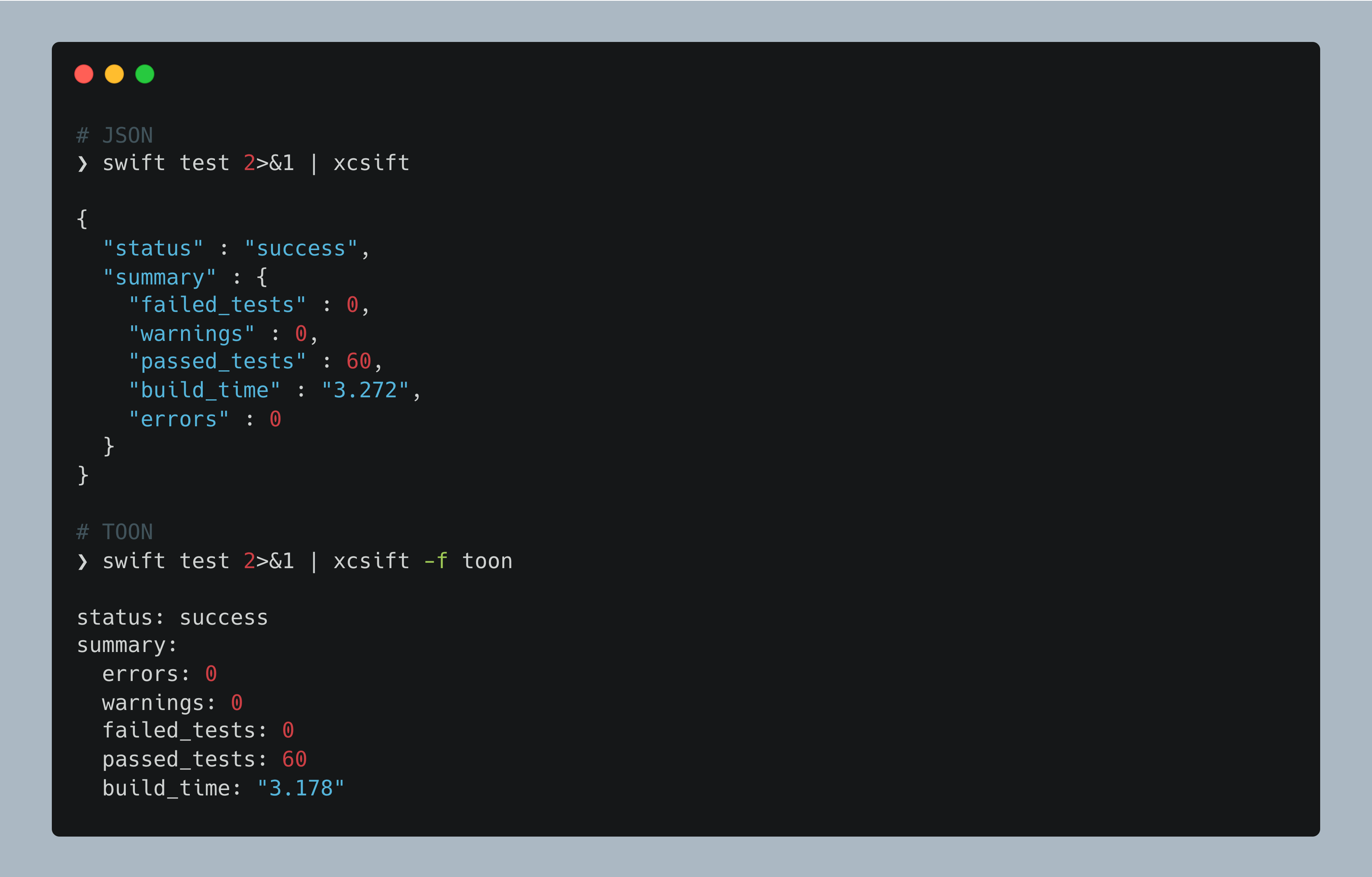
A Swift command-line tool to parse and format xcodebuild/SPM output for coding agents, optimized for token efficiency.
xcsift transforms verbose Xcode build output into concise, structured formats that coding agents and LLMs can efficiently parse and act upon. Unlike xcbeautify and xcpretty which focus on human-readable output, xcsift prioritizes information density and machine readability.
.profraw (SPM) and .xcresult (xcodebuild) to JSON.xcsift.toml for project or user-wide defaults--xcbeautifyxcsift mcp wraps an Xcode MCP server so agents get structured resultsSee the full documentation for details.
brew install xcsift
git clone https://github.com/ldomaradzki/xcsift.git
cd xcsift
swift build -c release
cp .build/release/xcsift /usr/local/bin/
Also available via mise and Mint. Since 1.7.0, releases publish a signed packslip manifest, so mise's packslip: backend verifies the archive before installing it and can link the agent skill of that version (mise skills sync).
Since 1.7.0, every release is signed by this repository's release workflow. The signer's packslip fingerprint is:
ps1_p3pqpu6mhfthsvnwyk2rm3leli
It names this repository by its numeric ID, not its name, so --pin refuses a release signed from
any other repository, including one that later takes over the name:
# Install the latest release, checked against the fingerprint
packslip install github.com/ldomaradzki/xcsift --pin ps1_p3pqpu6mhfthsvnwyk2rm3leli

# Or check archives you downloaded yourself, with the release's packslip.sigstore.json
packslip verify packslip.sigstore.json --pin ps1_p3pqpu6mhfthsvnwyk2rm3leli \
  --artifact xcsift-vX.Y.Z-macos-arm64.tar.gz
Integrate with coding assistants via built-in installers:
| Assistant | Install | Uninstall |
|---|---|---|
| Claude Code | xcsift install-claude-code | xcsift uninstall-claude-code |
| Codex | xcsift install-codex | xcsift uninstall-codex |
| Cursor | xcsift install-cursor | xcsift uninstall-cursor |
| Any agent, skill only (mise) | mise skills sync | mise skills sync --prune once xcsift is removed |
See Plugin Installation for options and verification steps.
xcsift mcp sits between a coding agent and an Xcode MCP server, forwarding the protocol untouched
and sifting only the tool results that carry build output:
agent ⇄ xcsift mcp ⇄ xcrun mcpbridge ⇄ Xcode
By default it wraps Xcode's own MCP server (Xcode 26+), reached through xcrun mcpbridge:
xcsift mcp --print-config     # Print an MCP client configuration snippet
xcsift mcp --install          # Register the proxy with Claude Code
xcsift mcp --uninstall        # Remove that registration again
xcsift mcp                    # Same as: xcsift mcp -- xcrun mcpbridge
xcsift mcp -- <any other stdio Xcode MCP server>
{
  "mcpServers": {
    "xcode": {
      "command": "xcsift",
      "args": ["mcp", "--", "xcrun", "mcpbridge"]
    }
  }
}
Setup for a coding agent, in three steps:
sudo xcrun mcp-server enable
(xcrun mcp-server status reports the current state).xcsift mcp --install (the same thing as
claude mcp add --transport stdio xcode -- xcsift mcp, with the flags you pass recorded in it).xcsift when Xcode asks, on the first project open or build.xcsift mcp --uninstall takes the registration back out, whichever way it was made.
Xcode approves an agent by binary and signature, so install xcsift (Homebrew) rather than pointing the config at a build directory, and expect one fresh approval after an upgrade.
Raw xcodebuild transcripts are replaced by the structured result. A server that already summarises
the build and writes the full log to disk keeps its summary, and the complete diagnostics parsed from
that log are appended. The proxy also adds an xcsift_parse_build_log tool so an agent can pull the
full diagnostics behind any build log.
See MCP Proxy for the full reference.
Pipe any xcodebuild or SPM command through xcsift. Always use 2>&1 to capture stderr.
# Build
xcodebuild build 2>&1 | xcsift
swift build 2>&1 | xcsift

# Test with coverage
swift test --enable-code-coverage 2>&1 | xcsift --coverage
xcodebuild test -enableCodeCoverage YES 2>&1 | xcsift -c --coverage-details

# TOON format (30-60% fewer tokens)
xcodebuild build 2>&1 | xcsift -f toon -w

# Warnings as errors + exit on failure (CI)
xcodebuild build 2>&1 | xcsift --Werror --exit-on-failure

# Configuration file
xcsift --init                    # Generate .xcsift.toml template
See Usage for the full CLI reference, Output Formats for JSON/TOON/GitHub Actions details, and Configuration for config file options.
| Feature | xcsift | xcbeautify | xcpretty |
|---|---|---|---|
| Target audience | Coding agents / LLMs / CI | Humans / CI | Humans |
| Output format | JSON + TOON + GH Actions | Colorized text + GH Actions | Formatted text |
| Token efficiency | Very High (TOON) | Medium | Low |
| LLM optimization | Yes (TOON format) | No | No |
| Machine readable | Yes | No | Limited |
| GitHub Actions | Yes (auto-detected) | Yes | No |
| Error extraction | Structured | Visual | Visual |
| Linker errors | Yes (structured) | No | No |
| Code coverage | Auto-converts | No | No |
| Build time | Fast | Fast | Slower |
swift build                            # Build
swift test                             # Run tests
swift format --recursive --in-place .  # Format (required before committing)
Large-log release benchmarks are available in Benchmarks/:
Benchmarks/large-log.sh 10          # Pull-request smoke benchmark
Benchmarks/large-log.sh 10 100 500  # Full size progression
Documentation source is in Sources/xcsift.docc/. Preview locally:
swift package --disable-sandbox preview-documentation --target xcsift
Hosted docs: ldomaradzki.github.io/xcsift
MIT License
752 followers · starred Jan 2026
3,502 followers · starred Oct 2025
664 followers · starred Mar 2026
5,294 followers · starred Apr 2026
A Swift command-line tool that parses xcodebuild output into token-efficient JSON for coding agents.
See the code
A Swift command-line tool to parse and format xcodebuild/SPM output for coding agents, optimized for token efficiency.
xcsift transforms verbose Xcode build output into concise, structured formats that coding agents and LLMs can efficiently parse and act upon. Unlike xcbeautify and xcpretty which focus on human-readable output, xcsift prioritizes information density and machine readability.
.profraw (SPM) and .xcresult (xcodebuild) to JSON.xcsift.toml for project or user-wide defaults--xcbeautifyxcsift mcp wraps an Xcode MCP server so agents get structured resultsSee the full documentation for details.
brew install xcsift
git clone https://github.com/ldomaradzki/xcsift.git
cd xcsift
swift build -c release
cp .build/release/xcsift /usr/local/bin/
Also available via mise and Mint. Since 1.7.0, releases publish a signed packslip manifest, so mise's packslip: backend verifies the archive before installing it and can link the agent skill of that version (mise skills sync).
Since 1.7.0, every release is signed by this repository's release workflow. The signer's packslip fingerprint is:
ps1_p3pqpu6mhfthsvnwyk2rm3leli
It names this repository by its numeric ID, not its name, so --pin refuses a release signed from
any other repository, including one that later takes over the name:
# Install the latest release, checked against the fingerprint
packslip install github.com/ldomaradzki/xcsift --pin ps1_p3pqpu6mhfthsvnwyk2rm3leli

# Or check archives you downloaded yourself, with the release's packslip.sigstore.json
packslip verify packslip.sigstore.json --pin ps1_p3pqpu6mhfthsvnwyk2rm3leli \
  --artifact xcsift-vX.Y.Z-macos-arm64.tar.gz
Integrate with coding assistants via built-in installers:
| Assistant | Install | Uninstall |
|---|---|---|
| Claude Code | xcsift install-claude-code | xcsift uninstall-claude-code |
| Codex | xcsift install-codex | xcsift uninstall-codex |
| Cursor | xcsift install-cursor | xcsift uninstall-cursor |
| Any agent, skill only (mise) | mise skills sync | mise skills sync --prune once xcsift is removed |
See Plugin Installation for options and verification steps.
xcsift mcp sits between a coding agent and an Xcode MCP server, forwarding the protocol untouched
and sifting only the tool results that carry build output:
agent ⇄ xcsift mcp ⇄ xcrun mcpbridge ⇄ Xcode
By default it wraps Xcode's own MCP server (Xcode 26+), reached through xcrun mcpbridge:
xcsift mcp --print-config     # Print an MCP client configuration snippet
xcsift mcp --install          # Register the proxy with Claude Code
xcsift mcp --uninstall        # Remove that registration again
xcsift mcp                    # Same as: xcsift mcp -- xcrun mcpbridge
xcsift mcp -- <any other stdio Xcode MCP server>
{
  "mcpServers": {
    "xcode": {
      "command": "xcsift",
      "args": ["mcp", "--", "xcrun", "mcpbridge"]
    }
  }
}
Setup for a coding agent, in three steps:
sudo xcrun mcp-server enable
(xcrun mcp-server status reports the current state).xcsift mcp --install (the same thing as
claude mcp add --transport stdio xcode -- xcsift mcp, with the flags you pass recorded in it).xcsift when Xcode asks, on the first project open or build.xcsift mcp --uninstall takes the registration back out, whichever way it was made.
Xcode approves an agent by binary and signature, so install xcsift (Homebrew) rather than pointing the config at a build directory, and expect one fresh approval after an upgrade.
Raw xcodebuild transcripts are replaced by the structured result. A server that already summarises
the build and writes the full log to disk keeps its summary, and the complete diagnostics parsed from
that log are appended. The proxy also adds an xcsift_parse_build_log tool so an agent can pull the
full diagnostics behind any build log.
See MCP Proxy for the full reference.
Pipe any xcodebuild or SPM command through xcsift. Always use 2>&1 to capture stderr.
# Build
xcodebuild build 2>&1 | xcsift
swift build 2>&1 | xcsift

# Test with coverage
swift test --enable-code-coverage 2>&1 | xcsift --coverage
xcodebuild test -enableCodeCoverage YES 2>&1 | xcsift -c --coverage-details

# TOON format (30-60% fewer tokens)
xcodebuild build 2>&1 | xcsift -f toon -w

# Warnings as errors + exit on failure (CI)
xcodebuild build 2>&1 | xcsift --Werror --exit-on-failure

# Configuration file
xcsift --init                    # Generate .xcsift.toml template
See Usage for the full CLI reference, Output Formats for JSON/TOON/GitHub Actions details, and Configuration for config file options.
| Feature | xcsift | xcbeautify | xcpretty |
|---|---|---|---|
| Target audience | Coding agents / LLMs / CI | Humans / CI | Humans |
| Output format | JSON + TOON + GH Actions | Colorized text + GH Actions | Formatted text |
| Token efficiency | Very High (TOON) | Medium | Low |
| LLM optimization | Yes (TOON format) | No | No |
| Machine readable | Yes | No | Limited |
| GitHub Actions | Yes (auto-detected) | Yes | No |
| Error extraction | Structured | Visual | Visual |
| Linker errors | Yes (structured) | No | No |
| Code coverage | Auto-converts | No | No |
| Build time | Fast | Fast | Slower |
swift build                            # Build
swift test                             # Run tests
swift format --recursive --in-place .  # Format (required before committing)
Large-log release benchmarks are available in Benchmarks/:
Benchmarks/large-log.sh 10          # Pull-request smoke benchmark
Benchmarks/large-log.sh 10 100 500  # Full size progression
Documentation source is in Sources/xcsift.docc/. Preview locally:
swift package --disable-sandbox preview-documentation --target xcsift
Hosted docs: ldomaradzki.github.io/xcsift
MIT License
752 followers · starred Jan 2026
3,502 followers · starred Oct 2025
664 followers · starred Mar 2026
5,294 followers · starred Apr 2026



