C library for building user interfaces
See the code

The C library for build user interfaces




LCUI is a library written in C for building graphical user interfaces. Its goal is to explore and practice new ways of developing user interfaces, characterized by its small size, ease of use, and provision of convenient development tools to help developers quickly create desktop applications with graphical user interfaces.
LC originates from the initials of the author's name. The library was initially designed to help the author develop small projects and gain development experience. However, the author did not gain a competitive advantage in the job market, which is crowded with C/C++ experts, and thus had to work in web front-end development. As a result, LCUI now leans towards integrating technologies from the web front-end domain.
You can get an overview of the development experience for LCUI applications from the following image:
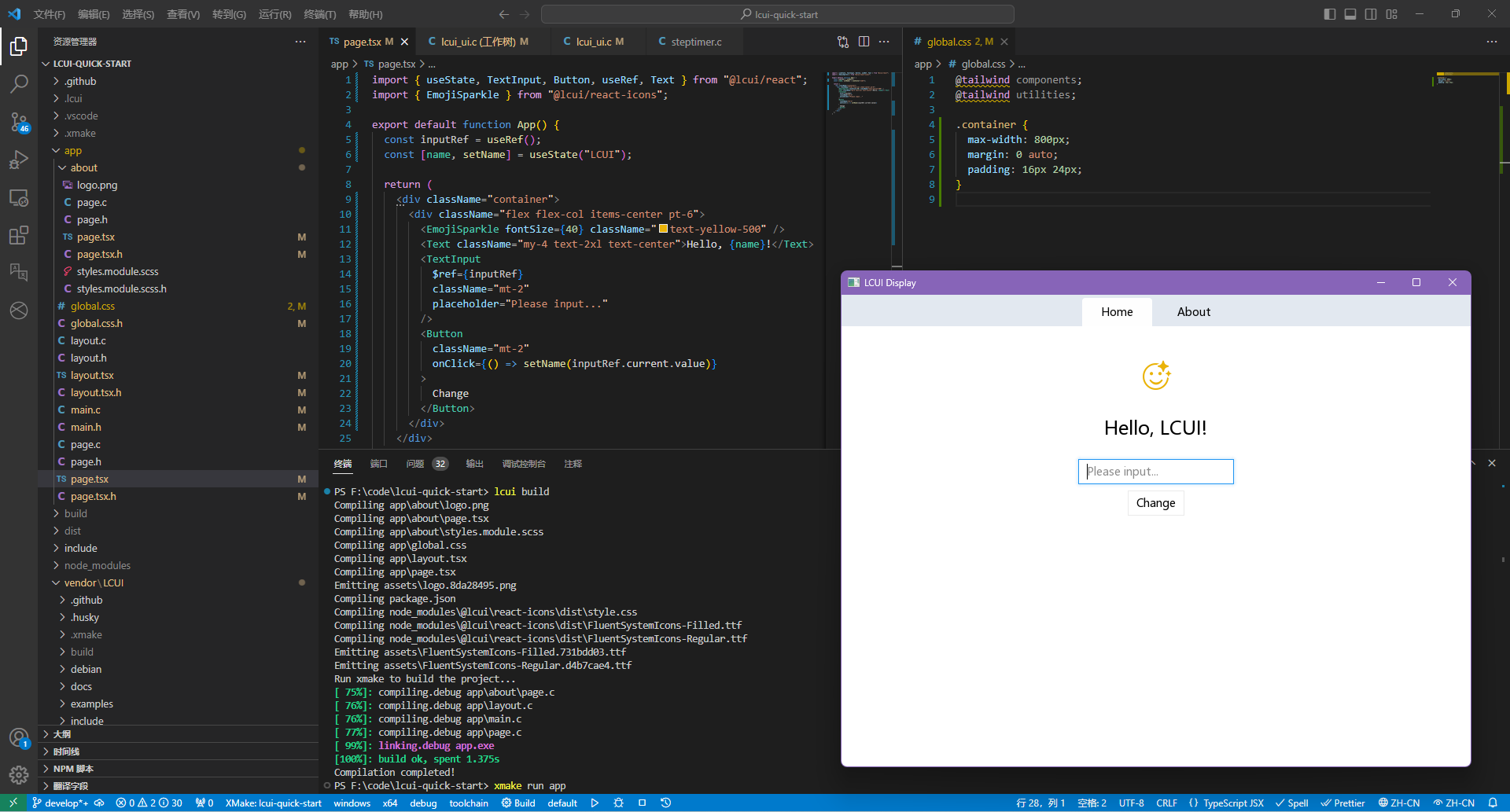
lcui build command to preprocess configuration files within the app directory, then generate corresponding C source code and resource files.Over time LCUI has been built up to be based on various libraries:
The core source code of LCUI is located in the src/ directory and is divided into the following modules:
Before you begin, you need to install the following software on your computer:
Then, run the following commands in a command-line window:
# Install the LCUI command-line development tool
npm install -g @lcui/cli

# Create an LCUI application project
lcui create my-lcui-app
Follow the prompts provided by the commands afterward.
| Title | Preview | Summary |
|---|---|---|
| Image Viewer | 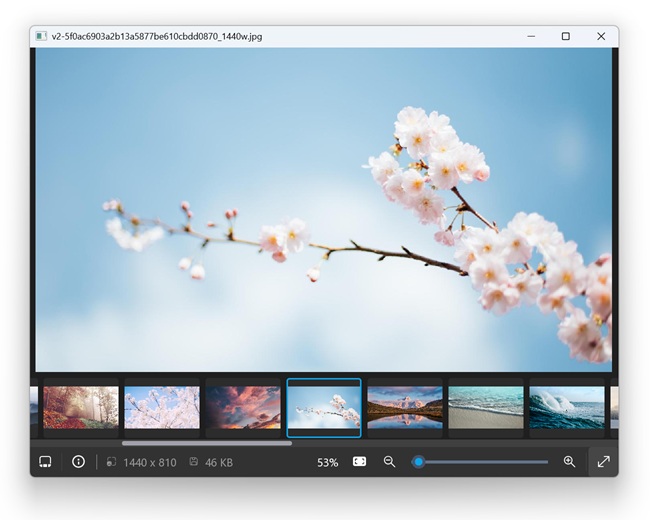 | Develop an image viewer program based on the LCUI library, build its graphical interface with web technologies, implement the interface interaction logic and various functions with C language, and deeply explore the features and development techniques of LCUI in the UI aspect. |
| Todo List | 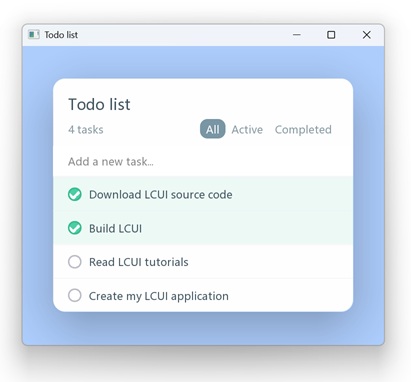 | Learn the basic concepts and usage of LCUI, as well as how to use it to build UI and implement state management, UI updates, and interactions. |
| Fabric | 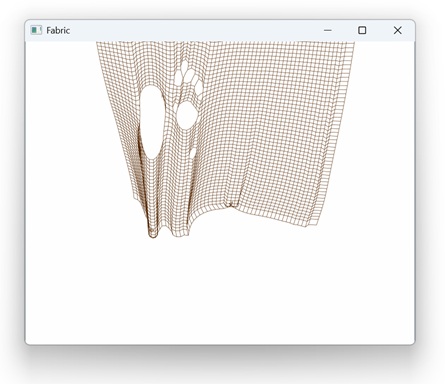 | Rewrite the existing fabric simulation program's JavaScript source code in C language, and use the cairo graphics library for fabric rendering. Then, apply LCUI to implement fabric animation playback and interaction. |
| Browser (Outdated) | 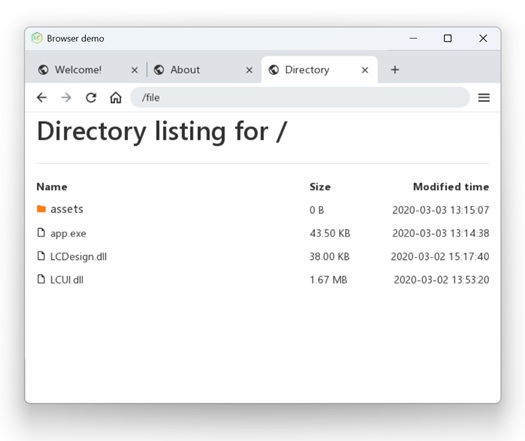 | Referencing a web browser, use LCUI to implement similar UI structure, layout, style, and multi-tab management features. Utilize LCUI's routing management functionality to implement multi-tab page state management and navigation, as well as a simple file browsing page. |
Below are the items for potential future development:
LCUI
inherit and !important.Command-Line Tools
lcui build --watch: Continuously monitor file changes and automatically rebuild.lcui dev-server: Similar to webpack-dev-server, build LCUI applications as websites to allow developers to preview UI in the browser.React Component Library
Develop a component library for LCUI applications using TypeScript + React, inspired by some web frontend component libraries (e.g., radix, shadcn/ui), and reuse components from the LC Design library.
Documentation
Think LCUI is slow to update? there are many ways to contribute to LCUI.
LCUI has adopted the code of conduct defined by the Contributor Covenant. This document is used across many open source communities, and we think it articulates our values well. For more, see the Code of Conduct.
Compilation error
The build configuration of this project has included the "Treat Warnings as Errors" compilation option. This might be because your compiler is relatively new and can detect more issues from the code.
You can try to search for all xmake.lua files that contain set_warnings("all", "error") and remove this rule.
Is this a browser engine? Or a development library like Electron that integrates a browser environment?
No, you can think of it as a traditional GUI development library that incorporates some web technologies.
Why should I choose LCUI over other GUI libraries/frameworks?
It's recommended to prioritize other GUI libraries/frameworks, as LCUI currently lacks:
Given its current state, LCUI is best suited for fulfilling the maintainer's personal needs or developing simple tools with minimal UI content and interactions.
Support development with TypeScript? If I know how to use it, why wouldn’t I just go with Electron?
Currently, TypeScript is primarily used to describe UI and resource dependencies, with only a few TypeScript features in use. You don’t need to study it in depth; in most cases, you can simply refer to example code for implementation.
If you have extensive web development experience and are willing to learn Electron, then Electron is clearly the better choice.
How about CSS support?
The following is a list of supported CSS features. Checked is supported (But does not mean full support). Unlisted properties are not supported by default.
@font-face@keyframes@media!important*type#id.class:hover:focus:active:first-child:last-child[attr="value"]:not():nth-child()parent > childa ~ b::after::beforeThe LCUI Project is released under the MIT License.
(top 24 of 29)
13,514 followers · starred Apr 2017
606 followers · starred Mar 2018
347 followers · starred Feb 2018
45 followers · starred Sep 2024
C library for building user interfaces
See the code
The C library for build user interfaces
LCUI is a library written in C for building graphical user interfaces. Its goal is to explore and practice new ways of developing user interfaces, characterized by its small size, ease of use, and provision of convenient development tools to help developers quickly create desktop applications with graphical user interfaces.
LC originates from the initials of the author's name. The library was initially designed to help the author develop small projects and gain development experience. However, the author did not gain a competitive advantage in the job market, which is crowded with C/C++ experts, and thus had to work in web front-end development. As a result, LCUI now leans towards integrating technologies from the web front-end domain.
You can get an overview of the development experience for LCUI applications from the following image:
lcui build command to preprocess configuration files within the app directory, then generate corresponding C source code and resource files.Over time LCUI has been built up to be based on various libraries:
The core source code of LCUI is located in the src/ directory and is divided into the following modules:
Before you begin, you need to install the following software on your computer:
Then, run the following commands in a command-line window:
# Install the LCUI command-line development tool
npm install -g @lcui/cli

# Create an LCUI application project
lcui create my-lcui-app
Follow the prompts provided by the commands afterward.
| Title | Preview | Summary |
|---|---|---|
| Image Viewer | | Develop an image viewer program based on the LCUI library, build its graphical interface with web technologies, implement the interface interaction logic and various functions with C language, and deeply explore the features and development techniques of LCUI in the UI aspect. |
| Todo List | | Learn the basic concepts and usage of LCUI, as well as how to use it to build UI and implement state management, UI updates, and interactions. |
| Fabric | | Rewrite the existing fabric simulation program's JavaScript source code in C language, and use the cairo graphics library for fabric rendering. Then, apply LCUI to implement fabric animation playback and interaction. |
| Browser (Outdated) | | Referencing a web browser, use LCUI to implement similar UI structure, layout, style, and multi-tab management features. Utilize LCUI's routing management functionality to implement multi-tab page state management and navigation, as well as a simple file browsing page. |
Below are the items for potential future development:
LCUI
inherit and !important.Command-Line Tools
lcui build --watch: Continuously monitor file changes and automatically rebuild.lcui dev-server: Similar to webpack-dev-server, build LCUI applications as websites to allow developers to preview UI in the browser.React Component Library
Develop a component library for LCUI applications using TypeScript + React, inspired by some web frontend component libraries (e.g., radix, shadcn/ui), and reuse components from the LC Design library.
Documentation
Think LCUI is slow to update? there are many ways to contribute to LCUI.
LCUI has adopted the code of conduct defined by the Contributor Covenant. This document is used across many open source communities, and we think it articulates our values well. For more, see the Code of Conduct.
Compilation error
The build configuration of this project has included the "Treat Warnings as Errors" compilation option. This might be because your compiler is relatively new and can detect more issues from the code.
You can try to search for all xmake.lua files that contain set_warnings("all", "error") and remove this rule.
Is this a browser engine? Or a development library like Electron that integrates a browser environment?
No, you can think of it as a traditional GUI development library that incorporates some web technologies.
Why should I choose LCUI over other GUI libraries/frameworks?
It's recommended to prioritize other GUI libraries/frameworks, as LCUI currently lacks:
Given its current state, LCUI is best suited for fulfilling the maintainer's personal needs or developing simple tools with minimal UI content and interactions.
Support development with TypeScript? If I know how to use it, why wouldn’t I just go with Electron?
Currently, TypeScript is primarily used to describe UI and resource dependencies, with only a few TypeScript features in use. You don’t need to study it in depth; in most cases, you can simply refer to example code for implementation.
If you have extensive web development experience and are willing to learn Electron, then Electron is clearly the better choice.
How about CSS support?
The following is a list of supported CSS features. Checked is supported (But does not mean full support). Unlisted properties are not supported by default.
@font-face@keyframes@media!important*type#id.class:hover:focus:active:first-child:last-child[attr="value"]:not():nth-child()parent > childa ~ b::after::beforeThe LCUI Project is released under the MIT License.
(top 24 of 29)
13,514 followers · starred Apr 2017
606 followers · starred Mar 2018
347 followers · starred Feb 2018
45 followers · starred Sep 2024



