
A open source transcription App for Mac using Gemini 3.5 Transcribe and local models
See the codeSee what people are saying
README
QuickTalk
An open source transcription app for Mac using Gemini or local Whisper.


A push-to-talk dictation app for macOS. Menu bar only, no Dock icon, powered by Google's Gemini 3.5 Transcribe with your own API key or Whisper on your Mac.
No bundled dependencies, no telemetry, no accounts. Use your own Gemini key, or install the optional local engine through Homebrew.
Install
There is no download — you build it yourself, in one command (why):
./build.sh
That compiles, assembles the .app, signs it, and installs it to /Applications. Needs
macOS 14+ and the Swift toolchain (xcode-select --install is enough). Then:
open /Applications/QuickTalk.app
Settings opens on first run. Work top to bottom:
- Paste your Gemini API key — get it from aistudio.google.com.
- Grant Input Monitoring, then quit and reopen. The restart is not optional.
- Grant Accessibility — takes effect immediately.
- Grant Microphone — you'll be asked on your first dictation.
The menu-bar item is the source of truth. When it reads "Hold Right ⌘ to dictate", everything is live; otherwise it names the missing permission.
Using it
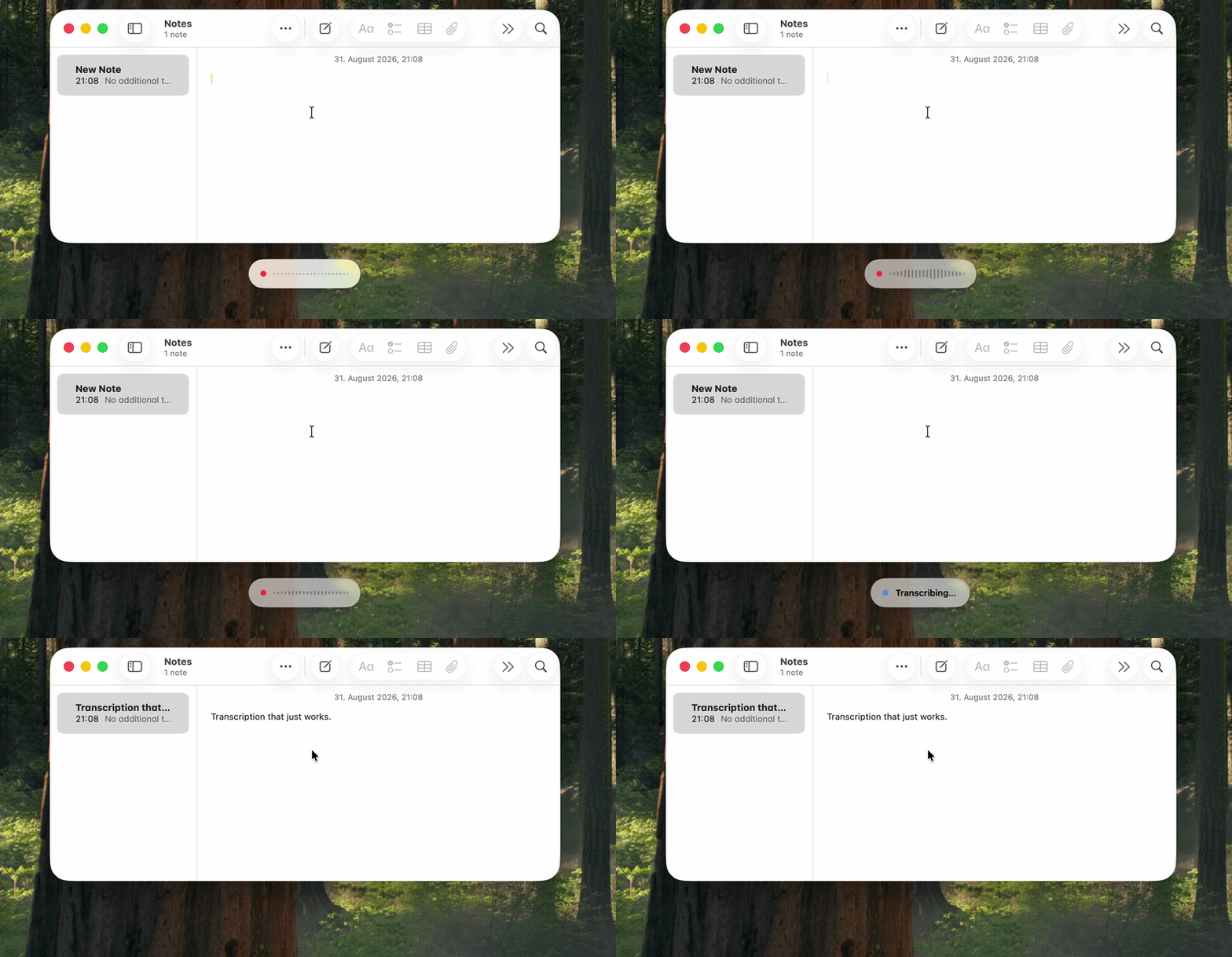
Hold the hotkey, speak, release. A pill appears at the bottom of the screen with a level meter, switches to "Transcribing…", and the text is pasted at your cursor. Presses shorter than 0.25 s are ignored.
| Setting | Default | Notes |
|---|---|---|
| Push-to-talk key | Right ⌘ | Also Left ⌘, Right/Left ⌥, Right ⌃, fn |
| Microphone | System Default | Any connected input, remembered per device |
| Mode | Smart | See below |
| Start cue | Purr | Six system sounds, previewed as you pick |
| App instructions | none | Per-app notes, added in Smart mode |
Modes
| Mode | How | Formatting | Per ~6 s dictation |
|---|---|---|---|
| Verbatim | streamed while you speak | word for word | ~$0.0009 |
| Smart | streamed, then tidied | paragraphs and real lists | ~$0.0013 |
| Cheap | one request after you finish | word for word | ~$0.0005 |
At 100 dictations a day that's roughly $2.60 / $3.80 / $1.50 a month.
Verbatim and Smart stream audio over a WebSocket while you speak, so the transcript is ready when you release the key. The audio file is written to disk even during a live session, so if the socket fails the batch request runs instead — a failed socket costs latency, never words.
Switch modes from the menu-bar icon under Formatting, without opening Settings.
Run it locally
Open Settings → Transcription → On this Mac. QuickTalk uses Homebrew's external whisper.cpp engine, downloaded on demand rather than linked into or shipped with the app:
brew install whisper-cpp
Settings can run that exact command for you and always shows a Copy button as an escape hatch. Choose and download either official model:
| Model | Download | Notes |
|---|---|---|
| Small | 190 MB | Multilingual and fast, with a small disk footprint |
| Large turbo | 574 MB | More accurate, with a larger disk and memory footprint |
The model download is checked against a pinned byte count and SHA-256 digest before it is
used. It lives in ~/Library/Application Support/QuickTalk/models/ and is excluded from
Time Machine. Remove reclaims that disk space.
Local dictation never sends audio or text anywhere, needs no API key, and still detects
German and English automatically. It is not streaming: the transcript arrives after you
release the key rather than being ready at release. Each take starts a fresh
whisper-cli, which exits afterwards, so no model remains in RAM and idle cost is zero.
Formatting modes and per-app instructions use Gemini and are therefore greyed out while
the local engine is selected; switching back restores the mode you had selected.
Per-app instructions
Dictating into a chat app and into an editor want different output from the same voice. QuickTalk sees which app was frontmost when you pressed the key and adds that app's standing instructions to the Smart formatting pass.
Open App Instructions… from the menu bar, add an app, and write what should happen — "use plenty of emojis and keep it casual" for a chat app, "plain prose, no markdown" for an editor.
Instructions apply in Smart mode only, since the other modes have no formatting pass to put them in. A result that stopped resembling your dictation is discarded and the raw transcript pasted instead. Detecting the frontmost app needs no extra permission — a name and bundle ID are public metadata; QuickTalk never reads window titles or contents.
Permissions
| Permission | For | Restart needed? |
|---|---|---|
| Input Monitoring | Seeing the key while you're in another app | Yes |
| Accessibility | Pasting the result | No |
| Microphone | Recording | No |
Two traps worth knowing. Input Monitoring is not Accessibility — without it,
CGEvent.tapCreate still succeeds and delivers only this app's own events, so the hotkey
works in QuickTalk and nowhere else, with no error to catch. And macOS keys permissions
on path and code signature, so two copies of the app are two identities in the Privacy
list, both called "QuickTalk".
To reset (note that Input Monitoring is ListenEvent):
killall QuickTalk; tccutil reset Microphone com.quicktalk.QuickTalk; tccutil reset Accessibility com.quicktalk.QuickTalk; tccutil reset ListenEvent com.quicktalk.QuickTalk
Troubleshooting
Hotkey does nothing outside QuickTalk → Input Monitoring. Grant it, quit, reopen.
Permission looks enabled but the app disagrees → a stale entry for an older copy or signature. Reset with the command above, remove duplicate QuickTalk rows, re-grant.
"No speech" when you did speak → check the microphone picker. Copy Diagnostics
shows peakLevel per take: real speech reads 0.019+, silence 0.000–0.002. A peak near
zero means capture failed, not the API.
Bluetooth headphones go muffled while dictating → pick the built-in microphone rather than "System Default". A Bluetooth headset can't carry high-quality playback and a mic at once; opening its mic switches it from A2DP to HFP. That's the headset's limitation. QuickTalk opens exactly the device you pick, so the built-in mic leaves your music alone.
Your API key
Stored in a file only your macOS account can read:
~/Library/Application Support/QuickTalk/gemini-api-key mode 0600, in a 0700 directory
Not in preferences — defaults read prints those in full, which leaks the moment someone
pastes their settings into a bug report. Not in the Keychain either: macOS grants keychain
access per code signature, so self-built copies (usually ad-hoc signed, whose signature
changes every build) get a password overlay every time.
It's excluded from Time Machine, never logged, and the diagnostics log redacts anything key-shaped — so Copy Diagnostics output is safe to paste publicly. Settings has a Remove button.
What this doesn't do: protect the key from other software running as you. No local store does — anything that can decrypt a key is readable by whatever decrypts it, and the Keychain only raises the bar. If your machine stops being trustworthy, revoke the key at aistudio.google.com.
Privacy
- The key tap watches
flagsChangedonly — modifier keys. No keystrokes, and therefore no passwords, pass through this process. It's.listenOnly, so your push-to-talk key keeps working normally. - The microphone is open only while you hold the key — no idle audio session.
- Audio is deleted after transcription, including when transcription fails.
- Your clipboard is restored after the paste.
- Gemini mode has one transcription destination,
generativelanguage.googleapis.com. Local mode makes no transcription request; model downloads come directly from the officialggerganov/whisper.cpprepository on Hugging Face.
Why there's no prebuilt download
Gatekeeper blocks un-notarised downloads, and notarisation needs the paid Apple Developer Program plus a Developer ID certificate. A development-signed build won't run on other Macs at all, and any signature names its signer.
License
MIT — see LICENSE.
Contributors

13 commits
Similar repos


Languages
Swift
99.0%
Shell
1.0%
A open source transcription App for Mac using Gemini 3.5 Transcribe and local models
See the codeSee what people are saying
README
QuickTalk
An open source transcription app for Mac using Gemini or local Whisper.
A push-to-talk dictation app for macOS. Menu bar only, no Dock icon, powered by Google's Gemini 3.5 Transcribe with your own API key or Whisper on your Mac.
No bundled dependencies, no telemetry, no accounts. Use your own Gemini key, or install the optional local engine through Homebrew.
Install
There is no download — you build it yourself, in one command (why):
./build.sh
That compiles, assembles the .app, signs it, and installs it to /Applications. Needs
macOS 14+ and the Swift toolchain (xcode-select --install is enough). Then:
open /Applications/QuickTalk.app
Settings opens on first run. Work top to bottom:
- Paste your Gemini API key — get it from aistudio.google.com.
- Grant Input Monitoring, then quit and reopen. The restart is not optional.
- Grant Accessibility — takes effect immediately.
- Grant Microphone — you'll be asked on your first dictation.
The menu-bar item is the source of truth. When it reads "Hold Right ⌘ to dictate", everything is live; otherwise it names the missing permission.
Using it
Hold the hotkey, speak, release. A pill appears at the bottom of the screen with a level meter, switches to "Transcribing…", and the text is pasted at your cursor. Presses shorter than 0.25 s are ignored.
| Setting | Default | Notes |
|---|---|---|
| Push-to-talk key | Right ⌘ | Also Left ⌘, Right/Left ⌥, Right ⌃, fn |
| Microphone | System Default | Any connected input, remembered per device |
| Mode | Smart | See below |
| Start cue | Purr | Six system sounds, previewed as you pick |
| App instructions | none | Per-app notes, added in Smart mode |
Modes
| Mode | How | Formatting | Per ~6 s dictation |
|---|---|---|---|
| Verbatim | streamed while you speak | word for word | ~$0.0009 |
| Smart | streamed, then tidied | paragraphs and real lists | ~$0.0013 |
| Cheap | one request after you finish | word for word | ~$0.0005 |
At 100 dictations a day that's roughly $2.60 / $3.80 / $1.50 a month.
Verbatim and Smart stream audio over a WebSocket while you speak, so the transcript is ready when you release the key. The audio file is written to disk even during a live session, so if the socket fails the batch request runs instead — a failed socket costs latency, never words.
Switch modes from the menu-bar icon under Formatting, without opening Settings.
Run it locally
Open Settings → Transcription → On this Mac. QuickTalk uses Homebrew's external whisper.cpp engine, downloaded on demand rather than linked into or shipped with the app:
brew install whisper-cpp
Settings can run that exact command for you and always shows a Copy button as an escape hatch. Choose and download either official model:
| Model | Download | Notes |
|---|---|---|
| Small | 190 MB | Multilingual and fast, with a small disk footprint |
| Large turbo | 574 MB | More accurate, with a larger disk and memory footprint |
The model download is checked against a pinned byte count and SHA-256 digest before it is
used. It lives in ~/Library/Application Support/QuickTalk/models/ and is excluded from
Time Machine. Remove reclaims that disk space.
Local dictation never sends audio or text anywhere, needs no API key, and still detects
German and English automatically. It is not streaming: the transcript arrives after you
release the key rather than being ready at release. Each take starts a fresh
whisper-cli, which exits afterwards, so no model remains in RAM and idle cost is zero.
Formatting modes and per-app instructions use Gemini and are therefore greyed out while
the local engine is selected; switching back restores the mode you had selected.
Per-app instructions
Dictating into a chat app and into an editor want different output from the same voice. QuickTalk sees which app was frontmost when you pressed the key and adds that app's standing instructions to the Smart formatting pass.
Open App Instructions… from the menu bar, add an app, and write what should happen — "use plenty of emojis and keep it casual" for a chat app, "plain prose, no markdown" for an editor.
Instructions apply in Smart mode only, since the other modes have no formatting pass to put them in. A result that stopped resembling your dictation is discarded and the raw transcript pasted instead. Detecting the frontmost app needs no extra permission — a name and bundle ID are public metadata; QuickTalk never reads window titles or contents.
Permissions
| Permission | For | Restart needed? |
|---|---|---|
| Input Monitoring | Seeing the key while you're in another app | Yes |
| Accessibility | Pasting the result | No |
| Microphone | Recording | No |
Two traps worth knowing. Input Monitoring is not Accessibility — without it,
CGEvent.tapCreate still succeeds and delivers only this app's own events, so the hotkey
works in QuickTalk and nowhere else, with no error to catch. And macOS keys permissions
on path and code signature, so two copies of the app are two identities in the Privacy
list, both called "QuickTalk".
To reset (note that Input Monitoring is ListenEvent):
killall QuickTalk; tccutil reset Microphone com.quicktalk.QuickTalk; tccutil reset Accessibility com.quicktalk.QuickTalk; tccutil reset ListenEvent com.quicktalk.QuickTalk
Troubleshooting
Hotkey does nothing outside QuickTalk → Input Monitoring. Grant it, quit, reopen.
Permission looks enabled but the app disagrees → a stale entry for an older copy or signature. Reset with the command above, remove duplicate QuickTalk rows, re-grant.
"No speech" when you did speak → check the microphone picker. Copy Diagnostics
shows peakLevel per take: real speech reads 0.019+, silence 0.000–0.002. A peak near
zero means capture failed, not the API.
Bluetooth headphones go muffled while dictating → pick the built-in microphone rather than "System Default". A Bluetooth headset can't carry high-quality playback and a mic at once; opening its mic switches it from A2DP to HFP. That's the headset's limitation. QuickTalk opens exactly the device you pick, so the built-in mic leaves your music alone.
Your API key
Stored in a file only your macOS account can read:
~/Library/Application Support/QuickTalk/gemini-api-key mode 0600, in a 0700 directory
Not in preferences — defaults read prints those in full, which leaks the moment someone
pastes their settings into a bug report. Not in the Keychain either: macOS grants keychain
access per code signature, so self-built copies (usually ad-hoc signed, whose signature
changes every build) get a password overlay every time.
It's excluded from Time Machine, never logged, and the diagnostics log redacts anything key-shaped — so Copy Diagnostics output is safe to paste publicly. Settings has a Remove button.
What this doesn't do: protect the key from other software running as you. No local store does — anything that can decrypt a key is readable by whatever decrypts it, and the Keychain only raises the bar. If your machine stops being trustworthy, revoke the key at aistudio.google.com.
Privacy
- The key tap watches
flagsChangedonly — modifier keys. No keystrokes, and therefore no passwords, pass through this process. It's.listenOnly, so your push-to-talk key keeps working normally. - The microphone is open only while you hold the key — no idle audio session.
- Audio is deleted after transcription, including when transcription fails.
- Your clipboard is restored after the paste.
- Gemini mode has one transcription destination,
generativelanguage.googleapis.com. Local mode makes no transcription request; model downloads come directly from the officialggerganov/whisper.cpprepository on Hugging Face.
Why there's no prebuilt download
Gatekeeper blocks un-notarised downloads, and notarisation needs the paid Apple Developer Program plus a Developer ID certificate. A development-signed build won't run on other Macs at all, and any signature names its signer.
License
MIT — see LICENSE.
Similar repos
Contributors
13 commits
Languages
Swift
99.0%
Shell
1.0%