
README
[!WARNING] ⚠️ DEPRECATION NOTICE
This repository is no longer actively maintained and will not receive further updates. The project has been deprecated and users are advised to use the
langsmith-skillsproject instead: langsmith-skills.
LangSmith Fetch
LangSmith Fetch is CLI for fetching threads or traces from LangSmith projects. It is designed to be easily used by humans or code agents to programmatically fetch LangSmith data for testing and debugging.

🚀 Quickstart
pip install langsmith-fetch
Set your LangSmith API key and project name:
export LANGSMITH_API_KEY=lsv2_...
export LANGSMITH_PROJECT=your-project-name
export LANGSMITH_ENDPOINT=your-langsmith-api-url # setting this if you use self-host langsmith
That's it! The CLI will automatically fetch traces or threads in LANGSMITH_PROJECT.
Fetch recent traces to directory (recommended):
langsmith-fetch traces ./my-traces --limit 10
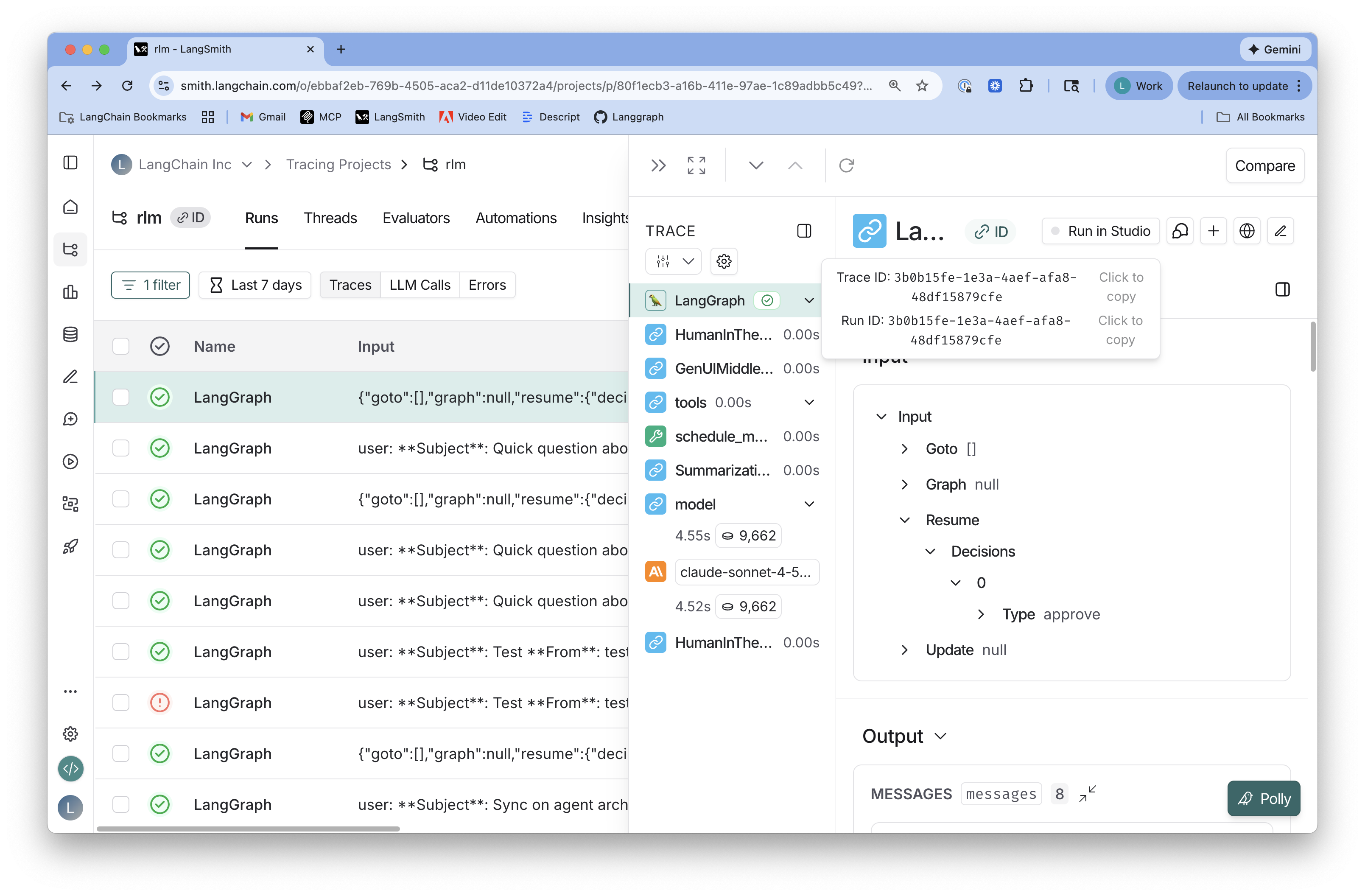
Fetch specific trace by ID:
langsmith-fetch trace 3b0b15fe-1e3a-4aef-afa8-48df15879cfe
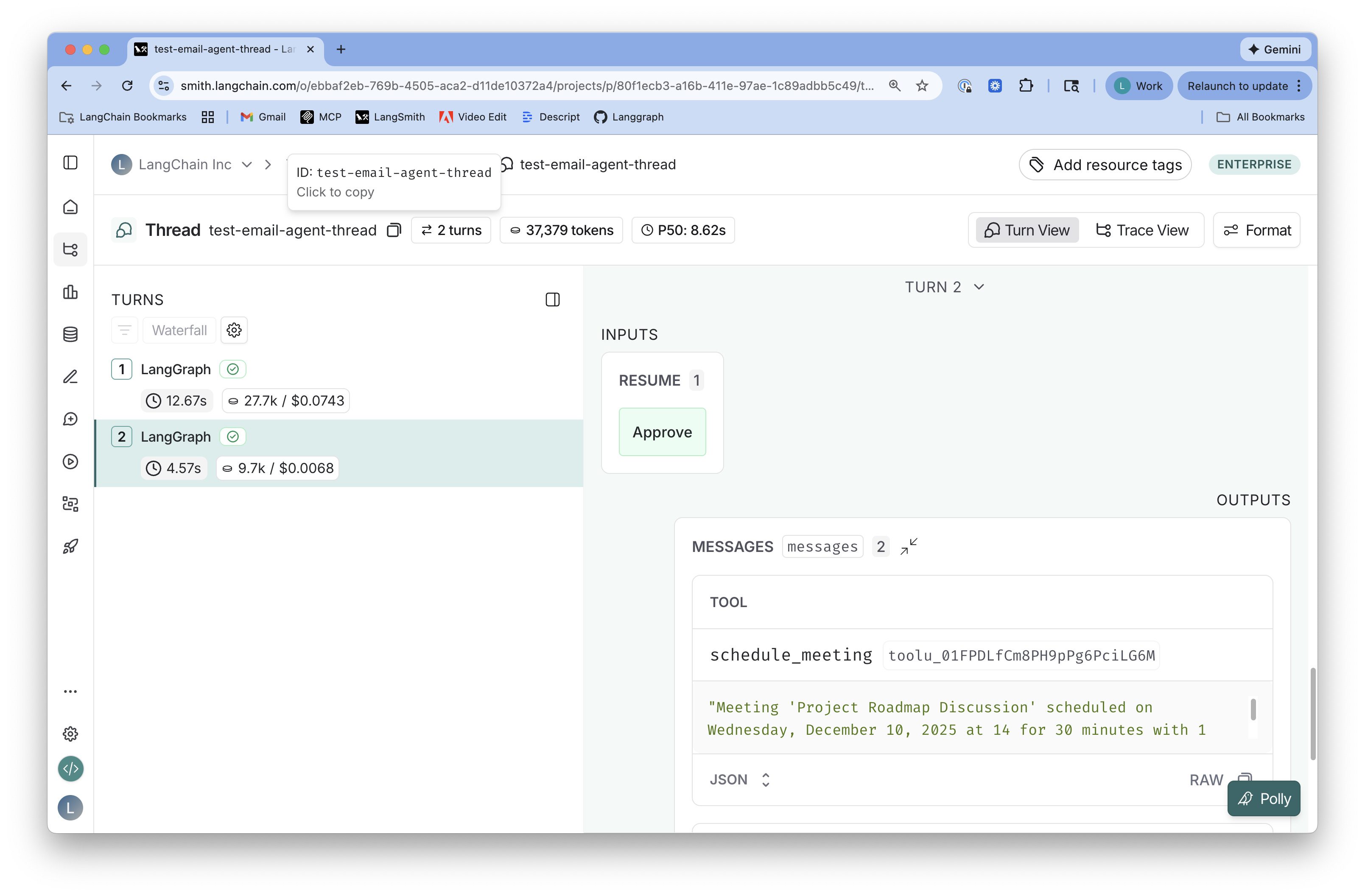
Same commands work for threads:
langsmith-fetch threads ./my-threads --limit 10
langsmith-fetch thread my-thread-id
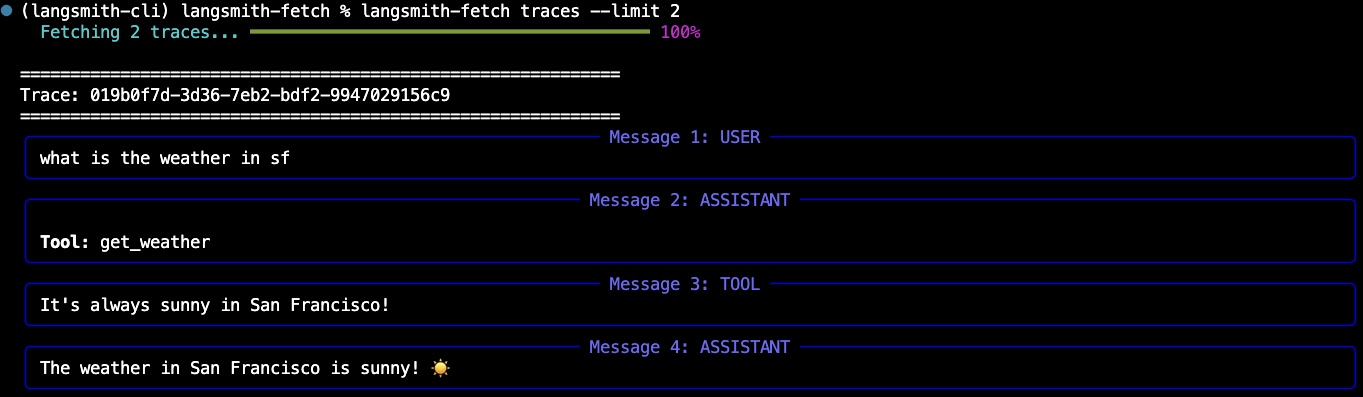
Include metadata and feedback:
langsmith-fetch traces ./my-traces --limit 10 --include-metadata --include-feedback
For code agents:
Use langsmith-fetch to fetch recent LangSmith traces. Run langsmith-fetch --help for usage details.
Commands
| Command | What it fetches | Output |
|---|---|---|
trace <id> | Specific trace by ID | stdout or file |
thread <id> | Specific thread by ID | stdout or file |
traces [dir] | Recent traces (bulk) | Multiple JSON files in directory (RECOMMENDED) or stdout |
threads [dir] | Recent threads (bulk) | Multiple JSON files in directory (RECOMMENDED) or stdout |
Flags
| Flag | Applies To | Description | Default |
|---|---|---|---|
--project-uuid <uuid> | thread, threads, traces | LangSmith project UUID (overrides config) | From config or env |
-n, --limit <int> | traces, threads | Maximum number to fetch | 1 |
--last-n-minutes <int> | traces, threads | Only fetch from last N minutes | None |
--since <timestamp> | traces, threads | Only fetch since ISO timestamp | None |
--filename-pattern <text> | traces, threads | Filename pattern (use {trace_id}, {thread_id}, {index}) | {trace_id}.json or {thread_id}.json |
--format <type> | All commands | Output format: pretty, json, or raw | pretty |
--file <path> | trace, thread | Save to file instead of stdout | stdout |
--include-metadata | traces | Include run metadata (status, timing, tokens, costs) | Not included |
--include-feedback | traces | Include feedback data (requires extra API call) | Not included |
--max-concurrent <int> | traces, threads | Concurrent fetches (max 10 recommended) | 5 |
--no-progress | traces, threads | Disable progress bar | Progress shown |
Output Formats
pretty(default): Human-readable Rich panels with color and formattingjson: Pretty-printed JSON with syntax highlightingraw: Compact single-line JSON for piping to tools likejq
Concepts
LangSmith organizes data into three levels:
- Runs: Individual LLM calls or tool executions
- Traces: A collection of runs representing a single execution path (one trace contains multiple runs)
- Threads: A collection of traces representing a conversation or session (one thread contains multiple traces)
Configuration
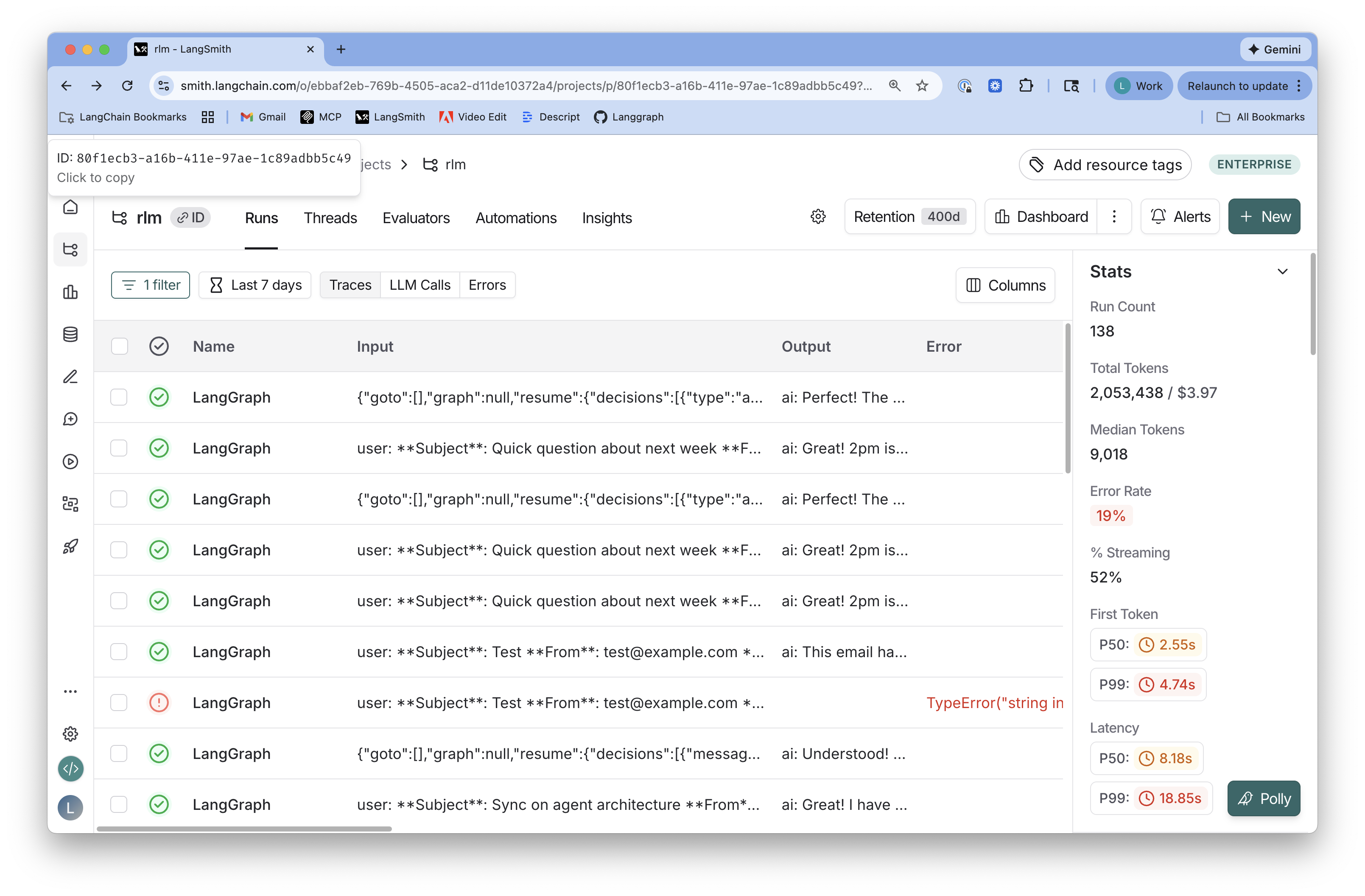
langsmith-fetch requires only LANGSMITH_PROJECT env var. It automatically looks up the Project UUID and saves both to ~/.langsmith-cli/config.yaml.
Finding IDs in LangSmith UI:
Project UUID (automatic lookup via LANGSMITH_PROJECT):
Trace ID (for fetching specific traces):
Thread ID (for fetching specific threads):
Tests
Run the test suite:
# Install with test dependencies
pip install -e ".[test]"

# Or with uv
uv sync --extra test

# Run all tests
pytest tests/

# Run with verbose output
pytest tests/ -v

# Run with coverage
pytest tests/ --cov=langsmith_cli
The test suite includes 71 tests covering:
- All CLI commands (traces, trace, thread, threads, config)
- All output formats (pretty, json, raw)
- Config management and storage
- Project UUID lookup and caching
- API fetching and error handling
- Time filtering and SDK integration
- Edge cases and validation
License
MIT
Contributors


Similar repos


Languages
Python
100.0%
README
[!WARNING] ⚠️ DEPRECATION NOTICE
This repository is no longer actively maintained and will not receive further updates. The project has been deprecated and users are advised to use the
langsmith-skillsproject instead: langsmith-skills.
LangSmith Fetch
LangSmith Fetch is CLI for fetching threads or traces from LangSmith projects. It is designed to be easily used by humans or code agents to programmatically fetch LangSmith data for testing and debugging.
🚀 Quickstart
pip install langsmith-fetch
Set your LangSmith API key and project name:
export LANGSMITH_API_KEY=lsv2_...
export LANGSMITH_PROJECT=your-project-name
export LANGSMITH_ENDPOINT=your-langsmith-api-url # setting this if you use self-host langsmith
That's it! The CLI will automatically fetch traces or threads in LANGSMITH_PROJECT.
Fetch recent traces to directory (recommended):
langsmith-fetch traces ./my-traces --limit 10
Fetch specific trace by ID:
langsmith-fetch trace 3b0b15fe-1e3a-4aef-afa8-48df15879cfe
Same commands work for threads:
langsmith-fetch threads ./my-threads --limit 10
langsmith-fetch thread my-thread-id
Include metadata and feedback:
langsmith-fetch traces ./my-traces --limit 10 --include-metadata --include-feedback
For code agents:
Use langsmith-fetch to fetch recent LangSmith traces. Run langsmith-fetch --help for usage details.
Commands
| Command | What it fetches | Output |
|---|---|---|
trace <id> | Specific trace by ID | stdout or file |
thread <id> | Specific thread by ID | stdout or file |
traces [dir] | Recent traces (bulk) | Multiple JSON files in directory (RECOMMENDED) or stdout |
threads [dir] | Recent threads (bulk) | Multiple JSON files in directory (RECOMMENDED) or stdout |
Flags
| Flag | Applies To | Description | Default |
|---|---|---|---|
--project-uuid <uuid> | thread, threads, traces | LangSmith project UUID (overrides config) | From config or env |
-n, --limit <int> | traces, threads | Maximum number to fetch | 1 |
--last-n-minutes <int> | traces, threads | Only fetch from last N minutes | None |
--since <timestamp> | traces, threads | Only fetch since ISO timestamp | None |
--filename-pattern <text> | traces, threads | Filename pattern (use {trace_id}, {thread_id}, {index}) | {trace_id}.json or {thread_id}.json |
--format <type> | All commands | Output format: pretty, json, or raw | pretty |
--file <path> | trace, thread | Save to file instead of stdout | stdout |
--include-metadata | traces | Include run metadata (status, timing, tokens, costs) | Not included |
--include-feedback | traces | Include feedback data (requires extra API call) | Not included |
--max-concurrent <int> | traces, threads | Concurrent fetches (max 10 recommended) | 5 |
--no-progress | traces, threads | Disable progress bar | Progress shown |
Output Formats
pretty(default): Human-readable Rich panels with color and formattingjson: Pretty-printed JSON with syntax highlightingraw: Compact single-line JSON for piping to tools likejq
Concepts
LangSmith organizes data into three levels:
- Runs: Individual LLM calls or tool executions
- Traces: A collection of runs representing a single execution path (one trace contains multiple runs)
- Threads: A collection of traces representing a conversation or session (one thread contains multiple traces)
Configuration
langsmith-fetch requires only LANGSMITH_PROJECT env var. It automatically looks up the Project UUID and saves both to ~/.langsmith-cli/config.yaml.
Finding IDs in LangSmith UI:
Project UUID (automatic lookup via LANGSMITH_PROJECT):
Trace ID (for fetching specific traces):
Thread ID (for fetching specific threads):
Tests
Run the test suite:
# Install with test dependencies
pip install -e ".[test]"

# Or with uv
uv sync --extra test

# Run all tests
pytest tests/

# Run with verbose output
pytest tests/ -v

# Run with coverage
pytest tests/ --cov=langsmith_cli
The test suite includes 71 tests covering:
- All CLI commands (traces, trace, thread, threads, config)
- All output formats (pretty, json, raw)
- Config management and storage
- Project UUID lookup and caching
- API fetching and error handling
- Time filtering and SDK integration
- Edge cases and validation
License
MIT
Similar repos
Contributors
Languages
Python
100.0%