📥 An inbox UX for interacting with human-in-the-loop agents.
See the code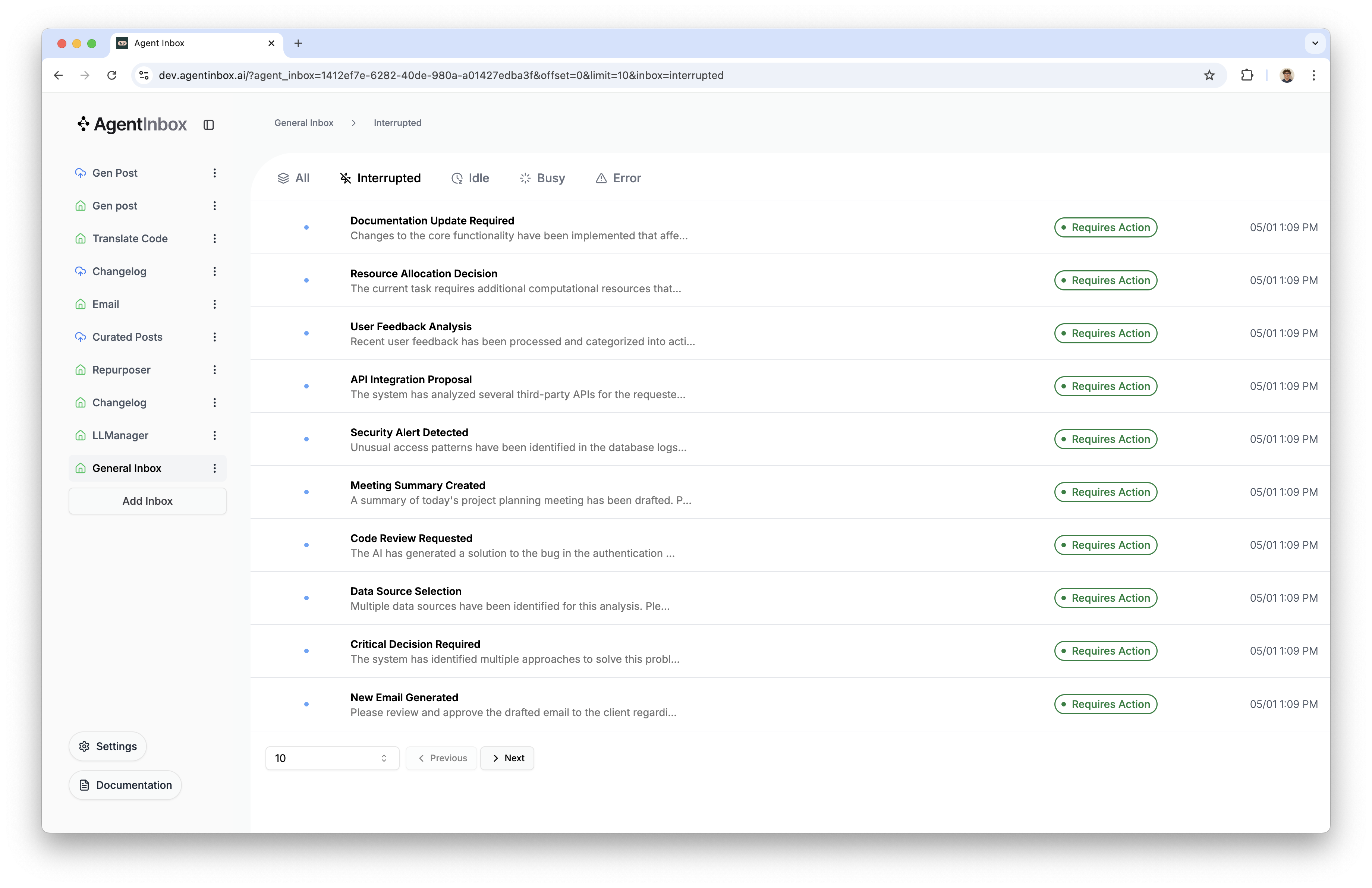
[!NOTE] Want to use the Agent Inbox without deploying it yourself? Check out the hosted version here: dev.agentinbox.ai
Before getting started, ensure you have:
[!NOTE] 🎥 Prefer a video walkthrough? Checkout this video for a step-by-step guide.
[!TIP] You can also view a minimum working version of a LangGraph agent using the Agent Inbox in Python here, and TypeScript here.
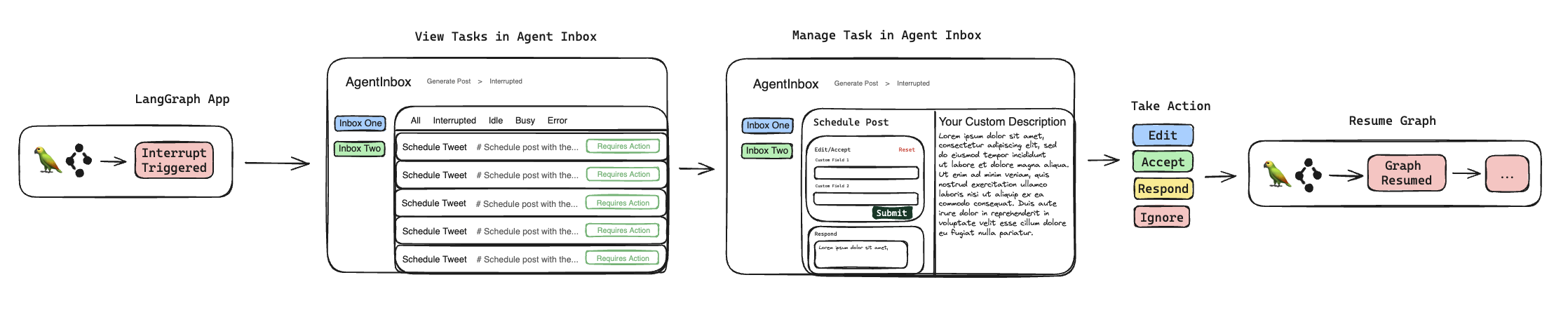
To start running the Agent Inbox, first clone the repository and install dependencies:
git clone https://github.com/langchain-ai/agent-inbox.git
cd agent-inbox
yarn install
Once up and running, you'll need to take two actions so that the Agent Inbox can connect to your LangGraph deployment.
Add your LangSmith API key: Click the "Settings" button in the sidebar, and enter your LangSmith API key.
Create your first inbox by opening the settings popover (bottom left, inside the sidebar), and clicking "Add Inbox". This will open a dialog with three fields:
- Assistant/Graph ID: (required) The name of your LangGraph graph, or an assistant ID. This will be used when sending human responses to your graph.
- Deployment URL: (required) The URL of your LangGraph deployment. This is how the Agent Inbox will connect to your LangGraph deployment for fetching interrupts, and sending human responses.
- Name: (optional) A name for your inbox. This will be used as a label for the inbox.
These values are stored in your browser's local storage, and are only used to connect & authenticate requests to the LangGraph deployment.
In order to use the Agent Inbox with your LangGraph project, you'll need to update all instances of where interrupts are used in your codebase (where you want them to be compatible with the Agent Inbox).
Below, you'll find the interrupt input & output schemas for both Python and TypeScript.
class HumanInterruptConfig(TypedDict):
    allow_ignore: bool
    allow_respond: bool
    allow_edit: bool
    allow_accept: bool


class ActionRequest(TypedDict):
    action: str
    args: dict

class HumanInterrupt(TypedDict):
    action_request: ActionRequest
    config: HumanInterruptConfig
    description: Optional[str]


class HumanResponse(TypedDict):
    type: Literal['accept', 'ignore', 'response', 'edit']
    args: Union[None, str, ActionRequest]
export interface HumanInterruptConfig {
  allow_ignore: boolean;
  allow_respond: boolean;
  allow_edit: boolean;
  allow_accept: boolean;
}

export interface ActionRequest {
  action: string;
  args: Record<string, any>;
}

export interface HumanInterrupt {
  action_request: ActionRequest;
  config: HumanInterruptConfig;
  description?: string;
}

export type HumanResponse = {
  type: "accept" | "ignore" | "response" | "edit";
  args: null | string | ActionRequest;
};
The human interrupt schema is used to define the types of interrupts, and what actions can be taken in response to each interrupt. We've landed on four types of actions:
accept: Accept the interrupt's arguments, or action. Will send an ActionRequest in the args field on HumanResponse. This ActionRequest will be the exact same as the action_request field on HumanInterrupt, but with all keys of the args field on ActionRequest converted to strings.edit: Edit the interrupt's arguments. Sends an instance of ActionRequest in the args field on HumanResponse. The args field on ActionRequest will have the same structure as the args field on HumanInterrupt, but the values of the keys will be strings, and will contain any edits the user has made.response: Send a response to the interrupt. Does not require any arguments. Will always send back a single string in the args field on HumanResponse.ignore: Ignore the interrupt's arguments, or action. Returns null for the args field on HumanResponse.You can set any combination of these actions in the config field on HumanInterrupt.
When the Agent Inbox sends a response, it will always send back a list with a single HumanResponse object in it.
action_request: The action and arguments for the interrupt
action: The name, or title of the action. This is rendered in the Agent Inbox as the main header for the interrupt event.args: The arguments for the action. E.g tool call arguments.config: The configuration for the interrupt
allow_ignore: Whether the user can ignore the interruptallow_respond: Whether the user can respond to the interruptallow_edit: Whether the user can edit the interruptallow_accept: Whether the user can accept the interruptdescription: A description of the interrupt
To use the Agent Inbox, you'll have to use the interrupt function, instead of raising a NodeInterrupt exception in your codebase. To read more about how the interrupt function works, see the LangGraph documentation: conceptual guide how-to guide (TypeScript docs coming soon, but the concepts & implementation are the same).
Then, when calling the interrupt function, you should pass an instance of HumanInterrupt as the interrupt argument. Then, when the user sends a response to the interrupt, you should expect the return value of the interrupt function to be an instance of HumanResponse.
Here's a simple example of using the interrupt function in your LangGraph project:
from typing import TypedDict, Literal, Optional, Union
from langgraph.types import interrupt

def my_graph_function(state: MyGraphState):
    # Extract the last tool call from the `messages` field in the state
    tool_call = state["messages"][-1].tool_calls[0]
    # Create an interrupt
    request: HumanInterrupt = {
        "action_request": {
            "action": tool_call['name'],
            "args": tool_call['args']
        },
        "config": {
            "allow_ignore": True,
            "allow_respond": True,
            "allow_edit": False,
            "allow_accept": False
        },
        "description": _generate_email_markdown(state) # Generate a detailed markdown description.
    }
    # Send the interrupt request, and extract the first response.
    # The Agent Inbox will always respond with a list of `HumanResponse` objects, although
    # at this time only a single object will be returned.
    response = interrupt(request)[0]
    if response['type'] == "response":
        # Do something with the response

    # ...rest of function
import { interrupt } from "@langchain/langgraph";
import { HumanInterrupt, HumanResponse } from "@langchain/langgraph/prebuilt";

function myGraphFunction(state: MyGraphState) {
  // Extract the last tool call from the `messages` field in the state
  const toolCall = state.messages[state.messages.length - 1].tool_calls[0];
  // Create an interrupt
  const request: HumanInterrupt = {
    action_request: {
      action: toolCall.name,
      args: toolCall.args
    },
    config: {
      allow_ignore: true,
      allow_respond: true,
      allow_edit: false,
      allow_accept: false
    },
    description: _generateEmailMarkdown(state) // Generate a detailed markdown description.
  };
  // Send the interrupt request, and extract the first response.
  // The Agent Inbox will always respond with an array of `HumanResponse` objects, although
  // at this time only a single object will be returned.
  const response = interrupt<HumanInterrupt, HumanResponse[]>(request)[0];
  if (response.type === "response") {
    // Do something with the response
  }
  // ...rest of function
};
Common issues and solutions:
LANGSMITH_API_KEY is set correctlyinterrupt function46 followers · starred May 2026
1,372 followers · starred Jan 2025
259 followers · starred May 2025
2,672 followers · starred Jul 2025
📥 An inbox UX for interacting with human-in-the-loop agents.
See the code
[!NOTE] Want to use the Agent Inbox without deploying it yourself? Check out the hosted version here: dev.agentinbox.ai
Before getting started, ensure you have:
[!NOTE] 🎥 Prefer a video walkthrough? Checkout this video for a step-by-step guide.
[!TIP] You can also view a minimum working version of a LangGraph agent using the Agent Inbox in Python here, and TypeScript here.
To start running the Agent Inbox, first clone the repository and install dependencies:
git clone https://github.com/langchain-ai/agent-inbox.git
cd agent-inbox
yarn install
Once up and running, you'll need to take two actions so that the Agent Inbox can connect to your LangGraph deployment.
Add your LangSmith API key: Click the "Settings" button in the sidebar, and enter your LangSmith API key.
Create your first inbox by opening the settings popover (bottom left, inside the sidebar), and clicking "Add Inbox". This will open a dialog with three fields:
- Assistant/Graph ID: (required) The name of your LangGraph graph, or an assistant ID. This will be used when sending human responses to your graph.
- Deployment URL: (required) The URL of your LangGraph deployment. This is how the Agent Inbox will connect to your LangGraph deployment for fetching interrupts, and sending human responses.
- Name: (optional) A name for your inbox. This will be used as a label for the inbox.
These values are stored in your browser's local storage, and are only used to connect & authenticate requests to the LangGraph deployment.
In order to use the Agent Inbox with your LangGraph project, you'll need to update all instances of where interrupts are used in your codebase (where you want them to be compatible with the Agent Inbox).
Below, you'll find the interrupt input & output schemas for both Python and TypeScript.
class HumanInterruptConfig(TypedDict):
    allow_ignore: bool
    allow_respond: bool
    allow_edit: bool
    allow_accept: bool


class ActionRequest(TypedDict):
    action: str
    args: dict

class HumanInterrupt(TypedDict):
    action_request: ActionRequest
    config: HumanInterruptConfig
    description: Optional[str]


class HumanResponse(TypedDict):
    type: Literal['accept', 'ignore', 'response', 'edit']
    args: Union[None, str, ActionRequest]
export interface HumanInterruptConfig {
  allow_ignore: boolean;
  allow_respond: boolean;
  allow_edit: boolean;
  allow_accept: boolean;
}

export interface ActionRequest {
  action: string;
  args: Record<string, any>;
}

export interface HumanInterrupt {
  action_request: ActionRequest;
  config: HumanInterruptConfig;
  description?: string;
}

export type HumanResponse = {
  type: "accept" | "ignore" | "response" | "edit";
  args: null | string | ActionRequest;
};
The human interrupt schema is used to define the types of interrupts, and what actions can be taken in response to each interrupt. We've landed on four types of actions:
accept: Accept the interrupt's arguments, or action. Will send an ActionRequest in the args field on HumanResponse. This ActionRequest will be the exact same as the action_request field on HumanInterrupt, but with all keys of the args field on ActionRequest converted to strings.edit: Edit the interrupt's arguments. Sends an instance of ActionRequest in the args field on HumanResponse. The args field on ActionRequest will have the same structure as the args field on HumanInterrupt, but the values of the keys will be strings, and will contain any edits the user has made.response: Send a response to the interrupt. Does not require any arguments. Will always send back a single string in the args field on HumanResponse.ignore: Ignore the interrupt's arguments, or action. Returns null for the args field on HumanResponse.You can set any combination of these actions in the config field on HumanInterrupt.
When the Agent Inbox sends a response, it will always send back a list with a single HumanResponse object in it.
action_request: The action and arguments for the interrupt
action: The name, or title of the action. This is rendered in the Agent Inbox as the main header for the interrupt event.args: The arguments for the action. E.g tool call arguments.config: The configuration for the interrupt
allow_ignore: Whether the user can ignore the interruptallow_respond: Whether the user can respond to the interruptallow_edit: Whether the user can edit the interruptallow_accept: Whether the user can accept the interruptdescription: A description of the interrupt
To use the Agent Inbox, you'll have to use the interrupt function, instead of raising a NodeInterrupt exception in your codebase. To read more about how the interrupt function works, see the LangGraph documentation: conceptual guide how-to guide (TypeScript docs coming soon, but the concepts & implementation are the same).
Then, when calling the interrupt function, you should pass an instance of HumanInterrupt as the interrupt argument. Then, when the user sends a response to the interrupt, you should expect the return value of the interrupt function to be an instance of HumanResponse.
Here's a simple example of using the interrupt function in your LangGraph project:
from typing import TypedDict, Literal, Optional, Union
from langgraph.types import interrupt

def my_graph_function(state: MyGraphState):
    # Extract the last tool call from the `messages` field in the state
    tool_call = state["messages"][-1].tool_calls[0]
    # Create an interrupt
    request: HumanInterrupt = {
        "action_request": {
            "action": tool_call['name'],
            "args": tool_call['args']
        },
        "config": {
            "allow_ignore": True,
            "allow_respond": True,
            "allow_edit": False,
            "allow_accept": False
        },
        "description": _generate_email_markdown(state) # Generate a detailed markdown description.
    }
    # Send the interrupt request, and extract the first response.
    # The Agent Inbox will always respond with a list of `HumanResponse` objects, although
    # at this time only a single object will be returned.
    response = interrupt(request)[0]
    if response['type'] == "response":
        # Do something with the response

    # ...rest of function
import { interrupt } from "@langchain/langgraph";
import { HumanInterrupt, HumanResponse } from "@langchain/langgraph/prebuilt";

function myGraphFunction(state: MyGraphState) {
  // Extract the last tool call from the `messages` field in the state
  const toolCall = state.messages[state.messages.length - 1].tool_calls[0];
  // Create an interrupt
  const request: HumanInterrupt = {
    action_request: {
      action: toolCall.name,
      args: toolCall.args
    },
    config: {
      allow_ignore: true,
      allow_respond: true,
      allow_edit: false,
      allow_accept: false
    },
    description: _generateEmailMarkdown(state) // Generate a detailed markdown description.
  };
  // Send the interrupt request, and extract the first response.
  // The Agent Inbox will always respond with an array of `HumanResponse` objects, although
  // at this time only a single object will be returned.
  const response = interrupt<HumanInterrupt, HumanResponse[]>(request)[0];
  if (response.type === "response") {
    // Do something with the response
  }
  // ...rest of function
};
Common issues and solutions:
LANGSMITH_API_KEY is set correctlyinterrupt function46 followers · starred May 2026
1,372 followers · starred Jan 2025
259 followers · starred May 2025
2,672 followers · starred Jul 2025



