Command-line utility for monitoring GPU hardware.
See the code




all-smi monitors GPUs, NPUs, CPUs, and memory from one terminal — on your workstation or across a cluster. It also exports Prometheus metrics and machine-readable snapshots for monitoring systems and scripts.
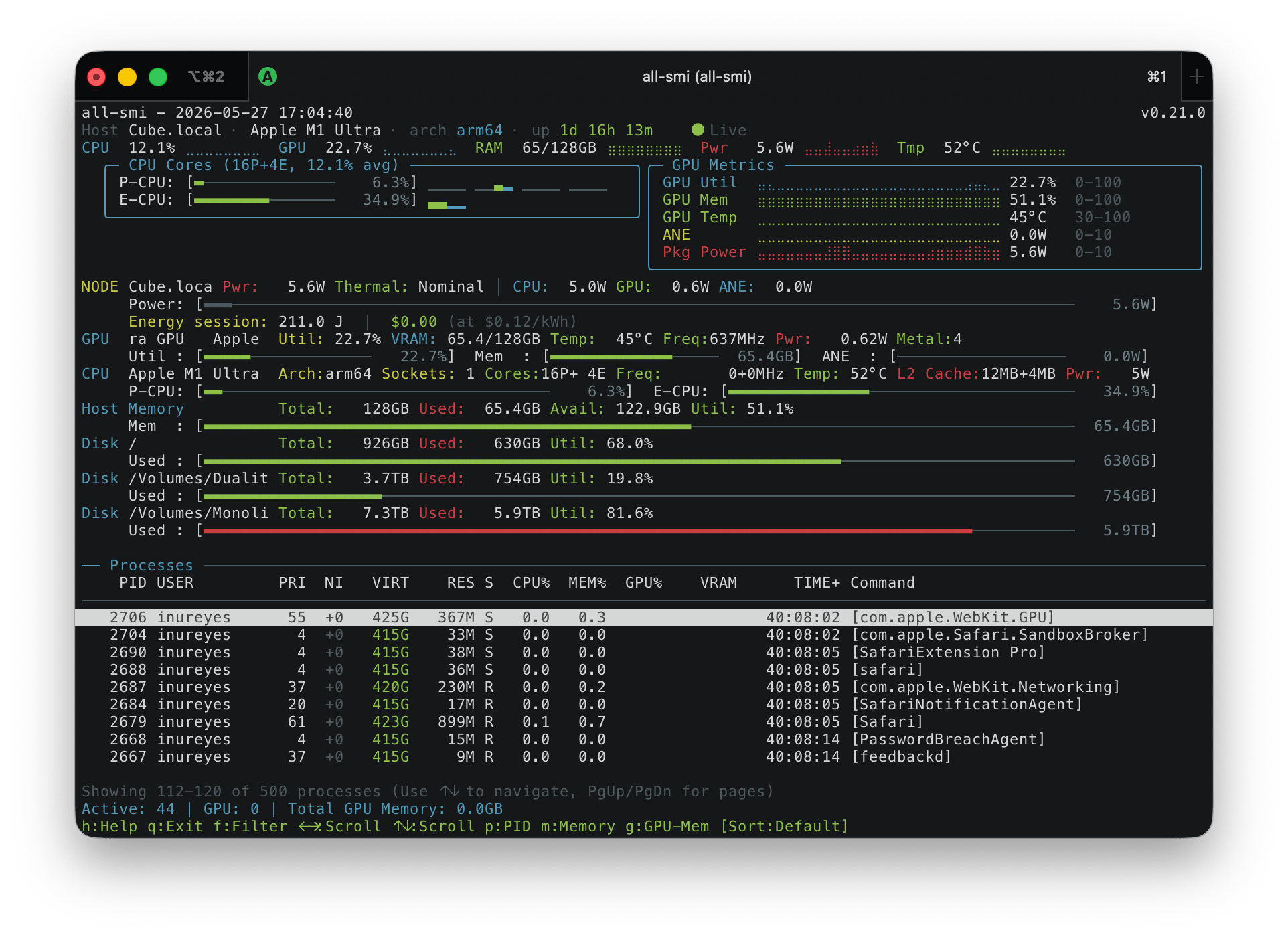
Local-node view (on macOS)
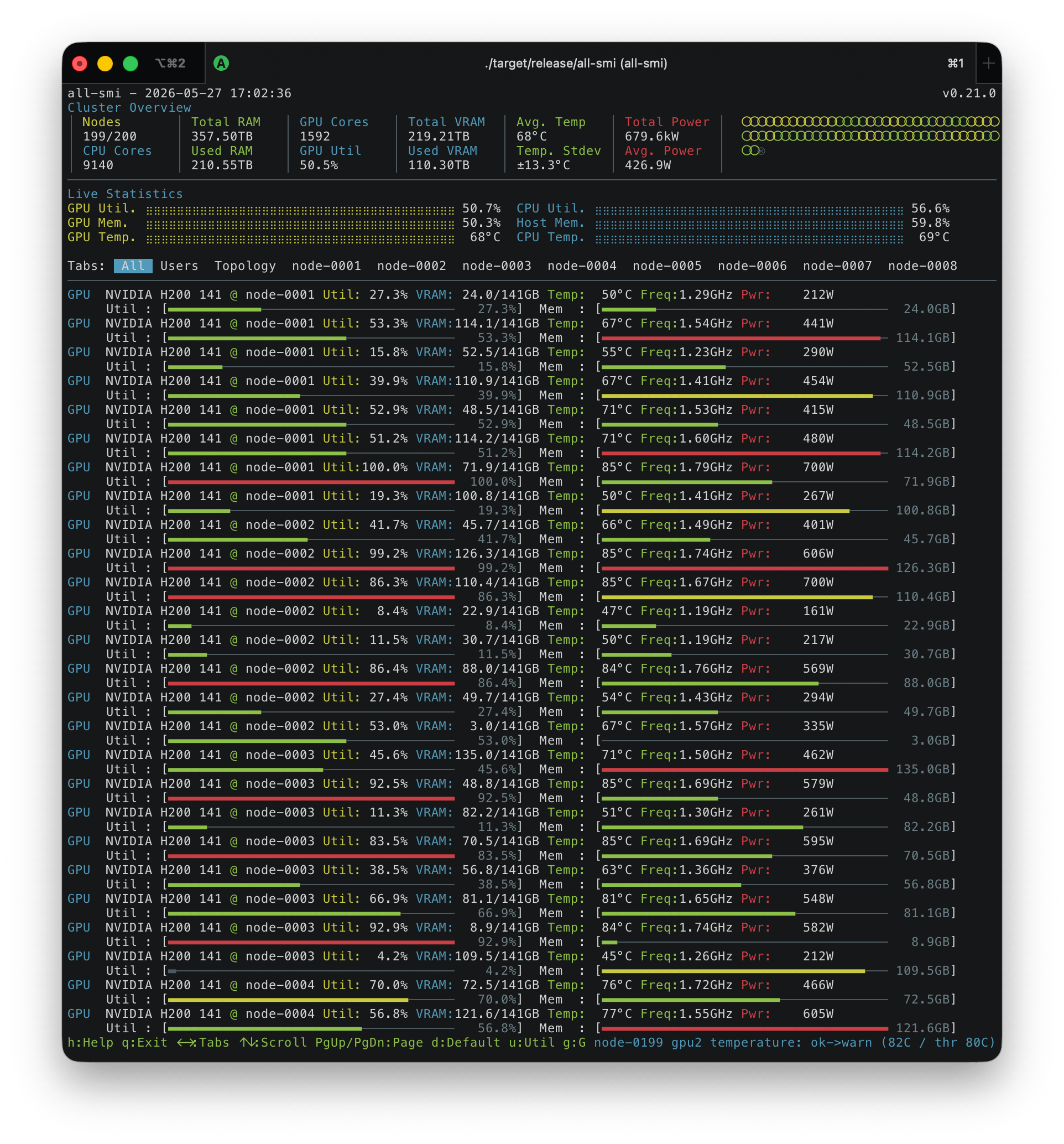
All-node view (remote mode)
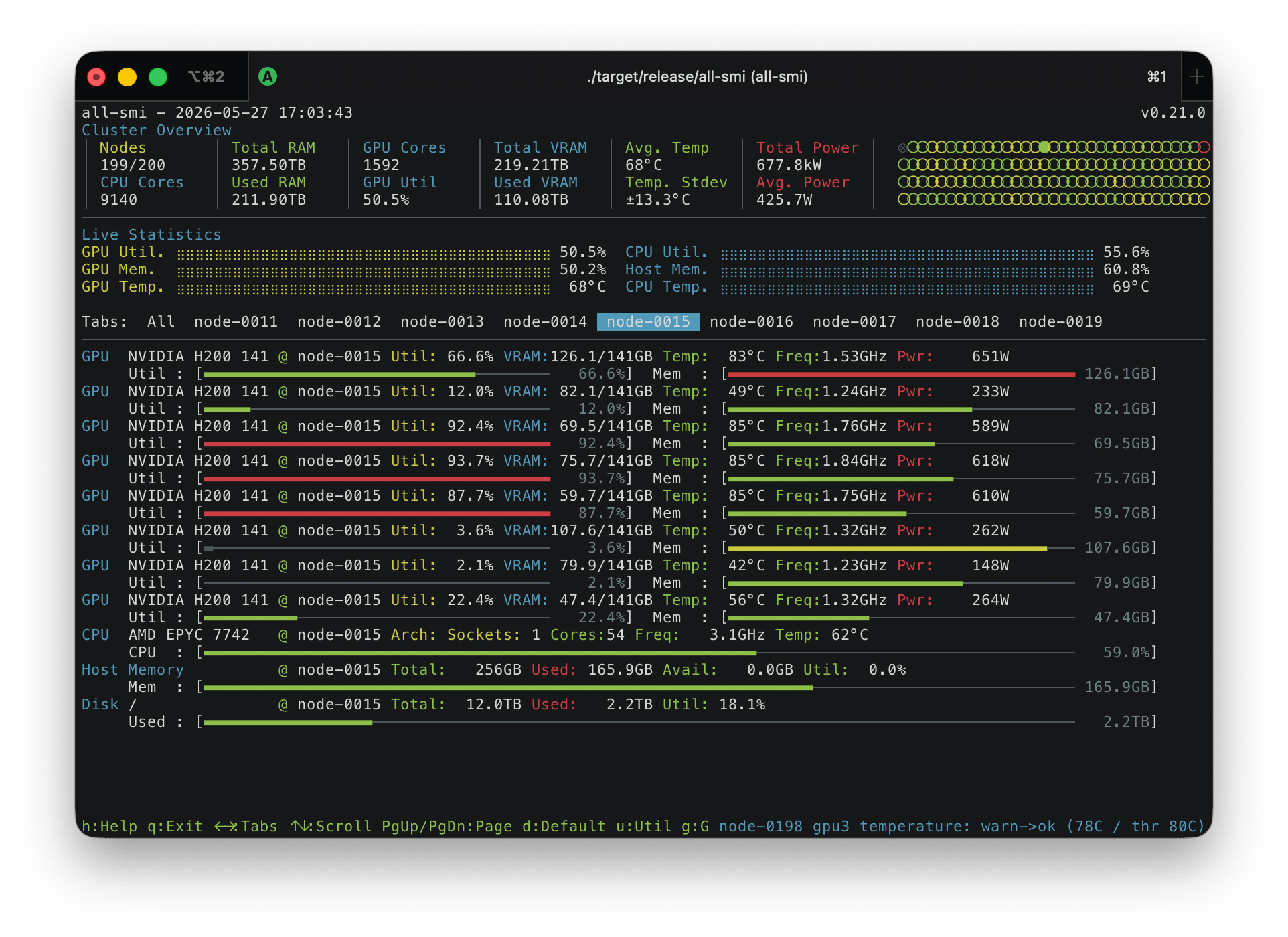
Node view (remote mode)
| Platform | Hardware / coverage |
|---|---|
| Linux | NVIDIA, AMD Radeon/Instinct, Intel Arc/Iris Xe/Xe, NVIDIA Jetson |
| Linux accelerators | Intel Gaudi, Google Cloud TPU, Tenstorrent Wormhole/Blackhole, Rebellions ATOM/REBEL, Furiosa RNGD, AWS Trainium/Inferentia |
| macOS (Apple Silicon) | GPU, CPU, memory, ANE power, and thermal metrics; no sudo required |
| macOS (Intel) | CPU, memory, and chassis metrics; no GPU monitoring |
| Windows | NVIDIA, AMD, and Intel GPU backends, CPU and memory; sensor coverage depends on drivers and permissions |
| Windows on ARM64 | NVIDIA RTX Spark N1X: Blackwell GPU with its NPU shown as a DLA gauge, heterogeneous Cortex-X925 / A725 CPU cores; building from source needs LLVM (clang) |
Not every device exposes every metric. See hardware requirements for drivers, permissions, and limitations.
brew install all-smi
sudo add-apt-repository ppa:lablup/backend-ai
sudo apt update
sudo apt install all-smi
cargo install all-smi — see build prerequisites. Cargo does not install the Linux AMD companion library; use a release archive, package, or source build for Linux AMD monitoring.On glibc Linux, keep liball_smi_amd.so with the downloaded binary for AMD monitoring. The main binary can run without it. No container image is published.
all-smi
With default settings this opens the local TUI. all-smi local selects it explicitly. Press h for help or q to quit. macOS does not require sudo; other platforms may need device permissions for particular readers.
Start an exporter on each node:
all-smi api --port 9090
Connect from your workstation:
all-smi view --hosts http://node1:9090 http://node2:9090
Metrics are available at http://node1:9090/metrics. Keep exporters on a trusted network; use your firewall or an authenticated proxy to control access. For machines without an exporter, see SSH monitoring.
# One-shot JSON (with default configuration)
all-smi snapshot

# Capture 30 seconds, then replay in the TUI
all-smi record --output trace.ndjson.zst --duration 30s
all-smi view --replay trace.ndjson.zst
See snapshots and recording for CSV, scripting, configuration caveats, and capture limitations.
all-smi doctor
all-smi config path
all-smi --help
Configuration is optional. To keep an exporter running across reboots, follow the service guide for your platform and installation method.
| I want to… | Read |
|---|---|
| Install or check hardware requirements | Installation |
| Use local/remote views, SSH, filters, alerts, or keyboard controls | Monitoring guide |
| Set persistent options or environment variables | Configuration reference |
| Run an exporter at boot and find its logs | Service guide |
| Script exports or record/replay an incident | Snapshots and recording |
| Diagnose missing metrics or create a support bundle | Troubleshooting |
| Integrate Prometheus, JSON, or SSE | API reference |
| Embed all-smi in a Rust program | Library API |
| Build, contribute, or run tests | Developer guide · Testing |
| Understand the internals | Architecture |
| Find changes in a release | Changelog |
These documents track main. For a released version, browse the documentation at its Git tag and consult the release history.
Bug reports, hardware compatibility reports, and pull requests are welcome. Start with the contribution guidelines. For missing devices or metrics, see how to collect a diagnostic report.
The project's development background and tooling are described in the development story.
6,598 followers · starred Oct 2026
373 followers · starred Jul 2026
629 followers · starred Jul 2026
306 followers · starred Sep 2026
Command-line utility for monitoring GPU hardware.
See the code
all-smi monitors GPUs, NPUs, CPUs, and memory from one terminal — on your workstation or across a cluster. It also exports Prometheus metrics and machine-readable snapshots for monitoring systems and scripts.
Local-node view (on macOS)
All-node view (remote mode)
Node view (remote mode)
| Platform | Hardware / coverage |
|---|---|
| Linux | NVIDIA, AMD Radeon/Instinct, Intel Arc/Iris Xe/Xe, NVIDIA Jetson |
| Linux accelerators | Intel Gaudi, Google Cloud TPU, Tenstorrent Wormhole/Blackhole, Rebellions ATOM/REBEL, Furiosa RNGD, AWS Trainium/Inferentia |
| macOS (Apple Silicon) | GPU, CPU, memory, ANE power, and thermal metrics; no sudo required |
| macOS (Intel) | CPU, memory, and chassis metrics; no GPU monitoring |
| Windows | NVIDIA, AMD, and Intel GPU backends, CPU and memory; sensor coverage depends on drivers and permissions |
| Windows on ARM64 | NVIDIA RTX Spark N1X: Blackwell GPU with its NPU shown as a DLA gauge, heterogeneous Cortex-X925 / A725 CPU cores; building from source needs LLVM (clang) |
Not every device exposes every metric. See hardware requirements for drivers, permissions, and limitations.
brew install all-smi
sudo add-apt-repository ppa:lablup/backend-ai
sudo apt update
sudo apt install all-smi
cargo install all-smi — see build prerequisites. Cargo does not install the Linux AMD companion library; use a release archive, package, or source build for Linux AMD monitoring.On glibc Linux, keep liball_smi_amd.so with the downloaded binary for AMD monitoring. The main binary can run without it. No container image is published.
all-smi
With default settings this opens the local TUI. all-smi local selects it explicitly. Press h for help or q to quit. macOS does not require sudo; other platforms may need device permissions for particular readers.
Start an exporter on each node:
all-smi api --port 9090
Connect from your workstation:
all-smi view --hosts http://node1:9090 http://node2:9090
Metrics are available at http://node1:9090/metrics. Keep exporters on a trusted network; use your firewall or an authenticated proxy to control access. For machines without an exporter, see SSH monitoring.
# One-shot JSON (with default configuration)
all-smi snapshot

# Capture 30 seconds, then replay in the TUI
all-smi record --output trace.ndjson.zst --duration 30s
all-smi view --replay trace.ndjson.zst
See snapshots and recording for CSV, scripting, configuration caveats, and capture limitations.
all-smi doctor
all-smi config path
all-smi --help
Configuration is optional. To keep an exporter running across reboots, follow the service guide for your platform and installation method.
| I want to… | Read |
|---|---|
| Install or check hardware requirements | Installation |
| Use local/remote views, SSH, filters, alerts, or keyboard controls | Monitoring guide |
| Set persistent options or environment variables | Configuration reference |
| Run an exporter at boot and find its logs | Service guide |
| Script exports or record/replay an incident | Snapshots and recording |
| Diagnose missing metrics or create a support bundle | Troubleshooting |
| Integrate Prometheus, JSON, or SSE | API reference |
| Embed all-smi in a Rust program | Library API |
| Build, contribute, or run tests | Developer guide · Testing |
| Understand the internals | Architecture |
| Find changes in a release | Changelog |
These documents track main. For a released version, browse the documentation at its Git tag and consult the release history.
Bug reports, hardware compatibility reports, and pull requests are welcome. Start with the contribution guidelines. For missing devices or metrics, see how to collect a diagnostic report.
The project's development background and tooling are described in the development story.
6,598 followers · starred Oct 2026
373 followers · starred Jul 2026
629 followers · starred Jul 2026
306 followers · starred Sep 2026



