InkBoy runs Game Boy games on a Waveshare ESP32-S3 e-paper board at about 30 fps. Choose fast dithered black and white or four-shade grayscale. It includes an SD ROM browser, speaker audio, automatic resume, tunable display presets and an optional FPS counter.
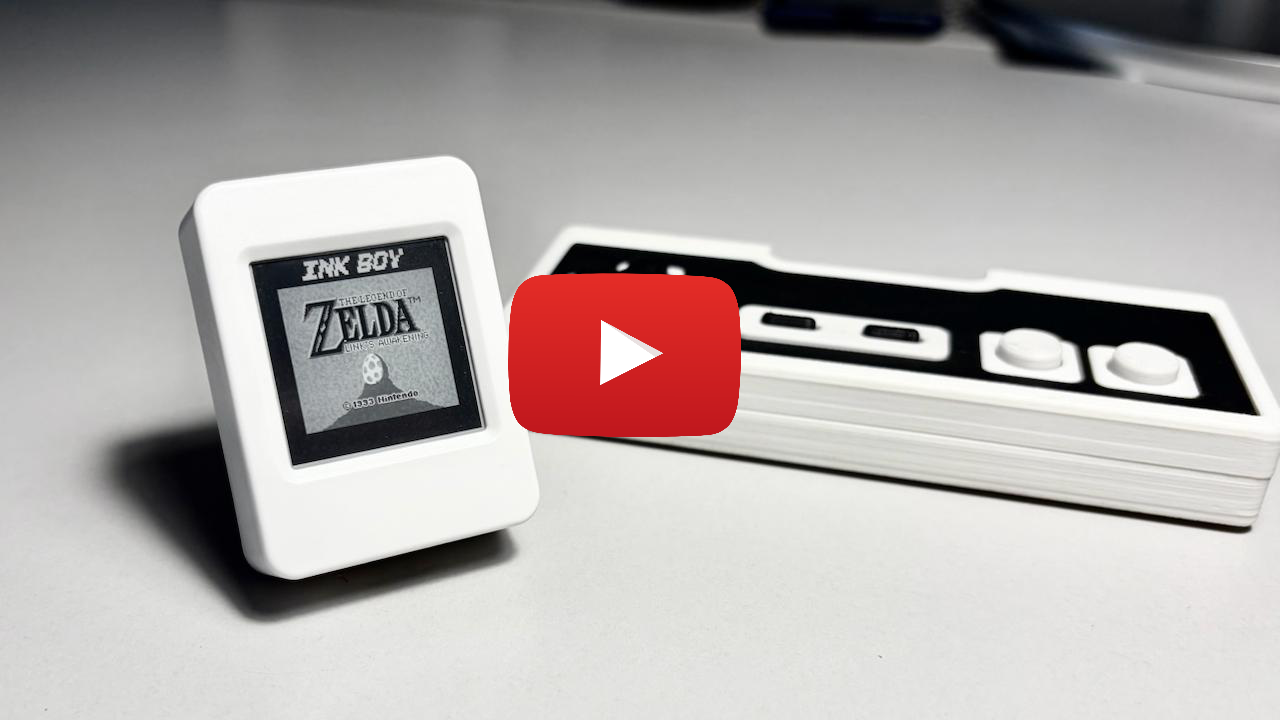
| Part | Requirement |
|---|---|
| Waveshare ESP32-S3-ePaper-1.54 V2 | 200×200 e-paper screen, speaker and microSD slot |
| microSD card | FAT32, for ROMs, saves and presets |
| InkBoy controller | Custom ESP32-C3 gamepad, connected over BLE or a USB-C data cable |
Only the custom InkBoy controller is currently supported. Generic Bluetooth and USB HID gamepads are not supported.
[!WARNING] Use at your own risk. Custom waveforms and high refresh rates may cause permanent image retention or panel damage. Long-term panel life has not been validated. This applies to default presets, source builds and prebuilt firmware; software checks do not guarantee panel safety.
Install ESP-IDF v6.1 with Espressif Installation Manager and open its IDF Terminal. Navigate to where you want the project saved (no spaces in the path), connect the board with a USB-C data cable, then run:
git clone --recursive https://github.com/kuslota/InkBoy.git
cd InkBoy
idf.py set-target esp32s3
idf.py build
idf.py flash
This creates an InkBoy folder in your current directory. See the flashing guide for folder setup, subsequent builds, prebuilt firmware and USB recovery.
Format the SD card as FAT32 and copy your ROMs into /roms. Power the board off before inserting or removing the card. The Big2Small puzzle game is included: copy roms/big2small.gb onto the card. It has its own GPL licence; no proprietary game ROMs are bundled.
Choose Settings → Controller → Connection:
ESP32 Gamepad.If your button wiring differs, use Settings → Controller → Map buttons.
| Input | In menus |
|---|---|
| Controller Up / Down | Move selection |
| Controller A / Start; B | Select; back |
| PWR tap; hold 0.7 s | Next item; back |
| BOOT tap; hold 0.7 s | Select; previous item |
During gameplay, the controller provides the usual Game Boy buttons. Press BOOT or PWR to pause, save and return Home.
Each pause replaces the game's single resume checkpoint. Continue saved restores it; manual save slots and rollback are not available. Use Home → Power off before removing the SD card. BOOT wakes the board.
The controller badge on Home and in Controller settings shows connected, WAIT (disconnected), OFF (service unavailable), or USB: PC (serial/flashing enabled). Full controls, badge meanings and save files are in the controls guide.
The controller shares the port with flashing and serial. Unplugging it does not free the port automatically.
To flash: hold BOOT + PWR together for at least 2 seconds until the badge shows USB: PC, disconnect the controller, connect your computer, then flash normally. The saved USB preference is unchanged. Restarting returns to controller mode; to return without restarting, disconnect the computer and repeat the gesture.
For repeated flashing, logging or automation, select Bluetooth first. USB then stays free across restarts. Some serial tools reset the board when opening the port. See USB switching and recovery for details.
Game Boy (DMG) games and dual-mode cartridges in DMG mode, up to 2 MiB. Color-only games and RTC cartridges are not supported. Busy scenes may drop below 30 fps; grayscale can leave faint trails. See full limitations.
Found display settings that work better? Open a pull request with your preset or changes to pulse counts, HOLD, history corrections or shade transitions. Include your board/display model, what you tested, and what improved or got worse; comparison photos or videos are welcome. See the tuning guide for the available settings.
esp32-gameboy component. Sound uses the MiniGB APU from Peanut-GB.Full license information is in THIRD_PARTY_NOTICES.md.
MIT, see LICENSE. Third-party components keep their own licenses.
InkBoy runs Game Boy games on a Waveshare ESP32-S3 e-paper board at about 30 fps. Choose fast dithered black and white or four-shade grayscale. It includes an SD ROM browser, speaker audio, automatic resume, tunable display presets and an optional FPS counter.
| Part | Requirement |
|---|---|
| Waveshare ESP32-S3-ePaper-1.54 V2 | 200×200 e-paper screen, speaker and microSD slot |
| microSD card | FAT32, for ROMs, saves and presets |
| InkBoy controller | Custom ESP32-C3 gamepad, connected over BLE or a USB-C data cable |
Only the custom InkBoy controller is currently supported. Generic Bluetooth and USB HID gamepads are not supported.
[!WARNING] Use at your own risk. Custom waveforms and high refresh rates may cause permanent image retention or panel damage. Long-term panel life has not been validated. This applies to default presets, source builds and prebuilt firmware; software checks do not guarantee panel safety.
Install ESP-IDF v6.1 with Espressif Installation Manager and open its IDF Terminal. Navigate to where you want the project saved (no spaces in the path), connect the board with a USB-C data cable, then run:
git clone --recursive https://github.com/kuslota/InkBoy.git
cd InkBoy
idf.py set-target esp32s3
idf.py build
idf.py flash
This creates an InkBoy folder in your current directory. See the flashing guide for folder setup, subsequent builds, prebuilt firmware and USB recovery.
Format the SD card as FAT32 and copy your ROMs into /roms. Power the board off before inserting or removing the card. The Big2Small puzzle game is included: copy roms/big2small.gb onto the card. It has its own GPL licence; no proprietary game ROMs are bundled.
Choose Settings → Controller → Connection:
ESP32 Gamepad.If your button wiring differs, use Settings → Controller → Map buttons.
| Input | In menus |
|---|---|
| Controller Up / Down | Move selection |
| Controller A / Start; B | Select; back |
| PWR tap; hold 0.7 s | Next item; back |
| BOOT tap; hold 0.7 s | Select; previous item |
During gameplay, the controller provides the usual Game Boy buttons. Press BOOT or PWR to pause, save and return Home.
Each pause replaces the game's single resume checkpoint. Continue saved restores it; manual save slots and rollback are not available. Use Home → Power off before removing the SD card. BOOT wakes the board.
The controller badge on Home and in Controller settings shows connected, WAIT (disconnected), OFF (service unavailable), or USB: PC (serial/flashing enabled). Full controls, badge meanings and save files are in the controls guide.
The controller shares the port with flashing and serial. Unplugging it does not free the port automatically.
To flash: hold BOOT + PWR together for at least 2 seconds until the badge shows USB: PC, disconnect the controller, connect your computer, then flash normally. The saved USB preference is unchanged. Restarting returns to controller mode; to return without restarting, disconnect the computer and repeat the gesture.
For repeated flashing, logging or automation, select Bluetooth first. USB then stays free across restarts. Some serial tools reset the board when opening the port. See USB switching and recovery for details.
Game Boy (DMG) games and dual-mode cartridges in DMG mode, up to 2 MiB. Color-only games and RTC cartridges are not supported. Busy scenes may drop below 30 fps; grayscale can leave faint trails. See full limitations.
Found display settings that work better? Open a pull request with your preset or changes to pulse counts, HOLD, history corrections or shade transitions. Include your board/display model, what you tested, and what improved or got worse; comparison photos or videos are welcome. See the tuning guide for the available settings.
esp32-gameboy component. Sound uses the MiniGB APU from Peanut-GB.Full license information is in THIRD_PARTY_NOTICES.md.
MIT, see LICENSE. Third-party components keep their own licenses.



