A platform for packaging and launching blockchain infra. Think docker compose for blockchain
See the code

Have you ever tried to build on top of a colleague's work, or contribute to an open source project, just to get stuck on the first steps of spinning up a stack to play with? Kurtosis handles the complexity of spinning up ephemeral dev or test stacks so you can focus on developing, not configuring.
Kurtosis is formed of:
Kurtosis is best for:
Kurtosis operates at a level higher than Docker Compose or Helm, and produces stacks running on either of the underlying engines (the Docker engine, or Kubernetes). Because of this additional layer of abstraction, we are able to introduce several features to improve the experience of spinning up ephemeral stacks:
NOTE: we do NOT recommend using Kurtosis to deploy long term production environments at this moment. Any issues/Discords related to production usage will be closed.
To see Kurtosis in action, first install it using the instructions here.
Then, run the Redis voting app Kurtosis package:
kurtosis run github.com/kurtosis-tech/awesome-kurtosis/redis-voting-app
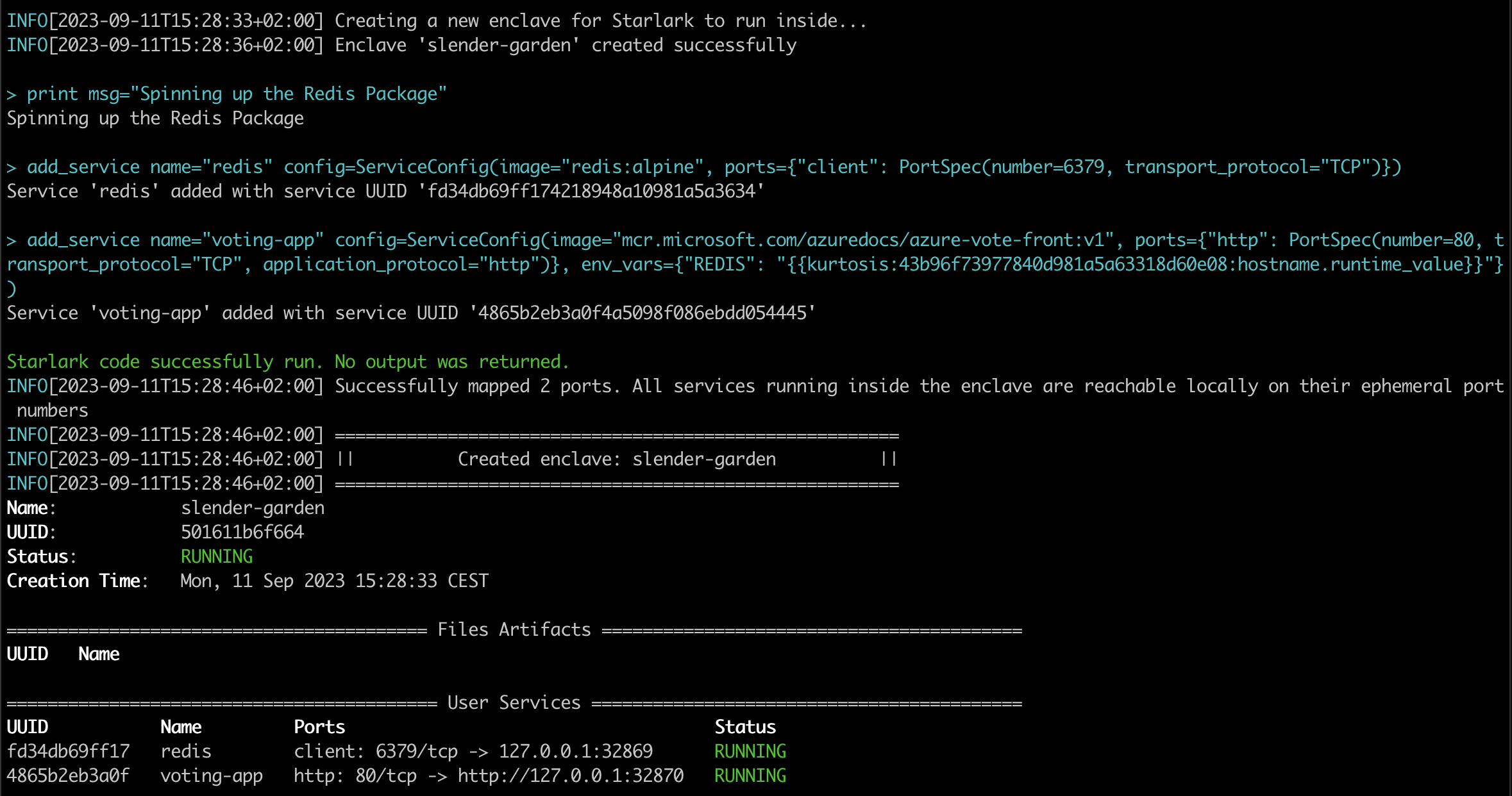
Finally, open the http link printed in the last line in your browser.
If you have an issue or feature request, we'd love to hear about it through one of the following:
kurtosis feedback --bug or kurtosis feedback --feature)To try more Kurtosis packages just like this one, check out the awesome-kurtosis repo!
To learn about how to write Kurtosis packages, check out our quickstart.
To read about how Kurtosis works, see our documentation.
To see where we're going with the product, check out the roadmap here.
Got more questions? Drop them in our Github Discussions where we, or other community members, can help answer.
This repository includes Claude Code skills that teach Claude how to work with Kurtosis. Skills are structured prompts in the skills/ directory that give Claude operational knowledge about building, debugging, deploying, and managing Kurtosis enclaves.
| Skill | Description |
|---|---|
clean | Clean up enclaves and artifacts |
cli-local-build | Build the CLI from source |
cluster-manage | Manage Kurtosis clusters |
context-manage | Manage Kurtosis contexts |
docker-debug | Debug Docker-based enclaves |
docker-local-build | Build and load Docker images locally |
dump | Dump enclave state for debugging |
enclave-inspect | Inspect running enclaves |
engine-manage | Start, stop, and restart the engine |
files-inspect | Inspect files artifacts |
gateway | Manage the Kurtosis gateway |
grafloki | Query Grafana and Loki observability |
import-compose | Import Docker Compose files |
k8s-clean-cluster | Clean Kurtosis resources from K8s |
k8s-debug-pods | Debug pods on Kubernetes |
k8s-dev-deploy | Build and deploy dev images to K8s |
lint | Lint the codebase |
port-forward | Forward ports from enclaves |
portal | Manage the Kurtosis portal |
run-package | Run Starlark packages |
service-manage | Manage services within enclaves |
starlark-dev | Develop Starlark packages |
Skills are auto-discovered by Claude Code when present in a project's skills/ directory. There are several ways to install them:
If you're contributing to Kurtosis, skills are already included:
git clone https://github.com/kurtosis-tech/kurtosis.git
cd kurtosis
Claude Code will automatically discover the skills when you open a conversation in this directory.
Copy the skills/ directory into any project where you want Claude to have Kurtosis knowledge:
# From the kurtosis repo, copy skills into your project
cp -r /path/to/kurtosis/skills /path/to/your-project/skills
If you want to keep skills in sync with the Kurtosis repo without copying:
# Symlink the entire skills directory
ln -s /path/to/kurtosis/skills /path/to/your-project/skills

# Or symlink individual skills
mkdir -p /path/to/your-project/skills
ln -s /path/to/kurtosis/skills/run-package /path/to/your-project/skills/run-package
To make Kurtosis skills available across all your Claude Code projects, add them to your global Claude configuration:
# Copy skills to your global Claude config
cp -r /path/to/kurtosis/skills ~/.claude/skills
Once installed, skills are invoked as slash commands in Claude Code:
/clean          # Clean up enclaves
/run-package    # Run a Starlark package
/docker-debug   # Debug Docker containers
/k8s-debug-pods # Debug Kubernetes pods
You can also reference skills naturally in conversation — Claude will use the relevant skill context automatically when discussing Kurtosis topics.
See our CONTRIBUTING file.
This repository is structured as a monorepo, containing the following projects:
container-engine-lib: Library used to abstract away container engine being used by the enclave.core: Container launched inside an enclave to coordinate its stateengine: Container launched to coordinate enclavesapi: Defines the API of the Kurtosis platform (engine and core)cli: Produces CLI binary, allowing interaction with the Kurtosis systemdocs: Documentation that is published to docs.kurtosis.cominternal_testsuites: End to end testsInstall the Nix package manager.
sh <(curl -L https://nixos.org/nix/install)
And enable some Nix flags (alternatively you can add --extra-experimental-features 'nix-command flakes' every time calling the nix command):
mkdir -p ~/.config/nix
echo "experimental-features = nix-command flakes" >> ~/.config/nix/nix.conf
And to bring the environment up, just open a new shell terminal, go to the root folder of the repo and run:
nix develop
This will download all dev deps and setup the environment accordingly.
You can also use the direnv to automatically load the environment when entering the main folder or using a plugin in your preferred IDE:
vscode: mkhl.direnvjet brains: Direnv integrationDirenv can also be easily installed with Nix (or HomeBrew if you prefer):
nix-env -f '<nixpkgs>' -iA direnv
Now you just to add the direnv hook to your shell:
echo 'eval "$(direnv hook bash)"' >> ~/.bashrc
# or for ZSH
echo 'eval "$(direnv hook zsh)"' >> ~/.zshrc
Now next time you open a new shell terminal and go to repo's folder you environment will update and load automatically.
The commands below assume that the env variable BREW_PREFIX contains the brew prefix.
BREW_PREFIX="$(brew --prefix)"
On MacOS:
# Install modern version of bash, the one that ships on MacOS is too old
brew install bash
# Allow bash as shell
echo "${BREW_PREFIX}/bin/bash" | sudo tee -a /etc/shells
# Optional: make bash your default shell
chsh -s "${BREW_PREFIX}/bin/bash"
On MacOS:
# Install modern version of git, the one that ships on MacOS can be too old
brew install git
On MacOS:
brew install docker
On MacOS:
brew install [email protected]
# Add the Go binary dir to your PATH
PATH="${BREW_PREFIX}/opt/[email protected]/bin:$PATH"
# Add the GOPATH bin dir to your PATH
PATH="${HOME}/go/bin:$PATH"
On Ubuntu:
wget https://go.dev/dl/go1.23.7.linux-amd64.tar.gz
tar -C /usr/local -zxf go1.23.7.linux-amd64.tar.gz
# Add the following to your bashrc or equivalent.
export PATH=$PATH:/usr/local/go/bin
On MacOS:
brew install goreleaser/tap/goreleaser
On Ubuntu:
echo 'deb [trusted=yes] https://repo.goreleaser.com/apt/ /' | sudo tee /etc/apt/sources.list.d/goreleaser.list
sudo apt update
sudo apt install goreleaser
On MacOS, using NVM:
brew install nvm
mkdir ~/.nvm
nvm install 20.11.0
npm install -g yarn
On Ubuntu, using NVM:
curl https://raw.githubusercontent.com/creationix/nvm/master/install.sh | bash
source ~/.bashrc
nvm install 20.11.0
npm install -g yarn
On MacOS, Ubuntu:
curl --proto '=https' --tlsv1.2 -sSf https://sh.rustup.rs | sh
On MacOS:
brew install protoc-gen-go
brew install protoc-gen-go-grpc
go install connectrpc.com/connect/cmd/protoc-gen-connect-go@latest
yarn global add ts-protoc-gen
yarn global add grpc-tools
On Ubuntu:
go install google.golang.org/grpc/cmd/protoc-gen-go@latest
go install google.golang.org/grpc/cmd/protoc-gen-go-grpc@latest
go install connectrpc.com/connect/cmd/protoc-gen-connect-go@latest
yarn global add ts-protoc-gen
yarn global add grpc-tools
On MacOS:
go install github.com/deepmap/oapi-codegen/cmd/[email protected]
yarn global add [email protected]
On Ubuntu:
go install github.com/deepmap/oapi-codegen/cmd/[email protected]
yarn global add [email protected]
To build the entire project, run:
./scripts/build.sh
Note: If you encounter module import errors related to github.com/kurtosis-tech/kurtosis/kurtosis_version, you may need to generate the version constants first:
./scripts/generate-kurtosis-version.sh
This script generates the required kurtosis_version.go file that contains version constants used throughout the codebase. The file is automatically generated during the build process, but may need to be run manually in some development scenarios.
To only build a specific project, run the script on ./PROJECT/PATH/script/build.sh, for example:
./container-engine-lib/scripts/build.sh
./core/scripts/build.sh
./api/scripts/build.sh
./engine/scripts/build.sh
./cli/scripts/build.sh
If there are any changes to the Protobuf files in the api subdirectory, the Protobuf bindings must be regenerated:
./api/scripts/regenerate-protobuf-bindings.sh
If you are developing Kurtosis over a Podman cluster, run:
./scripts/build.sh false true # no debug image, use podman
This will use the Podman image builder for building images. See documentation in scripts for more details on build options.
After building the project, run ./cli/cli/scripts/launch-cli.sh just like you would the kurtosis command. This will launch the latest locally built version of the CLI, which will also start the engine and core containers using their latest built images.
You can verify this by running ./cli/cli/launch-cli.sh engine status and
A Kurtosis engine is running with the following info:
Version:   53d823 <-- or `-dirty` depending on the commit
The version will be identical to the version on the latest dev versions of the engine image created - (can verify with docker images). Enclaves started by the engine will be started with the same version as the engine.
If you'd like to specify a different core image version than that of the engine, you can do so with the --api-container-version flag on enclave add (e.g. ./cli/cli/scripts/build.sh enclave add --api-container-version <image tag>).
If you are working on multiple dev versions of the engine at a time, you can use engine restart --version <image tag> to specify exactly what version of the engine to use.
For frequent contributors, we recommend attaching an alias to kurtosis and ./cli/cli/scripts/launch-cli.sh.
alias kt="kurtosis"
alias dkt="$(pwd)/cli/cli/scripts/launch-cli.sh"
If you want tab completion on the recently built CLI, you can alias it to kurtosis:
alias kurtosis="$(pwd)/cli/cli/scripts/launch-cli.sh"
kurtosis enclave add
Build scripts also run unit tests as part of the build process.
For all Go modules, run go test ./... on the module folder. For example:
cd cli/cli/
go test ./...
Each project's build script also runs the unit tests inside the project. Running ./script/build.sh will guarantee that all unit tests in the monorepo pass.
To run the end-to-end tests:
$ docker --version
Docker version X.Y.Z
$ kurtosis engine status
A Kurtosis engine is running with the following info:
Version:   0.X.Y
test.sh script$ ./internal_testsuites/scripts/test.sh
If you are developing the Typescript test, make sure that you have first built api/typescript. Any
changes made to the Typescript package within api/typescript aren't hot loaded as of 2022-09-29.
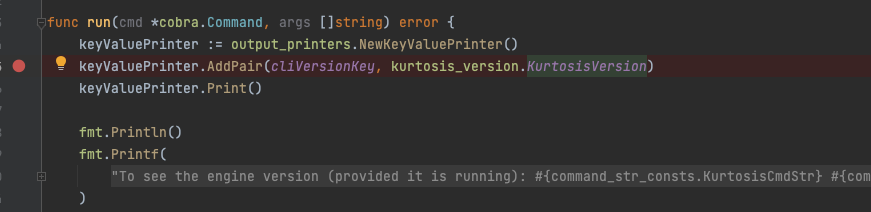
For running CLI with Golang remote debug:
cli/cli/scripts/build.sh
source ./scripts/set_kt_alias.sh
ktdebug version
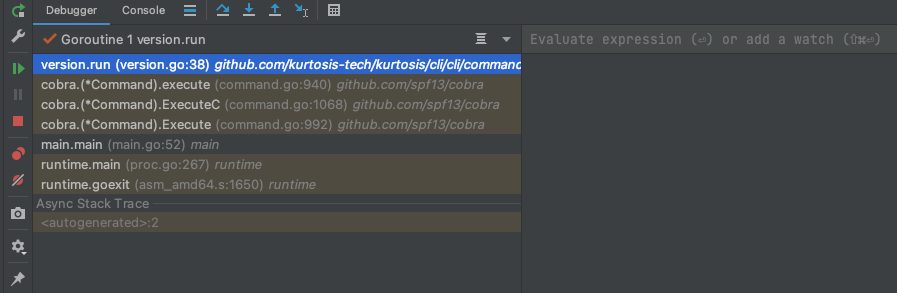
For running CLI with Delve debug client:
cli/cli/scripts/build.sh
source ./scripts/set_kt_alias.sh
ktdebug dlv-terminal version
break command(dlv) break version.run:1
continue command(dlv) continue
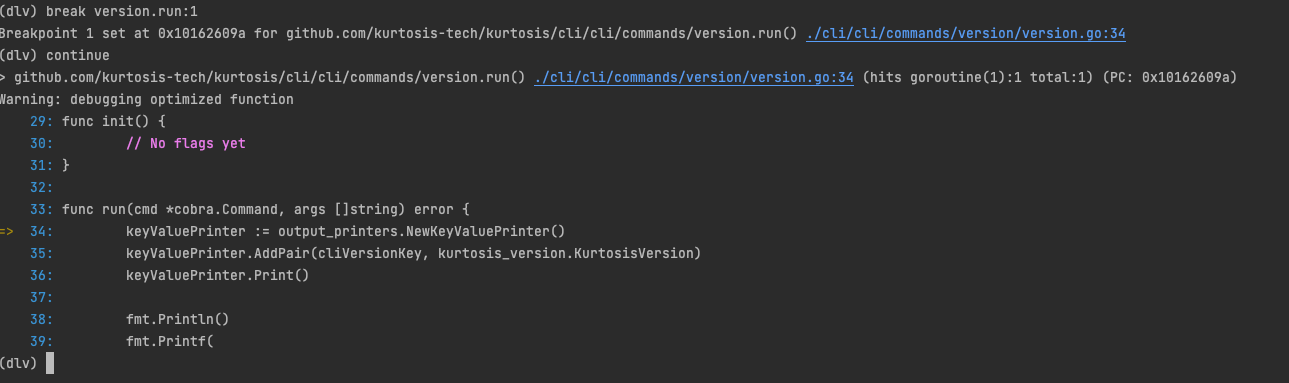 4. You can see [more Delve commands here][delve-docs]
For running Kurtosis engine with Golang remote debug:
debug_mode as true. This will generate a new Kurtosis engine container image which will contain the debug suffix in the name.scripts/build.sh true
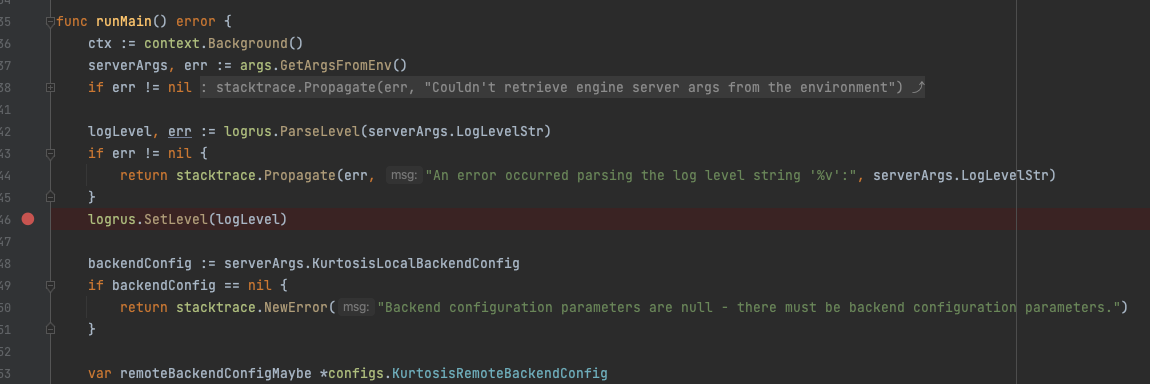
ktdev engine start --debug-mode or the ktdev engine restart --debug-mode commandssource ./scripts/set_kt_alias.sh
ktdev engine start --debug-mode

ktdebug instead of ktdev mentioned in a previous step, remember to run both remote debug configurations in the Goland IDE.source ./scripts/set_kt_alias.sh
ktdebug engine start
Additional steps if you are debugging Kurtosis engine in K8s:
# for example:
k3d image load kurtosistech/engine:5ec6eb-dirty-debug
scripts/port-forward-engine-debug.sh
ktdev gateway
For running Kurtosis APIC with Golang remote debug:
debug_mode as true. This will generate a new Kurtosis APIC container image which will contain the debug suffix in the name.scripts/build.sh true
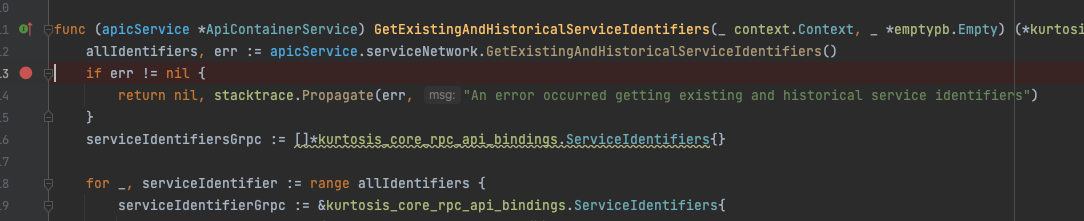
source ./scripts/set_kt_alias.sh
ktdev engine start --debug-mode
OR
ktdev engine start # you will have to build the engine in the regular way `engine/scripts/build.sh` if you choose this version
enclave add command and passing the debug-mode flag. This will create a new APIC container with the debug server port bounded and waiting for a connection.
IMPORTANT: You can only run one enclave in debug mode so far, if you want to run another one it will fail due the debug port is already in use,ktdev enclave add --debug-mode

ktdebug instead of ktdev mentioned in a previous step, remember to run the three remote debug configurations in the Goland IDE.source ./scripts/set_kt_alias.sh
ktdev engine start --debug-mode
ktdebug enclave add
Additional steps if you are debugging Kurtosis engine in K8s:
# for example:
k3d image load kurtosistech/core:5ec6eb-dirty-debug
scripts/port-forward-apic-debug.sh enclave-name
ktdev gateway
Kurtosis is an open source tool maintained by MAINTAINERS. If you find Kurtosis useful or use it for work, please consider supporting the continued development of Kurtosis. Thank you 🙏

Overall
Maintained
Code review
Latest release
Releases this year
220 followers · starred Feb 2024
226 followers · starred Jun 2024
285 followers · starred Dec 2023
355 followers · starred Jan 2024
A platform for packaging and launching blockchain infra. Think docker compose for blockchain
See the code
Have you ever tried to build on top of a colleague's work, or contribute to an open source project, just to get stuck on the first steps of spinning up a stack to play with? Kurtosis handles the complexity of spinning up ephemeral dev or test stacks so you can focus on developing, not configuring.
Kurtosis is formed of:
Kurtosis is best for:
Kurtosis operates at a level higher than Docker Compose or Helm, and produces stacks running on either of the underlying engines (the Docker engine, or Kubernetes). Because of this additional layer of abstraction, we are able to introduce several features to improve the experience of spinning up ephemeral stacks:
NOTE: we do NOT recommend using Kurtosis to deploy long term production environments at this moment. Any issues/Discords related to production usage will be closed.
To see Kurtosis in action, first install it using the instructions here.
Then, run the Redis voting app Kurtosis package:
kurtosis run github.com/kurtosis-tech/awesome-kurtosis/redis-voting-app
Finally, open the http link printed in the last line in your browser.
If you have an issue or feature request, we'd love to hear about it through one of the following:
kurtosis feedback --bug or kurtosis feedback --feature)To try more Kurtosis packages just like this one, check out the awesome-kurtosis repo!
To learn about how to write Kurtosis packages, check out our quickstart.
To read about how Kurtosis works, see our documentation.
To see where we're going with the product, check out the roadmap here.
Got more questions? Drop them in our Github Discussions where we, or other community members, can help answer.
This repository includes Claude Code skills that teach Claude how to work with Kurtosis. Skills are structured prompts in the skills/ directory that give Claude operational knowledge about building, debugging, deploying, and managing Kurtosis enclaves.
| Skill | Description |
|---|---|
clean | Clean up enclaves and artifacts |
cli-local-build | Build the CLI from source |
cluster-manage | Manage Kurtosis clusters |
context-manage | Manage Kurtosis contexts |
docker-debug | Debug Docker-based enclaves |
docker-local-build | Build and load Docker images locally |
dump | Dump enclave state for debugging |
enclave-inspect | Inspect running enclaves |
engine-manage | Start, stop, and restart the engine |
files-inspect | Inspect files artifacts |
gateway | Manage the Kurtosis gateway |
grafloki | Query Grafana and Loki observability |
import-compose | Import Docker Compose files |
k8s-clean-cluster | Clean Kurtosis resources from K8s |
k8s-debug-pods | Debug pods on Kubernetes |
k8s-dev-deploy | Build and deploy dev images to K8s |
lint | Lint the codebase |
port-forward | Forward ports from enclaves |
portal | Manage the Kurtosis portal |
run-package | Run Starlark packages |
service-manage | Manage services within enclaves |
starlark-dev | Develop Starlark packages |
Skills are auto-discovered by Claude Code when present in a project's skills/ directory. There are several ways to install them:
If you're contributing to Kurtosis, skills are already included:
git clone https://github.com/kurtosis-tech/kurtosis.git
cd kurtosis
Claude Code will automatically discover the skills when you open a conversation in this directory.
Copy the skills/ directory into any project where you want Claude to have Kurtosis knowledge:
# From the kurtosis repo, copy skills into your project
cp -r /path/to/kurtosis/skills /path/to/your-project/skills
If you want to keep skills in sync with the Kurtosis repo without copying:
# Symlink the entire skills directory
ln -s /path/to/kurtosis/skills /path/to/your-project/skills
# Or symlink individual skills
mkdir -p /path/to/your-project/skills
ln -s /path/to/kurtosis/skills/run-package /path/to/your-project/skills/run-package
To make Kurtosis skills available across all your Claude Code projects, add them to your global Claude configuration:
# Copy skills to your global Claude config
cp -r /path/to/kurtosis/skills ~/.claude/skills
Once installed, skills are invoked as slash commands in Claude Code:
/clean # Clean up enclaves
/run-package # Run a Starlark package
/docker-debug # Debug Docker containers
/k8s-debug-pods # Debug Kubernetes pods
You can also reference skills naturally in conversation — Claude will use the relevant skill context automatically when discussing Kurtosis topics.
See our CONTRIBUTING file.
This repository is structured as a monorepo, containing the following projects:
container-engine-lib: Library used to abstract away container engine being used by the enclave.core: Container launched inside an enclave to coordinate its stateengine: Container launched to coordinate enclavesapi: Defines the API of the Kurtosis platform (engine and core)cli: Produces CLI binary, allowing interaction with the Kurtosis systemdocs: Documentation that is published to docs.kurtosis.cominternal_testsuites: End to end testsInstall the Nix package manager.
sh <(curl -L https://nixos.org/nix/install)
And enable some Nix flags (alternatively you can add --extra-experimental-features 'nix-command flakes' every time calling the nix command):
mkdir -p ~/.config/nix
echo "experimental-features = nix-command flakes" >> ~/.config/nix/nix.conf
And to bring the environment up, just open a new shell terminal, go to the root folder of the repo and run:
nix develop
This will download all dev deps and setup the environment accordingly.
You can also use the direnv to automatically load the environment when entering the main folder or using a plugin in your preferred IDE:
vscode: mkhl.direnvjet brains: Direnv integrationDirenv can also be easily installed with Nix (or HomeBrew if you prefer):
nix-env -f '<nixpkgs>' -iA direnv
Now you just to add the direnv hook to your shell:
echo 'eval "$(direnv hook bash)"' >> ~/.bashrc
# or for ZSH
echo 'eval "$(direnv hook zsh)"' >> ~/.zshrc
Now next time you open a new shell terminal and go to repo's folder you environment will update and load automatically.
The commands below assume that the env variable BREW_PREFIX contains the brew prefix.
BREW_PREFIX="$(brew --prefix)"
On MacOS:
# Install modern version of bash, the one that ships on MacOS is too old
brew install bash
# Allow bash as shell
echo "${BREW_PREFIX}/bin/bash" | sudo tee -a /etc/shells
# Optional: make bash your default shell
chsh -s "${BREW_PREFIX}/bin/bash"
On MacOS:
# Install modern version of git, the one that ships on MacOS can be too old
brew install git
On MacOS:
brew install docker
On MacOS:
brew install [email protected]
# Add the Go binary dir to your PATH
PATH="${BREW_PREFIX}/opt/[email protected]/bin:$PATH"
# Add the GOPATH bin dir to your PATH
PATH="${HOME}/go/bin:$PATH"
On Ubuntu:
wget https://go.dev/dl/go1.23.7.linux-amd64.tar.gz
tar -C /usr/local -zxf go1.23.7.linux-amd64.tar.gz
# Add the following to your bashrc or equivalent.
export PATH=$PATH:/usr/local/go/bin
On MacOS:
brew install goreleaser/tap/goreleaser
On Ubuntu:
echo 'deb [trusted=yes] https://repo.goreleaser.com/apt/ /' | sudo tee /etc/apt/sources.list.d/goreleaser.list
sudo apt update
sudo apt install goreleaser
On MacOS, using NVM:
brew install nvm
mkdir ~/.nvm
nvm install 20.11.0
npm install -g yarn
On Ubuntu, using NVM:
curl https://raw.githubusercontent.com/creationix/nvm/master/install.sh | bash
source ~/.bashrc
nvm install 20.11.0
npm install -g yarn
On MacOS, Ubuntu:
curl --proto '=https' --tlsv1.2 -sSf https://sh.rustup.rs | sh
On MacOS:
brew install protoc-gen-go
brew install protoc-gen-go-grpc
go install connectrpc.com/connect/cmd/protoc-gen-connect-go@latest
yarn global add ts-protoc-gen
yarn global add grpc-tools
On Ubuntu:
go install google.golang.org/grpc/cmd/protoc-gen-go@latest
go install google.golang.org/grpc/cmd/protoc-gen-go-grpc@latest
go install connectrpc.com/connect/cmd/protoc-gen-connect-go@latest
yarn global add ts-protoc-gen
yarn global add grpc-tools
On MacOS:
go install github.com/deepmap/oapi-codegen/cmd/[email protected]
yarn global add [email protected]
On Ubuntu:
go install github.com/deepmap/oapi-codegen/cmd/[email protected]
yarn global add [email protected]
To build the entire project, run:
./scripts/build.sh
Note: If you encounter module import errors related to github.com/kurtosis-tech/kurtosis/kurtosis_version, you may need to generate the version constants first:
./scripts/generate-kurtosis-version.sh
This script generates the required kurtosis_version.go file that contains version constants used throughout the codebase. The file is automatically generated during the build process, but may need to be run manually in some development scenarios.
To only build a specific project, run the script on ./PROJECT/PATH/script/build.sh, for example:
./container-engine-lib/scripts/build.sh
./core/scripts/build.sh
./api/scripts/build.sh
./engine/scripts/build.sh
./cli/scripts/build.sh
If there are any changes to the Protobuf files in the api subdirectory, the Protobuf bindings must be regenerated:
./api/scripts/regenerate-protobuf-bindings.sh
If you are developing Kurtosis over a Podman cluster, run:
./scripts/build.sh false true # no debug image, use podman
This will use the Podman image builder for building images. See documentation in scripts for more details on build options.
After building the project, run ./cli/cli/scripts/launch-cli.sh just like you would the kurtosis command. This will launch the latest locally built version of the CLI, which will also start the engine and core containers using their latest built images.
You can verify this by running ./cli/cli/launch-cli.sh engine status and
A Kurtosis engine is running with the following info:
Version: 53d823 <-- or `-dirty` depending on the commit
The version will be identical to the version on the latest dev versions of the engine image created - (can verify with docker images). Enclaves started by the engine will be started with the same version as the engine.
If you'd like to specify a different core image version than that of the engine, you can do so with the --api-container-version flag on enclave add (e.g. ./cli/cli/scripts/build.sh enclave add --api-container-version <image tag>).
If you are working on multiple dev versions of the engine at a time, you can use engine restart --version <image tag> to specify exactly what version of the engine to use.
For frequent contributors, we recommend attaching an alias to kurtosis and ./cli/cli/scripts/launch-cli.sh.
alias kt="kurtosis"
alias dkt="$(pwd)/cli/cli/scripts/launch-cli.sh"
If you want tab completion on the recently built CLI, you can alias it to kurtosis:
alias kurtosis="$(pwd)/cli/cli/scripts/launch-cli.sh"
kurtosis enclave add
Build scripts also run unit tests as part of the build process.
For all Go modules, run go test ./... on the module folder. For example:
cd cli/cli/
go test ./...
Each project's build script also runs the unit tests inside the project. Running ./script/build.sh will guarantee that all unit tests in the monorepo pass.
To run the end-to-end tests:
$ docker --version
Docker version X.Y.Z
$ kurtosis engine status
A Kurtosis engine is running with the following info:
Version: 0.X.Y
test.sh script$ ./internal_testsuites/scripts/test.sh
If you are developing the Typescript test, make sure that you have first built api/typescript. Any
changes made to the Typescript package within api/typescript aren't hot loaded as of 2022-09-29.
For running CLI with Golang remote debug:
cli/cli/scripts/build.sh
source ./scripts/set_kt_alias.sh
ktdebug version
For running CLI with Delve debug client:
cli/cli/scripts/build.sh
source ./scripts/set_kt_alias.sh
ktdebug dlv-terminal version
break command(dlv) break version.run:1
continue command(dlv) continue
For running Kurtosis engine with Golang remote debug:
debug_mode as true. This will generate a new Kurtosis engine container image which will contain the debug suffix in the name.scripts/build.sh true
ktdev engine start --debug-mode or the ktdev engine restart --debug-mode commandssource ./scripts/set_kt_alias.sh
ktdev engine start --debug-mode
ktdebug instead of ktdev mentioned in a previous step, remember to run both remote debug configurations in the Goland IDE.source ./scripts/set_kt_alias.sh
ktdebug engine start
Additional steps if you are debugging Kurtosis engine in K8s:
# for example:
k3d image load kurtosistech/engine:5ec6eb-dirty-debug
scripts/port-forward-engine-debug.sh
ktdev gateway
For running Kurtosis APIC with Golang remote debug:
debug_mode as true. This will generate a new Kurtosis APIC container image which will contain the debug suffix in the name.scripts/build.sh true
source ./scripts/set_kt_alias.sh
ktdev engine start --debug-mode

OR

ktdev engine start # you will have to build the engine in the regular way `engine/scripts/build.sh` if you choose this version
enclave add command and passing the debug-mode flag. This will create a new APIC container with the debug server port bounded and waiting for a connection.
IMPORTANT: You can only run one enclave in debug mode so far, if you want to run another one it will fail due the debug port is already in use,ktdev enclave add --debug-mode
ktdebug instead of ktdev mentioned in a previous step, remember to run the three remote debug configurations in the Goland IDE.source ./scripts/set_kt_alias.sh
ktdev engine start --debug-mode
ktdebug enclave add
Additional steps if you are debugging Kurtosis engine in K8s:
# for example:
k3d image load kurtosistech/core:5ec6eb-dirty-debug
scripts/port-forward-apic-debug.sh enclave-name
ktdev gateway
Kurtosis is an open source tool maintained by MAINTAINERS. If you find Kurtosis useful or use it for work, please consider supporting the continued development of Kurtosis. Thank you 🙏
Overall
Maintained
Code review
Latest release
Releases this year
220 followers · starred Feb 2024
226 followers · starred Jun 2024
285 followers · starred Dec 2023
355 followers · starred Jan 2024



