A playable Windows city sandbox written in C++20, with Direct3D 12 and AMD FSR2, Dear ImGui, Lua missions, Jolt Physics, and XAudio2. Direct3D 11 with Dear ImGui menus remains available through -DX11; the default DX12 build retains its existing menus. Explore two cities, a beach and harbor, countryside forests, snowfields, desert, savanna, and a Marina Part-inspired waterfront district. Regional terrain includes mountains, rocky ridges, rolling hills, and dry basins with matching Jolt collision; terrain assets and rebuild instructions document the imported CC0 rocks.
Set forest fires that spread through grass and trees, or use an RPG to blast holes in buildings and scatter physical debris. Building damage updates collision for the current session and resets on load.
The project is an evolving prototype. Implementation and verification status are tracked in idea.md and the graphics upgrade plan.
The ongoing codebase refactor and current module boundaries are documented in Architecture.
For an in-depth explanation of the engine, see the Technical Guide. It follows models and vertices through the retained Direct3D 11 pipeline, mipmaps, lighting, animation, camera movement, and collision. For the default DX12 backend and shared renderer components, see Architecture.
data/missions.lua. Terrain shaping, geographic masks and world placements are editable runtime files; see gameplay data.data/radio.ini accepts additional direct MP3/AAC stream URLs.Recent milestones cover native DX12 and FSR2, DX12 deformation, shadows and clouds, and shared rendering resource ownership. The resource checkpoint passed eight targeted suites and matched DX11, native DX12, FSR2 and four-worker game checks; these are bounded checks within an unfinished prototype, not a claim that every roadmap item is complete. See current limitations.
Grass source credits and reproducible import steps are in GRASS.md. Run ./tools/verify_grass.ps1 for 1080p surface/distance/LOD/menu captures, or add -Benchmark to compare Off/default/maximum draw distance. Use -Capture lod-default or -Capture lod-max to compare the detailed grass radius. The grass_scenarios test checks 2K PBR assets, transparency, rooted wind weights, surface exclusions, deterministic placement, density, distance disabling, and independently adjustable LOD selection without changing roots. The simulation suite verifies both grass settings survive save/load.
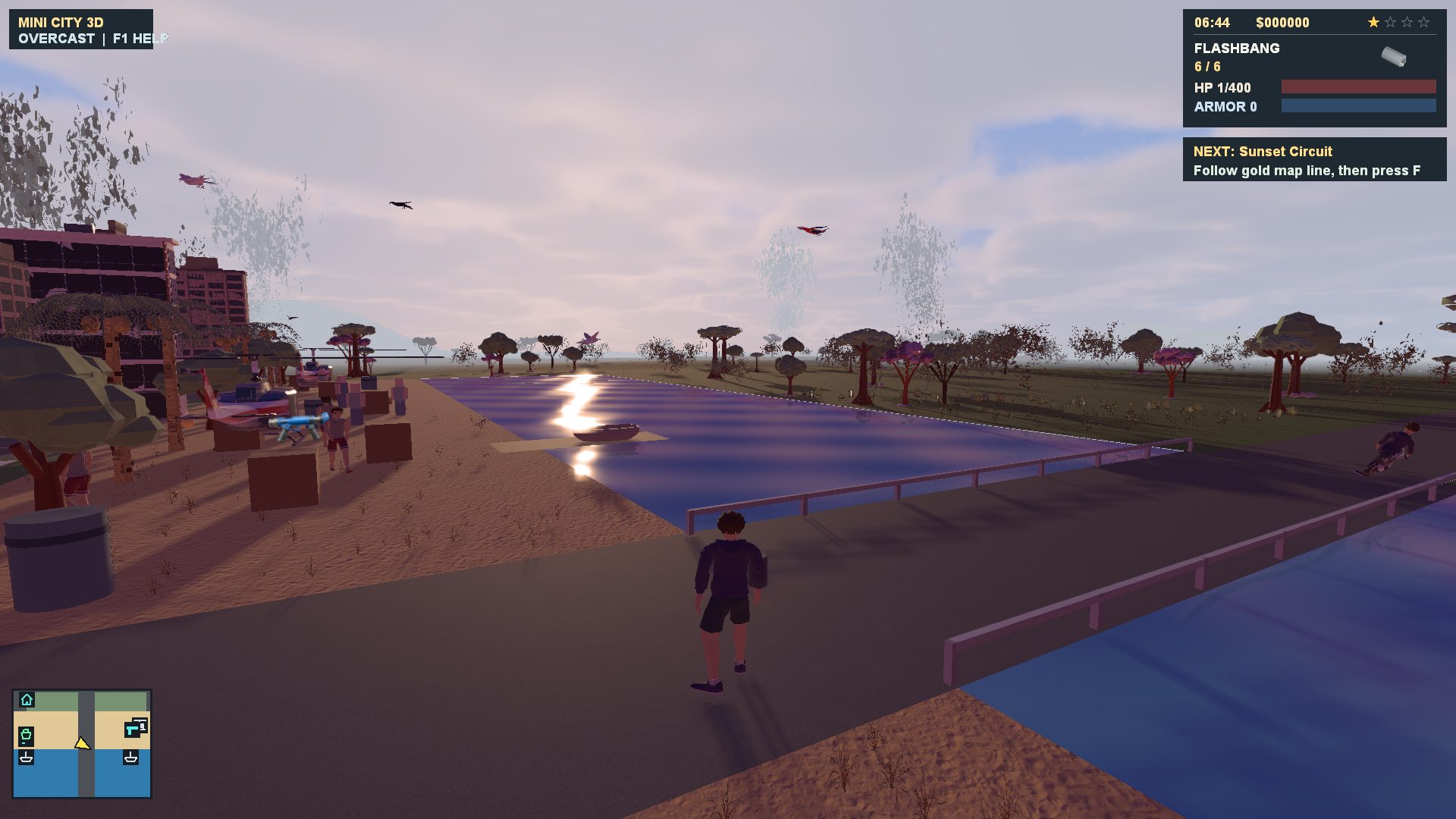
Waterfront at sunset
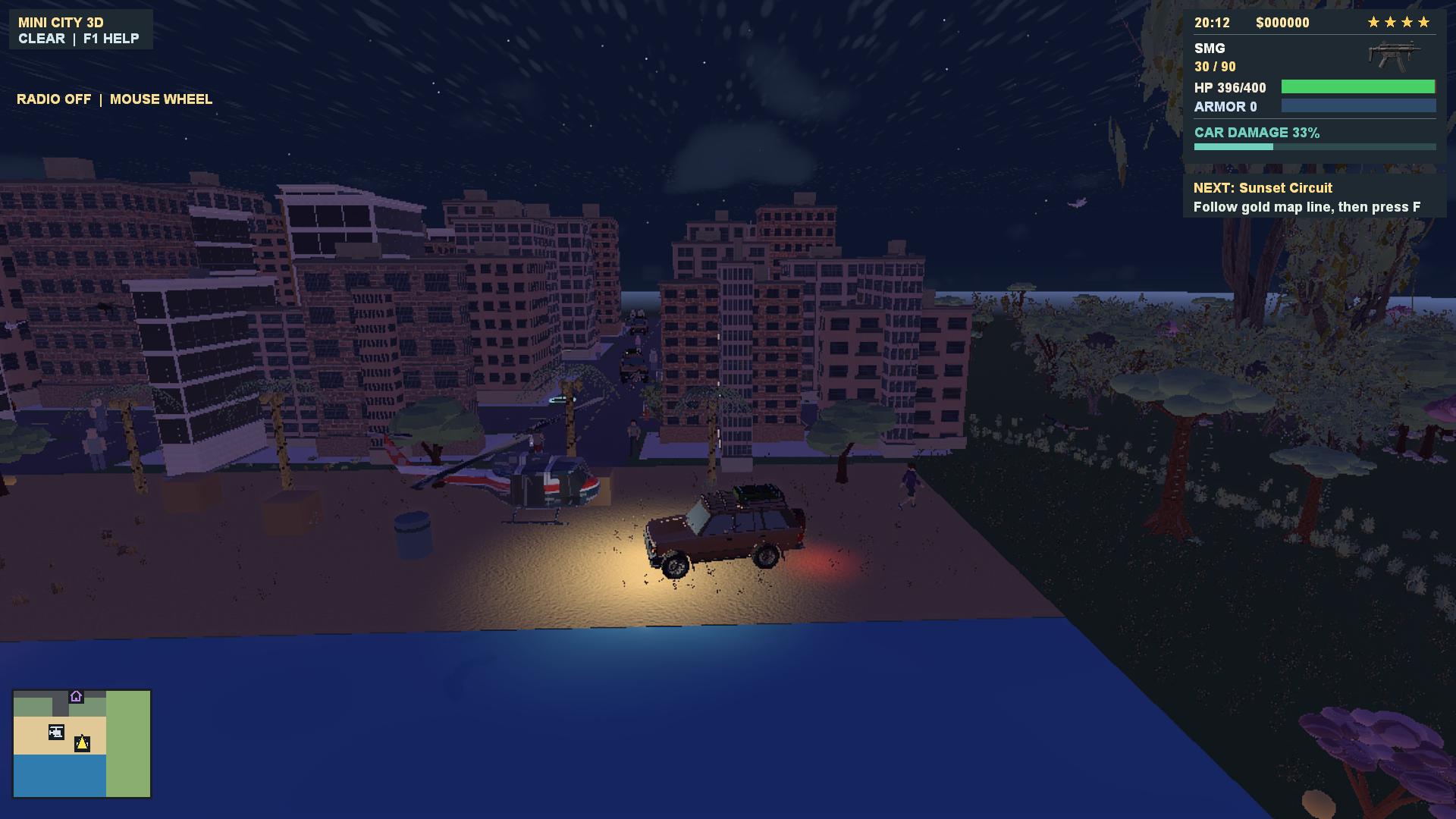
Driving through the city at night
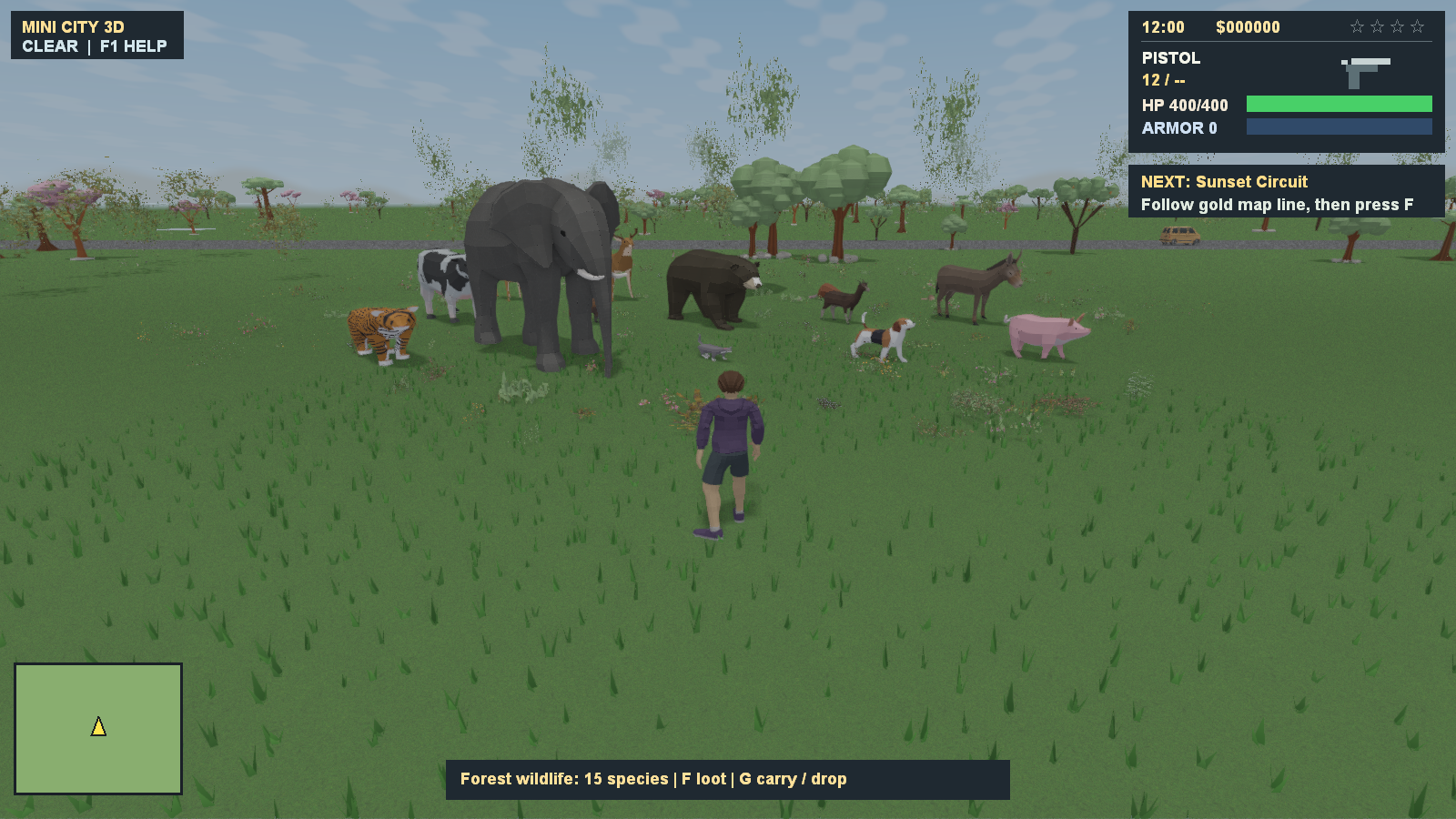
Countryside wildlife
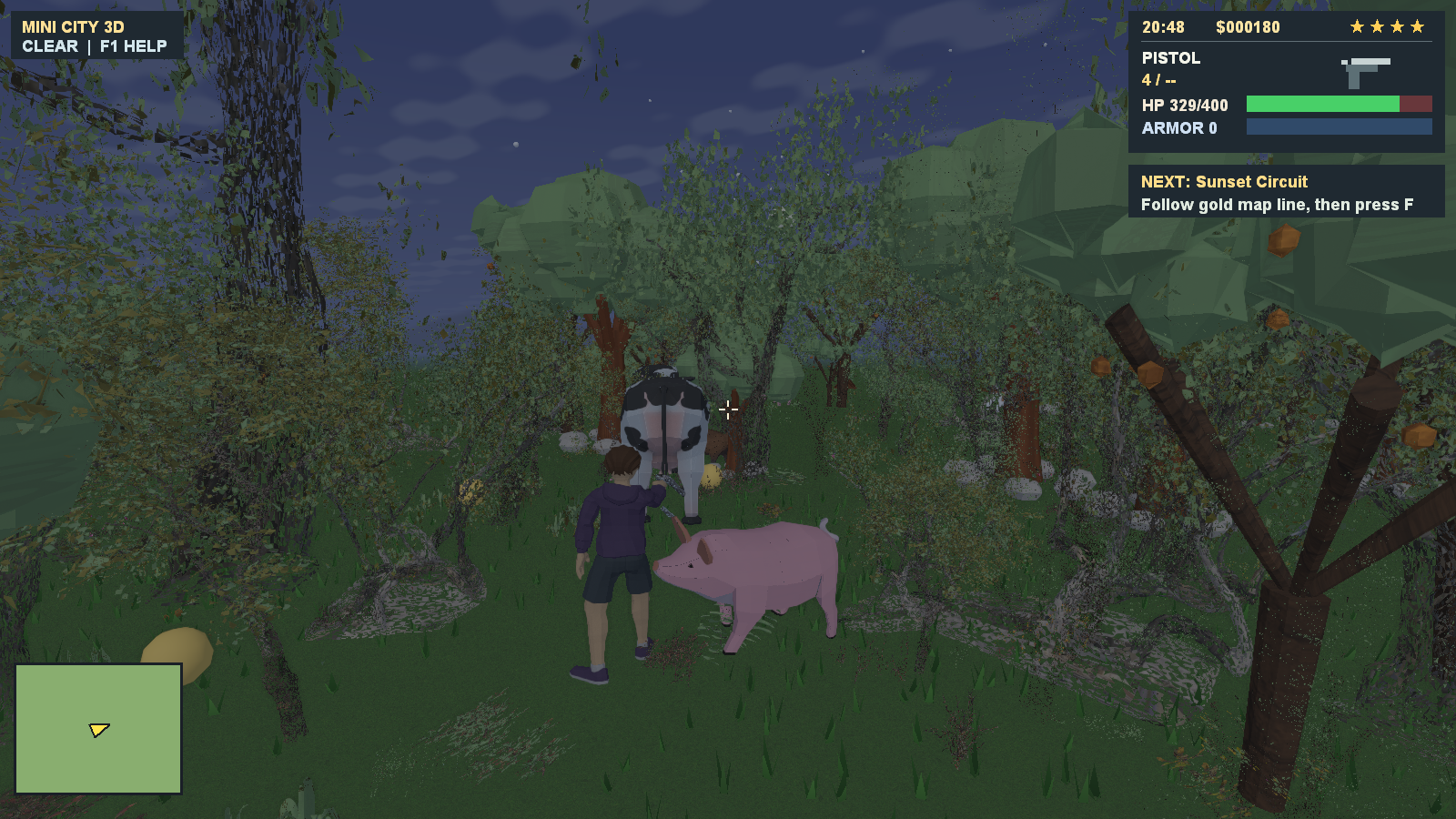
Animals in the forest
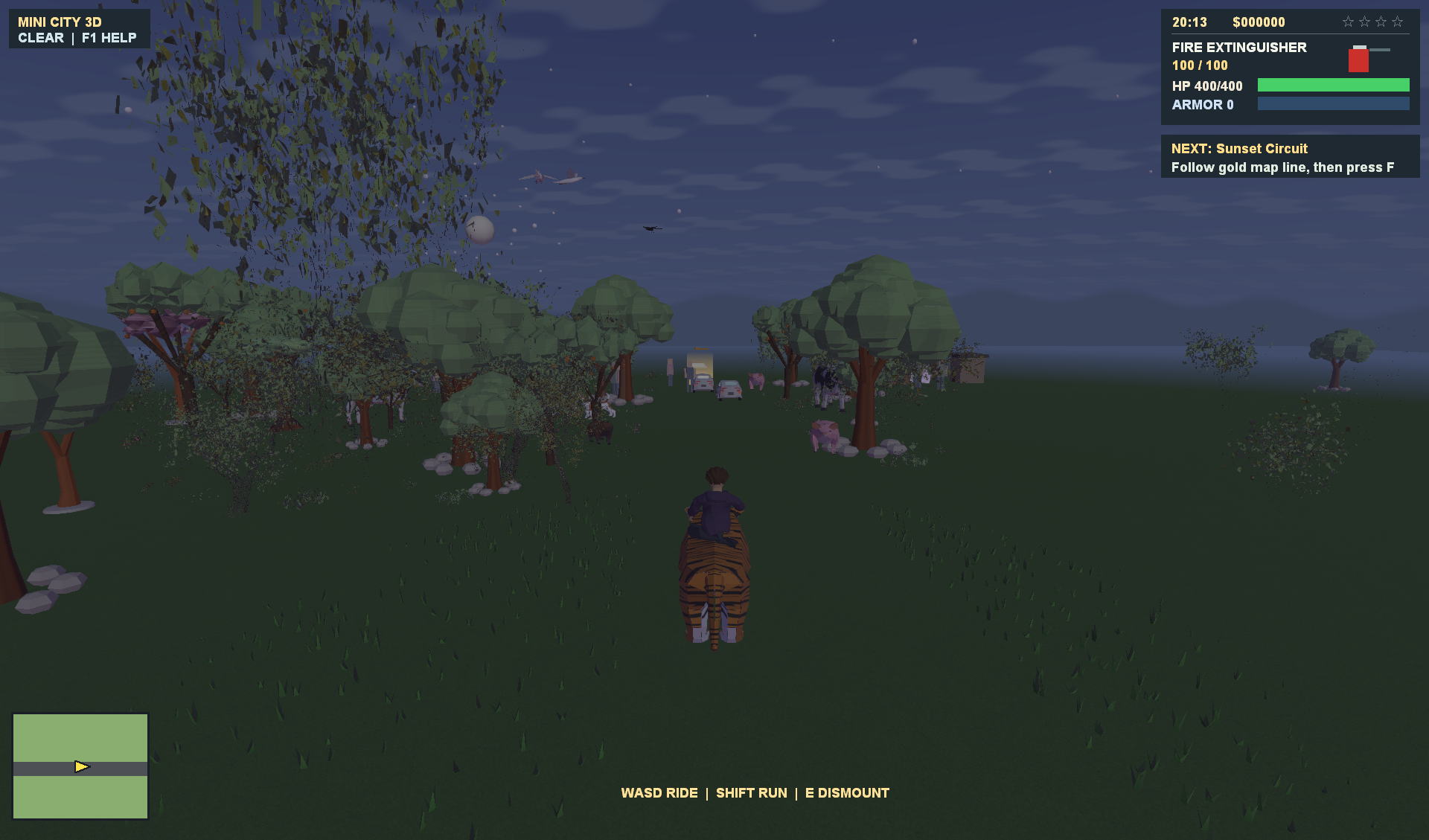
Riding a tiger
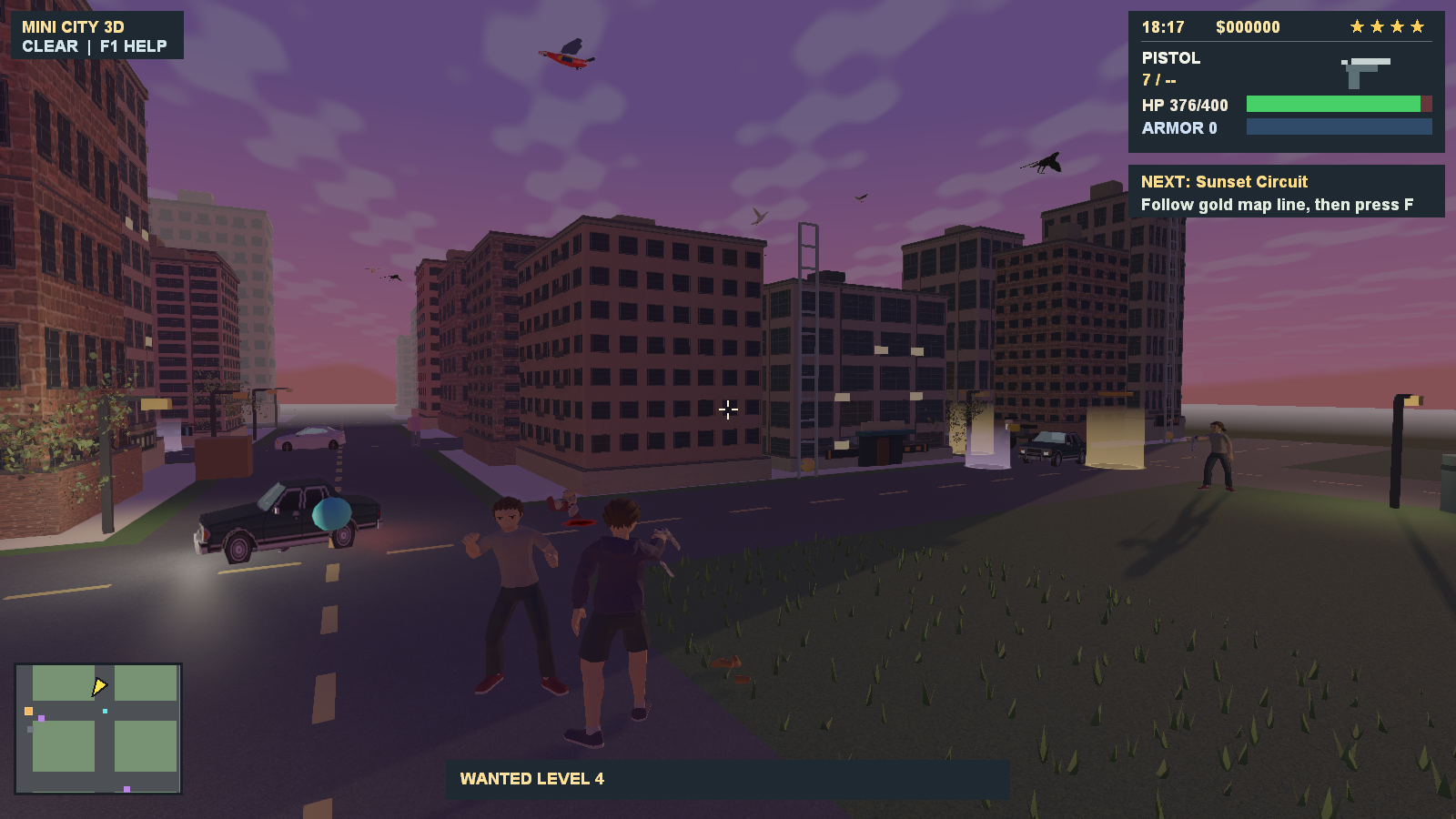
City combat
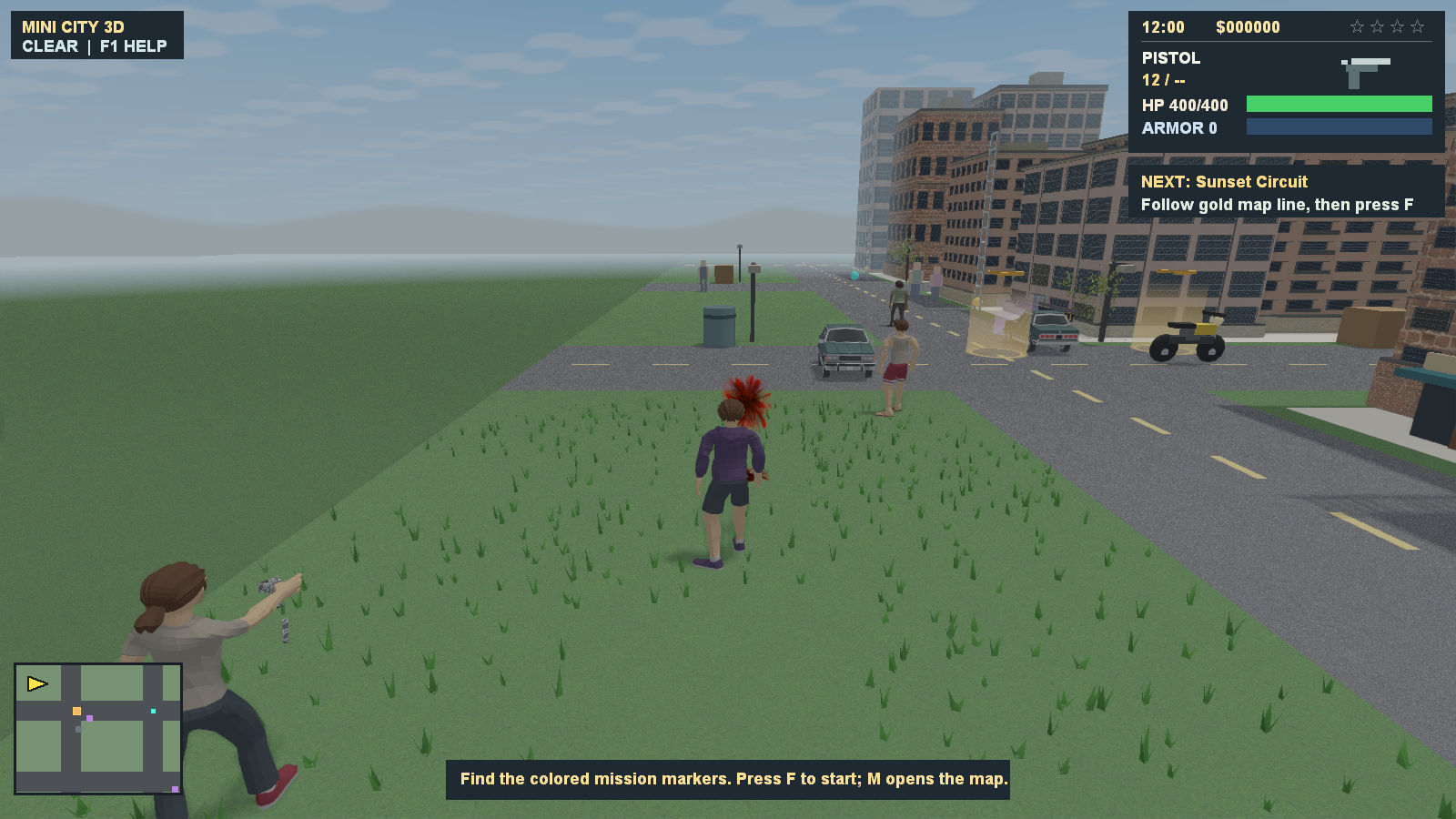
Hit effects
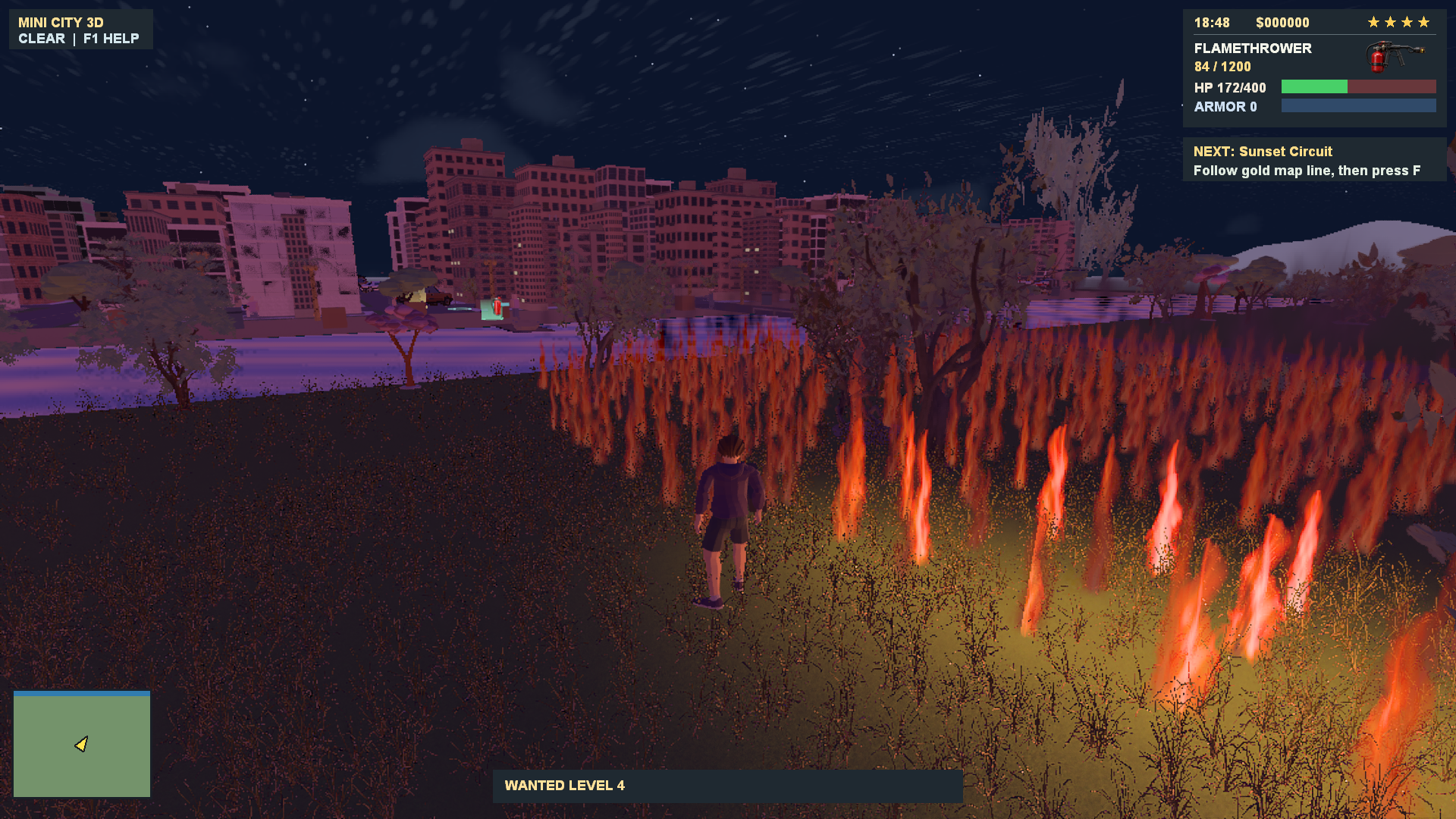
Forest fires
Flamethrowers and other incendiary weapons ignite vegetation, with fire spreading through grass and burning nearby trees and vehicles.
RPG building destruction
RPG blasts cut holes through buildings, update collision, and eject physical masonry debris. Building damage and debris are session effects that reset on load.
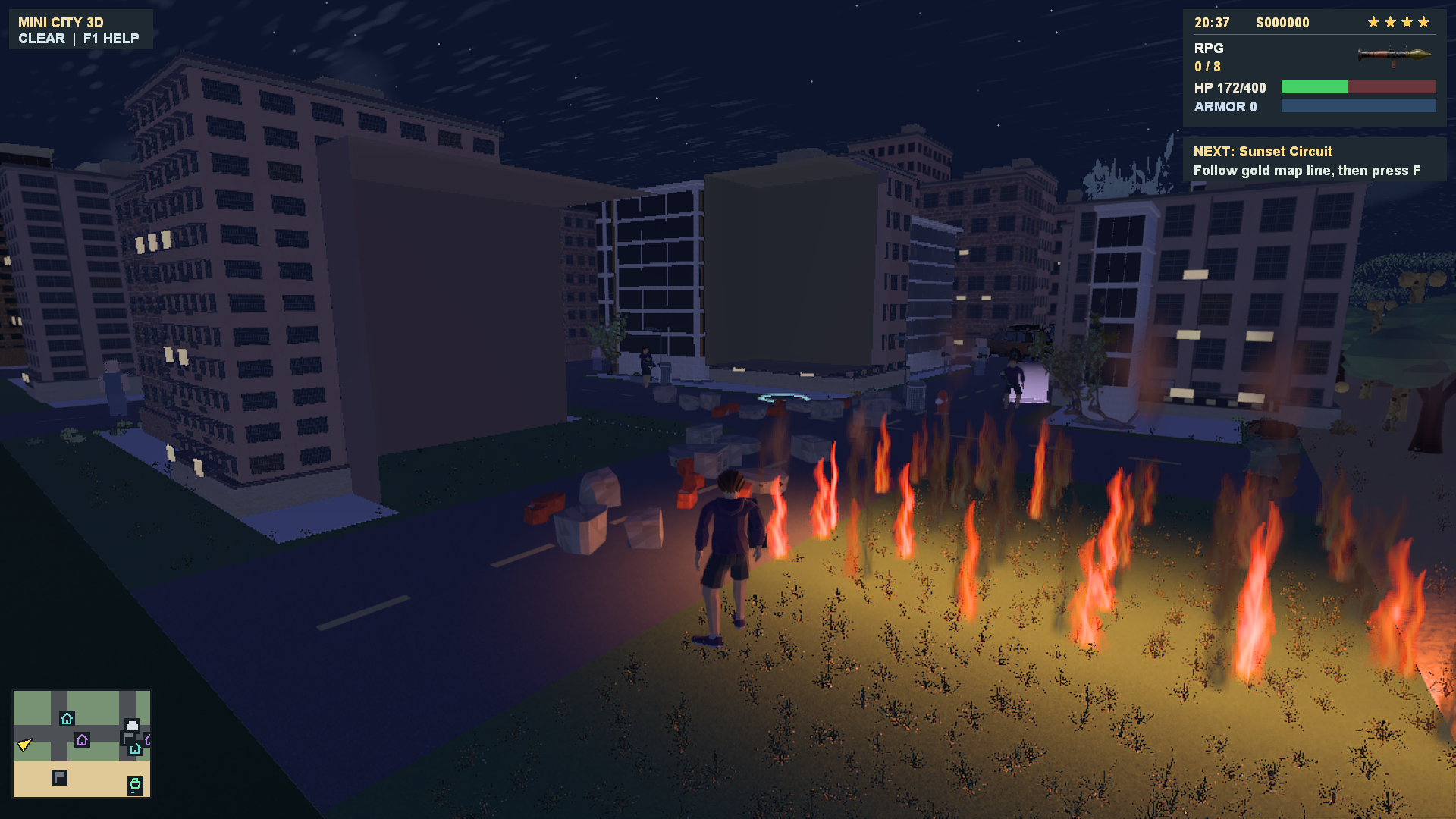
Minecraft-style builder mode
Mine terrain and place blocks in the city using the separately saved builder layer. Press F5 to toggle builder mode; the hotbar shows the selected material for mining and building.
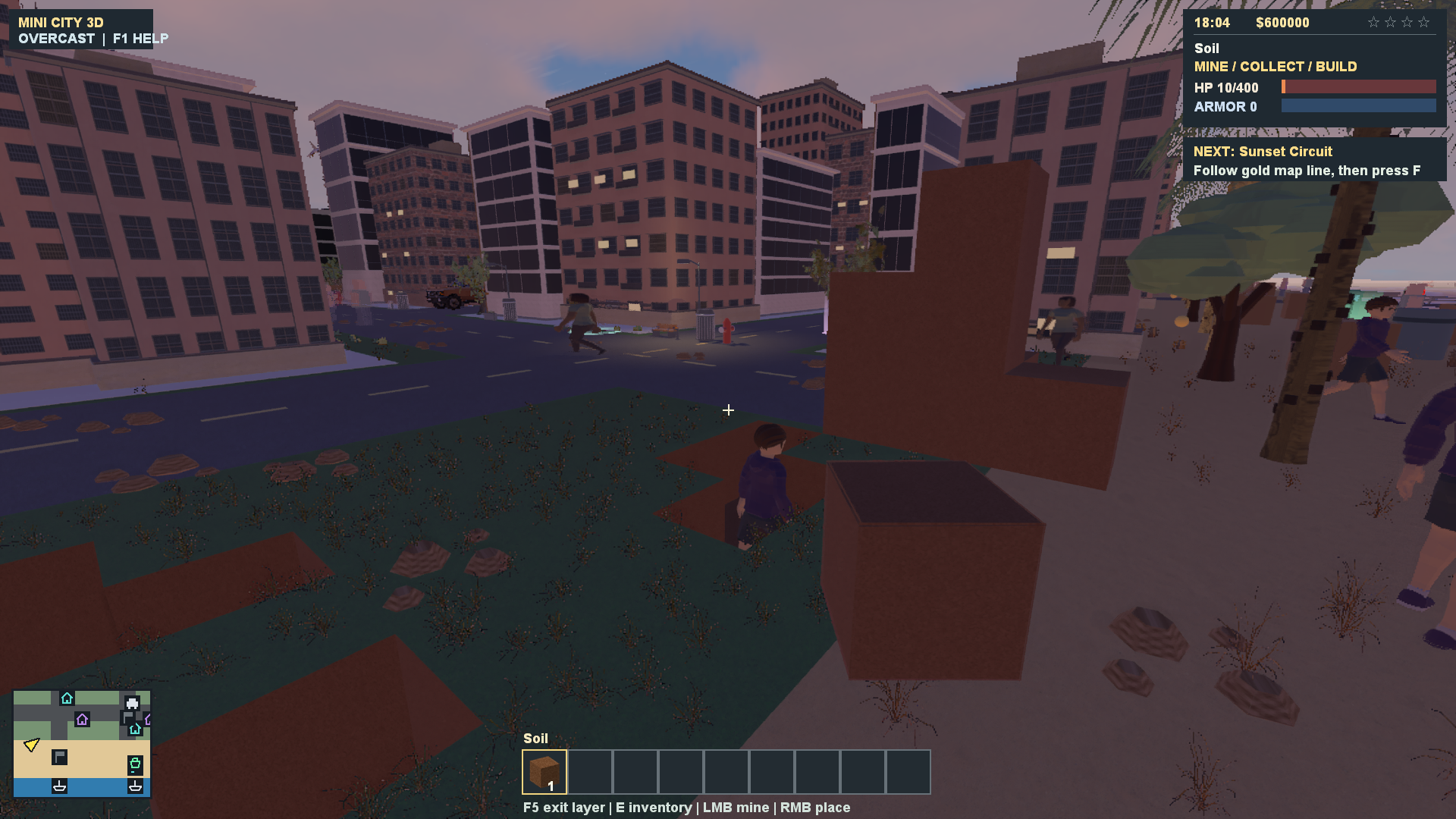
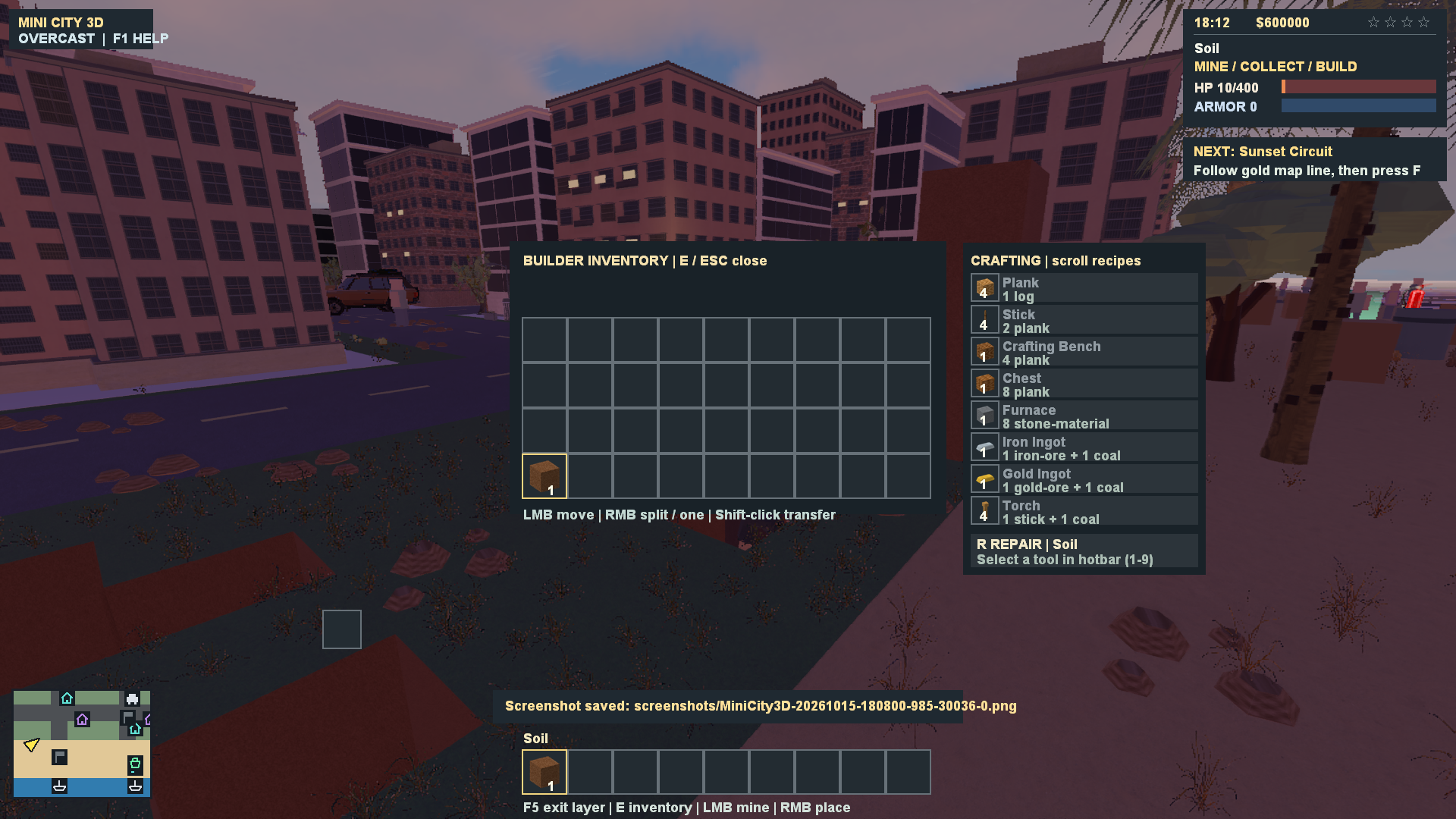
Builder inventory and crafting
Press E in builder mode to manage inventory and hotbar items, browse crafting recipes and their material costs, and access tool repair controls.
-DX11 build requires Direct3D 11.From a checkout of this repository:
git submodule update --init --recursive
./build.ps1 -RunTests
./MiniCity3D.exe
build.ps1 configures the compiler environment, builds the Direct3D game and test executables, copies runtime assets and data, runs tests when requested, and places the default DX12 executable at MiniCity3D.exe in the repository root. DX12 builds use a build directory with a -dx12 suffix. -DX11 delivers MiniCity3D-DX11.exe with Dear ImGui menus from a separate cache. -DX12 remains an explicit alias for the default. Specifying both switches is an error. Close a running executable before rebuilding it. package.ps1 -SkipBuild packages the root MiniCity3D.exe; use -Direct3DExecutable to select another binary explicitly.
To build without running tests:
./build.ps1
To choose a different output executable:
./build.ps1 -OutputPath 'build-output/MiniCity3D.exe'
Create the destination directory first and keep assets/ and data/ beside a relocated executable. The build directory already contains both folders.
Both Direct3D builds support Tracy v0.13.1. Build DX11 with ./build.ps1 -DX11 -Tracy, or build DX12 and the matching DX11 comparison executable together:
./build.ps1 -DX12 -Tracy -DX11Benchmark
./tools/benchmark_game.ps1 -Executable @(
    './build-msvc-ninja-dx12/MiniCity3D.exe',
    './build-msvc-ninja-dx12/MiniCity3D-DX11-benchmark.exe'
) -Frames 240 -Warmup 60 -Repeats 3
CMake equivalents are -DMINI_CITY_TRACY=ON -DMINI_CITY_USE_DX12=ON -DMINI_CITY_BUILD_DX11_BENCHMARK=ON. Tracy is pinned to commit 05cceee0df3b8d7c6fa87e9638af311dbabc63cb, restored on first configuration, and linked statically. Normal builds default to Tracy off. build.ps1 explicitly selects on/off on every invocation, so a previous profiling configuration cannot silently leave it enabled. The OpenGL target does not link Tracy.
Open the matching upstream tracy-profiler.exe and connect to localhost to inspect CPU frame/AI/physics/forest/grass/loading zones, named shader/texture/scene/recording/save threads, native DX11/DX12 GPU passes, and C++ heap allocations/frees with eight-frame allocation callstacks (including aligned allocations). MSVC profiling builds retain PDB symbols. Memory tracking covers new/delete and STL ownership; C malloc, driver allocations and GPU VRAM are outside these hooks. System tracing/ETW is disabled, so this build does not collect OS context switches or require elevation for Tracy. Collection is on demand while a viewer or capture tool is connected. Connect before launch with --tracy-wait=15 to include startup allocations and loading. Without that option, normal play starts immediately; connecting later includes subsequent events, not an existing heap snapshot. Include the BSD 3-clause notice in TRACY-LICENSE.txt when distributing a profiling build; CMake copies it beside the executable.
The benchmark runner defaults to city, dense forest and six-region travel scenarios, fixed seed 1, 60 Hz simulation, 1080p, High shadows/TAA and native rendering (--fsr2=0). It runs backends sequentially, alternates order across repeats, uses fresh isolated settings/save directories under build-benchmarks/, and leaves runtime copies there for inspection. It saves game.log.txt, benchmark-frames.csv, run.json and a combined summary.csv under the selected -OutputDirectory. Logs include mean/p95/p99/max frame times, simulation/physics/CPU render work, GPU shadow/scene/post timing, draws, triangles, AI and startup/loading statistics; CSV adds per-frame working set/private memory. GPU CSV values are the latest completed asynchronous samples, may repeat, and use -1 when unavailable. These are local measurements, not cross-hardware performance guarantees.
Choose -Scenarios forest, -Scenarios route -Frames 3600 -Warmup 120, or -RecordWorkers 4 for worker recording. -Validate enables loading validation and the DX12 debug layer for correctness checks; leave it off for timing comparisons. Benchmark logging works with Tracy disabled. For a saved Tracy trace, download the matching Windows tools from the upstream release and pass the capture executable:
./tools/benchmark_game.ps1 -Scenarios forest -Frames 120 `
    -CaptureExecutable './build-tools/tracy-0.13.1/tracy-capture.exe'
This waits up to 15 seconds for connection before startup and saves capture.tracy plus capture stdout/stderr beside the logs. Capture runs include Tracy overhead and should be compared separately from runs without a connected profiler. tools/verify_tracy_capture.ps1 -Trace <capture.tracy> exports CPU/GPU events, checks worker threads/pass timings, and verifies retained allocation data using upstream tools; add -RequireRecordingWorkers for a DX12 worker capture. Direct invocation also supports --smoke --benchmark --benchmark-csv --benchmark-frames=240 --benchmark-warmup=60; its CSV is written in the working directory. Counts are bounded and malformed values exit with a logged error. benchmark_options_scenarios checks those bounds, and profiling builds add profiling_memory_scenarios for allocation alignment, cross-thread release and failure contracts.
The default MiniCity3D build uses native DX12/FSR2. Run ./build.ps1 and launch ./MiniCity3D.exe. To select Direct3D 11 with Dear ImGui menus, run ./build.ps1 -DX11 and launch ./MiniCity3D-DX11.exe (CMake: -DMINI_CITY_USE_DX12=OFF). DX12 currently retains the previous menu backend. That backend creates a native D3D12 device and flip-model swapchain. Its rendering passes record D3D12 graphics/compute commands with explicit resource barriers, descriptor heaps, cached pipeline state objects, upload/readback buffers, and GPU fences. It does not use D3D11On12 or a D3D11 device. The optional MiniCity3D-DX11-benchmark target also uses DX11; CPU scene/asset modules retain their historical dx11_ names. The OpenGL fallback is unchanged.
In Esc → Graphics, select AMD FSR2 and adjust FSR2 sharpness from 0–100% (default 20%). Modes apply immediately and persist in settings.ini as FSR2=0..4 and FSR2Sharpness=0..100. A command-line mode overrides the saved choice for that run:
./MiniCity3D.exe --fsr2=1  # Quality
./MiniCity3D.exe --fsr2=0  # Native rendering; use the selected FXAA/TAA setting
| ID / mode | Render resolution at 1920 × 1080 | Linear scale |
|---|---|---|
| 0 — Off | 1920 × 1080 | Native |
| 1 — Quality (default) | 1280 × 720 | 1.5× |
| 2 — Balanced | 1129 × 635 | 1.7× |
| 3 — Performance | 960 × 540 | 2× |
| 4 — Ultra Performance | 640 × 360 | 3× |
FSR2 uses jittered scene color, depth, motion vectors, and a reactive mask. It replaces FXAA/TAA while enabled; HUD and menus are composed afterward at display resolution. Quality/resolution changes and camera cuts reset temporal history. This is temporal upscaling, not frame generation. Native DX12 preserves the existing shadow, HDR, post-processing, GPU skinning, instancing and LOD passes.
CMake fetches AMD's MIT-licensed FSR2 2.2.1, pinned at 1680d1edd5c034f88ebbbb793d8b88f8842cf804, and builds its DX12 backend and shader permutations. The first build needs internet access and takes longer to compile the permutations. FSR2 is linked statically; no FSR DLL needs to ship. Packages include AMD-FSR2-LICENSE.txt. Use a current Windows SDK and Visual Studio x64 C++ tools; FSR2 needs Shader Model 6.2 support.
dx12_fsr2_smoke verifies all quality modes, resize/history reset, and reconstructed GPU pixels using the real AMD dispatch. dx12_fsr2_warp repeats the same checks with --dx12-warp, forcing Microsoft's software adapter even on machines with a GPU. --dx12-debug enables the D3D12 debug layer when Windows Graphics Tools is installed. Game checks accept --fsr2=0 through --fsr2=4, --fsr2-cycle, and --capture-converged (with --smoke --benchmark --benchmark-short).
DX12 overlaps CPU preparation with GPU execution using two fence-protected recording slots. Upload memory is reused after both GPU work and live buffer references release it; texture descriptor tables and native draw state are cached, and scene vertices copy directly into upload memory using the CPU worker pool. Receiver-aware shadow culling, shadow-specific LOD and regrouped instances reduce submitted geometry. Cloud volumes use half width/height with depth-guided reconstruction; other post passes retain their existing resolution.
| Option | Purpose |
|---|---|
--scene-workers=1..8 | CPU scene preparation; 1 selects the serial reference |
--record-workers=1..8 | Native command-list recording for eligible shadow/opaque batches; default 1 |
--cpu-skinning | CPU deformation reference path |
--validate-gpu-skinning | GPU pose readback checks at frames 1, 30 and 60 |
--validate-loading | Prepared texture/shader checksums and compressed GPU mip readback |
--dx12-debug | D3D12 debug-layer checks; requires Windows Graphics Tools |
--dx12-warp | Force the Microsoft WARP software adapter for CI reproduction |
--dx12-sync | Full GPU wait per frame for synchronization diagnostics |
--full-res-clouds | Full-resolution cloud-volume reference path |
Worker recording is opt-in: each worker has its own native list, allocator and state cache, with ordered submission and fence-protected storage. Correctness checks pass, but repeated measurements did not establish a consistent speedup, so the default remains one recorder. Material/descriptor preparation and HUD work remain serial. Separate GPU timers report deformation and individual post stages in MiniCity3D.log.
For matched API benchmarks, configure with -DMINI_CITY_BUILD_DX11_BENCHMARK=ON and build the optional MiniCity3D-DX11-benchmark target. Run both executables from the same build directory with --smoke --benchmark, adding --fsr2=0 to DX12 for native-resolution comparisons. Keep settings identical and disable debug validation and screenshots while measuring. Results and remaining limits are in DX12 performance evidence.
The subsequent combined DX12 optimization fixture measured median mean frame time 35.78 → 26.44 ms at native 1080p on a Radeon 680M. This is a local 120-frame fixture comparison, not an expected result for every scene or GPU, and FSR2 is not guaranteed to improve a CPU-bound scene. See the recorded optimization results and limits.
For a Visual Studio 2022 installation:
cmake -S . -B build -G 'Visual Studio 17 2022' -A x64 -DBUILD_TESTING=ON
cmake --build build --config Release --parallel 4
ctest --test-dir build -C Release --output-on-failure
./build/Release/MiniCity3D.exe
CMake copies assets/ and data/ beside the game on every build, including builds that do not relink. Existing build caches retain their backend selection; pass -DMINI_CITY_USE_DX12=ON to migrate an older DX11 cache or use a fresh build directory. Baked runtime assets are included; Python and Blender are needed only when rebuilding or converting art.
The Direct3D executable immediately opens a loading window with a progress bar, current stage, and elapsed time. It remains responsive while graphics initialize; closing it cancels at the next startup checkpoint. The game appears after its first frame is prepared. --smoke runs keep the loading window hidden.
Startup prepares regional meshes and textures in advance to avoid uploads interrupting travel. Independent image decoding, mipmap generation, and graphics shader compilation now use a bounded CPU worker pool. The default uses up to four workers, reserving a logical CPU for the main thread when possible. GPU uploads and renderer cache updates remain on the main thread, and loading workers finish before gameplay starts. Closing the loader cancels pending work and joins the workers before cleanup.
Use --loader-workers=1 for the serial reference, or --loader-workers=2 through --loader-workers=8 to select a worker count. Each stage and total startup time are logged in MiniCity3D.log, including decode/mipmap/upload timings and actual peak concurrency. --validate-loading additionally checksums the prepared textures and shader bytecode; hashing adds work, so leave it off for performance measurements. Measured results and verification are in threading evidence.
To repeat matched startup measurements (three interleaved runs per worker count):
./tools/measure_threading.ps1
-Route runs the six-scene 3,600-frame 1080p benchmark, while -Travel checks regional jumps. Smoke runs use a fixed random seed. The benchmark reports scene preparation, CPU deformation, grass rebuilds, uploads/culling, draw/HUD submission, and presentation separately.
During gameplay a persistent pool handles grass-cache rebuild rows and CPU deformation in the retained DX11 or CPU-reference paths. Workers read the frame's unchanged world state and write separate preallocated output slots or private rows; the main thread joins them before uploads or the next simulation update. DX12 normally deforms supported humanoid clips, procedural poses and ragdoll vertices on the GPU. CPU joint/socket preparation remains. --scene-workers=1 selects serial scene preparation, and overrides accept 1–8 workers. Jolt physics and gameplay updates remain single threaded.
To compare runtime scene workers while holding loading at four workers:
./tools/measure_threading.ps1 -CompareScene -Travel -Workers 1,4
./tools/measure_threading.ps1 -CompareScene -Route -Repeats 1 -Workers 1,4
The game embeds an original city icon at 16, 24, 32, 48, 64, 128, and 256 pixels for Explorer, the taskbar, and window captions. The resource is in assets/app/; regenerate it with ./tools/build_game_icon.ps1.
MiniCity3D is the actively developed Direct3D target. The existing OpenGL fallback remains available through ./build.ps1 -OpenGL as MiniCity3DGL.exe.
These are the default bindings. Movement, sprint, vehicle interaction, sensitivity, and inverted mouse look can be changed under Esc > Controls.
| Input | Action |
|---|---|
| W / A / S / D | Move, drive, or ride an animal relative to the camera |
| Shift | Run on foot or while riding |
| Hold Alt | Walk slowly |
| Left Ctrl | Toggle crouch |
| Space | Jump; handbrake while driving |
| S while driving | Brake or reverse |
| Mouse | Rotate the camera; aim the tank turret and elevate its barrel independently of the hull |
| Hold right mouse button | Aim |
| Left mouse button | Fire, use melee/tools, throw the selected device, or open timed-bomb placement; dive while swimming |
| Right mouse button while swimming | Rise toward the surface; release both mouse buttons to hold depth |
| Space + left mouse button without aiming | Unarmed punch or jump strike |
| R | Reload; restart after death |
| 1-9 / Q | Select or cycle unlocked weapons and tools |
| E | Enter/exit a vehicle; mount/dismount a nearby tiger or elephant |
| J in a truck | Attach/detach a nearby trailer at the rear hitch |
| X | Detonate all active C4 charges |
| K with the knife selected | Perform a rear takedown when prompted |
| F / Tab | Use the selected nearby action / cycle nearby actions |
| G | Carry or drop a corpse |
| F near a ladder or climbable tree | Start climbing; W/S climb, F releases, Space jumps from a tree |
| H while driving | Toggle car or motorcycle headlights |
| C | Cycle first-person, third-person, and overview cameras |
| B / mouse wheel | Telescope / telescope or sniper zoom |
| Mouse wheel in a powered vehicle | Switch live radio stations or select Off |
| M | Toggle the map |
| T | Advance time by one hour |
| Esc | Pause, settings, Save, and Load |
| F1 | Toggle the full controls overlay |
| F3 | Toggle performance information |
| F4 | Open the debug menu |
| F5 | Switch between normal play and the saved builder layer |
| F11 | Save a PNG screenshot |
| Alt+Enter | Toggle windowed/borderless display |
Three helicopters are parked at (170, 250) downtown, (1550, 1690) near the beach, and (2070, 1700) near the harbor. Enter with E, use W/S for forward/reverse flight, A/D for yaw, Space to ascend, and hold Ctrl to descend. Releasing lift holds altitude after rotor spin-up. Landing uses the same solid-world collision and damage rules as other vehicles; exiting in the air starts a fall.
The minigun fires 25 rounds per second with a 300-round magazine and a 3.2-second reload. The shovel uses the melee swing animation and does not consume ammo. The grapple hook aims at solid buildings or trees within 700 units: hold LMB to launch and reel in, use WASD to steer, and release LMB to detach with momentum. It has a half-second cooldown and eight-second attachment limit, rejects sky/ground and dynamic blockers, and releases at obstructions. It is a traversal grapple, with no object-to-object tether mode. All three are sold in shops and have pickups near the starting intersection; Q cycles unlocked tools, and F4 can equip any catalog weapon. The radar and map use original pictograms for weapons, tools, shops, houses, vehicles, and missions.
Shops and house menus use arrow keys, Enter, and Esc. In debug fly mode, Space/Ctrl move vertically and Shift increases speed.
A car starts near the player. Follow the gold map line to the next mission marker and press F. Cyan markers provide weapons, green markers identify shops, purple markers identify houses for sale, and blue markers identify owned houses. Orange markers identify regional missions.
Graphics, controls, and volume are saved in settings.ini. Save/Load use savegame.ini. These files, MiniCity3D.log, and the screenshots/ directory are located beside the executable. Mission rewards and weapon pickups also trigger saves.
In the DX11 game, autosaves capture a snapshot on the gameplay thread and write it on a dedicated worker. One active write and one pending snapshot bound the queue; newer requests replace an unwritten pending snapshot. The worker writes a complete temporary INI and replaces the destination after flushing it. Manual Save waits for completion, Load waits for pending writes, and normal shutdown drains them. Failed autosaves report a message while preserving the previous save. Sound effects reuse PCM prepared during startup, including four takes for noise-based sounds, and held-weapon graphics are prepared before gameplay. See pickup hitch measurements.
Press F5 to enter or leave the builder layer. Normal-world scenery returns when leaving; re-entering restores saved block placements, building/tree cuts and terrain excavation. Transitions wait for the outgoing save to finish; a save failure keeps the current layer active and shows a retry message. Builder edits and inventory share the ordinary save file.
The builder includes 20 rock materials, four ores, pickaxes, axes, shovels, hoes, shears and brushes, crafting benches, furnaces and chests. Tool tier and durability affect harvesting; hoes till suitable soil, shears cut foliage, brushes collect loose deposits, and nearby crafting benches support material-cost repairs. Excavated pits and roofed tunnels update rendered terrain and Jolt collision.
| Input in builder mode | Action |
|---|---|
| Hold left mouse button | Mine or harvest the targeted surface |
| Right mouse button | Place the selected block, use a hoe, or open a targeted chest/bench/furnace |
| 1–9 / mouse wheel | Select a hotbar slot; the wheel scrolls recipes while inventory is open |
| E | Open/close inventory |
| Q | Drop one item from the selected stack |
| C | Switch first-person/third-person builder camera |
| Shift | Crouch; hold while using a chest to bypass opening it |
| R in inventory | Repair the selected tool when materials and a nearby bench permit it |
| Shift + click in inventory | Transfer stacks between inventory/hotbar or an open chest |
Builder controls take precedence over the normal weapon/vehicle shortcuts. The builder plan, progression checks, and actor/terrain checks describe verified scope. Continuous progression playtesting, dense-build performance and exceptional recovery remain open.
savegame.ini and settings.ini live beside the executable. Gameplay requests background saves, the pause menu offers Save/Load, and normal shutdown flushes pending saves. Graphics, controls and audio preferences are stored separately from progression. Back up these files before replacing a build or resetting progress.
MiniCity3D.log records startup stages, graphics validation and benchmark results. F11 captures PNGs under screenshots/ beside the executable. Keep assets/ and data/ alongside the game when moving it. Verification scripts that isolate runtime state are preferable to running save/load fixtures against a personal save.
Twenty countryside groves contain tigers, elephants, cats, dogs, pigs, cows, capybaras, bears, goats, donkeys, roe deer, deer, weasels, beavers, and mice. Grove centers use X = 3000/4000/5000/6000/7000 and Z = 1300/3900/6400/9000. Each grove has up to eight animals with stable save IDs; distant wildlife sleeps until approached.
Animal gait, play, attack, and corpse poses are procedural. The roe-deer model is an adapted fawn; see animal attribution.
To repeat the equipment visuals, run ./tools/verify_equipment.ps1 after building. It writes Direct3D captures to evidence/equipment-20261003/. The equipment_scenarios CTest checks flight at 30/60 Hz, hover/landing/airborne exits, wall collisions, minigun cadence/reload, shovel damage and poses, grapple cover/reeling/release, and corpse-free legacy save loading.
The Direct3D sky uses an analytic atmosphere, wind-driven volumetric cumulus clouds, thin cirrus, and angular stars/moon. Sky composition follows scene render resolution; DX12 traces the cloud volume at half width/height and reconstructs it using scene depth, while atmosphere, sun and stars keep the full scene resolution. With FSR2 enabled, the scene is then reconstructed to display resolution before the HUD. Cloud coverage follows weather, lighting follows time of day, and scene depth clips clouds against geometry when flying into or above the layer. Low/Medium/High graphics quality traces 24/36/48 cloud samples with early opacity termination and three sun-shadow samples. This is an approximation with Rayleigh/Mie-inspired sky coloration, not a complete physical atmosphere or cloud shadow system for terrain. The rendering approach follows Guerrilla's Horizon cloud presentation and Epic's volumetric cloud overview.
F4 → Infinite ammo enables sustained fire without consuming magazines or reserves, including empty weapons. The HUD shows INFINITE AMMO; disabling the toggle restores the original inventory. The toggle is session-only and resets when loading/resetting the game. Vehicle destruction and explosive projectiles play a distinct positional blast with a crack, bass impact, and debris tail.
Run ./tools/verify_sky.ps1 for day, zenith, overcast, sunset, night, rain, high-altitude, and F4-menu captures in evidence/sky-20261003/, or add -Benchmark for a 120-frame 1080p sample. The sky_smoke test renders and reads GPU pixels to check periodic noise, coverage, wind, night illumination, altitude transitions, and foreground clipping. The equipment and XAudio2 suites also cover the new ammo mode and cached explosion effect.
Run the complete build and CTest suite:
./build.ps1 -RunTests
# Equivalent wrapper:
./test.ps1
The default DX12 build registers 46 CTest entries (47 with Tracy enabled) covering simulation, vehicles, equipment, ordnance, wildlife, birds, traffic/navigation, grass, scene jobs, builder excavation/progression/transitions/recovery, persistence, assets, texture/shader loading, probes, audio, sky rendering, startup and benchmark options. Tracy adds allocation-hook contract tests; the retained DX11 primary build adds the ImGui menu entry. dx12_fsr2_smoke exercises real AMD reconstruction and native GPU state, skinning, recording and cloud scenarios; dx12_fsr2_warp also covers the software adapter. gpu_profiler_scenarios and resource_cache_scenarios cover shared ownership, query polling, partial allocation failures and retries. All 46 entries passed in 536.28 seconds for the ImGui/Lua/data milestone; final affected gameplay/script/data rechecks and the delivered native menu review also pass. The milestone evidence records that verification sequence; Tracy evidence records its targeted tests and real traces.
To rerun focused scenarios after building with Ninja:
ctest --test-dir build-msvc-ninja -C Release -R 'wildlife_scenarios|vehicle_collision_scenarios' --output-on-failure
ctest --test-dir build-msvc-ninja -C Release -R 'expansion_scenarios|equipment_scenarios|ordnance_scenarios|grass_scenarios' --output-on-failure
ctest --test-dir build-msvc-ninja -C Release -R 'dx12_fsr2_|gpu_profiler_scenarios|resource_cache_scenarios' --output-on-failure
Use the build directory produced by your generator. These historical gameplay capture scripts expect a DX11 executable; their retained evidence directories describe the backend originally tested:
./tools/verify_vehicle_expansion.ps1
./tools/verify_ordnance.ps1
./tools/verify_masonry_tank.ps1
Visual smoke flags stage repeatable scenes and exit after rendering:
./MiniCity3D.exe --smoke --day --animals --animal-ride --animal-ride-move --screenshot
./MiniCity3D.exe --smoke --day --animals --animal-ride --animal-ride-move --tiger --screenshot
./MiniCity3D.exe --smoke --day --tree-impact-preview --1080p --screenshot
./MiniCity3D.exe --smoke --day --tree-impact-preview --settled --1080p --screenshot
./MiniCity3D.exe --smoke --night --driver-preview --damaged --screenshot
./MiniCity3D.exe --smoke --day --marina --1080p --screenshot
./MiniCity3D.exe --smoke --benchmark --benchmark-short --fsr2=1 --capture-converged --dx12-debug
./MiniCity3D.exe --smoke --benchmark --benchmark-short --fsr2-cycle --capture-converged --dx12-debug
Smoke mode uses staged test state. To record performance, use --smoke --benchmark --1080p --day, or --smoke --benchmark-route --1080p for the deterministic six-segment route. Timings are written to MiniCity3D.log; local measurements do not establish performance on other hardware.
./package.ps1
This builds, copies cooked assets, data, attribution records, and the Jolt and AMD FSR2 licenses, runs packaged graphical smoke checks, and creates a ZIP under dist/. Raw model sources are excluded; FSR2 is linked into the executable.
Use ./package.ps1 -SkipBuild to package an existing build. -SkipSmoke skips graphical checks; -IncludeOpenGL includes an existing fallback executable.
The Windows workflow builds and tests pull requests and pushes to main on windows-2025, using its newer inbox D3D12/WARP runtime for FSR2 tests. It retains CTest and graphics logs in the MiniCity3D-test-diagnostics artifact, including failed runs. It uploads a downloadable package; successful main pushes also publish a prerelease tagged build-<run number>. Hosted CI skips graphical package smoke runs. A manual workflow run uploads an artifact without publishing a release.
| Path | Purpose |
|---|---|
src/ | C++ simulation, rendering, input, audio, and physics |
src/rendering/ | DX11/DX12 renderer sessions, shared shaders/layouts, resource owners, loading and GPU profiling |
src/dx12_backend.* | Native DX12 resources, descriptors, queues, barriers and command recording |
src/fsr2.* | AMD FSR2 context, jitter, resize/reset and dispatch integration |
tests/ | Deterministic scenarios and asset/pipeline checks |
data/ | Versioned gameplay and world configuration |
assets/models/ | Original sources, baked meshes, textures, and provenance |
assets/materials/ | Material textures and licenses |
assets/lighting/ | Cooked reflection probes and lighting data |
tools/ | Asset import, conversion, generation, and cooking scripts |
third_party/JoltPhysics/ | Pinned physics submodule |
third_party/FidelityFX-FSR2/ | Pinned AMD SDK restored by CMake; excluded from Git |
ARCHITECTURE.md | Current renderer boundaries, conventions, ownership and remaining refactor work |
evidence/ | Recorded test results, captures and measured milestone scope |
idea.md | Implementation roadmap and verified milestones |
graphics-upgrade-plan.md | Rendering roadmap and open work |
TECHNICAL_README.md | Detailed DX11 engine, asset, rendering, camera, and collision guide |
traffic-ai.md | Traffic and retaliation behavior |
The older top-down experiment is preserved in src/prototype2d.cpp.
Third-party assets have individual licenses; attribution is recorded alongside their sources and baked files.
third_party/JoltPhysics/LICENSE, copied into packages.third_party/FidelityFX-FSR2/LICENSE.txt, copied into packages as AMD-FSR2-LICENSE.txt.Most environment and original character/vehicle sources are CC0; consult each record when redistributing assets.
For art changes, see the asset conversion workflow and probe lighting workflow. python tools/convert_assets.py rebuilds the supported runtime assets. Animal imports use python tools/import_animals.py with Pillow.
The large island_tree_03.bin and jacaranda_tree.bin source files are omitted from Git; their baked meshes are included. Restore those source files before recooking them:
./tools/fetch_city_sources.ps1 -AssetIds island_tree_03,jacaranda_tree
Use E to enter/exit. W/S accelerate/brake ground vehicles; the combine's actual corn-header cutting auger turns while moving. In a truck, stop with its rear hitch close to the trailer and press J to attach/detach. In a tank, the mouse aims the turret/barrel independently of driving, and LMB fires from the moving barrel tip. Trailer coupling and fragments use Jolt rigid bodies.
In an airplane, W/S adjust throttle, Space/Ctrl pitch, A/D bank and Q/R operate the rudder. Gain airspeed before pulling up; excessive angle of attack reduces lift. Helicopter controls remain unchanged. The skateboard and bicycle have no engine audio or radio.
Scroll the mouse wheel while driving a powered vehicle to choose a station
or Off. data/radio.ini ships ten SomaFM stations: Groove Salad, Drone Zone,
Indie Pop Rocks!, Groove Salad Classic, Deep Space One, Space Station Soma,
Secret Agent, Lush, Underground 80s and Left Coast 70s. Append [Station10]
with unique Id, Name and a direct URL, and increment [Radio] Count.
Restart to reload the file. Websites, HLS playlists and authentication pages
are not direct audio streams. Connection errors appear in the HUD; decoding
is asynchronous. Streaming stops on pause/exit and follows master volume.
Recorded engine sound credits accompany the clips.
Esc → Graphics → Display mode selects Windowed, Borderless or Fullscreen.
Alt+Enter toggles windowed/borderless. Resolution and display mode persist
in settings.ini and savegame.ini, along with the radio station. Exclusive
fullscreen leaves on focus loss and retries on return; unavailable DXGI
exclusive mode falls back to borderless. The desktop verification confirmed
windowed/borderless and fallback; this Windows session rejected actual exclusive
mode with DXGI_ERROR_NOT_CURRENTLY_AVAILABLE.
RPG/tank and explosive-device blasts remove building volume and collision, including projectile, character, camera and navigation checks. Surviving facade triangles keep their UVs/materials. Holes and debris reset on load/new game and are omitted from the save. Cuts are bounded axis-aligned volumes with matching compound collision; this is not a structural building-collapse simulation. Vehicle debris uses imported mesh assemblies with box collision approximations and an 18-second lifetime; the active debris count is bounded.
In a tank, moving the mouse turns the turret independently of the driving
direction and elevates the barrel within its mechanical limits. LMB fires
from the moving barrel tip along its actual orientation. Tank camera aim stays
where it is pointed while driving, without automatic recentering toward the
hull. Joint poses update after Jolt's chassis movement. Unoccupied tanks
keep their last turret direction. expansion_scenarios covers aiming, shots,
rubble settling/cleanup and building-hole traversal;
tools/verify_masonry_tank.ps1 captures daytime DX11 previews.
New spawns (data/world.ini, X/Z): skateboard 410/250, bicycle 500/250,
tractor 4200/4500, combine 4400/4500, tank 1500/120, truck 1500/250,
trailer 1360/250, airplane 4500/4900. New vehicles also appear when loading
an older save whose vehicle list predates this expansion.
tools/verify_vehicle_expansion.ps1 captures the vehicle lineup, combine,
destruction and airborne plane in Direct3D 11. --smoke --display-preview
checks real window styles and DXGI mode/fallback transitions without saving.
Weapon pickups and the HUD share 27 transparent weapon/tool textures, replacing the cyan pickup spheres. Icon sources and generation prompt are included. Cars, sports cars, and helicopters render at twice their previous dimensions, with matching Jolt chassis, wheels, lamps, seating, camera framing, entry/exit clearance, and oriented projectile hit volumes. Traffic spacing and intersection yielding account for the larger cars. Fixed-wing flight uses force-based arcade dynamics with thrust, lift, drag, stall and landing gear; it is not a calibrated flight simulator.
The game has C4, a remote trigger, frag grenades, smoke grenades, molotov cocktails, police flashbangs, and a timed bomb. Buy them at shops, collect their city pickups, or equip them through F4. C4 uses an online CC0 model by Lucian Pavel; provenance is in assets/models/source/explosives/manifest.json.
ctest -R ordnance_scenarios covers the new gameplay, and tools/verify_ordnance.ps1 captures fresh DX11 equipment, timer, large-blast and underwater screenshots. Throwable flight and bounces use continuous swept game-level collision rather than separate Jolt rigid bodies. Interactive balance tuning and detailed underwater scenery remain open.
Building blasts in DX11 now eject beveled clay bricks, broken bricks, hollow concrete blocks, irregular concrete chunks and slabs with exposed steel. These original masonry meshes have mottled surface colors and Jolt bodies that tumble, collide and settle. Convex colliders follow the chipped outlines; blocks use five wall/web colliders so their two cores remain open. Blasts eject 16-32 pieces per changed building. Rubble lasts 45 seconds, shares the existing 160-fragment cap, and clears on new game/load.
The following work is still missing or needs further verification. The integrated Jolt physics/pedestrian ragdolls, runtime humanoid skeletal animation, and supported GPU instancing/LOD are present; their broader roadmap extensions remain open.
| Area | Missing work or current boundary |
|---|---|
| Animal animation | Animal gait, combat, corpse poses and rider seating are procedural. Animal skeletal clips, GPU skinning and animal ragdolls are not implemented. |
| Humanoid animation | DX12 deforms supported procedural/ragdoll vertices on the GPU; CPU joint/socket preparation remains, and the retained DX11 path still uses CPU deformation for those poses. General retargeting, local-TRS/quaternion hierarchy support and motion vectors for all animated objects remain open. |
| FSR2 and temporal rendering | FSR2 is available in DX12, with no frame generation. Moving rigid/procedural surfaces without per-object vectors use conservative history rejection; broader motion/ghosting tuning and other GPU vendors remain unverified. |
| Builder mode | Saved blocks, edits and terrain collision are integrated, but continuous progression playtesting, dense-build performance and exceptional reconstruction/interrupted-process recovery remain open. |
| Architecture | Shared renderer sessions, resource owners and profiling are integrated. Render-target/skinning/probe ownership, named passes, application/simulation boundaries, native DX12 cleanup and the wider naming migration remain unfinished. |
| World streaming | Nearby physics colliders stream around the player, but world definitions and mutable regional state still load globally. Wildlife navigation uses bounded steering. |
| Destruction and saves | Building holes, physical rubble, vehicle fragments, active devices, smoke and corpses are session-only and clear on new game/load. Building cuts subtract bounded axis-aligned volumes; structural collapse is not implemented. |
| Vehicle physics | Handling and fixed-wing flight are arcade-oriented; the motorcycle uses a narrow four-wheel surrogate. Imported vehicle fragments use approximate colliders. |
| Underwater world | Swimming depth is capped at 80 units; detailed seabed scenery is not implemented. |
| Assets and rendering | Complete source material/sampler import, distance-based texture mip residency, broader authored LOD coverage, animal deformation and full animated-object temporal coverage remain open. Material map coverage varies by asset. Reflections use screen-space data and bounded local probes. |
| Display verification | Windowed/borderless and exclusive-mode fallback were verified. Actual exclusive fullscreen and its focus restoration remain unverified on the tested desktop, which rejected exclusive mode. |
| Playtesting and performance | A complete human mission playthrough, dense-forest and combat balance tuning, moving-scene visual checks, clean-machine validation and performance across more Windows hardware remain open. Automated tests and staged captures cover specific scenarios. |
See idea.md and the graphics upgrade plan for milestone history and remaining scope. Some earlier entries describe features that later milestones have superseded.
A playable Windows city sandbox written in C++20, with Direct3D 12 and AMD FSR2, Dear ImGui, Lua missions, Jolt Physics, and XAudio2. Direct3D 11 with Dear ImGui menus remains available through -DX11; the default DX12 build retains its existing menus. Explore two cities, a beach and harbor, countryside forests, snowfields, desert, savanna, and a Marina Part-inspired waterfront district. Regional terrain includes mountains, rocky ridges, rolling hills, and dry basins with matching Jolt collision; terrain assets and rebuild instructions document the imported CC0 rocks.
Set forest fires that spread through grass and trees, or use an RPG to blast holes in buildings and scatter physical debris. Building damage updates collision for the current session and resets on load.
The project is an evolving prototype. Implementation and verification status are tracked in idea.md and the graphics upgrade plan.
The ongoing codebase refactor and current module boundaries are documented in Architecture.
For an in-depth explanation of the engine, see the Technical Guide. It follows models and vertices through the retained Direct3D 11 pipeline, mipmaps, lighting, animation, camera movement, and collision. For the default DX12 backend and shared renderer components, see Architecture.
data/missions.lua. Terrain shaping, geographic masks and world placements are editable runtime files; see gameplay data.data/radio.ini accepts additional direct MP3/AAC stream URLs.Recent milestones cover native DX12 and FSR2, DX12 deformation, shadows and clouds, and shared rendering resource ownership. The resource checkpoint passed eight targeted suites and matched DX11, native DX12, FSR2 and four-worker game checks; these are bounded checks within an unfinished prototype, not a claim that every roadmap item is complete. See current limitations.
Grass source credits and reproducible import steps are in GRASS.md. Run ./tools/verify_grass.ps1 for 1080p surface/distance/LOD/menu captures, or add -Benchmark to compare Off/default/maximum draw distance. Use -Capture lod-default or -Capture lod-max to compare the detailed grass radius. The grass_scenarios test checks 2K PBR assets, transparency, rooted wind weights, surface exclusions, deterministic placement, density, distance disabling, and independently adjustable LOD selection without changing roots. The simulation suite verifies both grass settings survive save/load.
Waterfront at sunset
Driving through the city at night
Countryside wildlife
Animals in the forest
Riding a tiger
City combat
Hit effects
Forest fires
Flamethrowers and other incendiary weapons ignite vegetation, with fire spreading through grass and burning nearby trees and vehicles.
RPG building destruction
RPG blasts cut holes through buildings, update collision, and eject physical masonry debris. Building damage and debris are session effects that reset on load.
Minecraft-style builder mode
Mine terrain and place blocks in the city using the separately saved builder layer. Press F5 to toggle builder mode; the hotbar shows the selected material for mining and building.
Builder inventory and crafting
Press E in builder mode to manage inventory and hotbar items, browse crafting recipes and their material costs, and access tool repair controls.
-DX11 build requires Direct3D 11.From a checkout of this repository:
git submodule update --init --recursive
./build.ps1 -RunTests
./MiniCity3D.exe
build.ps1 configures the compiler environment, builds the Direct3D game and test executables, copies runtime assets and data, runs tests when requested, and places the default DX12 executable at MiniCity3D.exe in the repository root. DX12 builds use a build directory with a -dx12 suffix. -DX11 delivers MiniCity3D-DX11.exe with Dear ImGui menus from a separate cache. -DX12 remains an explicit alias for the default. Specifying both switches is an error. Close a running executable before rebuilding it. package.ps1 -SkipBuild packages the root MiniCity3D.exe; use -Direct3DExecutable to select another binary explicitly.
To build without running tests:
./build.ps1
To choose a different output executable:
./build.ps1 -OutputPath 'build-output/MiniCity3D.exe'
Create the destination directory first and keep assets/ and data/ beside a relocated executable. The build directory already contains both folders.
Both Direct3D builds support Tracy v0.13.1. Build DX11 with ./build.ps1 -DX11 -Tracy, or build DX12 and the matching DX11 comparison executable together:
./build.ps1 -DX12 -Tracy -DX11Benchmark
./tools/benchmark_game.ps1 -Executable @(
    './build-msvc-ninja-dx12/MiniCity3D.exe',
    './build-msvc-ninja-dx12/MiniCity3D-DX11-benchmark.exe'
) -Frames 240 -Warmup 60 -Repeats 3
CMake equivalents are -DMINI_CITY_TRACY=ON -DMINI_CITY_USE_DX12=ON -DMINI_CITY_BUILD_DX11_BENCHMARK=ON. Tracy is pinned to commit 05cceee0df3b8d7c6fa87e9638af311dbabc63cb, restored on first configuration, and linked statically. Normal builds default to Tracy off. build.ps1 explicitly selects on/off on every invocation, so a previous profiling configuration cannot silently leave it enabled. The OpenGL target does not link Tracy.
Open the matching upstream tracy-profiler.exe and connect to localhost to inspect CPU frame/AI/physics/forest/grass/loading zones, named shader/texture/scene/recording/save threads, native DX11/DX12 GPU passes, and C++ heap allocations/frees with eight-frame allocation callstacks (including aligned allocations). MSVC profiling builds retain PDB symbols. Memory tracking covers new/delete and STL ownership; C malloc, driver allocations and GPU VRAM are outside these hooks. System tracing/ETW is disabled, so this build does not collect OS context switches or require elevation for Tracy. Collection is on demand while a viewer or capture tool is connected. Connect before launch with --tracy-wait=15 to include startup allocations and loading. Without that option, normal play starts immediately; connecting later includes subsequent events, not an existing heap snapshot. Include the BSD 3-clause notice in TRACY-LICENSE.txt when distributing a profiling build; CMake copies it beside the executable.
The benchmark runner defaults to city, dense forest and six-region travel scenarios, fixed seed 1, 60 Hz simulation, 1080p, High shadows/TAA and native rendering (--fsr2=0). It runs backends sequentially, alternates order across repeats, uses fresh isolated settings/save directories under build-benchmarks/, and leaves runtime copies there for inspection. It saves game.log.txt, benchmark-frames.csv, run.json and a combined summary.csv under the selected -OutputDirectory. Logs include mean/p95/p99/max frame times, simulation/physics/CPU render work, GPU shadow/scene/post timing, draws, triangles, AI and startup/loading statistics; CSV adds per-frame working set/private memory. GPU CSV values are the latest completed asynchronous samples, may repeat, and use -1 when unavailable. These are local measurements, not cross-hardware performance guarantees.
Choose -Scenarios forest, -Scenarios route -Frames 3600 -Warmup 120, or -RecordWorkers 4 for worker recording. -Validate enables loading validation and the DX12 debug layer for correctness checks; leave it off for timing comparisons. Benchmark logging works with Tracy disabled. For a saved Tracy trace, download the matching Windows tools from the upstream release and pass the capture executable:
./tools/benchmark_game.ps1 -Scenarios forest -Frames 120 `
    -CaptureExecutable './build-tools/tracy-0.13.1/tracy-capture.exe'
This waits up to 15 seconds for connection before startup and saves capture.tracy plus capture stdout/stderr beside the logs. Capture runs include Tracy overhead and should be compared separately from runs without a connected profiler. tools/verify_tracy_capture.ps1 -Trace <capture.tracy> exports CPU/GPU events, checks worker threads/pass timings, and verifies retained allocation data using upstream tools; add -RequireRecordingWorkers for a DX12 worker capture. Direct invocation also supports --smoke --benchmark --benchmark-csv --benchmark-frames=240 --benchmark-warmup=60; its CSV is written in the working directory. Counts are bounded and malformed values exit with a logged error. benchmark_options_scenarios checks those bounds, and profiling builds add profiling_memory_scenarios for allocation alignment, cross-thread release and failure contracts.
The default MiniCity3D build uses native DX12/FSR2. Run ./build.ps1 and launch ./MiniCity3D.exe. To select Direct3D 11 with Dear ImGui menus, run ./build.ps1 -DX11 and launch ./MiniCity3D-DX11.exe (CMake: -DMINI_CITY_USE_DX12=OFF). DX12 currently retains the previous menu backend. That backend creates a native D3D12 device and flip-model swapchain. Its rendering passes record D3D12 graphics/compute commands with explicit resource barriers, descriptor heaps, cached pipeline state objects, upload/readback buffers, and GPU fences. It does not use D3D11On12 or a D3D11 device. The optional MiniCity3D-DX11-benchmark target also uses DX11; CPU scene/asset modules retain their historical dx11_ names. The OpenGL fallback is unchanged.
In Esc → Graphics, select AMD FSR2 and adjust FSR2 sharpness from 0–100% (default 20%). Modes apply immediately and persist in settings.ini as FSR2=0..4 and FSR2Sharpness=0..100. A command-line mode overrides the saved choice for that run:
./MiniCity3D.exe --fsr2=1  # Quality
./MiniCity3D.exe --fsr2=0  # Native rendering; use the selected FXAA/TAA setting
| ID / mode | Render resolution at 1920 × 1080 | Linear scale |
|---|---|---|
| 0 — Off | 1920 × 1080 | Native |
| 1 — Quality (default) | 1280 × 720 | 1.5× |
| 2 — Balanced | 1129 × 635 | 1.7× |
| 3 — Performance | 960 × 540 | 2× |
| 4 — Ultra Performance | 640 × 360 | 3× |
FSR2 uses jittered scene color, depth, motion vectors, and a reactive mask. It replaces FXAA/TAA while enabled; HUD and menus are composed afterward at display resolution. Quality/resolution changes and camera cuts reset temporal history. This is temporal upscaling, not frame generation. Native DX12 preserves the existing shadow, HDR, post-processing, GPU skinning, instancing and LOD passes.
CMake fetches AMD's MIT-licensed FSR2 2.2.1, pinned at 1680d1edd5c034f88ebbbb793d8b88f8842cf804, and builds its DX12 backend and shader permutations. The first build needs internet access and takes longer to compile the permutations. FSR2 is linked statically; no FSR DLL needs to ship. Packages include AMD-FSR2-LICENSE.txt. Use a current Windows SDK and Visual Studio x64 C++ tools; FSR2 needs Shader Model 6.2 support.
dx12_fsr2_smoke verifies all quality modes, resize/history reset, and reconstructed GPU pixels using the real AMD dispatch. dx12_fsr2_warp repeats the same checks with --dx12-warp, forcing Microsoft's software adapter even on machines with a GPU. --dx12-debug enables the D3D12 debug layer when Windows Graphics Tools is installed. Game checks accept --fsr2=0 through --fsr2=4, --fsr2-cycle, and --capture-converged (with --smoke --benchmark --benchmark-short).
DX12 overlaps CPU preparation with GPU execution using two fence-protected recording slots. Upload memory is reused after both GPU work and live buffer references release it; texture descriptor tables and native draw state are cached, and scene vertices copy directly into upload memory using the CPU worker pool. Receiver-aware shadow culling, shadow-specific LOD and regrouped instances reduce submitted geometry. Cloud volumes use half width/height with depth-guided reconstruction; other post passes retain their existing resolution.
| Option | Purpose |
|---|---|
--scene-workers=1..8 | CPU scene preparation; 1 selects the serial reference |
--record-workers=1..8 | Native command-list recording for eligible shadow/opaque batches; default 1 |
--cpu-skinning | CPU deformation reference path |
--validate-gpu-skinning | GPU pose readback checks at frames 1, 30 and 60 |
--validate-loading | Prepared texture/shader checksums and compressed GPU mip readback |
--dx12-debug | D3D12 debug-layer checks; requires Windows Graphics Tools |
--dx12-warp | Force the Microsoft WARP software adapter for CI reproduction |
--dx12-sync | Full GPU wait per frame for synchronization diagnostics |
--full-res-clouds | Full-resolution cloud-volume reference path |
Worker recording is opt-in: each worker has its own native list, allocator and state cache, with ordered submission and fence-protected storage. Correctness checks pass, but repeated measurements did not establish a consistent speedup, so the default remains one recorder. Material/descriptor preparation and HUD work remain serial. Separate GPU timers report deformation and individual post stages in MiniCity3D.log.
For matched API benchmarks, configure with -DMINI_CITY_BUILD_DX11_BENCHMARK=ON and build the optional MiniCity3D-DX11-benchmark target. Run both executables from the same build directory with --smoke --benchmark, adding --fsr2=0 to DX12 for native-resolution comparisons. Keep settings identical and disable debug validation and screenshots while measuring. Results and remaining limits are in DX12 performance evidence.
The subsequent combined DX12 optimization fixture measured median mean frame time 35.78 → 26.44 ms at native 1080p on a Radeon 680M. This is a local 120-frame fixture comparison, not an expected result for every scene or GPU, and FSR2 is not guaranteed to improve a CPU-bound scene. See the recorded optimization results and limits.
For a Visual Studio 2022 installation:
cmake -S . -B build -G 'Visual Studio 17 2022' -A x64 -DBUILD_TESTING=ON
cmake --build build --config Release --parallel 4
ctest --test-dir build -C Release --output-on-failure
./build/Release/MiniCity3D.exe
CMake copies assets/ and data/ beside the game on every build, including builds that do not relink. Existing build caches retain their backend selection; pass -DMINI_CITY_USE_DX12=ON to migrate an older DX11 cache or use a fresh build directory. Baked runtime assets are included; Python and Blender are needed only when rebuilding or converting art.
The Direct3D executable immediately opens a loading window with a progress bar, current stage, and elapsed time. It remains responsive while graphics initialize; closing it cancels at the next startup checkpoint. The game appears after its first frame is prepared. --smoke runs keep the loading window hidden.
Startup prepares regional meshes and textures in advance to avoid uploads interrupting travel. Independent image decoding, mipmap generation, and graphics shader compilation now use a bounded CPU worker pool. The default uses up to four workers, reserving a logical CPU for the main thread when possible. GPU uploads and renderer cache updates remain on the main thread, and loading workers finish before gameplay starts. Closing the loader cancels pending work and joins the workers before cleanup.
Use --loader-workers=1 for the serial reference, or --loader-workers=2 through --loader-workers=8 to select a worker count. Each stage and total startup time are logged in MiniCity3D.log, including decode/mipmap/upload timings and actual peak concurrency. --validate-loading additionally checksums the prepared textures and shader bytecode; hashing adds work, so leave it off for performance measurements. Measured results and verification are in threading evidence.
To repeat matched startup measurements (three interleaved runs per worker count):
./tools/measure_threading.ps1
-Route runs the six-scene 3,600-frame 1080p benchmark, while -Travel checks regional jumps. Smoke runs use a fixed random seed. The benchmark reports scene preparation, CPU deformation, grass rebuilds, uploads/culling, draw/HUD submission, and presentation separately.
During gameplay a persistent pool handles grass-cache rebuild rows and CPU deformation in the retained DX11 or CPU-reference paths. Workers read the frame's unchanged world state and write separate preallocated output slots or private rows; the main thread joins them before uploads or the next simulation update. DX12 normally deforms supported humanoid clips, procedural poses and ragdoll vertices on the GPU. CPU joint/socket preparation remains. --scene-workers=1 selects serial scene preparation, and overrides accept 1–8 workers. Jolt physics and gameplay updates remain single threaded.
To compare runtime scene workers while holding loading at four workers:
./tools/measure_threading.ps1 -CompareScene -Travel -Workers 1,4
./tools/measure_threading.ps1 -CompareScene -Route -Repeats 1 -Workers 1,4
The game embeds an original city icon at 16, 24, 32, 48, 64, 128, and 256 pixels for Explorer, the taskbar, and window captions. The resource is in assets/app/; regenerate it with ./tools/build_game_icon.ps1.
MiniCity3D is the actively developed Direct3D target. The existing OpenGL fallback remains available through ./build.ps1 -OpenGL as MiniCity3DGL.exe.
These are the default bindings. Movement, sprint, vehicle interaction, sensitivity, and inverted mouse look can be changed under Esc > Controls.
| Input | Action |
|---|---|
| W / A / S / D | Move, drive, or ride an animal relative to the camera |
| Shift | Run on foot or while riding |
| Hold Alt | Walk slowly |
| Left Ctrl | Toggle crouch |
| Space | Jump; handbrake while driving |
| S while driving | Brake or reverse |
| Mouse | Rotate the camera; aim the tank turret and elevate its barrel independently of the hull |
| Hold right mouse button | Aim |
| Left mouse button | Fire, use melee/tools, throw the selected device, or open timed-bomb placement; dive while swimming |
| Right mouse button while swimming | Rise toward the surface; release both mouse buttons to hold depth |
| Space + left mouse button without aiming | Unarmed punch or jump strike |
| R | Reload; restart after death |
| 1-9 / Q | Select or cycle unlocked weapons and tools |
| E | Enter/exit a vehicle; mount/dismount a nearby tiger or elephant |
| J in a truck | Attach/detach a nearby trailer at the rear hitch |
| X | Detonate all active C4 charges |
| K with the knife selected | Perform a rear takedown when prompted |
| F / Tab | Use the selected nearby action / cycle nearby actions |
| G | Carry or drop a corpse |
| F near a ladder or climbable tree | Start climbing; W/S climb, F releases, Space jumps from a tree |
| H while driving | Toggle car or motorcycle headlights |
| C | Cycle first-person, third-person, and overview cameras |
| B / mouse wheel | Telescope / telescope or sniper zoom |
| Mouse wheel in a powered vehicle | Switch live radio stations or select Off |
| M | Toggle the map |
| T | Advance time by one hour |
| Esc | Pause, settings, Save, and Load |
| F1 | Toggle the full controls overlay |
| F3 | Toggle performance information |
| F4 | Open the debug menu |
| F5 | Switch between normal play and the saved builder layer |
| F11 | Save a PNG screenshot |
| Alt+Enter | Toggle windowed/borderless display |
Three helicopters are parked at (170, 250) downtown, (1550, 1690) near the beach, and (2070, 1700) near the harbor. Enter with E, use W/S for forward/reverse flight, A/D for yaw, Space to ascend, and hold Ctrl to descend. Releasing lift holds altitude after rotor spin-up. Landing uses the same solid-world collision and damage rules as other vehicles; exiting in the air starts a fall.
The minigun fires 25 rounds per second with a 300-round magazine and a 3.2-second reload. The shovel uses the melee swing animation and does not consume ammo. The grapple hook aims at solid buildings or trees within 700 units: hold LMB to launch and reel in, use WASD to steer, and release LMB to detach with momentum. It has a half-second cooldown and eight-second attachment limit, rejects sky/ground and dynamic blockers, and releases at obstructions. It is a traversal grapple, with no object-to-object tether mode. All three are sold in shops and have pickups near the starting intersection; Q cycles unlocked tools, and F4 can equip any catalog weapon. The radar and map use original pictograms for weapons, tools, shops, houses, vehicles, and missions.
Shops and house menus use arrow keys, Enter, and Esc. In debug fly mode, Space/Ctrl move vertically and Shift increases speed.
A car starts near the player. Follow the gold map line to the next mission marker and press F. Cyan markers provide weapons, green markers identify shops, purple markers identify houses for sale, and blue markers identify owned houses. Orange markers identify regional missions.
Graphics, controls, and volume are saved in settings.ini. Save/Load use savegame.ini. These files, MiniCity3D.log, and the screenshots/ directory are located beside the executable. Mission rewards and weapon pickups also trigger saves.
In the DX11 game, autosaves capture a snapshot on the gameplay thread and write it on a dedicated worker. One active write and one pending snapshot bound the queue; newer requests replace an unwritten pending snapshot. The worker writes a complete temporary INI and replaces the destination after flushing it. Manual Save waits for completion, Load waits for pending writes, and normal shutdown drains them. Failed autosaves report a message while preserving the previous save. Sound effects reuse PCM prepared during startup, including four takes for noise-based sounds, and held-weapon graphics are prepared before gameplay. See pickup hitch measurements.
Press F5 to enter or leave the builder layer. Normal-world scenery returns when leaving; re-entering restores saved block placements, building/tree cuts and terrain excavation. Transitions wait for the outgoing save to finish; a save failure keeps the current layer active and shows a retry message. Builder edits and inventory share the ordinary save file.
The builder includes 20 rock materials, four ores, pickaxes, axes, shovels, hoes, shears and brushes, crafting benches, furnaces and chests. Tool tier and durability affect harvesting; hoes till suitable soil, shears cut foliage, brushes collect loose deposits, and nearby crafting benches support material-cost repairs. Excavated pits and roofed tunnels update rendered terrain and Jolt collision.
| Input in builder mode | Action |
|---|---|
| Hold left mouse button | Mine or harvest the targeted surface |
| Right mouse button | Place the selected block, use a hoe, or open a targeted chest/bench/furnace |
| 1–9 / mouse wheel | Select a hotbar slot; the wheel scrolls recipes while inventory is open |
| E | Open/close inventory |
| Q | Drop one item from the selected stack |
| C | Switch first-person/third-person builder camera |
| Shift | Crouch; hold while using a chest to bypass opening it |
| R in inventory | Repair the selected tool when materials and a nearby bench permit it |
| Shift + click in inventory | Transfer stacks between inventory/hotbar or an open chest |
Builder controls take precedence over the normal weapon/vehicle shortcuts. The builder plan, progression checks, and actor/terrain checks describe verified scope. Continuous progression playtesting, dense-build performance and exceptional recovery remain open.
savegame.ini and settings.ini live beside the executable. Gameplay requests background saves, the pause menu offers Save/Load, and normal shutdown flushes pending saves. Graphics, controls and audio preferences are stored separately from progression. Back up these files before replacing a build or resetting progress.
MiniCity3D.log records startup stages, graphics validation and benchmark results. F11 captures PNGs under screenshots/ beside the executable. Keep assets/ and data/ alongside the game when moving it. Verification scripts that isolate runtime state are preferable to running save/load fixtures against a personal save.
Twenty countryside groves contain tigers, elephants, cats, dogs, pigs, cows, capybaras, bears, goats, donkeys, roe deer, deer, weasels, beavers, and mice. Grove centers use X = 3000/4000/5000/6000/7000 and Z = 1300/3900/6400/9000. Each grove has up to eight animals with stable save IDs; distant wildlife sleeps until approached.
Animal gait, play, attack, and corpse poses are procedural. The roe-deer model is an adapted fawn; see animal attribution.
To repeat the equipment visuals, run ./tools/verify_equipment.ps1 after building. It writes Direct3D captures to evidence/equipment-20261003/. The equipment_scenarios CTest checks flight at 30/60 Hz, hover/landing/airborne exits, wall collisions, minigun cadence/reload, shovel damage and poses, grapple cover/reeling/release, and corpse-free legacy save loading.
The Direct3D sky uses an analytic atmosphere, wind-driven volumetric cumulus clouds, thin cirrus, and angular stars/moon. Sky composition follows scene render resolution; DX12 traces the cloud volume at half width/height and reconstructs it using scene depth, while atmosphere, sun and stars keep the full scene resolution. With FSR2 enabled, the scene is then reconstructed to display resolution before the HUD. Cloud coverage follows weather, lighting follows time of day, and scene depth clips clouds against geometry when flying into or above the layer. Low/Medium/High graphics quality traces 24/36/48 cloud samples with early opacity termination and three sun-shadow samples. This is an approximation with Rayleigh/Mie-inspired sky coloration, not a complete physical atmosphere or cloud shadow system for terrain. The rendering approach follows Guerrilla's Horizon cloud presentation and Epic's volumetric cloud overview.
F4 → Infinite ammo enables sustained fire without consuming magazines or reserves, including empty weapons. The HUD shows INFINITE AMMO; disabling the toggle restores the original inventory. The toggle is session-only and resets when loading/resetting the game. Vehicle destruction and explosive projectiles play a distinct positional blast with a crack, bass impact, and debris tail.
Run ./tools/verify_sky.ps1 for day, zenith, overcast, sunset, night, rain, high-altitude, and F4-menu captures in evidence/sky-20261003/, or add -Benchmark for a 120-frame 1080p sample. The sky_smoke test renders and reads GPU pixels to check periodic noise, coverage, wind, night illumination, altitude transitions, and foreground clipping. The equipment and XAudio2 suites also cover the new ammo mode and cached explosion effect.
Run the complete build and CTest suite:
./build.ps1 -RunTests
# Equivalent wrapper:
./test.ps1
The default DX12 build registers 46 CTest entries (47 with Tracy enabled) covering simulation, vehicles, equipment, ordnance, wildlife, birds, traffic/navigation, grass, scene jobs, builder excavation/progression/transitions/recovery, persistence, assets, texture/shader loading, probes, audio, sky rendering, startup and benchmark options. Tracy adds allocation-hook contract tests; the retained DX11 primary build adds the ImGui menu entry. dx12_fsr2_smoke exercises real AMD reconstruction and native GPU state, skinning, recording and cloud scenarios; dx12_fsr2_warp also covers the software adapter. gpu_profiler_scenarios and resource_cache_scenarios cover shared ownership, query polling, partial allocation failures and retries. All 46 entries passed in 536.28 seconds for the ImGui/Lua/data milestone; final affected gameplay/script/data rechecks and the delivered native menu review also pass. The milestone evidence records that verification sequence; Tracy evidence records its targeted tests and real traces.
To rerun focused scenarios after building with Ninja:
ctest --test-dir build-msvc-ninja -C Release -R 'wildlife_scenarios|vehicle_collision_scenarios' --output-on-failure
ctest --test-dir build-msvc-ninja -C Release -R 'expansion_scenarios|equipment_scenarios|ordnance_scenarios|grass_scenarios' --output-on-failure
ctest --test-dir build-msvc-ninja -C Release -R 'dx12_fsr2_|gpu_profiler_scenarios|resource_cache_scenarios' --output-on-failure
Use the build directory produced by your generator. These historical gameplay capture scripts expect a DX11 executable; their retained evidence directories describe the backend originally tested:
./tools/verify_vehicle_expansion.ps1
./tools/verify_ordnance.ps1
./tools/verify_masonry_tank.ps1
Visual smoke flags stage repeatable scenes and exit after rendering:
./MiniCity3D.exe --smoke --day --animals --animal-ride --animal-ride-move --screenshot
./MiniCity3D.exe --smoke --day --animals --animal-ride --animal-ride-move --tiger --screenshot
./MiniCity3D.exe --smoke --day --tree-impact-preview --1080p --screenshot
./MiniCity3D.exe --smoke --day --tree-impact-preview --settled --1080p --screenshot
./MiniCity3D.exe --smoke --night --driver-preview --damaged --screenshot
./MiniCity3D.exe --smoke --day --marina --1080p --screenshot
./MiniCity3D.exe --smoke --benchmark --benchmark-short --fsr2=1 --capture-converged --dx12-debug
./MiniCity3D.exe --smoke --benchmark --benchmark-short --fsr2-cycle --capture-converged --dx12-debug
Smoke mode uses staged test state. To record performance, use --smoke --benchmark --1080p --day, or --smoke --benchmark-route --1080p for the deterministic six-segment route. Timings are written to MiniCity3D.log; local measurements do not establish performance on other hardware.
./package.ps1
This builds, copies cooked assets, data, attribution records, and the Jolt and AMD FSR2 licenses, runs packaged graphical smoke checks, and creates a ZIP under dist/. Raw model sources are excluded; FSR2 is linked into the executable.
Use ./package.ps1 -SkipBuild to package an existing build. -SkipSmoke skips graphical checks; -IncludeOpenGL includes an existing fallback executable.
The Windows workflow builds and tests pull requests and pushes to main on windows-2025, using its newer inbox D3D12/WARP runtime for FSR2 tests. It retains CTest and graphics logs in the MiniCity3D-test-diagnostics artifact, including failed runs. It uploads a downloadable package; successful main pushes also publish a prerelease tagged build-<run number>. Hosted CI skips graphical package smoke runs. A manual workflow run uploads an artifact without publishing a release.
| Path | Purpose |
|---|---|
src/ | C++ simulation, rendering, input, audio, and physics |
src/rendering/ | DX11/DX12 renderer sessions, shared shaders/layouts, resource owners, loading and GPU profiling |
src/dx12_backend.* | Native DX12 resources, descriptors, queues, barriers and command recording |
src/fsr2.* | AMD FSR2 context, jitter, resize/reset and dispatch integration |
tests/ | Deterministic scenarios and asset/pipeline checks |
data/ | Versioned gameplay and world configuration |
assets/models/ | Original sources, baked meshes, textures, and provenance |
assets/materials/ | Material textures and licenses |
assets/lighting/ | Cooked reflection probes and lighting data |
tools/ | Asset import, conversion, generation, and cooking scripts |
third_party/JoltPhysics/ | Pinned physics submodule |
third_party/FidelityFX-FSR2/ | Pinned AMD SDK restored by CMake; excluded from Git |
ARCHITECTURE.md | Current renderer boundaries, conventions, ownership and remaining refactor work |
evidence/ | Recorded test results, captures and measured milestone scope |
idea.md | Implementation roadmap and verified milestones |
graphics-upgrade-plan.md | Rendering roadmap and open work |
TECHNICAL_README.md | Detailed DX11 engine, asset, rendering, camera, and collision guide |
traffic-ai.md | Traffic and retaliation behavior |
The older top-down experiment is preserved in src/prototype2d.cpp.
Third-party assets have individual licenses; attribution is recorded alongside their sources and baked files.
third_party/JoltPhysics/LICENSE, copied into packages.third_party/FidelityFX-FSR2/LICENSE.txt, copied into packages as AMD-FSR2-LICENSE.txt.Most environment and original character/vehicle sources are CC0; consult each record when redistributing assets.
For art changes, see the asset conversion workflow and probe lighting workflow. python tools/convert_assets.py rebuilds the supported runtime assets. Animal imports use python tools/import_animals.py with Pillow.
The large island_tree_03.bin and jacaranda_tree.bin source files are omitted from Git; their baked meshes are included. Restore those source files before recooking them:
./tools/fetch_city_sources.ps1 -AssetIds island_tree_03,jacaranda_tree
Use E to enter/exit. W/S accelerate/brake ground vehicles; the combine's actual corn-header cutting auger turns while moving. In a truck, stop with its rear hitch close to the trailer and press J to attach/detach. In a tank, the mouse aims the turret/barrel independently of driving, and LMB fires from the moving barrel tip. Trailer coupling and fragments use Jolt rigid bodies.
In an airplane, W/S adjust throttle, Space/Ctrl pitch, A/D bank and Q/R operate the rudder. Gain airspeed before pulling up; excessive angle of attack reduces lift. Helicopter controls remain unchanged. The skateboard and bicycle have no engine audio or radio.
Scroll the mouse wheel while driving a powered vehicle to choose a station
or Off. data/radio.ini ships ten SomaFM stations: Groove Salad, Drone Zone,
Indie Pop Rocks!, Groove Salad Classic, Deep Space One, Space Station Soma,
Secret Agent, Lush, Underground 80s and Left Coast 70s. Append [Station10]
with unique Id, Name and a direct URL, and increment [Radio] Count.
Restart to reload the file. Websites, HLS playlists and authentication pages
are not direct audio streams. Connection errors appear in the HUD; decoding
is asynchronous. Streaming stops on pause/exit and follows master volume.
Recorded engine sound credits accompany the clips.
Esc → Graphics → Display mode selects Windowed, Borderless or Fullscreen.
Alt+Enter toggles windowed/borderless. Resolution and display mode persist
in settings.ini and savegame.ini, along with the radio station. Exclusive
fullscreen leaves on focus loss and retries on return; unavailable DXGI
exclusive mode falls back to borderless. The desktop verification confirmed
windowed/borderless and fallback; this Windows session rejected actual exclusive
mode with DXGI_ERROR_NOT_CURRENTLY_AVAILABLE.
RPG/tank and explosive-device blasts remove building volume and collision, including projectile, character, camera and navigation checks. Surviving facade triangles keep their UVs/materials. Holes and debris reset on load/new game and are omitted from the save. Cuts are bounded axis-aligned volumes with matching compound collision; this is not a structural building-collapse simulation. Vehicle debris uses imported mesh assemblies with box collision approximations and an 18-second lifetime; the active debris count is bounded.
In a tank, moving the mouse turns the turret independently of the driving
direction and elevates the barrel within its mechanical limits. LMB fires
from the moving barrel tip along its actual orientation. Tank camera aim stays
where it is pointed while driving, without automatic recentering toward the
hull. Joint poses update after Jolt's chassis movement. Unoccupied tanks
keep their last turret direction. expansion_scenarios covers aiming, shots,
rubble settling/cleanup and building-hole traversal;
tools/verify_masonry_tank.ps1 captures daytime DX11 previews.
New spawns (data/world.ini, X/Z): skateboard 410/250, bicycle 500/250,
tractor 4200/4500, combine 4400/4500, tank 1500/120, truck 1500/250,
trailer 1360/250, airplane 4500/4900. New vehicles also appear when loading
an older save whose vehicle list predates this expansion.
tools/verify_vehicle_expansion.ps1 captures the vehicle lineup, combine,
destruction and airborne plane in Direct3D 11. --smoke --display-preview
checks real window styles and DXGI mode/fallback transitions without saving.
Weapon pickups and the HUD share 27 transparent weapon/tool textures, replacing the cyan pickup spheres. Icon sources and generation prompt are included. Cars, sports cars, and helicopters render at twice their previous dimensions, with matching Jolt chassis, wheels, lamps, seating, camera framing, entry/exit clearance, and oriented projectile hit volumes. Traffic spacing and intersection yielding account for the larger cars. Fixed-wing flight uses force-based arcade dynamics with thrust, lift, drag, stall and landing gear; it is not a calibrated flight simulator.
The game has C4, a remote trigger, frag grenades, smoke grenades, molotov cocktails, police flashbangs, and a timed bomb. Buy them at shops, collect their city pickups, or equip them through F4. C4 uses an online CC0 model by Lucian Pavel; provenance is in assets/models/source/explosives/manifest.json.
ctest -R ordnance_scenarios covers the new gameplay, and tools/verify_ordnance.ps1 captures fresh DX11 equipment, timer, large-blast and underwater screenshots. Throwable flight and bounces use continuous swept game-level collision rather than separate Jolt rigid bodies. Interactive balance tuning and detailed underwater scenery remain open.
Building blasts in DX11 now eject beveled clay bricks, broken bricks, hollow concrete blocks, irregular concrete chunks and slabs with exposed steel. These original masonry meshes have mottled surface colors and Jolt bodies that tumble, collide and settle. Convex colliders follow the chipped outlines; blocks use five wall/web colliders so their two cores remain open. Blasts eject 16-32 pieces per changed building. Rubble lasts 45 seconds, shares the existing 160-fragment cap, and clears on new game/load.
The following work is still missing or needs further verification. The integrated Jolt physics/pedestrian ragdolls, runtime humanoid skeletal animation, and supported GPU instancing/LOD are present; their broader roadmap extensions remain open.
| Area | Missing work or current boundary |
|---|---|
| Animal animation | Animal gait, combat, corpse poses and rider seating are procedural. Animal skeletal clips, GPU skinning and animal ragdolls are not implemented. |
| Humanoid animation | DX12 deforms supported procedural/ragdoll vertices on the GPU; CPU joint/socket preparation remains, and the retained DX11 path still uses CPU deformation for those poses. General retargeting, local-TRS/quaternion hierarchy support and motion vectors for all animated objects remain open. |
| FSR2 and temporal rendering | FSR2 is available in DX12, with no frame generation. Moving rigid/procedural surfaces without per-object vectors use conservative history rejection; broader motion/ghosting tuning and other GPU vendors remain unverified. |
| Builder mode | Saved blocks, edits and terrain collision are integrated, but continuous progression playtesting, dense-build performance and exceptional reconstruction/interrupted-process recovery remain open. |
| Architecture | Shared renderer sessions, resource owners and profiling are integrated. Render-target/skinning/probe ownership, named passes, application/simulation boundaries, native DX12 cleanup and the wider naming migration remain unfinished. |
| World streaming | Nearby physics colliders stream around the player, but world definitions and mutable regional state still load globally. Wildlife navigation uses bounded steering. |
| Destruction and saves | Building holes, physical rubble, vehicle fragments, active devices, smoke and corpses are session-only and clear on new game/load. Building cuts subtract bounded axis-aligned volumes; structural collapse is not implemented. |
| Vehicle physics | Handling and fixed-wing flight are arcade-oriented; the motorcycle uses a narrow four-wheel surrogate. Imported vehicle fragments use approximate colliders. |
| Underwater world | Swimming depth is capped at 80 units; detailed seabed scenery is not implemented. |
| Assets and rendering | Complete source material/sampler import, distance-based texture mip residency, broader authored LOD coverage, animal deformation and full animated-object temporal coverage remain open. Material map coverage varies by asset. Reflections use screen-space data and bounded local probes. |
| Display verification | Windowed/borderless and exclusive-mode fallback were verified. Actual exclusive fullscreen and its focus restoration remain unverified on the tested desktop, which rejected exclusive mode. |
| Playtesting and performance | A complete human mission playthrough, dense-forest and combat balance tuning, moving-scene visual checks, clean-machine validation and performance across more Windows hardware remain open. Automated tests and staged captures cover specific scenarios. |
See idea.md and the graphics upgrade plan for milestone history and remaining scope. Some earlier entries describe features that later milestones have superseded.





