Template iOS app using Clean Architecture and MVVM. Includes DIContainer, FlowCoordinator, DTO, Response Caching and one of the views in SwiftUI
Swift
4,412
352 commits
updated Oct 11, 2026
iOS Project implemented with Clean Layered Architecture and MVVM. (Can be used as Template project by replacing item name “Movie”). More information in medium post: Medium Post about Clean Architecture + MVVM
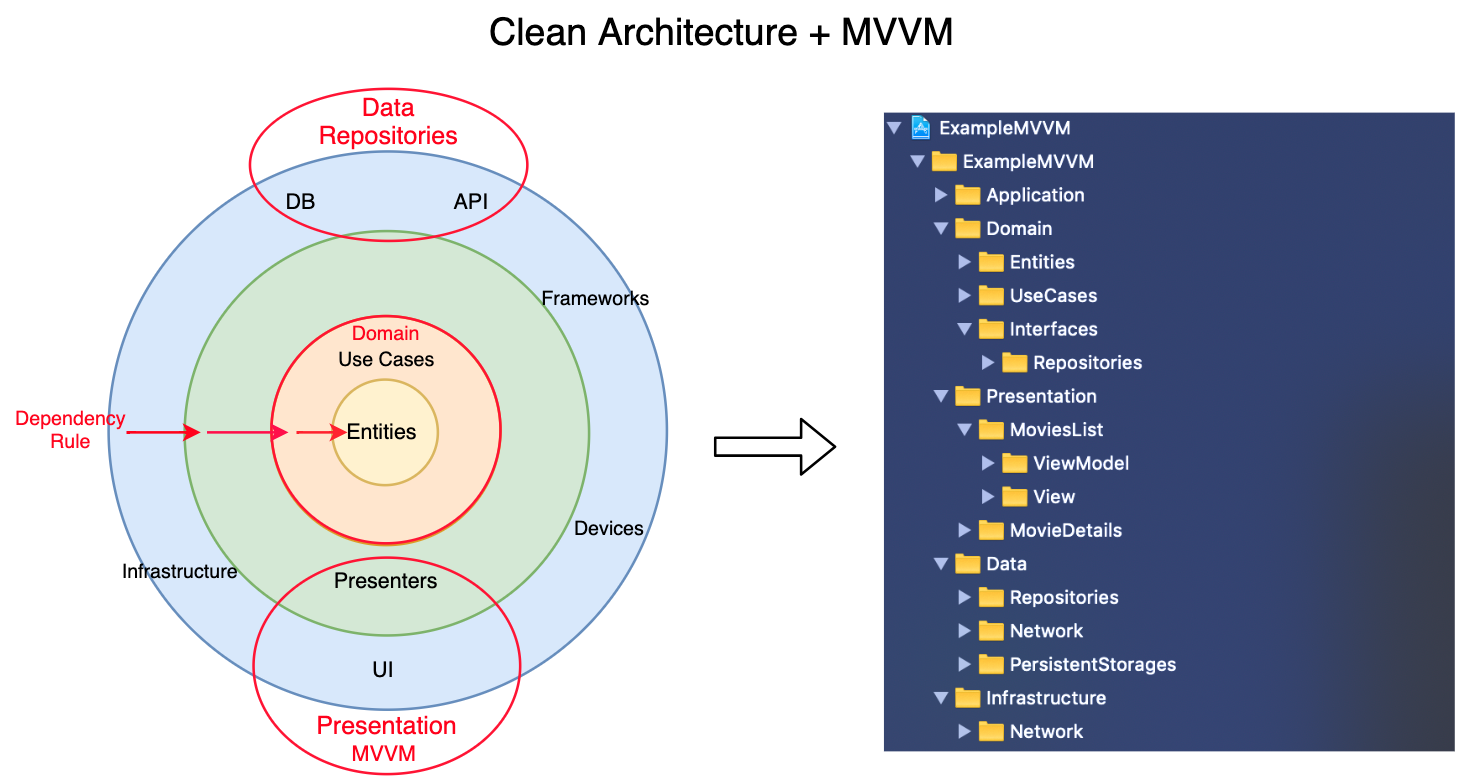
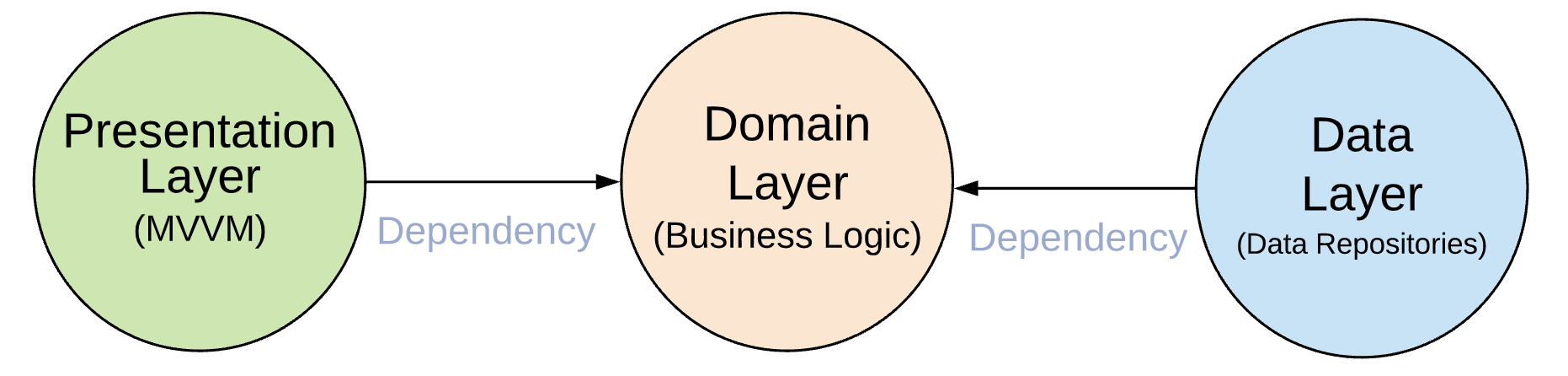
Note: Domain Layer should not include anything from other layers(e.g Presentation — UIKit or SwiftUI or Data Layer — Mapping Codable)
If you would like to reuse Networking from this example project as repository I made it availabe here
This repository uses Storyboards (except one view written in SwiftUI). There is another similar repository but instead of using Storyboards, all Views are written in Code. It also uses UITableViewDiffableDataSource: iOS-Clean-Architecture-MVVM-Views-In-Code
To search a movie, write a name of a movie inside searchbar and hit enter or the search button. There are two network calls: request movies and request poster images. Every successful search query is stored persistently.
https://user-images.githubusercontent.com/6785311/236615779-153ef846-ae0b-4ce8-908a-57fca7158b9d.mp4
159 followers · starred Oct 2021
105 followers · starred Sep 2023
14 followers · starred Jun 2022
43 followers · starred Dec 2019
Template iOS app using Clean Architecture and MVVM. Includes DIContainer, FlowCoordinator, DTO, Response Caching and one of the views in SwiftUI
Swift
4,412
352 commits
updated Oct 11, 2026
iOS Project implemented with Clean Layered Architecture and MVVM. (Can be used as Template project by replacing item name “Movie”). More information in medium post: Medium Post about Clean Architecture + MVVM
Note: Domain Layer should not include anything from other layers(e.g Presentation — UIKit or SwiftUI or Data Layer — Mapping Codable)
If you would like to reuse Networking from this example project as repository I made it availabe here
This repository uses Storyboards (except one view written in SwiftUI). There is another similar repository but instead of using Storyboards, all Views are written in Code. It also uses UITableViewDiffableDataSource: iOS-Clean-Architecture-MVVM-Views-In-Code
To search a movie, write a name of a movie inside searchbar and hit enter or the search button. There are two network calls: request movies and request poster images. Every successful search query is stored persistently.
https://user-images.githubusercontent.com/6785311/236615779-153ef846-ae0b-4ce8-908a-57fca7158b9d.mp4
159 followers · starred Oct 2021
105 followers · starred Sep 2023
14 followers · starred Jun 2022
43 followers · starred Dec 2019