Hello world. Here is Kubernetes scheduler simulator.
Nowadays, the scheduler is configurable/extendable in the multiple ways:
But, unfortunately, not all configurations/expansions yield good results. Those who customize the scheduler need to make sure their scheduler is working as expected, and doesn't have an unacceptably negative impact on the scheduling.
In real Kubernetes, we cannot know the results of scheduling in detail without reading the logs, which usually requires privileged access to the control plane.
That's why we are developing a simulator for kube-scheduler -- you can try out the behavior of the scheduler while checking which plugin made what decision for which Node.
git clone git@github.com:kubernetes-sigs/kube-scheduler-simulator.git
cd kube-scheduler-simulator
# Pull the latest stable images for simulator from the registry,
# and run up all components.
make docker_up
# All things up!
You can access the simulator in http://localhost:3000.
Please see this doc to know other ways to run up the simulator.
We have several components:
/simulator): the core implementation of the simulator/web): the Web client of the simulatorSimulator is composed of debuggable scheduler + the HTTP server which mainly for the web UI.
There are several ways to integrate your scheduler into the simulator. See integrate-your-scheduler.md.
Simulator runs with a fake cluster powered by KWOK You can create any resources in KWOK cluster via any clients (e.g. kubectl, k8s client library, or web UI described next). And when you create Pods, Pods will be scheduled by the debuggable scheduler, and they'll get the annotations that explain how each Pod was evaluated by each scheduler plugin.
kind: Pod
apiVersion: v1
metadata:
  name: hoge-pod
  annotations:
    kube-scheduler-simulator.sigs.k8s.io/bind-result: '{"DefaultBinder":"success"}'
    kube-scheduler-simulator.sigs.k8s.io/filter-result: >-
      {"node-282x7":{"AzureDiskLimits":"passed","EBSLimits":"passed","GCEPDLimits":"passed","InterPodAffinity":"passed","NodeAffinity":"passed","NodeName":"passed","NodePorts":"passed","NodeResourcesFit":"passed","NodeUnschedulable":"passed","NodeVolumeLimits":"passed","PodTopologySpread":"passed","TaintToleration":"passed","VolumeBinding":"passed","VolumeRestrictions":"passed","VolumeZone":"passed"},"node-gp9t4":{"AzureDiskLimits":"passed","EBSLimits":"passed","GCEPDLimits":"passed","InterPodAffinity":"passed","NodeAffinity":"passed","NodeName":"passed","NodePorts":"passed","NodeResourcesFit":"passed","NodeUnschedulable":"passed","NodeVolumeLimits":"passed","PodTopologySpread":"passed","TaintToleration":"passed","VolumeBinding":"passed","VolumeRestrictions":"passed","VolumeZone":"passed"}}
    kube-scheduler-simulator.sigs.k8s.io/finalscore-result: >-
      {"node-282x7":{"ImageLocality":"0","InterPodAffinity":"0","NodeAffinity":"0","NodeNumber":"0","NodeResourcesBalancedAllocation":"76","NodeResourcesFit":"73","PodTopologySpread":"200","TaintToleration":"300","VolumeBinding":"0"},"node-gp9t4":{"ImageLocality":"0","InterPodAffinity":"0","NodeAffinity":"0","NodeNumber":"0","NodeResourcesBalancedAllocation":"76","NodeResourcesFit":"73","PodTopologySpread":"200","TaintToleration":"300","VolumeBinding":"0"}}
    kube-scheduler-simulator.sigs.k8s.io/permit-result: '{}'
    kube-scheduler-simulator.sigs.k8s.io/permit-result-timeout: '{}'
    kube-scheduler-simulator.sigs.k8s.io/postfilter-result: '{}'
    kube-scheduler-simulator.sigs.k8s.io/prebind-result: '{"VolumeBinding":"success"}'
    kube-scheduler-simulator.sigs.k8s.io/prefilter-result: '{}'
    kube-scheduler-simulator.sigs.k8s.io/prefilter-result-status: >-
      {"InterPodAffinity":"success","NodeAffinity":"success","NodePorts":"success","NodeResourcesFit":"success","PodTopologySpread":"success","VolumeBinding":"success","VolumeRestrictions":"success"}
    kube-scheduler-simulator.sigs.k8s.io/prescore-result: >-
      {"InterPodAffinity":"success","NodeAffinity":"success","NodeNumber":"success","PodTopologySpread":"success","TaintToleration":"success"}
    kube-scheduler-simulator.sigs.k8s.io/reserve-result: '{"VolumeBinding":"success"}'
    kube-scheduler-simulator.sigs.k8s.io/result-history: >-
      [{"noderesourcefit-prefilter-data":"{\"MilliCPU\":100,\"Memory\":17179869184,\"EphemeralStorage\":0,\"AllowedPodNumber\":0,\"ScalarResources\":null}","kube-scheduler-simulator.sigs.k8s.io/bind-result":"{\"DefaultBinder\":\"success\"}","kube-scheduler-simulator.sigs.k8s.io/filter-result":"{\"node-282x7\":{\"AzureDiskLimits\":\"passed\",\"EBSLimits\":\"passed\",\"GCEPDLimits\":\"passed\",\"InterPodAffinity\":\"passed\",\"NodeAffinity\":\"passed\",\"NodeName\":\"passed\",\"NodePorts\":\"passed\",\"NodeResourcesFit\":\"passed\",\"NodeUnschedulable\":\"passed\",\"NodeVolumeLimits\":\"passed\",\"PodTopologySpread\":\"passed\",\"TaintToleration\":\"passed\",\"VolumeBinding\":\"passed\",\"VolumeRestrictions\":\"passed\",\"VolumeZone\":\"passed\"},\"node-gp9t4\":{\"AzureDiskLimits\":\"passed\",\"EBSLimits\":\"passed\",\"GCEPDLimits\":\"passed\",\"InterPodAffinity\":\"passed\",\"NodeAffinity\":\"passed\",\"NodeName\":\"passed\",\"NodePorts\":\"passed\",\"NodeResourcesFit\":\"passed\",\"NodeUnschedulable\":\"passed\",\"NodeVolumeLimits\":\"passed\",\"PodTopologySpread\":\"passed\",\"TaintToleration\":\"passed\",\"VolumeBinding\":\"passed\",\"VolumeRestrictions\":\"passed\",\"VolumeZone\":\"passed\"}}","kube-scheduler-simulator.sigs.k8s.io/finalscore-result":"{\"node-282x7\":{\"ImageLocality\":\"0\",\"InterPodAffinity\":\"0\",\"NodeAffinity\":\"0\",\"NodeNumber\":\"0\",\"NodeResourcesBalancedAllocation\":\"76\",\"NodeResourcesFit\":\"73\",\"PodTopologySpread\":\"200\",\"TaintToleration\":\"300\",\"VolumeBinding\":\"0\"},\"node-gp9t4\":{\"ImageLocality\":\"0\",\"InterPodAffinity\":\"0\",\"NodeAffinity\":\"0\",\"NodeNumber\":\"0\",\"NodeResourcesBalancedAllocation\":\"76\",\"NodeResourcesFit\":\"73\",\"PodTopologySpread\":\"200\",\"TaintToleration\":\"300\",\"VolumeBinding\":\"0\"}}","kube-scheduler-simulator.sigs.k8s.io/permit-result":"{}","kube-scheduler-simulator.sigs.k8s.io/permit-result-timeout":"{}","kube-scheduler-simulator.sigs.k8s.io/postfilter-result":"{}","kube-scheduler-simulator.sigs.k8s.io/prebind-result":"{\"VolumeBinding\":\"success\"}","kube-scheduler-simulator.sigs.k8s.io/prefilter-result":"{}","kube-scheduler-simulator.sigs.k8s.io/prefilter-result-status":"{\"InterPodAffinity\":\"success\",\"NodeAffinity\":\"success\",\"NodePorts\":\"success\",\"NodeResourcesFit\":\"success\",\"PodTopologySpread\":\"success\",\"VolumeBinding\":\"success\",\"VolumeRestrictions\":\"success\"}","kube-scheduler-simulator.sigs.k8s.io/prescore-result":"{\"InterPodAffinity\":\"success\",\"NodeAffinity\":\"success\",\"NodeNumber\":\"success\",\"PodTopologySpread\":\"success\",\"TaintToleration\":\"success\"}","kube-scheduler-simulator.sigs.k8s.io/reserve-result":"{\"VolumeBinding\":\"success\"}","kube-scheduler-simulator.sigs.k8s.io/score-result":"{\"node-282x7\":{\"ImageLocality\":\"0\",\"InterPodAffinity\":\"0\",\"NodeAffinity\":\"0\",\"NodeNumber\":\"0\",\"NodeResourcesBalancedAllocation\":\"76\",\"NodeResourcesFit\":\"73\",\"PodTopologySpread\":\"0\",\"TaintToleration\":\"0\",\"VolumeBinding\":\"0\"},\"node-gp9t4\":{\"ImageLocality\":\"0\",\"InterPodAffinity\":\"0\",\"NodeAffinity\":\"0\",\"NodeNumber\":\"0\",\"NodeResourcesBalancedAllocation\":\"76\",\"NodeResourcesFit\":\"73\",\"PodTopologySpread\":\"0\",\"TaintToleration\":\"0\",\"VolumeBinding\":\"0\"}}","kube-scheduler-simulator.sigs.k8s.io/selected-node":"node-282x7"}]
    kube-scheduler-simulator.sigs.k8s.io/score-result: >-
      {"node-282x7":{"ImageLocality":"0","InterPodAffinity":"0","NodeAffinity":"0","NodeNumber":"0","NodeResourcesBalancedAllocation":"76","NodeResourcesFit":"73","PodTopologySpread":"0","TaintToleration":"0","VolumeBinding":"0"},"node-gp9t4":{"ImageLocality":"0","InterPodAffinity":"0","NodeAffinity":"0","NodeNumber":"0","NodeResourcesBalancedAllocation":"76","NodeResourcesFit":"73","PodTopologySpread":"0","TaintToleration":"0","VolumeBinding":"0"}}
    kube-scheduler-simulator.sigs.k8s.io/selected-node: node-282x7
You can utilize these results to understand your scheduler, check/test your configurations or customized scheduler's behavior.
Further expansion, you can export internal state more, or change specific behaviours on plugins by implementing PluginExtender.
The simulator has its own configuration, you can refer to the documentation.
See the following docs to know more about simulator:
Web UI is the easiest way to check the scheduler's behavior.
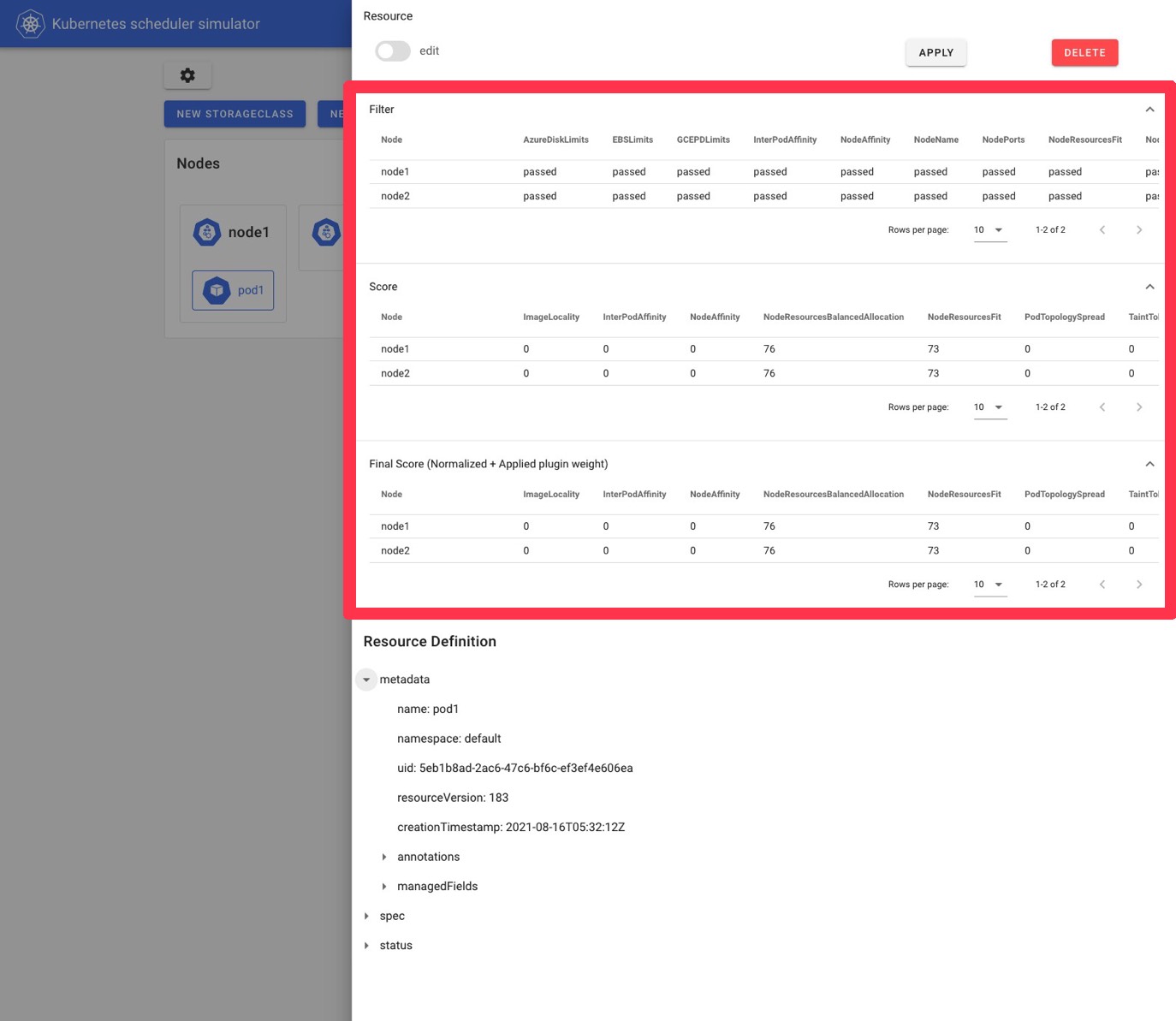
Nice table view for the scheduling result, the scheduler configuration reload feature; you can access every core features of the simulator with human-friendly ways!
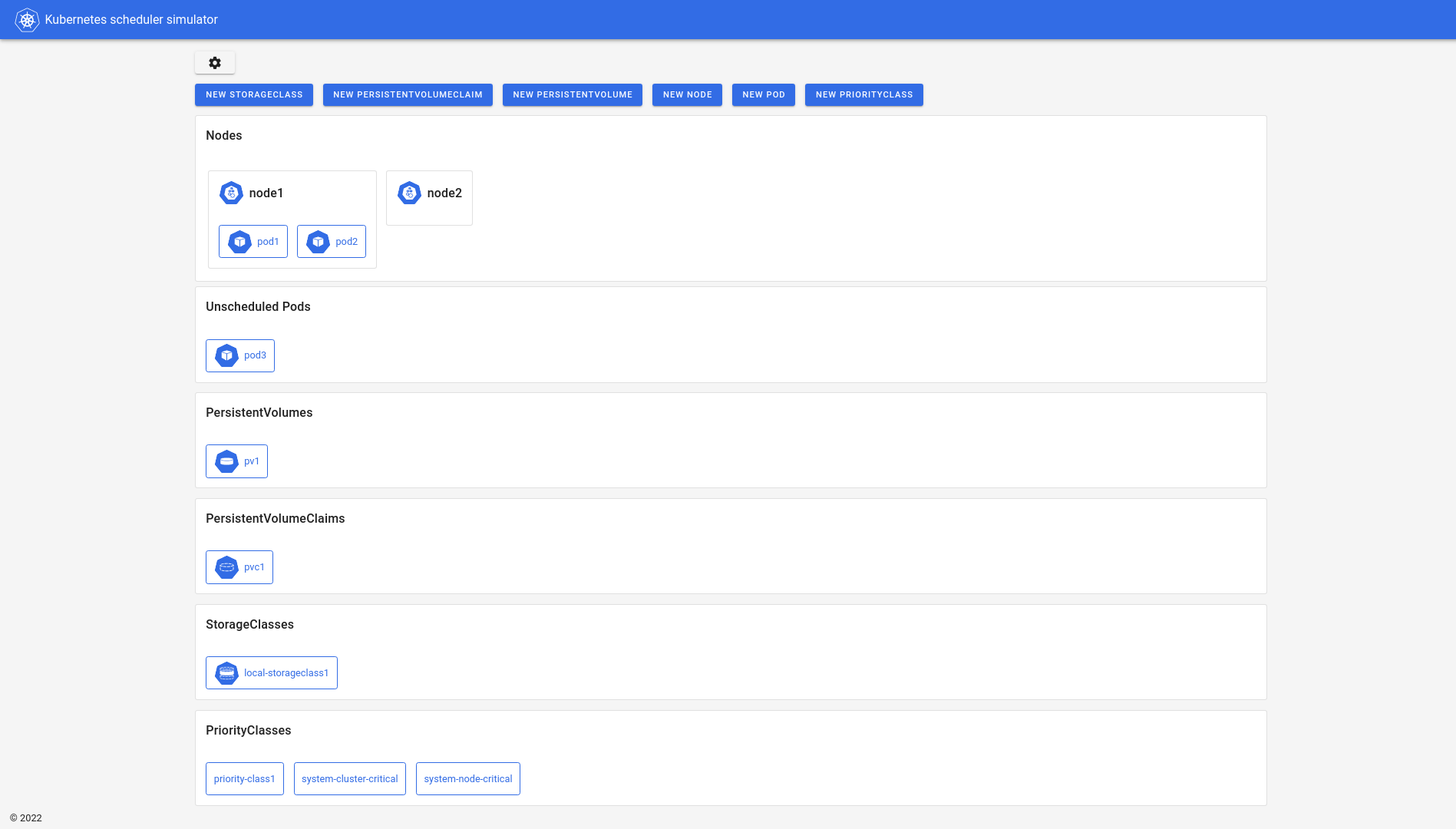
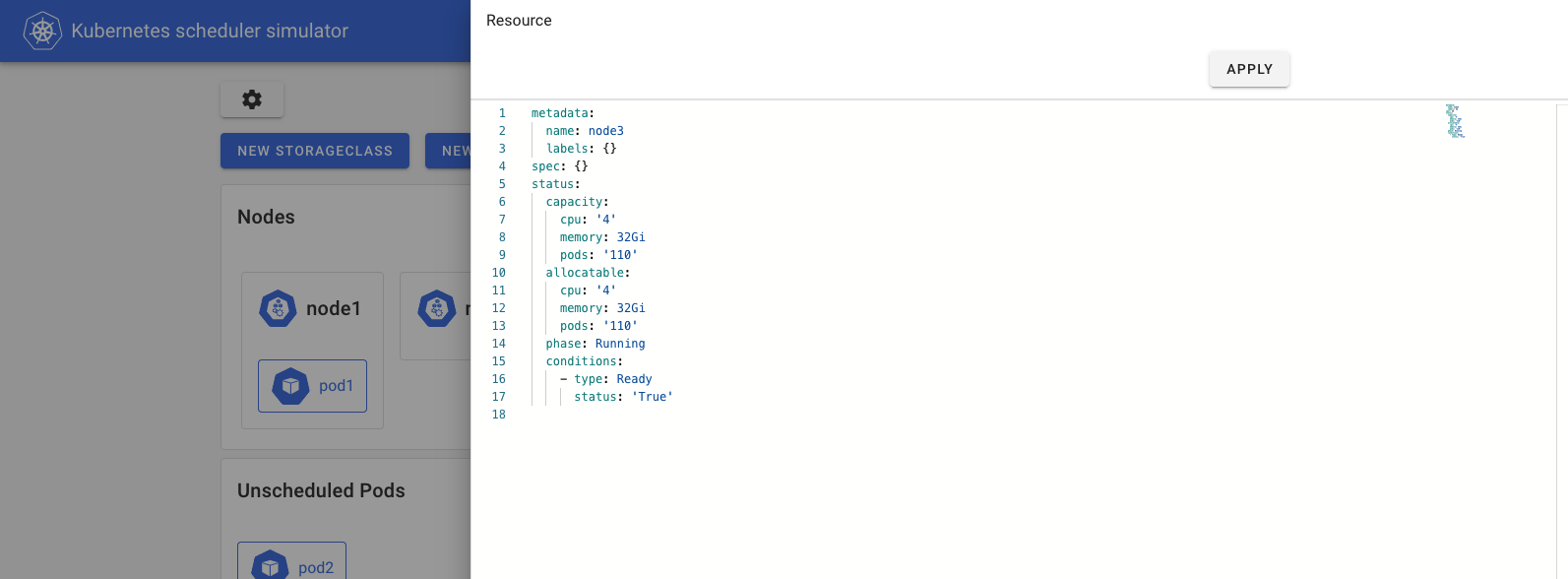
It has a cool yaml editor to create/edit resources.
And, after pods are scheduled, you can see the results of
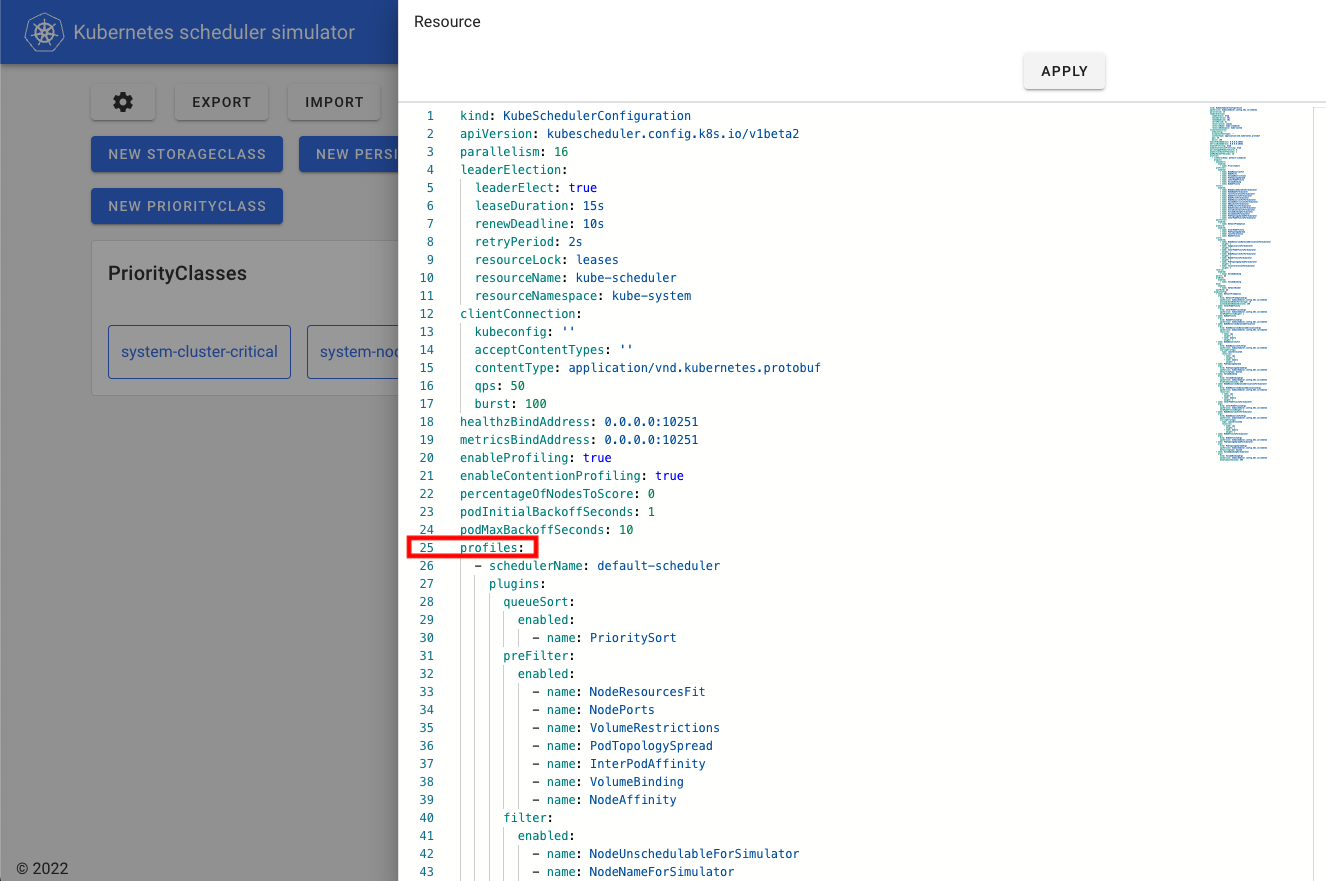
Also, You can change the configuration of the scheduler through KubeSchedulerConfiguration in Web UI.
(Note: changes to any fields other than .profiles are disabled on simulator,
since they do not affect the results of the scheduling.)
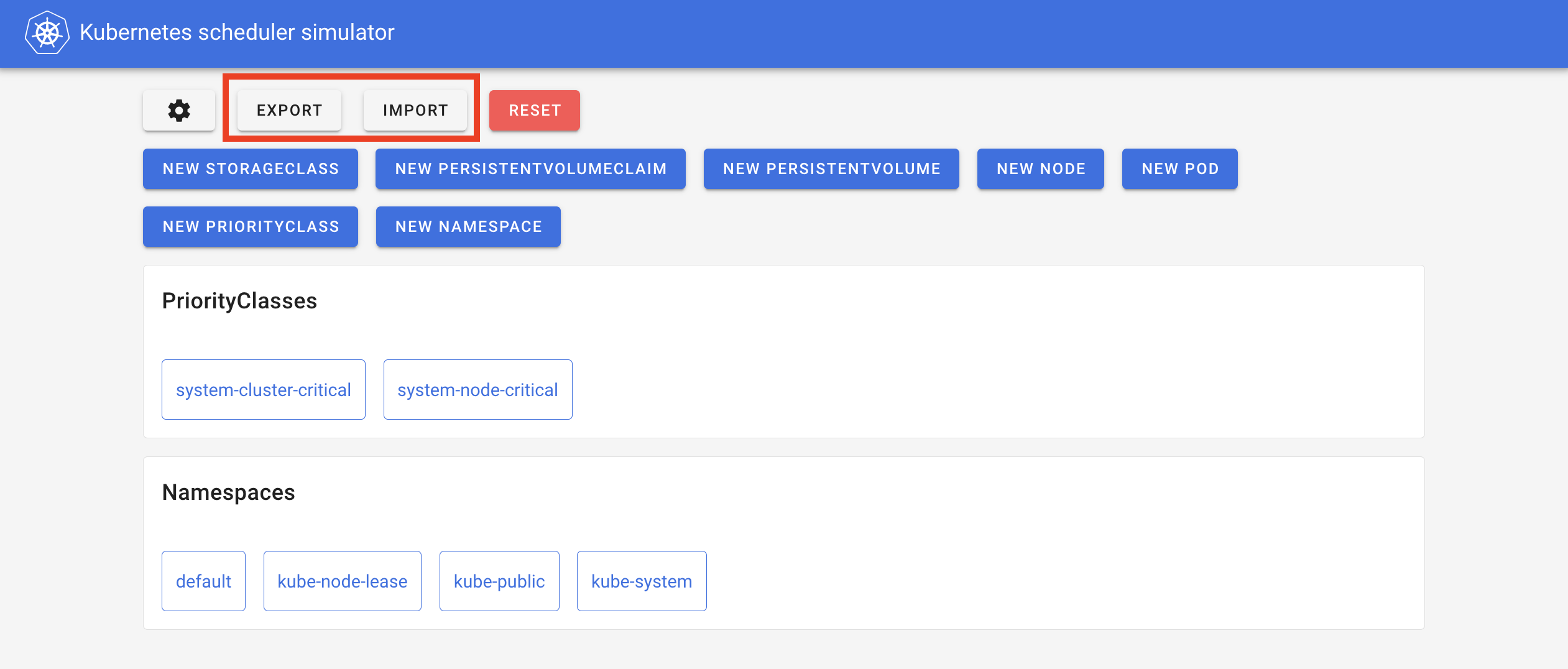
Also, you can take a snapshot of the resources so that you can share the situation or load them later.
See CONTRIBUTING.md
Learn how to engage with the Kubernetes community on the community page.
You can reach the maintainers of this project at:
Participation in the Kubernetes community is governed by the Kubernetes Code of Conduct.
Overall
Maintained
Code review
Latest release
Releases this year
471 followers · starred Apr 2025
521 followers · starred Aug 2021
148 followers · starred Oct 2021
130 followers · starred Apr 2022
Hello world. Here is Kubernetes scheduler simulator.
Nowadays, the scheduler is configurable/extendable in the multiple ways:
But, unfortunately, not all configurations/expansions yield good results. Those who customize the scheduler need to make sure their scheduler is working as expected, and doesn't have an unacceptably negative impact on the scheduling.
In real Kubernetes, we cannot know the results of scheduling in detail without reading the logs, which usually requires privileged access to the control plane.
That's why we are developing a simulator for kube-scheduler -- you can try out the behavior of the scheduler while checking which plugin made what decision for which Node.
git clone git@github.com:kubernetes-sigs/kube-scheduler-simulator.git
cd kube-scheduler-simulator
# Pull the latest stable images for simulator from the registry,
# and run up all components.
make docker_up
# All things up!
You can access the simulator in http://localhost:3000.
Please see this doc to know other ways to run up the simulator.
We have several components:
/simulator): the core implementation of the simulator/web): the Web client of the simulatorSimulator is composed of debuggable scheduler + the HTTP server which mainly for the web UI.
There are several ways to integrate your scheduler into the simulator. See integrate-your-scheduler.md.
Simulator runs with a fake cluster powered by KWOK You can create any resources in KWOK cluster via any clients (e.g. kubectl, k8s client library, or web UI described next). And when you create Pods, Pods will be scheduled by the debuggable scheduler, and they'll get the annotations that explain how each Pod was evaluated by each scheduler plugin.
kind: Pod
apiVersion: v1
metadata:
  name: hoge-pod
  annotations:
    kube-scheduler-simulator.sigs.k8s.io/bind-result: '{"DefaultBinder":"success"}'
    kube-scheduler-simulator.sigs.k8s.io/filter-result: >-
      {"node-282x7":{"AzureDiskLimits":"passed","EBSLimits":"passed","GCEPDLimits":"passed","InterPodAffinity":"passed","NodeAffinity":"passed","NodeName":"passed","NodePorts":"passed","NodeResourcesFit":"passed","NodeUnschedulable":"passed","NodeVolumeLimits":"passed","PodTopologySpread":"passed","TaintToleration":"passed","VolumeBinding":"passed","VolumeRestrictions":"passed","VolumeZone":"passed"},"node-gp9t4":{"AzureDiskLimits":"passed","EBSLimits":"passed","GCEPDLimits":"passed","InterPodAffinity":"passed","NodeAffinity":"passed","NodeName":"passed","NodePorts":"passed","NodeResourcesFit":"passed","NodeUnschedulable":"passed","NodeVolumeLimits":"passed","PodTopologySpread":"passed","TaintToleration":"passed","VolumeBinding":"passed","VolumeRestrictions":"passed","VolumeZone":"passed"}}
    kube-scheduler-simulator.sigs.k8s.io/finalscore-result: >-
      {"node-282x7":{"ImageLocality":"0","InterPodAffinity":"0","NodeAffinity":"0","NodeNumber":"0","NodeResourcesBalancedAllocation":"76","NodeResourcesFit":"73","PodTopologySpread":"200","TaintToleration":"300","VolumeBinding":"0"},"node-gp9t4":{"ImageLocality":"0","InterPodAffinity":"0","NodeAffinity":"0","NodeNumber":"0","NodeResourcesBalancedAllocation":"76","NodeResourcesFit":"73","PodTopologySpread":"200","TaintToleration":"300","VolumeBinding":"0"}}
    kube-scheduler-simulator.sigs.k8s.io/permit-result: '{}'
    kube-scheduler-simulator.sigs.k8s.io/permit-result-timeout: '{}'
    kube-scheduler-simulator.sigs.k8s.io/postfilter-result: '{}'
    kube-scheduler-simulator.sigs.k8s.io/prebind-result: '{"VolumeBinding":"success"}'
    kube-scheduler-simulator.sigs.k8s.io/prefilter-result: '{}'
    kube-scheduler-simulator.sigs.k8s.io/prefilter-result-status: >-
      {"InterPodAffinity":"success","NodeAffinity":"success","NodePorts":"success","NodeResourcesFit":"success","PodTopologySpread":"success","VolumeBinding":"success","VolumeRestrictions":"success"}
    kube-scheduler-simulator.sigs.k8s.io/prescore-result: >-
      {"InterPodAffinity":"success","NodeAffinity":"success","NodeNumber":"success","PodTopologySpread":"success","TaintToleration":"success"}
    kube-scheduler-simulator.sigs.k8s.io/reserve-result: '{"VolumeBinding":"success"}'
    kube-scheduler-simulator.sigs.k8s.io/result-history: >-
      [{"noderesourcefit-prefilter-data":"{\"MilliCPU\":100,\"Memory\":17179869184,\"EphemeralStorage\":0,\"AllowedPodNumber\":0,\"ScalarResources\":null}","kube-scheduler-simulator.sigs.k8s.io/bind-result":"{\"DefaultBinder\":\"success\"}","kube-scheduler-simulator.sigs.k8s.io/filter-result":"{\"node-282x7\":{\"AzureDiskLimits\":\"passed\",\"EBSLimits\":\"passed\",\"GCEPDLimits\":\"passed\",\"InterPodAffinity\":\"passed\",\"NodeAffinity\":\"passed\",\"NodeName\":\"passed\",\"NodePorts\":\"passed\",\"NodeResourcesFit\":\"passed\",\"NodeUnschedulable\":\"passed\",\"NodeVolumeLimits\":\"passed\",\"PodTopologySpread\":\"passed\",\"TaintToleration\":\"passed\",\"VolumeBinding\":\"passed\",\"VolumeRestrictions\":\"passed\",\"VolumeZone\":\"passed\"},\"node-gp9t4\":{\"AzureDiskLimits\":\"passed\",\"EBSLimits\":\"passed\",\"GCEPDLimits\":\"passed\",\"InterPodAffinity\":\"passed\",\"NodeAffinity\":\"passed\",\"NodeName\":\"passed\",\"NodePorts\":\"passed\",\"NodeResourcesFit\":\"passed\",\"NodeUnschedulable\":\"passed\",\"NodeVolumeLimits\":\"passed\",\"PodTopologySpread\":\"passed\",\"TaintToleration\":\"passed\",\"VolumeBinding\":\"passed\",\"VolumeRestrictions\":\"passed\",\"VolumeZone\":\"passed\"}}","kube-scheduler-simulator.sigs.k8s.io/finalscore-result":"{\"node-282x7\":{\"ImageLocality\":\"0\",\"InterPodAffinity\":\"0\",\"NodeAffinity\":\"0\",\"NodeNumber\":\"0\",\"NodeResourcesBalancedAllocation\":\"76\",\"NodeResourcesFit\":\"73\",\"PodTopologySpread\":\"200\",\"TaintToleration\":\"300\",\"VolumeBinding\":\"0\"},\"node-gp9t4\":{\"ImageLocality\":\"0\",\"InterPodAffinity\":\"0\",\"NodeAffinity\":\"0\",\"NodeNumber\":\"0\",\"NodeResourcesBalancedAllocation\":\"76\",\"NodeResourcesFit\":\"73\",\"PodTopologySpread\":\"200\",\"TaintToleration\":\"300\",\"VolumeBinding\":\"0\"}}","kube-scheduler-simulator.sigs.k8s.io/permit-result":"{}","kube-scheduler-simulator.sigs.k8s.io/permit-result-timeout":"{}","kube-scheduler-simulator.sigs.k8s.io/postfilter-result":"{}","kube-scheduler-simulator.sigs.k8s.io/prebind-result":"{\"VolumeBinding\":\"success\"}","kube-scheduler-simulator.sigs.k8s.io/prefilter-result":"{}","kube-scheduler-simulator.sigs.k8s.io/prefilter-result-status":"{\"InterPodAffinity\":\"success\",\"NodeAffinity\":\"success\",\"NodePorts\":\"success\",\"NodeResourcesFit\":\"success\",\"PodTopologySpread\":\"success\",\"VolumeBinding\":\"success\",\"VolumeRestrictions\":\"success\"}","kube-scheduler-simulator.sigs.k8s.io/prescore-result":"{\"InterPodAffinity\":\"success\",\"NodeAffinity\":\"success\",\"NodeNumber\":\"success\",\"PodTopologySpread\":\"success\",\"TaintToleration\":\"success\"}","kube-scheduler-simulator.sigs.k8s.io/reserve-result":"{\"VolumeBinding\":\"success\"}","kube-scheduler-simulator.sigs.k8s.io/score-result":"{\"node-282x7\":{\"ImageLocality\":\"0\",\"InterPodAffinity\":\"0\",\"NodeAffinity\":\"0\",\"NodeNumber\":\"0\",\"NodeResourcesBalancedAllocation\":\"76\",\"NodeResourcesFit\":\"73\",\"PodTopologySpread\":\"0\",\"TaintToleration\":\"0\",\"VolumeBinding\":\"0\"},\"node-gp9t4\":{\"ImageLocality\":\"0\",\"InterPodAffinity\":\"0\",\"NodeAffinity\":\"0\",\"NodeNumber\":\"0\",\"NodeResourcesBalancedAllocation\":\"76\",\"NodeResourcesFit\":\"73\",\"PodTopologySpread\":\"0\",\"TaintToleration\":\"0\",\"VolumeBinding\":\"0\"}}","kube-scheduler-simulator.sigs.k8s.io/selected-node":"node-282x7"}]
    kube-scheduler-simulator.sigs.k8s.io/score-result: >-
      {"node-282x7":{"ImageLocality":"0","InterPodAffinity":"0","NodeAffinity":"0","NodeNumber":"0","NodeResourcesBalancedAllocation":"76","NodeResourcesFit":"73","PodTopologySpread":"0","TaintToleration":"0","VolumeBinding":"0"},"node-gp9t4":{"ImageLocality":"0","InterPodAffinity":"0","NodeAffinity":"0","NodeNumber":"0","NodeResourcesBalancedAllocation":"76","NodeResourcesFit":"73","PodTopologySpread":"0","TaintToleration":"0","VolumeBinding":"0"}}
    kube-scheduler-simulator.sigs.k8s.io/selected-node: node-282x7
You can utilize these results to understand your scheduler, check/test your configurations or customized scheduler's behavior.
Further expansion, you can export internal state more, or change specific behaviours on plugins by implementing PluginExtender.
The simulator has its own configuration, you can refer to the documentation.
See the following docs to know more about simulator:
Web UI is the easiest way to check the scheduler's behavior.
Nice table view for the scheduling result, the scheduler configuration reload feature; you can access every core features of the simulator with human-friendly ways!
It has a cool yaml editor to create/edit resources.
And, after pods are scheduled, you can see the results of
Also, You can change the configuration of the scheduler through KubeSchedulerConfiguration in Web UI.
(Note: changes to any fields other than .profiles are disabled on simulator,
since they do not affect the results of the scheduling.)
Also, you can take a snapshot of the resources so that you can share the situation or load them later.
See CONTRIBUTING.md
Learn how to engage with the Kubernetes community on the community page.
You can reach the maintainers of this project at:
Participation in the Kubernetes community is governed by the Kubernetes Code of Conduct.
Overall
Maintained
Code review
Latest release
Releases this year
471 followers · starred Apr 2025
521 followers · starred Aug 2021
148 followers · starred Oct 2021
130 followers · starred Apr 2022