DRANET is a Kubernetes Network Driver that uses Dynamic Resource Allocation (DRA) to deliver high-performance networking for demanding applications in Kubernetes.
See the codeDRANET is a Kubernetes Network Driver that uses Dynamic Resource Allocation (DRA) to deliver high-performance networking for demanding applications in Kubernetes.
Our research paper, "The Kubernetes Network Driver Model: A Composable Architecture for High-Performance Networking", provides a deep dive into the DRANET model and its impact.
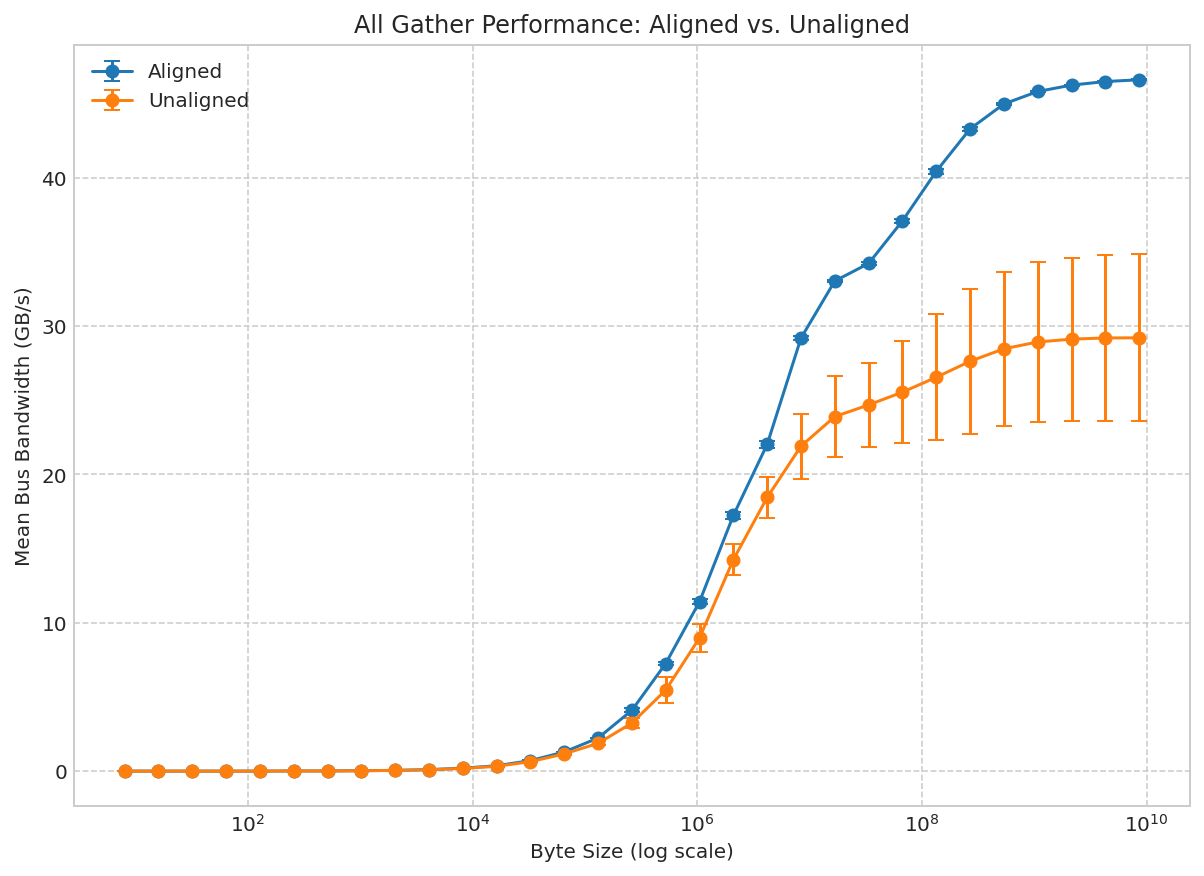
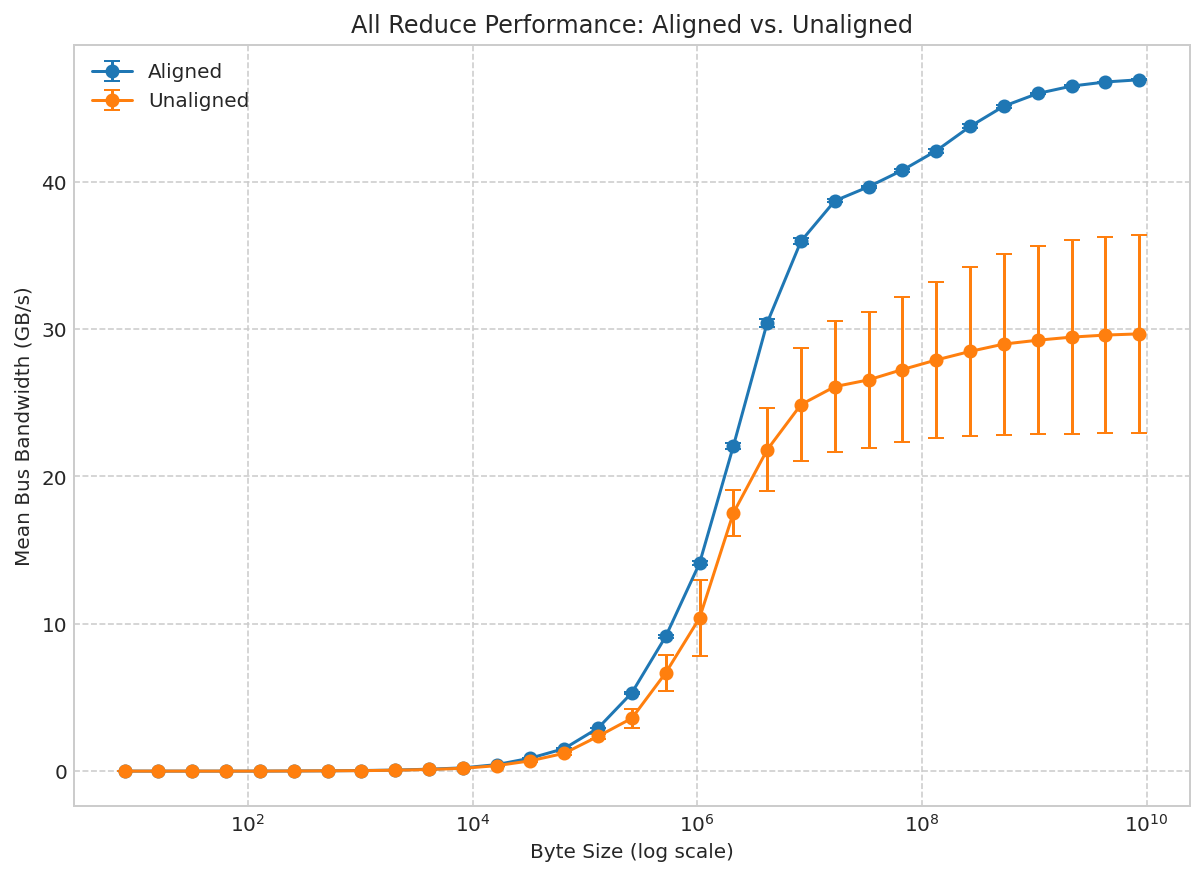
The key findings include:
all_gather and 58.1% for all_reduce operations in distributed AI/ML workloads.The DRANET driver communicates with the Kubelet through the DRA API and with the Container Runtime via NRI. This architectural approach ensures robust supportability and minimizes complexity, making it fully compatible with existing CNI plugins in your cluster.
Upon the creation of a Pod's network namespaces, the Container Runtime initiates a GRPC call to DRANET via NRI to execute the necessary network configurations.
A more detailed diagram illustrating this process can be found in our documentation: How It Works.
To get started with DRANET, your Kubernetes cluster needs to have Dynamic Resource Allocation (DRA) enabled. DRA is stable since Kubernetes v1.35 and enabled by default.
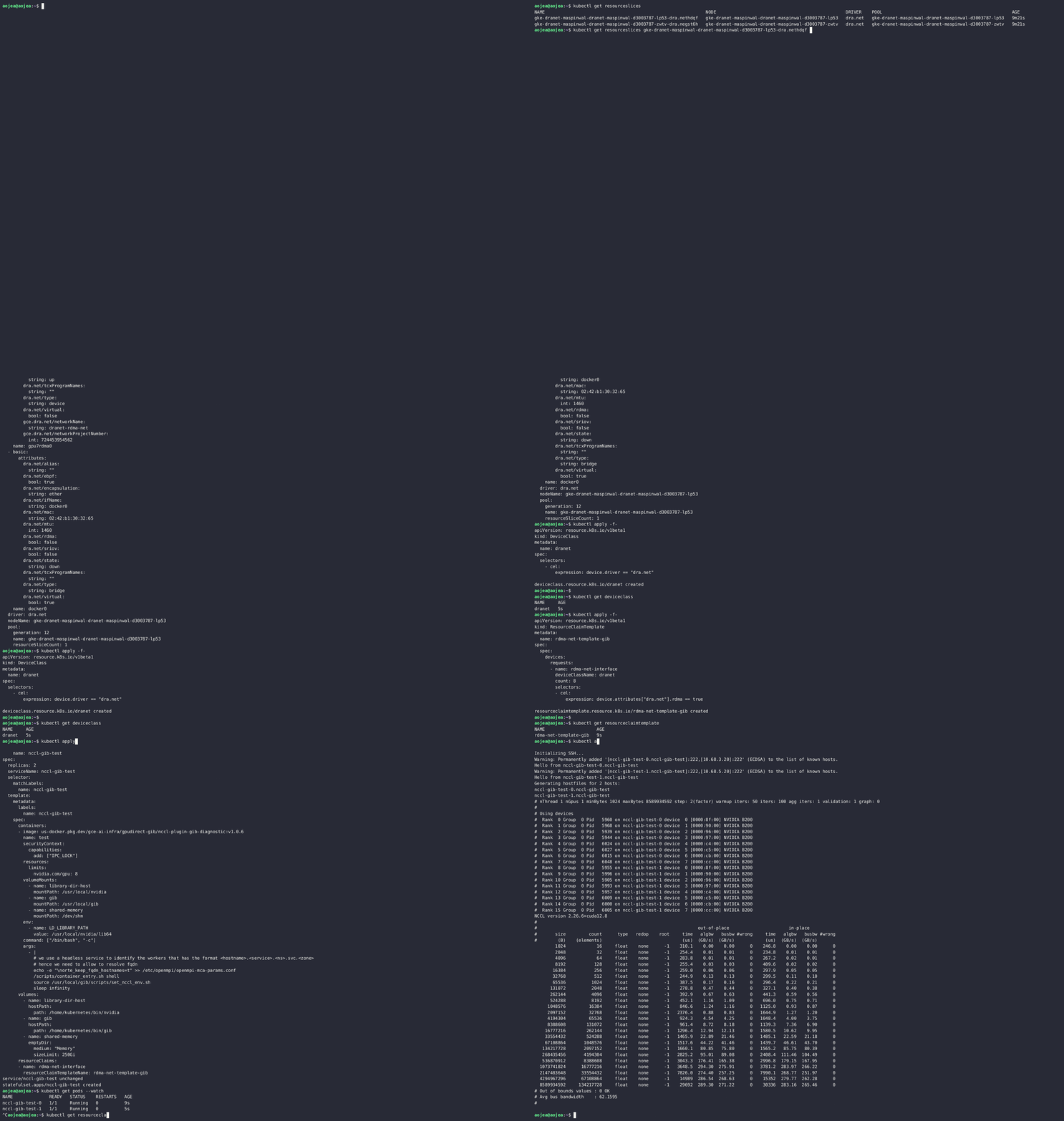
If you are using KIND, you can create a cluster with the following configuration:
kind: Cluster
apiVersion: kind.x-k8s.io/v1alpha4
nodes:
- role: control-plane
  image: kindest/node:v1.37.0
- role: worker
  image: kindest/node:v1.37.0
- role: worker
  image: kindest/node:v1.37.0
Then to create the cluster:
kind create cluster --config kind.yaml
For instructions on setting up DRA on GKE, refer to the official documentation: Set up Dynamic Resource Allocation
Install the latest stable version of DRANET using the provided manifest:
kubectl apply -f https://raw.githubusercontent.com/kubernetes-sigs/dranet/refs/heads/main/install.yaml
or using the Helm chart:
helm install -n kube-system dranet oci://registry.k8s.io/networking/charts/dranet --version v1.4.0
For available configuration options, see the chart README.
DRANET persists prepared pod device configuration in a local bbolt database so
NRI hooks can continue initialization after a driver restart. The default DB
path is /var/run/dranet/dranet.db, so deployment manifests must mount
/var/run/dranet as writable storage (hostPath with DirectoryOrCreate in the
provided manifests).
You can override the DB path with --db-path; set it to an empty
string to disable persistence and use in-memory state.
Once DRANET is running, you can inspect the network interfaces and their
attributes published by the drivers. Users can then create DeviceClasses,
ResourceClaims, and/or ResourceClaimTemplates to schedule pods and allocate
network devices.
For examples of how to use DRANET with DeviceClass and ResourceClaim to
attach network interfaces to pods, please refer to the Quick Start
guide.
We welcome your contributions! Please check out our CONTRIBUTING.md for more information.
Explore more concepts and advanced topics:
835 followers · starred Dec 2025
323 followers · starred Jan 2026
79 followers · starred Dec 2025
1,036 followers · starred Apr 2026
DRANET is a Kubernetes Network Driver that uses Dynamic Resource Allocation (DRA) to deliver high-performance networking for demanding applications in Kubernetes.
See the codeDRANET is a Kubernetes Network Driver that uses Dynamic Resource Allocation (DRA) to deliver high-performance networking for demanding applications in Kubernetes.
Our research paper, "The Kubernetes Network Driver Model: A Composable Architecture for High-Performance Networking", provides a deep dive into the DRANET model and its impact.
The key findings include:
all_gather and 58.1% for all_reduce operations in distributed AI/ML workloads.The DRANET driver communicates with the Kubelet through the DRA API and with the Container Runtime via NRI. This architectural approach ensures robust supportability and minimizes complexity, making it fully compatible with existing CNI plugins in your cluster.
Upon the creation of a Pod's network namespaces, the Container Runtime initiates a GRPC call to DRANET via NRI to execute the necessary network configurations.
A more detailed diagram illustrating this process can be found in our documentation: How It Works.
To get started with DRANET, your Kubernetes cluster needs to have Dynamic Resource Allocation (DRA) enabled. DRA is stable since Kubernetes v1.35 and enabled by default.
If you are using KIND, you can create a cluster with the following configuration:
kind: Cluster
apiVersion: kind.x-k8s.io/v1alpha4
nodes:
- role: control-plane
  image: kindest/node:v1.37.0
- role: worker
  image: kindest/node:v1.37.0
- role: worker
  image: kindest/node:v1.37.0
Then to create the cluster:
kind create cluster --config kind.yaml
For instructions on setting up DRA on GKE, refer to the official documentation: Set up Dynamic Resource Allocation
Install the latest stable version of DRANET using the provided manifest:
kubectl apply -f https://raw.githubusercontent.com/kubernetes-sigs/dranet/refs/heads/main/install.yaml
or using the Helm chart:
helm install -n kube-system dranet oci://registry.k8s.io/networking/charts/dranet --version v1.4.0
For available configuration options, see the chart README.
DRANET persists prepared pod device configuration in a local bbolt database so
NRI hooks can continue initialization after a driver restart. The default DB
path is /var/run/dranet/dranet.db, so deployment manifests must mount
/var/run/dranet as writable storage (hostPath with DirectoryOrCreate in the
provided manifests).
You can override the DB path with --db-path; set it to an empty
string to disable persistence and use in-memory state.
Once DRANET is running, you can inspect the network interfaces and their
attributes published by the drivers. Users can then create DeviceClasses,
ResourceClaims, and/or ResourceClaimTemplates to schedule pods and allocate
network devices.
For examples of how to use DRANET with DeviceClass and ResourceClaim to
attach network interfaces to pods, please refer to the Quick Start
guide.
We welcome your contributions! Please check out our CONTRIBUTING.md for more information.
Explore more concepts and advanced topics:
835 followers · starred Dec 2025
323 followers · starred Jan 2026
79 followers · starred Dec 2025
1,036 followers · starred Apr 2026



