
QEMU on browser
See the codeREADME
QEMU Wasm
This is a patched QEMU to make it runnable inside the browser. JIT binary translation (TCG) with multi-thread support (Multi-Threaded TCG) is also enabled.
This is an experimental software.
Demo page of QEMU on browser: https://ktock.github.io/qemu-wasm-demo/
Building
QEMU depends on several libraries including glib. Dockerfile in this repo contains dependencies compiled with emscripten. You can use this container for compiling QEMU with emscripten as well.
$ docker build -t buildqemu - < Dockerfile
$ docker run --rm -d --name build-qemu-wasm -v $(pwd):/qemu/:ro buildqemu
For building qemu-system-x86_64 (x86_64 guest):
$ EXTRA_CFLAGS="-O3 -g -Wno-error=unused-command-line-argument -matomics -mbulk-memory -DNDEBUG -DG_DISABLE_ASSERT -D_GNU_SOURCE -sASYNCIFY=1 -pthread -sPROXY_TO_PTHREAD=1 -sFORCE_FILESYSTEM -sALLOW_TABLE_GROWTH -sTOTAL_MEMORY=2300MB -sWASM_BIGINT -sMALLOC=mimalloc --js-library=/build/node_modules/xterm-pty/emscripten-pty.js -sEXPORT_ES6=1 -sASYNCIFY_IMPORTS=ffi_call_js" ; \
  docker exec -it build-qemu-wasm emconfigure /qemu/configure --static --target-list=x86_64-softmmu --cpu=wasm32 --cross-prefix= \
    --without-default-features --enable-system --with-coroutine=fiber --enable-virtfs \
    --extra-cflags="$EXTRA_CFLAGS" --extra-cxxflags="$EXTRA_CFLAGS" --extra-ldflags="-sEXPORTED_RUNTIME_METHODS=getTempRet0,setTempRet0,addFunction,removeFunction,TTY,FS" && \
  docker exec -it build-qemu-wasm emmake make -j $(nproc) qemu-system-x86_64
For building qemu-system-aarch64 (AArch64 guest):
$ EXTRA_CFLAGS="-O3 -g -Wno-error=unused-command-line-argument -matomics -mbulk-memory -DNDEBUG -DG_DISABLE_ASSERT -D_GNU_SOURCE -sASYNCIFY=1 -pthread -sPROXY_TO_PTHREAD=1 -sFORCE_FILESYSTEM -sALLOW_TABLE_GROWTH -sTOTAL_MEMORY=2300MB -sWASM_BIGINT -sMALLOC=mimalloc --js-library=/build/node_modules/xterm-pty/emscripten-pty.js -sEXPORT_ES6=1 -sASYNCIFY_IMPORTS=ffi_call_js" ; \
  docker exec -it build-qemu-wasm emconfigure /qemu/configure --static --target-list=aarch64-softmmu --cpu=wasm32 --cross-prefix= \
    --without-default-features --enable-system --with-coroutine=fiber --enable-virtfs \
    --extra-cflags="$EXTRA_CFLAGS" --extra-cxxflags="$EXTRA_CFLAGS" --extra-ldflags="-sEXPORTED_RUNTIME_METHODS=getTempRet0,setTempRet0,addFunction,removeFunction,TTY,FS" && \
  docker exec -it build-qemu-wasm emmake make -j $(nproc) qemu-system-aarch64
For building qemu-system-riscv64 (RISCV64 guest):
$ EXTRA_CFLAGS="-O3 -g -Wno-error=unused-command-line-argument -matomics -mbulk-memory -DNDEBUG -DG_DISABLE_ASSERT -D_GNU_SOURCE -sASYNCIFY=1 -pthread -sPROXY_TO_PTHREAD=1 -sFORCE_FILESYSTEM -sALLOW_TABLE_GROWTH -sTOTAL_MEMORY=2300MB -sWASM_BIGINT -sMALLOC=mimalloc --js-library=/build/node_modules/xterm-pty/emscripten-pty.js -sEXPORT_ES6=1 -sASYNCIFY_IMPORTS=ffi_call_js" ; \
  docker exec -it build-qemu-wasm emconfigure /qemu/configure --static --target-list=riscv64-softmmu --cpu=wasm32 --cross-prefix= \
    --without-default-features --enable-system --with-coroutine=fiber --enable-virtfs \
    --extra-cflags="$EXTRA_CFLAGS" --extra-cxxflags="$EXTRA_CFLAGS" --extra-ldflags="-sEXPORTED_RUNTIME_METHODS=getTempRet0,setTempRet0,addFunction,removeFunction,TTY,FS" && \
  docker exec -it build-qemu-wasm emmake make -j $(nproc) qemu-system-riscv64
Examples
Running QEMU on browser (x86_64 guest)
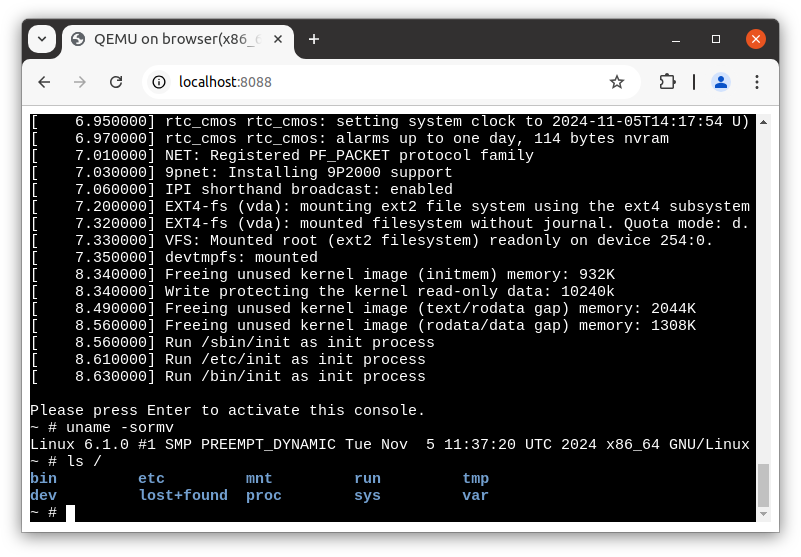
Build qemu-system-x86_64 as shown in "Building" section and keep build-qemu-wasm running.
The following steps are done outside of the container.
Preparing for example images (busybox + linux):
$ mkdir /tmp/pack/
$ docker build --output=type=local,dest=/tmp/pack/ ./examples/x86_64/image
Packaging dependencies:
$ cp ./pc-bios/{bios-256k.bin,vgabios-stdvga.bin,kvmvapic.bin,linuxboot_dma.bin} /tmp/pack/
$ docker cp /tmp/pack build-qemu-wasm:/
$ docker exec -it build-qemu-wasm /bin/sh -c "/emsdk/upstream/emscripten/tools/file_packager.py qemu-system-x86_64.data --preload /pack > load.js"
Serving them on localhost:
$ mkdir -p /tmp/test-js/htdocs/
$ cp -R ./examples/x86_64/src/* /tmp/test-js/
$ docker cp build-qemu-wasm:/build/qemu-system-x86_64 /tmp/test-js/htdocs/out.js
$ for f in qemu-system-x86_64.wasm qemu-system-x86_64.worker.js qemu-system-x86_64.data load.js ; do
    docker cp build-qemu-wasm:/build/${f} /tmp/test-js/htdocs/
  done
$ docker run --rm -p 127.0.0.1:8088:80 \
         -v "/tmp/test-js/htdocs:/usr/local/apache2/htdocs/:ro" \
         -v "/tmp/test-js/xterm-pty.conf:/usr/local/apache2/conf/extra/xterm-pty.conf:ro" \
         --entrypoint=/bin/sh httpd -c 'echo "Include conf/extra/xterm-pty.conf" >> /usr/local/apache2/conf/httpd.conf && httpd-foreground'
Then localhost:8088 serves the page.
Running Raspberry Pi emulated on browser
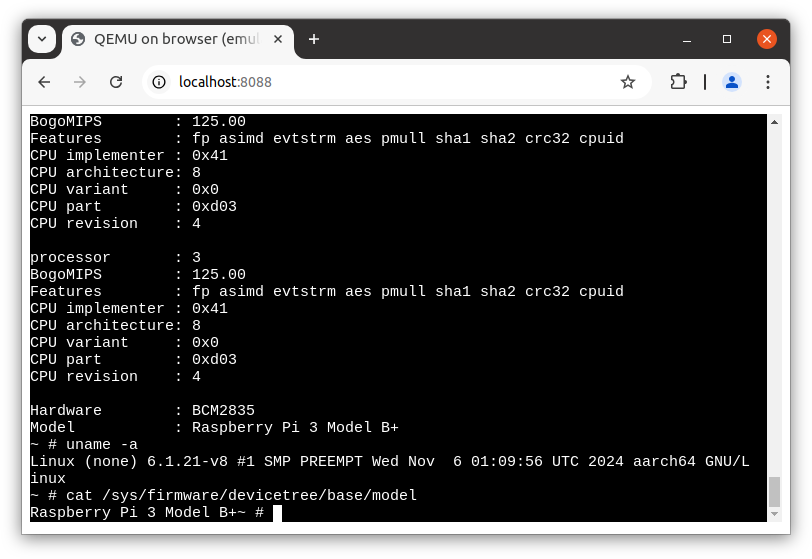
Build qemu-system-aarch64 as shown in "Building" section and keep build-qemu-wasm running.
The following steps are done outside of the container.
Preparing for example images (busbox + linux):
$ mkdir /tmp/pack/
$ docker build --output=type=local,dest=/tmp/pack/ ./examples/raspi3ap/image/
Packaging dependencies:
$ docker cp /tmp/pack build-qemu-wasm:/
$ docker exec -it build-qemu-wasm /bin/sh -c "/emsdk/upstream/emscripten/tools/file_packager.py qemu-system-aarch64.data --preload /pack > load.js"
Serving them on localhost:
$ mkdir -p /tmp/test-js/htdocs/
$ cp -R ./examples/raspi3ap/src/* /tmp/test-js/
$ docker cp build-qemu-wasm:/build/qemu-system-aarch64 /tmp/test-js/htdocs/out.js
$ for f in qemu-system-aarch64.wasm qemu-system-aarch64.worker.js qemu-system-aarch64.data load.js ; do
    docker cp build-qemu-wasm:/build/${f} /tmp/test-js/htdocs/
  done
$ docker run --rm -p 127.0.0.1:8088:80 \
         -v "/tmp/test-js/htdocs:/usr/local/apache2/htdocs/:ro" \
         -v "/tmp/test-js/xterm-pty.conf:/usr/local/apache2/conf/extra/xterm-pty.conf:ro" \
         --entrypoint=/bin/sh httpd -c 'echo "Include conf/extra/xterm-pty.conf" >> /usr/local/apache2/conf/httpd.conf && httpd-foreground'
Then localhost:8088 serves the page.
Running QEMU on browser (RISCV64 guest)
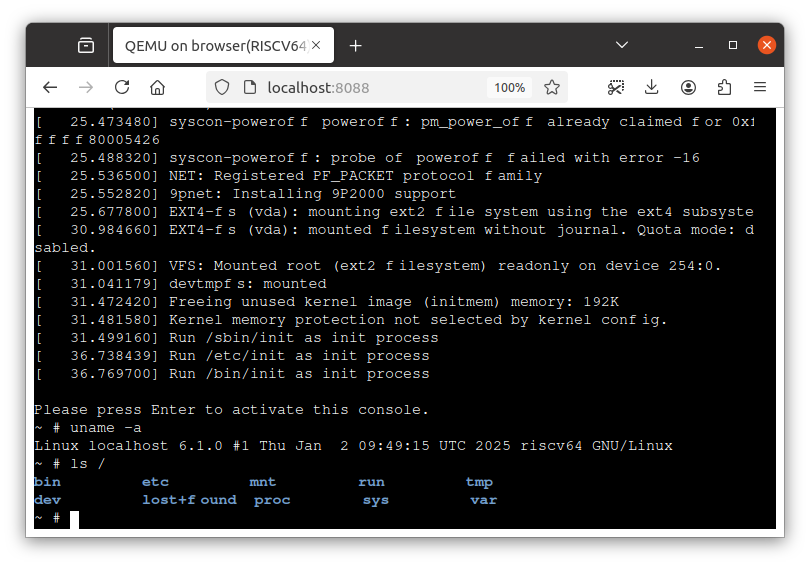
Build qemu-system-riscv64 as shown in "Building" section and keep build-qemu-wasm running.
The following steps are done outside of the container.
Preparing for example images (busybox + linux):
$ mkdir /tmp/pack/
$ docker build --output=type=local,dest=/tmp/pack/ ./examples/riscv64/image
Packaging dependencies:
$ cp ./pc-bios/opensbi-riscv64-generic-fw_dynamic.bin /tmp/pack/
$ docker cp /tmp/pack build-qemu-wasm:/
$ docker exec -it build-qemu-wasm /bin/sh -c "/emsdk/upstream/emscripten/tools/file_packager.py qemu-system-riscv64.data --preload /pack > load.js"
Serving them on localhost:
$ mkdir -p /tmp/test-js/htdocs/
$ cp -R ./examples/riscv64/src/* /tmp/test-js/
$ docker cp build-qemu-wasm:/build/qemu-system-riscv64 /tmp/test-js/htdocs/out.js
$ for f in qemu-system-riscv64.wasm qemu-system-riscv64.worker.js qemu-system-riscv64.data load.js ; do
    docker cp build-qemu-wasm:/build/${f} /tmp/test-js/htdocs/
  done
$ docker run --rm -p 127.0.0.1:8088:80 \
         -v "/tmp/test-js/htdocs:/usr/local/apache2/htdocs/:ro" \
         -v "/tmp/test-js/xterm-pty.conf:/usr/local/apache2/conf/extra/xterm-pty.conf:ro" \
         --entrypoint=/bin/sh httpd -c 'echo "Include conf/extra/xterm-pty.conf" >> /usr/local/apache2/conf/httpd.conf && httpd-foreground'
Then localhost:8088 serves the page.
How does it work?
This project adds a TCG backend that translates IR to Wasm. Wasm VM doesn't allow transferring control to the generated Wasm code on memory, so this project relies on browser APIs (WebAssembly.Module and WebAssembly.Instance) to achieve that.
Each TB is translated to a Wasm module. One IR instruction is translated to the corresponding Wasm instruction(s). TB modules can access QEMU module's memory and helper functions by importing them.
Ideally, all TBs should be translated to Wasm modules, but compilation overhead slows down the execution, and browsers don't look like capable of creating thousands of modules. So QEMU Wasm enables both TCI (IR interpreter) and TCG. Only TBs that run many times (e.g. 1000) are compiled to Wasm.
Status of upstreaming
Upstreaming WebAssembly host support to the QEMU project is currently in active development:
- TCI (slow interpreter mode) for 32bit guests: Upstreamed in QEMU 10.1 (https://wiki.qemu.org/ChangeLog/10.1)
- TCI (slow interpreter mode) for 64bit guests: Under discussion (PATCH v3)
- TCG (JIT mode): Under discussion (PATCH v2)
Additional Resources
./examples/: Containeing examples and docs about networking, virtfs, migration, etc.- Running containers inside browser with container2wasm integration: https://github.com/ktock/container2wasm/tree/v0.8.0/examples/emscripten
Similar projects
-
v86: https://github.com/copy/v86
- x86-compatible on-browser CPU emulator
- Supports JIT compilation using browser APIs
- 64bit guest is not supported as of Nov. 2024
-
Qemu.js: https://github.com/atrosinenko/qemujs
- QEMU ported to browser
- Supports JIT compilation (TCG) using browser APIs
- Single-threaded, no support for 64bit guests as of Nov. 2024


Similar repos


Languages
C
80.1%
C++
12.0%
Python
4.0%
Shell
1.6%
QEMU on browser
See the codeREADME
QEMU Wasm
This is a patched QEMU to make it runnable inside the browser. JIT binary translation (TCG) with multi-thread support (Multi-Threaded TCG) is also enabled.
This is an experimental software.
Demo page of QEMU on browser: https://ktock.github.io/qemu-wasm-demo/
Building
QEMU depends on several libraries including glib. Dockerfile in this repo contains dependencies compiled with emscripten. You can use this container for compiling QEMU with emscripten as well.
$ docker build -t buildqemu - < Dockerfile
$ docker run --rm -d --name build-qemu-wasm -v $(pwd):/qemu/:ro buildqemu
For building qemu-system-x86_64 (x86_64 guest):
$ EXTRA_CFLAGS="-O3 -g -Wno-error=unused-command-line-argument -matomics -mbulk-memory -DNDEBUG -DG_DISABLE_ASSERT -D_GNU_SOURCE -sASYNCIFY=1 -pthread -sPROXY_TO_PTHREAD=1 -sFORCE_FILESYSTEM -sALLOW_TABLE_GROWTH -sTOTAL_MEMORY=2300MB -sWASM_BIGINT -sMALLOC=mimalloc --js-library=/build/node_modules/xterm-pty/emscripten-pty.js -sEXPORT_ES6=1 -sASYNCIFY_IMPORTS=ffi_call_js" ; \
  docker exec -it build-qemu-wasm emconfigure /qemu/configure --static --target-list=x86_64-softmmu --cpu=wasm32 --cross-prefix= \
    --without-default-features --enable-system --with-coroutine=fiber --enable-virtfs \
    --extra-cflags="$EXTRA_CFLAGS" --extra-cxxflags="$EXTRA_CFLAGS" --extra-ldflags="-sEXPORTED_RUNTIME_METHODS=getTempRet0,setTempRet0,addFunction,removeFunction,TTY,FS" && \
  docker exec -it build-qemu-wasm emmake make -j $(nproc) qemu-system-x86_64
For building qemu-system-aarch64 (AArch64 guest):
$ EXTRA_CFLAGS="-O3 -g -Wno-error=unused-command-line-argument -matomics -mbulk-memory -DNDEBUG -DG_DISABLE_ASSERT -D_GNU_SOURCE -sASYNCIFY=1 -pthread -sPROXY_TO_PTHREAD=1 -sFORCE_FILESYSTEM -sALLOW_TABLE_GROWTH -sTOTAL_MEMORY=2300MB -sWASM_BIGINT -sMALLOC=mimalloc --js-library=/build/node_modules/xterm-pty/emscripten-pty.js -sEXPORT_ES6=1 -sASYNCIFY_IMPORTS=ffi_call_js" ; \
  docker exec -it build-qemu-wasm emconfigure /qemu/configure --static --target-list=aarch64-softmmu --cpu=wasm32 --cross-prefix= \
    --without-default-features --enable-system --with-coroutine=fiber --enable-virtfs \
    --extra-cflags="$EXTRA_CFLAGS" --extra-cxxflags="$EXTRA_CFLAGS" --extra-ldflags="-sEXPORTED_RUNTIME_METHODS=getTempRet0,setTempRet0,addFunction,removeFunction,TTY,FS" && \
  docker exec -it build-qemu-wasm emmake make -j $(nproc) qemu-system-aarch64
For building qemu-system-riscv64 (RISCV64 guest):
$ EXTRA_CFLAGS="-O3 -g -Wno-error=unused-command-line-argument -matomics -mbulk-memory -DNDEBUG -DG_DISABLE_ASSERT -D_GNU_SOURCE -sASYNCIFY=1 -pthread -sPROXY_TO_PTHREAD=1 -sFORCE_FILESYSTEM -sALLOW_TABLE_GROWTH -sTOTAL_MEMORY=2300MB -sWASM_BIGINT -sMALLOC=mimalloc --js-library=/build/node_modules/xterm-pty/emscripten-pty.js -sEXPORT_ES6=1 -sASYNCIFY_IMPORTS=ffi_call_js" ; \
  docker exec -it build-qemu-wasm emconfigure /qemu/configure --static --target-list=riscv64-softmmu --cpu=wasm32 --cross-prefix= \
    --without-default-features --enable-system --with-coroutine=fiber --enable-virtfs \
    --extra-cflags="$EXTRA_CFLAGS" --extra-cxxflags="$EXTRA_CFLAGS" --extra-ldflags="-sEXPORTED_RUNTIME_METHODS=getTempRet0,setTempRet0,addFunction,removeFunction,TTY,FS" && \
  docker exec -it build-qemu-wasm emmake make -j $(nproc) qemu-system-riscv64
Examples
Running QEMU on browser (x86_64 guest)
Build qemu-system-x86_64 as shown in "Building" section and keep build-qemu-wasm running.
The following steps are done outside of the container.
Preparing for example images (busybox + linux):
$ mkdir /tmp/pack/
$ docker build --output=type=local,dest=/tmp/pack/ ./examples/x86_64/image
Packaging dependencies:
$ cp ./pc-bios/{bios-256k.bin,vgabios-stdvga.bin,kvmvapic.bin,linuxboot_dma.bin} /tmp/pack/
$ docker cp /tmp/pack build-qemu-wasm:/
$ docker exec -it build-qemu-wasm /bin/sh -c "/emsdk/upstream/emscripten/tools/file_packager.py qemu-system-x86_64.data --preload /pack > load.js"
Serving them on localhost:
$ mkdir -p /tmp/test-js/htdocs/
$ cp -R ./examples/x86_64/src/* /tmp/test-js/
$ docker cp build-qemu-wasm:/build/qemu-system-x86_64 /tmp/test-js/htdocs/out.js
$ for f in qemu-system-x86_64.wasm qemu-system-x86_64.worker.js qemu-system-x86_64.data load.js ; do
    docker cp build-qemu-wasm:/build/${f} /tmp/test-js/htdocs/
  done
$ docker run --rm -p 127.0.0.1:8088:80 \
         -v "/tmp/test-js/htdocs:/usr/local/apache2/htdocs/:ro" \
         -v "/tmp/test-js/xterm-pty.conf:/usr/local/apache2/conf/extra/xterm-pty.conf:ro" \
         --entrypoint=/bin/sh httpd -c 'echo "Include conf/extra/xterm-pty.conf" >> /usr/local/apache2/conf/httpd.conf && httpd-foreground'
Then localhost:8088 serves the page.
Running Raspberry Pi emulated on browser
Build qemu-system-aarch64 as shown in "Building" section and keep build-qemu-wasm running.
The following steps are done outside of the container.
Preparing for example images (busbox + linux):
$ mkdir /tmp/pack/
$ docker build --output=type=local,dest=/tmp/pack/ ./examples/raspi3ap/image/
Packaging dependencies:
$ docker cp /tmp/pack build-qemu-wasm:/
$ docker exec -it build-qemu-wasm /bin/sh -c "/emsdk/upstream/emscripten/tools/file_packager.py qemu-system-aarch64.data --preload /pack > load.js"
Serving them on localhost:
$ mkdir -p /tmp/test-js/htdocs/
$ cp -R ./examples/raspi3ap/src/* /tmp/test-js/
$ docker cp build-qemu-wasm:/build/qemu-system-aarch64 /tmp/test-js/htdocs/out.js
$ for f in qemu-system-aarch64.wasm qemu-system-aarch64.worker.js qemu-system-aarch64.data load.js ; do
    docker cp build-qemu-wasm:/build/${f} /tmp/test-js/htdocs/
  done
$ docker run --rm -p 127.0.0.1:8088:80 \
         -v "/tmp/test-js/htdocs:/usr/local/apache2/htdocs/:ro" \
         -v "/tmp/test-js/xterm-pty.conf:/usr/local/apache2/conf/extra/xterm-pty.conf:ro" \
         --entrypoint=/bin/sh httpd -c 'echo "Include conf/extra/xterm-pty.conf" >> /usr/local/apache2/conf/httpd.conf && httpd-foreground'
Then localhost:8088 serves the page.
Running QEMU on browser (RISCV64 guest)
Build qemu-system-riscv64 as shown in "Building" section and keep build-qemu-wasm running.
The following steps are done outside of the container.
Preparing for example images (busybox + linux):
$ mkdir /tmp/pack/
$ docker build --output=type=local,dest=/tmp/pack/ ./examples/riscv64/image
Packaging dependencies:
$ cp ./pc-bios/opensbi-riscv64-generic-fw_dynamic.bin /tmp/pack/
$ docker cp /tmp/pack build-qemu-wasm:/
$ docker exec -it build-qemu-wasm /bin/sh -c "/emsdk/upstream/emscripten/tools/file_packager.py qemu-system-riscv64.data --preload /pack > load.js"
Serving them on localhost:
$ mkdir -p /tmp/test-js/htdocs/
$ cp -R ./examples/riscv64/src/* /tmp/test-js/
$ docker cp build-qemu-wasm:/build/qemu-system-riscv64 /tmp/test-js/htdocs/out.js
$ for f in qemu-system-riscv64.wasm qemu-system-riscv64.worker.js qemu-system-riscv64.data load.js ; do
    docker cp build-qemu-wasm:/build/${f} /tmp/test-js/htdocs/
  done
$ docker run --rm -p 127.0.0.1:8088:80 \
         -v "/tmp/test-js/htdocs:/usr/local/apache2/htdocs/:ro" \
         -v "/tmp/test-js/xterm-pty.conf:/usr/local/apache2/conf/extra/xterm-pty.conf:ro" \
         --entrypoint=/bin/sh httpd -c 'echo "Include conf/extra/xterm-pty.conf" >> /usr/local/apache2/conf/httpd.conf && httpd-foreground'
Then localhost:8088 serves the page.
How does it work?
This project adds a TCG backend that translates IR to Wasm. Wasm VM doesn't allow transferring control to the generated Wasm code on memory, so this project relies on browser APIs (WebAssembly.Module and WebAssembly.Instance) to achieve that.
Each TB is translated to a Wasm module. One IR instruction is translated to the corresponding Wasm instruction(s). TB modules can access QEMU module's memory and helper functions by importing them.
Ideally, all TBs should be translated to Wasm modules, but compilation overhead slows down the execution, and browsers don't look like capable of creating thousands of modules. So QEMU Wasm enables both TCI (IR interpreter) and TCG. Only TBs that run many times (e.g. 1000) are compiled to Wasm.
Status of upstreaming
Upstreaming WebAssembly host support to the QEMU project is currently in active development:
- TCI (slow interpreter mode) for 32bit guests: Upstreamed in QEMU 10.1 (https://wiki.qemu.org/ChangeLog/10.1)
- TCI (slow interpreter mode) for 64bit guests: Under discussion (PATCH v3)
- TCG (JIT mode): Under discussion (PATCH v2)
Additional Resources
./examples/: Containeing examples and docs about networking, virtfs, migration, etc.- Running containers inside browser with container2wasm integration: https://github.com/ktock/container2wasm/tree/v0.8.0/examples/emscripten
Similar projects
-
v86: https://github.com/copy/v86
- x86-compatible on-browser CPU emulator
- Supports JIT compilation using browser APIs
- 64bit guest is not supported as of Nov. 2024
-
Qemu.js: https://github.com/atrosinenko/qemujs
- QEMU ported to browser
- Supports JIT compilation (TCG) using browser APIs
- Single-threaded, no support for 64bit guests as of Nov. 2024
Similar repos
Contributors
(top 30 of 295)
Languages
C
80.1%
C++
12.0%
Python
4.0%
Shell
1.6%