

repositories {
    mavenCentral()
}

dependencies {
    implementation 'org.kordamp.bootstrapfx:bootstrapfx-core:0.4.0'
}

BootstrapFX is a partial port of Twitter Bootstrap for JavaFX. It mainly provides a CSS stylesheet that closely resembles the original while being custom tailored for JavaFX’s unique CSS flavor.
It’s worth mentioning that Twitter Bootstrap delivers more than just a standardized look for common widgets. It also provides new widgets, behavior and a grid system. Some of these features may be ported at a later stage to BootstrapFX.
You can get the latest version of BootstrapFX from Maven Central.
repositories {
mavenCentral()
}
dependencies {
implementation 'org.kordamp.bootstrapfx:bootstrapfx-core:0.4.0'
}<dependencies>
<dependency>
<groupId>org.kordamp.bootstrapfx</groupId>
<artifactId>bootstrapfx-core</artifactId>
<version>0.4.0</version>
</dependency>
</dependencies>Once the bootstrapfx-core dependency is in your classpath you just need to apply the boostrapfx.css stylesheet to
a scene, for example
import javafx.application.Application;
import javafx.geometry.Insets;
import javafx.scene.Node;
import javafx.scene.Scene;
import javafx.scene.control.Button;
import javafx.scene.layout.BorderPane;
import javafx.stage.Stage;
import org.kordamp.bootstrapfx.BootstrapFX;
import org.kordamp.bootstrapfx.scene.layout.Panel;

public class Sampler extends Application {
    @Override
    public void start(Stage primaryStage) throws Exception {                   //(1)
        Panel panel = new Panel("This is the title");
        panel.getStyleClass().add("panel-primary");                            //(2)
        BorderPane content = new BorderPane();
        content.setPadding(new Insets(20));
        Button button = new Button("Hello BootstrapFX");
        button.getStyleClass().setAll("btn","btn-danger");                     //(2)
        content.setCenter(button);
        panel.setBody(content);

        Scene scene = new Scene(panel);
        scene.getStylesheets().add(BootstrapFX.bootstrapFXStylesheet());       //(3)

        primaryStage.setTitle("BootstrapFX");
        primaryStage.setScene(scene);
        primaryStage.sizeToScene();
        primaryStage.show();
    }
}
Custom widget from BootstrapFX
Apply CSS class to widgets
Apply BootstrapFX stylesheet to scene
You must meet the following requirements:
JDK11 as a minimum
Gradle 6.8.3
You may used the included gradle wrapper script if you don’t have gradle installed.
Download Gradle from http://gradle.org/downloads
Unzip the file into a directory without spaces (recommended).
Create a GRADLE_HOME environment variable that points to this directory.
Adjust your PATH environment variable to include $GRADLE_HOME/bin (%GRADLE_HOME%\bin on Windows).
Test your setup by invoking gradle --version.
Follow the instructions found at http://sdkman.io/ to install SDKMAN.
You need a POSIX environment if running Windows. We recommend using Babun Shell (http://babun.github.io/)
Once SDKMAN is installed invoke sdk install gradle 6.8.3.
Test your setup by invoking gradle --version.
Gum is a wrapper script that facilitates invoking gradle tasks anywhere within a Gradle project. It’s smart enough to use the gradle wrapper if available or your global gradle command. This is an optional download.
Follow the instructions found at https://github.com/kordamp/gm to install gum
Make a full build by invoking the following command
$ gm buildRun the sampler application by invoking the following command
$ gm :sampler:runb, strong
i, em, italic, dfn
small
code, kbd, pre, samp
h1, h2, h3, h4, h5, h6
lead
p
text-mute
text-primary, text-success, text-info, text-warning, text-danger
bg-primary, bg-success, bg-info, bg-warning, bg-danger
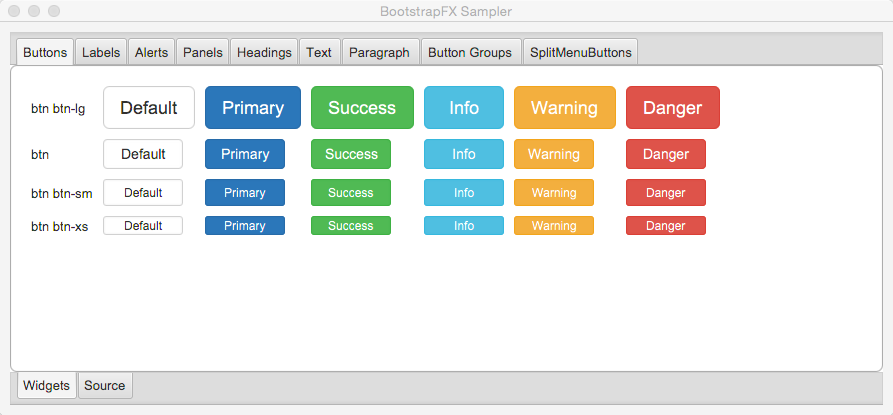
btn
btn-default, btn-primary, btn-success, btn-info, btn-warning, btn-danger
btn-lg, btn-sm, btn-xs
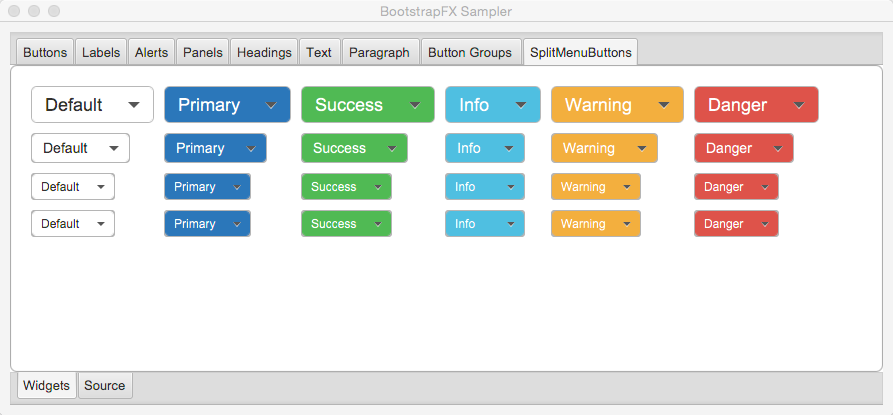
split-menu-btn
split-menu-btn-default, split-menu-btn-primary, split-menu-btn-success, split-menu-btn-info, split-menu-btn-warning, split-menu-btn-danger
split-menu-btn-lg, split-menu-btn-sm, split-menu-btn-xs
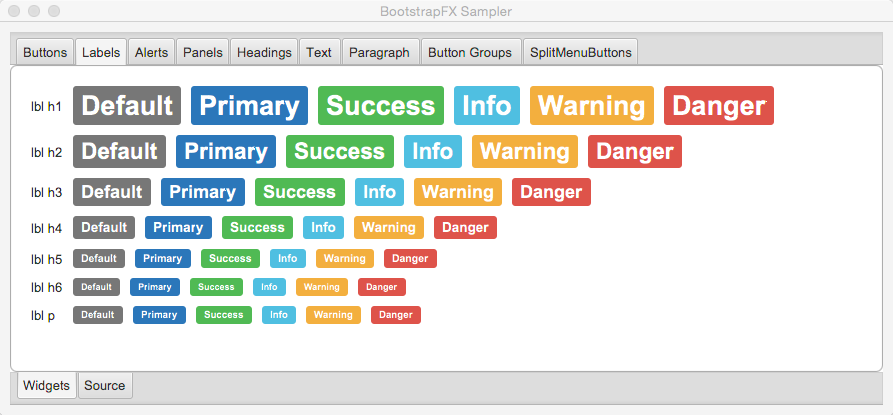
lbl
lbl-default, lbl-primary, lbl-success, lbl-info, lbl-warning, lbl-danger
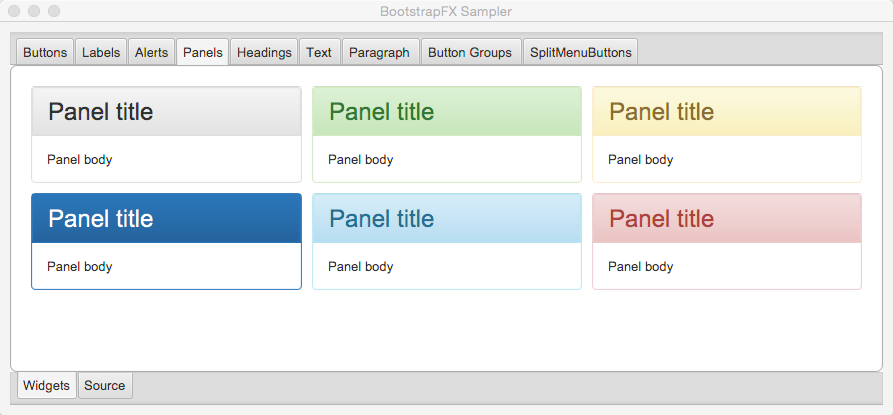
panel
panel-default, panel-primary, panel-success, panel-info, panel-warning, panel-danger
panel-heading
panel-title
panel-body
panel-footer
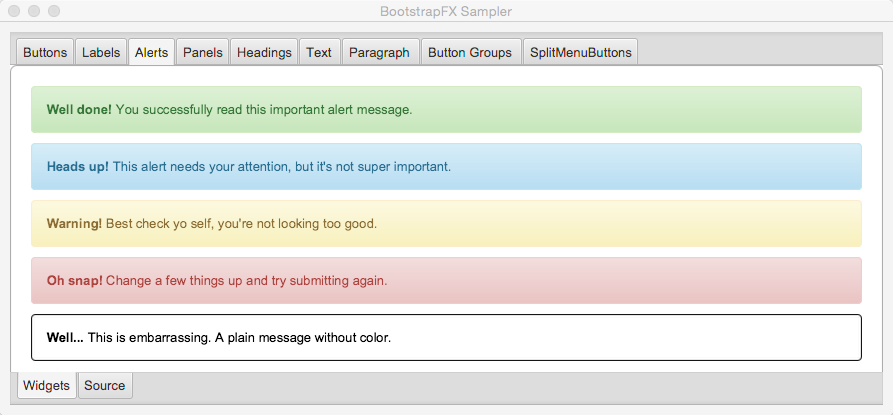
alert
alert-success, alert-info, alert-warning, alert-danger
btn-group-horizontal
btn-group-vertical
NOTE: all elements inside the vertical button group must have the same width.
progress-bar-primary
progress-bar-success
progress-bar-info
progress-bar-warning
progress-bar-danger
tooltip-primary
tooltip-success
tooltip-info
tooltip-warning
tooltip-danger
badge
Full modular build.
JDK 11 is now the minimum requirement.
The build was updated to use a different SASS plugin.
The bootstrapfx.css file has been moved to org/kordamp/bootstrapfx/bootstrapfx.css.
Added progress-bar variants
Added tooltip variants
Tweaked menu items and menus
Add Automatic-Module-Name to JAR manifest
POM updates
SplitMenu Button support
Button group support
lead on Text
First release
39 followers · starred Oct 2020
15 followers · starred Sep 2015
BootstrapFX is a partial port of Twitter Bootstrap for JavaFX. It mainly provides a CSS stylesheet that closely resembles the original while being custom tailored for JavaFX’s unique CSS flavor.
It’s worth mentioning that Twitter Bootstrap delivers more than just a standardized look for common widgets. It also provides new widgets, behavior and a grid system. Some of these features may be ported at a later stage to BootstrapFX.
You can get the latest version of BootstrapFX from Maven Central.
repositories {
    mavenCentral()
}

dependencies {
    implementation 'org.kordamp.bootstrapfx:bootstrapfx-core:0.4.0'
}<dependencies>
<dependency>
<groupId>org.kordamp.bootstrapfx</groupId>
<artifactId>bootstrapfx-core</artifactId>
<version>0.4.0</version>
</dependency>
</dependencies>Once the bootstrapfx-core dependency is in your classpath you just need to apply the boostrapfx.css stylesheet to
a scene, for example
import javafx.application.Application;
import javafx.geometry.Insets;
import javafx.scene.Node;
import javafx.scene.Scene;
import javafx.scene.control.Button;
import javafx.scene.layout.BorderPane;
import javafx.stage.Stage;
import org.kordamp.bootstrapfx.BootstrapFX;
import org.kordamp.bootstrapfx.scene.layout.Panel;

public class Sampler extends Application {
    @Override
    public void start(Stage primaryStage) throws Exception {                   //(1)
        Panel panel = new Panel("This is the title");
        panel.getStyleClass().add("panel-primary");                            //(2)
        BorderPane content = new BorderPane();
        content.setPadding(new Insets(20));
        Button button = new Button("Hello BootstrapFX");
        button.getStyleClass().setAll("btn","btn-danger");                     //(2)
        content.setCenter(button);
        panel.setBody(content);

        Scene scene = new Scene(panel);
        scene.getStylesheets().add(BootstrapFX.bootstrapFXStylesheet());       //(3)

        primaryStage.setTitle("BootstrapFX");
        primaryStage.setScene(scene);
        primaryStage.sizeToScene();
        primaryStage.show();
    }
}
Custom widget from BootstrapFX
Apply CSS class to widgets
Apply BootstrapFX stylesheet to scene
You must meet the following requirements:
JDK11 as a minimum
Gradle 6.8.3
You may used the included gradle wrapper script if you don’t have gradle installed.
Download Gradle from http://gradle.org/downloads
Unzip the file into a directory without spaces (recommended).
Create a GRADLE_HOME environment variable that points to this directory.
Adjust your PATH environment variable to include $GRADLE_HOME/bin (%GRADLE_HOME%\bin on Windows).
Test your setup by invoking gradle --version.
Follow the instructions found at http://sdkman.io/ to install SDKMAN.
You need a POSIX environment if running Windows. We recommend using Babun Shell (http://babun.github.io/)
Once SDKMAN is installed invoke sdk install gradle 6.8.3.
Test your setup by invoking gradle --version.
Gum is a wrapper script that facilitates invoking gradle tasks anywhere within a Gradle project. It’s smart enough to use the gradle wrapper if available or your global gradle command. This is an optional download.
Follow the instructions found at https://github.com/kordamp/gm to install gum
Make a full build by invoking the following command
$ gm buildRun the sampler application by invoking the following command
$ gm :sampler:runb, strong
i, em, italic, dfn
small
code, kbd, pre, samp
h1, h2, h3, h4, h5, h6
lead
p
text-mute
text-primary, text-success, text-info, text-warning, text-danger
bg-primary, bg-success, bg-info, bg-warning, bg-danger
btn
btn-default, btn-primary, btn-success, btn-info, btn-warning, btn-danger
btn-lg, btn-sm, btn-xs
split-menu-btn
split-menu-btn-default, split-menu-btn-primary, split-menu-btn-success, split-menu-btn-info, split-menu-btn-warning, split-menu-btn-danger
split-menu-btn-lg, split-menu-btn-sm, split-menu-btn-xs
lbl
lbl-default, lbl-primary, lbl-success, lbl-info, lbl-warning, lbl-danger
panel
panel-default, panel-primary, panel-success, panel-info, panel-warning, panel-danger
panel-heading
panel-title
panel-body
panel-footer
alert
alert-success, alert-info, alert-warning, alert-danger
btn-group-horizontal
btn-group-vertical
NOTE: all elements inside the vertical button group must have the same width.
progress-bar-primary
progress-bar-success
progress-bar-info
progress-bar-warning
progress-bar-danger
tooltip-primary
tooltip-success
tooltip-info
tooltip-warning
tooltip-danger
badge
Full modular build.
JDK 11 is now the minimum requirement.
The build was updated to use a different SASS plugin.
The bootstrapfx.css file has been moved to org/kordamp/bootstrapfx/bootstrapfx.css.
Added progress-bar variants
Added tooltip variants
Tweaked menu items and menus
Add Automatic-Module-Name to JAR manifest
POM updates
SplitMenu Button support
Button group support
lead on Text
First release
39 followers · starred Oct 2020
15 followers · starred Sep 2015


