
Unobtrusive notifications with icons and SVG support
Emacs Lisp
78
11 commits
updated Jan 7, 2026
README
knockknock
Unobtrusive notifications with icons and SVG support
knockknock provides beautiful, elegant notifications using posframe and nerd-icons. Display temporary alert messages with custom icons, titles, and messages in a centered, customizable frame that automatically disappears. Features pixel-perfect SVG layout with automatic text wrapping for long messages.
Support
This package is developed and maintained in my free time. If you find it useful and want to support continued development, consider sponsoring:
Every contribution, no matter how small, is greatly appreciated and helps keep this project alive!
Features
- Beautiful icon-based notifications with nerd-icons
- Custom SVG icons: Use your own SVG files as notification icons
- Two layout modes:
- SVG-based (default): Pixel-perfect positioning with automatic text wrapping
- Text-based: Uses nerd-icons with Emacs text properties
- Two-column layout: icon on left, title and message on right
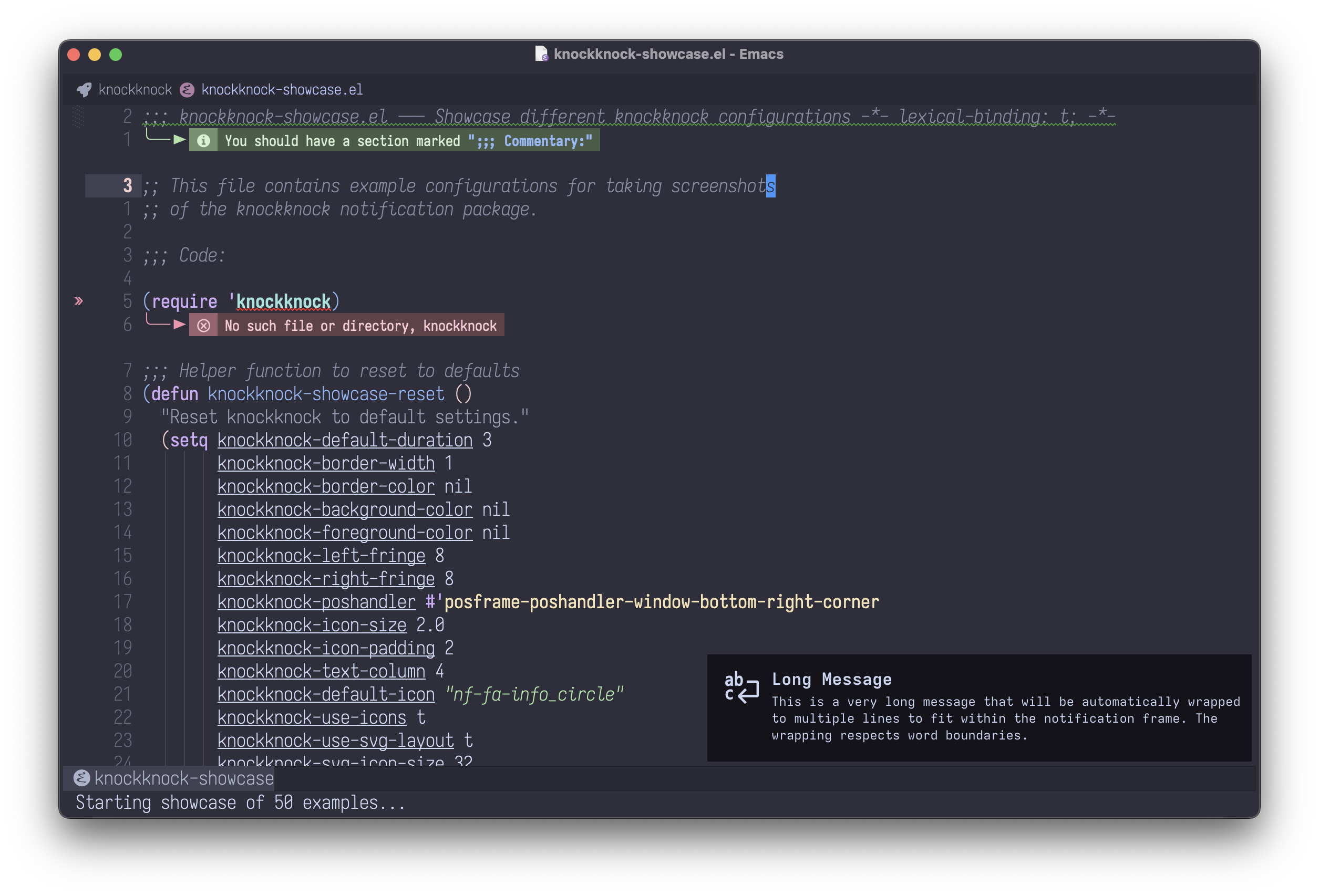
- Automatic text wrapping for long messages
- New notifications automatically replace current ones
- Clean, centered notification display
- Fully customizable appearance (colors, borders, duration, icon size)
- Auto-dismiss after configurable duration
- Manual dismiss support
- Multiple position handlers available
- Robust error handling: Automatic fallback from SVG to text layout on failure
- XML escaping: Secure SVG rendering prevents crashes from special characters
- Smart image sizing: Temporary max-image-size handling during rendering
- Debug mode: Optional debug logging for troubleshooting
- Backward compatible with simple text alerts
Screenshots
Basic Notifications
Simple alert with icon and message:
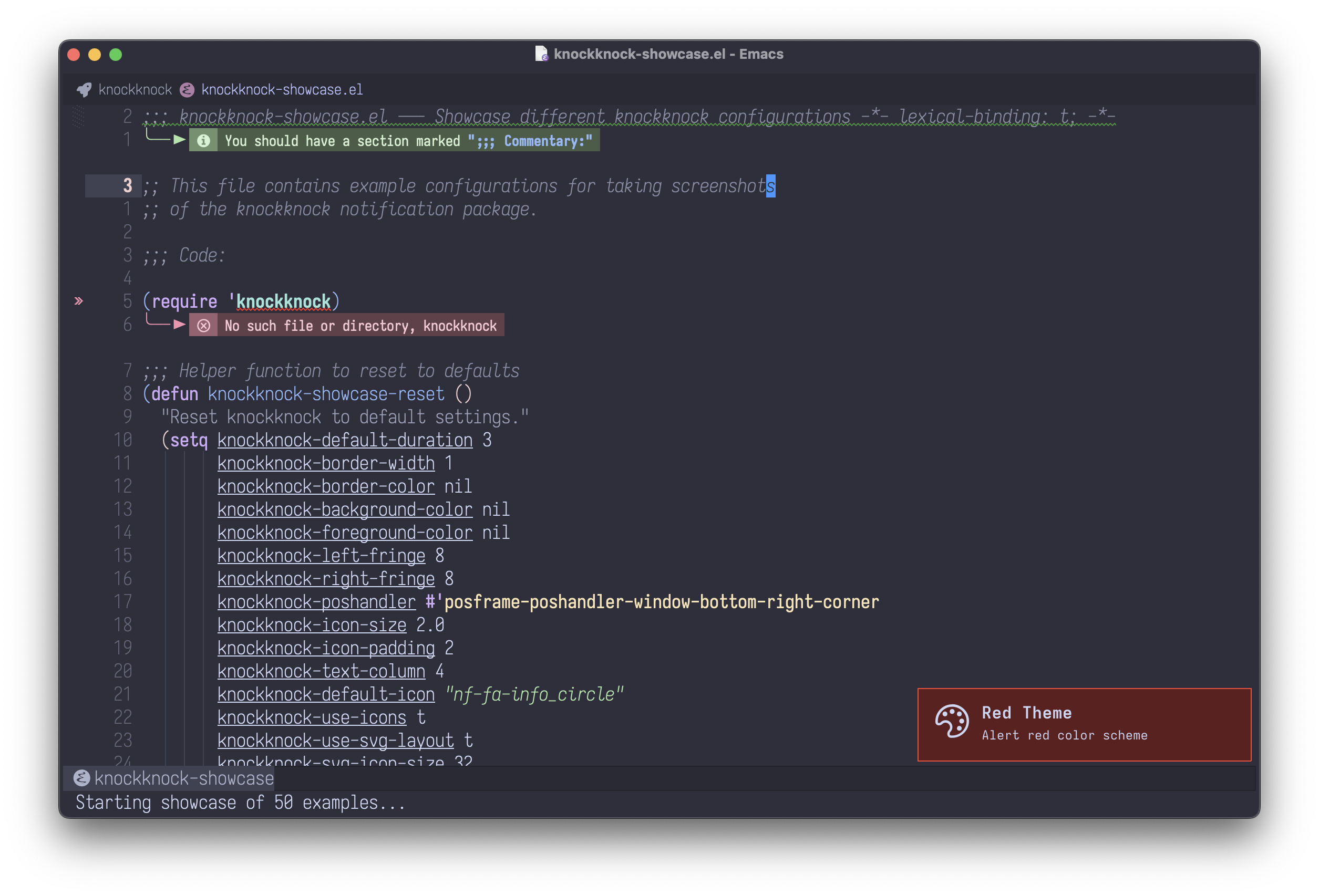
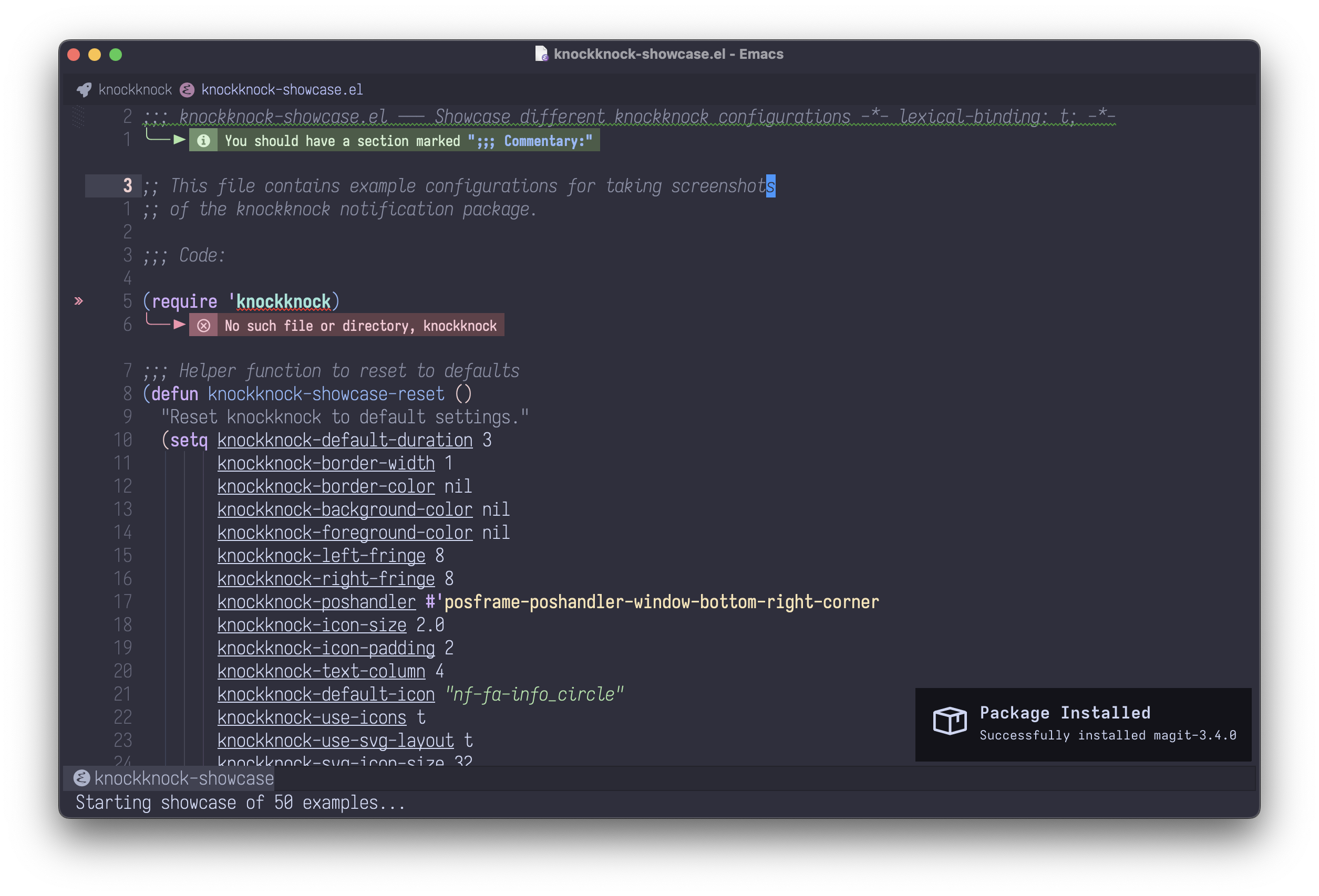
Package installation notification:
Layout Variations
Notification without icon:
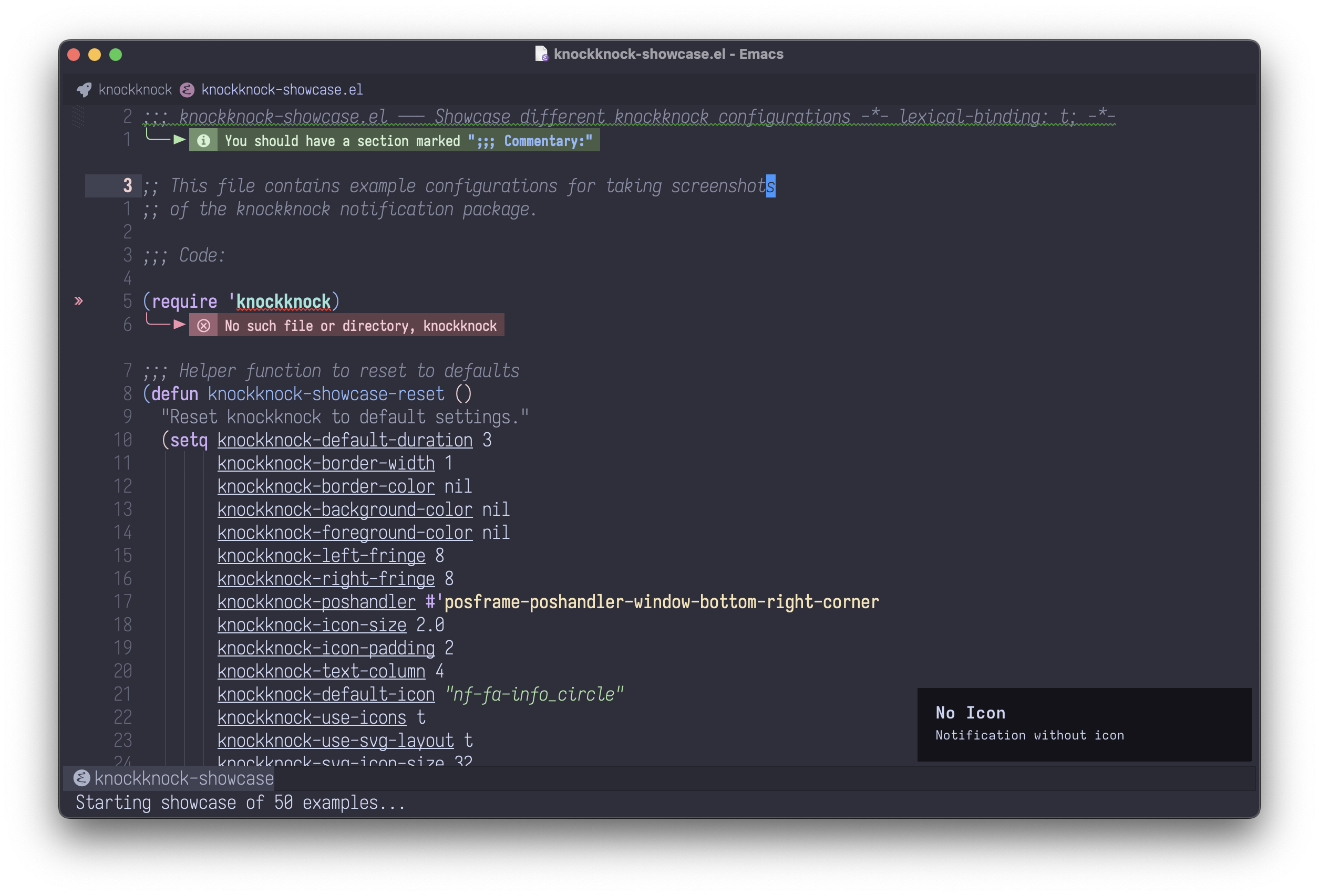
Long message with automatic text wrapping:
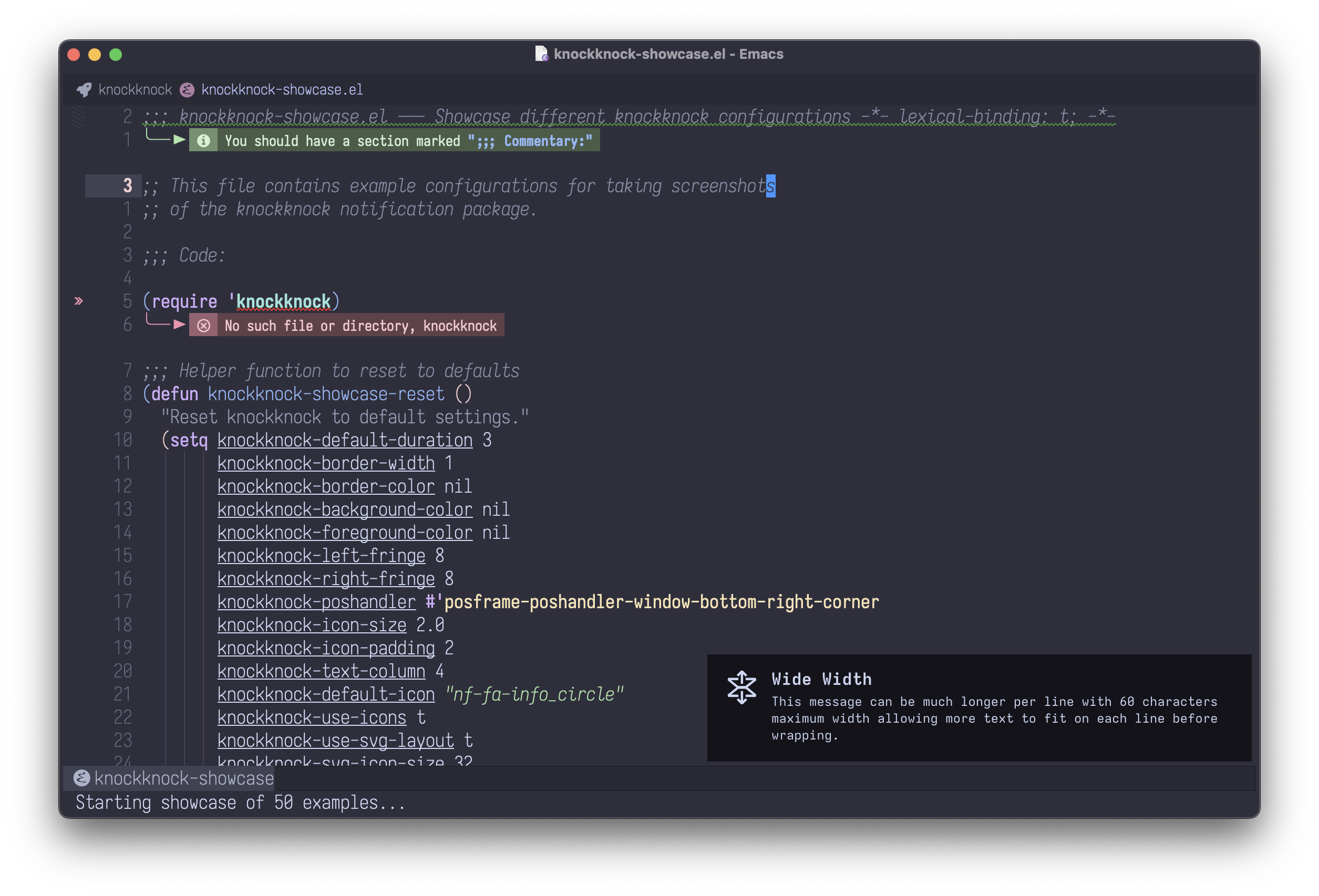
Wide notification for longer content:
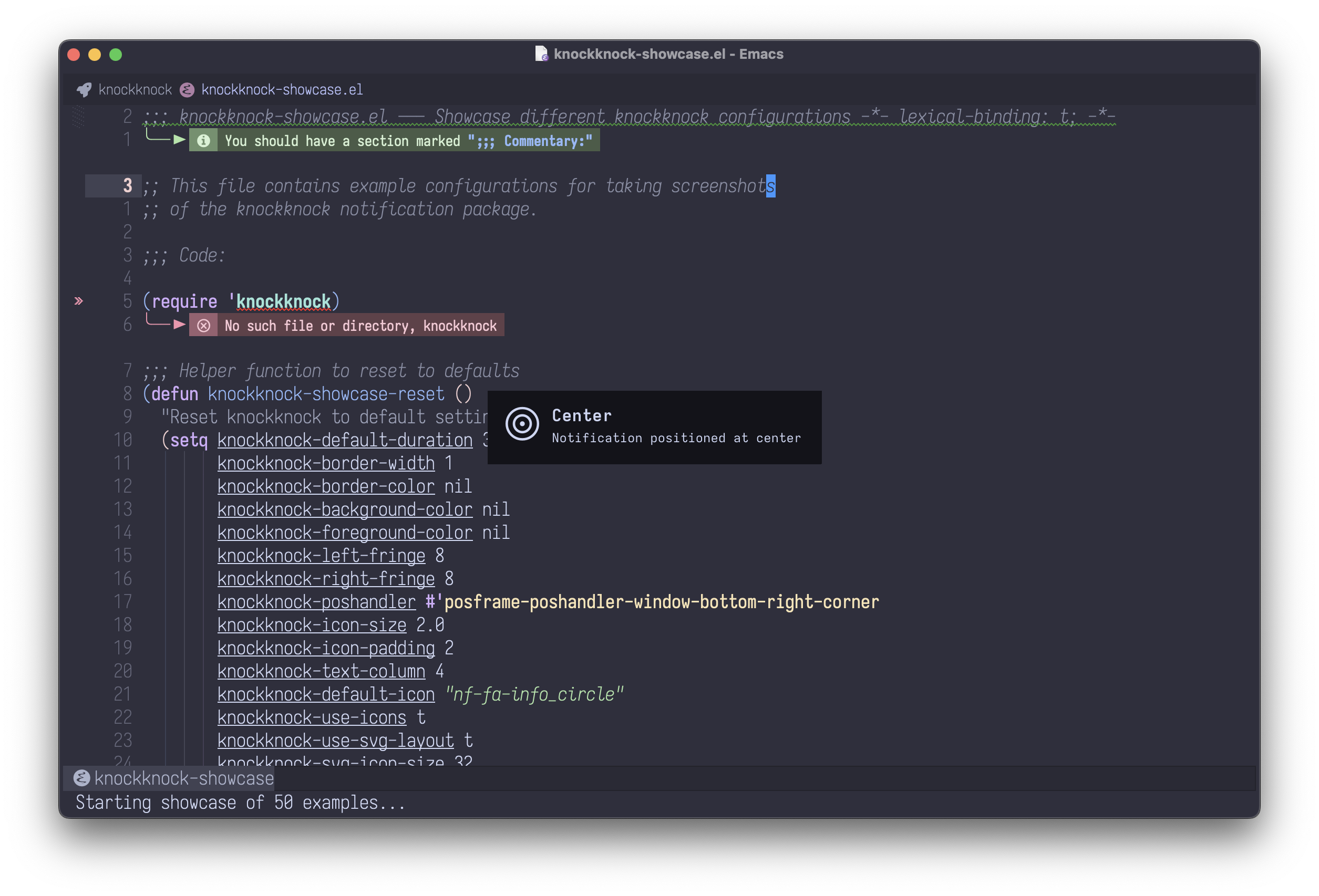
Position Options
Center-positioned notification:
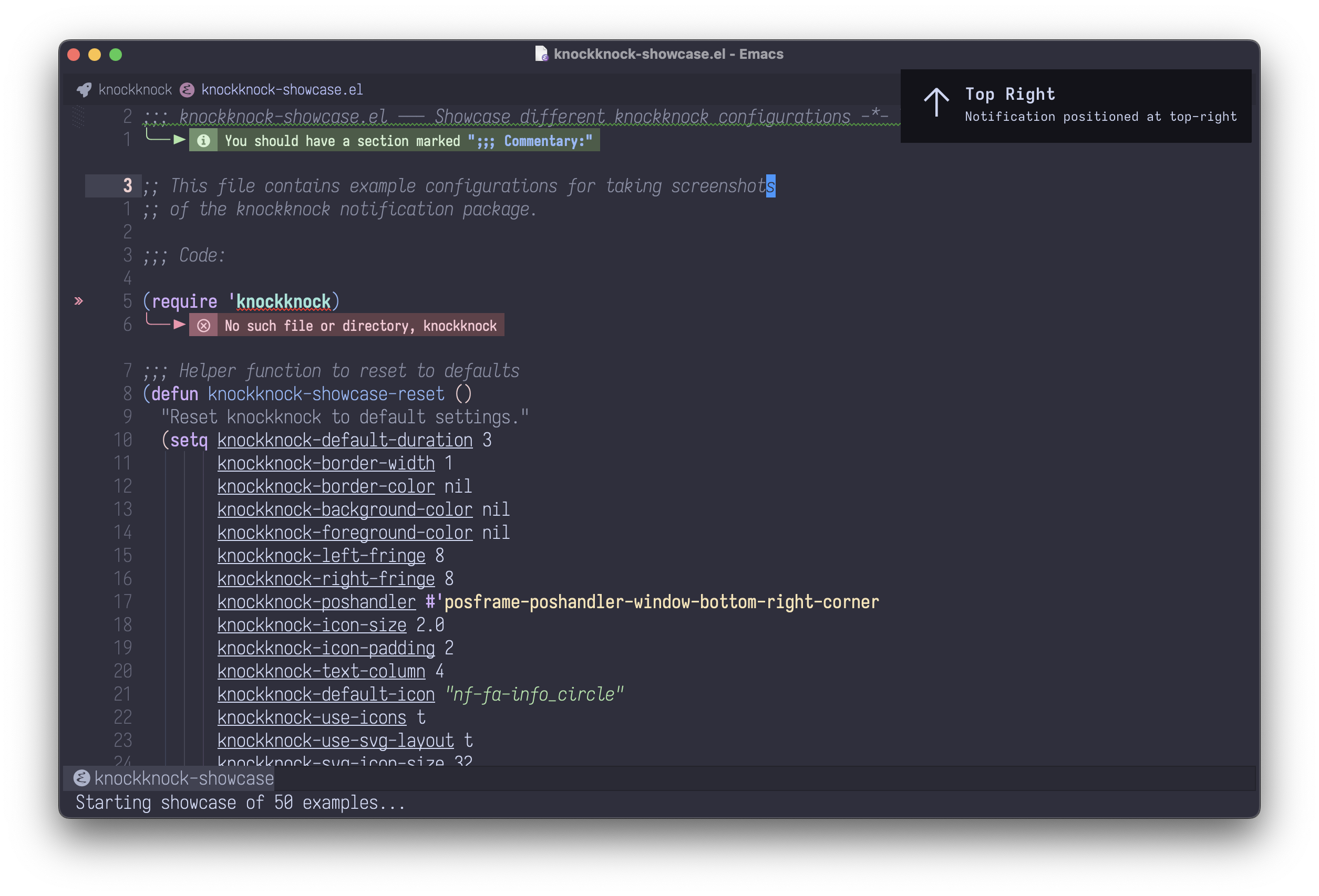
Top-right corner notification:
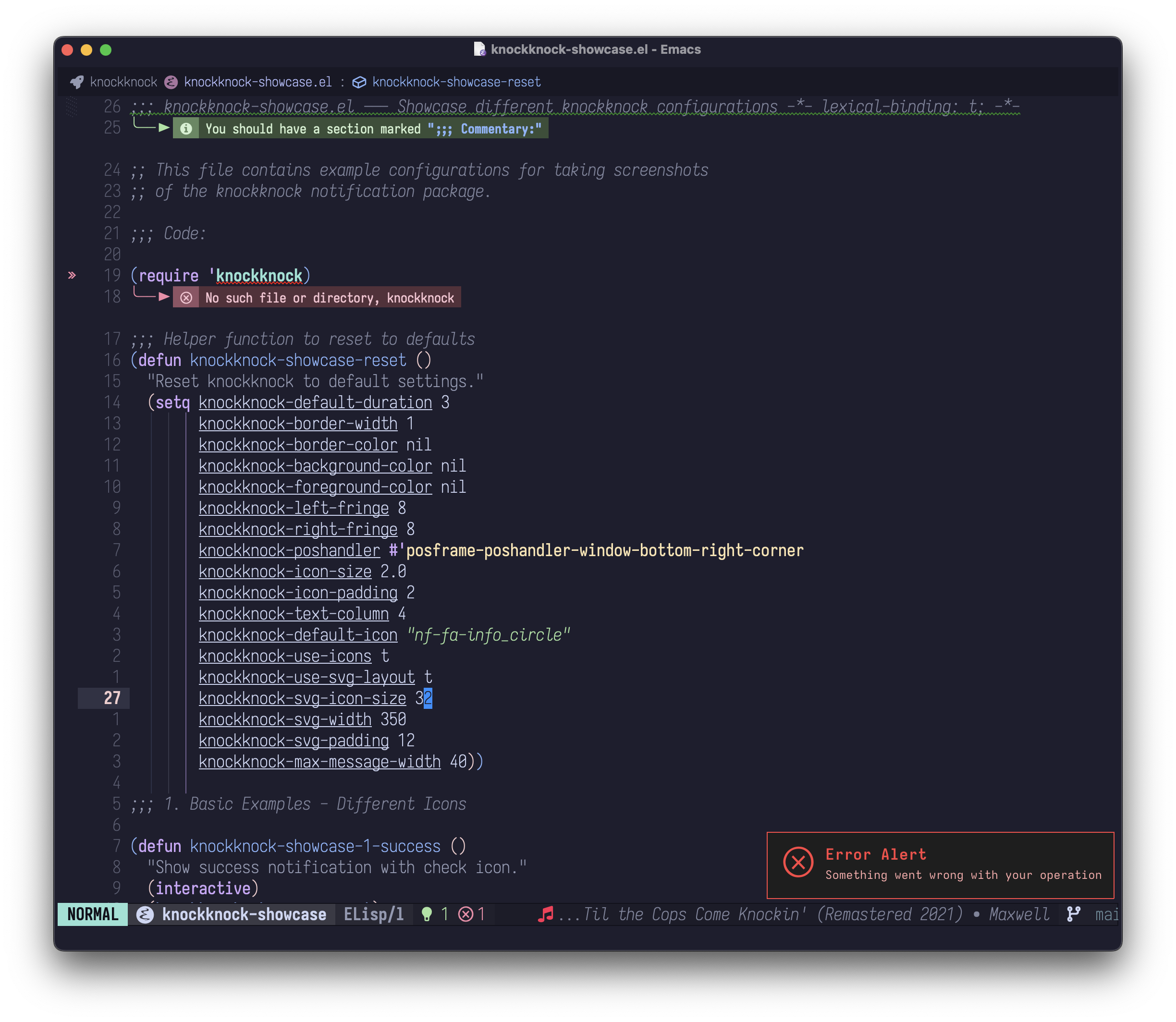
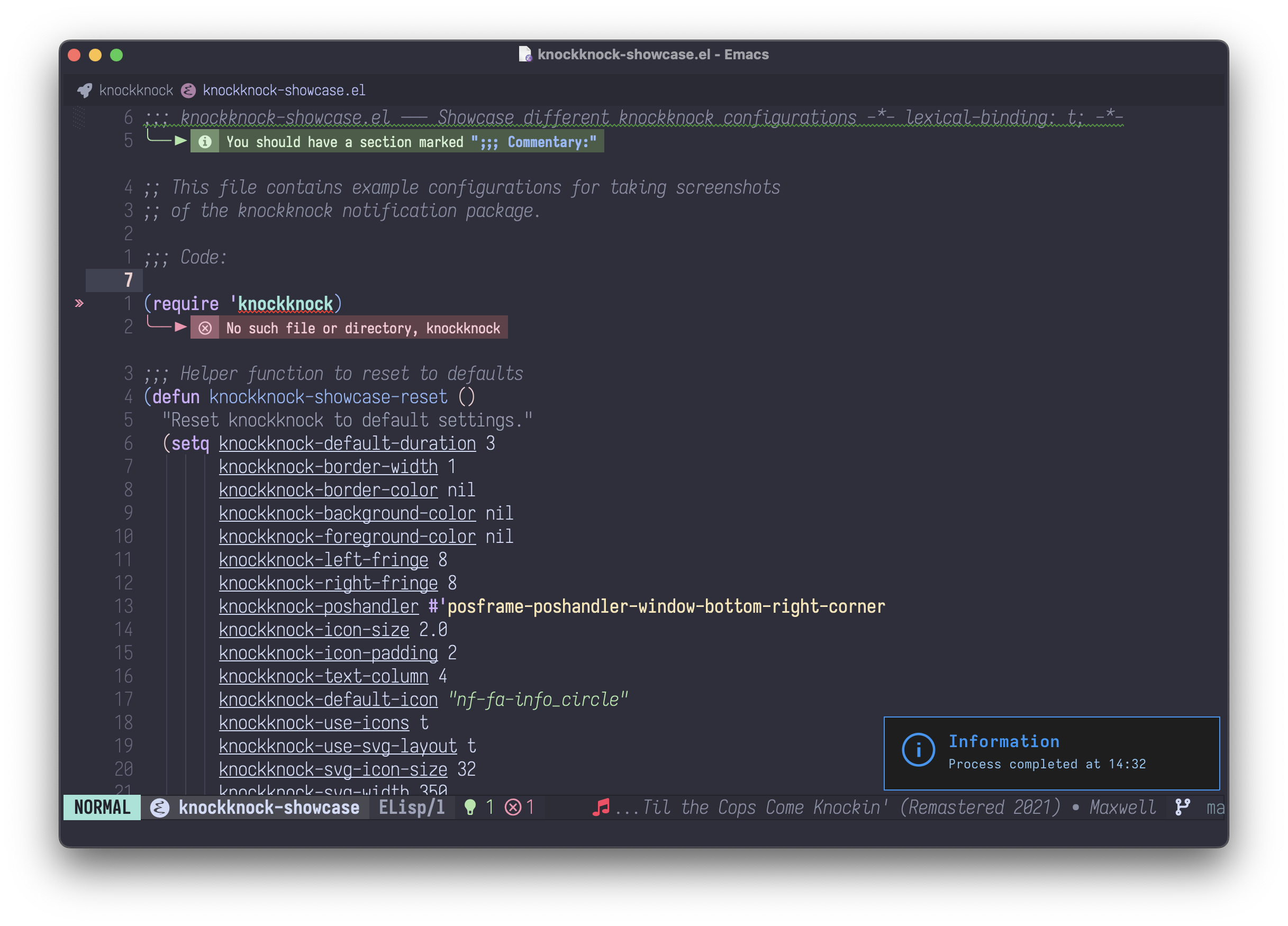
Custom Text Colors
Dark background with red text (error style):
Dark background with blue text (info style):
Requirements
- Emacs 26.1 or later
- posframe
- nerd-icons
Installation
Manual Installation
- Clone or download this repository to your local packages directory:
cd ~/.emacs.d/localpackages
git clone https://github.com/konrad1977/knockknock.git
- Add to your Emacs configuration:
(add-to-list 'load-path "~/.emacs.d/localpackages/knockknock")
(require 'knockknock)
Using straight.el
(straight-use-package
 '(knockknock :type git :host github :repo "konrad1977/knockknock"))
Using use-package with straight
(use-package knockknock
  :straight (:host github :repo "konrad1977/knockknock"))
Usage
Modern API (with icons)
Display a notification with title and message:
(knockknock-notify :title "Build Complete"
                   :message "All tests passed!")
Display a notification with custom icon:
(knockknock-notify :title "Error"
                   :message "Build failed"
                   :icon "cod-error"
                   :duration 5)
Display with only a title:
(knockknock-notify :title "Task Complete" :icon "cod-check")
Long messages wrap automatically:
(knockknock-notify :title "Long Message"
                   :message "This is a very long message that will automatically wrap to multiple lines to fit nicely in the notification"
                   :icon "cod-info"
                   :duration 8)
Available icon examples (you can use with or without "nf-" prefix):
"cod-check"or"nf-cod-check"- Checkmark"cod-error"or"nf-cod-error"- Error/X"cod-info"or"nf-cod-info"- Information"cod-warning"or"nf-cod-warning"- Warning"fa-rocket"or"nf-fa-rocket"- Rocket"fa-save"or"nf-fa-save"- Save/Disk- And many more from nerd-icons
Custom SVG Icons
You can use your own SVG files as notification icons with the :icon-file parameter:
(knockknock-notify :title "Custom Icon"
                   :message "Using my own SVG!"
                   :icon-file "~/icons/my-custom-icon.svg")
Notes:
- Custom SVG icons only work in SVG layout mode (
knockknock-use-svg-layout t) - The SVG is automatically scaled to
knockknock-svg-icon-size(default 32 pixels) - If
:icon-fileis provided along with:icon, the custom file takes precedence - If the file cannot be loaded, it falls back to the
:iconor default icon - In text layout mode,
:icon-fileis ignored and falls back to nerd-icons
Legacy API (simple text)
Display a notification with default duration (3 seconds):
(knockknock-alert "Hello, World!")
Display a notification with custom duration (5 seconds):
(knockknock-alert "This will show for 5 seconds" 5)
Manual Close
Manually close the current notification:
M-x knockknock-close
Progress Bar Notifications
knockknock supports progress bar notifications for long-running operations:
Percent-based progress
;; Create progress bar
(knockknock-progress-create :id 'download
                            :title "Downloading"
                            :message "package.tar.gz"
                            :icon "cod-cloud-download"
                            :percent 0)

;; Update progress
(knockknock-progress-update 'download :percent 50 :message "Halfway there...")
(knockknock-progress-update 'download :percent 100)  ; Auto-closes when complete
Step-based progress
;; Create with total steps
(knockknock-progress-create :id 'build
                            :title "Building"
                            :message "Compiling..."
                            :total 10)

;; Update current step
(knockknock-progress-update 'build :current 3)
(knockknock-progress-update 'build :current 7 :message "Linking...")
(knockknock-progress-update 'build :current 10)  ; Auto-closes at 100%
Manual close
(knockknock-progress-close 'download)
Customization
All aspects of knockknock can be customized through M-x customize-group RET knockknock RET or by setting variables in your configuration:
;; Duration
(setq knockknock-default-duration 5)

;; Colors (nil = use theme defaults)
(setq knockknock-background-color nil)  ; Use theme background
(setq knockknock-foreground-color nil)  ; Use theme foreground
(setq knockknock-border-color "orange")

;; Background color adjustments (applied to theme background)
(setq knockknock-darken-background-percent 0)   ; Darken background by percentage (0-100)
(setq knockknock-lighten-background-percent 0)  ; Lighten background by percentage (0-100)

;; Border and spacing
(setq knockknock-border-width 2)
(setq knockknock-left-fringe 10)
(setq knockknock-right-fringe 10)

;; Icon settings
(setq knockknock-use-icons t)                ; Enable/disable icons
(setq knockknock-default-icon "fa-bell")     ; Default icon

;; Debug mode
(setq knockknock-debug nil)                  ; Enable debug logging (default: nil)

;; Text wrapping
(setq knockknock-max-message-width 40)       ; Max characters per line

;; Position (see posframe documentation for available handlers)
(setq knockknock-poshandler #'posframe-poshandler-frame-top-center)
Text Layout Settings
For text-based layout:
(setq knockknock-use-svg-layout nil)         ; Switch to text layout
(setq knockknock-icon-size 3.5)              ; Icon size multiplier
(setq knockknock-icon-padding 2)             ; Spaces between icon and text
(setq knockknock-text-column 4)              ; Column position for text
SVG Layout Settings
For SVG-based layout (default):
(setq knockknock-use-svg-layout t)           ; SVG layout (default)
(setq knockknock-svg-icon-size 32)           ; Icon size in pixels
(setq knockknock-svg-min-width 300)          ; Minimum canvas width in pixels
(setq knockknock-svg-max-width 500)          ; Maximum canvas width in pixels
(setq knockknock-svg-padding 12)             ; Padding between icon and text
(setq knockknock-left-padding 12)            ; Left padding from edge to icon (pixels)
(setq knockknock-right-padding 16)           ; Right padding from text to edge (pixels)
Note: Image size limits are handled automatically during rendering. The package temporarily adjusts max-image-size when displaying notifications to ensure SVGs render correctly without affecting other parts of Emacs.
Progress Bar Settings
;; Bar appearance
(setq knockknock-progress-bar-height 12)        ; Height in pixels (SVG mode)
(setq knockknock-progress-bar-corner-radius 0)  ; 0 for square corners
(setq knockknock-progress-bar-width 30)         ; Width in characters (text mode)
(setq knockknock-progress-bar-margin-top 8)     ; Space above bar

;; Colors
(setq knockknock-progress-color "#2196F3")      ; Fill color (blue)
(setq knockknock-progress-background-color "#3a3a3a")  ; Track color

;; Style: 'modern (default), 'terminal, or 'ascii
(setq knockknock-progress-style 'modern)
;; modern:   ███████████░░░░░░░░░ 55%
;; terminal: ###########---------- 55%
;; ascii:    [===========          ] 55%
Customizing Faces
You can customize the appearance of titles, messages, and icons:
;; Make titles larger and bolder
(set-face-attribute 'knockknock-title-face nil
                    :weight 'bold
                    :height 1.3
                    :foreground "#ff6347")

;; Style the message text
(set-face-attribute 'knockknock-message-face nil
                    :slant 'italic
                    :foreground "#555555")

;; Change icon color
(set-face-attribute 'knockknock-icon-face nil
                    :foreground "#4169e1")
SVG Layout vs Text Layout
| Feature | SVG Layout (default) | Text Layout |
|---|---|---|
| Positioning | Pixel-perfect | Text-flow based |
| Theme integration | Automatic | Automatic |
| Text wrapping | Multi-line support | Multi-line support |
| Icon scaling | Exact pixels | Text properties |
| Custom SVG icons | Supported | Not supported |
| Implementation | Sophisticated | Simple |
| Performance | Slightly slower | Fast |
| Error handling | Automatic fallback | N/A |
| XML safety | Built-in escaping | N/A |
| Crash prevention | Yes | N/A |
When to use SVG layout (default):
- You want pixel-perfect control over positioning
- You're building a UI similar to agent-shell
- You need exact icon and text placement
- You want consistent rendering across different themes
- You benefit from automatic error handling and safety features
When to use text layout:
- You want simpler, faster rendering
- Text-based layout is sufficient
- You prefer Emacs-native text properties
- Maximum performance is critical
Available Position Handlers
posframe-poshandler-window-bottom-right-corner(default)posframe-poshandler-frame-centerposframe-poshandler-frame-top-centerposframe-poshandler-frame-bottom-centerposframe-poshandler-point-bottom-left-corner- And many more from posframe
Example Integration
With compilation
(add-hook 'compilation-finish-functions
          (lambda (buf status)
            (if (string-match "^finished" status)
                (knockknock-notify :title "Build Complete"
                                   :message "Compilation successful!"
                                   :icon "cod-check"
                                   :duration 3)
              (knockknock-notify :title "Build Failed"
                                 :message "Compilation failed"
                                 :icon "cod-error"
                                 :duration 5))))
With org-pomodoro
(add-hook 'org-pomodoro-finished-hook
          (lambda ()
            (knockknock-notify :title "Pomodoro Complete"
                               :message "Time for a break!"
                               :icon "fa-coffee"
                               :duration 5)))

(add-hook 'org-pomodoro-break-finished-hook
          (lambda ()
            (knockknock-notify :title "Break Over"
                               :message "Back to work!"
                               :icon "fa-clock_o"
                               :duration 5)))
With save notifications
(defun my-save-notification ()
  (knockknock-notify :title "File Saved"
                     :message (buffer-name)
                     :icon "fa-save"
                     :duration 2))

(add-hook 'after-save-hook #'my-save-notification)
With Git operations
(defun my-git-push-notification ()
  (knockknock-notify :title "Git Push"
                     :message "Successfully pushed to remote"
                     :icon "dev-git"
                     :duration 3))
With long messages (automatic wrapping)
(knockknock-notify
  :title "Test Results"
  :message "All 127 tests passed successfully. Code coverage is at 94%. No critical issues found."
  :icon "cod-check"
  :duration 6)
Custom notification functions
(defun my-notify-success (msg)
  (knockknock-notify :title "Success"
                     :message msg
                     :icon "cod-check"
                     :duration 3))

(defun my-notify-error (msg)
  (knockknock-notify :title "Error"
                     :message msg
                     :icon "cod-error"
                     :duration 5))

(defun my-notify-info (msg)
  (knockknock-notify :title "Information"
                     :message msg
                     :icon "cod-info"
                     :duration 4))

;; Usage
(my-notify-success "Operation completed!")
(my-notify-error "Something went wrong!")
(my-notify-info "Please review the changes")
Adjusting notification background brightness
Make notifications slightly darker or lighter than your theme:
;; Make notifications 5% darker than theme background
(setq knockknock-darken-background-percent 5)

;; Or make them 10% lighter
(setq knockknock-lighten-background-percent 10)

;; Reset to use exact theme color
(setq knockknock-darken-background-percent 0)
(setq knockknock-lighten-background-percent 0)
This is useful for making notifications visually distinct from regular buffers while still maintaining theme consistency. Note: If both are set, darken takes precedence.
Advanced Features
Automatic Notification Replacement
New notifications automatically replace any currently displayed notification:
;; First notification
(knockknock-notify :title "Building..." :icon "cod-loading")

;; This immediately replaces the first one
(knockknock-notify :title "Build Complete" :icon "cod-check")
Text Wrapping Customization
Control how long messages are wrapped:
;; Shorter lines (30 characters)
(setq knockknock-max-message-width 30)

;; Longer lines (50 characters)
(setq knockknock-max-message-width 50)
Disabling Icons
Show notifications without icons:
(setq knockknock-use-icons nil)
(knockknock-notify :title "No Icon" :message "Just text")
Reliability & Safety
knockknock v0.2.2 includes several improvements for stability and crash prevention:
Automatic Error Handling
If SVG rendering fails for any reason, the package automatically falls back to text-based layout without user intervention. You'll see a message in *Messages* if this happens, but your notification will still display.
XML Escaping
All text (titles, messages, and icons) is automatically XML-escaped before being inserted into SVG. This prevents crashes from special characters like <, >, &, quotes, etc.
Smart Image Sizing
The package temporarily adjusts max-image-size only during notification display, then immediately restores it. This ensures:
- SVG notifications render correctly
- Other parts of Emacs are not affected
- No global state pollution
Memory Safety
Image size calculations are kept minimal (default max 500x100 pixels) to avoid memory issues, while still providing beautiful notifications.
Troubleshooting
Icons not showing in SVG layout
Make sure you have nerd-icons installed and the font is available system-wide:
M-x nerd-icons-install-fonts
The font family used is "Symbols Nerd Font Mono". Verify it's installed correctly on your system.
SVG not rendering or showing blank notifications
The package handles image size limits automatically. If you still have issues:
-
Enable debug mode to see what's happening:
(setq knockknock-debug t)Check the
*Messages*buffer for debug output. -
Try switching to text layout temporarily:
(setq knockknock-use-svg-layout nil) -
Check for SVG support in your Emacs build:
(image-type-available-p 'svg) ; Should return t
Emacs crashes or memory issues
If you experience crashes:
- The package now includes automatic error handling that falls back to text layout if SVG fails
- XML escaping prevents crashes from special characters in notifications
- Image size limits are handled automatically and temporarily - they don't affect other parts of Emacs
If crashes persist, disable SVG layout:
(setq knockknock-use-svg-layout nil)
Theme colors not working
Set background and foreground to nil to use theme defaults:
(setq knockknock-background-color nil)
(setq knockknock-foreground-color nil)
Debug Mode
Enable detailed logging to troubleshoot issues:
(setq knockknock-debug t)
Debug messages appear in the *Messages* buffer and include:
- Layout mode selection (SVG vs text)
- SVG rendering progress
- Image creation status
- Error messages with automatic fallback notifications
Changelog
v0.3.0 (2025)
New Features:
- Progress bar notifications with
knockknock-progress-create,knockknock-progress-update,knockknock-progress-close - Support for both percent-based and step-based progress
- Auto-close when progress reaches 100%
- Progress bar stays visible until completion (not interrupted by regular notifications)
- Customizable progress bar appearance:
knockknock-progress-color- Fill colorknockknock-progress-background-color- Track colorknockknock-progress-bar-height- Height in pixelsknockknock-progress-bar-corner-radius- Corner radius (0 for square)knockknock-progress-style- Visual style (modern/terminal/ascii)
Improvements:
- Regular notifications are skipped while progress bar is active
- Frame readiness check prevents rendering issues during startup
- Fixed zero-value bug in progress updates (
:current 0and:percent 0now work correctly) - Fixed potential timer leak in progress render retry logic
- Added input validation for progress creation parameters
v0.2.6 (2025)
New Features:
- Added
:icon-fileparameter toknockknock-notifyfor custom SVG icons - Use your own SVG files as notification icons instead of nerd-icons
- Custom SVGs are automatically scaled to
knockknock-svg-icon-size - Graceful fallback to nerd-icons if custom file fails to load
v0.2.5 (2025)
Improvements:
- Added
knockknock-left-paddingandknockknock-right-paddingcustomization variables for better SVG layout control - Changed default fringe values from 0 to 10 pixels for better spacing
- Changed default position handler to
posframe-poshandler-window-bottom-right-cornerfor less intrusive notifications - Improved SVG layout with configurable padding for more precise positioning
v0.2.2 (2025)
Bug Fixes & Improvements:
- Fixed crash issues related to SVG rendering and librsvg
- Added XML escaping for safe SVG text rendering
- Implemented automatic error handling with fallback to text layout
- Smart
max-image-sizehandling (temporary adjustment during rendering) - Added
knockknock-debugcustomization variable for optional debug logging - Improved stability and crash prevention
Breaking Changes:
- Removed
knockknock-max-image-sizecustomization (now handled automatically)
v0.2.1
- Initial stable release with SVG support
- Two layout modes (SVG and text-based)
- Automatic text wrapping
- Customizable appearance
v0.2.0
- Added modern API with
knockknock-notify - SVG-based pixel-perfect layout
- Icon support via nerd-icons
- Title and message display
License
MIT License - see LICENSE file for details
Contributing
Contributions are welcome! Please feel free to submit issues or pull requests.
Author
Mikael Konradsson
Contributors

11 commits
Similar repos


Languages
Emacs Lisp
100.0%
Unobtrusive notifications with icons and SVG support
Emacs Lisp
78
11 commits
updated Jan 7, 2026
README
knockknock
Unobtrusive notifications with icons and SVG support
knockknock provides beautiful, elegant notifications using posframe and nerd-icons. Display temporary alert messages with custom icons, titles, and messages in a centered, customizable frame that automatically disappears. Features pixel-perfect SVG layout with automatic text wrapping for long messages.
Support
This package is developed and maintained in my free time. If you find it useful and want to support continued development, consider sponsoring:
Every contribution, no matter how small, is greatly appreciated and helps keep this project alive!
Features
- Beautiful icon-based notifications with nerd-icons
- Custom SVG icons: Use your own SVG files as notification icons
- Two layout modes:
- SVG-based (default): Pixel-perfect positioning with automatic text wrapping
- Text-based: Uses nerd-icons with Emacs text properties
- Two-column layout: icon on left, title and message on right
- Automatic text wrapping for long messages
- New notifications automatically replace current ones
- Clean, centered notification display
- Fully customizable appearance (colors, borders, duration, icon size)
- Auto-dismiss after configurable duration
- Manual dismiss support
- Multiple position handlers available
- Robust error handling: Automatic fallback from SVG to text layout on failure
- XML escaping: Secure SVG rendering prevents crashes from special characters
- Smart image sizing: Temporary max-image-size handling during rendering
- Debug mode: Optional debug logging for troubleshooting
- Backward compatible with simple text alerts
Screenshots
Basic Notifications
Simple alert with icon and message:
Package installation notification:
Layout Variations
Notification without icon:
Long message with automatic text wrapping:
Wide notification for longer content:
Position Options
Center-positioned notification:
Top-right corner notification:
Custom Text Colors
Dark background with red text (error style):
Dark background with blue text (info style):
Requirements
- Emacs 26.1 or later
- posframe
- nerd-icons
Installation
Manual Installation
- Clone or download this repository to your local packages directory:
cd ~/.emacs.d/localpackages
git clone https://github.com/konrad1977/knockknock.git
- Add to your Emacs configuration:
(add-to-list 'load-path "~/.emacs.d/localpackages/knockknock")
(require 'knockknock)
Using straight.el
(straight-use-package
 '(knockknock :type git :host github :repo "konrad1977/knockknock"))
Using use-package with straight
(use-package knockknock
  :straight (:host github :repo "konrad1977/knockknock"))
Usage
Modern API (with icons)
Display a notification with title and message:
(knockknock-notify :title "Build Complete"
                   :message "All tests passed!")
Display a notification with custom icon:
(knockknock-notify :title "Error"
                   :message "Build failed"
                   :icon "cod-error"
                   :duration 5)
Display with only a title:
(knockknock-notify :title "Task Complete" :icon "cod-check")
Long messages wrap automatically:
(knockknock-notify :title "Long Message"
                   :message "This is a very long message that will automatically wrap to multiple lines to fit nicely in the notification"
                   :icon "cod-info"
                   :duration 8)
Available icon examples (you can use with or without "nf-" prefix):
"cod-check"or"nf-cod-check"- Checkmark"cod-error"or"nf-cod-error"- Error/X"cod-info"or"nf-cod-info"- Information"cod-warning"or"nf-cod-warning"- Warning"fa-rocket"or"nf-fa-rocket"- Rocket"fa-save"or"nf-fa-save"- Save/Disk- And many more from nerd-icons
Custom SVG Icons
You can use your own SVG files as notification icons with the :icon-file parameter:
(knockknock-notify :title "Custom Icon"
                   :message "Using my own SVG!"
                   :icon-file "~/icons/my-custom-icon.svg")
Notes:
- Custom SVG icons only work in SVG layout mode (
knockknock-use-svg-layout t) - The SVG is automatically scaled to
knockknock-svg-icon-size(default 32 pixels) - If
:icon-fileis provided along with:icon, the custom file takes precedence - If the file cannot be loaded, it falls back to the
:iconor default icon - In text layout mode,
:icon-fileis ignored and falls back to nerd-icons
Legacy API (simple text)
Display a notification with default duration (3 seconds):
(knockknock-alert "Hello, World!")
Display a notification with custom duration (5 seconds):
(knockknock-alert "This will show for 5 seconds" 5)
Manual Close
Manually close the current notification:
M-x knockknock-close
Progress Bar Notifications
knockknock supports progress bar notifications for long-running operations:
Percent-based progress
;; Create progress bar
(knockknock-progress-create :id 'download
                            :title "Downloading"
                            :message "package.tar.gz"
                            :icon "cod-cloud-download"
                            :percent 0)

;; Update progress
(knockknock-progress-update 'download :percent 50 :message "Halfway there...")
(knockknock-progress-update 'download :percent 100)  ; Auto-closes when complete
Step-based progress
;; Create with total steps
(knockknock-progress-create :id 'build
                            :title "Building"
                            :message "Compiling..."
                            :total 10)

;; Update current step
(knockknock-progress-update 'build :current 3)
(knockknock-progress-update 'build :current 7 :message "Linking...")
(knockknock-progress-update 'build :current 10)  ; Auto-closes at 100%
Manual close
(knockknock-progress-close 'download)
Customization
All aspects of knockknock can be customized through M-x customize-group RET knockknock RET or by setting variables in your configuration:
;; Duration
(setq knockknock-default-duration 5)

;; Colors (nil = use theme defaults)
(setq knockknock-background-color nil)  ; Use theme background
(setq knockknock-foreground-color nil)  ; Use theme foreground
(setq knockknock-border-color "orange")

;; Background color adjustments (applied to theme background)
(setq knockknock-darken-background-percent 0)   ; Darken background by percentage (0-100)
(setq knockknock-lighten-background-percent 0)  ; Lighten background by percentage (0-100)

;; Border and spacing
(setq knockknock-border-width 2)
(setq knockknock-left-fringe 10)
(setq knockknock-right-fringe 10)

;; Icon settings
(setq knockknock-use-icons t)                ; Enable/disable icons
(setq knockknock-default-icon "fa-bell")     ; Default icon

;; Debug mode
(setq knockknock-debug nil)                  ; Enable debug logging (default: nil)

;; Text wrapping
(setq knockknock-max-message-width 40)       ; Max characters per line

;; Position (see posframe documentation for available handlers)
(setq knockknock-poshandler #'posframe-poshandler-frame-top-center)
Text Layout Settings
For text-based layout:
(setq knockknock-use-svg-layout nil)         ; Switch to text layout
(setq knockknock-icon-size 3.5)              ; Icon size multiplier
(setq knockknock-icon-padding 2)             ; Spaces between icon and text
(setq knockknock-text-column 4)              ; Column position for text
SVG Layout Settings
For SVG-based layout (default):
(setq knockknock-use-svg-layout t)           ; SVG layout (default)
(setq knockknock-svg-icon-size 32)           ; Icon size in pixels
(setq knockknock-svg-min-width 300)          ; Minimum canvas width in pixels
(setq knockknock-svg-max-width 500)          ; Maximum canvas width in pixels
(setq knockknock-svg-padding 12)             ; Padding between icon and text
(setq knockknock-left-padding 12)            ; Left padding from edge to icon (pixels)
(setq knockknock-right-padding 16)           ; Right padding from text to edge (pixels)
Note: Image size limits are handled automatically during rendering. The package temporarily adjusts max-image-size when displaying notifications to ensure SVGs render correctly without affecting other parts of Emacs.
Progress Bar Settings
;; Bar appearance
(setq knockknock-progress-bar-height 12)        ; Height in pixels (SVG mode)
(setq knockknock-progress-bar-corner-radius 0)  ; 0 for square corners
(setq knockknock-progress-bar-width 30)         ; Width in characters (text mode)
(setq knockknock-progress-bar-margin-top 8)     ; Space above bar

;; Colors
(setq knockknock-progress-color "#2196F3")      ; Fill color (blue)
(setq knockknock-progress-background-color "#3a3a3a")  ; Track color

;; Style: 'modern (default), 'terminal, or 'ascii
(setq knockknock-progress-style 'modern)
;; modern:   ███████████░░░░░░░░░ 55%
;; terminal: ###########---------- 55%
;; ascii:    [===========          ] 55%
Customizing Faces
You can customize the appearance of titles, messages, and icons:
;; Make titles larger and bolder
(set-face-attribute 'knockknock-title-face nil
                    :weight 'bold
                    :height 1.3
                    :foreground "#ff6347")

;; Style the message text
(set-face-attribute 'knockknock-message-face nil
                    :slant 'italic
                    :foreground "#555555")

;; Change icon color
(set-face-attribute 'knockknock-icon-face nil
                    :foreground "#4169e1")
SVG Layout vs Text Layout
| Feature | SVG Layout (default) | Text Layout |
|---|---|---|
| Positioning | Pixel-perfect | Text-flow based |
| Theme integration | Automatic | Automatic |
| Text wrapping | Multi-line support | Multi-line support |
| Icon scaling | Exact pixels | Text properties |
| Custom SVG icons | Supported | Not supported |
| Implementation | Sophisticated | Simple |
| Performance | Slightly slower | Fast |
| Error handling | Automatic fallback | N/A |
| XML safety | Built-in escaping | N/A |
| Crash prevention | Yes | N/A |
When to use SVG layout (default):
- You want pixel-perfect control over positioning
- You're building a UI similar to agent-shell
- You need exact icon and text placement
- You want consistent rendering across different themes
- You benefit from automatic error handling and safety features
When to use text layout:
- You want simpler, faster rendering
- Text-based layout is sufficient
- You prefer Emacs-native text properties
- Maximum performance is critical
Available Position Handlers
posframe-poshandler-window-bottom-right-corner(default)posframe-poshandler-frame-centerposframe-poshandler-frame-top-centerposframe-poshandler-frame-bottom-centerposframe-poshandler-point-bottom-left-corner- And many more from posframe
Example Integration
With compilation
(add-hook 'compilation-finish-functions
          (lambda (buf status)
            (if (string-match "^finished" status)
                (knockknock-notify :title "Build Complete"
                                   :message "Compilation successful!"
                                   :icon "cod-check"
                                   :duration 3)
              (knockknock-notify :title "Build Failed"
                                 :message "Compilation failed"
                                 :icon "cod-error"
                                 :duration 5))))
With org-pomodoro
(add-hook 'org-pomodoro-finished-hook
          (lambda ()
            (knockknock-notify :title "Pomodoro Complete"
                               :message "Time for a break!"
                               :icon "fa-coffee"
                               :duration 5)))

(add-hook 'org-pomodoro-break-finished-hook
          (lambda ()
            (knockknock-notify :title "Break Over"
                               :message "Back to work!"
                               :icon "fa-clock_o"
                               :duration 5)))
With save notifications
(defun my-save-notification ()
  (knockknock-notify :title "File Saved"
                     :message (buffer-name)
                     :icon "fa-save"
                     :duration 2))

(add-hook 'after-save-hook #'my-save-notification)
With Git operations
(defun my-git-push-notification ()
  (knockknock-notify :title "Git Push"
                     :message "Successfully pushed to remote"
                     :icon "dev-git"
                     :duration 3))
With long messages (automatic wrapping)
(knockknock-notify
  :title "Test Results"
  :message "All 127 tests passed successfully. Code coverage is at 94%. No critical issues found."
  :icon "cod-check"
  :duration 6)
Custom notification functions
(defun my-notify-success (msg)
  (knockknock-notify :title "Success"
                     :message msg
                     :icon "cod-check"
                     :duration 3))

(defun my-notify-error (msg)
  (knockknock-notify :title "Error"
                     :message msg
                     :icon "cod-error"
                     :duration 5))

(defun my-notify-info (msg)
  (knockknock-notify :title "Information"
                     :message msg
                     :icon "cod-info"
                     :duration 4))

;; Usage
(my-notify-success "Operation completed!")
(my-notify-error "Something went wrong!")
(my-notify-info "Please review the changes")
Adjusting notification background brightness
Make notifications slightly darker or lighter than your theme:
;; Make notifications 5% darker than theme background
(setq knockknock-darken-background-percent 5)

;; Or make them 10% lighter
(setq knockknock-lighten-background-percent 10)

;; Reset to use exact theme color
(setq knockknock-darken-background-percent 0)
(setq knockknock-lighten-background-percent 0)
This is useful for making notifications visually distinct from regular buffers while still maintaining theme consistency. Note: If both are set, darken takes precedence.
Advanced Features
Automatic Notification Replacement
New notifications automatically replace any currently displayed notification:
;; First notification
(knockknock-notify :title "Building..." :icon "cod-loading")

;; This immediately replaces the first one
(knockknock-notify :title "Build Complete" :icon "cod-check")
Text Wrapping Customization
Control how long messages are wrapped:
;; Shorter lines (30 characters)
(setq knockknock-max-message-width 30)

;; Longer lines (50 characters)
(setq knockknock-max-message-width 50)
Disabling Icons
Show notifications without icons:
(setq knockknock-use-icons nil)
(knockknock-notify :title "No Icon" :message "Just text")
Reliability & Safety
knockknock v0.2.2 includes several improvements for stability and crash prevention:
Automatic Error Handling
If SVG rendering fails for any reason, the package automatically falls back to text-based layout without user intervention. You'll see a message in *Messages* if this happens, but your notification will still display.
XML Escaping
All text (titles, messages, and icons) is automatically XML-escaped before being inserted into SVG. This prevents crashes from special characters like <, >, &, quotes, etc.
Smart Image Sizing
The package temporarily adjusts max-image-size only during notification display, then immediately restores it. This ensures:
- SVG notifications render correctly
- Other parts of Emacs are not affected
- No global state pollution
Memory Safety
Image size calculations are kept minimal (default max 500x100 pixels) to avoid memory issues, while still providing beautiful notifications.
Troubleshooting
Icons not showing in SVG layout
Make sure you have nerd-icons installed and the font is available system-wide:
M-x nerd-icons-install-fonts
The font family used is "Symbols Nerd Font Mono". Verify it's installed correctly on your system.
SVG not rendering or showing blank notifications
The package handles image size limits automatically. If you still have issues:
-
Enable debug mode to see what's happening:
(setq knockknock-debug t)Check the
*Messages*buffer for debug output. -
Try switching to text layout temporarily:
(setq knockknock-use-svg-layout nil) -
Check for SVG support in your Emacs build:
(image-type-available-p 'svg) ; Should return t
Emacs crashes or memory issues
If you experience crashes:
- The package now includes automatic error handling that falls back to text layout if SVG fails
- XML escaping prevents crashes from special characters in notifications
- Image size limits are handled automatically and temporarily - they don't affect other parts of Emacs
If crashes persist, disable SVG layout:
(setq knockknock-use-svg-layout nil)
Theme colors not working
Set background and foreground to nil to use theme defaults:
(setq knockknock-background-color nil)
(setq knockknock-foreground-color nil)
Debug Mode
Enable detailed logging to troubleshoot issues:
(setq knockknock-debug t)
Debug messages appear in the *Messages* buffer and include:
- Layout mode selection (SVG vs text)
- SVG rendering progress
- Image creation status
- Error messages with automatic fallback notifications
Changelog
v0.3.0 (2025)
New Features:
- Progress bar notifications with
knockknock-progress-create,knockknock-progress-update,knockknock-progress-close - Support for both percent-based and step-based progress
- Auto-close when progress reaches 100%
- Progress bar stays visible until completion (not interrupted by regular notifications)
- Customizable progress bar appearance:
knockknock-progress-color- Fill colorknockknock-progress-background-color- Track colorknockknock-progress-bar-height- Height in pixelsknockknock-progress-bar-corner-radius- Corner radius (0 for square)knockknock-progress-style- Visual style (modern/terminal/ascii)
Improvements:
- Regular notifications are skipped while progress bar is active
- Frame readiness check prevents rendering issues during startup
- Fixed zero-value bug in progress updates (
:current 0and:percent 0now work correctly) - Fixed potential timer leak in progress render retry logic
- Added input validation for progress creation parameters
v0.2.6 (2025)
New Features:
- Added
:icon-fileparameter toknockknock-notifyfor custom SVG icons - Use your own SVG files as notification icons instead of nerd-icons
- Custom SVGs are automatically scaled to
knockknock-svg-icon-size - Graceful fallback to nerd-icons if custom file fails to load
v0.2.5 (2025)
Improvements:
- Added
knockknock-left-paddingandknockknock-right-paddingcustomization variables for better SVG layout control - Changed default fringe values from 0 to 10 pixels for better spacing
- Changed default position handler to
posframe-poshandler-window-bottom-right-cornerfor less intrusive notifications - Improved SVG layout with configurable padding for more precise positioning
v0.2.2 (2025)
Bug Fixes & Improvements:
- Fixed crash issues related to SVG rendering and librsvg
- Added XML escaping for safe SVG text rendering
- Implemented automatic error handling with fallback to text layout
- Smart
max-image-sizehandling (temporary adjustment during rendering) - Added
knockknock-debugcustomization variable for optional debug logging - Improved stability and crash prevention
Breaking Changes:
- Removed
knockknock-max-image-sizecustomization (now handled automatically)
v0.2.1
- Initial stable release with SVG support
- Two layout modes (SVG and text-based)
- Automatic text wrapping
- Customizable appearance
v0.2.0
- Added modern API with
knockknock-notify - SVG-based pixel-perfect layout
- Icon support via nerd-icons
- Title and message display
License
MIT License - see LICENSE file for details
Contributing
Contributions are welcome! Please feel free to submit issues or pull requests.
Author
Mikael Konradsson
Similar repos
Contributors
11 commits
Languages
Emacs Lisp
100.0%