
README
GradCast

Most college search tools stop at tuition. GradCast connects actual degree-level earnings to real local rent, federal/state taxes, and student loan amortization to show your real monthly take-home.
A proof-of-concept web application that helps students simulate their financial future after graduation — based on real college costs, program-level earnings data, local housing markets, and tax calculations. Built on the U.S. Department of Education's College Scorecard API and HUD Fair Market Rent data.
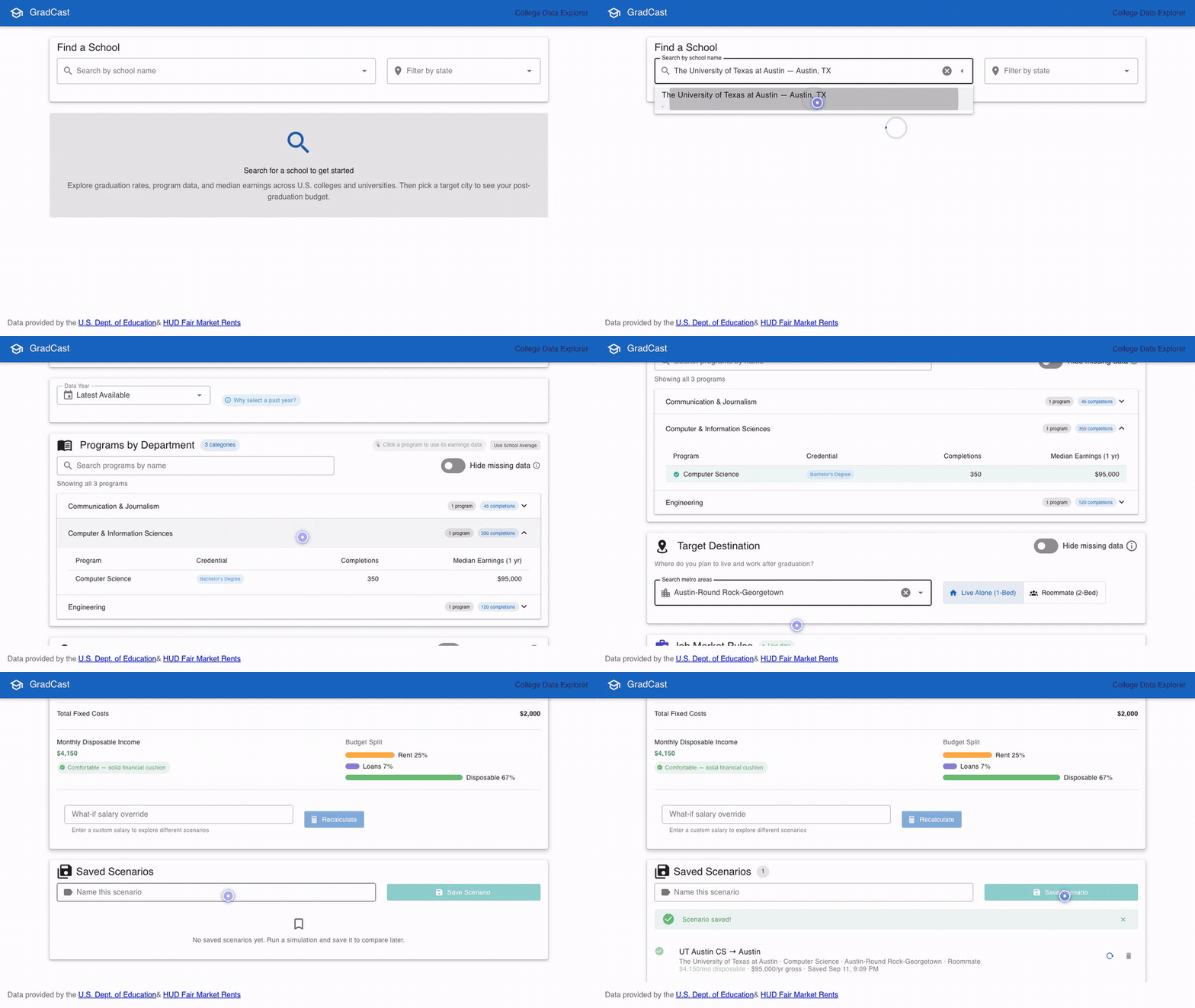
Interactive walkthrough of the progressive disclosure flow (search → program → city → live budget consequences).
📺 Watch high-definition MP4 walkthrough (720p)
Tech Stack
- Backend: C# / ASP.NET Core 10 Minimal API
- Frontend: Vue 3 (Composition API) + TypeScript + Vuetify 4 + Pinia
- Testing: Playwright (Frontend E2E) + xUnit (.NET Backend)
- Data Layer: SQLite via Dapper / Microsoft.Data.Sqlite (local/hybrid mode) or live API calls (remote mode)
- Build: .NET CLI + Vite
Features
Phase 1: College Data Explorer
- Type-ahead school search with optional state filtering
- School overview: admission rate, enrollment, tuition, completion rate
- Program-level data grouped by CIP category (department)
- Median earnings (1 year post-graduation) per program
- 5-year tuition trend line chart (in-state vs. out-of-state)
- Year selector for historic data with completeness tooltip
Phase 2: Budget Simulator ("The Consequences Engine")
- Progressive disclosure UX: each step reveals the next, guiding the user through choices
- Program selection: click any program row to use its earnings data in the simulation
- Target destination picker: search 156 US metro areas with housing type toggle (live alone / roommate)
- Job Market Pulse: live job openings, local median salary, and Scorecard earnings comparison via Adzuna API (matched by CIP program category and target metro area)
- Post-Grad Monthly Budget Simulator:
- Net take-home pay (federal + state taxes + FICA)
- Rent from HUD Fair Market Rents (by metro + housing type)
- Student loan payment (standard 10-year amortization from estimated debt)
- Disposable income with status indicator (comfortable / manageable / tight / deficit)
- Budget split percentage bars
- Salary override for what-if scenarios
- Saved Scenarios: name and save budget simulations to localStorage for comparison
Data Modes
hybrid(default): Local DB for imported data, API fallback for historic yearslocal: All requests query local SQLite database onlyapi: All Scorecard requests go to the live API
User Flow
1. Search for a school          → Type-ahead autocomplete
2. View school details          → Tuition, admission rate, completion rate, trend chart
3. Browse/select a program      → Click to lock in earnings data (optional)
4. Pick target destination      → Metro area + housing preference
5. Job market pulse appears     → Active job openings & local salary vs. Scorecard earnings
6. Budget simulator appears     → Real numbers, real consequences
7. Save scenarios               → Compare different school/city/program combinations
Getting Started
Quickest Start ("Just Run")
GradCast includes zero-friction options so you can run the app immediately without downloading 470 MB datasets or manually managing multiple terminals:
Option 1: Docker Compose (Zero local SDKs required)
Runs both the backend API and frontend SPA in a single container with auto-seeded reference data:
docker compose up --build
- Open http://localhost:5062 in your browser.
- Health check:
http://localhost:5062/health - Database is persisted in the
gradcast-datavolume. (To mount an existing localgradcast.db, see the volume comment indocker-compose.yml). - Optional: set
COLLEGE_SCORECARD_API_KEYandADZUNA_APP_ID/ADZUNA_APP_KEYin your environment or a.envfile for remote data fallback and live job pulses.
Option 2: One-Command Local Script (./start.sh)
For local development on macOS/Linux:
./start.sh
What ./start.sh does:
- Validates
.NET 10 SDKandNode.js 20+prerequisites. - Installs
npmdependencies automatically ifnode_modulesis missing. - Checks for port conflicts on
5062and5173. - Auto-seeds reference data (
gradcast.db) on API startup if missing. - Launches both the API (
http://localhost:5062) and Vite dev server (http://localhost:5173) with hot reloading, and cleanly terminates both processes onCtrl+C.
Additional script modes:
./start.sh --single     # Builds frontend into dist and runs unified single-process ASP.NET server (port 5062)
./start.sh --api-only   # Runs backend API only (port 5062)
Option 3: GitHub Codespaces / Dev Container
- Open this repository on GitHub.
- Click Code → Codespaces → Create codespace on main.
- Once the environment loads, run
./start.shin the terminal. - Ports
5062(API) and5173(Web) are forwarded automatically for browser preview.
Prerequisites (For Manual Local Development)
- .NET 10 SDK
- Node.js 20+
- A free API key from api.data.gov (required for
apiandhybridmodes) - (Optional) Free API credentials from developer.adzuna.com (for live Job Market Pulse data)
Quick Start (Hybrid Mode — Recommended)
-
Clone the repo:
git clone https://github.com/knowthankyew/gradcast.git cd gradcast -
Download College Scorecard data from collegescorecard.ed.gov/data — click "All Data Files Download (.zip, 470 MB)"
-
Import the data:
dotnet run --project src/import -- ~/Downloads/CollegeScorecard_Raw_Data.zipThis creates
gradcast.dbwith schools, programs, metro areas, and housing costs. -
Configure API keys (optional — Scorecard API for remote/hybrid fallback, Adzuna for live job pulse):
Option A: .NET User Secrets (Recommended for local dev)
dotnet user-secrets set "CollegeScorecard:ApiKey" "YOUR_SCORECARD_KEY" --project src/api
dotnet user-secrets set "Adzuna:AppId" "YOUR_ADZUNA_APP_ID" --project src/api
dotnet user-secrets set "Adzuna:AppKey" "YOUR_ADZUNA_APP_KEY" --project src/api
Option B: Environment Variables
# Standard ASP.NET Core hierarchical naming
export CollegeScorecard__ApiKey="YOUR_SCORECARD_KEY"
export Adzuna__AppId="YOUR_ADZUNA_APP_ID"
export Adzuna__AppKey="YOUR_ADZUNA_APP_KEY"

# Or flat naming
export COLLEGE_SCORECARD_API_KEY="YOUR_SCORECARD_KEY"
export ADZUNA_APP_ID="YOUR_ADZUNA_APP_ID"
export ADZUNA_APP_KEY="YOUR_ADZUNA_APP_KEY"
Option C: Local Configuration File
cp src/api/appsettings.Development.example.json src/api/appsettings.Development.json # Edit src/api/appsettings.Development.json with your keys (gitignored) -
Run the API (hybrid mode is enabled by default):
dotnet run --project src/apiAPI starts on
http://localhost:5062 -
Run the frontend (in a separate terminal):
cd src/web
npm install
npm run dev
App starts on
http://localhost:5173 -
Open
http://localhost:5173and explore.
Quick Start (API-only Mode — No Import Needed)
If you just want to try it without downloading the bulk data:
# Configure your API key (see step 4 above), then:
dotnet run --project src/import -- --seed-only  # Creates empty DB with metro/FMR seed data
dotnet run --project src/api
cd src/web && npm install && npm run dev
Note: Budget simulations require the imported metro/housing data (seeded automatically), but school data will come from the live API.
Import Tool
# Point at the downloaded Scorecard zip
dotnet run --project src/import -- ~/Downloads/CollegeScorecard_Raw_Data.zip

# Or an extracted directory
dotnet run --project src/import -- ~/Downloads/scorecard_data/

# Seed reference data only (no bulk data download required)
dotnet run --project src/import -- --seed-only

# Custom database path
dotnet run --project src/import -- ~/Downloads/CollegeScorecard_Raw_Data.zip ./custom.db
The import is idempotent and also seeds:
- 156 CBSA metro areas (Census Bureau delineation data)
- FY2025 Fair Market Rents for all metros (HUD data)
Project Structure
gradcast/
├── src/
│   ├── api/                              # ASP.NET Core 10 backend
│   │   ├── Program.cs                    # DI, middleware, endpoint mapping
│   │   ├── Configuration/                # Options classes & tax configuration
│   │   │   ├── CollegeScorecardOptions.cs
│   │   │   ├── AdzunaOptions.cs
│   │   │   └── TaxData/
│   │   │       └── tax_config_2026.json  # Versioned federal/state tax brackets
│   │   ├── Endpoints/                    # Minimal API route handlers
│   │   │   ├── SchoolEndpoints.cs        # /api/schools/*
│   │   │   ├── LocationEndpoints.cs      # /api/locations/*
│   │   │   ├── FinanceEndpoints.cs       # /api/finance/*
│   │   │   └── JobEndpoints.cs           # /api/jobs/*
│   │   ├── Models/                       # DTOs
│   │   └── Services/                     # Business logic
│   │       ├── ICollegeScorecardService.cs
│   │       ├── CollegeScorecardService.cs      # Remote Scorecard API
│   │       ├── LocalCollegeScorecardService.cs # SQLite queries
│   │       ├── HybridCollegeScorecardService.cs
│   │       ├── LocationService.cs              # Metro area search
│   │       ├── HousingCostService.cs           # HUD FMR lookup
│   │       ├── TaxCalculationService.cs        # Federal + state tax math
│   │       ├── LoanAmortizationService.cs      # Student loan payments
│   │       ├── IJobPulseService.cs             # Job pulse contract
│   │       ├── AdzunaJobPulseService.cs        # Live job openings via Adzuna
│   │       ├── CipJobKeywordMap.cs             # CIP code to job search keywords
│   │       └── BudgetSimulatorService.cs       # Orchestrates the full sim
│   ├── api.tests/                        # xUnit backend test suites
│   │   ├── Configuration/                # Options binding & DI registration tests
│   │   ├── Data/                         # Reference data seeder integration tests
│   │   ├── Endpoints/                    # Route contracts & API validation tests
│   │   ├── Services/                     # Service unit tests (Budget, Tax, Loan, etc.)
│   │   └── TestDoubles/                  # Shared test doubles & stubs
│   ├── data/                             # SQLite data layer (Dapper & connection factory)
│   │   ├── Entities/                     # School, Program, CbsaLocation, FairMarketRent, etc.
│   │   ├── SeedData/                     # Static seed (metros + FMR values)
│   │   ├── ISqliteConnectionFactory.cs   # Connection factory interface
│   │   ├── SqliteConnectionFactory.cs    # Connection factory with WAL pragmas
│   │   └── SqliteDatabaseInitializer.cs  # Schema DDL & covering index creation
│   ├── import/                           # CLI import tool
│   │   └── Program.cs                    # Bulk Scorecard import & reference data seeder
│   └── web/                              # Vue 3 + Vuetify 4 frontend
│       ├── e2e/                          # Playwright end-to-end tests
│       │   ├── fixtures/mockData.ts      # Deterministic route mocks
│       │   ├── gradcast-flow.spec.ts     # Core progressive disclosure flow
│       │   ├── saved-scenarios.spec.ts   # Scenario persistence & hydration
│       │   └── what-if-scenarios.spec.ts # Salary override & state integrity
│       ├── playwright.config.ts          # Playwright test configuration
│       └── src/
│           ├── components/               # UI components
│           │   ├── DisclaimerBanner.vue  # Legal/data disclaimer banner
│           │   ├── SchoolSearch.vue
│           │   ├── SchoolDetail.vue
│           │   ├── ProgramList.vue       # Selectable program rows
│           │   ├── YearSelector.vue      # Historic data year selector
│           │   ├── TuitionTrend.vue      # 5-year tuition history chart
│           │   ├── LocationSelector.vue  # Metro + housing type
│           │   ├── JobPulseWidget.vue    # Active openings & salary comparison
│           │   ├── BudgetSimulator.vue   # The "consequences engine"
│           │   └── SavedBudgets.vue      # localStorage scenarios
│           ├── composables/              # API + logic composables
│           │   ├── useSchoolApi.ts
│           │   ├── useBudgetSimulator.ts
│           │   ├── useJobPulse.ts
│           │   └── useSavedBudgets.ts
│           ├── stores/                   # Pinia state management
│           │   └── appStore.ts           # Shared state + isRestoring mutex
│           ├── data/                     # Static lookup data (CIP categories)
│           │   └── cipCategories.ts
│           └── types/                    # TypeScript interfaces
├── GradCast.slnx                         # .NET solution
└── README.md
Testing
Frontend (Playwright E2E)
The frontend includes end-to-end test suites powered by Playwright with realistic network mocking:
cd src/web
npm run test:e2e        # Run all tests headless
npm run test:e2e:ui     # Interactive UI mode with DOM inspection and time-travel debugging
npm run test:e2e:headed # Run in visible browser window
npm run demo:record     # Re-record demo & generate optimized GIF and MP4
npm run demo:record:headed # Run demo recorder in a visible browser window
Test coverage:
- Core User Flow: Progressive disclosure from school search to full budget simulation.
- Saved Scenarios: Saving, reloading/hydrating from empty state, deleting, and bulk clearing.
- What-If Simulations: Salary overrides, scorecard median resets, and historic year selector resilience.
Backend (xUnit)
dotnet test
Deployment (Fly.io)
GradCast is configured for single-machine containerized deployment to Fly.io backed by a persistent Fly Volume for SQLite:
- Launch App:
fly launch --no-deploy - Provision Persistent Volume:
fly volumes create gradcast_data --region dfw --size 1 - Set Optional API Secrets:
fly secrets set COLLEGE_SCORECARD_API_KEY=your_key ADZUNA_APP_ID=your_id ADZUNA_APP_KEY=your_key - Deploy:
fly deploy
Live instance is accessible at https://gradcast.fly.dev.
API Endpoints
| Method | Path | Description |
|---|---|---|
| GET | /api/schools/search?q={name}&state={ST} | Search schools |
| GET | /api/schools/{id}?year={year} | School detail with programs |
| GET | /api/schools/{id}/tuition-trend | 5-year tuition history |
| GET | /api/locations/search?q={query} | Search metro areas |
| GET | /api/locations/{cbsa}/housing?type=1bed|2bed | Fair Market Rent |
| GET | /api/finance/net-pay?grossSalary=&state= | Net pay calculator |
| GET | /api/finance/loan-payment?principal=&rate=&termYears= | Loan amortization |
| POST | /api/finance/simulator | Full budget simulation |
| GET | /api/jobs/pulse?cipCode={cip}&cbsa={cbsa} | Live job openings & salary data |
Phase 3 Vision
- Multi-year career trajectory modeling
- Side-by-side school/city comparison mode
- Savings rate projections and emergency fund timelines
- Geographic arbitrage suggestions (same degree, different cities)
Data Sources
| Source | Data | Update Frequency |
|---|---|---|
| College Scorecard | Schools, programs, earnings, completion rates | Annual |
| HUD Fair Market Rents | Rent by metro area | Annual |
| Census Bureau | CBSA metro area delineations | Decennial+ |
| Federal tax brackets | Income tax calculations | Annual (hardcoded) |
| Adzuna | Job openings & local salaries by CIP/metro | Real-time API |
License
MIT
Contributors

84 commits

7 commits
See what people are saying
Similar repos




Languages
C#
57.5%
Vue
20.3%
TypeScript
19.4%
Shell
2.0%
README
GradCast
Most college search tools stop at tuition. GradCast connects actual degree-level earnings to real local rent, federal/state taxes, and student loan amortization to show your real monthly take-home.
A proof-of-concept web application that helps students simulate their financial future after graduation — based on real college costs, program-level earnings data, local housing markets, and tax calculations. Built on the U.S. Department of Education's College Scorecard API and HUD Fair Market Rent data.
Interactive walkthrough of the progressive disclosure flow (search → program → city → live budget consequences).
📺 Watch high-definition MP4 walkthrough (720p)
Tech Stack
- Backend: C# / ASP.NET Core 10 Minimal API
- Frontend: Vue 3 (Composition API) + TypeScript + Vuetify 4 + Pinia
- Testing: Playwright (Frontend E2E) + xUnit (.NET Backend)
- Data Layer: SQLite via Dapper / Microsoft.Data.Sqlite (local/hybrid mode) or live API calls (remote mode)
- Build: .NET CLI + Vite
Features
Phase 1: College Data Explorer
- Type-ahead school search with optional state filtering
- School overview: admission rate, enrollment, tuition, completion rate
- Program-level data grouped by CIP category (department)
- Median earnings (1 year post-graduation) per program
- 5-year tuition trend line chart (in-state vs. out-of-state)
- Year selector for historic data with completeness tooltip
Phase 2: Budget Simulator ("The Consequences Engine")
- Progressive disclosure UX: each step reveals the next, guiding the user through choices
- Program selection: click any program row to use its earnings data in the simulation
- Target destination picker: search 156 US metro areas with housing type toggle (live alone / roommate)
- Job Market Pulse: live job openings, local median salary, and Scorecard earnings comparison via Adzuna API (matched by CIP program category and target metro area)
- Post-Grad Monthly Budget Simulator:
- Net take-home pay (federal + state taxes + FICA)
- Rent from HUD Fair Market Rents (by metro + housing type)
- Student loan payment (standard 10-year amortization from estimated debt)
- Disposable income with status indicator (comfortable / manageable / tight / deficit)
- Budget split percentage bars
- Salary override for what-if scenarios
- Saved Scenarios: name and save budget simulations to localStorage for comparison
Data Modes
hybrid(default): Local DB for imported data, API fallback for historic yearslocal: All requests query local SQLite database onlyapi: All Scorecard requests go to the live API
User Flow
1. Search for a school          → Type-ahead autocomplete
2. View school details          → Tuition, admission rate, completion rate, trend chart
3. Browse/select a program      → Click to lock in earnings data (optional)
4. Pick target destination      → Metro area + housing preference
5. Job market pulse appears     → Active job openings & local salary vs. Scorecard earnings
6. Budget simulator appears     → Real numbers, real consequences
7. Save scenarios               → Compare different school/city/program combinations
Getting Started
Quickest Start ("Just Run")
GradCast includes zero-friction options so you can run the app immediately without downloading 470 MB datasets or manually managing multiple terminals:
Option 1: Docker Compose (Zero local SDKs required)
Runs both the backend API and frontend SPA in a single container with auto-seeded reference data:
docker compose up --build
- Open http://localhost:5062 in your browser.
- Health check:
http://localhost:5062/health - Database is persisted in the
gradcast-datavolume. (To mount an existing localgradcast.db, see the volume comment indocker-compose.yml). - Optional: set
COLLEGE_SCORECARD_API_KEYandADZUNA_APP_ID/ADZUNA_APP_KEYin your environment or a.envfile for remote data fallback and live job pulses.
Option 2: One-Command Local Script (./start.sh)
For local development on macOS/Linux:
./start.sh
What ./start.sh does:
- Validates
.NET 10 SDKandNode.js 20+prerequisites. - Installs
npmdependencies automatically ifnode_modulesis missing. - Checks for port conflicts on
5062and5173. - Auto-seeds reference data (
gradcast.db) on API startup if missing. - Launches both the API (
http://localhost:5062) and Vite dev server (http://localhost:5173) with hot reloading, and cleanly terminates both processes onCtrl+C.
Additional script modes:
./start.sh --single     # Builds frontend into dist and runs unified single-process ASP.NET server (port 5062)
./start.sh --api-only   # Runs backend API only (port 5062)
Option 3: GitHub Codespaces / Dev Container
- Open this repository on GitHub.
- Click Code → Codespaces → Create codespace on main.
- Once the environment loads, run
./start.shin the terminal. - Ports
5062(API) and5173(Web) are forwarded automatically for browser preview.
Prerequisites (For Manual Local Development)
- .NET 10 SDK
- Node.js 20+
- A free API key from api.data.gov (required for
apiandhybridmodes) - (Optional) Free API credentials from developer.adzuna.com (for live Job Market Pulse data)
Quick Start (Hybrid Mode — Recommended)
-
Clone the repo:
git clone https://github.com/knowthankyew/gradcast.git cd gradcast -
Download College Scorecard data from collegescorecard.ed.gov/data — click "All Data Files Download (.zip, 470 MB)"
-
Import the data:
dotnet run --project src/import -- ~/Downloads/CollegeScorecard_Raw_Data.zipThis creates
gradcast.dbwith schools, programs, metro areas, and housing costs. -
Configure API keys (optional — Scorecard API for remote/hybrid fallback, Adzuna for live job pulse):
Option A: .NET User Secrets (Recommended for local dev)
dotnet user-secrets set "CollegeScorecard:ApiKey" "YOUR_SCORECARD_KEY" --project src/api
dotnet user-secrets set "Adzuna:AppId" "YOUR_ADZUNA_APP_ID" --project src/api
dotnet user-secrets set "Adzuna:AppKey" "YOUR_ADZUNA_APP_KEY" --project src/api
Option B: Environment Variables
# Standard ASP.NET Core hierarchical naming
export CollegeScorecard__ApiKey="YOUR_SCORECARD_KEY"
export Adzuna__AppId="YOUR_ADZUNA_APP_ID"
export Adzuna__AppKey="YOUR_ADZUNA_APP_KEY"

# Or flat naming
export COLLEGE_SCORECARD_API_KEY="YOUR_SCORECARD_KEY"
export ADZUNA_APP_ID="YOUR_ADZUNA_APP_ID"
export ADZUNA_APP_KEY="YOUR_ADZUNA_APP_KEY"
Option C: Local Configuration File
cp src/api/appsettings.Development.example.json src/api/appsettings.Development.json # Edit src/api/appsettings.Development.json with your keys (gitignored) -
Run the API (hybrid mode is enabled by default):
dotnet run --project src/apiAPI starts on
http://localhost:5062 -
Run the frontend (in a separate terminal):
cd src/web
npm install
npm run dev
App starts on
http://localhost:5173 -
Open
http://localhost:5173and explore.
Quick Start (API-only Mode — No Import Needed)
If you just want to try it without downloading the bulk data:
# Configure your API key (see step 4 above), then:
dotnet run --project src/import -- --seed-only  # Creates empty DB with metro/FMR seed data
dotnet run --project src/api
cd src/web && npm install && npm run dev
Note: Budget simulations require the imported metro/housing data (seeded automatically), but school data will come from the live API.
Import Tool
# Point at the downloaded Scorecard zip
dotnet run --project src/import -- ~/Downloads/CollegeScorecard_Raw_Data.zip

# Or an extracted directory
dotnet run --project src/import -- ~/Downloads/scorecard_data/

# Seed reference data only (no bulk data download required)
dotnet run --project src/import -- --seed-only

# Custom database path
dotnet run --project src/import -- ~/Downloads/CollegeScorecard_Raw_Data.zip ./custom.db
The import is idempotent and also seeds:
- 156 CBSA metro areas (Census Bureau delineation data)
- FY2025 Fair Market Rents for all metros (HUD data)
Project Structure
gradcast/
├── src/
│   ├── api/                              # ASP.NET Core 10 backend
│   │   ├── Program.cs                    # DI, middleware, endpoint mapping
│   │   ├── Configuration/                # Options classes & tax configuration
│   │   │   ├── CollegeScorecardOptions.cs
│   │   │   ├── AdzunaOptions.cs
│   │   │   └── TaxData/
│   │   │       └── tax_config_2026.json  # Versioned federal/state tax brackets
│   │   ├── Endpoints/                    # Minimal API route handlers
│   │   │   ├── SchoolEndpoints.cs        # /api/schools/*
│   │   │   ├── LocationEndpoints.cs      # /api/locations/*
│   │   │   ├── FinanceEndpoints.cs       # /api/finance/*
│   │   │   └── JobEndpoints.cs           # /api/jobs/*
│   │   ├── Models/                       # DTOs
│   │   └── Services/                     # Business logic
│   │       ├── ICollegeScorecardService.cs
│   │       ├── CollegeScorecardService.cs      # Remote Scorecard API
│   │       ├── LocalCollegeScorecardService.cs # SQLite queries
│   │       ├── HybridCollegeScorecardService.cs
│   │       ├── LocationService.cs              # Metro area search
│   │       ├── HousingCostService.cs           # HUD FMR lookup
│   │       ├── TaxCalculationService.cs        # Federal + state tax math
│   │       ├── LoanAmortizationService.cs      # Student loan payments
│   │       ├── IJobPulseService.cs             # Job pulse contract
│   │       ├── AdzunaJobPulseService.cs        # Live job openings via Adzuna
│   │       ├── CipJobKeywordMap.cs             # CIP code to job search keywords
│   │       └── BudgetSimulatorService.cs       # Orchestrates the full sim
│   ├── api.tests/                        # xUnit backend test suites
│   │   ├── Configuration/                # Options binding & DI registration tests
│   │   ├── Data/                         # Reference data seeder integration tests
│   │   ├── Endpoints/                    # Route contracts & API validation tests
│   │   ├── Services/                     # Service unit tests (Budget, Tax, Loan, etc.)
│   │   └── TestDoubles/                  # Shared test doubles & stubs
│   ├── data/                             # SQLite data layer (Dapper & connection factory)
│   │   ├── Entities/                     # School, Program, CbsaLocation, FairMarketRent, etc.
│   │   ├── SeedData/                     # Static seed (metros + FMR values)
│   │   ├── ISqliteConnectionFactory.cs   # Connection factory interface
│   │   ├── SqliteConnectionFactory.cs    # Connection factory with WAL pragmas
│   │   └── SqliteDatabaseInitializer.cs  # Schema DDL & covering index creation
│   ├── import/                           # CLI import tool
│   │   └── Program.cs                    # Bulk Scorecard import & reference data seeder
│   └── web/                              # Vue 3 + Vuetify 4 frontend
│       ├── e2e/                          # Playwright end-to-end tests
│       │   ├── fixtures/mockData.ts      # Deterministic route mocks
│       │   ├── gradcast-flow.spec.ts     # Core progressive disclosure flow
│       │   ├── saved-scenarios.spec.ts   # Scenario persistence & hydration
│       │   └── what-if-scenarios.spec.ts # Salary override & state integrity
│       ├── playwright.config.ts          # Playwright test configuration
│       └── src/
│           ├── components/               # UI components
│           │   ├── DisclaimerBanner.vue  # Legal/data disclaimer banner
│           │   ├── SchoolSearch.vue
│           │   ├── SchoolDetail.vue
│           │   ├── ProgramList.vue       # Selectable program rows
│           │   ├── YearSelector.vue      # Historic data year selector
│           │   ├── TuitionTrend.vue      # 5-year tuition history chart
│           │   ├── LocationSelector.vue  # Metro + housing type
│           │   ├── JobPulseWidget.vue    # Active openings & salary comparison
│           │   ├── BudgetSimulator.vue   # The "consequences engine"
│           │   └── SavedBudgets.vue      # localStorage scenarios
│           ├── composables/              # API + logic composables
│           │   ├── useSchoolApi.ts
│           │   ├── useBudgetSimulator.ts
│           │   ├── useJobPulse.ts
│           │   └── useSavedBudgets.ts
│           ├── stores/                   # Pinia state management
│           │   └── appStore.ts           # Shared state + isRestoring mutex
│           ├── data/                     # Static lookup data (CIP categories)
│           │   └── cipCategories.ts
│           └── types/                    # TypeScript interfaces
├── GradCast.slnx                         # .NET solution
└── README.md
Testing
Frontend (Playwright E2E)
The frontend includes end-to-end test suites powered by Playwright with realistic network mocking:
cd src/web
npm run test:e2e        # Run all tests headless
npm run test:e2e:ui     # Interactive UI mode with DOM inspection and time-travel debugging
npm run test:e2e:headed # Run in visible browser window
npm run demo:record     # Re-record demo & generate optimized GIF and MP4
npm run demo:record:headed # Run demo recorder in a visible browser window
Test coverage:
- Core User Flow: Progressive disclosure from school search to full budget simulation.
- Saved Scenarios: Saving, reloading/hydrating from empty state, deleting, and bulk clearing.
- What-If Simulations: Salary overrides, scorecard median resets, and historic year selector resilience.
Backend (xUnit)
dotnet test
Deployment (Fly.io)
GradCast is configured for single-machine containerized deployment to Fly.io backed by a persistent Fly Volume for SQLite:
- Launch App:
fly launch --no-deploy - Provision Persistent Volume:
fly volumes create gradcast_data --region dfw --size 1 - Set Optional API Secrets:
fly secrets set COLLEGE_SCORECARD_API_KEY=your_key ADZUNA_APP_ID=your_id ADZUNA_APP_KEY=your_key - Deploy:
fly deploy
Live instance is accessible at https://gradcast.fly.dev.
API Endpoints
| Method | Path | Description |
|---|---|---|
| GET | /api/schools/search?q={name}&state={ST} | Search schools |
| GET | /api/schools/{id}?year={year} | School detail with programs |
| GET | /api/schools/{id}/tuition-trend | 5-year tuition history |
| GET | /api/locations/search?q={query} | Search metro areas |
| GET | /api/locations/{cbsa}/housing?type=1bed|2bed | Fair Market Rent |
| GET | /api/finance/net-pay?grossSalary=&state= | Net pay calculator |
| GET | /api/finance/loan-payment?principal=&rate=&termYears= | Loan amortization |
| POST | /api/finance/simulator | Full budget simulation |
| GET | /api/jobs/pulse?cipCode={cip}&cbsa={cbsa} | Live job openings & salary data |
Phase 3 Vision
- Multi-year career trajectory modeling
- Side-by-side school/city comparison mode
- Savings rate projections and emergency fund timelines
- Geographic arbitrage suggestions (same degree, different cities)
Data Sources
| Source | Data | Update Frequency |
|---|---|---|
| College Scorecard | Schools, programs, earnings, completion rates | Annual |
| HUD Fair Market Rents | Rent by metro area | Annual |
| Census Bureau | CBSA metro area delineations | Decennial+ |
| Federal tax brackets | Income tax calculations | Annual (hardcoded) |
| Adzuna | Job openings & local salaries by CIP/metro | Real-time API |
License
MIT
See what people are saying
Similar repos
Contributors
84 commits
7 commits
Languages
C#
57.5%
Vue
20.3%
TypeScript
19.4%
Shell
2.0%