
An on-demand codex session attached to your zsh shell
Shell
0
11 commits
updated Oct 1, 2026
See what people are saying
README
zsh-codex-assistant
An on-demand codex session attached to your zsh shell. You can bring it forward any time, shell context is preserved.
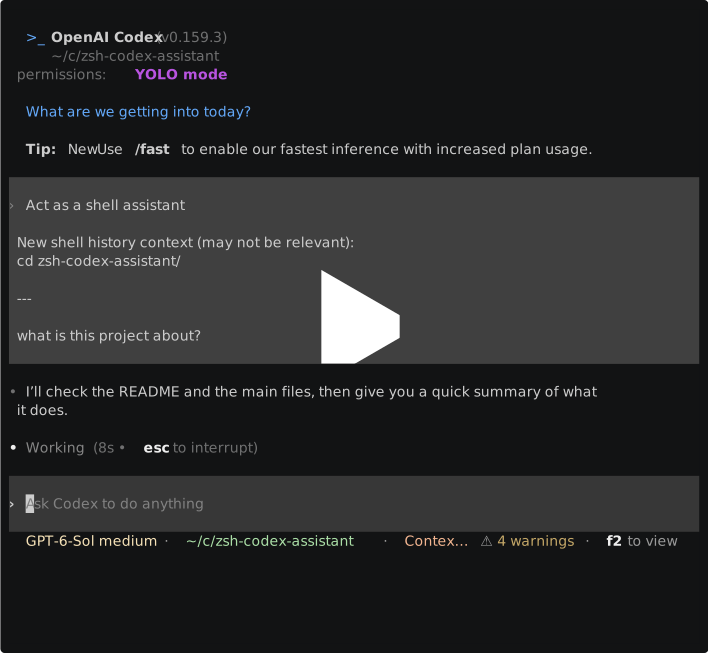
How it works
Use @ your prompt to hop into Codex anytime.
$ # run your commands normally in the shell
$ cd ./zsh-codex-assistant
$ # prefix your prompts with '@'. first invocation starts a background codex session for this shell
$ @ explain this project
<codex CLI opens, responds to your request and exits>
$ # your shell returns to normal.
$ ls
session-notify.zsh zsh-codex-assistant.plugin.zsh ...
$ @ what was my last request?
$ <codex session resumes, your shell command history since the last invocation is put into the context>
Motivation
I decided to build this because none of the existing tools were quite satisfactory:
- I need a persistent harness process, not just an agent in oneshot mode - to preserve shell context and skip the warmup delay
- I do not want to trust a pile of overcomplicated slop for my root shell (there are plenty of other projects for AI in the shell that suffer from feature bloat)
- I only need codex support
If you need LLM command generation in-place, check out zsh-ai - it's decent.
Install
Requires Zsh and an installed, signed-in Codex CLI. Make sure codex works first.
Install manually
Clone this repository, then add this line to your ~/.zshrc, using the path where you cloned it:
source /path/to/zsh-codex-assistant/zsh-codex-assistant.plugin.zsh
Open a new terminal to load the plugin.
Load it after plugins that customize the Enter key if you have any.
With zplug
Add this alongside your other zplug declarations in ~/.zshrc, after any
plugins that customize the Enter key and before zplug load:
zplug "klntsky/zsh-codex-assistant", use:"zsh-codex-assistant.plugin.zsh"
Open a new terminal, run zplug install, then open another new terminal to
load the plugin. Your ~/.zshrc should already call zplug load after the
declarations.
If you already cloned this repository and want zplug to use that checkout, register its path instead:
zplug "/path/to/zsh-codex-assistant", from:local, use:"zsh-codex-assistant.plugin.zsh"
Local checkouts do not need zplug install. Put the declaration before your
existing zplug load line, then open a new terminal.
Optional settings
Add any of these settings to ~/.zshrc:
export ZSH_CODEX_ASSISTANT_MODEL="your-model"
export ZSH_CODEX_ASSISTANT_PROFILE="your-profile"
export ZSH_CODEX_ASSISTANT_INITIAL_PROMPT="Act as a shell assistant"
Similar repos


Languages
Shell
100.0%
An on-demand codex session attached to your zsh shell
Shell
0
11 commits
updated Oct 1, 2026
See what people are saying
README
zsh-codex-assistant
An on-demand codex session attached to your zsh shell. You can bring it forward any time, shell context is preserved.
How it works
Use @ your prompt to hop into Codex anytime.
$ # run your commands normally in the shell
$ cd ./zsh-codex-assistant
$ # prefix your prompts with '@'. first invocation starts a background codex session for this shell
$ @ explain this project
<codex CLI opens, responds to your request and exits>
$ # your shell returns to normal.
$ ls
session-notify.zsh zsh-codex-assistant.plugin.zsh ...
$ @ what was my last request?
$ <codex session resumes, your shell command history since the last invocation is put into the context>
Motivation
I decided to build this because none of the existing tools were quite satisfactory:
- I need a persistent harness process, not just an agent in oneshot mode - to preserve shell context and skip the warmup delay
- I do not want to trust a pile of overcomplicated slop for my root shell (there are plenty of other projects for AI in the shell that suffer from feature bloat)
- I only need codex support
If you need LLM command generation in-place, check out zsh-ai - it's decent.
Install
Requires Zsh and an installed, signed-in Codex CLI. Make sure codex works first.
Install manually
Clone this repository, then add this line to your ~/.zshrc, using the path where you cloned it:
source /path/to/zsh-codex-assistant/zsh-codex-assistant.plugin.zsh
Open a new terminal to load the plugin.
Load it after plugins that customize the Enter key if you have any.
With zplug
Add this alongside your other zplug declarations in ~/.zshrc, after any
plugins that customize the Enter key and before zplug load:
zplug "klntsky/zsh-codex-assistant", use:"zsh-codex-assistant.plugin.zsh"
Open a new terminal, run zplug install, then open another new terminal to
load the plugin. Your ~/.zshrc should already call zplug load after the
declarations.
If you already cloned this repository and want zplug to use that checkout, register its path instead:
zplug "/path/to/zsh-codex-assistant", from:local, use:"zsh-codex-assistant.plugin.zsh"
Local checkouts do not need zplug install. Put the declaration before your
existing zplug load line, then open a new terminal.
Optional settings
Add any of these settings to ~/.zshrc:
export ZSH_CODEX_ASSISTANT_MODEL="your-model"
export ZSH_CODEX_ASSISTANT_PROFILE="your-profile"
export ZSH_CODEX_ASSISTANT_INITIAL_PROMPT="Act as a shell assistant"
Similar repos
Languages
Shell
100.0%