
README
Jujutsu VCS Plugin for IntelliJ IDEA
Native IntelliJ integration for Jujutsu (jj), a Git-compatible version control system built around a fundamentally different workflow: your working copy is always a commit.
Features
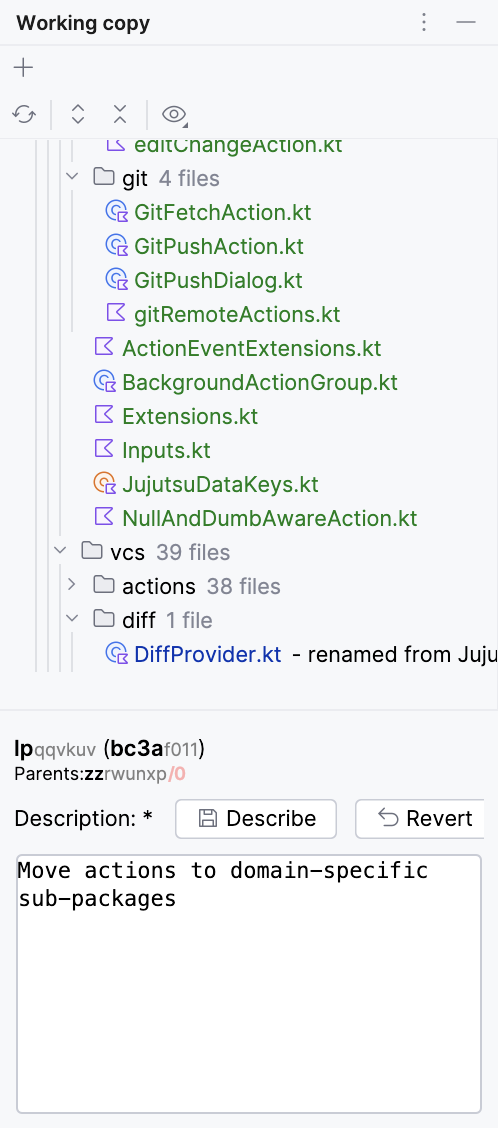
- Describe-First Workflow — The Working Copy tool window lets you describe your current work and create new changes with one click. No staging area, no "WIP" commits.
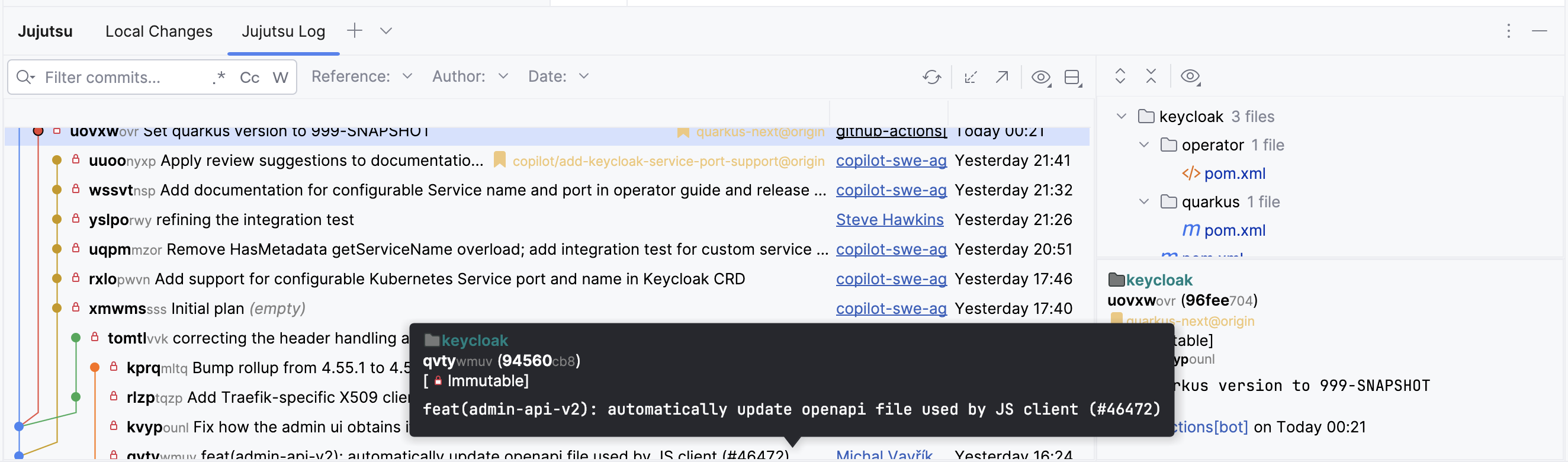
- Custom Log View — Visual commit graph with inline change IDs, descriptions, bookmarks, and author info. Filter by text, branch, author, or date range.
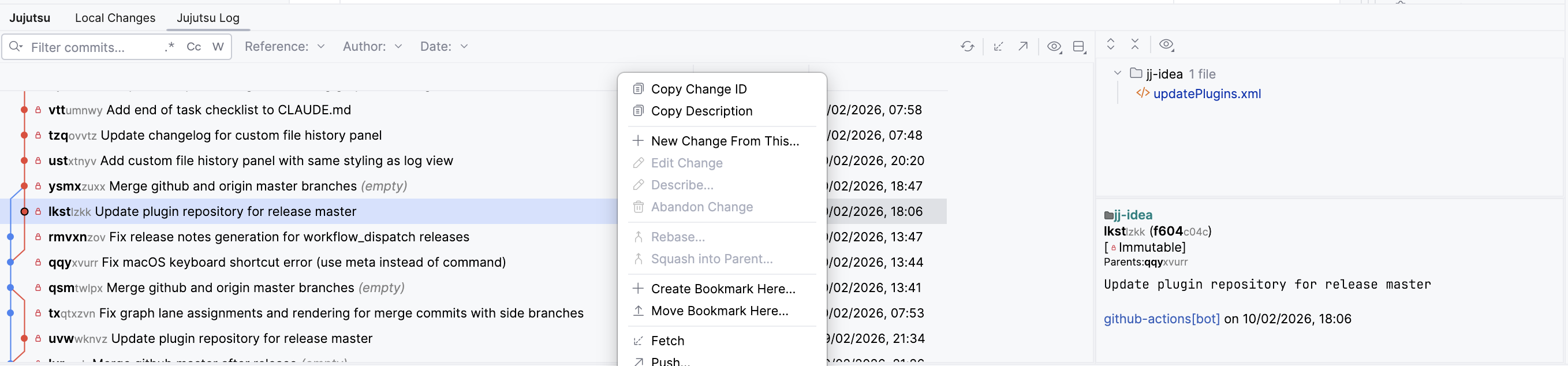
- Change Operations — Edit, abandon, describe, squash, and rebase changes directly from the log context menu.
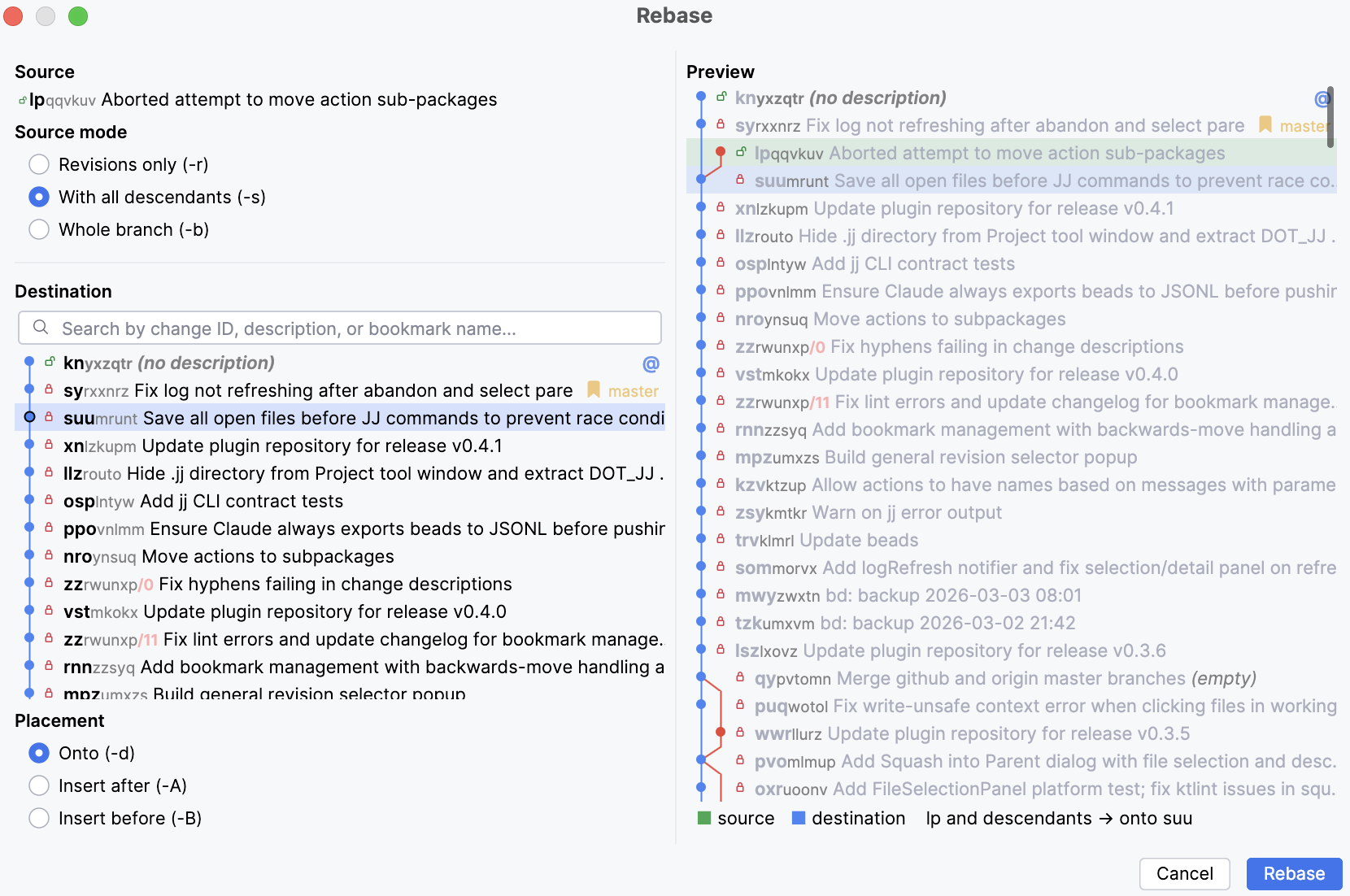
- Rebase — Full rebase dialog with source mode selection (-r/-s/-b), visual destination picker with commit graph, and live preview.
- Git Remotes — Fetch and push to Git remotes without leaving the IDE.
- File History & Annotations — Full file history with diff viewer. Line-by-line blame annotations.
- Multi-Repository Support — Work with multiple JJ repositories in a single project with a unified log view.
- Real-Time Status — Auto-refresh keeps the UI in sync as you edit files.
Working Copy
The Working Copy panel sits on the left side of the IDE, showing changed files grouped by directory with status coloring. Describe your work and create new changes without leaving your editor.
Log View
The custom log replaces the standard VCS log with a JJ-native view. Hover over any commit for details, or right-click for operations.
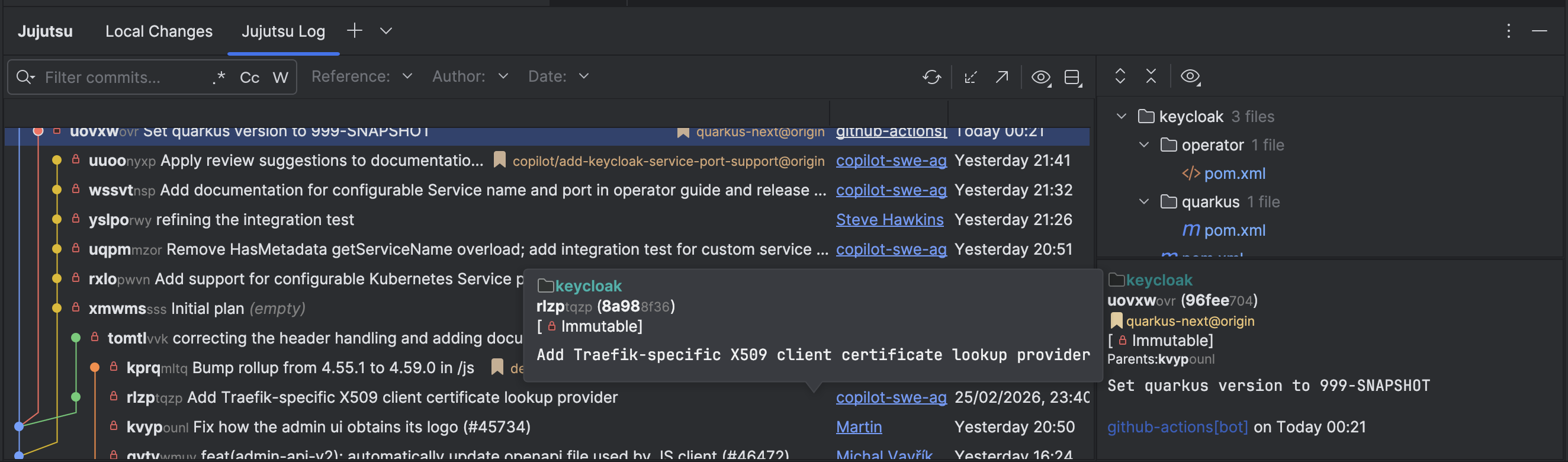
Works in both light and dark themes:
Rebase Dialog
Visual rebase with source mode selection, searchable destination picker, and a live preview showing the result before you commit to it.
Installing
From Custom Repository (Recommended)
- In IntelliJ IDEA: Settings → Plugins → ⚙️ → Manage Plugin Repositories
- Add:
https://raw.githubusercontent.com/kkkev/jj-idea/master/updatePlugins.xml - Search for "Jujutsu VCS Integration" in the Marketplace tab and install
Future updates will be detected automatically.
From GitHub Releases
- Go to Releases
- Download the latest
.zipfile - In IntelliJ IDEA: Settings → Plugins → ⚙️ → Install Plugin from Disk
Build from Source
./gradlew buildPlugin
Then install from build/distributions/ via Settings → Plugins → Install Plugin from Disk.
Requirements
- IntelliJ IDEA 2025.2 or later
- Jujutsu (
jj) version 0.37 or later installed, available in PATH (or otherwise configured)
Getting Started
- Open a project with a
.jjdirectory, or create one with VCS → Create JJ Repository - The Working Copy panel appears on the left; the Jujutsu log appears in the Version Control tool window
- Configure settings at Settings → Version Control → Jujutsu
Support
This plugin is free and maintained in my spare time, with a lot of the work done using AI coding tools. If it saves you time, you can sponsor me on GitHub to help fund those tools and continued development — entirely optional. Feedback and issues are just as welcome.
Sponsors
Thanks to everyone who has sponsored this plugin! Recurring sponsors at $20/month or more are listed here.
Roadmap
See ROADMAP.md for planned features, including hunk-level squash & split, a bookmark widget and branches panel, operation log & undo, and forge integration.
Documentation
- Contributing — Architecture, coding standards, testing, and workflow
- Agent Instructions — Operating rules for AI coding agents working in this repo
License
Contributors


Similar repos


Languages
Kotlin
99.6%
README
Jujutsu VCS Plugin for IntelliJ IDEA
Native IntelliJ integration for Jujutsu (jj), a Git-compatible version control system built around a fundamentally different workflow: your working copy is always a commit.
Features
- Describe-First Workflow — The Working Copy tool window lets you describe your current work and create new changes with one click. No staging area, no "WIP" commits.
- Custom Log View — Visual commit graph with inline change IDs, descriptions, bookmarks, and author info. Filter by text, branch, author, or date range.
- Change Operations — Edit, abandon, describe, squash, and rebase changes directly from the log context menu.
- Rebase — Full rebase dialog with source mode selection (-r/-s/-b), visual destination picker with commit graph, and live preview.
- Git Remotes — Fetch and push to Git remotes without leaving the IDE.
- File History & Annotations — Full file history with diff viewer. Line-by-line blame annotations.
- Multi-Repository Support — Work with multiple JJ repositories in a single project with a unified log view.
- Real-Time Status — Auto-refresh keeps the UI in sync as you edit files.
Working Copy
The Working Copy panel sits on the left side of the IDE, showing changed files grouped by directory with status coloring. Describe your work and create new changes without leaving your editor.
Log View
The custom log replaces the standard VCS log with a JJ-native view. Hover over any commit for details, or right-click for operations.
Works in both light and dark themes:
Rebase Dialog
Visual rebase with source mode selection, searchable destination picker, and a live preview showing the result before you commit to it.
Installing
From Custom Repository (Recommended)
- In IntelliJ IDEA: Settings → Plugins → ⚙️ → Manage Plugin Repositories
- Add:
https://raw.githubusercontent.com/kkkev/jj-idea/master/updatePlugins.xml - Search for "Jujutsu VCS Integration" in the Marketplace tab and install
Future updates will be detected automatically.
From GitHub Releases
- Go to Releases
- Download the latest
.zipfile - In IntelliJ IDEA: Settings → Plugins → ⚙️ → Install Plugin from Disk
Build from Source
./gradlew buildPlugin
Then install from build/distributions/ via Settings → Plugins → Install Plugin from Disk.
Requirements
- IntelliJ IDEA 2025.2 or later
- Jujutsu (
jj) version 0.37 or later installed, available in PATH (or otherwise configured)
Getting Started
- Open a project with a
.jjdirectory, or create one with VCS → Create JJ Repository - The Working Copy panel appears on the left; the Jujutsu log appears in the Version Control tool window
- Configure settings at Settings → Version Control → Jujutsu
Support
This plugin is free and maintained in my spare time, with a lot of the work done using AI coding tools. If it saves you time, you can sponsor me on GitHub to help fund those tools and continued development — entirely optional. Feedback and issues are just as welcome.
Sponsors
Thanks to everyone who has sponsored this plugin! Recurring sponsors at $20/month or more are listed here.
Roadmap
See ROADMAP.md for planned features, including hunk-level squash & split, a bookmark widget and branches panel, operation log & undo, and forge integration.
Documentation
- Contributing — Architecture, coding standards, testing, and workflow
- Agent Instructions — Operating rules for AI coding agents working in this repo
License
Similar repos
Contributors
Languages
Kotlin
99.6%