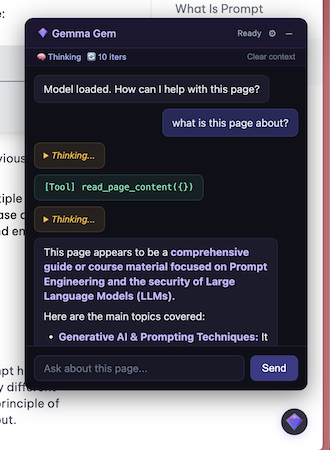
Gemma Gem runs Google's Gemma 4 model entirely on-device via WebGPU — no API keys, no cloud, no data leaving your machine.
TypeScript
971
30 commits
updated May 29, 2026
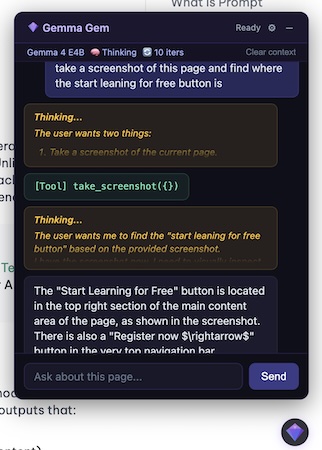
Your personal AI assistant living right inside the browser. Gemma Gem runs Google's Gemma 4 model entirely on-device via WebGPU — no API keys, no cloud, no data leaving your machine. It can read pages, click buttons, fill forms, run JavaScript, and answer questions about any site you visit.
pnpm install
pnpm build
Load the extension in chrome://extensions (developer mode) from .output/chrome-mv3-dev/.
Offscreen Document          Service Worker           Content Script
(Gemma 4 + Agent Loop)  <-> (Message Router)    <-> (Chat UI + DOM Tools)
       |                         |
  WebGPU inference          Screenshot capture
  Token streaming           JS execution
@huggingface/transformers + WebGPU. Runs the agent loop.take_screenshot and run_javascript.read_page_content, click_element, type_text, scroll_page).| Tool | Description | Runs in |
|---|---|---|
read_page_content | Read text/HTML of the page or a CSS selector | Content script |
take_screenshot | Capture visible page as PNG | Service worker |
click_element | Click an element by CSS selector | Content script |
type_text | Type into an input by CSS selector | Content script |
scroll_page | Scroll up/down by pixel amount | Content script |
run_javascript | Execute JS in the page context with full DOM access | Service worker |
Click the gear icon in the chat header:
↺ button resets a shortcut to its default. Defaults: Alt+G toggles the chat, Escape closes it. Bindings persist across sessions.| Shortcut | Action | Default |
|---|---|---|
| Toggle chat | Open/close the chat overlay from anywhere on the page | Alt+G |
| Close chat | Close the overlay when it's open | Escape |
Both are rebindable from the gear-icon settings panel (see Shortcuts above).
pnpm build              # Development build (with logging, source maps)
pnpm build:prod         # Production build (logging silenced, minified)
onnx-community/gemma-4-E2B-it-ONNX, onnx-community/gemma-4-E4B-it-ONNX) — q4f16 quantization, 128K contextAll logs are prefixed with [Gemma Gem]. In development builds, info/debug/warn logs are active. Production builds only log errors.
chrome://extensions → Gemma Gem → "Inspect views: service worker"chrome://extensions → Gemma Gem → "Inspect views: offscreen.html"chrome://inspect#other lists all inspectable extension contexts (service worker, offscreen document, etc.)The offscreen document logs are the most useful — they show model loading, prompt construction, token counts, raw model output, and tool execution.
Estimated minimal requirements (not benchmarked on real devices)
| E2B (~500 MB) | E4B (~1.5 GB) | |
|---|---|---|
| GPU VRAM / Shared Memory | 4 GB | 6 GB |
| System RAM | 6-8 GB | 8-16 GB |
| Browser | Chrome 113+ / Edge 113+ with WebGPU | Same |
| GPU Feature | shader-f16 required | Same |
3,119 followers · starred Apr 2026
600 followers · starred Apr 2026
37 followers · starred Apr 2026
162 followers · starred Apr 2026
Gemma Gem runs Google's Gemma 4 model entirely on-device via WebGPU — no API keys, no cloud, no data leaving your machine.
TypeScript
971
30 commits
updated May 29, 2026
Your personal AI assistant living right inside the browser. Gemma Gem runs Google's Gemma 4 model entirely on-device via WebGPU — no API keys, no cloud, no data leaving your machine. It can read pages, click buttons, fill forms, run JavaScript, and answer questions about any site you visit.
pnpm install
pnpm build
Load the extension in chrome://extensions (developer mode) from .output/chrome-mv3-dev/.
Offscreen Document          Service Worker           Content Script
(Gemma 4 + Agent Loop)  <-> (Message Router)    <-> (Chat UI + DOM Tools)
       |                         |
  WebGPU inference          Screenshot capture
  Token streaming           JS execution
@huggingface/transformers + WebGPU. Runs the agent loop.take_screenshot and run_javascript.read_page_content, click_element, type_text, scroll_page).| Tool | Description | Runs in |
|---|---|---|
read_page_content | Read text/HTML of the page or a CSS selector | Content script |
take_screenshot | Capture visible page as PNG | Service worker |
click_element | Click an element by CSS selector | Content script |
type_text | Type into an input by CSS selector | Content script |
scroll_page | Scroll up/down by pixel amount | Content script |
run_javascript | Execute JS in the page context with full DOM access | Service worker |
Click the gear icon in the chat header:
↺ button resets a shortcut to its default. Defaults: Alt+G toggles the chat, Escape closes it. Bindings persist across sessions.| Shortcut | Action | Default |
|---|---|---|
| Toggle chat | Open/close the chat overlay from anywhere on the page | Alt+G |
| Close chat | Close the overlay when it's open | Escape |
Both are rebindable from the gear-icon settings panel (see Shortcuts above).
pnpm build              # Development build (with logging, source maps)
pnpm build:prod         # Production build (logging silenced, minified)
onnx-community/gemma-4-E2B-it-ONNX, onnx-community/gemma-4-E4B-it-ONNX) — q4f16 quantization, 128K contextAll logs are prefixed with [Gemma Gem]. In development builds, info/debug/warn logs are active. Production builds only log errors.
chrome://extensions → Gemma Gem → "Inspect views: service worker"chrome://extensions → Gemma Gem → "Inspect views: offscreen.html"chrome://inspect#other lists all inspectable extension contexts (service worker, offscreen document, etc.)The offscreen document logs are the most useful — they show model loading, prompt construction, token counts, raw model output, and tool execution.
Estimated minimal requirements (not benchmarked on real devices)
| E2B (~500 MB) | E4B (~1.5 GB) | |
|---|---|---|
| GPU VRAM / Shared Memory | 4 GB | 6 GB |
| System RAM | 6-8 GB | 8-16 GB |
| Browser | Chrome 113+ / Edge 113+ with WebGPU | Same |
| GPU Feature | shader-f16 required | Same |
3,119 followers · starred Apr 2026
600 followers · starred Apr 2026
37 followers · starred Apr 2026
162 followers · starred Apr 2026