
See what people are saying
README
🏞 mackenzie
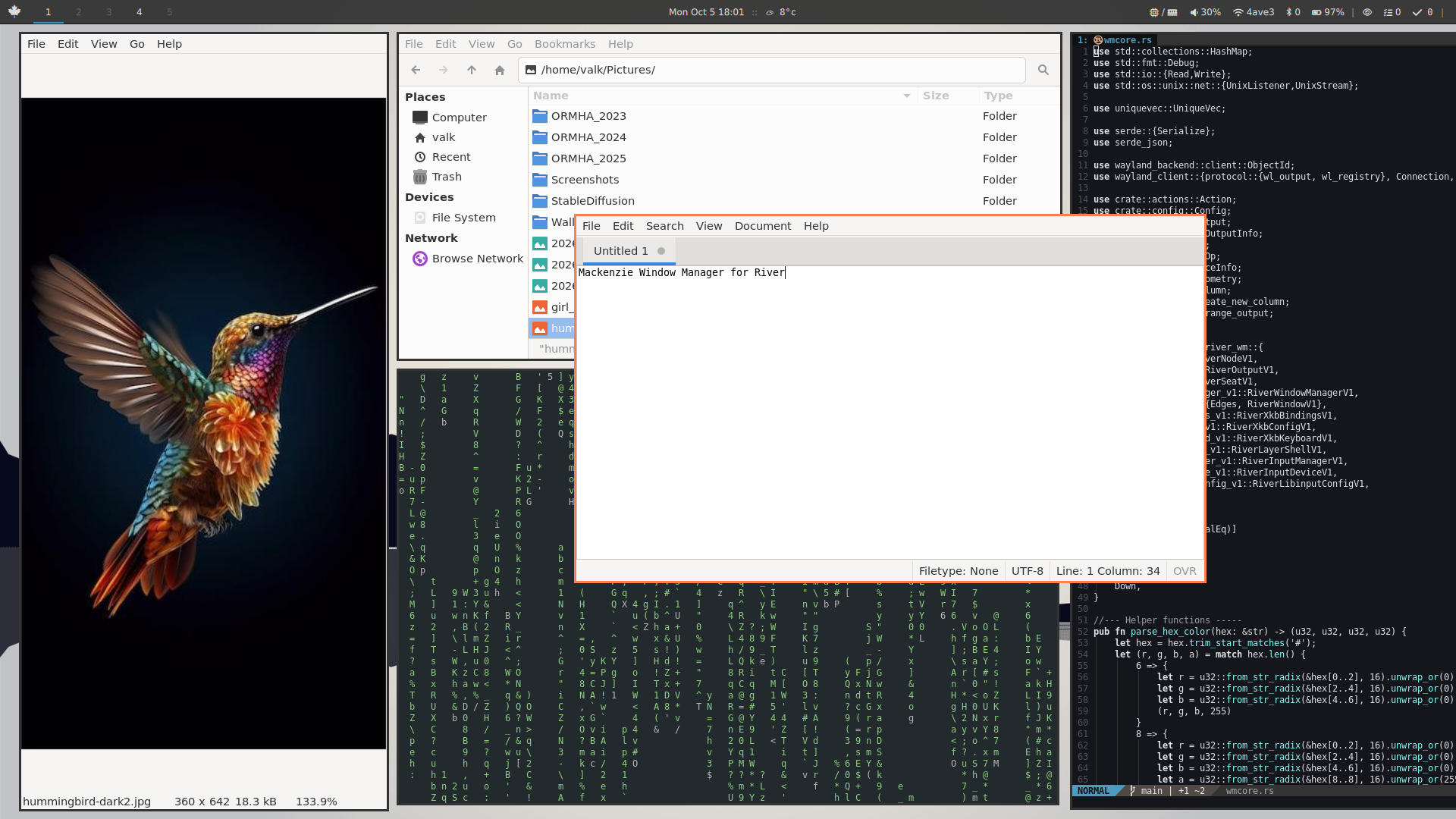
A simple scrolling window manager/compositor for River. It is written to fit my specific needs, and a way to teach myself how to code in rust.
Description
- Named after the longest river in Canada, the Mackenzie river.
- Minimal scrolling layout, heavily inspired by niri.
- Written in rust
- Built upon tinyrwm
- Features:
- No frills (menu, titlebar, icons, animations*, pixmap themes, etc...)
- Configration file uses toml format
- Supports multi-output setups
- Basic IPC call for use with waybar or quickshell
- Easy to read code structure so others can easily understand, reference and learn from
* may be added later
Screenshots
v0.1.0
Building
- Build dependencies
- river >= 0.4.x
- toml
- libxkbcommon
cargo build --release
sudo cp target/release/mackenzie /usr/local/bin/
cp examples/mackenzie.toml ~/.config/river/
Usage
Mackenzie needs to be invoked using River:
river -c mackenzie
or add a line to exec mackenzie in the river init file ~/.config/river/init as follows:
#!/bin/bash

swaybg -c "#252525" &
waybar &
# ... other autostart items

exec /usr/local/bin/mackenzie
For use as an ipc client:
mackenzie --get     [status|version|tags]
          --watch   tags
          --action  focus_tag 1
                    focus left
                    quit
                    ... etc
Configuration
Default configuration file is read from $HOME/.config/river/mackenzie.toml.
It is divided into 5 sections:
- layout - configuration of the generic WM and layout features
[layout] n_tags = 3 gap = 10 scroll_edge_gap = 15 default_column_width = 0.5 - window - configuration of the individual window
[window] move_resize_step = 15 border_width = 2 border_color_focused = "#1793D0" border_color_unfocused = "#333333FF" # Specify the alpha with the last two digits - inputs - configuration of the inputs
[inputs] xkb_layout = "us" xkb_options = "compose:ralt" touchpad_tap_click = true touchpad_natural_scroll = true - rules - window rules to apply
[rules] windowrules = [ # template: # { app_id="id", title="some title", width=0.5, maximized = true, floating=true, tag=1, output="output_name" } {app_id="Firefox", floating = true}, ] - keybinds - defines key bindings
[keybinds] # Mod1=Alt, Mod4=Super Mod1-space = { action="spawn", args=["foot"] } Mod4-Shift-h = { action="focus", args=["left"] } XF86AudioMute = { action="spawn", args=["pactl", "set-sink-mute", "@DEFAULT_SINK@", "toggle"] }- If no configuration is provided, it defaults to two hard-coded fallback keybinds:
Mod1+spacespawns foot terminal emulatorMod1+qto quit the compositor
- If no configuration is provided, it defaults to two hard-coded fallback keybinds:
- mousebinds - defines mouse bindings
[mousebinds]
Mod1-BTN_LEFT = { action="move_floating" }
Mod1-BTN_RIGHT = { action="resize_floating" }
Version Log
Please use the Github Issues Tracker to report bugs and issues.
- 0.1 (work in progress)
- Goal: get the base code in working order
Similar repos


See what people are saying
README
🏞 mackenzie
A simple scrolling window manager/compositor for River. It is written to fit my specific needs, and a way to teach myself how to code in rust.
Description
- Named after the longest river in Canada, the Mackenzie river.
- Minimal scrolling layout, heavily inspired by niri.
- Written in rust
- Built upon tinyrwm
- Features:
- No frills (menu, titlebar, icons, animations*, pixmap themes, etc...)
- Configration file uses toml format
- Supports multi-output setups
- Basic IPC call for use with waybar or quickshell
- Easy to read code structure so others can easily understand, reference and learn from
* may be added later
Screenshots
v0.1.0
Building
- Build dependencies
- river >= 0.4.x
- toml
- libxkbcommon
cargo build --release
sudo cp target/release/mackenzie /usr/local/bin/
cp examples/mackenzie.toml ~/.config/river/
Usage
Mackenzie needs to be invoked using River:
river -c mackenzie
or add a line to exec mackenzie in the river init file ~/.config/river/init as follows:
#!/bin/bash

swaybg -c "#252525" &
waybar &
# ... other autostart items

exec /usr/local/bin/mackenzie
For use as an ipc client:
mackenzie --get     [status|version|tags]
          --watch   tags
          --action  focus_tag 1
                    focus left
                    quit
                    ... etc
Configuration
Default configuration file is read from $HOME/.config/river/mackenzie.toml.
It is divided into 5 sections:
- layout - configuration of the generic WM and layout features
[layout] n_tags = 3 gap = 10 scroll_edge_gap = 15 default_column_width = 0.5 - window - configuration of the individual window
[window] move_resize_step = 15 border_width = 2 border_color_focused = "#1793D0" border_color_unfocused = "#333333FF" # Specify the alpha with the last two digits - inputs - configuration of the inputs
[inputs] xkb_layout = "us" xkb_options = "compose:ralt" touchpad_tap_click = true touchpad_natural_scroll = true - rules - window rules to apply
[rules] windowrules = [ # template: # { app_id="id", title="some title", width=0.5, maximized = true, floating=true, tag=1, output="output_name" } {app_id="Firefox", floating = true}, ] - keybinds - defines key bindings
[keybinds] # Mod1=Alt, Mod4=Super Mod1-space = { action="spawn", args=["foot"] } Mod4-Shift-h = { action="focus", args=["left"] } XF86AudioMute = { action="spawn", args=["pactl", "set-sink-mute", "@DEFAULT_SINK@", "toggle"] }- If no configuration is provided, it defaults to two hard-coded fallback keybinds:
Mod1+spacespawns foot terminal emulatorMod1+qto quit the compositor
- If no configuration is provided, it defaults to two hard-coded fallback keybinds:
- mousebinds - defines mouse bindings
[mousebinds]
Mod1-BTN_LEFT = { action="move_floating" }
Mod1-BTN_RIGHT = { action="resize_floating" }
Version Log
Please use the Github Issues Tracker to report bugs and issues.
- 0.1 (work in progress)
- Goal: get the base code in working order