
An open framework for autonomous mathematical research—with persistent memory, reproducible evidence, and a workflow that improves through use.
See the codeSee what people are saying
README
Noemesis: a self-improving framework for autonomous mathematical research
Noemesis is an open framework combining autonomous investigation and on-demand formal verification with persistent memory, reproducible evidence, and workflows that improve through use.
- Research that survives session boundaries. Resume from findings, proofs, and context stored in the repository, even on another machine.
- Autonomous investigation. Pursue a goal through repeated cycles of reasoning, experimentation, and review.
- Formal verification on demand. Turn selected results into Lean proofs with checked dependencies, explicit scope, and reproducible verification. Feed discrepancies back into the research agenda.
- A workflow that improves through use. Identify friction after each cycle and make bounded improvements to tools and procedures.
- Inspectable results. Preserve arguments, assumptions, computational evidence, and failed approaches with explicit claim statuses.
- A live, versioned notebook. Follow progress locally or online, with complete research checkpoints in Git.
Read the research online · Run Noemesis · Formalize claims · Browse locally
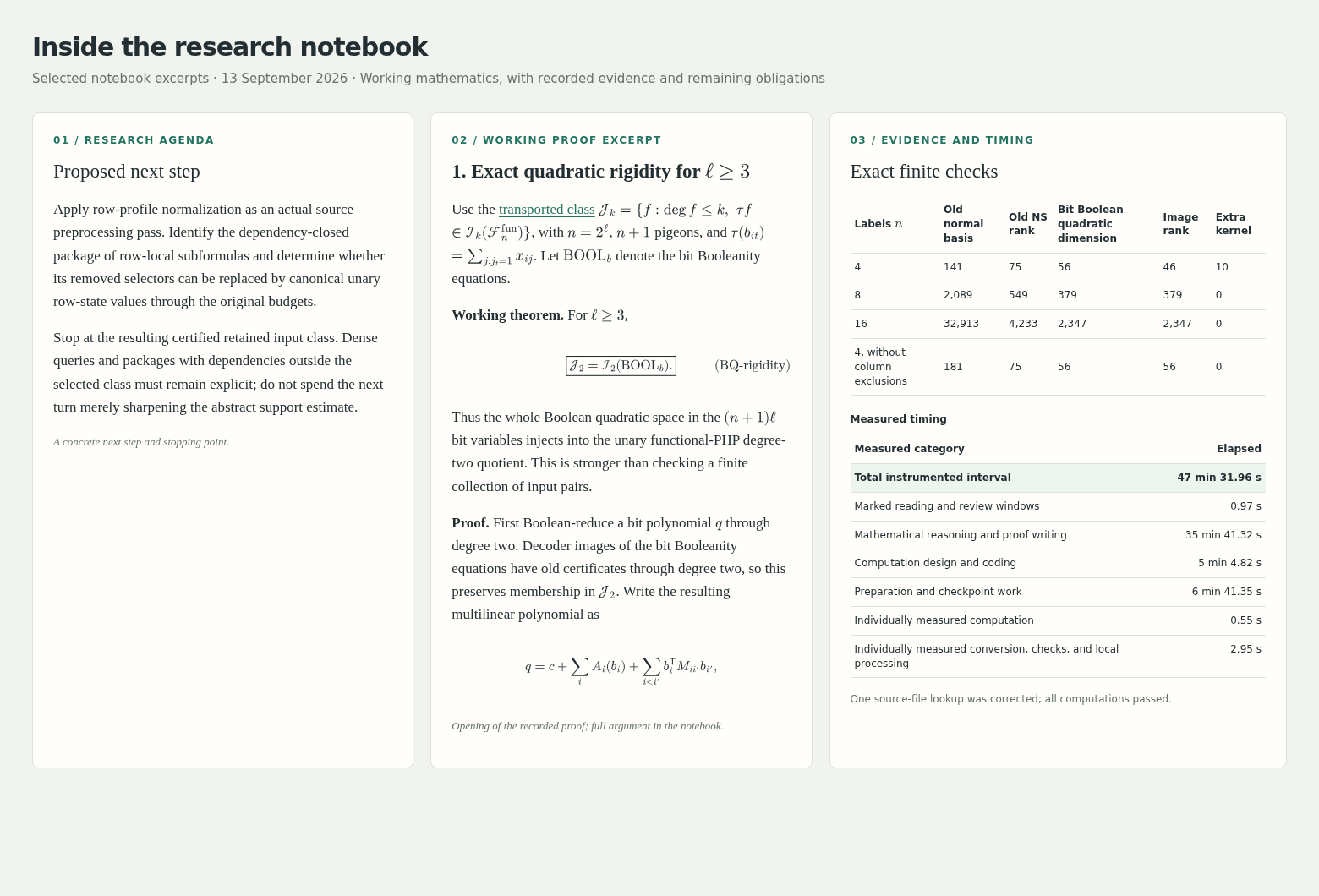
Selected excerpts from the 13 September 2026 notebook checkpoint, arranged side by side.
Noemesis supports two complementary workflows: investigating mathematical questions and formally verifying selected claims. Both use persistent context, protected execution, measured evidence, and a shared research record. Self-improvement means refining these workflows and their tools. Formalization is explicitly requested; recording a mathematical argument does not automatically make it formally verified.
First ongoing case study: proof-complexity lower bounds
The first application investigates superpolynomial proof-size lower bounds for the ordinary pigeonhole principle in fixed-depth AC⁰[p]-Frege systems: bounded-depth propositional proof systems with modular counting gates. The goal remains open.
Read the live research notebook. Its initial sections describe the current state, remaining obstacles, and proposed next step. The research record preserves results, proofs, unsuccessful attempts, and measured timing, making the ongoing investigation available for inspection.
The research began in Claude, continued in ChatGPT, and moved to Codex. The pre-handoff research compendium and historical manuscript preserve the earlier development.
Publication in preparation: resolution over parities
A whitepaper preprint (PDF) presents a superpolynomial proof-size lower bound for the usual bit pigeonhole principle in unrestricted DAG-like resolution over parities, Res(⊕). The result imposes no regularity or proof-depth restriction. The theorem and its dependencies are verified in Lean, including a fresh kernel replay; the preprint has not yet been externally peer reviewed.
The TeX sources expand the argument and its dependencies. The formalized notebook theorem provides a linked proof, and the publication prerequisites describe the intended validation before an arXiv v1.
How a research cycle works
Restore context → Choose an obstacle → Investigate → Check → Record → Assess the process → Commit → Repeat
Each cycle starts with a named unresolved obligation and a concrete stopping point. The agent develops an argument or experiment, reviews the result, and records what actually changed—even when the outcome is an obstruction or failed attempt. It then assesses the process, completes the research checkpoint, and commits any justified framework improvement separately before continuing.
The Spin prompt runs this loop under the research protocol. Corrections receive new dated entries; earlier arguments remain available. See Automatic research to start the loop with a Codex goal.
How a formalization cycle works
Select a claim → Map its dependencies → Formalize dependencies and claim → Verify → Record findings → Assess the process → Commit → Repeat
On request, the agent translates an indexed claim into Lean, checks its complete statement and proof dependencies, and records the verified scope alongside the human-readable argument. Existing indexed dependencies receive their own research entries before the claims that use them. Formal proof design and verification have separate measured timing categories.
Formalization also informs further research: it can expose missing hypotheses, incorrect statements, or gaps in an argument. The notebook's Gaps identified by formalization section makes these findings visible to both research and formalization agents, with links to the full evidence and corrections.
Use Formalize for one claim or Automatic formalization for a supplied set. Both follow the formalization protocol; ordinary research cycles do not require formalization.
Tools behind the workflow
The agent follows the research protocol; the tools enforce specific execution and evidence checks. The launchers integrate with Codex CLI and Claude Code, while the research record uses ordinary HTML, Markdown, code, and data files.
| Task | Tools and records |
|---|---|
| Recover the right context | A cached, bounded resume bundle, bounded excerpts and enforced overview budgets keep restoration focused. Recovery evidence records explicit resumes and repeat-work proxies through existing timing tools. |
| Find and reuse results | The generated claim index links stable labels and exact scopes to full records; the structured registry and lookup tools support compact search and future graph navigation. |
| Check selected claims formally | The Lean project pins Lean and Mathlib for terminal-based proof checking; the claim index links completed formalizations and their exact scope. |
| Run and measure experiments | compute.sh combines resource controls, timeouts, complete output logs, and timing reports that count overlap once. |
| Preserve reproducible evidence | Provenance manifests record file hashes; session archival preserves outputs and refuses conflicting replacements. |
| Finish a research checkpoint | finish-turn.py exports timing, archives evidence, and inserts the notebook timing table before review and commit. |
| Publish the intended material | Checkout/history checks check known private-source exclusions; the static builder packages only public site files. |
Read the research
The published notebook needs no setup or agent account. Start with its living overview for the research agenda, then follow claim links into the full record and supporting evidence.
Browse locally
git clone https://github.com/kbr-/math-research.git
cd math-research
python3 server.py
Open http://localhost:8000. Editing notebook.html refreshes
its rendered mathematics automatically. MathJax loads from a CDN, so the browser
needs internet access. index.html supplies the layout and rendering logic.
Use python3 server.py --port 8001 if the default port is occupied.
Math is processed in nearby paragraphs and displays, with pauses between blocks.
Off-screen research entries defer layout while remaining available to browser
search and anchor links. Navigation searches section positions without measuring
the whole record on each scroll. See the
performance measurements and browser-check commands.
Use Search notebook (or /) from anywhere on the page to search all prose
and original TeX, including equations that have not rendered. Results link to
matching passages; Match case distinguishes TeX commands such as \Gamma
and \gamma. This is literal search with whitespace normalized, not symbolic
equivalence or a conversion from rendered symbols to TeX. Ctrl+F remains the
browser's own search. The reusable text index is built only on the first query.
The published notebook is built by
GitHub Actions when relevant notebook or site-tooling changes are pushed to
main. It is a standalone site and requires no local server.
Continue the research
To run the agent, clone the repository as above, install and authenticate Codex CLI or Claude Code, and initialize the computation controls before running experiments. Browsing the notebook alone does not require those controls.
Research using this framework has been tested with several GPT and Claude models: GPT-6 Astra in Codex, and Claude Opus 5 and 5.5 and Claude Fable 5.1 in Claude Code, at various reasoning settings. Each notebook entry credits the model and setting that produced it.
research/notes/RESUME.md is the reading guide for restoring research context. It points to the notebook's authoritative initial sections and selected supporting sources. The original handoff import is complete; resuming work does not require repeating it.
With Codex CLI installed and authenticated, run:
./start-session.sh
On a fresh clone, the launcher starts a session that restores context from the
committed files. Subsequent launches resume the session recorded locally in
.codex-session-id. Use --new to start and bind a fresh session, or --resume
to require an existing binding. Session IDs, chat history, and authentication
are not included in the repository.
start-session.sh starts or reuses the managed Codex daemon with remote control
enabled, then connects the terminal over its default Unix socket (unix://).
To start only the background daemon, run ./start-codex.sh. Neither launcher
requests a daemon restart. Closing the terminal leaves the daemon running.
For a new phone pairing, run codex remote-control pair and follow the
Codex Remote instructions.
The session launcher selects Vim for Ctrl+G and requests automatic approval
review for new sessions. Remote resumes retain the task's existing permissions;
Codex rejects permission overrides when resuming a remote task.
Context and auto-compaction budgets are shared constants at the top of
start-codex.sh, applied when starting or resuming the terminal session.
The project .codex/config.toml also supplies defaults for phone-created sessions.
Review and trust the Codex framework hooks to enable restoration
and command guards; changed hook definitions need normal trust review.
Use the same CODEX_HOME for both launchers and pairing. A Codex CLI version
supporting daemon remote control and --remote unix:// is required.
With Claude Code, run ./start-claude.sh instead. It accepts the same options,
records its session in .claude-session-id, and sets its own auto-compaction budget.
Like the Codex daemon, the session runs in the background (claude --bg) and the
launcher attaches the terminal to it (claude attach), reusing a running session
rather than starting a copy; closing the terminal only detaches. --detached starts
or reuses it without attaching. The session is started with --remote-control, which makes
it reachable from claude.ai/code and the Claude app through Remote Control, and the
terminal and the phone can use it at the same time. claude stop ID ends it.
CLAUDE.md imports AGENTS.md, and the tracked
.claude/settings.json pre-approves the routine
framework commands, including git push origin main; AGENTS.md
still decides when a push is authorized. The launcher selects the auto permission mode.
AGENTS.md describes the research workflow: maintain the notebook's living sections, append each research attempt with its timing and evidence, and commit complete checkpoints locally. Publishing requires authorization under the repository's Git policy; research work alone does not authorize a push.
Automatic research
Use a Codex goal to keep the agent working across successive turns without
prompting it after every checkpoint. The goal points to the Spin prompt in
PROMPTS.md, which defines the research, process-improvement, and checkpoint
loop, including how to resume after context compaction.
After restoring context in the session for your chosen checkout:
- Codex CLI: enter
/goal <objective>in the interactive session. - ChatGPT app: open the remotely connected Codex session for that checkout,
enter
/goal, and supply the same objective in the goal interface. - Claude Code: use
/loopin place of/goal, for example/loop Execute the Spin prompt in ./PROMPTS.md.The same substitution applies to the other goal examples below. If you use Claude Code's/goalinstead, its evaluator judges the condition from each turn's last message, so the condition must say when the loop ends: a bare/goal Spinwas judged achieved after a checkpoint report (30 September 2026). For example,/goal Execute the Spin prompt in ./PROMPTS.md until the notebook's goal is proved or I say stop; a commit or push is never completion.
Enter this goal in the CLI, or paste the objective after /goal into the app's
goal field:
/goal Execute the Spin prompt in ./PROMPTS.md.
The Spin prompt uses the maintainer's standing authorization to push main
under the Git policy.
For another checkout or branch, specify any needed overrides in the goal.
For local-only work, append: "Override Spin's branch and publication
instructions: stay on the current branch, commit locally, and do not push."
The Spin prompt remains the authoritative loop; there is no need to paste its
full instructions into each goal.
Keep the machine hosting the remote session awake and connected while it works. See the official OpenAI guides to long-running work and goal commands.
Formalize
Formalization is opt-in: ordinary research and the Spin prompt do not require Lean proofs. Set up the pinned Lean and Mathlib dependencies using the formalization guide, then ask the agent to execute the Formalize prompt against a claim-index reference:
Execute the Formalize prompt in ./PROMPTS.md against claim lem:mp-telescoping.
The agent identifies the statement and its dependencies, writes per-claim Lean files, and verifies the proofs. It records the human-readable argument, exact verified scope, evidence, and timing in the notebook, links the formalization from the claim index, and updates Gaps identified by formalization when needed. A claim is marked formalized only when its full statement and required proof dependencies are verified, under the formalization rules. The example claim above is already formalized; choose an unformalized claim for new work. Checkpoints stay on the current branch and are committed locally.
Automatic formalization
Use the Spin-formalize prompt with a set of claims to repeat formalization and process review without prompting after each claim. In a Codex goal, using the same interface described in Automatic research, supply an objective such as:
/goal Execute the Spin-formalize prompt in ./PROMPTS.md against claims {lem:affine-clause-resolution-PC-degree, lem:semantic-weakening-PC-degree}.
The agent chooses a dependency-first order. Each existing indexed claim gets its own research-record entry and checkpoint before claims that depend on it; a newly introduced dependency may share its parent's entry while receiving its own Lean file and claim-index entry. Each cycle includes a process assessment, with useful framework improvements committed separately. False or blocked claims are recorded honestly while independent targets continue; partial verification is not counted as completion. This loop does not enable formalization in ordinary research sessions or authorize publication.
For a larger theorem, use Spin-formalize-parallel: the coordinator maps its dependencies, assigns independent branches to subagents in separate worktrees, integrates their checkpoints, audits the combined work, and performs the final assembly.
/goal Execute the Spin-formalize-parallel prompt in ./PROMPTS.md against theorem <reference>.
Computation tools
Python 3.10+ is required for the complete toolset. The notebook server, resource controller, and timing tools use the Python standard library. requirements-research.txt records numerical-library versions used in the research environment; historical suite A01 also requires Numba. Dependency installation by an agent requires explicit approval under COMPUTATION_RULES.md.
The protected computation launcher requires Linux, cgroup v2, a user systemd manager, and a C compiler. Its resource profile uses CPUs 0–13 and a shared 10 GB combined RAM-plus-swap budget, with no fixed RAM/swap split. See resource-controls/README.md for compatibility and enforcement details. Unsupported controls fail closed.
Initialize the controls from the checkout root after reboot or login:
python3 resource-controls/setup.py
./compute.sh --status
Setup rebuilds runtime controls from source and installs no packages. Run
computations through ./compute.sh; it combines resource enforcement, timing,
and full output logging. For example, with a research script calculation.py:
./compute.sh start turn001
./compute.sh phase turn001 reading
./compute.sh run turn001 --threads 1 -- python3 calculation.py
# After drafting the notebook entry with <!-- TIMING turn001 -->:
./tools/finish-turn.py turn001
The finalizer exports timing, archives evidence under the resource limits, and
fills the unique notebook placeholder. --next turn002 also starts the next
cycle's clock immediately after the snapshot. Review and commit the checkpoint
afterward. The lower-level timing commands remain in COMPUTATION_RULES.md.
Substantial result files belong in research/results/, with their generating
commands and verification evidence. Completed timing sessions are archived in
research/provenance/; operational logs and scratch files are ignored.
Build a local static notebook artifact with:
./compute.sh --threads 1 python3 tools/build_pages.py --out _site
The generated _site/ directory contains only the rendered page and revision
metadata. It is ignored by Git.
Waiting for the maintainer's review
Notes parked for a later decision. They are not rules; remove an item once it is decided.
- Agent cost and delegation report, 17 September 2026: what a long Claude Code session cost, the Fable-statement and Opus-proof delegation trial, and open choices for unattended Spin (compaction threshold, a fresh session per cycle).
- Undecided: should agents append intermediate findings and the current line of attack to a working file during long cycles, so an unexpected compaction loses less? See the report's final section. The token cost is small; the open question is whether it helps or distracts.
Repository contents
publications/: manuscripts and preprints with editable TeX and rendered PDFs, including the bit-PHP resolution-over-parities preprint.PROMPTS.md: reusable Dump, Resume, and Spin prompts.notebook.html: authoritative current state, working mathematical context, and append-only research record.research/notes/: restart navigation, proofs, source audits, and historical import snapshots. The notebook is the sole research log.research/results/: complete computation outputs and timing tables.research/references/: bibliography, source audits, and papers cleared for redistribution. The reference guide lists availability and licensing.research/provenance/: durable timing, execution evidence, and resource tests.resource-controls/,tools/,compute.sh: reproducible execution and setup code.php_codex_handoff/: the unchanged historical package, including the manuscript, original TeX, eleven check archives, and reports, plus the ChatGPT-generated pre-handoff compendium.
Verify historical-file integrity, the licensed source PDF, and essential tools:
./compute.sh --threads 1 python3 tools/verify-checkout.py
Runtime binaries, virtual environments, temporary renders, operational logs, credentials, and local session state are excluded from version control.
About the name
Noemesis (noh-EM-uh-sis) is a coined name inspired by noema, the philosophical term for the content of thought.
License and credit
Original software is MIT-licensed; original research writing and other covered non-software material use CC BY 4.0. Forks and further research are welcome. Preserve the applicable attribution notices and cite the results or tools your research relies on. See LICENSE, ATTRIBUTION.md, and CITATION.cff. Mathematical facts and ideas are not claimed as copyright property; scholarly attribution remains an ethical expectation.
Third-party materials retain their own rights. See THIRD_PARTY_NOTICES.md for source licensing and redistribution details.
Side research notebooks
The Branch protocol creates a separate research thread with its own goal and
empty record, while retaining the shared claim registry. See
setup, selection and serving. Main remains the default;
creating a notebook does not publish it or start an unbounded investigation.
Similar repos


An open framework for autonomous mathematical research—with persistent memory, reproducible evidence, and a workflow that improves through use.
See the codeSee what people are saying
README
Noemesis: a self-improving framework for autonomous mathematical research
Noemesis is an open framework combining autonomous investigation and on-demand formal verification with persistent memory, reproducible evidence, and workflows that improve through use.
- Research that survives session boundaries. Resume from findings, proofs, and context stored in the repository, even on another machine.
- Autonomous investigation. Pursue a goal through repeated cycles of reasoning, experimentation, and review.
- Formal verification on demand. Turn selected results into Lean proofs with checked dependencies, explicit scope, and reproducible verification. Feed discrepancies back into the research agenda.
- A workflow that improves through use. Identify friction after each cycle and make bounded improvements to tools and procedures.
- Inspectable results. Preserve arguments, assumptions, computational evidence, and failed approaches with explicit claim statuses.
- A live, versioned notebook. Follow progress locally or online, with complete research checkpoints in Git.
Read the research online · Run Noemesis · Formalize claims · Browse locally
Selected excerpts from the 13 September 2026 notebook checkpoint, arranged side by side.
Noemesis supports two complementary workflows: investigating mathematical questions and formally verifying selected claims. Both use persistent context, protected execution, measured evidence, and a shared research record. Self-improvement means refining these workflows and their tools. Formalization is explicitly requested; recording a mathematical argument does not automatically make it formally verified.
First ongoing case study: proof-complexity lower bounds
The first application investigates superpolynomial proof-size lower bounds for the ordinary pigeonhole principle in fixed-depth AC⁰[p]-Frege systems: bounded-depth propositional proof systems with modular counting gates. The goal remains open.
Read the live research notebook. Its initial sections describe the current state, remaining obstacles, and proposed next step. The research record preserves results, proofs, unsuccessful attempts, and measured timing, making the ongoing investigation available for inspection.
The research began in Claude, continued in ChatGPT, and moved to Codex. The pre-handoff research compendium and historical manuscript preserve the earlier development.
Publication in preparation: resolution over parities
A whitepaper preprint (PDF) presents a superpolynomial proof-size lower bound for the usual bit pigeonhole principle in unrestricted DAG-like resolution over parities, Res(⊕). The result imposes no regularity or proof-depth restriction. The theorem and its dependencies are verified in Lean, including a fresh kernel replay; the preprint has not yet been externally peer reviewed.
The TeX sources expand the argument and its dependencies. The formalized notebook theorem provides a linked proof, and the publication prerequisites describe the intended validation before an arXiv v1.
How a research cycle works
Restore context → Choose an obstacle → Investigate → Check → Record → Assess the process → Commit → Repeat
Each cycle starts with a named unresolved obligation and a concrete stopping point. The agent develops an argument or experiment, reviews the result, and records what actually changed—even when the outcome is an obstruction or failed attempt. It then assesses the process, completes the research checkpoint, and commits any justified framework improvement separately before continuing.
The Spin prompt runs this loop under the research protocol. Corrections receive new dated entries; earlier arguments remain available. See Automatic research to start the loop with a Codex goal.
How a formalization cycle works
Select a claim → Map its dependencies → Formalize dependencies and claim → Verify → Record findings → Assess the process → Commit → Repeat
On request, the agent translates an indexed claim into Lean, checks its complete statement and proof dependencies, and records the verified scope alongside the human-readable argument. Existing indexed dependencies receive their own research entries before the claims that use them. Formal proof design and verification have separate measured timing categories.
Formalization also informs further research: it can expose missing hypotheses, incorrect statements, or gaps in an argument. The notebook's Gaps identified by formalization section makes these findings visible to both research and formalization agents, with links to the full evidence and corrections.
Use Formalize for one claim or Automatic formalization for a supplied set. Both follow the formalization protocol; ordinary research cycles do not require formalization.
Tools behind the workflow
The agent follows the research protocol; the tools enforce specific execution and evidence checks. The launchers integrate with Codex CLI and Claude Code, while the research record uses ordinary HTML, Markdown, code, and data files.
| Task | Tools and records |
|---|---|
| Recover the right context | A cached, bounded resume bundle, bounded excerpts and enforced overview budgets keep restoration focused. Recovery evidence records explicit resumes and repeat-work proxies through existing timing tools. |
| Find and reuse results | The generated claim index links stable labels and exact scopes to full records; the structured registry and lookup tools support compact search and future graph navigation. |
| Check selected claims formally | The Lean project pins Lean and Mathlib for terminal-based proof checking; the claim index links completed formalizations and their exact scope. |
| Run and measure experiments | compute.sh combines resource controls, timeouts, complete output logs, and timing reports that count overlap once. |
| Preserve reproducible evidence | Provenance manifests record file hashes; session archival preserves outputs and refuses conflicting replacements. |
| Finish a research checkpoint | finish-turn.py exports timing, archives evidence, and inserts the notebook timing table before review and commit. |
| Publish the intended material | Checkout/history checks check known private-source exclusions; the static builder packages only public site files. |
Read the research
The published notebook needs no setup or agent account. Start with its living overview for the research agenda, then follow claim links into the full record and supporting evidence.
Browse locally
git clone https://github.com/kbr-/math-research.git
cd math-research
python3 server.py
Open http://localhost:8000. Editing notebook.html refreshes
its rendered mathematics automatically. MathJax loads from a CDN, so the browser
needs internet access. index.html supplies the layout and rendering logic.
Use python3 server.py --port 8001 if the default port is occupied.
Math is processed in nearby paragraphs and displays, with pauses between blocks.
Off-screen research entries defer layout while remaining available to browser
search and anchor links. Navigation searches section positions without measuring
the whole record on each scroll. See the
performance measurements and browser-check commands.
Use Search notebook (or /) from anywhere on the page to search all prose
and original TeX, including equations that have not rendered. Results link to
matching passages; Match case distinguishes TeX commands such as \Gamma
and \gamma. This is literal search with whitespace normalized, not symbolic
equivalence or a conversion from rendered symbols to TeX. Ctrl+F remains the
browser's own search. The reusable text index is built only on the first query.
The published notebook is built by
GitHub Actions when relevant notebook or site-tooling changes are pushed to
main. It is a standalone site and requires no local server.
Continue the research
To run the agent, clone the repository as above, install and authenticate Codex CLI or Claude Code, and initialize the computation controls before running experiments. Browsing the notebook alone does not require those controls.
Research using this framework has been tested with several GPT and Claude models: GPT-6 Astra in Codex, and Claude Opus 5 and 5.5 and Claude Fable 5.1 in Claude Code, at various reasoning settings. Each notebook entry credits the model and setting that produced it.
research/notes/RESUME.md is the reading guide for restoring research context. It points to the notebook's authoritative initial sections and selected supporting sources. The original handoff import is complete; resuming work does not require repeating it.
With Codex CLI installed and authenticated, run:
./start-session.sh
On a fresh clone, the launcher starts a session that restores context from the
committed files. Subsequent launches resume the session recorded locally in
.codex-session-id. Use --new to start and bind a fresh session, or --resume
to require an existing binding. Session IDs, chat history, and authentication
are not included in the repository.
start-session.sh starts or reuses the managed Codex daemon with remote control
enabled, then connects the terminal over its default Unix socket (unix://).
To start only the background daemon, run ./start-codex.sh. Neither launcher
requests a daemon restart. Closing the terminal leaves the daemon running.
For a new phone pairing, run codex remote-control pair and follow the
Codex Remote instructions.
The session launcher selects Vim for Ctrl+G and requests automatic approval
review for new sessions. Remote resumes retain the task's existing permissions;
Codex rejects permission overrides when resuming a remote task.
Context and auto-compaction budgets are shared constants at the top of
start-codex.sh, applied when starting or resuming the terminal session.
The project .codex/config.toml also supplies defaults for phone-created sessions.
Review and trust the Codex framework hooks to enable restoration
and command guards; changed hook definitions need normal trust review.
Use the same CODEX_HOME for both launchers and pairing. A Codex CLI version
supporting daemon remote control and --remote unix:// is required.
With Claude Code, run ./start-claude.sh instead. It accepts the same options,
records its session in .claude-session-id, and sets its own auto-compaction budget.
Like the Codex daemon, the session runs in the background (claude --bg) and the
launcher attaches the terminal to it (claude attach), reusing a running session
rather than starting a copy; closing the terminal only detaches. --detached starts
or reuses it without attaching. The session is started with --remote-control, which makes
it reachable from claude.ai/code and the Claude app through Remote Control, and the
terminal and the phone can use it at the same time. claude stop ID ends it.
CLAUDE.md imports AGENTS.md, and the tracked
.claude/settings.json pre-approves the routine
framework commands, including git push origin main; AGENTS.md
still decides when a push is authorized. The launcher selects the auto permission mode.
AGENTS.md describes the research workflow: maintain the notebook's living sections, append each research attempt with its timing and evidence, and commit complete checkpoints locally. Publishing requires authorization under the repository's Git policy; research work alone does not authorize a push.
Automatic research
Use a Codex goal to keep the agent working across successive turns without
prompting it after every checkpoint. The goal points to the Spin prompt in
PROMPTS.md, which defines the research, process-improvement, and checkpoint
loop, including how to resume after context compaction.
After restoring context in the session for your chosen checkout:
- Codex CLI: enter
/goal <objective>in the interactive session. - ChatGPT app: open the remotely connected Codex session for that checkout,
enter
/goal, and supply the same objective in the goal interface. - Claude Code: use
/loopin place of/goal, for example/loop Execute the Spin prompt in ./PROMPTS.md.The same substitution applies to the other goal examples below. If you use Claude Code's/goalinstead, its evaluator judges the condition from each turn's last message, so the condition must say when the loop ends: a bare/goal Spinwas judged achieved after a checkpoint report (30 September 2026). For example,/goal Execute the Spin prompt in ./PROMPTS.md until the notebook's goal is proved or I say stop; a commit or push is never completion.
Enter this goal in the CLI, or paste the objective after /goal into the app's
goal field:
/goal Execute the Spin prompt in ./PROMPTS.md.
The Spin prompt uses the maintainer's standing authorization to push main
under the Git policy.
For another checkout or branch, specify any needed overrides in the goal.
For local-only work, append: "Override Spin's branch and publication
instructions: stay on the current branch, commit locally, and do not push."
The Spin prompt remains the authoritative loop; there is no need to paste its
full instructions into each goal.
Keep the machine hosting the remote session awake and connected while it works. See the official OpenAI guides to long-running work and goal commands.
Formalize
Formalization is opt-in: ordinary research and the Spin prompt do not require Lean proofs. Set up the pinned Lean and Mathlib dependencies using the formalization guide, then ask the agent to execute the Formalize prompt against a claim-index reference:
Execute the Formalize prompt in ./PROMPTS.md against claim lem:mp-telescoping.
The agent identifies the statement and its dependencies, writes per-claim Lean files, and verifies the proofs. It records the human-readable argument, exact verified scope, evidence, and timing in the notebook, links the formalization from the claim index, and updates Gaps identified by formalization when needed. A claim is marked formalized only when its full statement and required proof dependencies are verified, under the formalization rules. The example claim above is already formalized; choose an unformalized claim for new work. Checkpoints stay on the current branch and are committed locally.
Automatic formalization
Use the Spin-formalize prompt with a set of claims to repeat formalization and process review without prompting after each claim. In a Codex goal, using the same interface described in Automatic research, supply an objective such as:
/goal Execute the Spin-formalize prompt in ./PROMPTS.md against claims {lem:affine-clause-resolution-PC-degree, lem:semantic-weakening-PC-degree}.
The agent chooses a dependency-first order. Each existing indexed claim gets its own research-record entry and checkpoint before claims that depend on it; a newly introduced dependency may share its parent's entry while receiving its own Lean file and claim-index entry. Each cycle includes a process assessment, with useful framework improvements committed separately. False or blocked claims are recorded honestly while independent targets continue; partial verification is not counted as completion. This loop does not enable formalization in ordinary research sessions or authorize publication.
For a larger theorem, use Spin-formalize-parallel: the coordinator maps its dependencies, assigns independent branches to subagents in separate worktrees, integrates their checkpoints, audits the combined work, and performs the final assembly.
/goal Execute the Spin-formalize-parallel prompt in ./PROMPTS.md against theorem <reference>.
Computation tools
Python 3.10+ is required for the complete toolset. The notebook server, resource controller, and timing tools use the Python standard library. requirements-research.txt records numerical-library versions used in the research environment; historical suite A01 also requires Numba. Dependency installation by an agent requires explicit approval under COMPUTATION_RULES.md.
The protected computation launcher requires Linux, cgroup v2, a user systemd manager, and a C compiler. Its resource profile uses CPUs 0–13 and a shared 10 GB combined RAM-plus-swap budget, with no fixed RAM/swap split. See resource-controls/README.md for compatibility and enforcement details. Unsupported controls fail closed.
Initialize the controls from the checkout root after reboot or login:
python3 resource-controls/setup.py
./compute.sh --status
Setup rebuilds runtime controls from source and installs no packages. Run
computations through ./compute.sh; it combines resource enforcement, timing,
and full output logging. For example, with a research script calculation.py:
./compute.sh start turn001
./compute.sh phase turn001 reading
./compute.sh run turn001 --threads 1 -- python3 calculation.py
# After drafting the notebook entry with <!-- TIMING turn001 -->:
./tools/finish-turn.py turn001
The finalizer exports timing, archives evidence under the resource limits, and
fills the unique notebook placeholder. --next turn002 also starts the next
cycle's clock immediately after the snapshot. Review and commit the checkpoint
afterward. The lower-level timing commands remain in COMPUTATION_RULES.md.
Substantial result files belong in research/results/, with their generating
commands and verification evidence. Completed timing sessions are archived in
research/provenance/; operational logs and scratch files are ignored.
Build a local static notebook artifact with:
./compute.sh --threads 1 python3 tools/build_pages.py --out _site
The generated _site/ directory contains only the rendered page and revision
metadata. It is ignored by Git.
Waiting for the maintainer's review
Notes parked for a later decision. They are not rules; remove an item once it is decided.
- Agent cost and delegation report, 17 September 2026: what a long Claude Code session cost, the Fable-statement and Opus-proof delegation trial, and open choices for unattended Spin (compaction threshold, a fresh session per cycle).
- Undecided: should agents append intermediate findings and the current line of attack to a working file during long cycles, so an unexpected compaction loses less? See the report's final section. The token cost is small; the open question is whether it helps or distracts.
Repository contents
publications/: manuscripts and preprints with editable TeX and rendered PDFs, including the bit-PHP resolution-over-parities preprint.PROMPTS.md: reusable Dump, Resume, and Spin prompts.notebook.html: authoritative current state, working mathematical context, and append-only research record.research/notes/: restart navigation, proofs, source audits, and historical import snapshots. The notebook is the sole research log.research/results/: complete computation outputs and timing tables.research/references/: bibliography, source audits, and papers cleared for redistribution. The reference guide lists availability and licensing.research/provenance/: durable timing, execution evidence, and resource tests.resource-controls/,tools/,compute.sh: reproducible execution and setup code.php_codex_handoff/: the unchanged historical package, including the manuscript, original TeX, eleven check archives, and reports, plus the ChatGPT-generated pre-handoff compendium.
Verify historical-file integrity, the licensed source PDF, and essential tools:
./compute.sh --threads 1 python3 tools/verify-checkout.py
Runtime binaries, virtual environments, temporary renders, operational logs, credentials, and local session state are excluded from version control.
About the name
Noemesis (noh-EM-uh-sis) is a coined name inspired by noema, the philosophical term for the content of thought.
License and credit
Original software is MIT-licensed; original research writing and other covered non-software material use CC BY 4.0. Forks and further research are welcome. Preserve the applicable attribution notices and cite the results or tools your research relies on. See LICENSE, ATTRIBUTION.md, and CITATION.cff. Mathematical facts and ideas are not claimed as copyright property; scholarly attribution remains an ethical expectation.
Third-party materials retain their own rights. See THIRD_PARTY_NOTICES.md for source licensing and redistribution details.
Side research notebooks
The Branch protocol creates a separate research thread with its own goal and
empty record, while retaining the shared claim registry. See
setup, selection and serving. Main remains the default;
creating a notebook does not publish it or start an unbounded investigation.