A zero-terminal, real-time sync engine powered by your own Cloudflare Worker.
See the codeA zero-terminal, real-time sync engine for Obsidian, powered by your own Cloudflare Worker.
Your notes sync live across devices, with CRDT merge semantics instead of conflicted-copy workflows, delayed file sync, or database-heavy hosted services.
No terminal, no .env files, no database setup required.
YAOS chooses live Markdown CRDT sync on infrastructure you deploy in your Cloudflare account. That gives fast cross-device editing, with explicit limits around durability receipts, attachments, empty folders, and non-Markdown plugin files.
| Conflicts | Real-time | Deployment | No terminal | Free | |
|---|---|---|---|---|---|
| iCloud / Dropbox | Conflicted copies | No | No | Yes | Yes |
| Obsidian Sync | Rare | Delayed | No | Yes | $96/yr |
| Git / LiveSync | Manual | Varies | Self-hosted / self-deployed | No | Yes |
| Relay / Screengarden | No | Yes | No | Yes | Freemium |
| YAOS | CRDT merge | Yes | Self-deployed Cloudflare | Yes | $0 |
YAOS uses Yjs CRDTs to keep one live vault state moving across devices instead of asking them to take polite turns uploading files and hoping nothing collides.
If you want the official, fully managed experience, pay for Obsidian Sync and support the team. If you want a fast, self-deployed, local-first alternative on your own Cloudflare account, welcome to YAOS!
YAOS has two parts: an Obsidian plugin and a small Cloudflare server you deploy to your own account. The Worker setup page walks you through the remaining steps, so you don't need to memorize this.
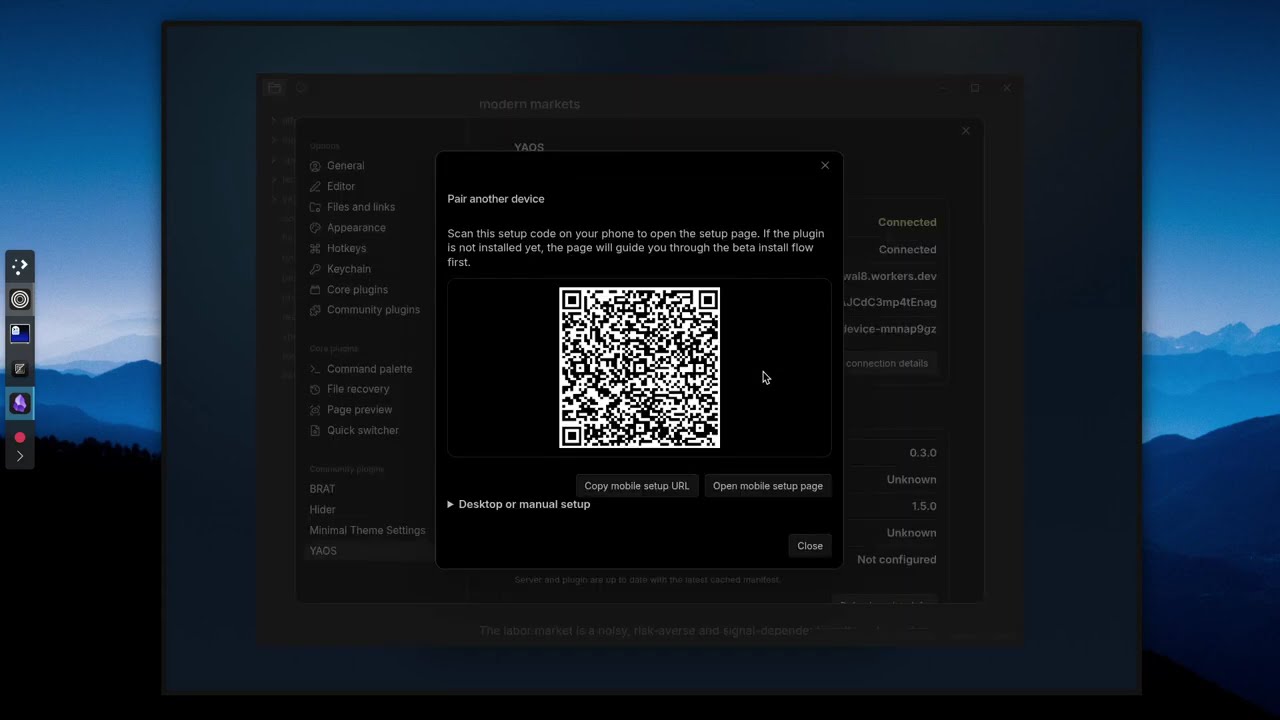
1. Deploy your server Click Deploy to Cloudflare above. Cloudflare creates a Worker in your account.
2. Claim your server Open the Worker URL. Click Claim to lock the server to you and generate your setup token.
3. Install the plugin Install YAOS from the Obsidian Marketplace.
4. Connect your vault From the claim page, open the setup link or scan the QR code. YAOS fills in the connection details automatically.
That's it. Your vault is syncing.
Text sync works out of the box. To sync images, PDFs, and other attachments, add a Cloudflare R2 bucket — it takes about a minute.
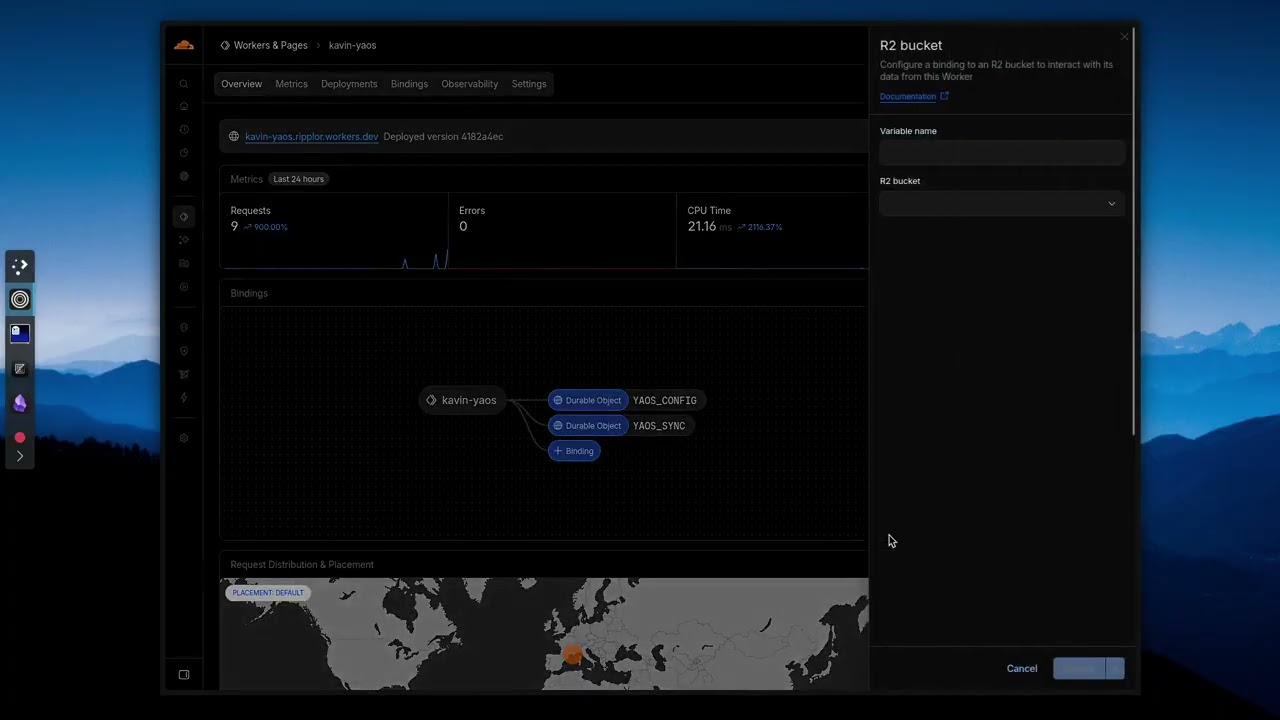
R2 also enables daily automatic snapshots and on-demand point-in-time backups. You can browse snapshots, diff against current state, and selectively restore individual files. If you skip R2, text sync still works — you just won't have attachment sync or snapshots.
Because Obsidian vaults are just local Markdown files, YAOS plays unusually well with scripts, CLI tools, and AI agents that edit files directly on disk. The CRDT state stays aligned with the filesystem, so changes from any source — git, shell scripts, agents writing to disk — propagate cleanly across devices instead of falling back to conflicted-copy workflows.
If you're building agentic workflows on top of Obsidian vaults, YAOS gives you the sync infrastructure so you don't have to wire up your own.
"Unauthorized" errors: Token mismatch between plugin and server. Check both match exactly.
"R2 not configured": The server doesn't have a YAOS_BUCKET binding yet. See the R2 setup video.
Cloudflare deploy/dashboard issues: If build queue or dashboard behavior is flaky, see operations, including the wrangler.toml R2-binding fallback.
Sync stops on mobile: Use "Reconnect to sync server" command. Check you have network connectivity.
Files not syncing: Check exclude patterns. Files over max size are skipped. Use debug logging to see what's happening, and then raise an issue on GitHub.
Diagnostics: Use Show sync debug info for local inspection. Safe diagnostics exports redact server URL, vault ID, device name, and vault paths.
16 followers · starred Apr 2026
2,858 followers · starred May 2026
2,672 followers · starred Mar 2026
365 followers · starred May 2026
A zero-terminal, real-time sync engine powered by your own Cloudflare Worker.
See the codeA zero-terminal, real-time sync engine for Obsidian, powered by your own Cloudflare Worker.
Your notes sync live across devices, with CRDT merge semantics instead of conflicted-copy workflows, delayed file sync, or database-heavy hosted services.
No terminal, no .env files, no database setup required.
YAOS chooses live Markdown CRDT sync on infrastructure you deploy in your Cloudflare account. That gives fast cross-device editing, with explicit limits around durability receipts, attachments, empty folders, and non-Markdown plugin files.
| Conflicts | Real-time | Deployment | No terminal | Free | |
|---|---|---|---|---|---|
| iCloud / Dropbox | Conflicted copies | No | No | Yes | Yes |
| Obsidian Sync | Rare | Delayed | No | Yes | $96/yr |
| Git / LiveSync | Manual | Varies | Self-hosted / self-deployed | No | Yes |
| Relay / Screengarden | No | Yes | No | Yes | Freemium |
| YAOS | CRDT merge | Yes | Self-deployed Cloudflare | Yes | $0 |
YAOS uses Yjs CRDTs to keep one live vault state moving across devices instead of asking them to take polite turns uploading files and hoping nothing collides.
If you want the official, fully managed experience, pay for Obsidian Sync and support the team. If you want a fast, self-deployed, local-first alternative on your own Cloudflare account, welcome to YAOS!
YAOS has two parts: an Obsidian plugin and a small Cloudflare server you deploy to your own account. The Worker setup page walks you through the remaining steps, so you don't need to memorize this.
1. Deploy your server Click Deploy to Cloudflare above. Cloudflare creates a Worker in your account.
2. Claim your server Open the Worker URL. Click Claim to lock the server to you and generate your setup token.
3. Install the plugin Install YAOS from the Obsidian Marketplace.
4. Connect your vault From the claim page, open the setup link or scan the QR code. YAOS fills in the connection details automatically.
That's it. Your vault is syncing.
Text sync works out of the box. To sync images, PDFs, and other attachments, add a Cloudflare R2 bucket — it takes about a minute.
R2 also enables daily automatic snapshots and on-demand point-in-time backups. You can browse snapshots, diff against current state, and selectively restore individual files. If you skip R2, text sync still works — you just won't have attachment sync or snapshots.
Because Obsidian vaults are just local Markdown files, YAOS plays unusually well with scripts, CLI tools, and AI agents that edit files directly on disk. The CRDT state stays aligned with the filesystem, so changes from any source — git, shell scripts, agents writing to disk — propagate cleanly across devices instead of falling back to conflicted-copy workflows.
If you're building agentic workflows on top of Obsidian vaults, YAOS gives you the sync infrastructure so you don't have to wire up your own.
"Unauthorized" errors: Token mismatch between plugin and server. Check both match exactly.
"R2 not configured": The server doesn't have a YAOS_BUCKET binding yet. See the R2 setup video.
Cloudflare deploy/dashboard issues: If build queue or dashboard behavior is flaky, see operations, including the wrangler.toml R2-binding fallback.
Sync stops on mobile: Use "Reconnect to sync server" command. Check you have network connectivity.
Files not syncing: Check exclude patterns. Files over max size are skipped. Use debug logging to see what's happening, and then raise an issue on GitHub.
Diagnostics: Use Show sync debug info for local inspection. Safe diagnostics exports redact server URL, vault ID, device name, and vault paths.
16 followers · starred Apr 2026
2,858 followers · starred May 2026
2,672 followers · starred Mar 2026
365 followers · starred May 2026



