
An array language for signal processing, numerical computing, and ML -- filters, spectra, linear algebra, and publication-quality figures, with no copy step between the computation and the paper.
HTML
1
36 commits
updated Sep 19, 2026
README

Qu



An array language for measurement science: signals, spectra, impedance, and the figures that go in the paper.
Qu is a small interpreted language with a numerical standard library and a publication-quality plotting backend. It exists because the alternative — prototype in one language, plot in another, and hand-transcribe the numbers into a manuscript — puts a copy step between the computation and the claim, and that step is where results go wrong.
One engine, one syntax, for the work that usually gets split across three tools: signal processing (filters, spectra, transforms), numerical computation (dense linear algebra, real and complex), testing an algorithm against another (same seed, same data, a real number either way), a sandbox that fails loudly instead of quietly (an unread keyword, a shape mismatch, a singular matrix — errors, never guesses), and machine learning (classic algorithms today, a fuller platform on the roadmap). Prototype, measure, and plot it without leaving the language, or the REPL.
# A noisy tone, filtered, measured and plotted — all of it here.
fs = 1000
t  = (0 to 999) / fs
y  = sin(2 * pi * 50 * t) + 0.2 * randn(1000, seed = 1)
lp = butter(4, "low", 120, fs)
z  = filtfilt(lp, y)
print("residual rms {rms(z - sin(2 * pi * 50 * t)):.4f}")

theme("publication")
plot(t[0:400], z[0:400], color = "#0072BD", lw = pt(0.8))
xlabel("time $t$ [s]")
ylabel("amplitude")
savefig("filtered.pdf")
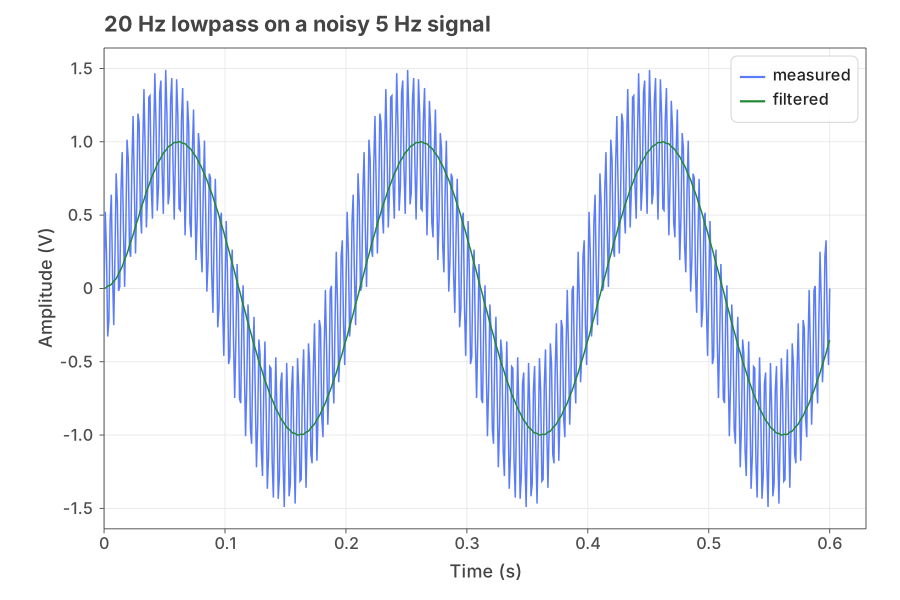
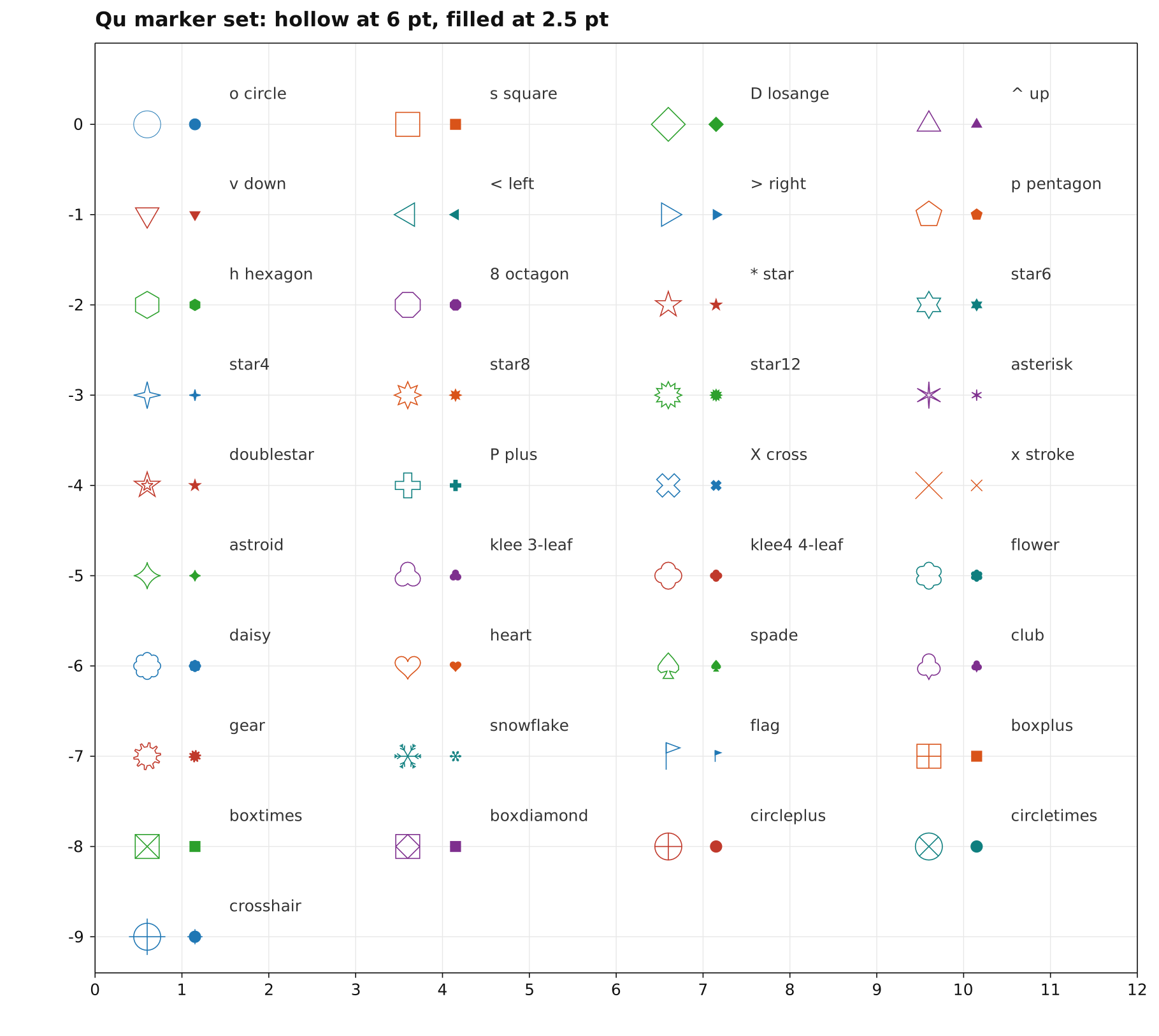
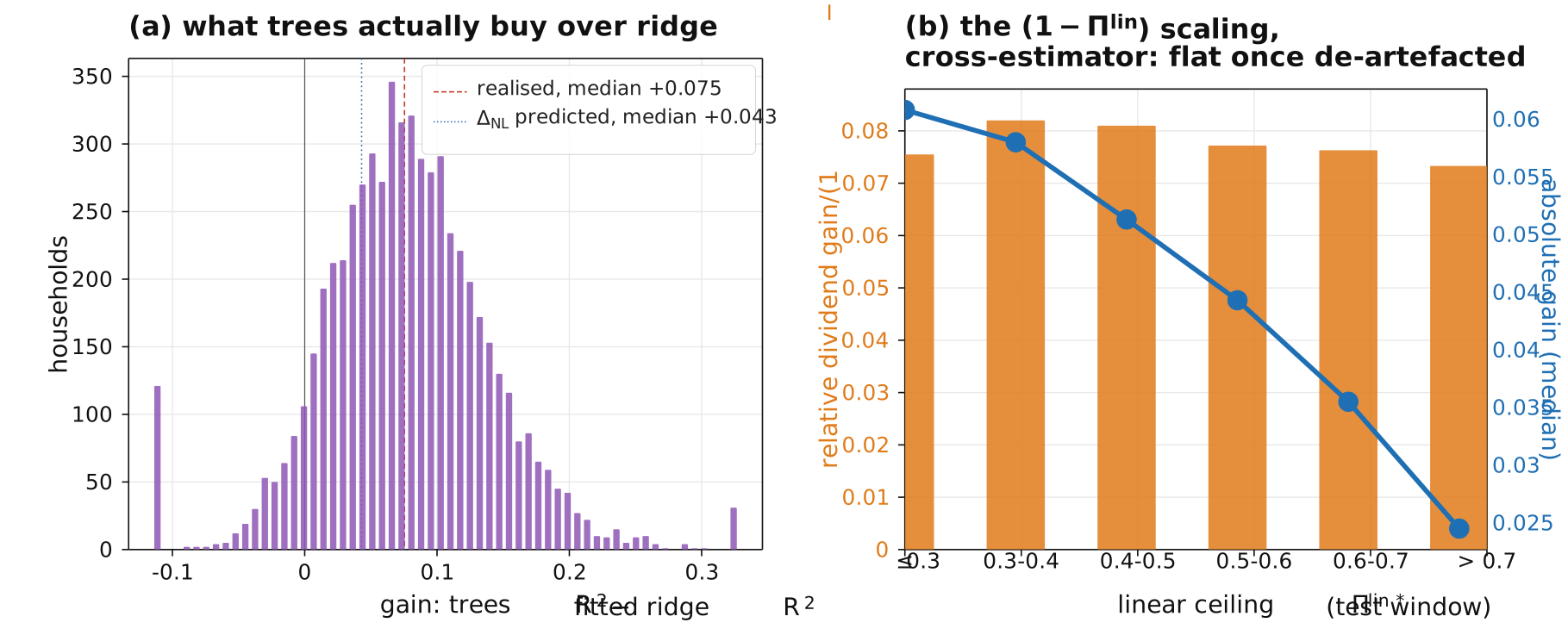
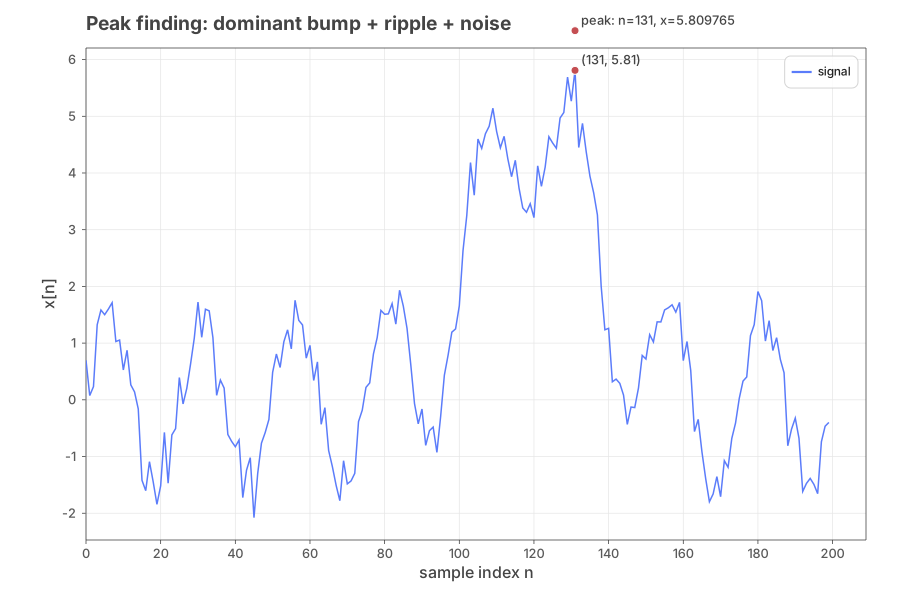
Real output, not mockups — every figure below is a .svg a Qu script
actually produced, checked in as-is. More in catalog/,
around a hundred complete, runnable examples.
Five things people actually use it for
Mathematical computation — dense linear algebra, real and complex,
no separate import. Testing an algorithm against another — seed=
makes every random draw reproducible, so "which method is actually
better" is a real comparison, not noise. A sandbox that won't lie to
you — an unread keyword, a shape mismatch, a singular matrix: errors,
never guesses (see Design commitments, the one
thing the whole language is organised around). A testbed for real
signals — Qu Studio's DSP Workbench and qu repl are built for
change-one-parameter-re-run-look, not edit-save-switch-window-look.
Machine learning — classic algorithms, a real train/test split, a
real accuracy number:
n = 60
class0 = randn(n, 2) + [2, 2]
class1 = randn(n, 2) + [-1.5, -1.5]
X = vstack(class0, class1)
y = [zeros(n), ones(n)]

split = train_test_split(X, y, test_size=0.3, seed=7)
model = knn_model(split.X_train, split.y_train, 5, kind="classification")
pred  = model.predict(split.X_test)
print("test accuracy: {length(where(pred == split.y_test)) / length(pred):.3f}")
What it has
Numerics. Real and complex scalars, vectors and matrices. FFT, filter
design and application, resampling, windows, spectral estimates. Dense
linear algebra — LU, QR, SVD, Cholesky, eigen, pseudo-inverse, least
squares — on real and complex matrices. nnls, nonlinear
least_squares with box bounds, optimizers, root finders.
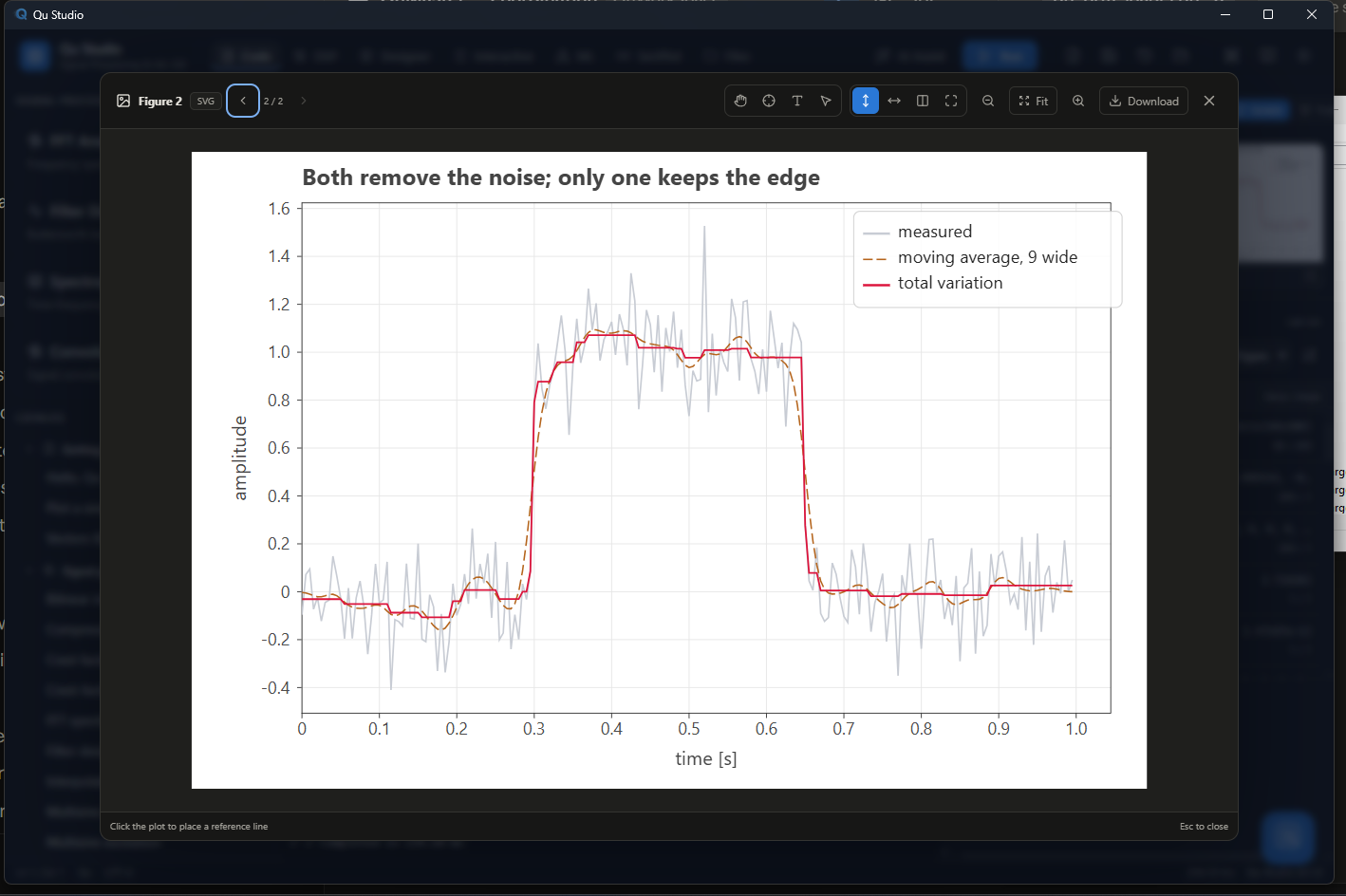
Plotting that ends in a figure, not a screenshot. SVG, PDF with
embedded and subset fonts, and TikZ. Maths in labels ($\eta_{\mathrm {exc}}$ sets the way LaTeX would, variables italic and operators
upright), twin axes with independent scales, contours, error bars,
colorbars, thirty-odd marker glyphs.
Data in the shapes instruments produce it. MATLAB .mat files read
natively, CSV with the provenance headers instruments emit, raw binary
arrays and structs, images.
The rest. Tables, statistics, a machine-learning set (SVM, forests,
gradient boosting, k-NN, PCA, GMM, MLPs), parallel pmap/pools, GPU
matmul, serial and TCP I/O.
Qu Studio
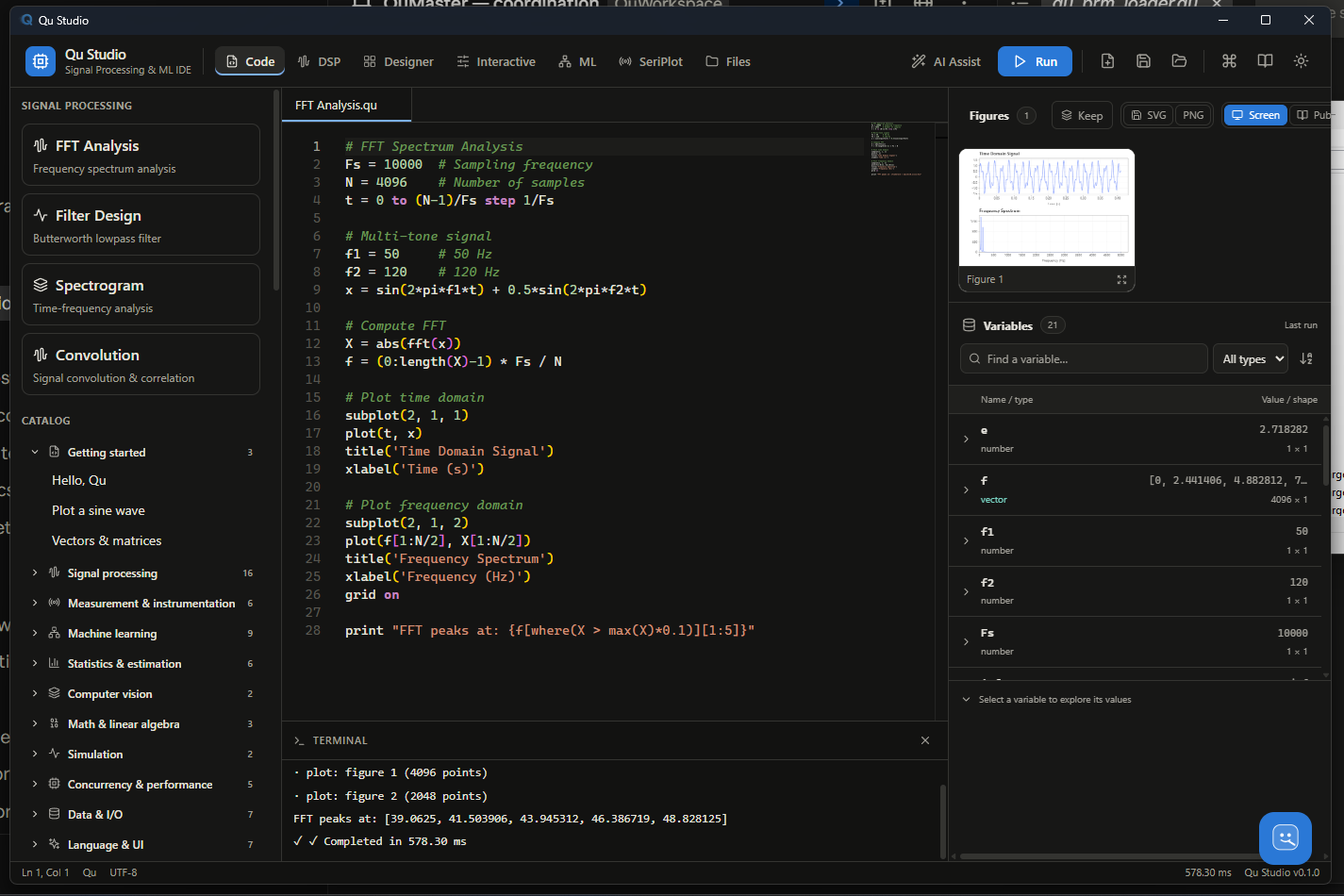
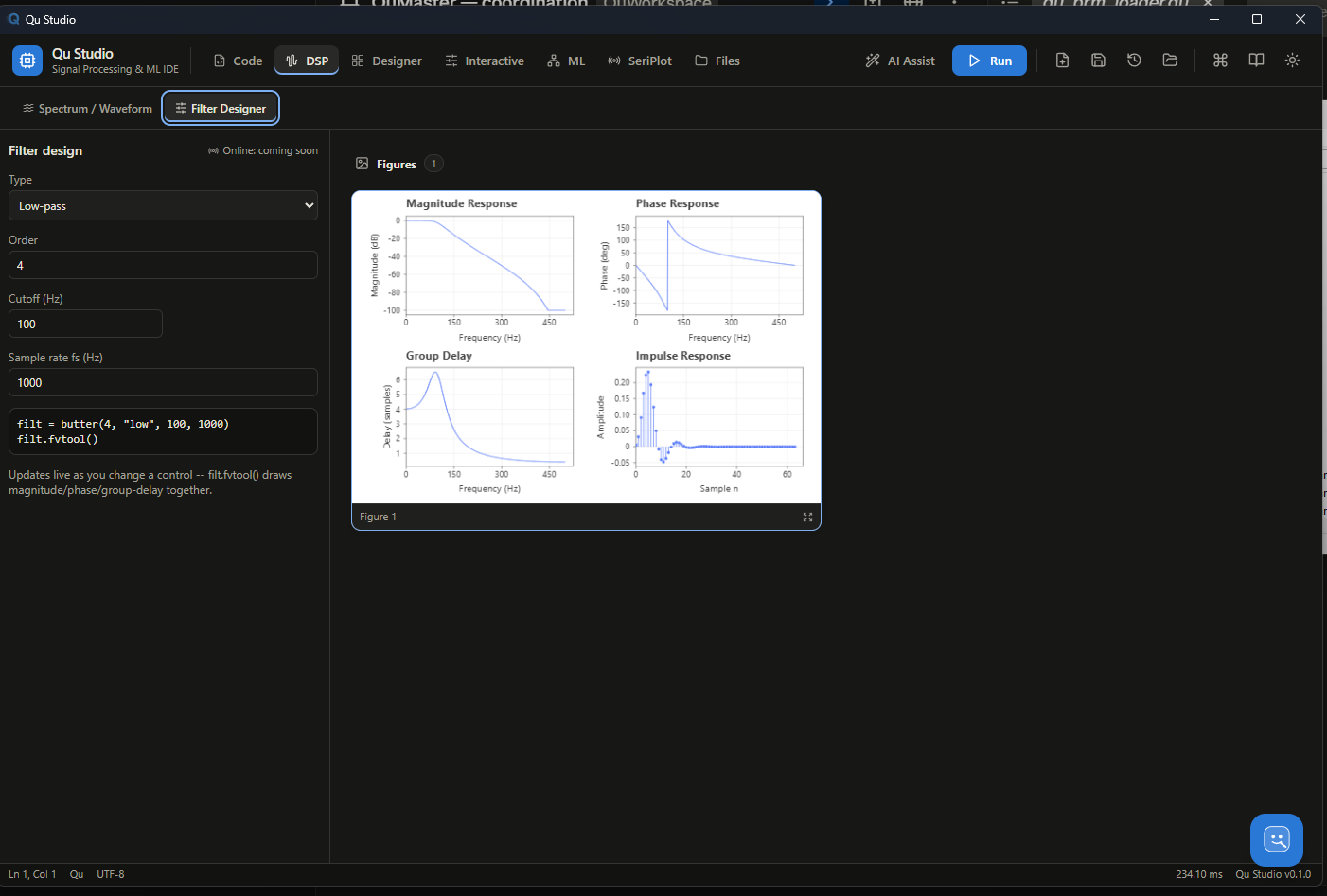
A desktop IDE (Tauri + Rust, bundles its own engine build) for when a
terminal and a text editor aren't the whole workflow: a code editor with
live run, a visual GUI designer for building instrument-panel-style
front ends without hand-writing layout code, a DSP workbench for
interactive filter/spectrum exploration, and a figure/report browser for
the plots a script produces. It is optional — everything Qu does is
equally reachable from qu run/qu repl on the command line — but it's
where the language and the plotting backend are meant to be felt working
together, not just described.
Source under qu-studio-tauri/; build it the same
way as any Tauri app (npm install && npm run tauri build) once the
engine itself is built.
Other editors
Not everyone wants a dedicated IDE. Qu Studio is the primary one; VS
Code is the second most-supported editor, on the strength of a real
Jupyter kernel — notebooks, not just syntax highlighting. Two more
lightweight integrations live under editors/:
| Gives you | Install | |
|---|---|---|
VS Code — notebooks (qu-jupyter) | A real Jupyter kernel (ZeroMQ, HMAC-signed, no system libzmq needed): open a .ipynb, pick "Qu", get persistent state across cells, streamed output, inline figures — the same kernel works in JupyterLab/classic Jupyter too | qu-jupyter install registers the kernelspec; VS Code's Jupyter extension discovers it automatically |
| VS Code — syntax/run | Syntax highlighting, run-file (▶/Ctrl+Alt+Q) with output streaming, live parse-error squiggles as you type | Copy the folder into your extensions directory, or package with vsce |
| Sublime Text | Syntax highlighting, Ctrl+B to run, Ctrl+Shift+B to check syntax only | Copy two files into Sublime's Packages folder |
| Notepad++ | Syntax highlighting (User Defined Language), run via the built-in Run dialog or the NppExec plugin | Import one .xml file |
None of these fake a debugger — no breakpoints or stepping today. The
notebook kernel's real persistent state (a cell can see an earlier
cell's variables) is a genuinely different thing from that: it's qu repl's session model over the Jupyter protocol, not stepped execution
inside one statement. The plain VS Code extension's post-run variable
dump remains the honest substitute where it's used instead: the script's
final top-level bindings, after it finishes running, not a paused
inspection.
Getting started
cargo build --release --manifest-path engine/Cargo.toml
engine/target/release/qu run catalog/demo_hello.qu
engine/target/release/qu repl
The book is the place to start reading: a guided
tour, three fundamentals volumes, and a standard-library reference
organised by domain.
docs/qu-language-spec.built.md is the
normative specification, built directly from the working engine so it
cannot claim a feature that doesn't exist.
catalog/ holds around a hundred worked scripts, each one a
complete program that runs.
Design commitments
These are the things Qu will not trade away, stated so you can hold it to them.
A keyword the callee never reads is an error. Not ignored. Qu tracks which style keys a builtin actually looked at and rejects the rest, so a typo or a keyword that belongs to a sibling function cannot be silently dropped. This is checked from the code itself, so it cannot drift out of step with what the code does.
A function cannot rewrite its caller's variables. Assignment inside a
function binds locally; reads fall through to the enclosing scope; and
global is available when writing through is what you mean.
Silence is the worst failure. Where Qu can either guess or say so, it says so — a shape mismatch, a non-positive-definite matrix, a scale that cannot be applied. Wrong answers that look right are the failure mode this language is organised against.
Status
Version 0.3.0, and honest about what that means: one implementation, a small number of users, and a specification that is ahead of the engine in places. The numerical core is checked against reference implementations — several ports reproduce NumPy, SciPy and MATLAB results exactly — and the test suite runs to several thousand cases. It is being used for real work; it has not yet been used for your real work, and that is the difference between 0.x and 1.0.
Credits
Vibe-coded by Ahmed Yahia Kallel, with the help of Claude Code (Opus 5, Sonnet 5) and Qwen 3.6 (27B, 35B).
Licence
Dual-licensed, with attribution to Ahmed Yahia Kallel required in both halves and no non-commercial restriction:
- Code (the engine,
qu-coreand friends, and every.qusource file) — Apache License 2.0. See LICENSE-APACHE. - Docs, book prose, and the website — Creative Commons Attribution-ShareAlike 4.0 (CC BY-SA 4.0). See LICENSE-DOCS.
See LICENSE for the exact split, and NOTICE for the attribution notices Apache-2.0 requires derivative works to carry forward.
Contributors

36 commits
Similar repos


Languages
HTML
66.5%
Rust
29.2%
TypeScript
2.7%
An array language for signal processing, numerical computing, and ML -- filters, spectra, linear algebra, and publication-quality figures, with no copy step between the computation and the paper.
HTML
1
36 commits
updated Sep 19, 2026
README
Qu
An array language for measurement science: signals, spectra, impedance, and the figures that go in the paper.
Qu is a small interpreted language with a numerical standard library and a publication-quality plotting backend. It exists because the alternative — prototype in one language, plot in another, and hand-transcribe the numbers into a manuscript — puts a copy step between the computation and the claim, and that step is where results go wrong.
One engine, one syntax, for the work that usually gets split across three tools: signal processing (filters, spectra, transforms), numerical computation (dense linear algebra, real and complex), testing an algorithm against another (same seed, same data, a real number either way), a sandbox that fails loudly instead of quietly (an unread keyword, a shape mismatch, a singular matrix — errors, never guesses), and machine learning (classic algorithms today, a fuller platform on the roadmap). Prototype, measure, and plot it without leaving the language, or the REPL.
# A noisy tone, filtered, measured and plotted — all of it here.
fs = 1000
t  = (0 to 999) / fs
y  = sin(2 * pi * 50 * t) + 0.2 * randn(1000, seed = 1)
lp = butter(4, "low", 120, fs)
z  = filtfilt(lp, y)
print("residual rms {rms(z - sin(2 * pi * 50 * t)):.4f}")

theme("publication")
plot(t[0:400], z[0:400], color = "#0072BD", lw = pt(0.8))
xlabel("time $t$ [s]")
ylabel("amplitude")
savefig("filtered.pdf")
Real output, not mockups — every figure below is a .svg a Qu script
actually produced, checked in as-is. More in catalog/,
around a hundred complete, runnable examples.
Five things people actually use it for
Mathematical computation — dense linear algebra, real and complex,
no separate import. Testing an algorithm against another — seed=
makes every random draw reproducible, so "which method is actually
better" is a real comparison, not noise. A sandbox that won't lie to
you — an unread keyword, a shape mismatch, a singular matrix: errors,
never guesses (see Design commitments, the one
thing the whole language is organised around). A testbed for real
signals — Qu Studio's DSP Workbench and qu repl are built for
change-one-parameter-re-run-look, not edit-save-switch-window-look.
Machine learning — classic algorithms, a real train/test split, a
real accuracy number:
n = 60
class0 = randn(n, 2) + [2, 2]
class1 = randn(n, 2) + [-1.5, -1.5]
X = vstack(class0, class1)
y = [zeros(n), ones(n)]

split = train_test_split(X, y, test_size=0.3, seed=7)
model = knn_model(split.X_train, split.y_train, 5, kind="classification")
pred  = model.predict(split.X_test)
print("test accuracy: {length(where(pred == split.y_test)) / length(pred):.3f}")
What it has
Numerics. Real and complex scalars, vectors and matrices. FFT, filter
design and application, resampling, windows, spectral estimates. Dense
linear algebra — LU, QR, SVD, Cholesky, eigen, pseudo-inverse, least
squares — on real and complex matrices. nnls, nonlinear
least_squares with box bounds, optimizers, root finders.
Plotting that ends in a figure, not a screenshot. SVG, PDF with
embedded and subset fonts, and TikZ. Maths in labels ($\eta_{\mathrm {exc}}$ sets the way LaTeX would, variables italic and operators
upright), twin axes with independent scales, contours, error bars,
colorbars, thirty-odd marker glyphs.
Data in the shapes instruments produce it. MATLAB .mat files read
natively, CSV with the provenance headers instruments emit, raw binary
arrays and structs, images.
The rest. Tables, statistics, a machine-learning set (SVM, forests,
gradient boosting, k-NN, PCA, GMM, MLPs), parallel pmap/pools, GPU
matmul, serial and TCP I/O.
Qu Studio
A desktop IDE (Tauri + Rust, bundles its own engine build) for when a
terminal and a text editor aren't the whole workflow: a code editor with
live run, a visual GUI designer for building instrument-panel-style
front ends without hand-writing layout code, a DSP workbench for
interactive filter/spectrum exploration, and a figure/report browser for
the plots a script produces. It is optional — everything Qu does is
equally reachable from qu run/qu repl on the command line — but it's
where the language and the plotting backend are meant to be felt working
together, not just described.
Source under qu-studio-tauri/; build it the same
way as any Tauri app (npm install && npm run tauri build) once the
engine itself is built.
Other editors
Not everyone wants a dedicated IDE. Qu Studio is the primary one; VS
Code is the second most-supported editor, on the strength of a real
Jupyter kernel — notebooks, not just syntax highlighting. Two more
lightweight integrations live under editors/:
| Gives you | Install | |
|---|---|---|
VS Code — notebooks (qu-jupyter) | A real Jupyter kernel (ZeroMQ, HMAC-signed, no system libzmq needed): open a .ipynb, pick "Qu", get persistent state across cells, streamed output, inline figures — the same kernel works in JupyterLab/classic Jupyter too | qu-jupyter install registers the kernelspec; VS Code's Jupyter extension discovers it automatically |
| VS Code — syntax/run | Syntax highlighting, run-file (▶/Ctrl+Alt+Q) with output streaming, live parse-error squiggles as you type | Copy the folder into your extensions directory, or package with vsce |
| Sublime Text | Syntax highlighting, Ctrl+B to run, Ctrl+Shift+B to check syntax only | Copy two files into Sublime's Packages folder |
| Notepad++ | Syntax highlighting (User Defined Language), run via the built-in Run dialog or the NppExec plugin | Import one .xml file |
None of these fake a debugger — no breakpoints or stepping today. The
notebook kernel's real persistent state (a cell can see an earlier
cell's variables) is a genuinely different thing from that: it's qu repl's session model over the Jupyter protocol, not stepped execution
inside one statement. The plain VS Code extension's post-run variable
dump remains the honest substitute where it's used instead: the script's
final top-level bindings, after it finishes running, not a paused
inspection.
Getting started
cargo build --release --manifest-path engine/Cargo.toml
engine/target/release/qu run catalog/demo_hello.qu
engine/target/release/qu repl
The book is the place to start reading: a guided
tour, three fundamentals volumes, and a standard-library reference
organised by domain.
docs/qu-language-spec.built.md is the
normative specification, built directly from the working engine so it
cannot claim a feature that doesn't exist.
catalog/ holds around a hundred worked scripts, each one a
complete program that runs.
Design commitments
These are the things Qu will not trade away, stated so you can hold it to them.
A keyword the callee never reads is an error. Not ignored. Qu tracks which style keys a builtin actually looked at and rejects the rest, so a typo or a keyword that belongs to a sibling function cannot be silently dropped. This is checked from the code itself, so it cannot drift out of step with what the code does.
A function cannot rewrite its caller's variables. Assignment inside a
function binds locally; reads fall through to the enclosing scope; and
global is available when writing through is what you mean.
Silence is the worst failure. Where Qu can either guess or say so, it says so — a shape mismatch, a non-positive-definite matrix, a scale that cannot be applied. Wrong answers that look right are the failure mode this language is organised against.
Status
Version 0.3.0, and honest about what that means: one implementation, a small number of users, and a specification that is ahead of the engine in places. The numerical core is checked against reference implementations — several ports reproduce NumPy, SciPy and MATLAB results exactly — and the test suite runs to several thousand cases. It is being used for real work; it has not yet been used for your real work, and that is the difference between 0.x and 1.0.
Credits
Vibe-coded by Ahmed Yahia Kallel, with the help of Claude Code (Opus 5, Sonnet 5) and Qwen 3.6 (27B, 35B).
Licence
Dual-licensed, with attribution to Ahmed Yahia Kallel required in both halves and no non-commercial restriction:
- Code (the engine,
qu-coreand friends, and every.qusource file) — Apache License 2.0. See LICENSE-APACHE. - Docs, book prose, and the website — Creative Commons Attribution-ShareAlike 4.0 (CC BY-SA 4.0). See LICENSE-DOCS.
See LICENSE for the exact split, and NOTICE for the attribution notices Apache-2.0 requires derivative works to carry forward.
Similar repos
Contributors
36 commits
Languages
HTML
66.5%
Rust
29.2%
TypeScript
2.7%