
An alternative app icon for the Kitty terminal emulator
Makefile
252
14 commits
updated Oct 4, 2023
README
Kitty App Icon
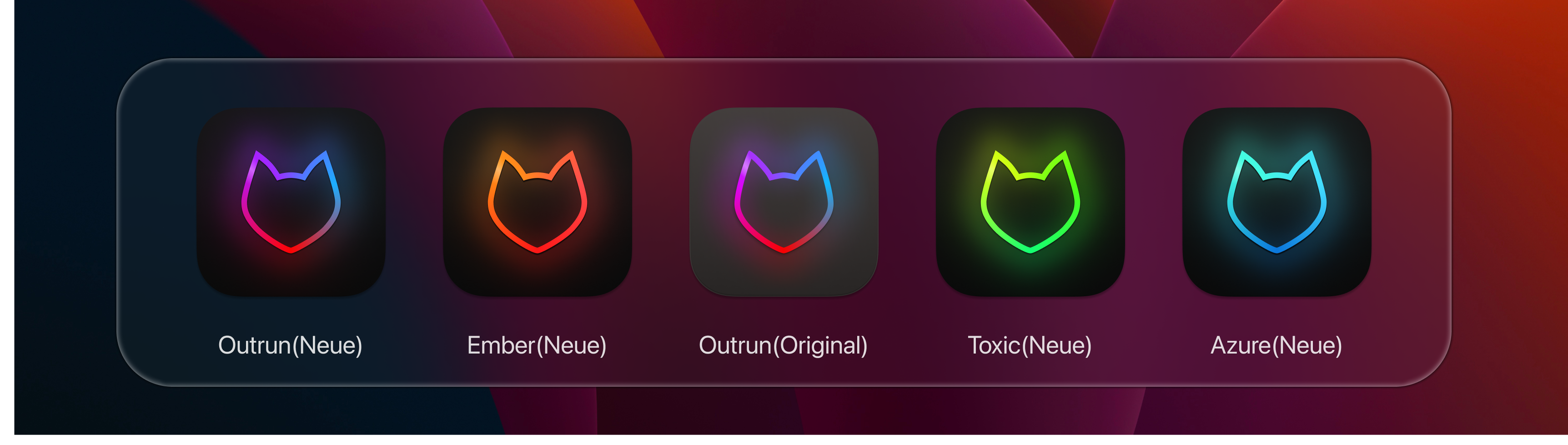
A set of alternative app icons for Kitty.
Changes
- 2023-07-08 re-exported with P3 display color profile instead of sRGB. Improves color saturation on P3 capable displays.
Installation
MacOS
- Find
kitty.appin theApplicationsfolder, select it and press⌘ + i. - Drag the
.icnsfile for your favourite variant frombuild/onto the application icon in thekitty infopane. - Delete the icon cache and restart
Dock:
rm /var/folders/*/*/*/com.apple.dock.iconcache; killall Dock
Linux
- Locate the kitty logos in
/usr/lib/kitty/logo - Backup existing
kitty.png&kitty-128.png(may need to do this as root, depending on how you installed kitty) - Locate your favourite variant in
build/ - Copy
icon_128x128.pngto/usr/lib/kitty/logorename tokitty-128.png - Copy
icon_32x32.pngto/usr/lib/kitty/logoand rename tokitty.png - (optional) Depending on your DE and installation you may need to change the launcher icon. For xfce you can press super + space and search for kitty, right click on the result and click edit application. From there you can swap out the icon with one from this repository.
Other alternatives
design
kitty
kitty-icon
kitty-terminal
macos-icon
macos-icons
Contributors


Similar repos


Languages
Makefile
100.0%
An alternative app icon for the Kitty terminal emulator
Makefile
252
14 commits
updated Oct 4, 2023
README
Kitty App Icon
A set of alternative app icons for Kitty.
Changes
- 2023-07-08 re-exported with P3 display color profile instead of sRGB. Improves color saturation on P3 capable displays.
Installation
MacOS
- Find
kitty.appin theApplicationsfolder, select it and press⌘ + i. - Drag the
.icnsfile for your favourite variant frombuild/onto the application icon in thekitty infopane. - Delete the icon cache and restart
Dock:
rm /var/folders/*/*/*/com.apple.dock.iconcache; killall Dock
Linux
- Locate the kitty logos in
/usr/lib/kitty/logo - Backup existing
kitty.png&kitty-128.png(may need to do this as root, depending on how you installed kitty) - Locate your favourite variant in
build/ - Copy
icon_128x128.pngto/usr/lib/kitty/logorename tokitty-128.png - Copy
icon_32x32.pngto/usr/lib/kitty/logoand rename tokitty.png - (optional) Depending on your DE and installation you may need to change the launcher icon. For xfce you can press super + space and search for kitty, right click on the result and click edit application. From there you can swap out the icon with one from this repository.
Other alternatives
design
kitty
kitty-icon
kitty-terminal
macos-icon
macos-icons
Similar repos
Contributors
Languages
Makefile
100.0%