
Colored pretty printer for Go language
See the codeREADME
pp 

Colored pretty printer for Go language
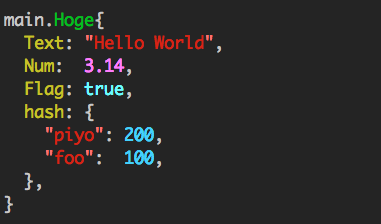
Usage
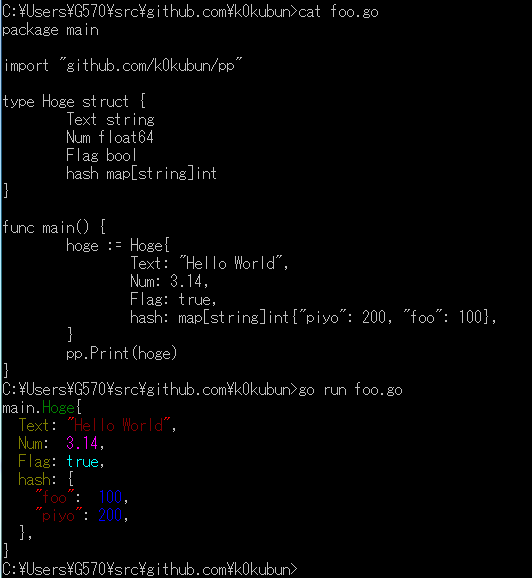
Just call pp.Print().
import "github.com/k0kubun/pp/v3"

m := map[string]string{"foo": "bar", "hello": "world"}
pp.Print(m)
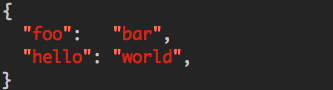
API
fmt package-like functions are provided.
pp.Print()
pp.Println()
pp.Sprint()
pp.Fprintf()
See the documentation for API details.
Configuration
They can be customized globally with pp.Default.
pp.Default.SetColoringEnabled(false)
pp.Println() // no color
You can also create individual instances that do not interfere with the default printer:
mypp := pp.New()
mypp.SetColoringEnabled(false)
mypp.SetExportedOnly(true)
mypp.SetOmitEmpty(true)
mypp.Println()
See PrettyPrinter documentation for all available configurations.
Custom colors
If you require, you may change the colors (all or some) for syntax highlighting:
// Create a struct describing your scheme
scheme := pp.ColorScheme{
	Integer:       pp.Green | pp.Bold,
	Float:         pp.Black | pp.BackgroundWhite | pp.Bold,
	String:        pp.Yellow,
}

// Register it for usage
pp.Default.SetColorScheme(scheme)
Look into ColorScheme struct for the field names.
If you would like to revert to the default highlighting, you may do so by calling pp.ResetColorScheme().
Out of the following color flags, you may combine any color with a background color and optionally with the bold parameter. Please note that bold will likely not work on the windows platform.
// Colors
Black
Red
Green
Yellow
Blue
Magenta
Cyan
White

// Background colors
BackgroundBlack
BackgroundRed
BackgroundGreen
BackgroundYellow
BackgroundBlue
BackgroundMagenta
BackgroundCyan
BackgroundWhite

// Other
Bold

// Special
NoColor
Demo
Timeline
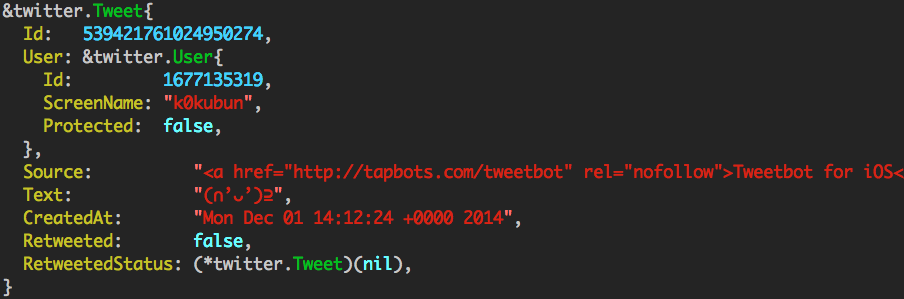
UserStream event
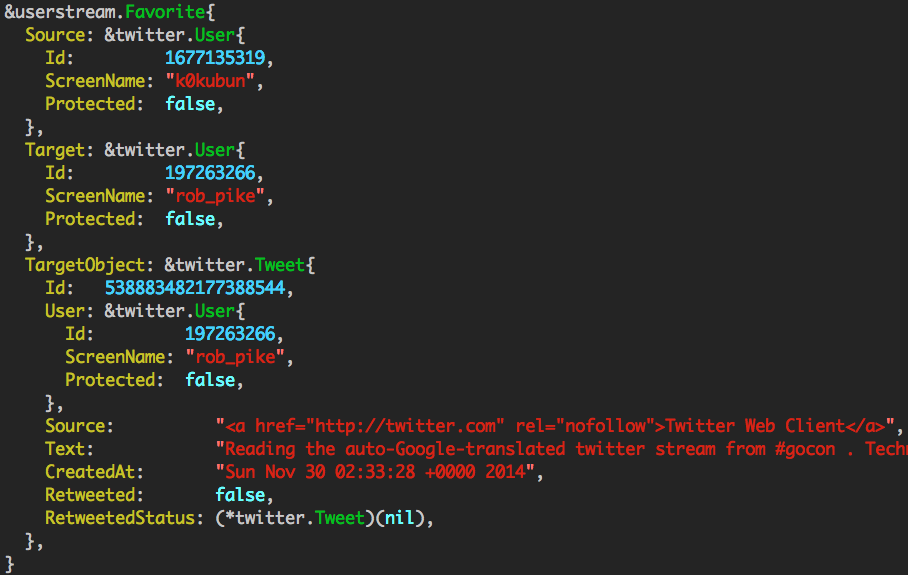
Works on windows
Releasing
export CHANGELOG_GITHUB_TOKEN="..."
gem install github_changelog_generator
github_changelog_generator --unreleased-label vX.Y.Z

# Update HEAD to vX.Y.Z
vim CHANGELOG.md
git add CHANGELOG.md
git commit -m "Version X.Y.Z"
git tag vX.Y.Z
git push origin master && git push origin --tags
License
MIT License
Significant stargazers

407 followers · starred Mar 2023

594 followers · starred Sep 2025

209 followers · starred Nov 2025

825 followers · starred Dec 2014
Similar repos


Colored pretty printer for Go language
See the codeREADME
pp
Colored pretty printer for Go language
Usage
Just call pp.Print().
import "github.com/k0kubun/pp/v3"

m := map[string]string{"foo": "bar", "hello": "world"}
pp.Print(m)
API
fmt package-like functions are provided.
pp.Print()
pp.Println()
pp.Sprint()
pp.Fprintf()
See the documentation for API details.
Configuration
They can be customized globally with pp.Default.
pp.Default.SetColoringEnabled(false)
pp.Println() // no color
You can also create individual instances that do not interfere with the default printer:
mypp := pp.New()
mypp.SetColoringEnabled(false)
mypp.SetExportedOnly(true)
mypp.SetOmitEmpty(true)
mypp.Println()
See PrettyPrinter documentation for all available configurations.
Custom colors
If you require, you may change the colors (all or some) for syntax highlighting:
// Create a struct describing your scheme
scheme := pp.ColorScheme{
	Integer:       pp.Green | pp.Bold,
	Float:         pp.Black | pp.BackgroundWhite | pp.Bold,
	String:        pp.Yellow,
}

// Register it for usage
pp.Default.SetColorScheme(scheme)
Look into ColorScheme struct for the field names.
If you would like to revert to the default highlighting, you may do so by calling pp.ResetColorScheme().
Out of the following color flags, you may combine any color with a background color and optionally with the bold parameter. Please note that bold will likely not work on the windows platform.
// Colors
Black
Red
Green
Yellow
Blue
Magenta
Cyan
White

// Background colors
BackgroundBlack
BackgroundRed
BackgroundGreen
BackgroundYellow
BackgroundBlue
BackgroundMagenta
BackgroundCyan
BackgroundWhite

// Other
Bold

// Special
NoColor
Demo
Timeline
UserStream event
Works on windows
Releasing
export CHANGELOG_GITHUB_TOKEN="..."
gem install github_changelog_generator
github_changelog_generator --unreleased-label vX.Y.Z

# Update HEAD to vX.Y.Z
vim CHANGELOG.md
git add CHANGELOG.md
git commit -m "Version X.Y.Z"
git tag vX.Y.Z
git push origin master && git push origin --tags
License
MIT License
Similar repos
Significant stargazers
407 followers · starred Mar 2023
594 followers · starred Sep 2025
209 followers · starred Nov 2025
825 followers · starred Dec 2014